Page 372 of 573
595
Driving your vehicle
Warning
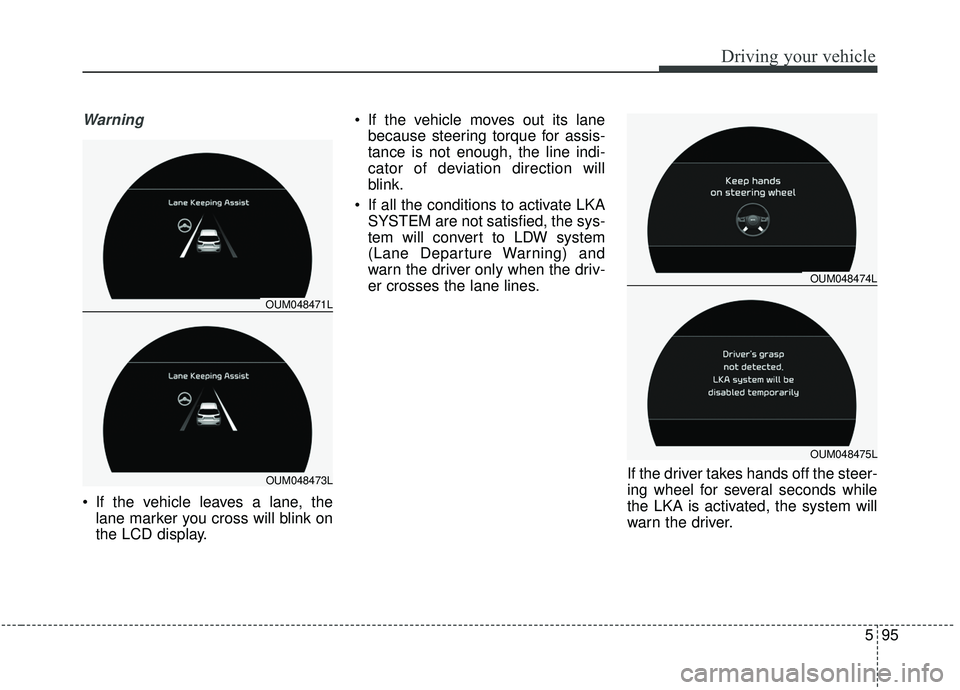
If the vehicle leaves a lane, thelane marker you cross will blink on
the LCD display. If the vehicle moves out its lane
because steering torque for assis-
tance is not enough, the line indi-
cator of deviation direction will
blink.
If all the conditions to activate LKA SYSTEM are not satisfied, the sys-
tem will convert to LDW system
(Lane Departure Warning) and
warn the driver only when the driv-
er crosses the lane lines.
If the driver takes hands off the steer-
ing wheel for several seconds while
the LKA is activated, the system will
warn the driver.
OUM048474L
OUM048475L
OUM048471L
OUM048473L
Page 374 of 573
597
Driving your vehicle
The steering will not be assistedwhen you change lanes fast.
The steering will not be assisted when you brake suddenly.
The steering will not be assisted when the lane is very wide or nar-
row.
The steering will not be assisted when only one side lane marker is
detected.
There are more than two lane markers such as a construction
area.
Radius of a curve is too small.
When you turn steering wheel sud- denly, the LKA SYSTEM will be
disabled temporarily.
Driving on a steep slope or hill.DRIVER’S ATTENTION
The driver must be cautious in the
below situations may not work
properly when recognition of the
lane marker is poor or limited : � � When lane and road condition is
poor
- It is difficult to distinguish the lane marker from road when the
lane marker is covered with dust
or sand.
- It is difficult to distinguish the color of the lane marker from
road.
- There is something looks like a lane marker.
- The lane marker is indistinct or damaged.
- The number of lanes increases/ decreases or the lane lines are
crossing (Driving through a toll
plaza/toll gate, merged/divided
lane).
- There are more than two lane markers. - The lane marker is very thick or
thin.
- The lane marker is not visible due to snow, rain, stain, a puddle
or other factors.
- A shadow is on the lane marker because of a median strip,
guardrail, noise barriers and
others.
- When the lane markers are com- plicated or a structure substi-
tutes for the lines such as a
construction area.
- There are crosswalk signs or other symbols on the road.
- The lane suddenly disappears such as at the intersection.
- The lane marker in a tunnel is covered with dirt or oil and etc .
Page 376 of 573
599
Driving your vehicle
LKA system fail indicator
The LKA system fail indicator (yel-
low) will illuminate with an audible
warning if the LKA system is not
working properly. In this case, have
the system checked by an authorized
Kia dealer.When there is a problem with the sys-
tem do one of the following:
Turn the system on after turning
the engine off and on again.
Check if the ignition switch is in the ON position.
Check if the system is affected by the weather. (ex: fog, heavy rain,
etc.)
Check if there is foreign matter on the camera lens
If the problem is not solved, have the
system checked by an authorized
Kia dealer.
LKA SYSTEM Function
Change
The driver can change LKA to Lane
Departure Warning System (LDW
system) or change the LKA SYSTEM
mode between Std. Lane Keeping
Assist and Active Lane Keep. Assist
from the User Settings Mode on the
LCD display.
The driver can choose them by plac-
ing the ignition switch to the ON posi-
tion and by selecting ‘User Settings’,
‘Driver Assistance’, and ‘Lane Safety’.
The system is automatically set to
Std. Lane Keeping Assist.
Page 384 of 573
5107
Driving your vehicle
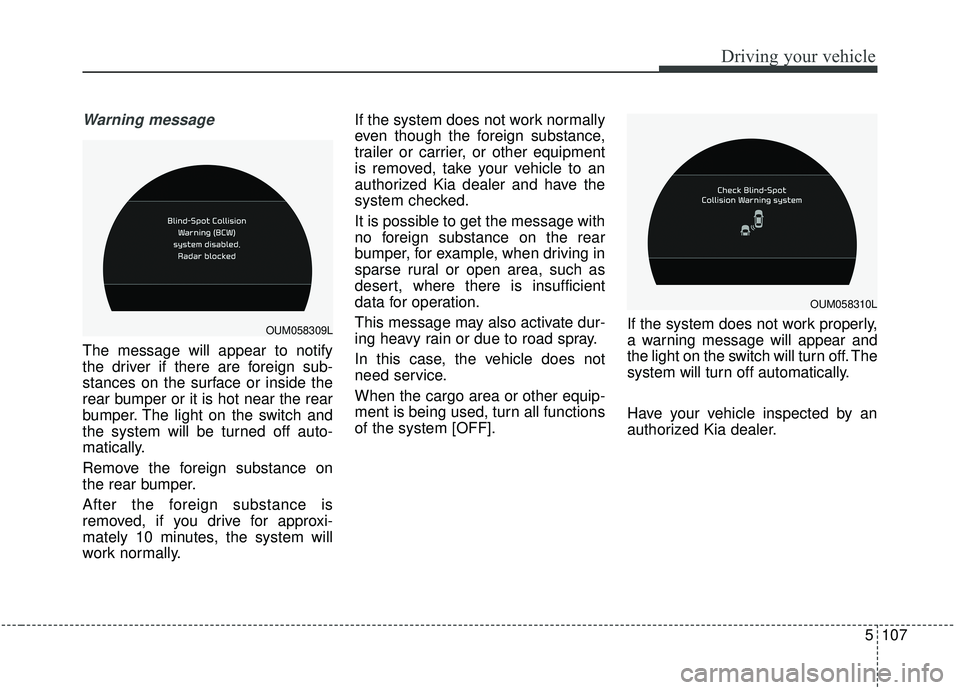
Warning message
The message will appear to notify
the driver if there are foreign sub-
stances on the surface or inside the
rear bumper or it is hot near the rear
bumper. The light on the switch and
the system will be turned off auto-
matically.
Remove the foreign substance on
the rear bumper.
After the foreign substance is
removed, if you drive for approxi-
mately 10 minutes, the system will
work normally.If the system does not work normally
even though the foreign substance,
trailer or carrier, or other equipment
is removed, take your vehicle to an
authorized Kia dealer and have the
system checked.
It is possible to get the message with
no foreign substance on the rear
bumper, for example, when driving in
sparse rural or open area, such as
desert, where there is insufficient
data for operation.
This message may also activate dur-
ing heavy rain or due to road spray.
In this case, the vehicle does not
need service.
When the cargo area or other equip-
ment is being used, turn all functions
of the system [OFF].
If the system does not work properly,
a warning message will appear and
the light on the switch will turn off. The
system will turn off automatically.
Have your vehicle inspected by an
authorized Kia dealer.
OUM058310L
OUM058309L
Page 385 of 573

Driving your vehicle
108
5
Non-operating condition
Outside rearview mirror may not
alert the driver when:
- The outside rearview mirror housing
is damaged or covered with debris.
- The window is covered with debris.
- The windows are severely tinted.
DRIVER’S ATTENTION
The driver must be cautious in the
below situations, because the sys-
tem may not detect other vehicles
or objects in certain circumstances.
- The vehicle drives on a curved road or through a tollgate.
- The sensor is polluted with rain, snow, mud, etc.
- The rear bumper, in which the sensor is located, is covered or
blocked with a foreign matter
such as a sticker, a bumper
guard, a bicycle stand, etc.
- The rear bumper is damaged, or the sensor is out of the original
default position.
- The vehicle height gets lower or higher due to heavy loading in a
liftgate, abnormal tire pressure,
etc.
- The vehicle drives in a bad weather such as heavy rain or
snow.
(Continued)(Continued)
- There is a fixed object near the
vehicle, such as a guardrail,
pedestrian, animal, tunnel, etc.
- A big vehicle is near such as a bus or truck.
- A motorcycle or bicycle is near.
- A flat trailer is near.
- If the vehicle has started at the same time as the vehicle next to
you and has accelerated.
- When the other vehicle passes at a very fast speed.
- While changing lanes.
- When going down or up a steep road where the height of the lane
is different.
- When the other vehicle approaches very close.
- When a trailer or carrier is installed.
- When the temperature of the rear bumper is very high or low.
(Continued)
Page 386 of 573

5109
Driving your vehicle
(Continued)
- When the sensors are blockedby other vehicles, walls or park-
ing-lot pillars.
- When the detected vehicle also moves back, as your vehicle
drives back.
- If there are small things like Shopping cart, baby carriage and
pedestrians.
- If there is low height vehicle like sport vehicle.
- When other vehicles are close to your vehicle.
- When the vehicle in the next lane moves two lanes away from
you OR when the vehicle two
lanes away moves to the next
lane from you.
- When driving through a narrow road with many plants.
- When driving on wet surface. (Continued)(Continued)
- The vehicle is driven near areas
containing metal substances
such as a construction zone,
railroad, etc.
- When the surrounding vehicle or structure is driving in a wide
area (desert, field, suburb etc.) This device complies with
Industry Canada licence-exempt
RSS standard(s).
Operation is subject to the following
conditions:
(1) This device may not cause inter-
ference, and
(2) This device must accept any
interference, including interfer-
ence that may cause undesired
operation of the device.
(3) Changes or modifications not
expressly approved by the party
responsible for compliance could
void the user's authority to oper-
ate the device.
Page 390 of 573

5113
Driving your vehicle
System disabled
The Driver Attention Warning system
enters the ready status and displays
the 'Disabled' screen in the following
situations.
- The camera sensor keeps failing todetect the lanes.
- Driving speed remains under 60 km/h (37 mph) or over 180 km/h
(112 mph).
System malfunction
When the “Check System” warning
message appears, the system is not
working properly. In this case, have
the vehicle inspected by an author-
ized Kia dealer.✽ ✽ NOTICE
• It may suggest a break according
to the driver’s driving pattern or
habits even if the driver doesn’t
feel fatigued.
• The driver, who feels fatigued, should take a break, even though
there is no break suggestion by the
Driver Attention Warning system.
OUM048481L
WARNING
The Driver Attention Warning
system is not a substitute for
safe driving practices, but a
convenience function only. It is
the responsibility of the driver
to always drive cautiously to
prevent unexpected and sud-
den situations from occurring.
Pay attention to the road condi-
tions at all times.
Page 391 of 573

Driving your vehicle
114
5
✽ ✽
NOTICE
The Driver Attention Warning sys-
tem utilizes the camera sensor on the
front windshield for its operation.
To keep the camera sensor in the
best condition, you should observe
the followings:
- Do not disassemble camera tem-
porarily for tinted window or
attaching any types of coatings and
accessories. If you disassemble a
camera and assemble it again, take
your vehicle to an authorized Kia
dealer and have the system
checked to need a calibration.
- Do not locate any reflective objects (i.e. white paper, mirror)
over the dashboard. Any light
reflection may cause a mal-func-
tion of the Driver Attention
Warning (DAW) system.
- Pay extreme caution to keep the camera sensor out of water.
- Do not arbitrarily disassemble the camera assembly, nor apply any
impact on the camera assembly.
• Playing the vehicle audio system at high volume may offset the
Driver Attention Warning system
warning sounds
✽ ✽ NOTICE
The Driver Attention Warning sys-
tem may not properly operate with
limited alerting in the following situ-
ations:
• The lane detection performance is
limited. (For more information,
refer to “Lane Keeping Assist
System (LKA system)” in this
chapter.)
• The vehicle is violently driven or is abruptly turned for obstacle
avoidance (e.g. construction area,
other vehicles, fallen objects,
bumpy road).
• Forward drivability of the vehicle is severely undermined (possibly
due to wide variation in tire pres-
sures, uneven tire wear-out, toe-
in/toe-out alignment). (Continued)(Continued)
• The vehicle drives on a curvy road.
• The vehicle drives on a bumpy
road.
• The vehicle drives through a windy area.
• The vehicle is controlled by the fol- lowing driver assistance systems:
- Lane Keeping Assist System(LKA system)
- forward collision-avoidance assist (FCA) System.
- Smart Cruise Control (SCC) System