Page 171 of 573
483
Features of your vehicle
The trip computer is a microcomput-
er-controlled driver information sys-
tem that displays information related
to driving.
✽ ✽NOTICE
Some driving information stored in
the trip computer (for example
Average Vehicle Speed) resets if the
battery is disconnected.
Trip Modes Fuel Economy
Average Fuel Economy (1)
The average fuel economy is cal-
culated by the total driving dis-
tance and fuel consumption since
the last average fuel economy
reset.
- Fuel economy range: 0.0 ~ 99.9km/L, L/100km or MPG
The average fuel economy can be reset both manually and automati-
cally.
TRIP MODES (TRIP COMPUTER)
To change the trip mode, scroll the
MOVE scroll switch (▲/▼) in the trip
computer mode.
OUMA048527C
* : if equipped
Accumulated Info
Digital speedometer
Drive Info
Fuel Economy
Smart shift*
Page 172 of 573

Features of your vehicle
84
4
Manual reset
To reset average fuel economy man-
ually, press the OK button (reset) on
the steering wheel for more than 1
second when the average fuel econ-
omy is displayed.
Automatic reset
To make the average fuel economy
be reset automatically whenever
refueling, select the “Auto Reset”
mode in User Setting menu of the
LCD display (Refer to “LCD
Display”). OFF - You may set to default man-
ually by using the trip switch reset
button.
When driving - The vehicle will automatically set to default once 4
hours pass after the Engine
Start/Stop Button or ignition switch
is in the ACC or OFF position.
When refueling - After refueling more than 6 liters (1.6 gallons) and
driving over 1 km/h (1 mph), the
vehicle will reset to default auto-
matically.
✽ ✽ NOTICE
The average fuel economy is not dis-
played for more accurate calculation
if the vehicle does not drive more
than 10 seconds or 50 meters (0.03
miles) since the ignition switch or
Engine Start/Stop button is turned
to ON.
Instant Fuel Economy (2)
This mode displays the instant fuel
economy during the last few sec-
onds when the vehicle speed is
more than 10 km/h (6.2 mph).
- Fuel economy range: 0 ~ 30km/L, L/100km or 0 ~ 50 MPG
Page 173 of 573
485
Features of your vehicle
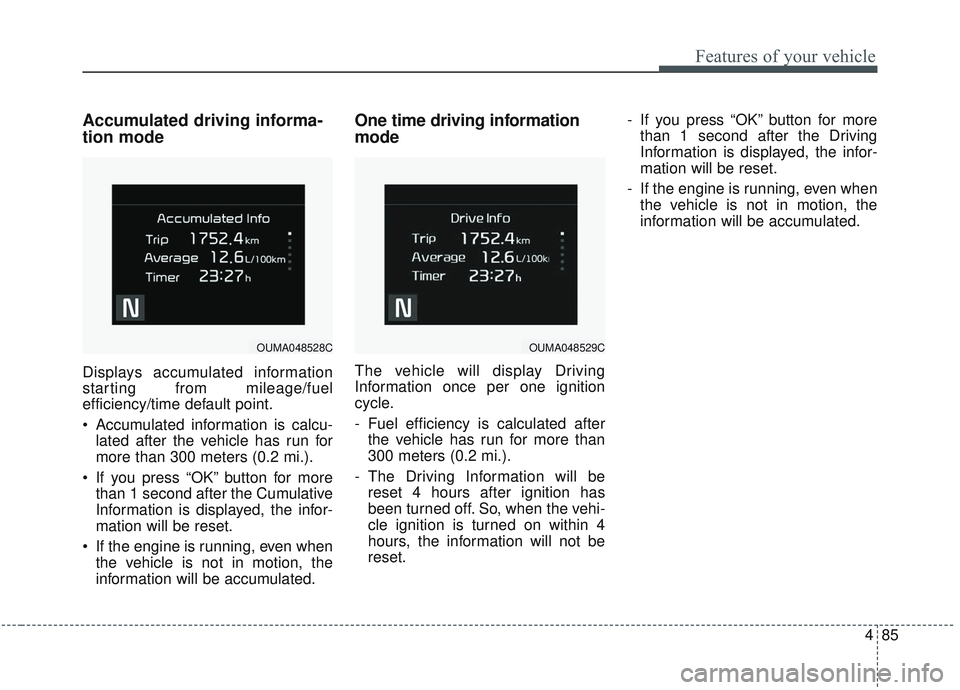
Accumulated driving informa-
tion mode
Displays accumulated information
starting from mileage/fuel
efficiency/time default point.
Accumulated information is calcu-lated after the vehicle has run for
more than 300 meters (0.2 mi.).
If you press “OK” button for more than 1 second after the Cumulative
Information is displayed, the infor-
mation will be reset.
If the engine is running, even when the vehicle is not in motion, the
information will be accumulated.
One time driving information
mode
The vehicle will display Driving
Information once per one ignition
cycle.
- Fuel efficiency is calculated afterthe vehicle has run for more than
300 meters (0.2 mi.).
- The Driving Information will be reset 4 hours after ignition has
been turned off. So, when the vehi-
cle ignition is turned on within 4
hours, the information will not be
reset. - If you press “OK” button for more
than 1 second after the Driving
Information is displayed, the infor-
mation will be reset.
- If the engine is running, even when the vehicle is not in motion, the
information will be accumulated.
OUMA048529COUMA048528C
Page 176 of 573

Features of your vehicle
88
4
Service mode
When Service Required is set, the
remaining distance/period to drive
appears on the LCD screen.
From the point at which the remain-
ing distance to drive amounts to
1,500 km (900 mi.) or the remaining
period amounts to 3 days, Service
Required message automatically
displays and remained on LCD
screen for a number of seconds
every time the engine start/stop but-
ton is ON. With Service Required in place,
Service Required Alarm message
pops up when an aggregated
amount of miles/time driven reaches
a certain point.
With Service Required mode, press
OK button for more than 1 second.
The values will return to initial setting
values.
❈
See User Settings
Mode in this chapter for further
information about Service Required
Setting.
❈ Service Required Setting
Battery Cable Disconnection, Fuse
Switch OFF, or Service Required
Setting values (an amount of
miles/time driven) can be randomly
changed. In such cases, re-enter
Service Required Setting values.
Master Warning Mode
This warning light informs the driv- er of the following situations
- LED head lamp malfunction (ifequipped)
- Smart Cruise Control with Stop &
Go malfunction (if equipped)
- Forward Collision-Avoidance
- Assist malfunction (if equipped)
- Blind-Spot Collision Warning radar blind (if equipped)
- Smart Cruise Control with Stop & Go radar blind (if equipped)
- Lamp malfunction
- High Beam Assist malfunction (if equipped)
The Master Warning Light illumi-
nates when more than one of the
above warning situations occur.
If the warning situation is solved, the
master warning light will be turned
off.
OUMA048560C
Page 177 of 573
489
Features of your vehicle
Distance to empty
The distance to empty is the esti-mated distance the vehicle can be
driven with the remaining fuel.
- Distance range : 1 ~ 9,999 km (1~ 9,999 mi.)
If the estimated distance is below 1 km (1 mi.), the trip computer will
display “---” as distance to empty.
✽ ✽ NOTICE
• If the vehicle is not on level ground
or the battery power has been
interrupted, the distance to empty
function may not operate correct-
ly.
• The distance to empty may differ from the actual driving distance as
it is an estimate of the available
driving distance.
• The trip computer may not regis- ter additional fuel if less than 1.6
liters (6 gallons) of fuel are added
to the vehicle.
• The fuel economy and distance to empty may vary significantly
based on driving conditions, driv-
ing habits, and condition of the
vehicle.
User Settings Mode
Description
In this mode, you can change setting
of the doors, lights, and so on.
OUMA048561C
OUMA048467
Page 197 of 573
4109
Features of your vehicle
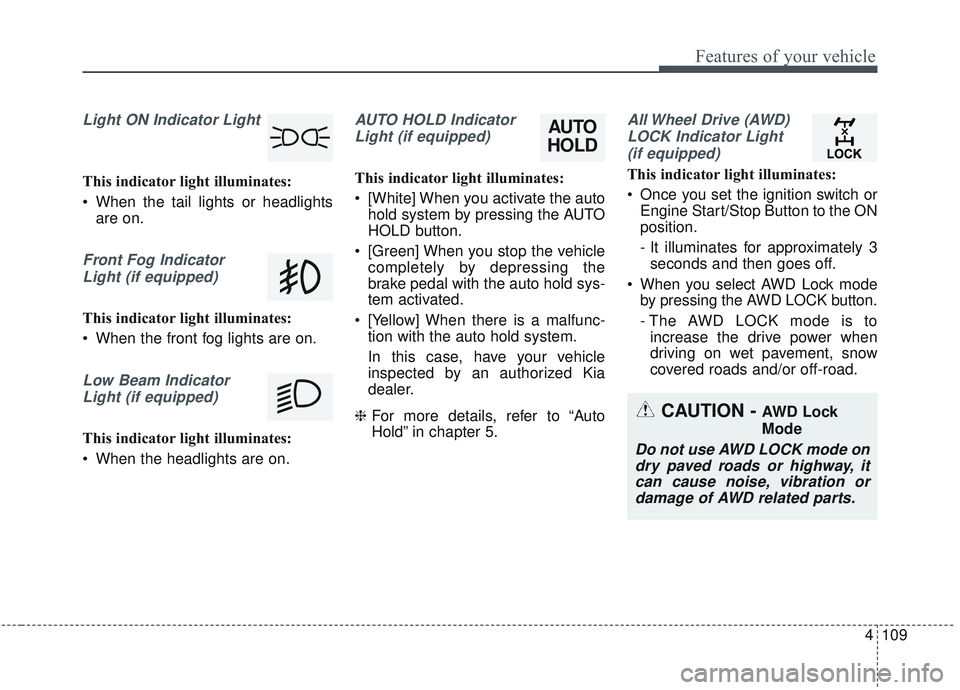
Light ON Indicator Light
This indicator light illuminates:
When the tail lights or headlightsare on.
Front Fog Indicator
Light (if equipped)
This indicator light illuminates:
When the front fog lights are on.
Low Beam IndicatorLight (if equipped)
This indicator light illuminates:
When the headlights are on.
AUTO HOLD IndicatorLight (if equipped)
This indicator light illuminates:
[White] When you activate the auto hold system by pressing the AUTO
HOLD button.
[Green] When you stop the vehicle completely by depressing the
brake pedal with the auto hold sys-
tem activated.
[Yellow] When there is a malfunc- tion with the auto hold system.
In this case, have your vehicle
inspected by an authorized Kia
dealer.
❈ For more details, refer to “Auto
Hold” in chapter 5.
All Wheel Drive (AWD)
LOCK Indicator Light (if equipped)
This indicator light illuminates:
Once you set the ignition switch or Engine Start/Stop Button to the ON
position.
- It illuminates for approximately 3seconds and then goes off.
When you select AWD Lock mode by pressing the AWD LOCK button.
- The AWD LOCK mode is toincrease the drive power when
driving on wet pavement, snow
covered roads and/or off-road.
CAUTION - AWD Lock
Mode
Do not use AWD LOCK mode ondry paved roads or highway, itcan cause noise, vibration ordamage of AWD related parts.
AUTO
HOLD
Page 225 of 573
4137
Features of your vehicle
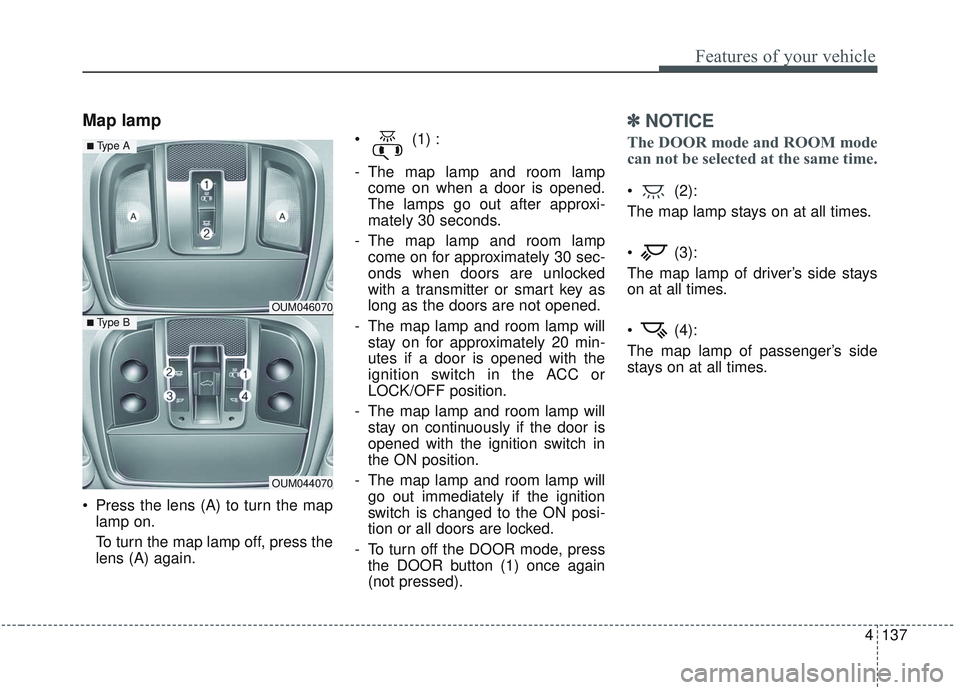
Map lamp
Press the lens (A) to turn the maplamp on.
To turn the map lamp off, press the
lens (A) again. (1) :
- The map lamp and room lamp
come on when a door is opened.
The lamps go out after approxi-
mately 30 seconds.
- The map lamp and room lamp come on for approximately 30 sec-
onds when doors are unlocked
with a transmitter or smart key as
long as the doors are not opened.
- The map lamp and room lamp will stay on for approximately 20 min-
utes if a door is opened with the
ignition switch in the ACC or
LOCK/OFF position.
- The map lamp and room lamp will stay on continuously if the door is
opened with the ignition switch in
the ON position.
- The map lamp and room lamp will go out immediately if the ignition
switch is changed to the ON posi-
tion or all doors are locked.
- To turn off the DOOR mode, press the DOOR button (1) once again
(not pressed).
✽ ✽ NOTICE
The DOOR mode and ROOM mode
can not be selected at the same time.
(2):
The map lamp stays on at all times.
(3):
The map lamp of driver’s side stays
on at all times.
(4):
The map lamp of passenger’s side
stays on at all times.
OUM046070
OUM044070
■ Type B
■ Type A
Page 238 of 573
Features of your vehicle
150
4
When using the air conditioning
system, you may notice clear water
dripping (or even puddling) on the
ground under the passenger side
of the vehicle. This is a normal sys-
tem operation characteristic.
Operating the air conditioning sys- tem in the recirculated air position
provides maximum cooling, how-
ever, continual operation in this
mode may cause the air inside the
vehicle to become stale.
During cooling operation, you may occasionally notice a misty air flow
because of rapid cooling and
humid air intake. This is a normal
system operation characteristic.Climate control air filter
(if equipped)
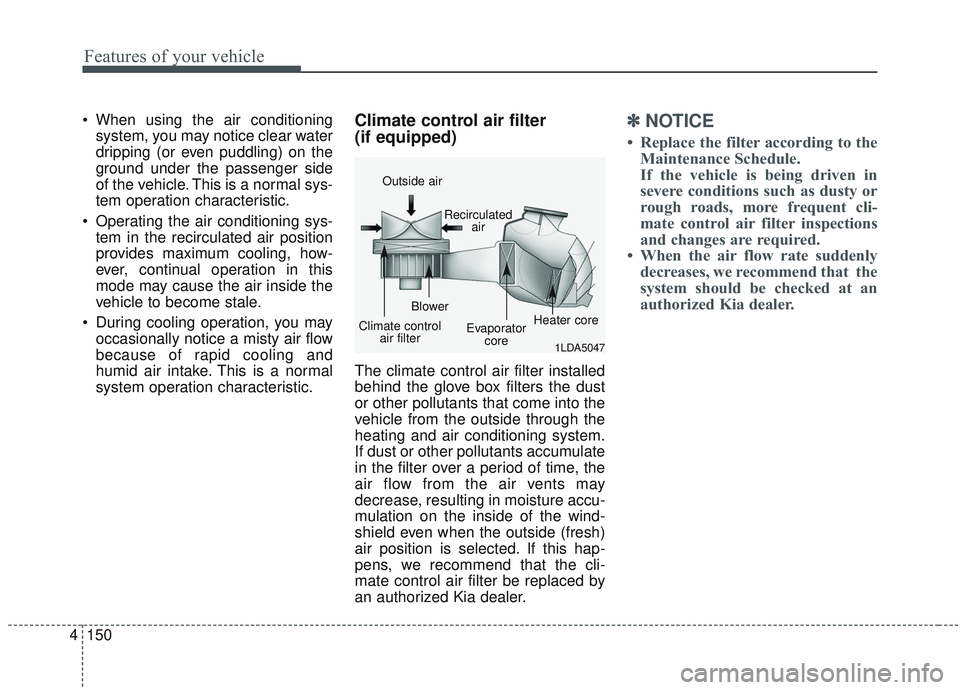
The climate control air filter installed
behind the glove box filters the dust
or other pollutants that come into the
vehicle from the outside through the
heating and air conditioning system.
If dust or other pollutants accumulate
in the filter over a period of time, the
air flow from the air vents may
decrease, resulting in moisture accu-
mulation on the inside of the wind-
shield even when the outside (fresh)
air position is selected. If this hap-
pens, we recommend that the cli-
mate control air filter be replaced by
an authorized Kia dealer.
✽ ✽ NOTICE
• Replace the filter according to the
Maintenance Schedule.
If the vehicle is being driven in
severe conditions such as dusty or
rough roads, more frequent cli-
mate control air filter inspections
and changes are required.
• When the air flow rate suddenly decreases, we recommend that the
system should be checked at an
authorized Kia dealer.
1LDA5047
Outside air
Recirculatedair
Climate control air filter Blower
Evaporatorcore Heater core

