Page 307 of 503

645
Driving your vehicle
Limitation of the system
The FCA system is designed to mon-
itor the vehicle ahead through radar
signals to warn the driver that a colli-
sion is imminent, and if necessary,
apply emergency braking. In certain
situations, the radar sensor may not
be able to detect the vehicle ahead.
In these cases, the FCA system may
not operate. The driver must pay
careful attention in the following situ-
ations where the FCA operation may
be limited:WARNING
Due to sensing limitation, theFCA may not produce warning
messages or warning alarms
in certain situations. Read the
section “Limitation of the sys-
tem” for more information.
When there is a malfunction with the FCA, the automatic
braking control does not
operate even with other brak-
ing systems normally operat-
ing.
The FCA system only recog- nizes vehicles in front of it
while driving forward. It does
not identify any animals or
vehicles in the opposite direc-
tion.
The FCA cannot recognize cross-traffic or parked vehi-
cles presenting a side-profile.
(Continued)
(Continued)
If the vehicle ahead suddenlystops, there is a risk of colli-
sion. The driver must always
pay caution in case of danger-
ous situations.
When the driver depresses the brake in a risk of collision,
the FCA system may not oper-
ate.
SC CAN (ENG) 6.QXP 7/18/2018 5:42 PM Page 45
Page 309 of 503
647
Driving your vehicle
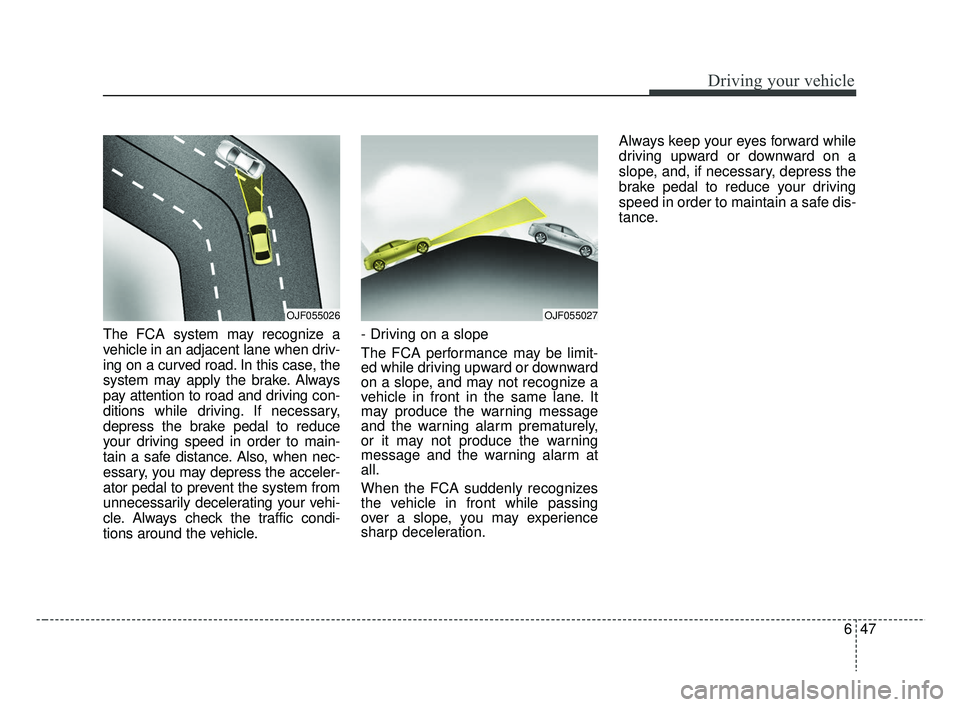
The FCA system may recognize a
vehicle in an adjacent lane when driv-
ing on a curved road. In this case, the
system may apply the brake. Always
pay attention to road and driving con-
ditions while driving. If necessary,
depress the brake pedal to reduce
your driving speed in order to main-
tain a safe distance. Also, when nec-
essary, you may depress the acceler-
ator pedal to prevent the system from
unnecessarily decelerating your vehi-
cle. Always check the traffic condi-
tions around the vehicle.- Driving on a slope
The FCA performance may be limit-
ed while driving upward or downward
on a slope, and may not recognize a
vehicle in front in the same lane. It
may produce the warning message
and the warning alarm prematurely,
or it may not produce the warning
message and the warning alarm at
all.
When the FCA suddenly recognizes
the vehicle in front while passing
over a slope, you may experience
sharp deceleration.Always keep your eyes forward while
driving upward or downward on a
slope, and, if necessary, depress the
brake pedal to reduce your driving
speed in order to maintain a safe dis-
tance.
OJF055027OJF055026
SC CAN (ENG) 6.QXP 7/18/2018 5:42 PM Page 47
Page 310 of 503
Driving your vehicle
48
6
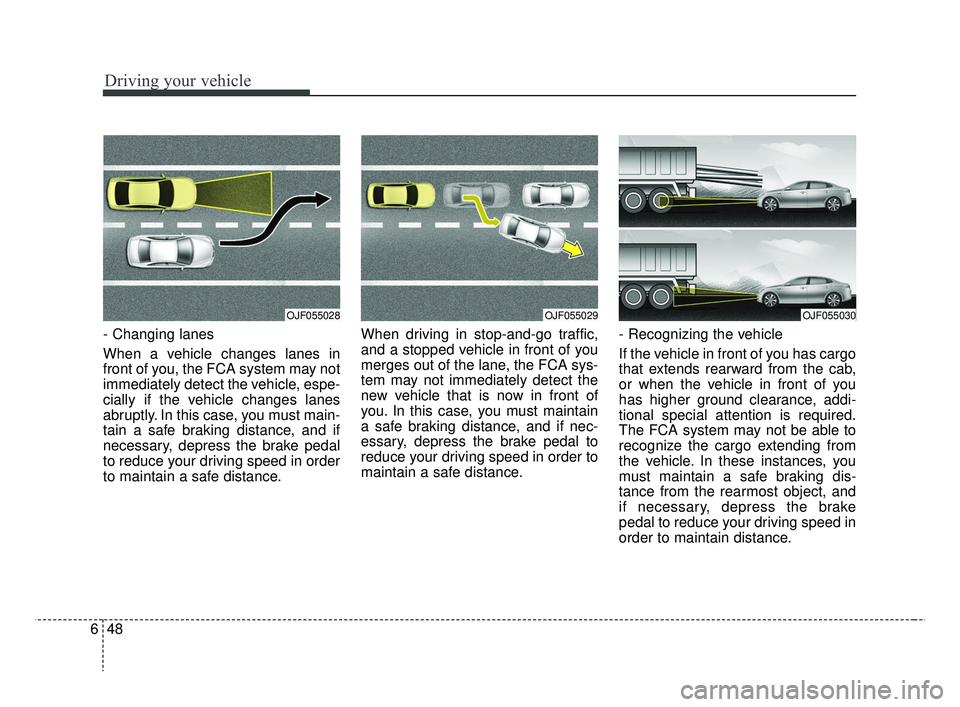
- Changing lanes
When a vehicle changes lanes in
front of you, the FCA system may not
immediately detect the vehicle, espe-
cially if the vehicle changes lanes
abruptly. In this case, you must main-
tain a safe braking distance, and if
necessary, depress the brake pedal
to reduce your driving speed in order
to maintain a safe distance. When driving in stop-and-go traffic,
and a stopped vehicle in front of you
merges out of the lane, the FCA sys-
tem may not immediately detect the
new vehicle that is now in front of
you. In this case, you must maintain
a safe braking distance, and if nec-
essary, depress the brake pedal to
reduce your driving speed in order to
maintain a safe distance.
- Recognizing the vehicle
If the vehicle in front of you has cargo
that extends rearward from the cab,
or when the vehicle in front of you
has higher ground clearance, addi-
tional special attention is required.
The FCA system may not be able to
recognize the cargo extending from
the vehicle. In these instances, you
must maintain a safe braking dis-
tance from the rearmost object, and
if necessary, depress the brake
pedal to reduce your driving speed in
order to maintain distance.
OJF055030OJF055029OJF055028
SC CAN (ENG) 6.QXP 7/18/2018 5:42 PM Page 48
Page 311 of 503
649
Driving your vehicle
✽ ✽NOTICE
In some instances, the FCA system
may be canceled when subjected to
electromagnetic interference.
WARNING - Testing the
FCA
The FCA does not operate in
certain situations. Thus, never
test-operate the FCA against a
vehicle or an object. It may
cause a severe injury or even
death.
WARNING - FCA and
Towing
Cancel the FCA in the User
Settings on the LCD display,
before towing another vehicle.
While towing, the brake applica-
tion may adversely affect your
vehicle safety.
WARNING
Use extreme caution when the vehicle in front of you has
cargo that extends rearward
from the cab, or when the
vehicle in front of you has
higher ground clearance.
The FCA system is designed to detect and monitor the
vehicle ahead through sensor
recognition. It is not designed
to detect bicycles, motorcy-
cles, or smaller wheeled
objects such as luggage
bags, shopping carts, or
strollers.
SC CAN (ENG) 6.QXP 7/18/2018 5:42 PM Page 49
Page 312 of 503
Driving your vehicle
50
6
The cruise control system allows you
to program the vehicle to maintain a
constant speed without depressing
the accelerator pedal.
This system is designed to function
above approximately 30 km/h (20
mph).
If the cruise control is left on,
(CRUISE indicator light in the instru-
ment cluster illuminated) the cruise
control can be switched on acciden-
tally. Keep the cruise control system
off (CRUISE indicator light OFF)
when the cruise control is not in use,
to avoid inadvertently setting a
speed.
Use the cruise control system only
when traveling on open highways in
good weather.
Do not use the cruise control when
driving in heavy or varying traffic, or
on slippery (rainy, icy or snow-cov-
ered) or winding roads or over 6%
up-hill or down-hill roads.✽ ✽
NOTICE
• During normal cruise control
operation, when the SET switch is
activated or reactivated after
applying the brakes, the cruise
control will energize after approx-
imately 3 seconds. This delay is
normal.
• To activate cruise control, depress the brake pedal at least once after
turning the ignition switch to the
ON position or starting the engine.
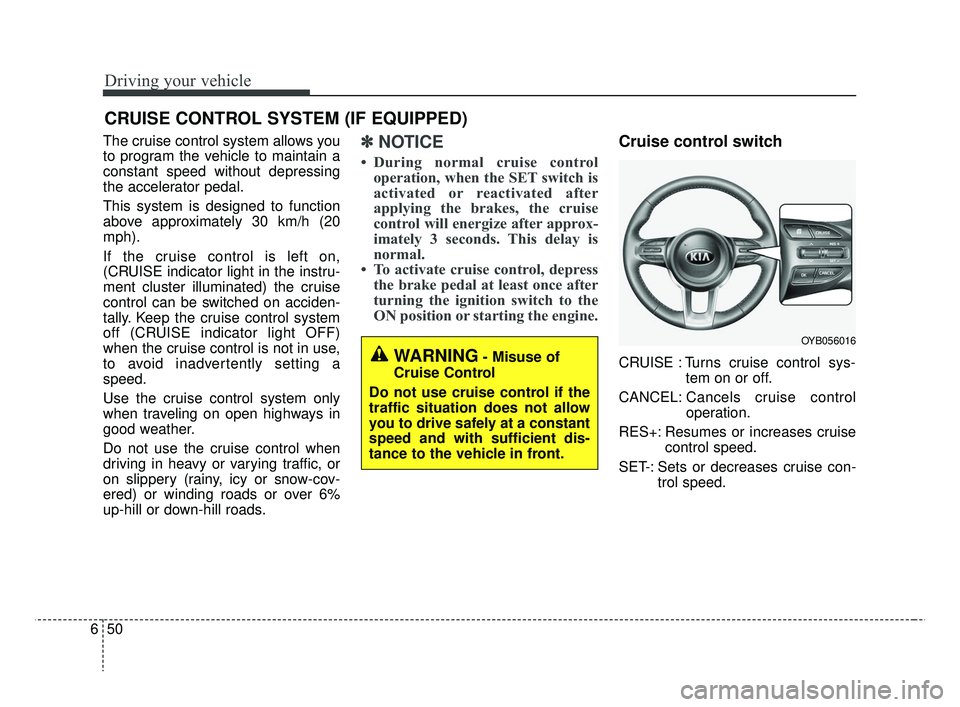
Cruise control switch
CRUISE : Turns cruise control sys-
tem on or off.
CANCEL: Cancels cruise control
operation.
RES+: Resumes or increases cruise control speed.
SET-: Sets or decreases cruise con- trol speed.
CRUISE CONTROL SYSTEM (IF EQUIPPED)
WARNING- Misuse of
Cruise Control
Do not use cruise control if the
traffic situation does not allow
you to drive safely at a constant
speed and with sufficient dis-
tance to the vehicle in front.
OYB056016
SC CAN (ENG) 6.QXP 7/18/2018 5:42 PM Page 50
Page 313 of 503
651
Driving your vehicle
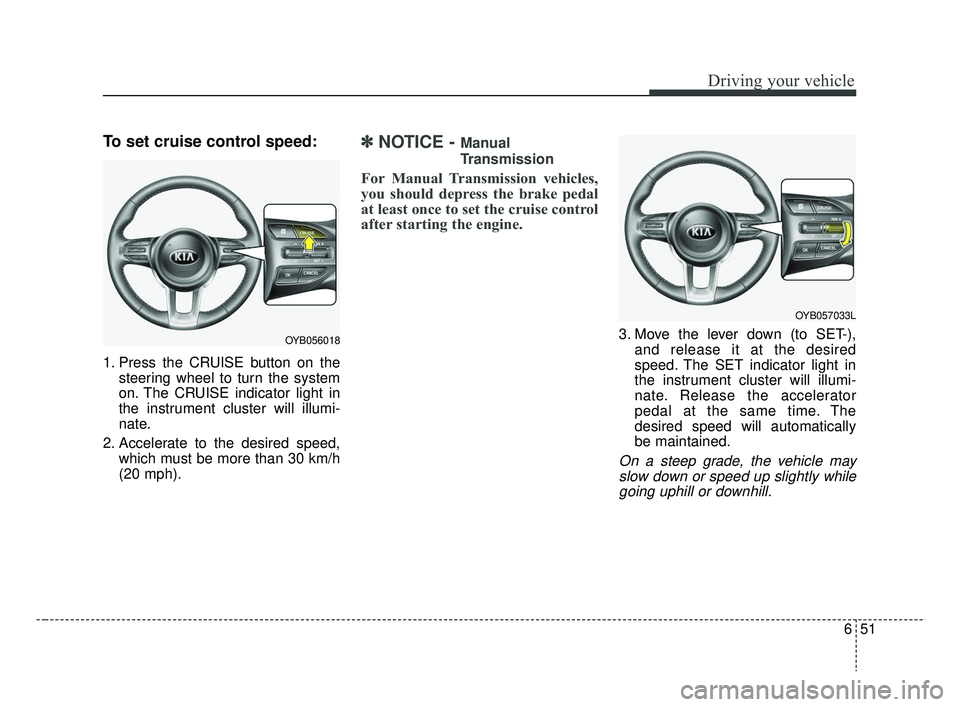
To set cruise control speed:
1. Press the CRUISE button on thesteering wheel to turn the system
on. The CRUISE indicator light in
the instrument cluster will illumi-
nate.
2. Accelerate to the desired speed, which must be more than 30 km/h
(20 mph).
✽ ✽NOTICE - Manual
Transmission
For Manual Transmission vehicles,
you should depress the brake pedal
at least once to set the cruise control
after starting the engine.
3. Move the lever down (to SET-),
and release it at the desired
speed. The SET indicator light in
the instrument cluster will illumi-
nate. Release the accelerator
pedal at the same time. The
desired speed will automatically
be maintained.
On a steep grade, the vehicle mayslow down or speed up slightly whilegoing uphill or downhill.
OYB056018
OYB057033L
SC CAN (ENG) 6.QXP 7/18/2018 5:42 PM Page 51
Page 315 of 503
653
Driving your vehicle
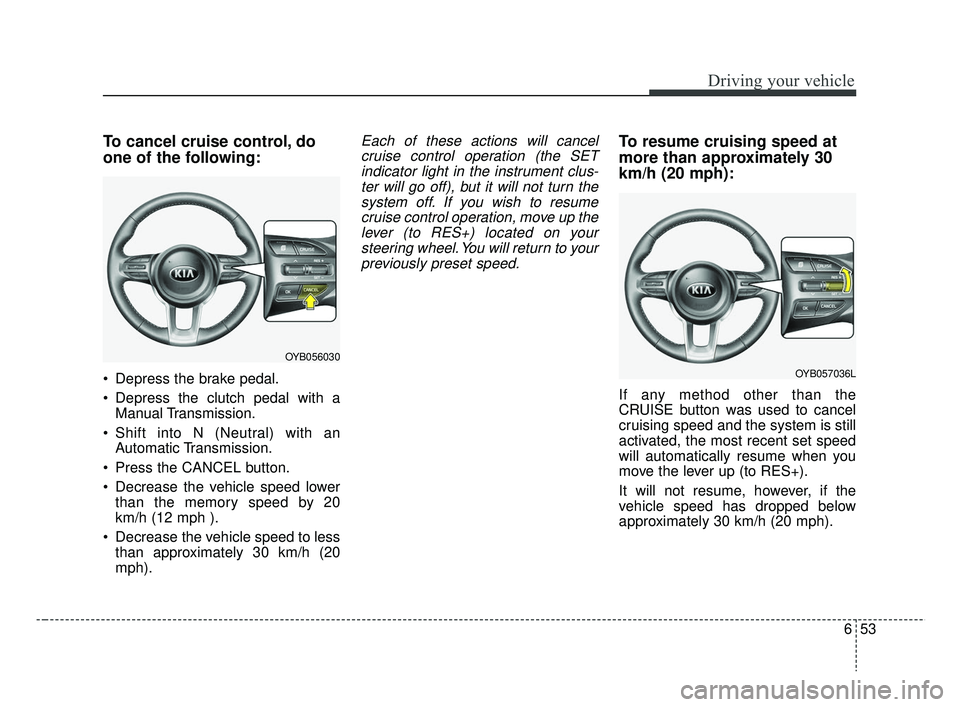
To cancel cruise control, do
one of the following:
Depress the brake pedal.
Depress the clutch pedal with aManual Transmission.
Shift into N (Neutral) with an Automatic Transmission.
Press the CANCEL button.
Decrease the vehicle speed lower than the memory speed by 20
km/h (12 mph ).
Decrease the vehicle speed to less than approximately 30 km/h (20
mph).
Each of these actions will cancelcruise control operation (the SETindicator light in the instrument clus-ter will go off), but it will not turn thesystem off. If you wish to resumecruise control operation, move up thelever (to RES+) located on yoursteering wheel. You will return to yourpreviously preset speed.To resume cruising speed at
more than approximately 30
km/h (20 mph):
If any method other than the
CRUISE button was used to cancel
cruising speed and the system is still
activated, the most recent set speed
will automatically resume when you
move the lever up (to RES+).
It will not resume, however, if the
vehicle speed has dropped below
approximately 30 km/h (20 mph).
OYB056030
OYB057036L
SC CAN (ENG) 6.QXP 7/18/2018 5:43 PM Page 53
Page 317 of 503
655
Driving your vehicle
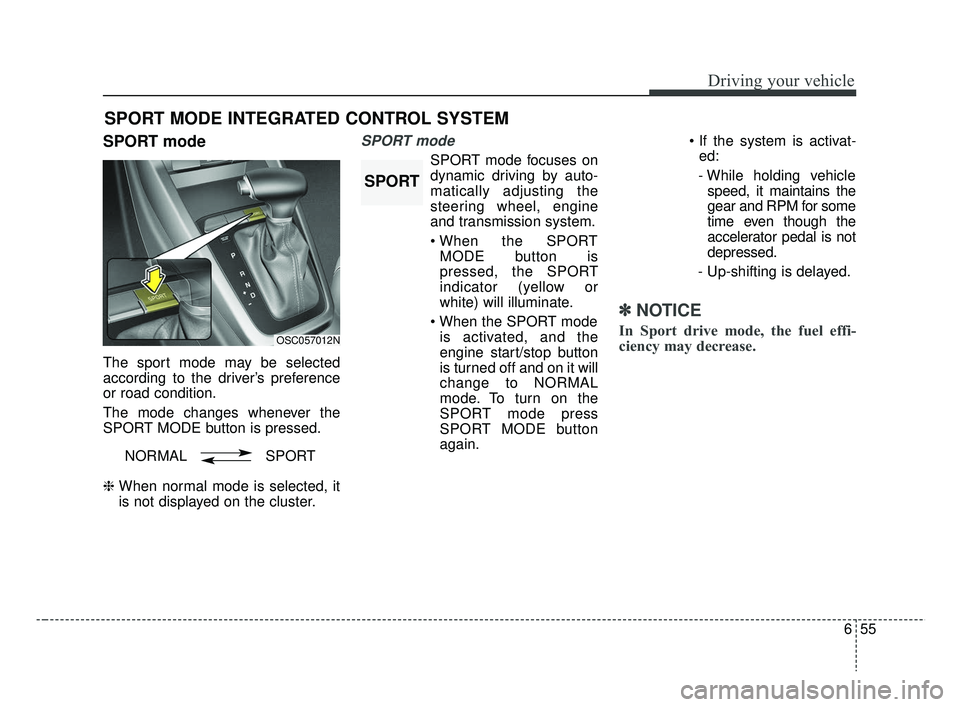
SPORT mode
The sport mode may be selected
according to the driver’s preference
or road condition.
The mode changes whenever the
SPORT MODE button is pressed.
❈ When normal mode is selected, it
is not displayed on the cluster.
SPORT mode
SPORT mode focuses on
dynamic driving by auto-
matically adjusting the
steering wheel, engine
and transmission system.
MODE button is
pressed, the SPORT
indicator (yellow or
white) will illuminate.
is activated, and the
engine start/stop button
is turned off and on it will
change to NORMAL
mode. To turn on the
SPORT mode press
SPORT MODE button
again.
ed:
- While holding vehicle speed, it maintains the
gear and RPM for some
time even though the
accelerator pedal is not
depressed.
- Up-shifting is delayed.
✽ ✽
NOTICE
In Sport drive mode, the fuel effi-
ciency may decrease.
SPORT MODE INTEGRATED CONTROL SYSTEM
OSC057012N
NORMAL SPORT
SPORT
SC CAN (ENG) 6.QXP 7/18/2018 5:43 PM Page 55