Page 149 of 580

Features of your vehicle
56
4
✽ ✽
NOTICE
To prevent discharge of the battery,
do not operate when the engine is
stopped.
Heated steering wheel
(if equipped)
When the Engine Start/Stop Button
is in the ON position, pressing the
heated steering wheel button warms
the steering wheel. The indicator on
the button will illuminate.
�
Steering wheel heater automatic
control system
When the steering wheel heater automatic control system is in use
at the level two (High).
After thirty minutes of use, the sys-
tem will automatically switch to
level one (Low). If any switch oper-
ation is not made, the system is
kept at level one (Low). Press the
switch to turn off the steering
wheel heater.
The steering wheel automatic con-
trol system will not work if the driv-
er switches the system to level one
(Low) before thirty minutes pass.
If you turn on the ignition with “The Auto Comfort Control” set from
Navigation touch screen in instru-
ment panel, the wheel heater
wiring will be automatically con-
trolled according to the tempera-
ture. Using the switch, the driver
can operate the system according
to the switch level.
ORJ048400
OFF→ HIGH( )→ LOW( )
→
Page 161 of 580

Features of your vehicle
68
4
L/R : When the remote control outside
rearview mirror switch (1) is
selected to the L (left) or R (right)
position, both outside rearview
mirrors will move downward.
Neutral : When the remote control
outside rearview mirror
switch is placed in the mid-
dle position, the outside
rearview mirrors will not
operate while the vehicle is
moving rearward.
The outside rearview mirrors will auto-
matically revert to their original posi-
tions under the following conditions:
1. The Engine Start/Stop button is in the OFF position.
2. Shift lever is moved to any position except R (Reverse).
3. The remote control outside rearview mirror switch is not
selected.Folding the outside rearview mirror
Electric type
The outside rearview mirror can be
folded or unfolded by pressing the
button. The mirror will fold or unfold automat-
ically as follows:
The mirror will fold or unfold when
the door is locked or unlocked by
the smart key.
The mirror will fold or unfold when the door is locked or unlocked by the
button on the outside door handle.
The mirror will unfold when you approach the vehicle (all doors
closed and locked) with a smart
key in possession.
ORJ048405
CAUTION -Electric type
outside rearview mirror
The electric type outside rearview mirror operates even though theengine start/stop button is in theOFF position. However, to preventunnecessary battery discharge,do not adjust the mirrors longerthan necessary while the engineis not running.
Do not fold the electric type out-side rearview mirror by hand. Thiscould cause motor failure.
Page 169 of 580
Features of your vehicle
76
4
Over view
LCD windows show the following
information to drivers.
- Trip information
- LCD modes
- Warning messages
Trip information (Trip computer)
The trip computer is a microcomput-
er-controlled driver information sys-
tem that displays information related
to driving.
✽ ✽
NOTICE
Some driving information stored in
the trip computer (for example
Average Fuel Economy) resets if the
battery is disconnected.
Trip Modes
LCD WINDOWS (IF EQUIPPED)
ORJ048173N
ORJ048174N
■ Type A
■Type B
Accumulated Info
Digital speedometer
Drive Info
TRIP
Drive Mode
Page 176 of 580

483
Features of your vehicle
When Service Required is set, a
Service Required Alarm message
pops up when an aggregated
amount of miles/time driven reaches
a certain point.
With Service Required mode, press
OK button for more than 1 second.
The values will return to initial setting
values.
❈Service Required Setting
If the Battery Cable is disconnected,
Fuse Switch is turned OFF, the
Service Required Setting values (an
amount of miles/time driven) may
change. In this situation, re-enter
Service Required settings.Master warning mode (if equipped)
This warning light informs the driv- er of the following situations:
- LED head lamp malfunction (if equipped)
- Blind-Spot Collision Warning sys- tem malfunction
- Rear Cross-Traffic Collision Warning system malfunction (if
equipped)
- Smart Cruise Control with Stop & Go malfunction
- Forward Collision-Avoidance Assist malfunction
- Blind-Spot Collision Warning radar blind
- Smart Cruise Control with Stop & Go radar blind
- Forward Collision-Avoidance Assist radar blind
- Lamp malfunction
- High Beam Assist malfunction (if equipped) The Master Warning Light illumi-
nates if one or more of the above
warning situations occur.
Page 177 of 580
Features of your vehicle
84
4
Distance to empty
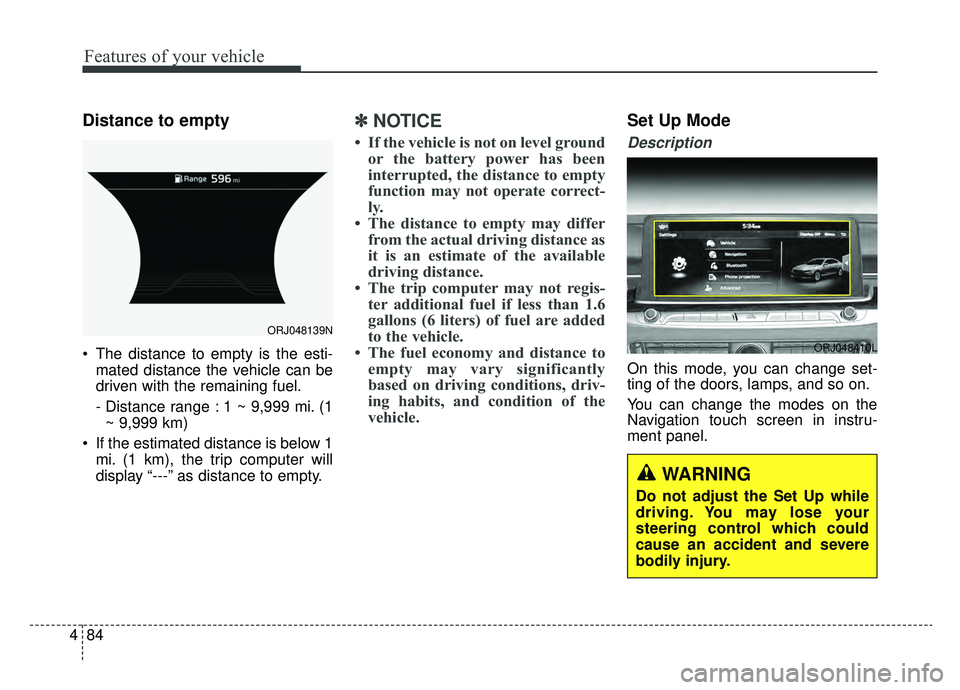
The distance to empty is the esti-
mated distance the vehicle can be
driven with the remaining fuel.
- Distance range : 1 ~ 9,999 mi. (1~ 9,999 km)
If the estimated distance is below 1 mi. (1 km), the trip computer will
display “---” as distance to empty.
✽ ✽ NOTICE
• If the vehicle is not on level ground
or the battery power has been
interrupted, the distance to empty
function may not operate correct-
ly.
• The distance to empty may differ from the actual driving distance as
it is an estimate of the available
driving distance.
• The trip computer may not regis- ter additional fuel if less than 1.6
gallons (6 liters) of fuel are added
to the vehicle.
• The fuel economy and distance to empty may vary significantly
based on driving conditions, driv-
ing habits, and condition of the
vehicle.
Set Up Mode
Description
On this mode, you can change set-
ting of the doors, lamps, and so on.
You can change the modes on the
Navigation touch screen in instru-
ment panel.
ORJ048139N
ORJ048410L
WARNING
Do not adjust the Set Up while
driving. You may lose your
steering control which could
cause an accident and severe
bodily injury.
Page 178 of 580
485
Features of your vehicle
Shift to P to edit settings
This warning message appears on
Navigation touch screen in instru-
ment panel, if you try to adjust the
Set Up while driving.
For your safety, change the Vehicle
Settings after parking the vehicle,
applying the parking brake and mov-
ing the shift lever to P (Park).
Warning Messages (if equipped)
Shift to P
This warning message illuminates ifyou try to turn off the engine without
the transmission in P (Park) posi-
tion.
At this time, the Engine Start/Stop Button turns to the ACC position (If
you press the Engine Start/Stop
Button once more, it will turn to the
ON position).
Low Key Battery
This warning message illuminatesif the battery of the smart key is
discharged when the Engine
Start/Stop Button changes to the
OFF position.
Press brake pedal to start engine
This warning message illuminatesif the Engine Start/Stop Button
changes to the ACC position twice
by pressing the button repeatedly
without depressing the brake pedal.
It means that you should depress the brake pedal to start the engine.
Key not in vehicle
This warning message illuminatesif the smart key is not in the vehicle
when you press the Engine
Start/Stop Button.
It means that you should always have the smart key with you.
Page 194 of 580
4101
Features of your vehicle
Immobilizer IndicatorLight (With Smart Key)
This indicator light illuminates for up
to 30 seconds:
When the vehicle detects the smart key in the vehicle properly
while the Engine Start/Stop Button
is ACC or ON.
- At this time, you can start theengine.
- The indicator light goes off after starting the engine.
This indicator light blinks for a few
seconds:
When the smart key is not in the vehicle.
- At this time, you can not start theengine. This indicator light illuminates for 2
seconds and goes off:
When the vehicle cannot detect the
smart key which is in the vehicle
while the Engine Start/Stop Button
is ON.
In this case, have the vehicle inspect-
ed by an authorized K900 Kia dealer.
This indicator light blinks:
When the battery of the smart key is weak.
- At this time, you cannot start theengine. However, you can start the
engine if you press the Engine
Start/Stop Button with the smart
key. (For more details, refer to
“Starting the Engine” in chapter 5).
When there is a malfunction with the immobilizer system.
In this case, have the vehicle inspect-
ed by an authorized K900 Kia dealer.
Turn Signal Indicator
Light
This indicator light blinks:
When you switch on the turn signal light on.
If any of the following occurs, there
may be a malfunction with the turn
signal system. In this case, have the
vehicle inspected by an authorized
K900 Kia dealer. - The indicator light does not blinkbut illuminates.
- The indicator light blinks more rapidly.
- The indicator light does not illumi- nate at all.
Page 207 of 580
Features of your vehicle
114
4
Battery saver function
The purpose of this feature is to
prevent the battery from being dis-
charged if the lights are left in the
ON position. The system automati-
cally shuts off the parking lights 30
seconds after the ignition key is
removed and the driver’s door is
opened and closed.
With this feature, the parking lights will turn off automatically if the driver
parks on the side of the road at night
and opens the driver’s side door.
If necessary, to keep the parking
lights on when the ignition key is
removed, perform the following:
1) Open the driver-side door.
2) Turn the parking lights OFF and ON again using the light switch
on the steering column.
Daytime running light
The Daytime Running Lights (DRL)
can make it easier for others to see the
front of your vehicle during the day.
DRL can be helpful in many different
driving conditions, and it is especially
helpful after dawn and before sunset.
The DRL system will turn the dedi-
cated lamp OFF when :
1.The headlight switch is on
- It includes that the headlight is onin the dark when the headlight
switch is in the auto light position.
2.The engine is off
3.Engaging the Parking Brake
Lighting control
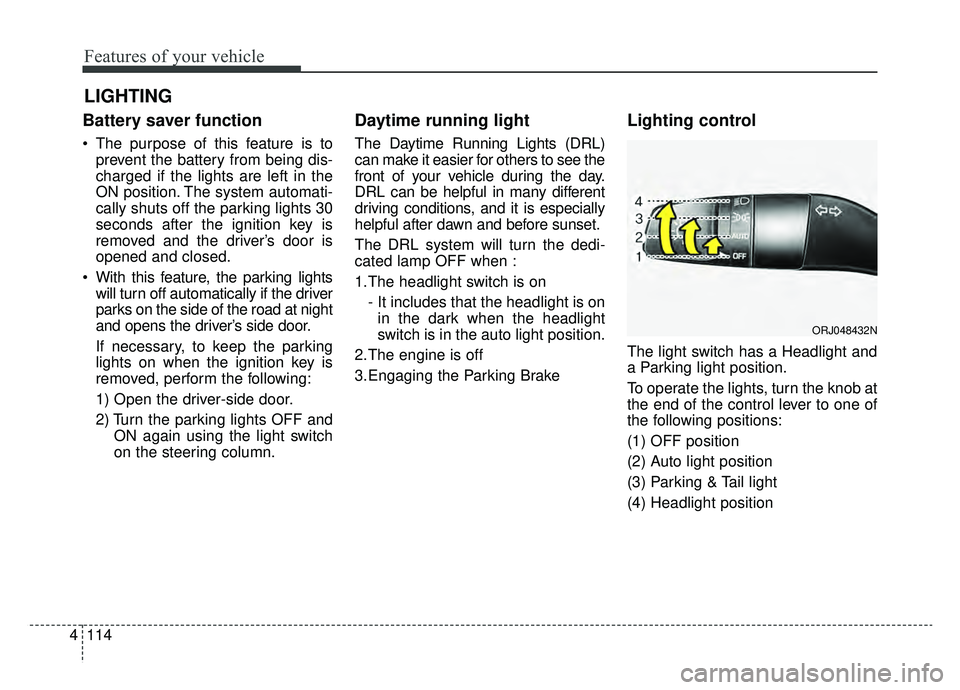
The light switch has a Headlight and
a Parking light position.
To operate the lights, turn the knob at
the end of the control lever to one of
the following positions:
(1) OFF position
(2) Auto light position
(3) Parking & Tail light
(4) Headlight position
LIGHTING
ORJ048432N
