Page 253 of 580
Features of your vehicle
160
4
If the wireless charging is not func-
tioning properly, the orange light will
blink and flash for ten seconds then
turn off. In such cases, remove the
smart phone from the pad and
replace it on the pad again, or double
check the charging status.
If you leave the smart phone on the
charging pad when the vehicle igni-
tion is in OFF, the vehicle will alert
you through warning messages and
sound (applicable for vehicles with
voice guidance function) after the
‘Good bye’ function on the instru-
ment cluster ends. However, it does
not alert for every smart phone. It is
not a malfunction of the system, but
the smart phone soft ware incompat-
ibility.
WARNING - Distracted
driving
Driving while distracted can
result in a loss of vehicle con-
trol that may lead to an acci-
dent, severe bodily injury, and
death. The driver’s primary
responsibility is in the safe and
legal operation of a vehicle, and
use of any handheld devices,
other equipment, or vehicle sys-
tems which take the driver’s
eyes, attention and focus away
from the safe operation of a
vehicle or which are not permis-
sible by law should never be
used during operation of the
vehicle.CAUTION - Liquid in
Wireless Smart Phone
Charger
To prevent liquid from damaging the wireless smart phone charg-ing system in your vehicle,securely close the tray coverwhen charging your phone.
WARNING - Metal in
Wireless Charging System
If any metallic object such as a
coin is placed between the wire-
less charging system and the
smart phone, the charging may
be disrupted. Also, the metallic
object may heat up and poten-
tially damage the charging sys-
tem. If there is any metallic
object between the smart phone
and the charging pad, immedi-
ately remove the smart phone.
Remove the metallic object
after it has cooled down.
Page 256 of 580
4163
Features of your vehicle
Floor mat anchor (s)
When using a floor mat on the front
floor carpet, make sure it attaches to
the floor mat anchor(s) in your vehi-
cle. This keeps the floor mat from
sliding forward.
OXM043309
WARNING - After market
floor mat
Do not install aftermarket floor
mats that are not capable of
being securely attached to the
vehicle's floor mat anchors.
Unsecured floor mats can inter-
fere with pedal operation.
WARNING
Do not hang other objects such
as hangers or hard objects
except clothes. Also, do not put
heavy, sharp or breakable
objects in the pockets of the
clothing. In an accident or when
the curtain air bag is inflated, it
may cause vehicle damage or
bodily injury.
OPS046500
CAUTION - Hanging
clothing
Do not hang heavy clothes, since they may damage the hook.
Page 257 of 580
Features of your vehicle
164
4
The following must be observed
when installing ANY floor mat to the
vehicle.
Ensure that the floor mats are
securely attached to the vehicle's
floor mat anchor(s) before driving
the vehicle.
Do not use ANY floor mat that can- not be firmly attached to the vehi-
cle's floor mat anchors.
Do not stack floor mats on top of one another (e.g. all-weather rub-
ber mat on top of a carpeted floor
mat). Only a single floor mat should
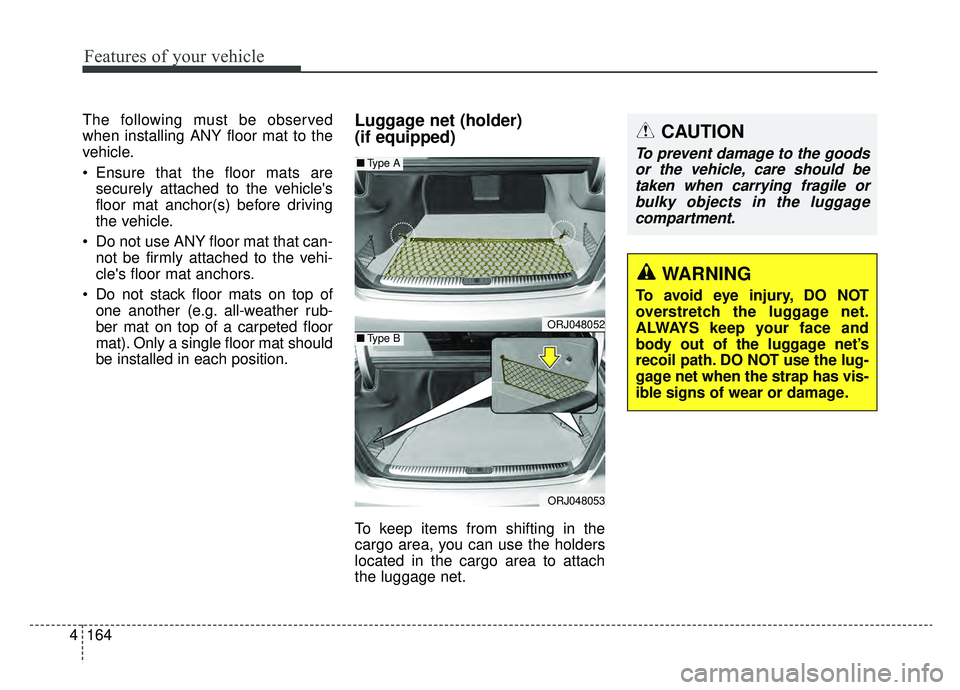
be installed in each position.Luggage net (holder)
(if equipped)
To keep items from shifting in the
cargo area, you can use the holders
located in the cargo area to attach
the luggage net.
ORJ048052
ORJ048053
■ Type A
■Type B
WARNING
To avoid eye injury, DO NOT
overstretch the luggage net.
ALWAYS keep your face and
body out of the luggage net’s
recoil path. DO NOT use the lug-
gage net when the strap has vis-
ible signs of wear or damage.
CAUTION
To prevent damage to the goods
or the vehicle, care should betaken when carrying fragile orbulky objects in the luggagecompartment.
Page 258 of 580
4165
Features of your vehicle
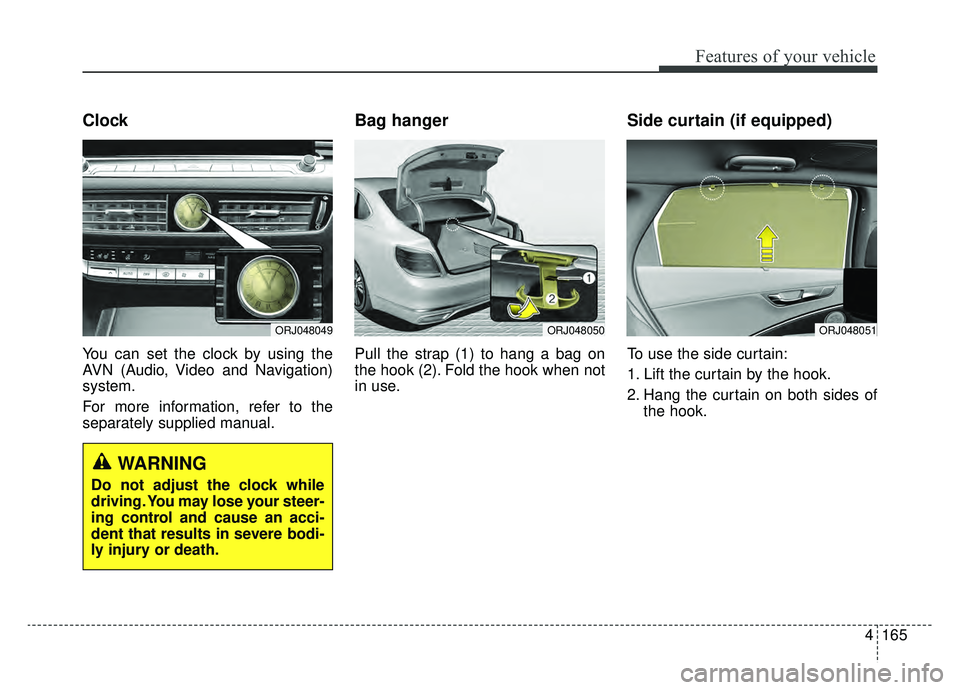
Clock
You can set the clock by using the
AVN (Audio, Video and Navigation)
system.
For more information, refer to the
separately supplied manual.
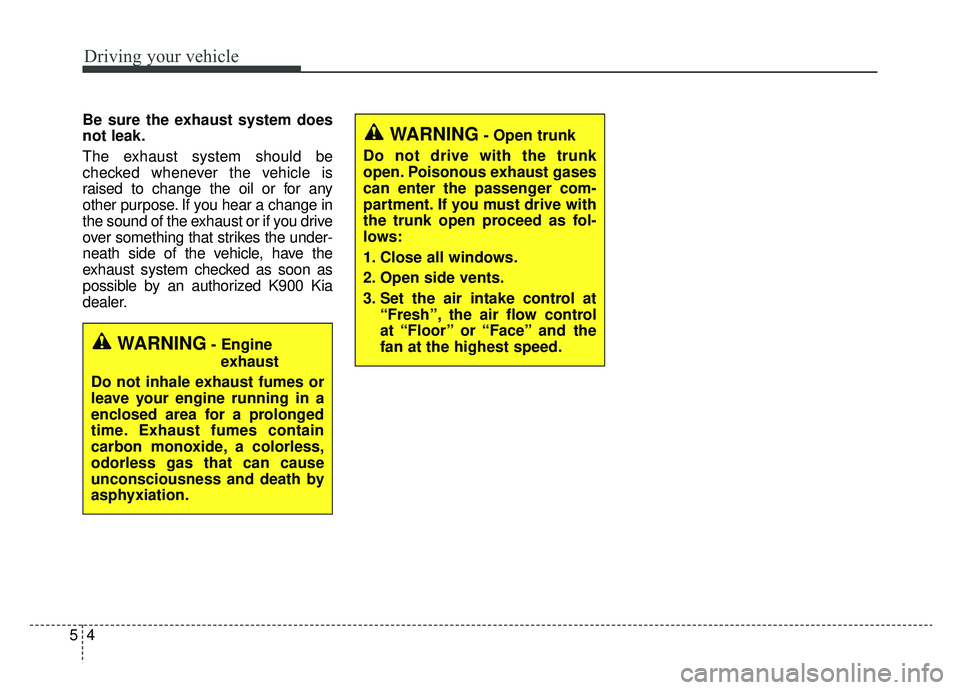
Bag hanger
Pull the strap (1) to hang a bag on
the hook (2). Fold the hook when not
in use.
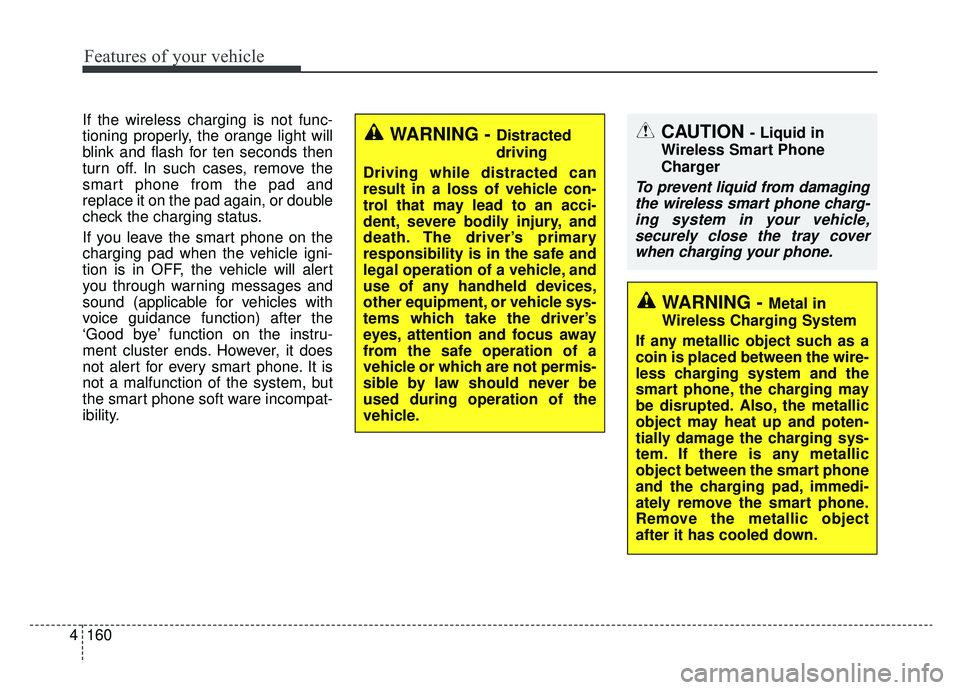
Side curtain (if equipped)
To use the side curtain:
1. Lift the curtain by the hook.
2. Hang the curtain on both sides ofthe hook.
ORJ048050ORJ048051ORJ048049
WARNING
Do not adjust the clock while
driving. You may lose your steer-
ing control and cause an acci-
dent that results in severe bodi-
ly injury or death.
Page 263 of 580
Features of your vehicle
170
4
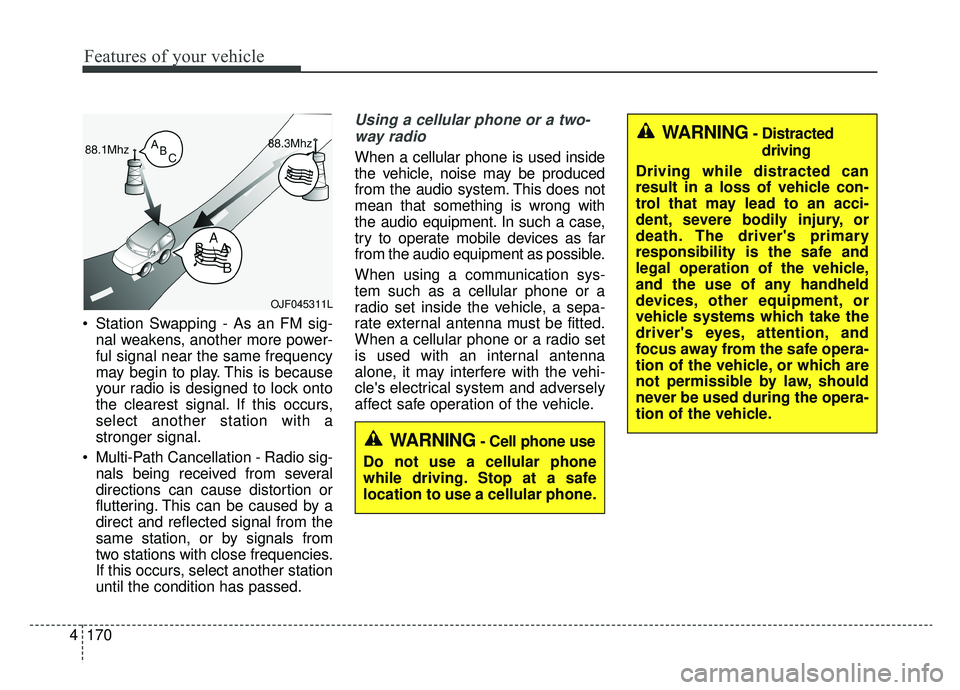
Station Swapping - As an FM sig-
nal weakens, another more power-
ful signal near the same frequency
may begin to play. This is because
your radio is designed to lock onto
the clearest signal. If this occurs,
select another station with a
stronger signal.
Multi-Path Cancellation - Radio sig- nals being received from several
directions can cause distortion or
fluttering. This can be caused by a
direct and reflected signal from the
same station, or by signals from
two stations with close frequencies.
If this occurs, select another station
until the condition has passed.
Using a cellular phone or a two-
way radio
When a cellular phone is used inside
the vehicle, noise may be produced
from the audio system. This does not
mean that something is wrong with
the audio equipment. In such a case,
try to operate mobile devices as far
from the audio equipment as possible.
When using a communication sys-
tem such as a cellular phone or a
radio set inside the vehicle, a sepa-
rate external antenna must be fitted.
When a cellular phone or a radio set
is used with an internal antenna
alone, it may interfere with the vehi-
cle's electrical system and adversely
affect safe operation of the vehicle.
OJF045311L
WARNING- Cell phone use
Do not use a cellular phone
while driving. Stop at a safe
location to use a cellular phone.
WARNING- Distracted driving
Driving while distracted can
result in a loss of vehicle con-
trol that may lead to an acci-
dent, severe bodily injury, or
death. The driver's primary
responsibility is the safe and
legal operation of the vehicle,
and the use of any handheld
devices, other equipment, or
vehicle systems which take the
driver's eyes, attention, and
focus away from the safe opera-
tion of the vehicle, or which are
not permissible by law, should
never be used during the opera-
tion of the vehicle.
Page 267 of 580
 system . . . . . . . . . . . . . . . 5-90
. . . . . . . . . . . . . . . . . . . . . . . . . . . . . . . . . . . 5-\
90
. . . . . . . . . . . . . . . . . . . . . . . . . . . .")
ISG (Idle Stop and Go) system . . . . . . . . . . . . . . . 5-90
. . . . . . . . . . . . . . . . . . . . . . . . . . . . . . . . . . . 5-\
90
. . . . . . . . . . . . . . . . . . . . . . . . . . . . . . . . . . . 5-\
91
. . . . . . . . . . . . . . 5-92
. . . . . . . . . . . . . . . . . . . . . . . 5-92
. . . . . . . . . . . . . . . . . . . . . . . 5-93
Drive mode integrated control system . . . . . . . . . 5-94
Lane Following Assist (LFA) system . . . . . . . . . . 5-99
. . . . . . . . . . . . . . . . . . . . . . . . 5-100
. . . . . . . . . . . . . . . . . . . . . . 5-102
. . . . . . . . . . . . . . . . . . . . . . 5-103
Lane Keeping Assist (LKA) System . . . . . . . . . . 5-105
. . . . . . . . . . . . . . . . . . . . . . . 5-107
. . . . . . . . . . . . . . . . . . . . . 5-112
. . . . . . . . . . . . . . . . . . 5-113
. . . . . . . . . . . . . . . . . . . . . . . . . . 5-114
. . . . . . . . . . 5-114
Forward Collision-avoidance Assist-lane-change oncoming function (FCA) . . . . . . . . . . . . . . . . . 5-114
. . . . . . . . . . . . . . . . . . . . . . . . . . . . . . . . . 5-115
Blind-spot collision warning/blind-spot collision-avoidance assist . . . . . . . . . . . . . . . . . . 5-116
. . . . . . . . . . . . . . . . . . 5-117
. . . . . . . . . . . 5-119
Rear Cross-traffic Collision Warning (RCCW) system /Rear Cross-traffic Collision-avoidance Assist
(RCCA) system . . . . . . . . . . . . . . . . . . . . . . . . . . 5-129
. . . . . . . . . . . . . . . . . . 5-130
. . . . . . . . . . . 5-131
Driver attention warning (DAW) . . . . . . . . . . . . 5-141
. . . . . . . . . . . . . . . . . . 5-141
. . . . . . . . . . . . . . . . . . . . . . . . . 5-143
. . . . . . . . . . . . . . . . . . . . . . . . . . . . . 5-144
. . . . . . . . . . . . . . . . . . . . . . . . . . 5-144
Economical operation . . . . . . . . . . . . . . . . . . . . . 5-146
Special driving conditions . . . . . . . . . . . . . . . . . . 5-148
. . . . . . . . . . . . . . . . . 5-148
. . . . . . . . . . . . . . . . . . . . . . . . . . 5-148
. . . . . . . . . . . . . . . . . . . . . . . . . . . 5-149
. . . . . . . . . . . . . . . . . . . . . . . . . . . . . 5-149
. . . . . . . . . . . . . . . . . . . . . . . . . . . 5-150
. . . . . . . . . . . . . . . . . . . . . . 5-151
. . . . . . . . . . . . . . . . . . . . . . . . . . . . . 5-151
. . . . . . . . . . . . . . . . . . . . . . . . . . . . 5-151
Winter driving . . . . . . . . . . . . . . . . . . . . . . . . . . . 5-152
. . . . . . . . . . . . . . . . . . . . . . 5-152
. . . . . . . . . 5-154
. . . . . . . . . . . . . . . . . . . . . 5-154
5
Page 269 of 580
Driving your vehicle
45
Be sure the exhaust system does
not leak.
The exhaust system should be
checked whenever the vehicle is
raised to change the oil or for any
other purpose. If you hear a change in
the sound of the exhaust or if you drive
over something that strikes the under-
neath side of the vehicle, have the
exhaust system checked as soon as
possible by an authorized K900 Kia
dealer.
WARNING- Engineexhaust
Do not inhale exhaust fumes or
leave your engine running in a
enclosed area for a prolonged
time. Exhaust fumes contain
carbon monoxide, a colorless,
odorless gas that can cause
unconsciousness and death by
asphyxiation.
WARNING- Open trunk
Do not drive with the trunk
open. Poisonous exhaust gases
can enter the passenger com-
partment. If you must drive with
the trunk open proceed as fol-
lows:
1. Close all windows.
2. Open side vents.
3. Set the air intake control at “Fresh”, the air flow control
at “Floor” or “Face” and the
fan at the highest speed.
Page 270 of 580
55
Driving your vehicle
Before entering vehicle
• Be sure that all windows, outsidemirror(s), and outside lights are
clean.
Check the condition of the tires.
Check under the vehicle for any sign of leaks.
Be sure there are no obstacles behind you if you intend to back up.
Necessary inspections
Fluid levels, such as engine oil,
engine coolant, brake fluid, and
washer fluid should be checked on a
regular basis, at the exact interval
depending on the fluid. Further
details are provided in chapter 7,
“Maintenance”.
Before starting
Close and lock all doors.
Position the seat so that all con-trols are easily reached.
Buckle your seat belt.
Adjust the inside and outside rearview mirrors.
Be sure that all lights work.
Check all gauges.
Check the operation of warning lights when the ignition switch is
turned to the ON position.
Release the parking brake and make sure the brake warning light
goes out.
For safe operation, be sure you are
familiar with your vehicle and its
equipment.
BEFORE DRIVING
WARNING - Distracted driving
Focus on the road while driving.
The driver's primary responsi-
bility is in the safe and legal
operation of the vehicle. Use of
any handled devices, other
equipment or vehicle systems
that distract the driver should
not be used during vehicle
operation.