2019 KIA FORTE Battery
[x] Cancel search: BatteryPage 210 of 550
4125
Features of your vehicle
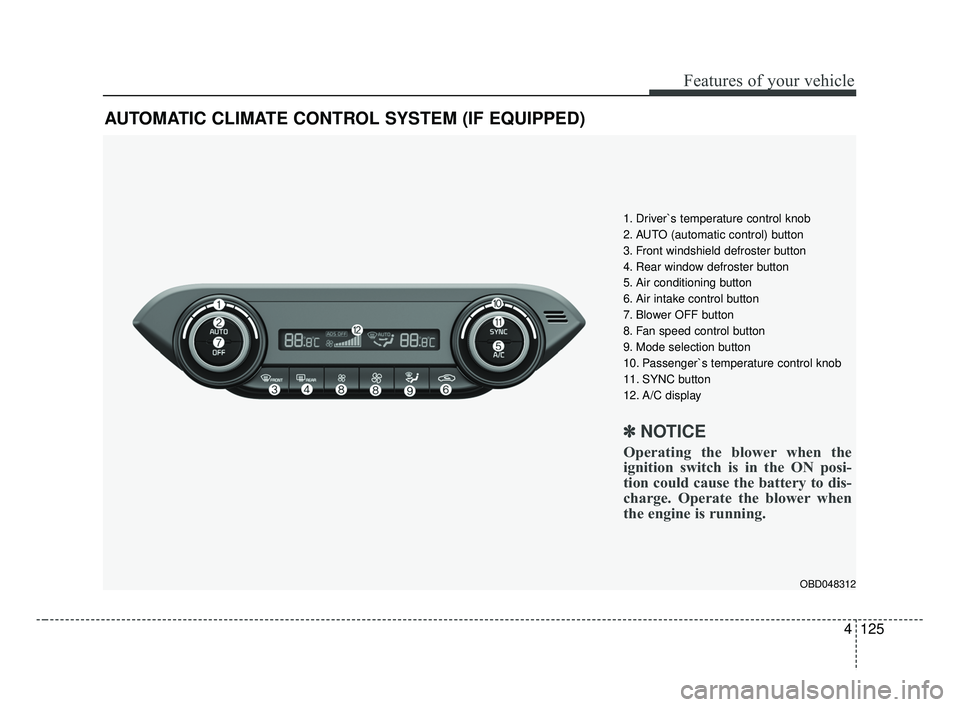
AUTOMATIC CLIMATE CONTROL SYSTEM (IF EQUIPPED)
OBD048312
1. Driver`s temperature control knob
2. AUTO (automatic control) button
3. Front windshield defroster button
4. Rear window defroster button
5. Air conditioning button
6. Air intake control button
7. Blower OFF button
8. Fan speed control button
9. Mode selection button
10. Passenger`s temperature control knob
11. SYNC button
12. A/C display
✽ ✽NOTICE
Operating the blower when the
ignition switch is in the ON posi-
tion could cause the battery to dis-
charge. Operate the blower when
the engine is running.
BDm CAN (ENG) 4.qxp 7/4/2018 10:09 AM Page 125
Page 215 of 550

Features of your vehicle
130
4
Adjusting the driver and passenger
side temperature equally
Press the “SYNC” button to adjust
the driver and passenger side tem-
perature equally.
The passenger side temperature
will be set to the same temperature
as the driver side temperature.
Turn the driver side temperature control knob. The driver and pas-
senger side temperature will be
adjusted equally. Adjusting the driver and passenger
side temperature individually
Press the “SYNC” button again to
adjust the driver and passenger
side temperature individually. The
illumination of button turns off.
Operate the driver side tempera- ture control knob to adjust the driv-
er side temperature.
Operate the passenger side tem- perature control knob to adjust the
passenger side temperature.
Temperature conversion
You can switch the temperature
mode from Centigrade to Fahrenheit
as follows:
While pressing the OFF button,
press the AUTO button for 3 seconds
or more.
The display will change from
Centigrade to Fahrenheit, or from
Fahrenheit to Centigrade.
If the battery has been discharged or
disconnected, the temperature mode
display will reset to Fahrenheit.
Air intake control
This is used to select the outside
(fresh) air position or recirculated air
position.
To change the air intake control posi-
tion, push the control button.
OBD048317
OBD048318
BDm CAN (ENG) 4.qxp 7/4/2018 10:09 AM Page 130
Page 224 of 550
4139
Features of your vehicle
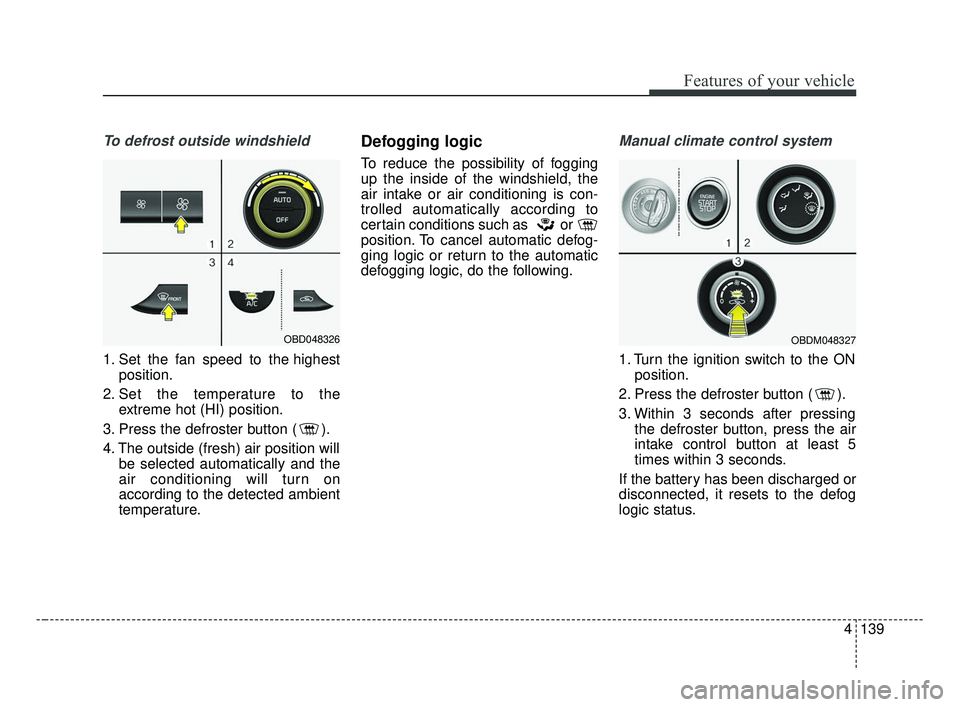
To defrost outside windshield
1. Set the fan speed to the highestposition.
2. Set the temperature to the extreme hot (HI) position.
3. Press the defroster button ( ).
4. The outside (fresh) air position will be selected automatically and the
air conditioning will turn on
according to the detected ambient
temperature.
Defogging logic
To reduce the possibility of fogging
up the inside of the windshield, the
air intake or air conditioning is con-
trolled automatically according to
certain conditions such as or
position. To cancel automatic defog-
ging logic or return to the automatic
defogging logic, do the following.
Manual climate control system
1. Turn the ignition switch to the ONposition.
2. Press the defroster button ( ).
3. Within 3 seconds after pressing the defroster button, press the air
intake control button at least 5
times within 3 seconds.
If the battery has been discharged or
disconnected, it resets to the defog
logic status.
OBD048326OBDM048327
BDm CAN (ENG) 4.qxp 7/4/2018 10:10 AM Page 139
Page 225 of 550
Features of your vehicle
140
4
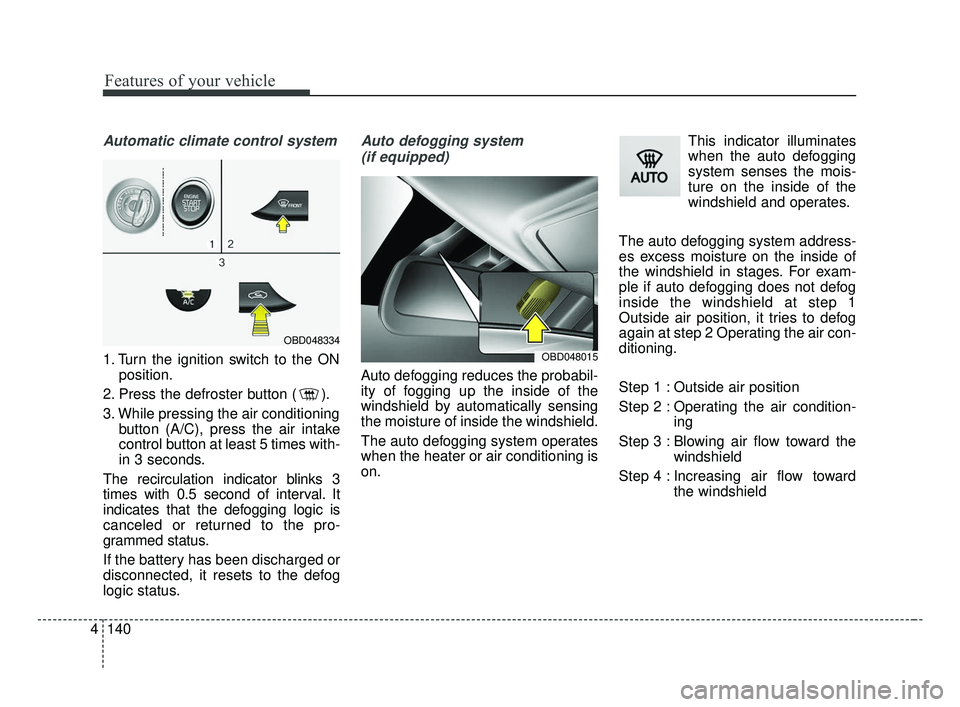
Automatic climate control system
1. Turn the ignition switch to the ON
position.
2. Press the defroster button ( ).
3. While pressing the air conditioning button (A/C), press the air intake
control button at least 5 times with-
in 3 seconds.
The recirculation indicator blinks 3
times with 0.5 second of interval. It
indicates that the defogging logic is
canceled or returned to the pro-
grammed status.
If the battery has been discharged or
disconnected, it resets to the defog
logic status.
Auto defogging system (if equipped)
Auto defogging reduces the probabil-
ity of fogging up the inside of the
windshield by automatically sensing
the moisture of inside the windshield.
The auto defogging system operates
when the heater or air conditioning is
on. This indicator illuminates
when the auto defogging
system senses the mois-
ture on the inside of the
windshield and operates.
The auto defogging system address-
es excess moisture on the inside of
the windshield in stages. For exam-
ple if auto defogging does not defog
inside the windshield at step 1
Outside air position, it tries to defog
again at step 2 Operating the air con-
ditioning.
Step 1 : Outside air position
Step 2 : Operating the air condition- ing
Step 3 : Blowing air flow toward the windshield
Step 4 : Increasing air flow toward the windshield
OBD048015
OBD048334
BDm CAN (ENG) 4.qxp 7/4/2018 10:10 AM Page 140
Page 232 of 550

4147
Features of your vehicle
* The actual sunvisor lamp in the vehi-cle may differ from the illustration.Sliding armrest (if equipped)
To move forward
Grab the front portion of the armrest
then press up the lever (1) and pull it
forward
To move rearward
Push the armrest rearward with your
palm.
WARNING
Do not grab the front portion of
the armrest (1) when moving
the armrest rearward. It may
pinch your fingers.
OBDM048347
CAUTION- Vanity mirror
lamp
If you use the vanity mirror lamp,turn off the lamp before return-ing the sunvisor to its originalposition, otherwise it couldresult in battery discharge andpossible sunvisor damage.
CAUTION- Ticket holder
Do not put too many tickets between a ticket holder and asunvisor. It could result indeformation of the ticket hold-er.
Do not put a plastic card like a credit card. It could result indeformation of the plasticcard.
BDm CAN (ENG) 4.qxp 7/4/2018 10:10 AM Page 147
Page 233 of 550

Features of your vehicle
148
4
Power outlet (if equipped)
The power outlet is designed to pro-
vide power for mobile telephones or
other devices designed to operate
with vehicle electrical systems. The
devices should draw less than 10
amps with the engine running.
Use the power outlet only when the
engine is running and remove the
accessory plug after use. Using the
accessory plug for prolonged peri-
ods of time with the engine off could
cause the battery to discharge.
Only use 12V electric accessories which are less than 10A in electric
capacity. Adjust the air-conditioner or heater
to the lowest operating level when
using the power outlet.
Close the cover when not in use.
Some electronic devices can cause electronic interference when
plugged into a vehicle’s power out-
let. These devices may cause
excessive audio static and malfunc-
tions in other electronic systems or
devices used in your vehicle.
Push the plug in as far as it will go. If good contact is not made, the
plug may overheat and the fuse
may open.
Plug in battery equipped electronic devices with reverse current protec-
tion. Otherwise, the current from
the battery may flow into the vehi-
cle’s electrical/electronic system
and cause system malfunction.
WARNING - Electric shock
Do not put a finger or a foreign
object (pen, etc.) into a power
outlet and do not touch with a
wet hand. You may receive an
electric shock.
OBD048022
BDm CAN (ENG) 4.qxp 7/4/2018 10:10 AM Page 148
Page 234 of 550

4149
Features of your vehicle
USB charger (if equipped)
The USB car charger allows drivers
to charge their digital devices like
smartphone, and PC tablets.
Connect the device to the USB port
using a manufacturer certified cable
to begin charging.
Power is supplied to the USB car
charger in either the ACC state or
with the ignition on. In order to pre-
vent battery discharge, only connect
digital devices to the USB port with
the ignition on. Use the display
screen of the connected device to
check its charging progress. Your
smartphone or tablet may heat up
while charging.This does not impact life or function
of the device. For safety reasons,
charging will stop if the battery heats
up to temperatures that will negative-
ly affect the device. Not all devices
are supported by the USB charger
and may require additional adapters.
CAUTION
- Use the USB car charger with
the ignition on. Otherwise,vehicle battery dischargedmay occur.
- Use the official USB cable of the digital device to becharged.
- Make sure that any foreign object, drinks, and water donot come into contact with theUSB car charger. Water or for-eign objects can damage theUSB charger.
- Do not connect devices with current consumption exceed-ing 2.1A.
- Do not connect devices that generate excessive electro-magnetic noise. Doing so mayinterrupt the vehicle audio/AVelectronic devices.
(Continued)
OBDM048083
BDm CAN (ENG) 4.qxp 7/4/2018 10:10 AM Page 149
Page 248 of 550

Cruise control system. . . . . . . . . . . . . . . . . . . . . . . 5-73
• To set cruise control speed: . . . . . . . . . . . . . . . . . . . . 5-74
• To increase cruise control set speed: . . . . . . . . . . . . . 5-74
• To decrease the cruising speed: . . . . . . . . . . . . . . . . . 5-75
• To temporarily accelerate with the cruise control on . 5-75
• To cancel cruise control, do one of the following . . . 5-75
• To resume cruising speed at more than approximately 30 km/h (20 mph) . . . . . . . . . . . . . . 5-76
• To turn cruise control off, do one of the following. . 5-76
Smart Cruise Control . . . . . . . . . . . . . . . . . . . . . . 5-77
• Smart Cruise Control switch . . . . . . . . . . . . . . . . . . . 5-79
• Smart Cruise Control speed . . . . . . . . . . . . . . . . . . . . 5-79
• Vehicle to vehicle distance setting . . . . . . . . . . . . . . . 5-84
• When the lane ahead is clear . . . . . . . . . . . . . . . . . . . 5-85
• When there is a vehicle ahead of you in your lane . 5-86
• To adjust the sensitivity of smart cruise control . . . 5-90
• To convert to cruise control mode . . . . . . . . . . . . . . . 5-90
• Limitations of the system . . . . . . . . . . . . . . . . . . . . . . 5-91
Drive mode integrated control system . . . . . . . . . 5-98
Blind-spot Collision Warning (BCW) . . . . . . . . 5-102
• BCW (Blind-Spot Collision Warning)/ LCA (Lane Change Assist) . . . . . . . . . . . . . . . . . . . 5-103
• RCCW (Rear Cross-Traffic Collision Warning) . . 5-106
• Driver's Attention . . . . . . . . . . . . . . . . . . . . . . . . . . . 5-110
Lane Keeping Assist (LKA) system . . . . . . . . . . 5-112
• LKA operation . . . . . . . . . . . . . . . . . . . . . . . . . . . . . . 5-113
• LKA malfunction . . . . . . . . . . . . . . . . . . . . . . . . . . . . 5-119
• LKA function change . . . . . . . . . . . . . . . . . . . . . . . . 5-120
Driver Attention Warning (DAW) . . . . . . . . . . . 5-121
• System setting and activation . . . . . . . . . . . . . . . . . . 5-121
• Resetting the system . . . . . . . . . . . . . . . . . . . . . . . . . 5-123
• System disabled . . . . . . . . . . . . . . . . . . . . . . . . . . . . . 5-123
• System malfunction . . . . . . . . . . . . . . . . . . . . . . . . . . 5-124
Economical operation . . . . . . . . . . . . . . . . . . . . . 5-126
Special driving conditions . . . . . . . . . . . . . . . . . . 5-128
• Hazardous driving conditions . . . . . . . . . . . . . . . . . 5-128
• Rocking the vehicle . . . . . . . . . . . . . . . . . . . . . . . . . . 5-128
• Smooth cornering . . . . . . . . . . . . . . . . . . . . . . . . . . . 5-129
• Driving at night . . . . . . . . . . . . . . . . . . . . . . . . . . . . . 5-129
• Driving in the rain . . . . . . . . . . . . . . . . . . . . . . . . . . . 5-130
• Driving in flooded areas . . . . . . . . . . . . . . . . . . . . . . 5-131
• Driving off-road . . . . . . . . . . . . . . . . . . . . . . . . . . . . . 5-131
• Highway driving . . . . . . . . . . . . . . . . . . . . . . . . . . . . 5-131
Winter driving . . . . . . . . . . . . . . . . . . . . . . . . . . . 5-132
• Snowy or icy conditions . . . . . . . . . . . . . . . . . . . . . . 5-132
• Use high quality ethylene glycol coolant . . . . . . . . . 5-133
• Check battery and cables . . . . . . . . . . . . . . . . . . . . . 5-133
• Change to "winter weight" oil if necessary . . . . . . 5-133
• Check spark plugs and ignition system. . . . . . . . . . 5-133
5
BDm CAN (ENG) 5.QXP 7/4/2018 10:12 AM Page 2