2019 KIA FORTE air conditioning
[x] Cancel search: air conditioningPage 87 of 550

Instrument cluster . . . . . . . . . . . . . . . . . . . . . . . . . 4-56
• Instrument cluster control . . . . . . . . . . . . . . . . . . . . . 4-57
• LCD window control . . . . . . . . . . . . . . . . . . . . . . . . . . 4-57
• Gauges . . . . . . . . . . . . . . . . . . . . . . . . . . . . . . . . . . . . \
. 4-58
• Transmission shift indicator . . . . . . . . . . . . . . . . . . . . 4-61
LCD windows . . . . . . . . . . . . . . . . . . . . . . . . . . . . . 4-63
• Over view . . . . . . . . . . . . . . . . . . . . . . . . . . . . . . . . . . . 4-\
63
• Trip information (Trip computer) . . . . . . . . . . . . . . . 4-63
• Distance to empty . . . . . . . . . . . . . . . . . . . . . . . . . . . . 4-63
• LCD modes (For type B, C cluster) . . . . . . . . . . . . . . 4-69
• Service mode . . . . . . . . . . . . . . . . . . . . . . . . . . . . . . . . 4-70
• User settings mode (For type B, C cluster) . . . . . . . . 4-71
Warning and indicator lights . . . . . . . . . . . . . . . . 4-80
• Warning lights . . . . . . . . . . . . . . . . . . . . . . . . . . . . . . . 4-80
• Indicator lights. . . . . . . . . . . . . . . . . . . . . . . . . . . . . . . 4-90
Parking distance warning-reverse . . . . . . . . . . . . 4-96
• Operation of the parking distance warning-reverse. 4-96
• Non-operational conditions of parking distance warning-reverse . . . . . . . . . . . . . . . . . . . . . . . . . . . . . 4-97
• Parking distance warning-reverse precautions . . . . 4-98
• Self-diagnosis . . . . . . . . . . . . . . . . . . . . . . . . . . . . . . . . 4-98
Rear view monitor . . . . . . . . . . . . . . . . . . . . . . . . . 4-99
Lighting . . . . . . . . . . . . . . . . . . . . . . . . . . . . . . . . . 4-100
• Battery saver function. . . . . . . . . . . . . . . . . . . . . . . . 4-100
• Daytime running light . . . . . . . . . . . . . . . . . . . . . . . . 4-100 • Lighting control . . . . . . . . . . . . . . . . . . . . . . . . . . . . . 4-100
• High beam operation. . . . . . . . . . . . . . . . . . . . . . . . . 4-102
• High beam assist . . . . . . . . . . . . . . . . . . . . . . . . . . . . 4-103
• Turn signals and lane change signals . . . . . . . . . . . 4-106
• Front fog light . . . . . . . . . . . . . . . . . . . . . . . . . . . . . . 4-107
Wipers and washers . . . . . . . . . . . . . . . . . . . . . . . 4-108
• Windshield wipers . . . . . . . . . . . . . . . . . . . . . . . . . . . 4-108
• Front windshield washers . . . . . . . . . . . . . . . . . . . . . 4-109
Interior lights . . . . . . . . . . . . . . . . . . . . . . . . . . . . 4-110
• Room lamp . . . . . . . . . . . . . . . . . . . . . . . . . . . . . . . . . 4-110
• Map lamp . . . . . . . . . . . . . . . . . . . . . . . . . . . . . . . . . . 4-110
• Trunk room lamp. . . . . . . . . . . . . . . . . . . . . . . . . . . . 4-111
• Vanity mirror lamp . . . . . . . . . . . . . . . . . . . . . . . . . . 4-112
• Glove box lamp . . . . . . . . . . . . . . . . . . . . . . . . . . . . . 4-112
Welcome system . . . . . . . . . . . . . . . . . . . . . . . . . . 4-113
• Headlight (Headlamp) escort function . . . . . . . . . . 4-113
• Interior light . . . . . . . . . . . . . . . . . . . . . . . . . . . . . . . . 4-113
• Pocket light . . . . . . . . . . . . . . . . . . . . . . . . . . . . . . . . . 4-113
Defroster . . . . . . . . . . . . . . . . . . . . . . . . . . . . . . . . 4-114
• Rear window defroster . . . . . . . . . . . . . . . . . . . . . . . 4-114
Manual climate control system . . . . . . . . . . . . . . 4-115
• Heating and air conditioning . . . . . . . . . . . . . . . . . . 4-116
• System operation . . . . . . . . . . . . . . . . . . . . . . . . . . . . 4-121
• Climate control air filter . . . . . . . . . . . . . . . . . . . . . . 4-123
4
BDm CAN (ENG) 4.qxp 7/4/2018 10:03 AM Page 2
Page 88 of 550

• Checking the amount of air conditionerrefrigerant and compressor lubricant . . . . . . . . . . 4-124
Automatic climate control system . . . . . . . . . . . 4-125
• Automatic heating and air conditioning . . . . . . . . . 4-126
• Manual heating and air conditioning . . . . . . . . . . . 4-127
• System operation . . . . . . . . . . . . . . . . . . . . . . . . . . . . 4-133
• Climate control air filter . . . . . . . . . . . . . . . . . . . . . . 4-135
• Checking the amount of air conditionerrefrigerant and compressor lubricant . . . . . . . . . . 4-135
Windshield defrosting and defogging . . . . . . . . . 4-137
• Manual climate control system . . . . . . . . . . . . . . . . 4-137
• Automatic climate control system . . . . . . . . . . . . . . 4-138
• Defogging logic. . . . . . . . . . . . . . . . . . . . . . . . . . . . . . 4-139
Storage compartments . . . . . . . . . . . . . . . . . . . . . 4-142
• Center console storage . . . . . . . . . . . . . . . . . . . . . . . 4-142
• Glove box . . . . . . . . . . . . . . . . . . . . . . . . . . . . . . . . . . 4-14\
2
• Sunglass holder . . . . . . . . . . . . . . . . . . . . . . . . . . . . . 4-143
Interior features . . . . . . . . . . . . . . . . . . . . . . . . . . 4-144
• Cup holder . . . . . . . . . . . . . . . . . . . . . . . . . . . . . . . . . 4-144
• Seat warmer . . . . . . . . . . . . . . . . . . . . . . . . . . . . . . . . 4-144
• Air ventilation seat . . . . . . . . . . . . . . . . . . . . . . . . . . 4-146
• Sunvisor . . . . . . . . . . . . . . . . . . . . . . . . . . . . . . . . . . . 4-\
146
• Sliding armrest . . . . . . . . . . . . . . . . . . . . . . . . . . . . . 4-147
• Power outlet . . . . . . . . . . . . . . . . . . . . . . . . . . . . . . . . 4-148
• USB charger . . . . . . . . . . . . . . . . . . . . . . . . . . . . . . . . 4-149 • Wireless smart phone charging system . . . . . . . . . . 4-150
• Clothes hanger . . . . . . . . . . . . . . . . . . . . . . . . . . . . . . 4-153
• Floor mat anchor (s) . . . . . . . . . . . . . . . . . . . . . . . . . 4-154
Audio system . . . . . . . . . . . . . . . . . . . . . . . . . . . . . 4-155
• Antenna. . . . . . . . . . . . . . . . . . . . . . . . . . . . . . . . .\
. . . 4-155
• AUX, USB port . . . . . . . . . . . . . . . . . . . . . . . . . . . . . 4-156
• How vehicle audio works . . . . . . . . . . . . . . . . . . . . . 4-156
Declaration of Conformity . . . . . . . . . . . . . . . . . 4-161
• IC. . . . . . . . . . . . . . . . . . . . . . . . . . . . . . . . . . . \
. . . . . . 4-161
4
BDm CAN (ENG) 4.qxp 7/4/2018 10:03 AM Page 3
Page 200 of 550
4115
Features of your vehicle
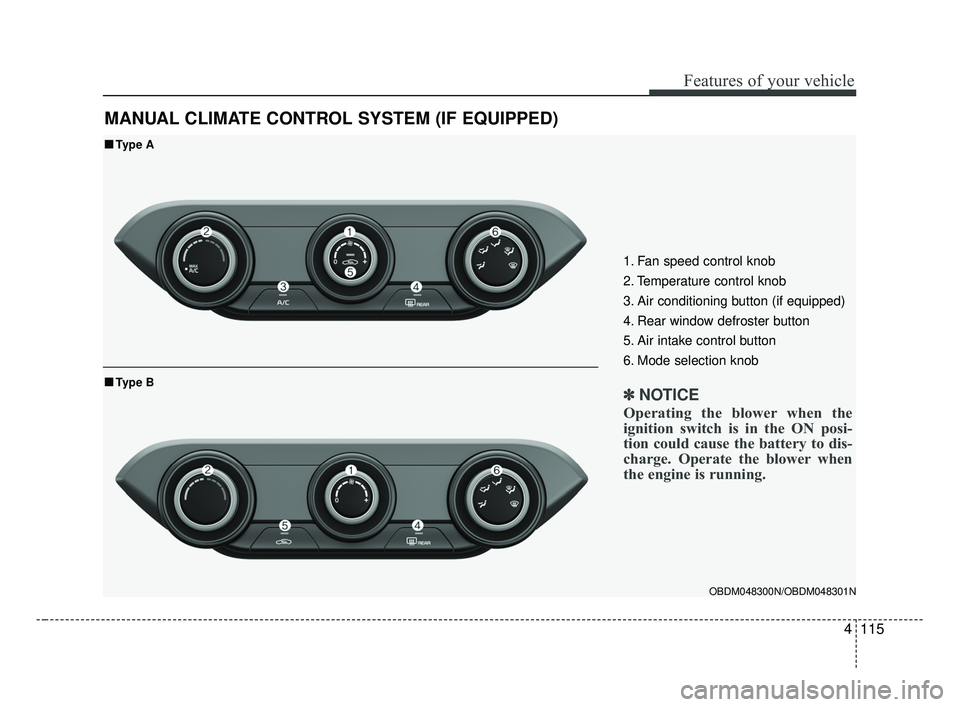
MANUAL CLIMATE CONTROL SYSTEM (IF EQUIPPED)
OBDM048300N/OBDM048301N
■ ■Type A
■ ■Type B
1. Fan speed control knob
2. Temperature control knob
3. Air conditioning button (if equipped)
4. Rear window defroster button
5. Air intake control button
6. Mode selection knob
✽ ✽ NOTICE
Operating the blower when the
ignition switch is in the ON posi-
tion could cause the battery to dis-
charge. Operate the blower when
the engine is running.
BDm CAN (ENG) 4.qxp 7/4/2018 10:08 AM Page 115
Page 201 of 550
Features of your vehicle
116
4
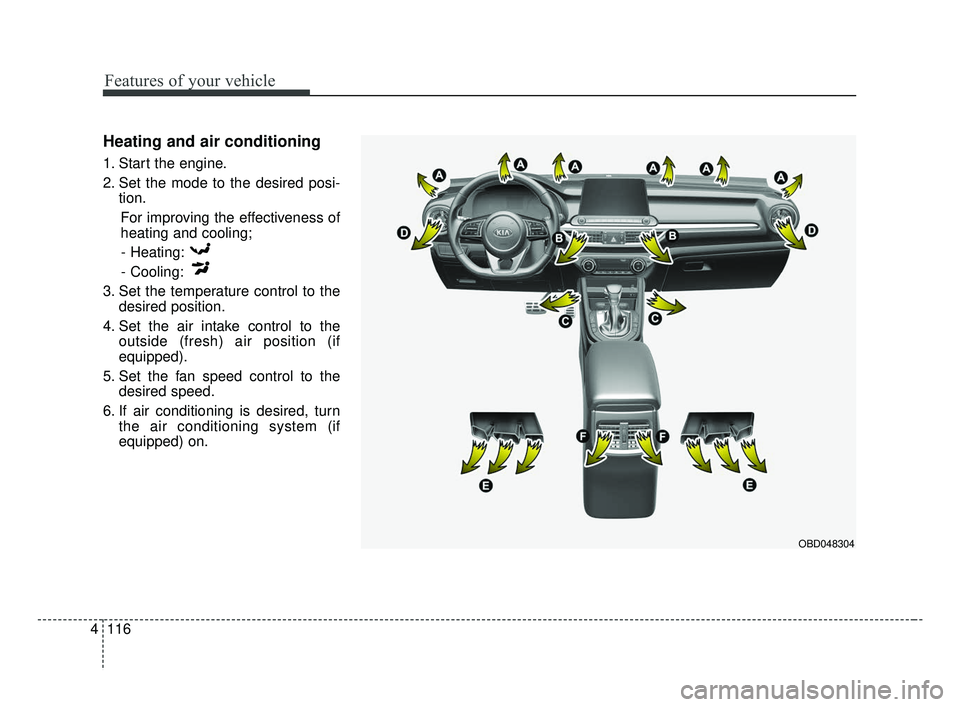
Heating and air conditioning
1. Start the engine.
2. Set the mode to the desired posi-
tion.
For improving the effectiveness of
heating and cooling;- Heating:
- Cooling:
3. Set the temperature control to the desired position.
4. Set the air intake control to the outside (fresh) air position (if
equipped).
5. Set the fan speed control to the desired speed.
6. If air conditioning is desired, turn the air conditioning system (if
equipped) on.
OBD048304
BDm CAN (ENG) 4.qxp 7/4/2018 10:08 AM Page 116
Page 203 of 550
Features of your vehicle
118
4
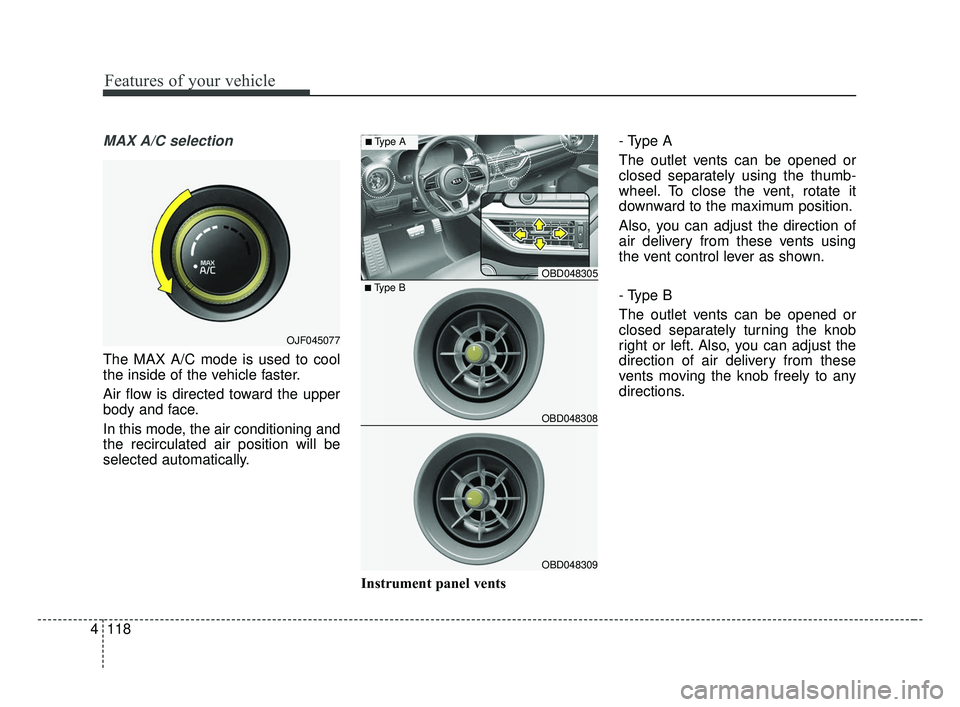
MAX A/C selection
The MAX A/C mode is used to cool
the inside of the vehicle faster.
Air flow is directed toward the upper
body and face.
In this mode, the air conditioning and
the recirculated air position will be
selected automatically.
Instrument panel vents- Type A
The outlet vents can be opened or
closed separately using the thumb-
wheel. To close the vent, rotate it
downward to the maximum position.
Also, you can adjust the direction of
air delivery from these vents using
the vent control lever as shown.
- Type B
The outlet vents can be opened or
closed separately turning the knob
right or left. Also, you can adjust the
direction of air delivery from these
vents moving the knob freely to any
directions.
OJF045077
OBD048305
OBD048308
OBD048309
■Type B
■Type A
BDm CAN (ENG) 4.qxp 7/4/2018 10:08 AM Page 118
Page 205 of 550
Features of your vehicle
120
4
Prolonged operation of the heater in
the recirculated air position (without
air conditioning selected) may cause
fogging of the windshield and side
windows and the air within the pas-
senger compartment may become
stale. In addition, prolonged use of
the air conditioning with the recircu-
lated air position selected will result
in excessively dry air in the passen-
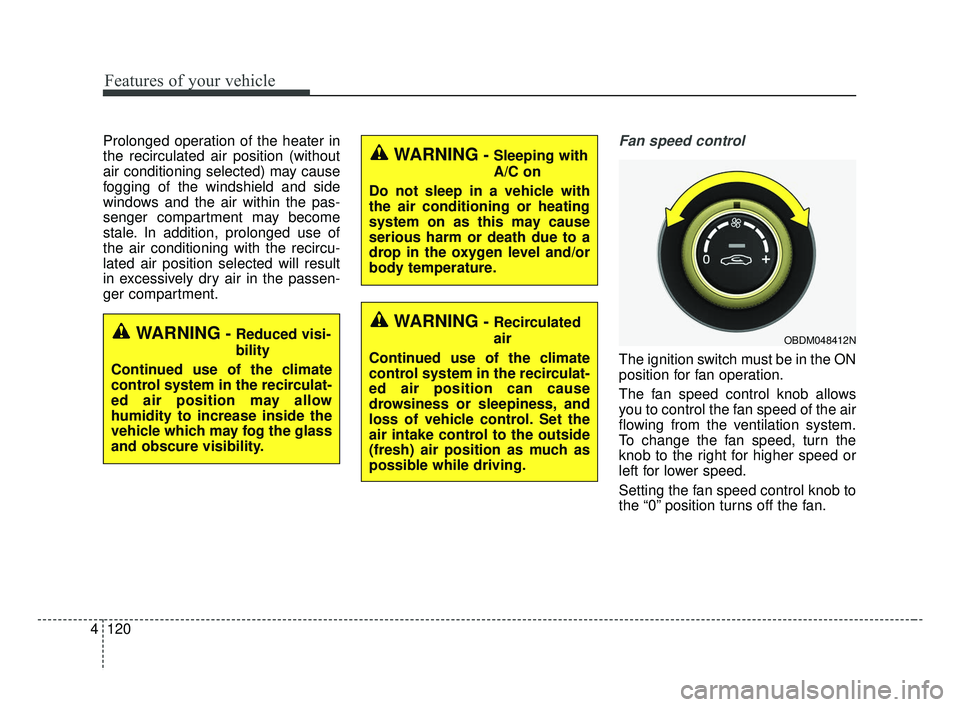
ger compartment.Fan speed control
The ignition switch must be in the ON
position for fan operation.
The fan speed control knob allows
you to control the fan speed of the air
flowing from the ventilation system.
To change the fan speed, turn the
knob to the right for higher speed or
left for lower speed.
Setting the fan speed control knob to
the “0” position turns off the fan.
WARNING- Sleeping with
A/C on
Do not sleep in a vehicle with
the air conditioning or heating
system on as this may cause
serious harm or death due to a
drop in the oxygen level and/or
body temperature.
WARNING- Recirculated
air
Continued use of the climate
control system in the recirculat-
ed air position can cause
drowsiness or sleepiness, and
loss of vehicle control. Set the
air intake control to the outside
(fresh) air position as much as
possible while driving.
OBDM048412NWARNING- Reduced visi-
bility
Continued use of the climate
control system in the recirculat-
ed air position may allow
humidity to increase inside the
vehicle which may fog the glass
and obscure visibility.
BDm CAN (ENG) 4.qxp 7/4/2018 10:09 AM Page 120
Page 206 of 550

4121
Features of your vehicle
Air conditioning
Press the A/C button to turn the air
conditioning system on (indicator
light will illuminate). Press the button
again to turn the air conditioning sys-
tem off.
System operation
Ventilation
1.Set the mode to the position.
2.Set the air intake control to the out-side (fresh) air position.
3.Set the temperature control to the desired position.
4.Set the fan speed control to the desired speed.
Heating
1.Set the mode to the position.
2.Set the air intake control to the out-side (fresh) air position.
3.Set the temperature control to the desired position.
4.Set the fan speed control to the desired speed.
5.If dehumidified heating is desired, turn the air conditioning system (if
equipped) on.
If the windshield fogs up, set the mode to the or position. Operation Tips
To keep dust or unpleasant fumes
from entering the vehicle through
the ventilation system, temporarily
set the air intake control to the
recirculated air position. Be sure to
return the control to the fresh air
position when the irritation has
passed to keep fresh air in the
vehicle. This will help keep the driv-
er alert and comfortable.
Air for the heating/cooling system is drawn in through the grilles just
ahead of the windshield. Care
should be taken that these are not
blocked by leaves, snow, ice or
other obstructions.
To prevent interior fog on the wind- shield, set the air intake control to
the fresh air position and fan speed
to the desired position, turn on the
air conditioning system, and adjust
the temperature control to desired
temperature.OBD048311
BDm CAN (ENG) 4.qxp 7/4/2018 10:09 AM Page 121
Page 207 of 550
Features of your vehicle
122
4
Air conditioning
Kia Air Conditioning Systems are
filled with R-1234yf refrigerant.
1.Start the engine. Push the air con-
ditioning button.
2.Set the mode to the position.
3.Set the air intake control to the out- side air or recirculated air position.
4.Adjust the fan speed control and temperature control to maintain
maximum comfort.
The refrigerant system should only be serviced by trained and certified
technicians to insure proper and
safe operation.
The refrigerant system should be serviced in a well-ventilated place.
The air conditioning evaporator (cooling coil) shall never be repaired
or replaced with one removed from
a used or salvaged vehicle and new
replacement MAC evaporators
should be certified (and labeled) as
meeting SAE Standard J2842. Air conditioning system operation tips
If the vehicle has been parked in
direct sunlight during hot weather,
open the windows for a short time
to let the hot air inside the vehicle
escape.
To help reduce moisture inside of the windows on rainy or humid
days, decrease the humidity inside
the vehicle by operating the air
conditioning system.
During air conditioning system operation, you may occasionally
notice a slight change in engine
speed as the air conditioning com-
pressor cycles. This is a normal
system operation characteristic.
Use the air conditioning system every month only for a few minutes
to ensure maximum system per-
formance.CAUTION - Excessive A/C
When using the air conditioningsystem, monitor the tempera-ture gauge closely while drivingup hills or in heavy traffic whenoutside temperatures are high.Air conditioning system opera-tion may cause engine over-heating. Continue to use theblower fan but turn the air con-ditioning system off if the tem-perature gauge indicates engineoverheating.
CAUTION
When opening the windows inhumid weather, air conditioningmay create water dropletsinside the vehicle. Since exces-sive water droplets may causedamage to electrical equipment,air conditioning should only beused with the windows closed.
BDm CAN (ENG) 4.qxp 7/4/2018 10:09 AM Page 122