2019 KIA FORTE reset
[x] Cancel search: resetPage 225 of 550
Features of your vehicle
140
4
Automatic climate control system
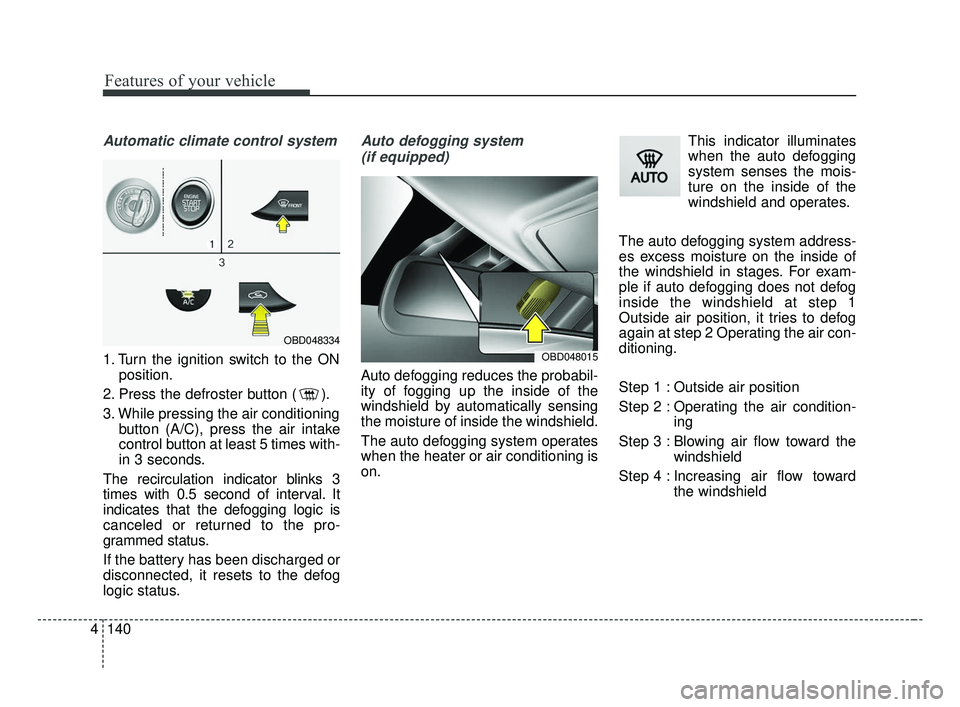
1. Turn the ignition switch to the ON
position.
2. Press the defroster button ( ).
3. While pressing the air conditioning button (A/C), press the air intake
control button at least 5 times with-
in 3 seconds.
The recirculation indicator blinks 3
times with 0.5 second of interval. It
indicates that the defogging logic is
canceled or returned to the pro-
grammed status.
If the battery has been discharged or
disconnected, it resets to the defog
logic status.
Auto defogging system (if equipped)
Auto defogging reduces the probabil-
ity of fogging up the inside of the
windshield by automatically sensing
the moisture of inside the windshield.
The auto defogging system operates
when the heater or air conditioning is
on. This indicator illuminates
when the auto defogging
system senses the mois-
ture on the inside of the
windshield and operates.
The auto defogging system address-
es excess moisture on the inside of
the windshield in stages. For exam-
ple if auto defogging does not defog
inside the windshield at step 1
Outside air position, it tries to defog
again at step 2 Operating the air con-
ditioning.
Step 1 : Outside air position
Step 2 : Operating the air condition- ing
Step 3 : Blowing air flow toward the windshield
Step 4 : Increasing air flow toward the windshield
OBD048015
OBD048334
BDm CAN (ENG) 4.qxp 7/4/2018 10:10 AM Page 140
Page 226 of 550

4141
Features of your vehicle
To cancel or reset the Auto Defogging
System
Press the front windshield defroster
button for 3 seconds when the igni-
tion switch is in the ON position.
When the Auto Defogging System is
canceled, ADS OFF symbol will blink
3 times and the ADS OFF will be dis-
played on the climate control infor-
mation screen.
When the Auto Defogging System is
reset, ADS OFF symbol will blink 6
times without a signal.
CAUTION
Do not remove the sensor coverlocated on the upper end of thepassenger side windshieldglass. Damage to the systemparts could occur and may notbe covered by your vehicle war-ranty.
BDm CAN (ENG) 4.qxp 7/4/2018 10:10 AM Page 141
Page 248 of 550

Cruise control system. . . . . . . . . . . . . . . . . . . . . . . 5-73
• To set cruise control speed: . . . . . . . . . . . . . . . . . . . . 5-74
• To increase cruise control set speed: . . . . . . . . . . . . . 5-74
• To decrease the cruising speed: . . . . . . . . . . . . . . . . . 5-75
• To temporarily accelerate with the cruise control on . 5-75
• To cancel cruise control, do one of the following . . . 5-75
• To resume cruising speed at more than approximately 30 km/h (20 mph) . . . . . . . . . . . . . . 5-76
• To turn cruise control off, do one of the following. . 5-76
Smart Cruise Control . . . . . . . . . . . . . . . . . . . . . . 5-77
• Smart Cruise Control switch . . . . . . . . . . . . . . . . . . . 5-79
• Smart Cruise Control speed . . . . . . . . . . . . . . . . . . . . 5-79
• Vehicle to vehicle distance setting . . . . . . . . . . . . . . . 5-84
• When the lane ahead is clear . . . . . . . . . . . . . . . . . . . 5-85
• When there is a vehicle ahead of you in your lane . 5-86
• To adjust the sensitivity of smart cruise control . . . 5-90
• To convert to cruise control mode . . . . . . . . . . . . . . . 5-90
• Limitations of the system . . . . . . . . . . . . . . . . . . . . . . 5-91
Drive mode integrated control system . . . . . . . . . 5-98
Blind-spot Collision Warning (BCW) . . . . . . . . 5-102
• BCW (Blind-Spot Collision Warning)/ LCA (Lane Change Assist) . . . . . . . . . . . . . . . . . . . 5-103
• RCCW (Rear Cross-Traffic Collision Warning) . . 5-106
• Driver's Attention . . . . . . . . . . . . . . . . . . . . . . . . . . . 5-110
Lane Keeping Assist (LKA) system . . . . . . . . . . 5-112
• LKA operation . . . . . . . . . . . . . . . . . . . . . . . . . . . . . . 5-113
• LKA malfunction . . . . . . . . . . . . . . . . . . . . . . . . . . . . 5-119
• LKA function change . . . . . . . . . . . . . . . . . . . . . . . . 5-120
Driver Attention Warning (DAW) . . . . . . . . . . . 5-121
• System setting and activation . . . . . . . . . . . . . . . . . . 5-121
• Resetting the system . . . . . . . . . . . . . . . . . . . . . . . . . 5-123
• System disabled . . . . . . . . . . . . . . . . . . . . . . . . . . . . . 5-123
• System malfunction . . . . . . . . . . . . . . . . . . . . . . . . . . 5-124
Economical operation . . . . . . . . . . . . . . . . . . . . . 5-126
Special driving conditions . . . . . . . . . . . . . . . . . . 5-128
• Hazardous driving conditions . . . . . . . . . . . . . . . . . 5-128
• Rocking the vehicle . . . . . . . . . . . . . . . . . . . . . . . . . . 5-128
• Smooth cornering . . . . . . . . . . . . . . . . . . . . . . . . . . . 5-129
• Driving at night . . . . . . . . . . . . . . . . . . . . . . . . . . . . . 5-129
• Driving in the rain . . . . . . . . . . . . . . . . . . . . . . . . . . . 5-130
• Driving in flooded areas . . . . . . . . . . . . . . . . . . . . . . 5-131
• Driving off-road . . . . . . . . . . . . . . . . . . . . . . . . . . . . . 5-131
• Highway driving . . . . . . . . . . . . . . . . . . . . . . . . . . . . 5-131
Winter driving . . . . . . . . . . . . . . . . . . . . . . . . . . . 5-132
• Snowy or icy conditions . . . . . . . . . . . . . . . . . . . . . . 5-132
• Use high quality ethylene glycol coolant . . . . . . . . . 5-133
• Check battery and cables . . . . . . . . . . . . . . . . . . . . . 5-133
• Change to "winter weight" oil if necessary . . . . . . 5-133
• Check spark plugs and ignition system. . . . . . . . . . 5-133
5
BDm CAN (ENG) 5.QXP 7/4/2018 10:12 AM Page 2
Page 322 of 550

Driving your vehicle
76
5
Each of these actions will cancel
cruise control operation (The SETspeed will disappear.), but it will notturn the system off. If you wish toresume cruise control operation,move the lever up (to RES+). You willreturn to your previously presetspeed.To resume cruising speed at
more than approximately 30
km/h (20 mph):
If any method other than the
CRUISE ON-OFF switch was used
to cancel cruising speed and the sys-
tem is still activated, the most recent
set speed will automatically resume
when you move the lever up.
It will not resume, however, if the
vehicle speed has dropped below
approximately 30 km/h (20 mph).
To turn cruise control off, do
one of the following:
Press the CRUISE button (The CRUISE status on the LCD screen
will disappear.).
Turn the ignition off.
Both of these actions will cancel the cruise control operation. If you wantto resume the cruise control opera-tion, repeat the steps provided in “Toset cruise control speed” on the pre-vious page.
OBD058086L
OBD058083L
BDm CAN (ENG) 5.QXP 7/4/2018 10:15 AM Page 76
Page 329 of 550
583
Driving your vehicle
Each of these actions will cancel the
smart cruise control operation. (the
set speed and vehicle to vehicle dis-
tance on the LCD display will go off.)
If the smart cruise control is can-
celled automatically, the smart cruise
control will not resume even though
the RES+ or SET-lever is moved.
✽ ✽NOTICE
If the smart cruise control is cancelled
by other than the reasons mentioned,
take your vehicle to an authorized
Kia dealer and have the system
checked.
✽ ✽NOTICE
If the system is automatically can-
celled, the warning chime will sound
and a message will appear for a few
seconds.
You must adjust the vehicle speed by
depressing the accelerator or brake
pedal according to the road and
driving conditions ahead.
Always check the road conditions.
Do not rely on the warning chime.
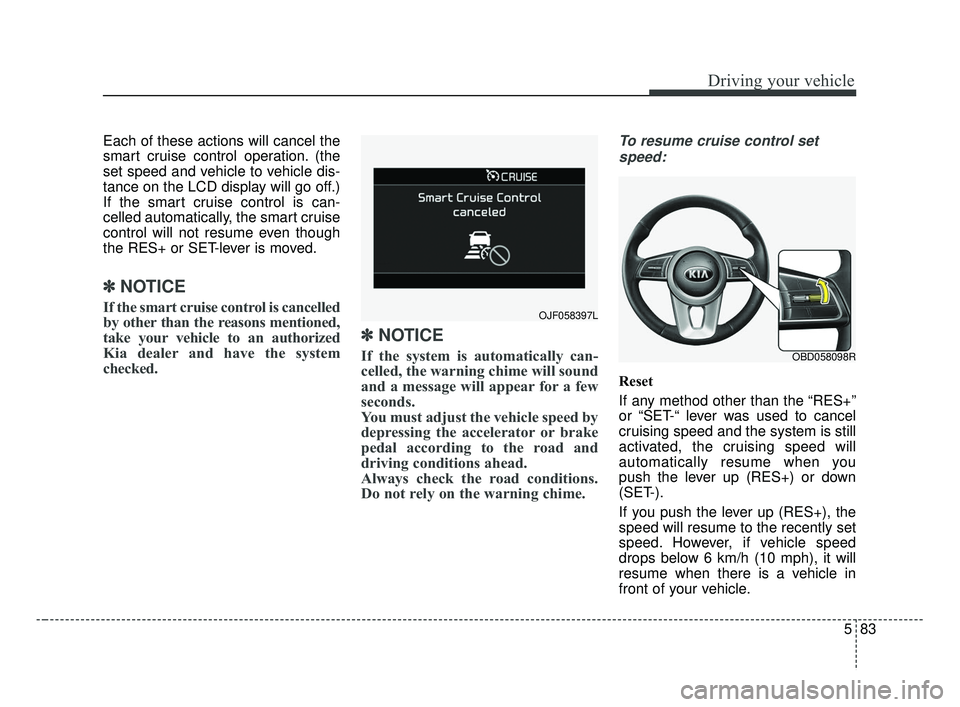
To resume cruise control set
speed:
Reset
If any method other than the “RES+”
or “SET-“ lever was used to cancel
cruising speed and the system is still
activated, the cruising speed will
automatically resume when you
push the lever up (RES+) or down
(SET-).
If you push the lever up (RES+), the
speed will resume to the recently set
speed. However, if vehicle speed
drops below 6 km/h (10 mph), it will
resume when there is a vehicle in
front of your vehicle.
OJF058397L
OBD058098R
BDm CAN (ENG) 5.QXP 7/4/2018 10:15 AM Page 83
Page 369 of 550

5123
Driving your vehicle
Resetting the system
The last break time is set to 00:00and the driver's attention level is
set to 5 (very attentive) when the
driver resets the Driver Attention
Warning system.
The driver attention warning sys- tem resets in the following situa-
tions. - The engine is turned OFF.
- The driver unfastens the seat belt
and then opens the driver’s door
in stop.
- The driver takes a break from driving that lasts more than 10
minutes.
The driver attention warning sys- tem operates again, when the driv-
er restarts driving.
System disabled
The Driver Attention Warning system
enters the ready status and displays
the 'Disabled' screen in the following
situations.
- The camera sensor is unable todetect the lanes.
- Driving speed remains under 64 km/h (40 mph) or over 177 km/h
(110 mph).
OBD058114R
BDm CAN (ENG) 5.QXP 7/4/2018 10:18 AM Page 123
Page 389 of 550

63
What to do in an emergency
If the engine stalls at a cross-
road or crossing
If the engine stalls at a crossroad or
crossing, set the shift lever in the N
(Neutral) position and then push the
vehicle to a safe place.
If you have a flat tire while
driving
If a tire goes flat while you are driv-
ing:
1. Take your foot off the acceleratorpedal and let the vehicle slow
down while driving straight ahead.
Do not apply the brakes immedi-
ately or attempt to pull off the road
as this may cause a loss of con-
trol. When the vehicle has slowed
to such a speed that it is safe to do
so, brake carefully and pull off the
road. Drive off the road as far as
possible and park on firm level
ground. If you are on a divided
highway, do not park in the median
area between the two traffic lanes. 2. When the vehicle is stopped, turn
on your emergency hazard flash-
ers, set the parking brake and put
the transmission in P (for Intelligent
Variable Transmission) or in
reverse (Manual Transmission).
3. Have all passengers get out of the vehicle. Be sure they all get out on
the side of the vehicle that is away
from traffic.
4. When changing a flat tire, follow the instruction provided later in
this section.
If the engine stalls while driv-
ing
1. Reduce your speed gradually,keeping a straight line. Move cau-
tiously off the road to a safe place.
2. Turn on your emergency flashers.
3. Try to start the engine again. If your vehicle will not start, contact
an authorized Kia dealer or seek
other qualified assistance.
✽ ✽NOTICE
If there was a check engine light and
loss of power or stall and if safe to do
so, wait at least 10 seconds to restart
the vehicle after it stalls. This may
reset the car so it will no longer run
at low power (limp home) condition.
IN CASE OF AN EMERGENCY WHILE DRIVING
BDm CAN (ENG) 6.qxp 7/4/2018 10:20 AM Page 3
Page 425 of 550

Battery . . . . . . . . . . . . . . . . . . . . . . . . . . . . . . . . . . . 7-\
37
• For best battery service . . . . . . . . . . . . . . . . . . . . . . . 7-37
• Recharging the battery . . . . . . . . . . . . . . . . . . . . . . . . 7-38
• Reset items . . . . . . . . . . . . . . . . . . . . . . . . . . . . . . . . . . 7-39\
Tires and wheels . . . . . . . . . . . . . . . . . . . . . . . . . . . 7-40
• Tire care . . . . . . . . . . . . . . . . . . . . . . . . . . . . . . . . . . . . \
7-40
• Recommended cold tire inflation pressures . . . . . . . 7-40
• Tire pressure . . . . . . . . . . . . . . . . . . . . . . . . . . . . . . . . 7-41
• Checking tire inflation pressure. . . . . . . . . . . . . . . . . 7-41
• Tire rotation . . . . . . . . . . . . . . . . . . . . . . . . . . . . . . . . . 7-42
• Wheel alignment and tire balance . . . . . . . . . . . . . . . 7-43
• Tire replacement . . . . . . . . . . . . . . . . . . . . . . . . . . . . . 7-44
• Wheel replacement . . . . . . . . . . . . . . . . . . . . . . . . . . . 7-45
• Tire traction . . . . . . . . . . . . . . . . . . . . . . . . . . . . . . . . . 7-45
• Tire maintenance . . . . . . . . . . . . . . . . . . . . . . . . . . . . . 7-45
• Tire sidewall labeling . . . . . . . . . . . . . . . . . . . . . . . . . 7-45
• All season tires . . . . . . . . . . . . . . . . . . . . . . . . . . . . . . . 7-52
• Summer tires . . . . . . . . . . . . . . . . . . . . . . . . . . . . . . . . 7-52
• Snow tires . . . . . . . . . . . . . . . . . . . . . . . . . . . . . . . . . . . 7-\
52
• Radial-ply tires . . . . . . . . . . . . . . . . . . . . . . . . . . . . . . 7-53
• Low aspect ratio tire . . . . . . . . . . . . . . . . . . . . . . . . . . 7-54
Fuses . . . . . . . . . . . . . . . . . . . . . . . . . . . . . . . . . . . . \
7-55
• Inner panel fuse replacement . . . . . . . . . . . . . . . . . . . 7-57
• Engine compartment fuse replacement. . . . . . . . . . . 7-58
• Fuse/relay panel description. . . . . . . . . . . . . . . . . . . . 7-61
Light bulbs . . . . . . . . . . . . . . . . . . . . . . . . . . . . . . . 7-71
• Bulb replacement precaution . . . . . . . . . . . . . . . . . . 7-71
• Light bulb position (Front). . . . . . . . . . . . . . . . . . . . . 7-73
• Light bulb position (Rear) . . . . . . . . . . . . . . . . . . . . . 7-74
• Light bulb position (Side) . . . . . . . . . . . . . . . . . . . . . . 7-75
• Headlamp (Low beam) bulb replacement(Headlamp Type A,B) . . . . . . . . . . . . . . . . . . . . . . . . 7-75
• Headlamp (High beam) bulb replacement (Headlamp Type A,B) . . . . . . . . . . . . . . . . . . . . . . . . 7-77
• Side marker bulb replacement (Headlamp Type A,B) . . . . . . . . . . . . . . . . . . . . . . . . 7-78
• Position lamp / Day time running lamp (LED type) replacement (Headlamp Type B) . . . . . . . . . . . . . . . 7-79
• Headlamp (LED type) replacement (Headlamp Type C) . . . . . . . . . . . . . . . . . . . . . . . . . . 7-79
• Front turn signal lamp bulb replacement . . . . . . . . . 7-79
• Front fog lamp bulb replacement . . . . . . . . . . . . . . . 7-80
• Side repeater lamp (LED type) bulb replacement . . 7-80
• Side repeater lamp (Bulb type) bulb replacement . . 7-80
• Stop and tail lamp/side marker (Bulb type) bulb replacement (Rear combination lamp Type A) . . . 7-81
• Tail lamp (inside) (Bulb type) bulb replacement (Rear combination lamp Type A) . . . . . . . . . . . . . . 7-82
• Stop and tail lamp (LED type) bulb replacement (Rear combination lamp Type B) . . . . . . . . . . . . . . 7-83
7
BDm CAN (ENG) 7.qxp 7/4/2018 10:23 AM Page 2