Page 228 of 550
4143
Features of your vehicle
✽ ✽
NOTICE
If the temperature control knob is in
the warm or hot position, warm or
hot air will flow into the glove box.
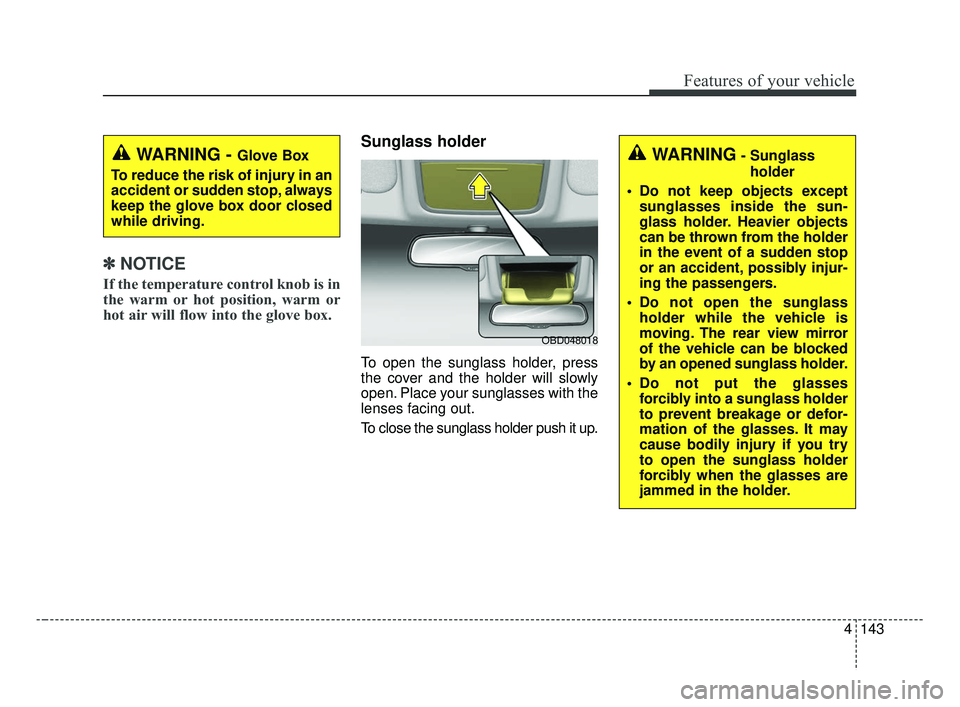
Sunglass holder
To open the sunglass holder, press
the cover and the holder will slowly
open. Place your sunglasses with the
lenses facing out.
To close the sunglass holder push it up.
WARNING - Glove Box
To reduce the risk of injury in an
accident or sudden stop, always
keep the glove box door closed
while driving.WARNING- Sunglass holder
Do not keep objects except sunglasses inside the sun-
glass holder. Heavier objects
can be thrown from the holder
in the event of a sudden stop
or an accident, possibly injur-
ing the passengers.
Do not open the sunglass holder while the vehicle is
moving. The rear view mirror
of the vehicle can be blocked
by an opened sunglass holder.
Do not put the glasses forcibly into a sunglass holder
to prevent breakage or defor-
mation of the glasses. It may
cause bodily injury if you try
to open the sunglass holder
forcibly when the glasses are
jammed in the holder.
OBD048018
BDm CAN (ENG) 4.qxp 7/4/2018 10:10 AM Page 143
Page 231 of 550
Features of your vehicle
146
4
Air ventilation seat (if equipped)
The temperature setting of the seat
changes according to the switch
position.
If you want to ventilate your seat
cushion, press the switch (blue
color).
Each time you press the button, the airflow will change as follows: The seat warmer (with air ventila-
tion) defaults to the OFF position
whenever the ignition switch is
turned on.
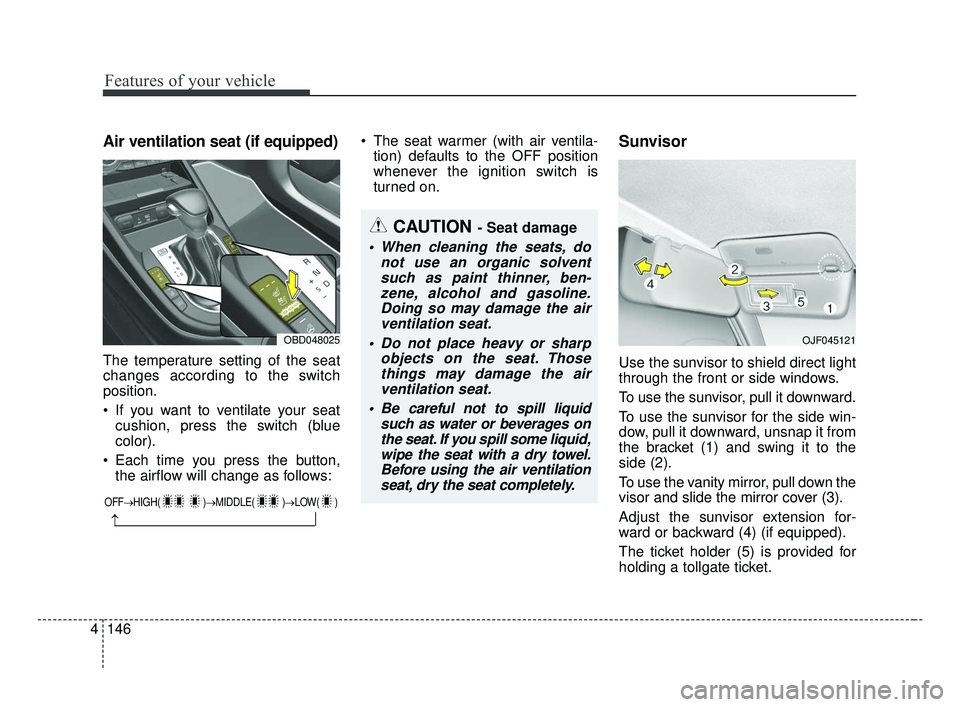
Sunvisor
Use the sunvisor to shield direct light
through the front or side windows.
To use the sunvisor, pull it downward.
To use the sunvisor for the side win-
dow, pull it downward, unsnap it from
the bracket (1) and swing it to the
side (2).
To use the vanity mirror, pull down the
visor and slide the mirror cover (3).
Adjust the sunvisor extension for-
ward or backward (4) (if equipped).
The ticket holder (5) is provided for
holding a tollgate ticket.
CAUTION - Seat damage
When cleaning the seats, do not use an organic solventsuch as paint thinner, ben-zene, alcohol and gasoline.Doing so may damage the airventilation seat.
Do not place heavy or sharp objects on the seat. Thosethings may damage the airventilation seat.
Be careful not to spill liquid such as water or beverages onthe seat. If you spill some liquid,wipe the seat with a dry towel.Before using the air ventilationseat, dry the seat completely.
OJF045121OBD048025
OFF→ HIGH( )→ MIDDLE( )→LOW( )
→
BDm CAN (ENG) 4.qxp 7/4/2018 10:10 AM Page 146
Page 232 of 550
4147
Features of your vehicle
* The actual sunvisor lamp in the vehi-cle may differ from the illustration.Sliding armrest (if equipped)
To move forward
Grab the front portion of the armrest
then press up the lever (1) and pull it
forward
To move rearward
Push the armrest rearward with your
palm.
WARNING
Do not grab the front portion of
the armrest (1) when moving
the armrest rearward. It may
pinch your fingers.
OBDM048347
CAUTION- Vanity mirror
lamp
If you use the vanity mirror lamp,turn off the lamp before return-ing the sunvisor to its originalposition, otherwise it couldresult in battery discharge andpossible sunvisor damage.
CAUTION- Ticket holder
Do not put too many tickets between a ticket holder and asunvisor. It could result indeformation of the ticket hold-er.
Do not put a plastic card like a credit card. It could result indeformation of the plasticcard.
BDm CAN (ENG) 4.qxp 7/4/2018 10:10 AM Page 147
Page 251 of 550

55
Driving your vehicle
Before entering vehicle
• Be sure that all windows, outsidemirror(s), and outside lights are
clean.
Check the condition of the tires.
Check under the vehicle for any sign of leaks.
Be sure there are no obstacles behind you if you intend to back up.
Necessary inspections
Fluid levels, such as engine oil,
engine coolant, brake fluid, and
washer fluid should be checked on a
regular basis, at the exact interval
depending on the fluid. Further
details are provided in chapter 8,
“Maintenance”.
Before starting
Close and lock all doors.
Position the seat so that all con-trols are easily reached.
Buckle your seat belt.
Adjust the inside and outside rearview mirrors.
Be sure that all lights work.
Check all gauges.
Check the operation of warning lights when the ignition switch is
turned to the ON position.
Release the parking brake and make sure the brake warning light
goes out.
For safe operation, be sure you are
familiar with your vehicle and its
equipment.
BEFORE DRIVING
WARNING - Distracted driving
Focus on the road while driving.
The driver's primary responsi-
bility is in the safe and legal
operation of the vehicle. Use of
any handled devices, other
equipment or vehicle systems
that distract the driver should
not be used during vehicle
operation.
BDm CAN (ENG) 5.QXP 7/4/2018 10:12 AM Page 5
Page 297 of 550
551
Driving your vehicle
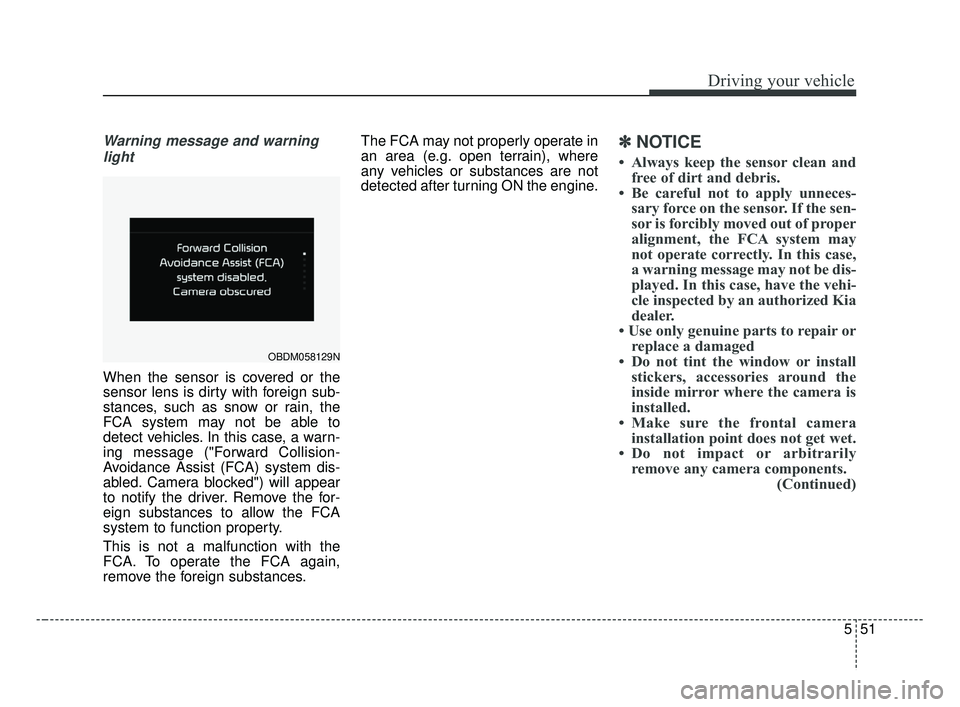
Warning message and warninglight
When the sensor is covered or the
sensor lens is dirty with foreign sub-
stances, such as snow or rain, the
FCA system may not be able to
detect vehicles. In this case, a warn-
ing message ("Forward Collision-
Avoidance Assist (FCA) system dis-
abled. Camera blocked") will appear
to notify the driver. Remove the for-
eign substances to allow the FCA
system to function property.
This is not a malfunction with the
FCA. To operate the FCA again,
remove the foreign substances. The FCA may not properly operate in
an area (e.g. open terrain), where
any vehicles or substances are not
detected after turning ON the engine.
✽ ✽
NOTICE
• Always keep the sensor clean and
free of dirt and debris.
• Be careful not to apply unneces- sary force on the sensor. If the sen-
sor is forcibly moved out of proper
alignment, the FCA system may
not operate correctly. In this case,
a warning message may not be dis-
played. In this case, have the vehi-
cle inspected by an authorized Kia
dealer.
• Use only genuine parts to repair or replace a damaged
• Do not tint the window or install stickers, accessories around the
inside mirror where the camera is
installed.
• Make sure the frontal camera installation point does not get wet.
• Do not impact or arbitrarily remove any camera components. (Continued)
OBDM058129N
BDm CAN (ENG) 5.QXP 7/4/2018 10:14 AM Page 51
Page 298 of 550

Driving your vehicle
52
5
(Continued)
• Do not place reflective
objects(white paper or mirror etc.)
on the dashboard.
The system may unnecessarily
activate or deactivate due to
reflection of the sunlight.
• Excessive audio system volume may prevent occupants from hear-
ing the FCA system warning
alarm.System malfunction
When the FCA is not working prop-
erly, the FCA warning light ( ) will
illuminate and the warning mes-
sage will appear for a few seconds.
After the message disappears, the
master warning light ( ) will illu-
minate. In this case, have the vehi-
cle inspected by an authorized Kia
dealer. The FCA system will get deactivat-
ed for the sake of driver's safety
when the ESC warning light comes
on. The FCA warning message will
appear at the same time, too. But
that doesn't necessarily mean the
malfunction of the FCA system.
Both FCA warning light and warn-
ing message will disappear once
the ESC warning light issue is
resolved.
OBDM058095N
BDm CAN (ENG) 5.QXP 7/4/2018 10:14 AM Page 52
Page 311 of 550

565
Driving your vehicle
✽ ✽NOTICE
• Do not install any accessories,
such as license plate molding or
sticker, on the sensor area. Nor
arbitrarily replace the bumper.
Those may adversely affect the
sensing performance.
• Always keep the sensor/bumper area clean.
• Use only soft clothes to wash the vehicle. Also, do not spray highly-
pressurized water on the sensor
installed on the bumper.
• Be careful not to apply unneces- sary force on the frontal sensor
area. When the sensor moves out
of the correct position due to
external force, the system may not
normally operate and may not
provide a warning light or mes-
sage. In this case, have the vehicle
inspected by an authorized Kia
dealer.
• Use only the genuine Kia sensor cover. Do not arbitrarily apply
paint on the sensor cover. (Continued)(Continued)
• Do not tint the window or install
stickers, or accessories around the
inside mirror where the camera is
installed.
• Make sure the frontal camera installation point does not get wet.
• Do not impact or arbitrarily remove any radar/camera compo-
nents.
• Do not place reflective objects(white paper or mirror etc.)
on the dashboard.
The system may unnecessarily
activate or deactivate due to
reflection of the sunlight.
• Excessive audio system volume may prevent occupants from hear-
ing the FCA system warning
alarm.
System malfunction
When the FCA is not working prop-
erly, the FCA warning light ( ) will
illuminate and the warning mes-
sage will appear for a few seconds.
After the message disappears, the
master warning light ( ) will illu-
minate. In this case, have the vehi-
cle inspected by an authorized Kia
dealer.
OBDM058095N
BDm CAN (ENG) 5.QXP 7/4/2018 10:14 AM Page 65
Page 348 of 550

Driving your vehicle
102
5
The Blind-Spot Collision Warning
(BCW) system uses radar sensors in
the rear bumper to monitor and warn
the driver of an approaching vehicle
in the driver's blind spot area.
The system monitors the rear area of
the vehicle and provides information
to the driver with an audible alert and
a indicator on the outside rearview
mirrors. (1) Blind spot area
The BCW range varies relative tovehicle speed. Note that if your
vehicle is traveling much faster
than the vehicles around you, the
warning will not occur. (2) Closing at high speed
The BCW-Closing at high speedfeature will alert you when a vehi-
cle is approaching in an adjacent
lane at a high rate of speed. If the
driver activates the turn signal
when the system detects an
oncoming vehicle, the system
sounds an audible alert. Distance
from approaching vehicle can be
seen differently according to the
relative speed.
(3) RCCW (Rear Cross-Traffic Collision Warning)
The RCCW feature monitors approaching cross traffic from the
left and right side of the vehicle
when your vehicle is in reverse.
The feature will operate when the
vehicle is moving in reverse
below about 10 km/h (6 mph). If
oncoming cross traffic is detected
a warning chime will sound.
Distance from approaching vehi-
cle can be seen differently
according to the relative speed.
BLIND-SPOT COLLISION WARNING (BCW) (IF EQUIPPED)
WARNING
Always be aware of road con- ditions while driving and be
alert for unexpected situa-
tions even though the BCW
system is operating.
The BCW is not a substitute for proper and safe driving.
Always drive safely and use
caution when changing lanes
or backing up the vehicle. The
BCW may not detect every
object alongside the vehicle.
OBD058079L
BDm CAN (ENG) 5.QXP 7/4/2018 10:17 AM Page 102
