Page 181 of 518

499
Features of your vehicle
Electronic Parking Brake(EPB) Warning Light(if equipped)
This warning light illuminates:
Once you set the Engine Start/Stop Button to the ON posi-
tion.
- It illuminates for approximately 3seconds and then goes off.
When there is a malfunction with the EPB.
In this case, have your vehicle
inspected by an authorized Kia
dealer.
✽ ✽ NOTICE- Electronic Parking
Brake (EPB) Warning Light
The Electronic Parking Brake
(EPB) Warning Light may illumi-
nate when the Electronic Stability
control (ESC) Indicator Light comes
on to indicate that the ESC is not
working properly (This does not
indicate malfunction of the EPB).
Master Warning light (if equipped)
This warning light informs the driver of the following situations
- Blind Spot Detection fail
- Advanced Smart Cruise Control fail
- Blind Spot Detection automatic can-celation
- Advanced Smart Cruise Control radar fail
- Lamp wire disconnection and so on
The Master Warning Light illumi-
nates when more than one of the
above warning situations occur. At
this time, the LCD Modes Icon will
change from ( ) to ( ).
If the warning situation is solved, the
master warning light will be turned off
and the LCD Modes Icon will be
changed back to its previous icon ( ).
Autonomous Emergency Braking (AEB) Warninglight (if equipped)
This indicator light illuminates:
When there is a malfunction with the AEB.
In this case, have the vehicle inspect-
ed by an authorized Kia dealer.
EPB
Page 182 of 518

Features of your vehicle
100
4
LED Headlamp Warning
Light (if equipped)
This warning light illuminates:
Once you set the Engine Start/Stop Button to the ON position.
- It illuminates for approximately 3seconds and then goes off.
When there is a malfunction with the LED headlamp.
In this case, have your vehicle
inspected by an authorized Kia
dealer.
This warning light blinks:
When there is a malfunction with a LED headlamp related part.
In this case, have your vehicle
inspected by an authorized Kia
dealer.
✽ ✽ NOTICE
Continuous driving with the LED
Headlamp Warning Light on or
blinking can reduce LED headlamp
(low beam) life.
Icy Road Warning Light
(if equipped)
This warning light is to warn the driv-
er the road may be icy.
When the following conditions occur,
the warning light (including Outside
Temperature Gauge) blinks 5 times
and then illuminates, and a warning
chime sounds once.
- The temperature on the Outside Temperature Gauge is below
approximately 40°F (4°C).
Indicator Lights
Electronic Stability
Control (ESC) IndicatorLight
This indicator light illuminates:
Once you set the Engine Start/Stop Button to the ON posi-
tion.
- It illuminates for approximately 3seconds and then goes off.
When there is a malfunction with the ESC system.
In this case, have your vehicle
inspected by an authorized Kia
dealer.
This indicator light blinks:
While the ESC is operating.
❈ For more details, refer to
“Electronic Stability Control (ESC)”
in chapter 5.
Page 183 of 518

4101
Features of your vehicle
Electronic StabilityControl (ESC) OFFIndicator Light
This indicator light illuminates:
Once you set the Engine Start/Stop Button to the ON posi-
tion.
- It illuminates for approximately 3seconds and then goes off.
When you deactivate the ESC sys- tem by pressing the ESC OFF but-
ton.
❈ For more details, refer to
“Electronic Stability Control (ESC)”
in chapter 5.
Immobilizer Indicator
Light (With Smart Key)
This indicator light illuminates for up
to 30 seconds:
When the vehicle detects the smart key in the vehicle properly
while the Engine Start/Stop Button
is ACC or ON.
- At this time, you can start theengine.
- The indicator light goes off after starting the engine.
This indicator light blinks for a few
seconds:
When the smart key is not in the vehicle.
- At this time, you can not start theengine. This indicator light illuminates for 2
seconds and goes off:
When the vehicle can not detect
the smart key which is in the vehi-
cle while the Engine Start/Stop
Button is ON.
In this case, have your vehicle
inspected by an authorized Kia
dealer.
This indicator light blinks:
When the battery of the smart key is weak.
- At this time, you can not start theengine. However, you can start the
engine if you press the Engine
Start/Stop Button with the smart
key. (For more details, refer to
“Starting the Engine” in chapter 5).
When there is a malfunction with the immobilizer system.
In this case, have your vehicle
inspected by an authorized Kia
dealer.
Page 188 of 518
Features of your vehicle
106
4
Head Up Display ON/OFF
The HUD display may be activated or
deactivated in user setting mode
while engine is ON.
Head Up Display Information
1. Turn By Turn navigation informa-
tion
2. Road signs
3. Speedometer
4. Cruise setting speed
5. Smart Cruise Control with Stop & Go (SCC) information
6. BLIND-SPOT COLLISION WARN- ING (BCW)
7. Warning light (Low fuel, BCW)
8. AV mode information
Head Up Display Setting
On the LCD display, you can change
the head up display settings as fol-
lows.
1. Display height
2. Rotation
3. Brightness
4. Content select
5. Speedometer size
6. Speedometer color
❈ For more details, refer to “LCD
window” in this chapter.
OYG046113LOYG046158N
Page 190 of 518

Features of your vehicle
108
4
This system will activate when
backing up with the ignition switch
ON.
If the vehicle is moving at a speed
over 3 mph (5 km/h), the system
may not be activated.
The sensing distance while the back-up warning system is in oper-
ation is approximately 47 in. (120
cm) at the rear bumper center
area, 23.5 in. (60 cm) at the rear
bumper side areas.
When more than two objects are sensed at the same time, the clos-
est one will be recognized first.Types of warning sound
When an object is 47 in. to 24 in.(120 cm to 61 cm) from the rear
bumper: Buzzer beeps intermit-
tently.
When an object is 24 in. to 12 in. (60 cm to 31 cm) from the rear
bumper: Buzzer beeps more fre-
quently.
When an object is within 16 in. (40 cm) of the rear bumper:
Buzzer sounds continuously.
Non-operational conditions of
parking distance warning-
reverse
The parking distance warning-
reverse may not operate properly
when:
1. Moisture is frozen to the sensor. (It will operate normally once the
moisture clears.)
2. The sensor is covered with foreign matter, such as snow or water, or
the sensor cover is blocked. (It will
operate normally when the materi-
al is removed or the sensor is no
longer blocked.)
3. Driving on uneven road surfaces (unpaved roads, gravel, bumps,
gradient).
4. Objects generating excessive noise (vehicle horns, loud motor-
cycle engines, or truck air brakes)
are within range of the sensor.
5. Heavy rain or water spray exists.
6. Wireless transmitters or mobile phones are within range of the
sensor.
7. The sensor is covered with snow.
8. Trailer towing
Page 194 of 518
Features of your vehicle
112
4
The Surround View Monitoring
System (SVM) is not a substitute for
proper and safe parking procedures.
The Surround View Monitoring
System (SVM) may not detect every
object surrounding the vehicle.
Always drive safely and use caution
when parking.
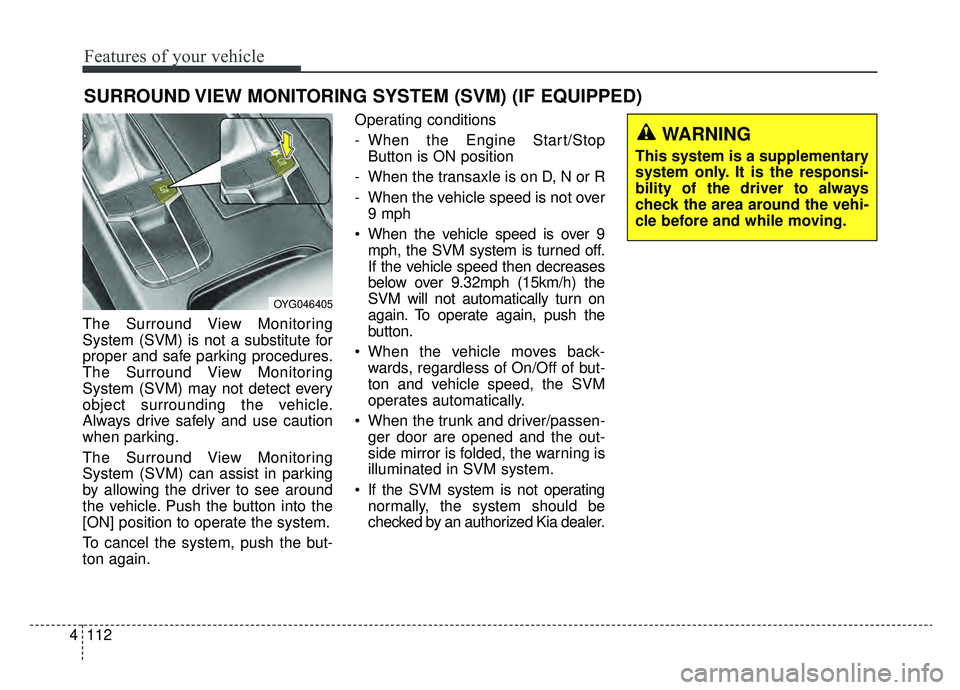
The Surround View Monitoring
System (SVM) can assist in parking
by allowing the driver to see around
the vehicle. Push the button into the
[ON] position to operate the system.
To cancel the system, push the but-
ton again. Operating conditions
- When the Engine Start/Stop
Button is ON position
- When the transaxle is on D, N or R
- When the vehicle speed is not over 9 mph
When the vehicle speed is over 9 mph, the SVM system is turned off.
If the vehicle speed then decreases
below over 9.32mph (15km/h) the
SVM will not automatically turn on
again. To operate again, push the
button.
When the vehicle moves back- wards, regardless of On/Off of but-
ton and vehicle speed, the SVM
operates automatically.
When the trunk and driver/passen- ger door are opened and the out-
side mirror is folded, the warning is
illuminated in SVM system.
If the SVM system is not operating normally, the system should be
checked by an authorized Kia dealer.
SURROUND VIEW MONITORING SYSTEM (SVM) (IF EQUIPPED)
OYG046405
WARNING
This system is a supplementary
system only. It is the responsi-
bility of the driver to always
check the area around the vehi-
cle before and while moving.
Page 197 of 518
4115
Features of your vehicle
High beam operation
To turn on the high beam headlamp,
push the lever away from you. The lever
will return to its original position. The
high beam indicator will light when the
headlight high beams are switched on.
To turn off the high beam headlamps,
pull the lever towards you. It will return
to the normal (low beam) position
when released.
To prevent the battery from being
discharged, do not leave the lights
on for a prolonged time while the
engine is not running.To flash the headlights, pull the lever
towards you. It will return to the nor-
mal (low beam) position when
released. The headlight switch does
not need to be on to use this flashing
feature.
WARNING - High beams
Do not use high beam when
there are other vehicles in front
of your vehicle. Using high
beam could obstruct the other
driver’s vision.
OUM044058
OUM044059
Page 204 of 518

Features of your vehicle
122
4
Front windshield washers
In the OFF position, pull the lever
gently toward you to spray washer
fluid on the windshield and to run the
wipers 1-3 cycles.
Use this function when the wind-
shield is dirty.
The spray and wiper operation will
continue until you release the lever.
If the washer does not work, check
the washer fluid level. If the fluid level
is not sufficient, you will need to add
appropriate non-abrasive windshield
washer fluid to the washer reservoir. The reservoir filler neck is located in
the front of the engine compartment
on the passenger side.
OJF045063L
CAUTION - Washer pump
To prevent possible damage to
the washer pump, do not oper-ate the washer when the fluidreservoir is empty.
WARNING - Obscured
visibility
Do not use the washer in freez-
ing temperatures without first
warming the windshield with
the defrosters; the washer solu-
tion could freeze on the wind-
shield and obscure your vision.
CAUTION -Wipers & windshields
To prevent possible damage to the wipers or windshield,do not operate the wiperswhen the windshield is dry.
To prevent damage to the wiper blades, do not use gasoline,kerosene, paint thinner, orother solvents on or near them.
To prevent damage to the wiper arms and other compo-nents, do not attempt to movethe wipers manually.

