Page 157 of 518
475
Features of your vehicle
✽ ✽NOTICE - Fuel gauge
Running out of fuel can expose vehi-
cle occupants to danger. You must
obtain additional fuel as soon as pos-
sible after the warning light comes
on or when the gauge indicator
comes close to the “E (Empty)”
level.
✽ ✽NOTICE
The fuel display may not be accu-
rate if the vehicle is on an incline.
Odometer
The odometer Indicates the total dis-
tance that the vehicle has been driv-
en and should be used to determine
when periodic maintenance should
be performed.
- Odometer range : 0 ~ 999999 miles
or 0 ~ 1599999 kilometers.
Outside Temperature Gauge
This gauge indicates the current out-
side air temperatures by 1°F (1°C).
- Temperature range : -40°F ~ 211°F(-40°C ~ 85°C)
CAUTION- Low fuel
Avoid driving with an extremelylow fuel level. Running out offuel could cause the engine tomisfire damaging the catalyticconverter.OYG046116N
OYG046117N
■Type A
■Type BOYG046118N
OYG046119N
■Type A
■Type B
Page 161 of 518

479
Features of your vehicle
Average Fuel Economy (2)
The average fuel economy is calcu-lated by the total driving distance
and fuel consumption since the last
average fuel economy reset.
- Fuel economy range: 0.0 ~ 99.9MPG or L/100km
The average fuel economy can be reset both manually and automati-
cally.
Manual reset
To clear the average fuel economy
manually, press the OK button
(reset) on the steering wheel for
more than 1 second when the aver-
age fuel economy is displayed. Automatic reset
To make the average fuel economy
be reset automatically whenever
refueling, select the “Fuel economy
auto reset” mode in User Setting
menu of the LCD window (Refer to
“LCD window”).
Under “Fuel economy auto reset”
mode, the average fuel economy will
be cleared to zero (---) when the vehi-
cle speed exceeds 1 mph (1 km/h)
after refueling more than 2 gallons (6
liters).
✽ ✽
NOTICE
The average fuel economy is not dis-
played for more accurate calculation
if the vehicle does not drive more
than 10 seconds or 0.03 miles (50
meters) since Engine Start/Stop but-
ton is turned to ON.
Instant Fuel Economy (3)
This mode displays the instant fuel
economy during the last few sec-
onds when the vehicle speed is
more than 4.9 mph (8 km/h).
- Fuel economy range: 0 ~ 50(MPG), 0 ~ 30 (km/L, L/100 km).
CAUTION - Low Fuel
Level
Level warning light on or withthe fuel level below “0 or E” cancause the engine to misfire anddamage the catalytic converter(if equipped).
Page 162 of 518

Features of your vehicle
80
4
Accumulated driving information
mode
Displays accumulated information
starting from mileage/fuel
efficiency/time default point.
Accumulated information is calcu- lated after the vehicle has run for
more than 0.19 mi (300 meters).
If you press “OK” button for more than 1 second after the Cumulative
Information is displayed, the infor-
mation will be reset.
If the engine is running, even when the vehicle is not in motion, the
information will be accumulated.
One time driving information mode
The vehicle will display Driving
Information once per one ignition cycle.
- Fuel efficiency is calculated after thevehicle has run for more than 0.19 mi
(300 meters).
- The Driving Information will be reset 4 hours after ignition has been turned
off. So, when the vehicle ignition is
turned on within 4 hours, the informa-
tion will not be reset.
- If you press “OK” button for more
than 1 second after the Driving
Information is displayed, the informa-
tion will be reset. - If the engine is running, even when
the vehicle is not in motion, the infor-
mation will be accumulated.OYG046154N
OYG046155N
Page 165 of 518
483
Features of your vehicle
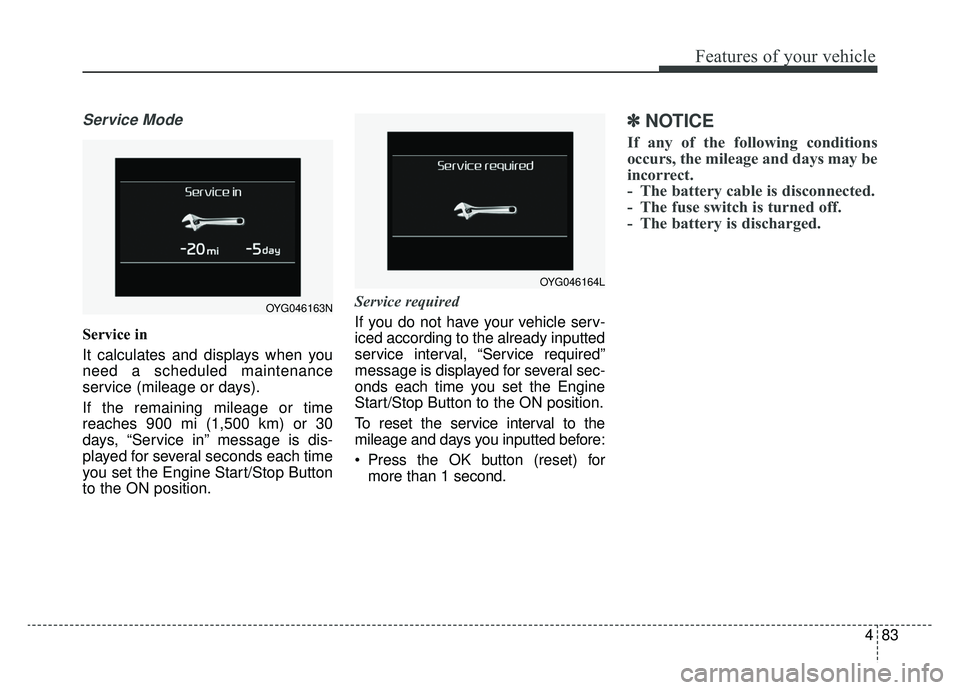
Service Mode
Service in
It calculates and displays when you
need a scheduled maintenance
service (mileage or days).
If the remaining mileage or time
reaches 900 mi (1,500 km) or 30
days, “Service in” message is dis-
played for several seconds each time
you set the Engine Start/Stop Button
to the ON position.Service required
If you do not have your vehicle serv-
iced according to the already inputted
service interval, “Service required”
message is displayed for several sec-
onds each time you set the Engine
Start/Stop Button to the ON position.
To reset the service interval to the
mileage and days you inputted before:
Press the OK button (reset) for
more than 1 second.
✽ ✽ NOTICE
If any of the following conditions
occurs, the mileage and days may be
incorrect.
- The battery cable is disconnected.
- The fuse switch is turned off.
- The battery is discharged.
OYG046164L
OYG046163N
Page 167 of 518

485
Features of your vehicle
Driver Assistance (if equipped)
Smart Cruise Control with Stop
& Go Reaction (if equipped) :
Choose the sensitivity
(Slow/Normal/Fast) of the smart
cruise control.
❈ For more details, refer to “Smart
Cruise Control with Stop & Go” in
chapter 5.
Forward Collision-Avoidance Assist (FCA, if equipped) :To
activate or deactivate the FCA sys-
tem.
❈ For more details, refer to “Forward
Collision-Avoidance Assist(FCA)”
in chapter 5
Forward Collision Warning (FCW, if equipped) : Choose the
sensitivity of the for-ward collision
warning. (Late/Normal/Early)
❈ For more details, refer to “Forward
Collision-Avoidance Assist(FCA)”
in chapter 5.
LCA (Lane change assist) (if
equipped) : To adjust the initial
warning alert time for the Lane
Change Assist.
❈ For more information, refer to “Blind
Spot Detection System” in chapter 5.
Rear Cross Traffic Alert (if
equipped) : If this item is checked,
the rear cross traffic alert function
will be activated.
❈ For more details, refer to “Blind Spot
Detection System” in chapter 5.
Blind Spot Collision Warning
Sound (if equipped) : If this item
is checked, the blind spot collision
warning sound function will be acti-
vated.
❈ For more details, refer to “Blind spot
Collision Warning” in chapter 5. Door
Automatically Lock
- Enable on Speed : All doors will be automatically locked when the
vehicle speed exceeds 9.3 mph
(15 km/h).
- Enable on Shift : All doors will be automatically locked if the
transaxle shift lever is shifted from
the P (Park) position to the R
(Reverse), N (Neutral), or D (Drive)
position.
Automatically Unlock
- Off : The auto door unlock opera- tion will be canceled.
- Vehicle Off/On key out : All doors will be automatically unlocked
when the Engine Start/Stop button
is set to the OFF position.
- On Shift to P : All doors will be automatically unlocked if the
transaxle shift lever is shifted to the
P (Park) position.
Page 169 of 518

487
Features of your vehicle
Convenience
Seat Easy Access (if equipped)
- None : The seat easy access func- tion will be deactivated.
- Normal/Enhanced : When you turn off the engine, the driver’s seat will
automatically move rear 3 inches
(7.6cm) (Enhanced) for you to
enter or exit the vehicle more com-
fortably.
If you change the Engine
Start/Stop Button from OFF posi-
tion to the AC function, the driver’s
seat will return to the original posi-
tion.
❈ For more details, refer to “Driver
Position Memory System” in chap-
ter 3.
Steering Easy Access
(if equipped)
- On (checked) : The steering wheel will automatically move forward or
rearward for the driver to enter or
exit the vehicle comfortably.
- Off (unchecked) : The steering easy access function will be deac-
tivated.
❈ For more details, refer to “Driver
Position Memory System” in chap-
ter 3.
Wireless smart phone charging
system (if equipped) : If this item
checked, the Wireless smart
phone charging system will be acti-
vated.
Wiper/Light Display (if equipped) :
If this item checked, the Wiper/Light
Display will be activated.
Gear position pop up (if
equipped) : To activate or deacti-
vate the gear position pop-up.
When activated, the gear position
will be displayed on the LCD dis-
play. Service interval
Service Interval
To activate or deactivate the service
interval function.
Adjust Interval
To adjust the interval by mileage and
period.
Reset
To reset the service interval function
Other Features
Page 170 of 518

Features of your vehicle
88
4
Fuel Economy Auto Reset
- Off : The average fuel economy
will not reset automatically when-
ever refueling.
- After Ignition : The average fuel economy will reset automatically
whenever it has passed 4 hours
after turning OFF the engine.
- After Refueling : The average fuel economy will reset automatically
when refueling.
❈ For more details, refer to “Trip
Computer” in this chapter.
Fuel Economy Unit : Choose the
fuel economy unit. (US gallon, UK
gallon)
Temperature Unit : Choose the tem-
perature unit. (°C,°F)
Tire Pressure Unit (if equipped) :
Choose the tire pressure unit. (psi,
kPa, Bar)
Language : Choose the language.Warning messages
Warning messages appear on the
LCD to warn the driver. It is located in
the center of the instrument cluster.
The warning message may appear
differently depending on the type of
instrument cluster and some may not
show the warning message at all.
The warning message is shown in
either symbol, symbol and text, or
text only.
Door or Trunk open
It means that any door or trunk is
open.
OYG046144
Page 171 of 518

489
Features of your vehicle
Sunroof Open (if equipped)
This warning is displayed if youturn off the engine when the sun-
roof is open.
Engine has overheated
This warning message illuminates
when the engine coolant tempera-
ture is above 248°F (120°C).
This means that the engine is over-
heated and may be damaged.
If your vehicle is overheated, refer to
“Overheating” in chapter 6. Turn on FUSE SWITCH (if equipped)
This warning message illuminates
if the fuse switch under the steer-
ing wheel is OFF.
It means that you should turn the fuse switch on.
❈ For more details, refer to “Fuses” in
chapter 7.
Shift to P (for smart key system)
This warning message illuminates if you try to turn off the engine without
the shift lever in P (Park) position.
If the driver’s door is opened with
the Engine Start/Stop Button in the
ACC or ON position and shift lever
is not in P(Park) position, the mes-
sage above will appear.
At this time, the Engine Start/Stop Button turns to the ACC position (If
you press the Engine Start/Stop
Button once more, it will turn to the
ON position).
OYG046166L
■ Type BOYG046165L
■Type A
OYG046145