Page 280 of 626
NOTE:If shift conditions/interlocks are not met, a “To
Tow Vehicle Safely, Read Neutral Shift Procedure in Own-
er ’s Manual” message will flash from the instrument
cluster display. Refer to “Instrument Cluster Display” in
“Getting To Know Your Instrument Panel” for further
information.
Shifting Out Of NEUTRAL (N)
Use the following procedure to prepare your vehicle for
normal usage.
1. Bring the vehicle to a complete stop.
2. Firmly apply the parking brake.
3. Start the engine.
4. Press and hold the brake pedal.
5. Shift the transmission into NEUTRAL.
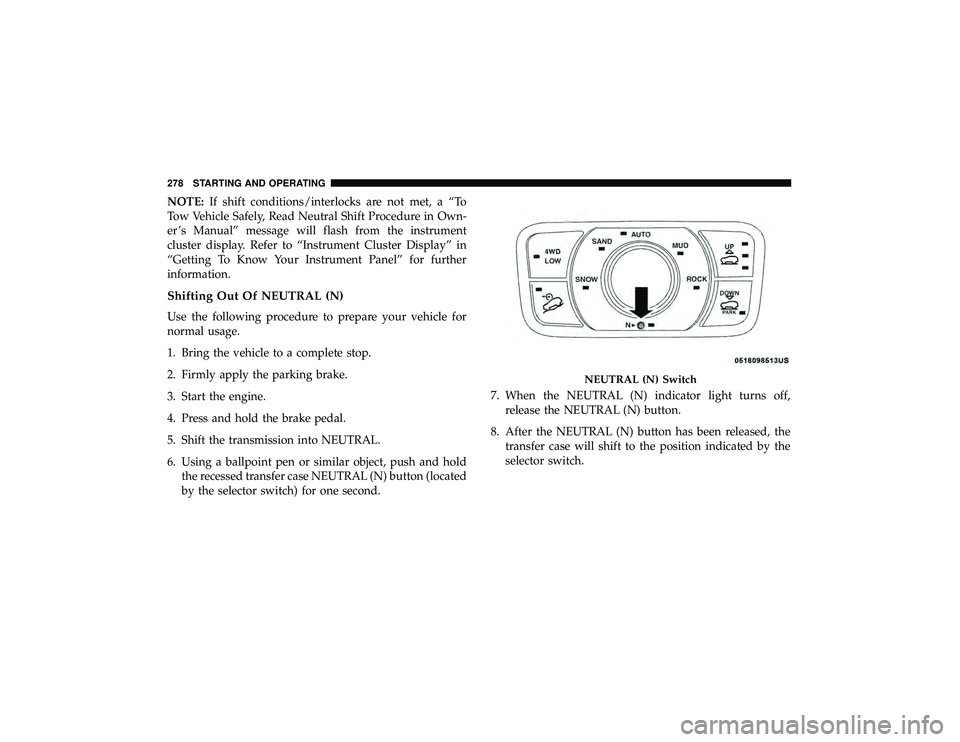
6. Using a ballpoint pen or similar object, push and hold the recessed transfer case NEUTRAL (N) button (located
by the selector switch) for one second. 7. When the NEUTRAL (N) indicator light turns off,
release the NEUTRAL (N) button.
8. After the NEUTRAL (N) button has been released, the transfer case will shift to the position indicated by the
selector switch.
Page 289 of 626
Alternate electric power steering efforts can be selected
through the Uconnect System. Refer to ”Customer Pro-
grammable Features” within “Uconnect Settings” in “Mul-
timedia” for further information.If the Electric Power Steering warning icon is
displayed and the “SERVICE POWER STEER-
ING” or the “POWER STEERING ASSIST OFF –
SERVICE SYSTEM” message is displayed within
the instrument cluster display, this indicates the vehicle
needs to be taken to the dealer for service. Refer to
“Warning Lights And Messages” in “Getting To Know
Your Instrument Panel” for further information.
NOTE:
• Even if the power steering assistance is no longer
operational, it is still possible to steer the vehicle. Under
these conditions there will be a substantial increase in
steering effort, especially at low speeds and during
parking maneuvers.
• If the condition persists, see your authorized dealer for
service.
If the Steering icon is displayed and the “POWER STEER-
ING SYSTEM OVER TEMP” message is displayed on the instrument cluster screen, they indicate that extreme steer-
ing maneuvers may have occurred which caused an over
temperature condition in the power steering system. Once
driving conditions are safe, pull over and let the vehicle
idle for a few moments until the icon and message turn off.
STOP/START SYSTEM — IF EQUIPPED
The Stop/Start function is developed to reduce fuel con-
sumption. The system will stop the engine automatically
during a vehicle stop if the required conditions are met.
Releasing the brake pedal or pressing the accelerator pedal
will automatically re-start the engine.
This vehicle has been upgraded with a heavy duty starter,
enhanced battery, and other upgraded engine parts, to
handle the additional engine starts.
Automatic Mode
The Stop/Start feature is enabled after every
normal customer engine start. At that time, the
system will go into STOP/START READY and if
all other conditions are met, can go into a STOP/
START AUTOSTOP ACTIVE “Autostop” mode.
6
STARTING AND OPERATING 287
Page 290 of 626
To Activate The Autostop Mode, The Following Must
Occur:
•The system must be in STOP/START READY state. A
STOP/START READY message will be displayed in the
instrument cluster display within the Stop/Start section.
Refer to “Instrument Cluster” in “Getting To Know Your
Instrument Panel” for further information.
• The vehicle must be completely stopped.
• The shifter must be in a forward gear and the brake
pedal depressed.
The engine will shut down, the tachometer will move to
the zero position and the Stop/Start telltale will illuminate
indicating you are in Autostop. Customer settings will be
maintained upon return to an engine running condition.
Refer to the “Stop/Start System” in the “Starting And
Operating” section for further information.
Possible Reasons The Engine Does Not Autostop
Prior to engine shut down, the system will check many
safety and comfort conditions to see if they are fulfilled.
Detailed information about the operation of the Stop/Start
system may be viewed in the instrument cluster display
Stop/Start Screen. In the following situations, the engine
will not stop: •
Driver ’s seat belt is not buckled.
• Driver ’s door is not closed.
• Battery temperature is too warm or cold.
• Battery charge is low.
• The vehicle is on a steep grade.
• Cabin heating or cooling is in process and an acceptable
cabin temperature has not been achieved.
• HVAC is set to full defrost mode at a high blower speed.
• HVAC set to MAX A/C.
• Engine has not reached normal operating temperature.
• The transmission is not in a forward gear.
• Hood is open.
• Vehicle is in 4LO transfer case mode.
• Brake pedal is not pressed with sufficient pressure.
Other Factors Which Can Inhibit Autostop Include:
• Accelerator pedal input.
• Engine temp too high.
• 5 mph (8 km/h) threshold not achieved from previous
AUTOSTOP.
288 STARTING AND OPERATING
Page 291 of 626
•Steering angle beyond threshold.
• ACC is on and speed is set.
It may be possible for the vehicle to be driven several times
without the STOP/START system going into a STOP/
START READY state under more extreme conditions of the
items listed above.
To Start The Engine While In Autostop Mode
While in a forward gear, the engine will start when the
brake pedal is released or the throttle pedal is depressed.
The transmission will automatically re-engage upon en-
gine restart.
Conditions That Will Cause The Engine To Start Auto-
matically While In Autostop Mode:
• The transmission selector is moved out of DRIVE.
• To maintain cabin temperature comfort.
• HVAC is set to full defrost mode.
• HVAC system temperature or fan speed is manually
adjusted.
• Battery voltage drops too low.
• Low brake vacuum (e.g. after several brake pedal appli-
cations). •
STOP/START OFF switch is pushed.
• A STOP/START system error occurs.
• 4WD system is put into 4LO mode.
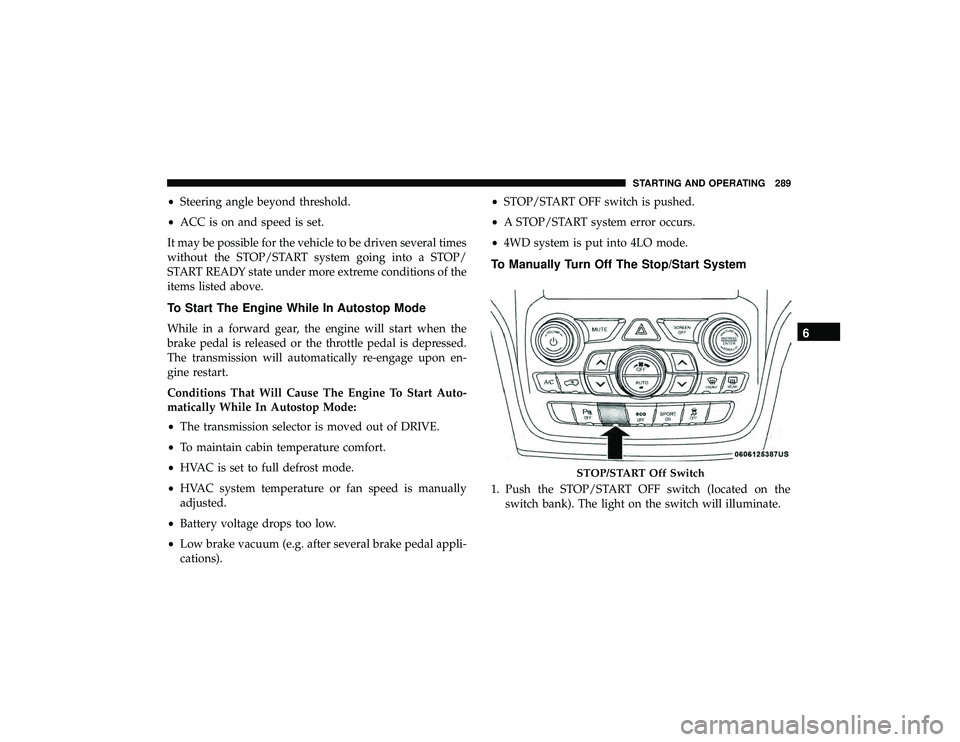
To Manually Turn Off The Stop/Start System
1. Push the STOP/START OFF switch (located on the
switch bank). The light on the switch will illuminate.
Page 292 of 626
2. The “STOP/START OFF” message will appear in instru-ment cluster display within the Stop/Start section. Refer
to “Instrument Cluster” in “Getting To Know Your
Instrument Panel” for further information.
3. At the next vehicle stop (after turning off the STOP/ START system), the engine will not be stopped.
4. The STOP/START system will reset itself back to an ON condition every time the ignition is turned off and back
on.
To Manually Turn On The Stop/Start System
Push the STOP/START OFF switch (located on the switch
bank). The light on the switch will turn off.
System Malfunction
If there is a malfunction in the STOP/START system, the
system will not shut down the engine. A “SERVICE STOP/
START SYSTEM” message will appear in the instrument
cluster display. Refer to “Instrument Cluster Display“ in
“Getting to Know Your Instrument Panel” for further
information.
If the “SERVICE STOP/START SYSTEM” message appears
in the instrument cluster display, have the system checked
by an authorized dealer.
SPEED CONTROL — IF EQUIPPED
When engaged, the Speed Control takes over accelerator
operations at speeds greater than 20 mph (32 km/h).
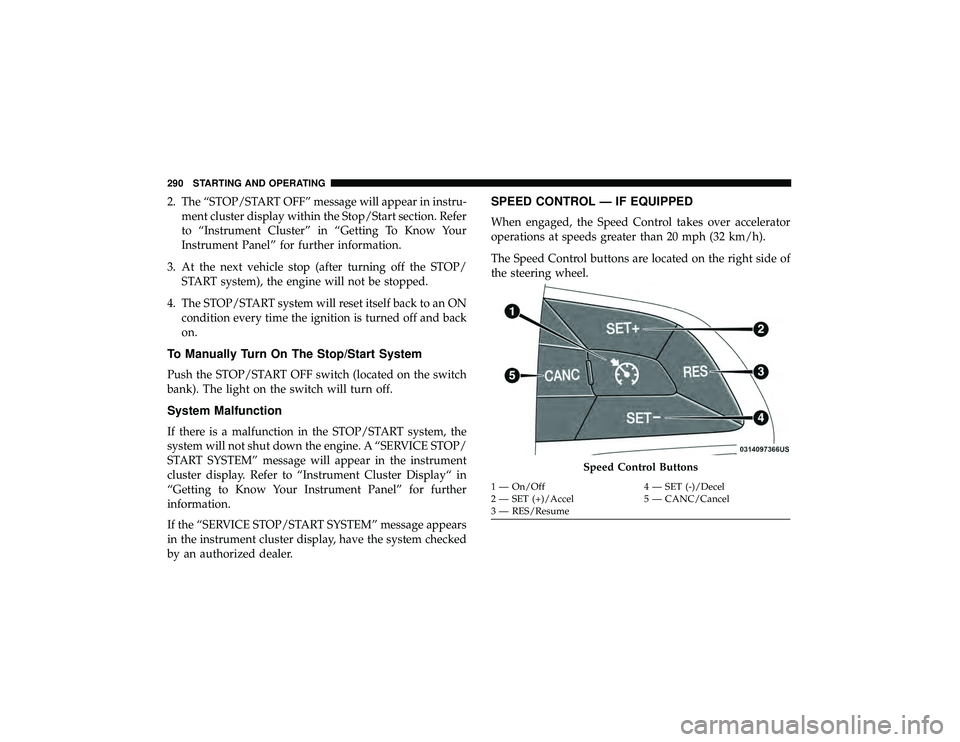
The Speed Control buttons are located on the right side of
the steering wheel.
Page 297 of 626
WARNING!(Continued)
•Will bring the vehicle to a complete stop while
following a target vehicle and hold the vehicle for
2 seconds in the stop position. If the target vehicle
does not start moving within two seconds the ACC
system will display a message that the system will
release the brakes and that the brakes must be
applied manually. An audible chime will sound
when the brakes are released.
You should switch off the ACC system:
• When driving in fog, heavy rain, heavy snow, sleet,
heavy traffic, and complex driving situations (i.e., in
highway construction zones).
• When entering a turn lane or highway off ramp;
when driving on roads that are winding, icy, snow-
covered, slippery, or have steep uphill or downhill
slopes.
• When towing a trailer up or down steep slopes.
• When circumstances do not allow safe driving at a
constant speed.
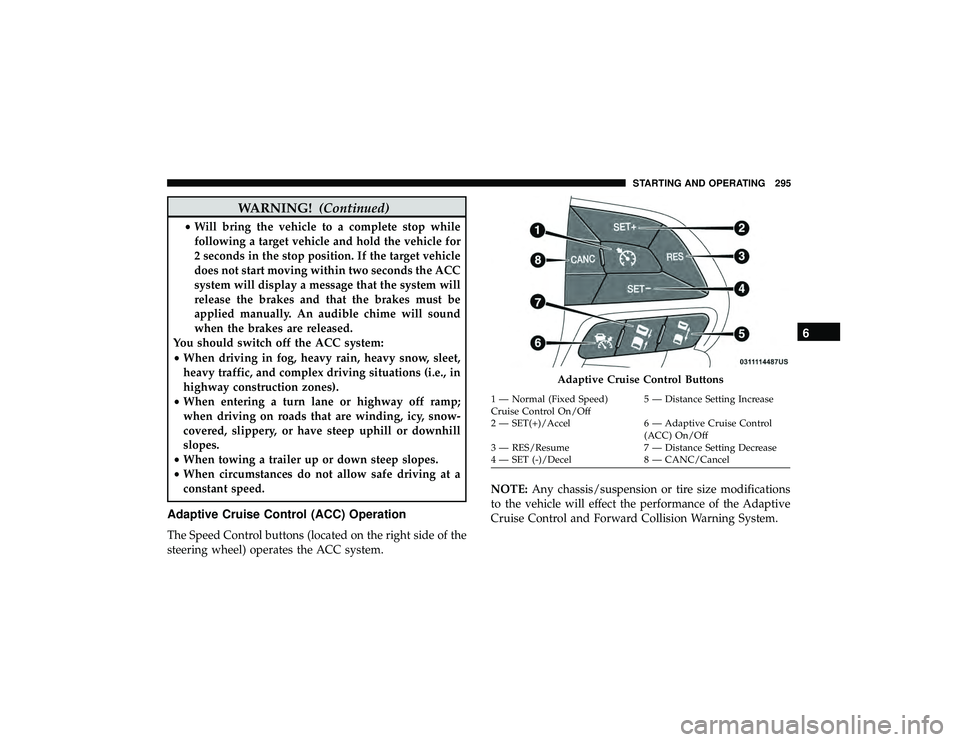
Adaptive Cruise Control (ACC) Operation
The Speed Control buttons (located on the right side of the
steering wheel) operates the ACC system. NOTE:
Any chassis/suspension or tire size modifications
to the vehicle will effect the performance of the Adaptive
Cruise Control and Forward Collision Warning System.
Page 302 of 626
Metric Speed (km/h)
•Pushing the SET (-)button once will result in a 1 km/h
decrease in set speed. Each subsequent tap of the button
results in a decrease of 1 km/h.
• If the button is continually pushed, the set speed will
continue to decrease in 10 km/h decrements until the
button is released. The decrease in set speed is reflected
in the instrument cluster display.
NOTE:
• When you override and push the SET (+)button or SET
(-) buttons, the new set speed will be the current speed
of the vehicle.
• When you use the SET (-)button to decelerate, if the
engine’s braking power does not slow the vehicle suffi-
ciently to reach the set speed, the brake system will
automatically slow the vehicle. •
The ACC system applies the brake down to a full stop
when following a target vehicle. If an ACC host vehicle
follows a target vehicle to a standstill, the host vehicle
will release the vehicle brakes two seconds after coming
to a full stop.
• The ACC system maintains set speed when driving up
hill and down hill. However, a slight speed change on
moderate hills is normal. In addition, downshifting may
occur while climbing uphill or descending downhill.
This is normal operation and necessary to maintain set
speed. When driving up hill and down hill, the ACC
system will cancel if the braking temperature exceeds
normal range (overheated).
300 STARTING AND OPERATING
Page 306 of 626
ACC Operation At Stop
If the ACC system brings your vehicle to a standstill while
following a target vehicle, if the target vehicle starts
moving within two seconds of your vehicle coming to a
standstill, your vehicle will resume motion without the
need for any driver action.
If the target vehicle does not start moving within two
seconds of your vehicle coming to a standstill, the ACC
with Stop system will cancel and the brakes will release. A
cancel message will display on the instrument cluster
display and produce a warning chime. Driver intervention
will be required at this moment.
While ACC with Stop is holding your vehicle at a stand-
still, if the driver seatbelt is unbuckled or the driver door is
opened, the ACC with Stop system will cancel and the
brakes will release. A cancel message will display on the
instrument cluster display and produce a warning chime.
Driver intervention will be required at this moment.