2019 Hyundai Tucson Manual ignition
[x] Cancel search: Manual ignitionPage 16 of 546
I IN
NS
ST
TR
RU
UM
ME
EN
NT
T
P
PA
AN
NE
EL
L
O
OV
VE
ER
RV
VI
IE
EW
W
The actual shape may differ from the illustration.
1-5
Your vehicle at a glance
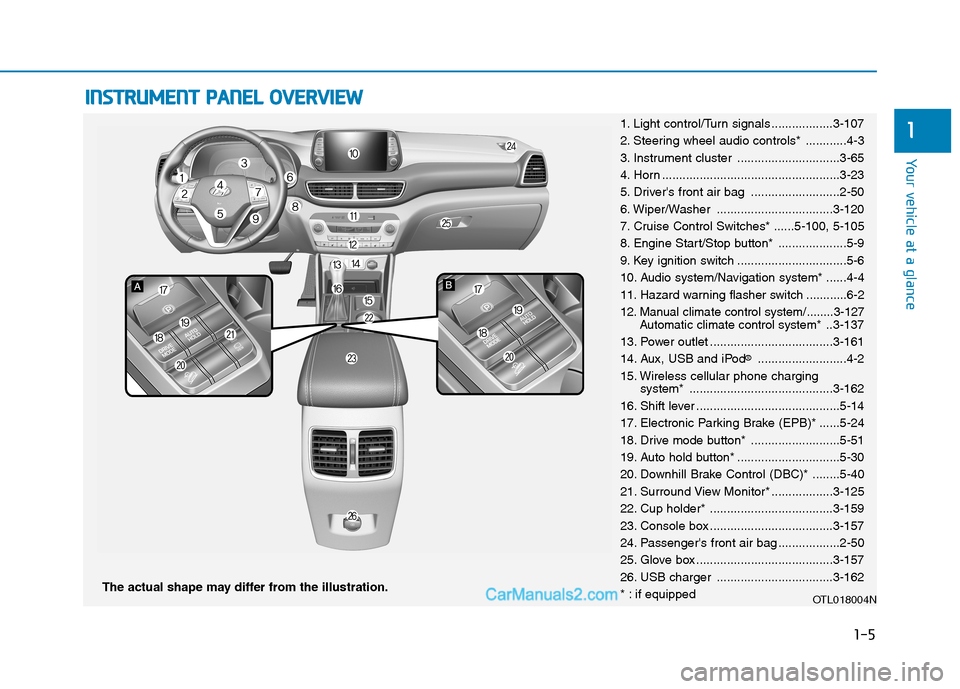
11. Light control/Turn signals ..................3-107
2. Steering wheel audio controls* ............4-3
3. Instrument cluster ..............................3-65
4. Horn ....................................................3-23
5. Driver's front air bag ..........................2-50
6. Wiper/Washer ..................................3-120
7. Cruise Control Switches* ......5-100, 5-105
8. Engine Start/Stop button* ....................5-9
9. Key ignition switch ................................5-6
10. Audio system/Navigation system* ......4-4
11. Hazard warning flasher switch ............6-2
12. Manual climate control system/........3-127
Automatic climate control system*..3-137
13. Power outlet ....................................3-161
14. Aux, USB and iPod
®..........................4-2
15. Wireless cellular phone charging
system* ..........................................3-162
16. Shift lever ..........................................5-14
17. Electronic Parking Brake (EPB)* ......5-24
18. Drive mode button* ..........................5-51
19. Auto hold button* ..............................5-30
20. Downhill Brake Control (DBC)* ........5-40
21. Surround View Monitor* ..................3-125
22. Cup holder* ....................................3-159
23. Console box ....................................3-157
24. Passenger's front air bag ..................2-50
25. Glove box ........................................3-157
26. USB charger ..................................3-162
* : if equipped
OTL018004N
Page 39 of 546
2-21
Safety system of your vehicle
2
During mild weather or under condi-
tions where the operation of the seat
heater is not needed, keep the switch-
es in the OFF position.
Manual temperature control
Each time you press the front seat
heater button, the temperature set-
ting of the seat is changed as fol-
lows :
Automatic temperature control
The front seat heater will automat-
ically adjust the temperature level
after an extended period of time in
order to reduce long term exposure
with the seat heater.
If you re-select the HIGH tempera-
ture mode by pressing the front
seat heater button, the automatic
timer will reset and start again. When pressing the switch for more
than 1.5 seconds with the seat
heateroperating, the seat heater
will turn OFF.
The seat heater defaults to the OFF
position each time the ignition
switch is turned to the ON position.
Information
With the seat heater switch in the ON
position, the heating system in the seat
turns off or on automatically depend-
ing on the seat temperature.
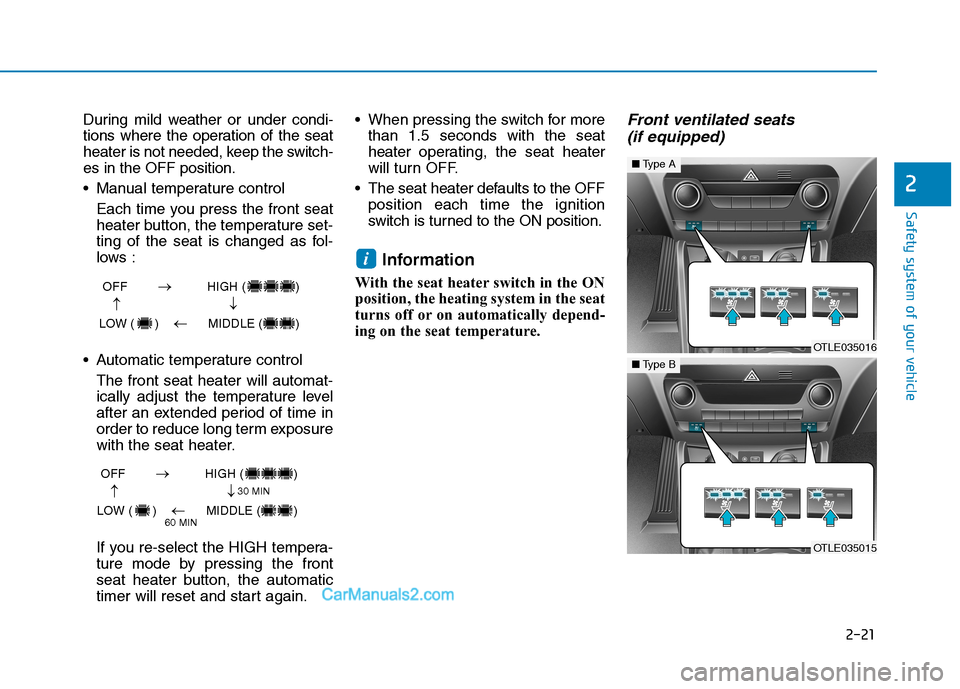
Front ventilated seats
(if equipped)
i
OFF HIGH ( )
LOW ( ) MIDDLE ( )
→→
→
→
OFF HIGH ( )
LOW ( ) MIDDLE ( )
→→
→
→
30 MIN
60 MIN
OTLE035016
■Type A
OTLE035015
■Type B
Page 41 of 546
2-23
Safety system of your vehicle
2
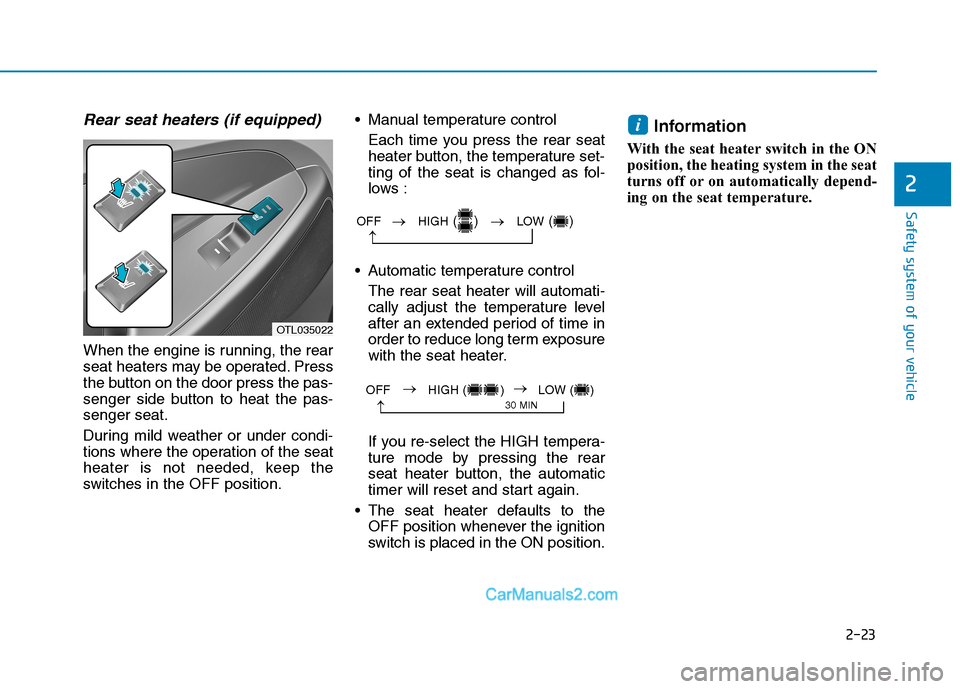
Rear seat heaters (if equipped)
When the engine is running, the rear
seat heaters may be operated. Press
the button on the door press the pas-
senger side button to heat the pas-
senger seat.
During mild weather or under condi-
tions where the operation of the seat
heater is not needed, keep the
switches in the OFF position. Manual temperature control
Each time you press the rear seat
heater button, the temperature set-
ting of the seat is changed as fol-
lows :
Automatic temperature control
The rear seat heater will automati-
cally adjust the temperature level
after an extended period of time in
order to reduce long term exposure
with the seat heater.
If you re-select the HIGH tempera-
ture mode by pressing the rear
seat heater button, the automatic
timer will reset and start again.
The seat heater defaults to the
OFF position whenever the ignition
switch is placed in the ON position.
Information
With the seat heater switch in the ON
position, the heating system in the seat
turns off or on automatically depend-
ing on the seat temperature.
i
OTL035022
OFF →HIGH() →LOW()
→
→
30 MINOFF HIGH ( ) LOW ( )→→
Page 108 of 546
3-17
Convenient features of your vehicle
3
If the inner door handle of the driv-
er door or front passenger door is
pulled when the door lock button is
in the lock position, the button is
unlocked and the door will open.
The front doors cannot be locked if
the key is in the ignition switch and
any front door is open.
The doors cannot be locked if the
smart key is in the vehicle and any
door is open.
Information
If a power door lock ever fails to func-
tion while you are in the vehicle try
one or more of the following tech-
niques to exit:
• Operate the door unlock feature
repeatedly (both electronic and
manual) while simultaneously
pulling on the door handle.
• Operate the other door locks and
handles, front and rear.
• Lower a front window and use the
mechanical key to unlock the door
from outside.
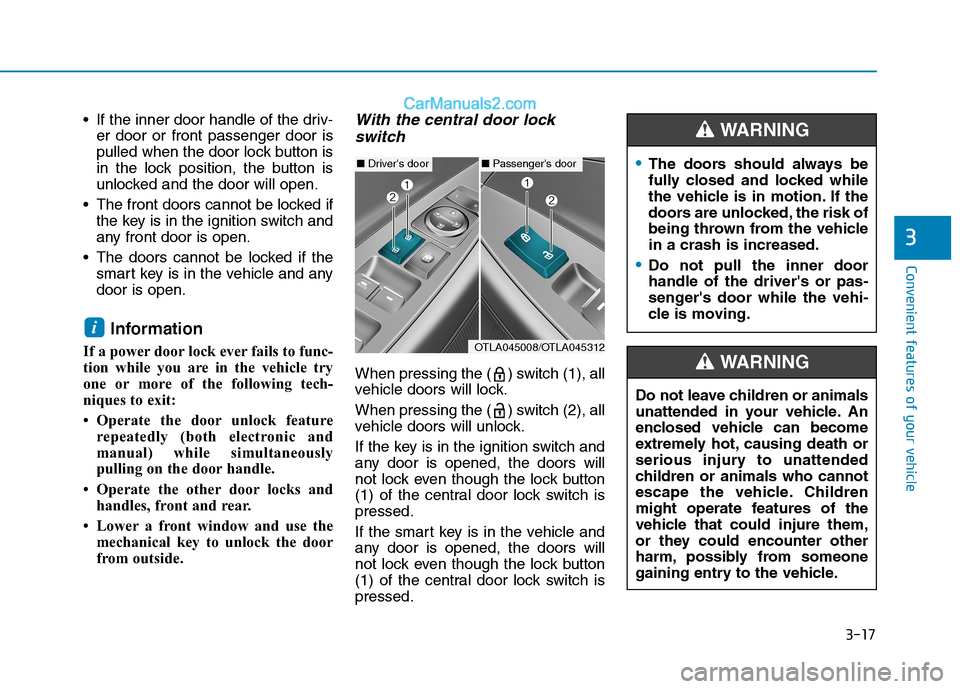
With the central door lock
switch
When pressing the ( ) switch (1), all
vehicle doors will lock.
When pressing the ( ) switch (2), all
vehicle doors will unlock.
If the key is in the ignition switch and
any door is opened, the doors will
not lock even though the lock button
(1) of the central door lock switch is
pressed.
If the smart key is in the vehicle and
any door is opened, the doors will
not lock even though the lock button
(1) of the central door lock switch is
pressed.
i
■Driver's door■Passenger's door
OTLA045008/OTLA045312
The doors should always be
fully closed and locked while
the vehicle is in motion. If the
doors are unlocked, the risk of
being thrown from the vehicle
in a crash is increased.
Do not pull the inner door
handle of the driver's or pas-
senger's door while the vehi-
cle is moving.
WARNING
Do not leave children or animals
unattended in your vehicle. An
enclosed vehicle can become
extremely hot, causing death or
serious injury to unattended
children or animals who cannot
escape the vehicle. Children
might operate features of the
vehicle that could injure them,
or they could encounter other
harm, possibly from someone
gaining entry to the vehicle.
WARNING
Page 195 of 546
3-104
Convenient features of your vehicle
Average fuel economy/
Instant fuel economy
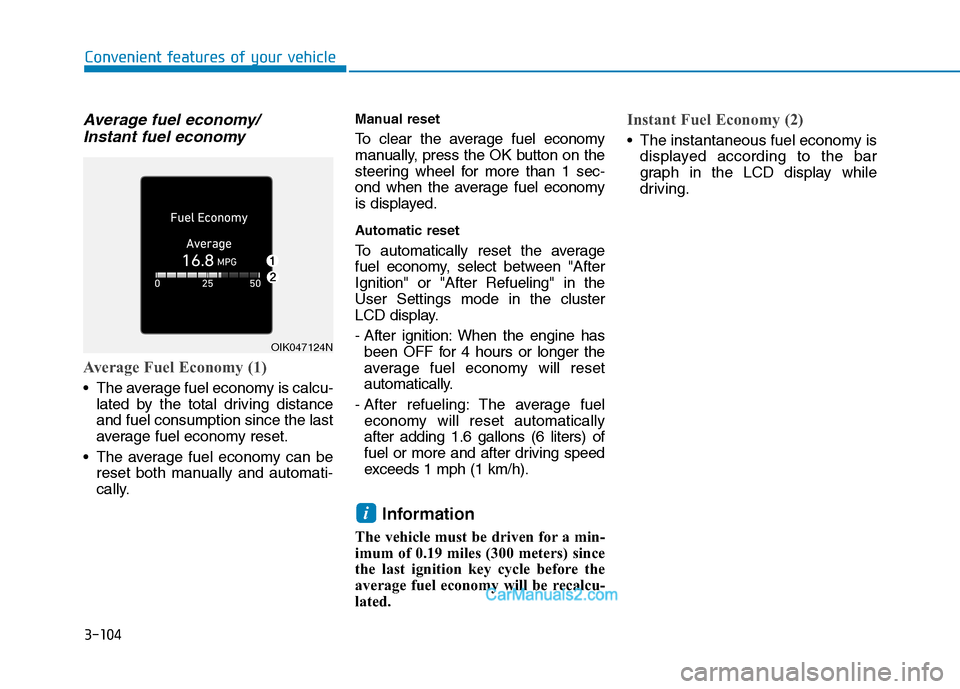
Average Fuel Economy (1)
The average fuel economy is calcu-
lated by the total driving distance
and fuel consumption since the last
average fuel economy reset.
The average fuel economy can be
reset both manually and automati-
cally.
Manual reset
To clear the average fuel economy
manually, press the OK button on the
steering wheel for more than 1 sec-
ond when the average fuel economy
is displayed.
Automatic reset
To automatically reset the average
fuel economy, select between "After
Ignition" or "After Refueling" in the
User Settings mode in the cluster
LCD display.
- After ignition: When the engine has
been OFF for 4 hours or longer the
average fuel economy will reset
automatically.
- After refueling: The average fuel
economy will reset automatically
after adding 1.6 gallons (6 liters) of
fuel or more and after driving speed
exceeds 1 mph (1 km/h).
Information
The vehicle must be driven for a min-
imum of 0.19 miles (300 meters) since
the last ignition key cycle before the
average fuel economy will be recalcu-
lated.
Instant Fuel Economy (2)
The instantaneous fuel economy is
displayed according to the bar
graph in the LCD display while
driving.
i
OIK047124N
Page 243 of 546
3-152
Convenient features of your vehicle
Defogging logic
To reduce the probability of fogging
up the inside of the windshield, the
air intake or air conditioning are con-
trolled automatically according to
certain conditions such as or
position. To cancel or return the
defogging logic, do the following.
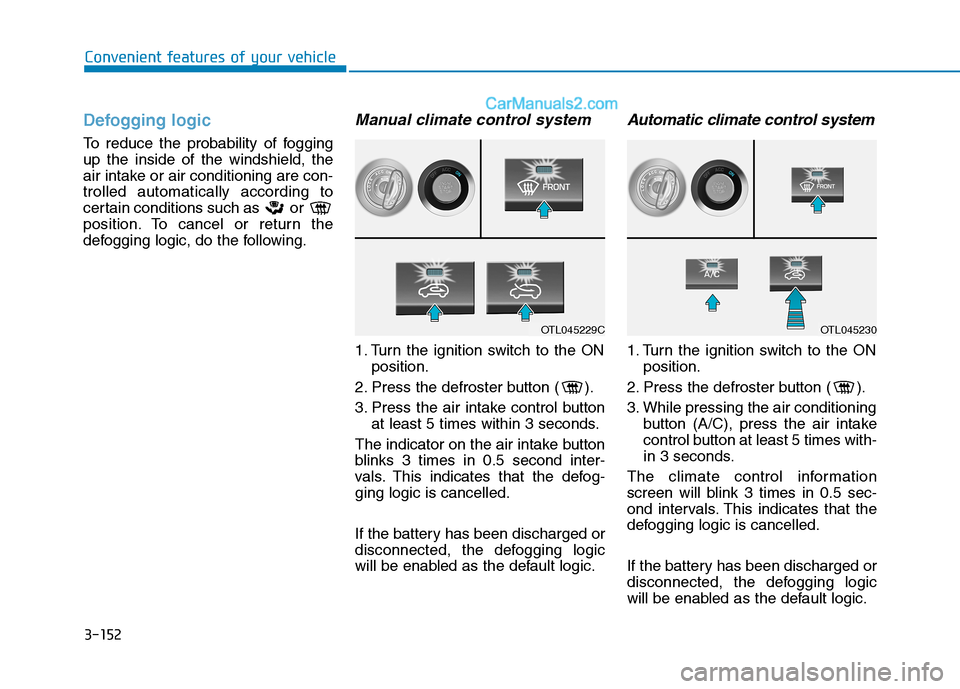
Manual climate control system
1. Turn the ignition switch to the ON
position.
2. Press the defroster button ( ).
3. Press the air intake control button
at least 5 times within 3 seconds.
The indicator on the air intake button
blinks 3 times in 0.5 second inter-
vals. This indicates that the defog-
ging logic is cancelled.
If the battery has been discharged or
disconnected, the defogging logic
will be enabled as the default logic.
Automatic climate control system
1. Turn the ignition switch to the ON
position.
2. Press the defroster button ( ).
3. While pressing the air conditioning
button (A/C), press the air intake
control button at least 5 times with-
in 3 seconds.
The climate control information
screen will blink 3 times in 0.5 sec-
ond intervals. This indicates that the
defogging logic is cancelled.
If the battery has been discharged or
disconnected, the defogging logic
will be enabled as the default logic.
OTL045229COTL045230
Page 285 of 546
5-19
Driving your vehicle
Parking
Always come to a complete stop and
continue to depress the brake pedal.
Move the shift lever into the P (Park)
position, apply the parking brake,
and place the ignition switch in the
LOCK/OFF position. Take the Key
with you when exiting the vehicle.
Good Driving Practices
Never move the shift lever from P
(Park) or N (Neutral) to any other
position with the accelerator pedal
depressed.
Never move the shift lever into P
(Park) when the vehicle is in
motion.
Be sure the vehicle is completely
stopped before you attempt to shift
into R (Reverse) or D (Drive).
Do not move the shift lever to N
(Neutral) when driving. Doing so
may result in an accident because
of a loss of engine braking and the
transmission could be damaged.
Do not drive with your foot resting
on the brake pedal. Even light, but
consistent pedal pressure can
result in the brakes overheating,
brake wear and possibly even
brake failure.
Depressing both accelerator and
brake pedals at the same time can
trigger logic for engine power
reduction to assure vehicle decel-
eration. Vehicle acceleration will
resume after the brake pedal is
released. When driving in Manual Shift
Mode, slow down before shifting to
a lower gear. Otherwise, the lower
gear may not be engaged if the
engine rpms are outside of the
allowable range.
Always apply the parking brake
when leaving the vehicle. Do not
depend on placing the transmis-
sion in P (Park) to keep the vehicle
from moving.
Exercise extreme caution when
driving on a slippery surface. Be
especially careful when braking,
accelerating or shifting gears. On a
slippery surface, an abrupt change
in vehicle speed can cause the
drive wheels to lose traction and
may cause loss of vehicle control
resulting in an accident.
Optimum vehicle performance and
economy is obtained by smoothly
depressing and releasing the
accelerator.
5
When you stay in the vehicle
with the engine running, be
careful not to depress the
accelerator pedal for a long
period of time. The engine or
exhaust system may overheat
and start a fire.
The exhaust gas and the
exhaust system are very hot.
Keep away from the exhaust
system components.
Do not stop or park over flam-
mable materials, such as dry
grass, paper or leaves. They
may ignite and cause a fire.
WARNING
Page 291 of 546
5-25
Driving your vehicle
5
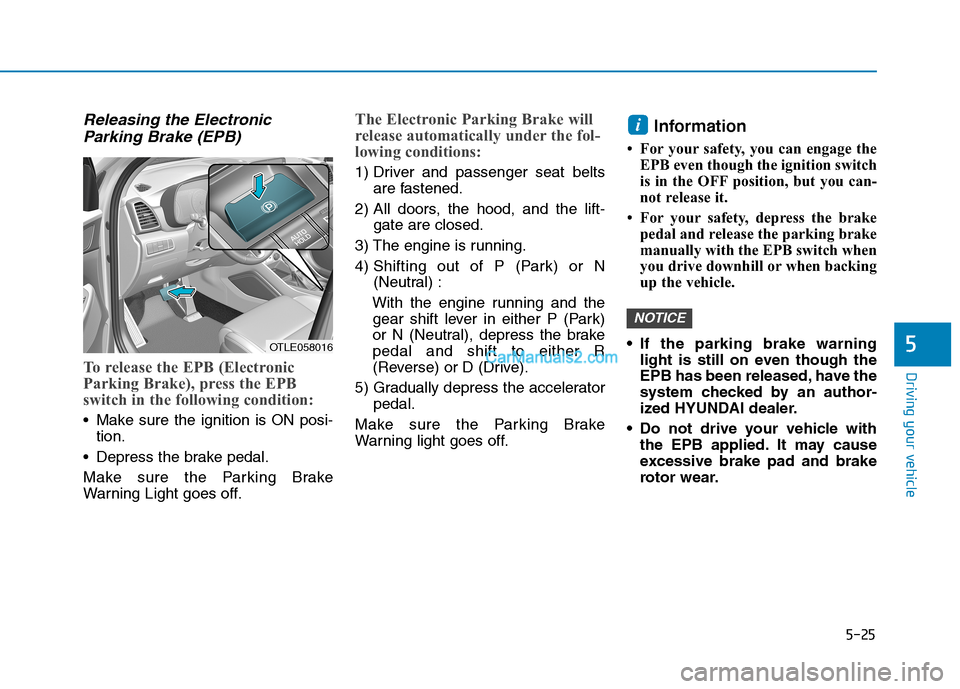
Releasing the Electronic
Parking Brake (EPB)
To release the EPB (Electronic
Parking Brake), press the EPB
switch in the following condition:
Make sure the ignition is ON posi-
tion.
Depress the brake pedal.
Make sure the Parking Brake
Warning Light goes off.
The Electronic Parking Brake will
release automatically under the fol-
lowing conditions:
1) Driver and passenger seat belts
are fastened.
2) All doors, the hood, and the lift-
gate are closed.
3) The engine is running.
4) Shifting out of P (Park) or N
(Neutral) :
With the engine running and the
gear shift lever in either P (Park)
or N (Neutral), depress the brake
pedal and shift to either R
(Reverse) or D (Drive).
5) Gradually depress the accelerator
pedal.
Make sure the Parking Brake
Warning light goes off.
Information
• For your safety, you can engage the
EPB even though the ignition switch
is in the OFF position, but you can-
not release it.
• For your safety, depress the brake
pedal and release the parking brake
manually with the EPB switch when
you drive downhill or when backing
up the vehicle.
If the parking brake warning
light is still on even though the
EPB has been released, have the
system checked by an author-
ized HYUNDAI dealer.
Do not drive your vehicle with
the EPB applied. It may cause
excessive brake pad and brake
rotor wear.
NOTICE
i
OTLE058016