2019 Hyundai Tucson start button
[x] Cancel search: start buttonPage 16 of 546
I IN
NS
ST
TR
RU
UM
ME
EN
NT
T
P
PA
AN
NE
EL
L
O
OV
VE
ER
RV
VI
IE
EW
W
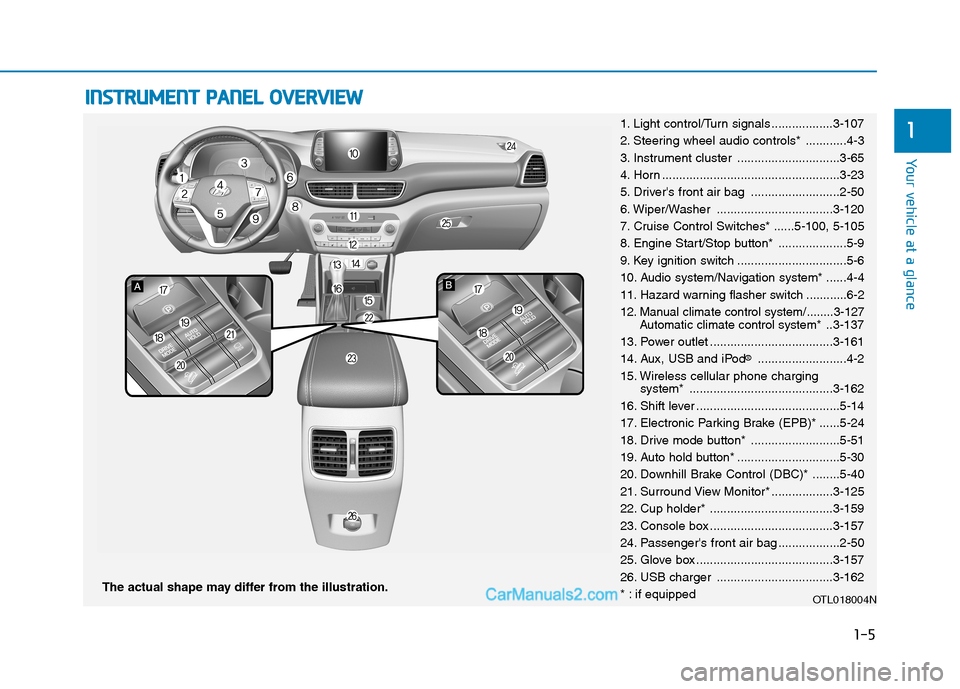
The actual shape may differ from the illustration.
1-5
Your vehicle at a glance
11. Light control/Turn signals ..................3-107
2. Steering wheel audio controls* ............4-3
3. Instrument cluster ..............................3-65
4. Horn ....................................................3-23
5. Driver's front air bag ..........................2-50
6. Wiper/Washer ..................................3-120
7. Cruise Control Switches* ......5-100, 5-105
8. Engine Start/Stop button* ....................5-9
9. Key ignition switch ................................5-6
10. Audio system/Navigation system* ......4-4
11. Hazard warning flasher switch ............6-2
12. Manual climate control system/........3-127
Automatic climate control system*..3-137
13. Power outlet ....................................3-161
14. Aux, USB and iPod
®..........................4-2
15. Wireless cellular phone charging
system* ..........................................3-162
16. Shift lever ..........................................5-14
17. Electronic Parking Brake (EPB)* ......5-24
18. Drive mode button* ..........................5-51
19. Auto hold button* ..............................5-30
20. Downhill Brake Control (DBC)* ........5-40
21. Surround View Monitor* ..................3-125
22. Cup holder* ....................................3-159
23. Console box ....................................3-157
24. Passenger's front air bag ..................2-50
25. Glove box ........................................3-157
26. USB charger ..................................3-162
* : if equipped
OTL018004N
Page 39 of 546
2-21
Safety system of your vehicle
2
During mild weather or under condi-
tions where the operation of the seat
heater is not needed, keep the switch-
es in the OFF position.
Manual temperature control
Each time you press the front seat
heater button, the temperature set-
ting of the seat is changed as fol-
lows :
Automatic temperature control
The front seat heater will automat-
ically adjust the temperature level
after an extended period of time in
order to reduce long term exposure
with the seat heater.
If you re-select the HIGH tempera-
ture mode by pressing the front
seat heater button, the automatic
timer will reset and start again. When pressing the switch for more
than 1.5 seconds with the seat
heateroperating, the seat heater
will turn OFF.
The seat heater defaults to the OFF
position each time the ignition
switch is turned to the ON position.
Information
With the seat heater switch in the ON
position, the heating system in the seat
turns off or on automatically depend-
ing on the seat temperature.
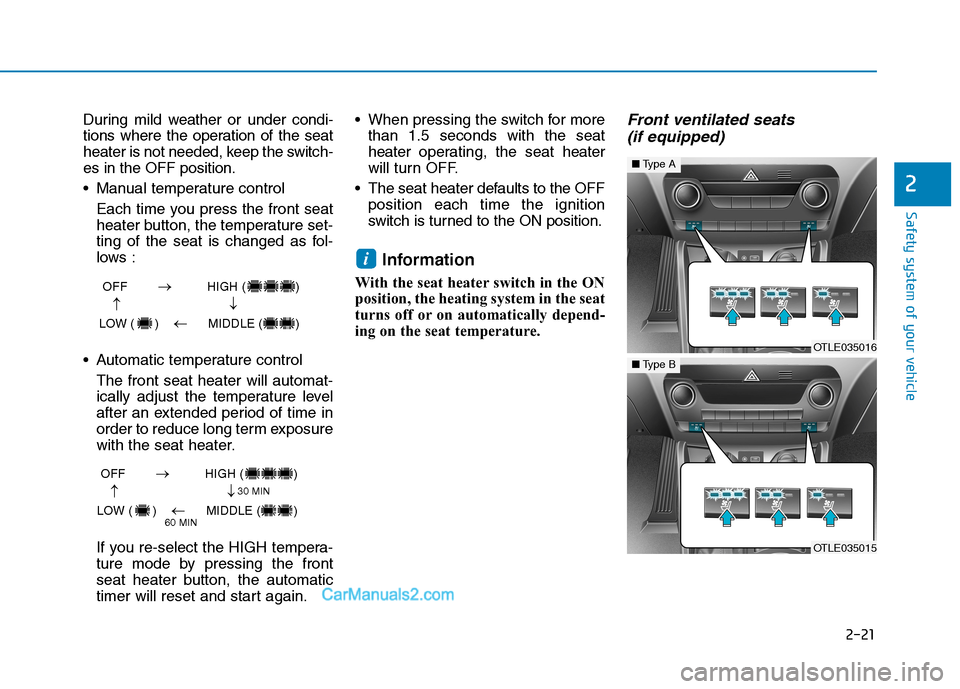
Front ventilated seats
(if equipped)
i
OFF HIGH ( )
LOW ( ) MIDDLE ( )
→→
→
→
OFF HIGH ( )
LOW ( ) MIDDLE ( )
→→
→
→
30 MIN
60 MIN
OTLE035016
■Type A
OTLE035015
■Type B
Page 40 of 546
2-22
Safety system of your vehicle
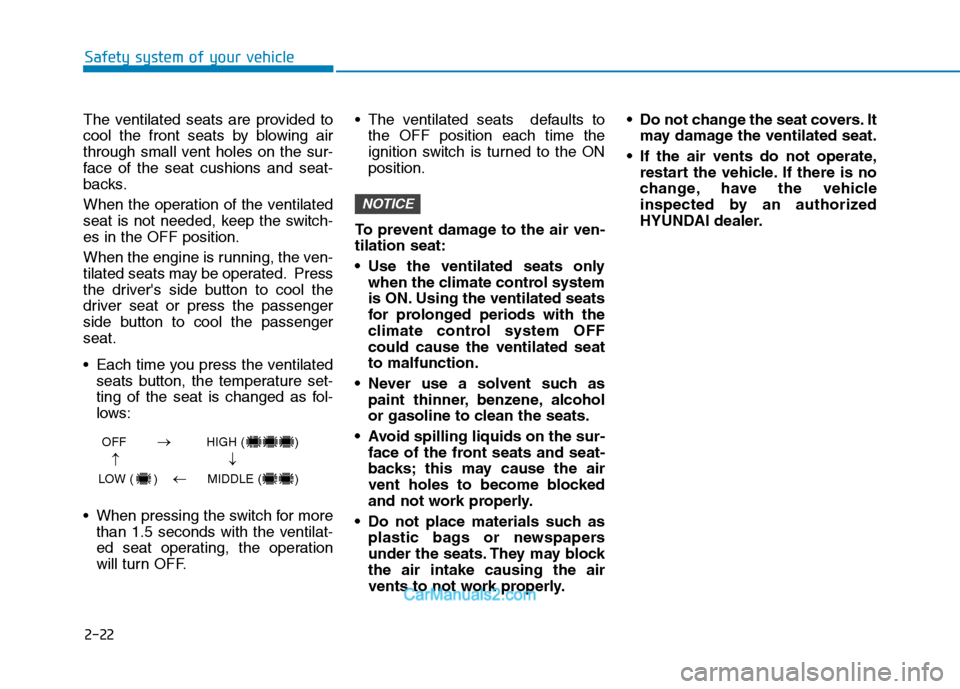
The ventilated seats are provided to
cool the front seats by blowing air
through small vent holes on the sur-
face of the seat cushions and seat-
backs.
When the operation of the ventilated
seat is not needed, keep the switch-
es in the OFF position.
When the engine is running, the ven-
tilated seats may be operated. Press
the driver's side button to cool the
driver seat or press the passenger
side button to cool the passenger
seat.
Each time you press the ventilated
seats button, the temperature set-
ting of the seat is changed as fol-
lows:
When pressing the switch for more
than 1.5 seconds with the ventilat-
ed seat operating, the operation
will turn OFF. The ventilated seats defaults to
the OFF position each time the
ignition switch is turned to the ON
position.
To prevent damage to the air ven-
tilation seat:
Use the ventilated seats only
when the climate control system
is ON. Using the ventilated seats
for prolonged periods with the
climate control system OFF
could cause the ventilated seat
to malfunction.
Never use a solvent such as
paint thinner, benzene, alcohol
or gasoline to clean the seats.
Avoid spilling liquids on the sur-
face of the front seats and seat-
backs; this may cause the air
vent holes to become blocked
and not work properly.
Do not place materials such as
plastic bags or newspapers
under the seats. They may block
the air intake causing the air
vents to not work properly. Do not change the seat covers. It
may damage the ventilated seat.
If the air vents do not operate,
restart the vehicle. If there is no
change, have the vehicle
inspected by an authorized
HYUNDAI dealer.
NOTICE
OFF HIGH ( )
LOW ( ) MIDDLE ( )
→→
→
→
Page 41 of 546
2-23
Safety system of your vehicle
2
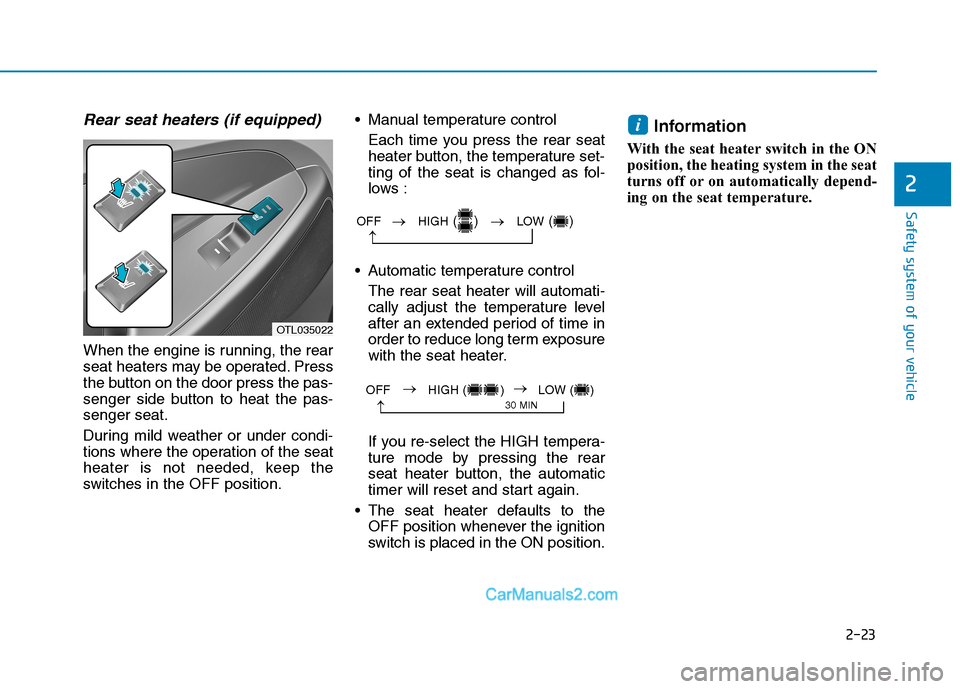
Rear seat heaters (if equipped)
When the engine is running, the rear
seat heaters may be operated. Press
the button on the door press the pas-
senger side button to heat the pas-
senger seat.
During mild weather or under condi-
tions where the operation of the seat
heater is not needed, keep the
switches in the OFF position. Manual temperature control
Each time you press the rear seat
heater button, the temperature set-
ting of the seat is changed as fol-
lows :
Automatic temperature control
The rear seat heater will automati-
cally adjust the temperature level
after an extended period of time in
order to reduce long term exposure
with the seat heater.
If you re-select the HIGH tempera-
ture mode by pressing the rear
seat heater button, the automatic
timer will reset and start again.
The seat heater defaults to the
OFF position whenever the ignition
switch is placed in the ON position.
Information
With the seat heater switch in the ON
position, the heating system in the seat
turns off or on automatically depend-
ing on the seat temperature.
i
OTL035022
OFF →HIGH() →LOW()
→
→
30 MINOFF HIGH ( ) LOW ( )→→
Page 90 of 546
2-72
Safety system of your vehicle
Additional Safety Precautions
Passengers should not move out of
or change seats while the vehicle is
moving.A passenger who is not
wearing a seat belt during a crash or
emergency stop can be thrown
against the inside of the vehicle,
against other occupants, or be ejected
from the vehicle.
Do not use any accessories on seat
belts.Devices claiming to improve
occupant comfort or reposition the
seat belt can reduce the protection
provided by the seat belt and increase
the chance of serious injury in a crash
Do not modify the front seats.
Modification of the front seats could
interfere with the operation of the sup-
plemental restraint system sensing
components or side air bags.
Do not place items under the front
seats.Placing items under the front
seats could interfere with the opera-
tion of the supplemental restraint sys-
tem sensing components and wiring
harnesses.
Do not cause impact to the doors.
Impact to the doors when the ignition
switch or the engine Start/Stop button
is in the ON position may cause the air
bags to inflate.Modifications to accommodate
disabilities.If you require modifica-
tion to your vehicle to accommodate
a disability, contact the HYUNDAI
Customer Connect Center at 1-800-
633-5151.
Adding equipment to or modify-
ing your air bag equipped vehicle
If you modify your vehicle by changing
your vehicle's frame, bumper system,
front end or side sheet metal or ride
height, this may affect the operation of
your vehicle's air bag system.
If components of the air bag
system must be discarded, or
if the vehicle must be
scrapped, certain safety pre-
cautions must be observed.
Consult an authorized
HYUNDAI dealer for the nec-
essary information. Failure to
follow these precautions
could increase the risk of per-
sonal injury.
Page 96 of 546
3-5
Convenient features of your vehicle
The Two Press Unlock feature can
also be enabled or disabled by
pressing the door lock and unlock
buttons simultaneously on the Key
FOB:
Press and hold both the Door Lock
button and the Door Unlock button
simultaneously until the hazard
warning lights blink.
This will enable or disable the Two
Press Unlock feature. Repeat this
procedure to enable/disable the
mode again.
Information
After unlocking the doors, the doors
will automatically relock after 30 sec-
onds unless a door is opened.
Liftgate unlocking
To unlock the liftgate:
1. Press and hold the Liftgate Unlock
button (3) on the remote key for
more than one second.
2. The hazard warning lights will
blink two times.
3. Once the liftgate is opened and
then closed, the liftgate will auto-
matically re-lock after 30 seconds.
Information
The word "HOLD" is written on the
button to inform you that you must
press and hold the button for more
than one second.
Panic button (if equipped)
Press and hold the Panic button (4)
for more than one second. The horn
sounds and hazard warning lights
flash for about 30 seconds.
To cancel the panic mode, press any
button on the remote key.
Start-up
For more details, refer to the "Key
Ignition Switch" section in chapter
5.
To prevent damaging the remote
key:
• Keep the remote key away from
water or any liquid and fire.
Internal circuits may malfunc-
tion if the inside of the remote
key gets damp (from liquids or
moisture) or if it is heated. This
can exclude the remote key from
being covered under warranty.
Avoid dropping or throwing the
remote key.
Protect the remote key from
extreme temperatures.
NOTICE
i
i
3
Page 99 of 546
3-8
Convenient features of your vehicle
Smart Key (if equipped)
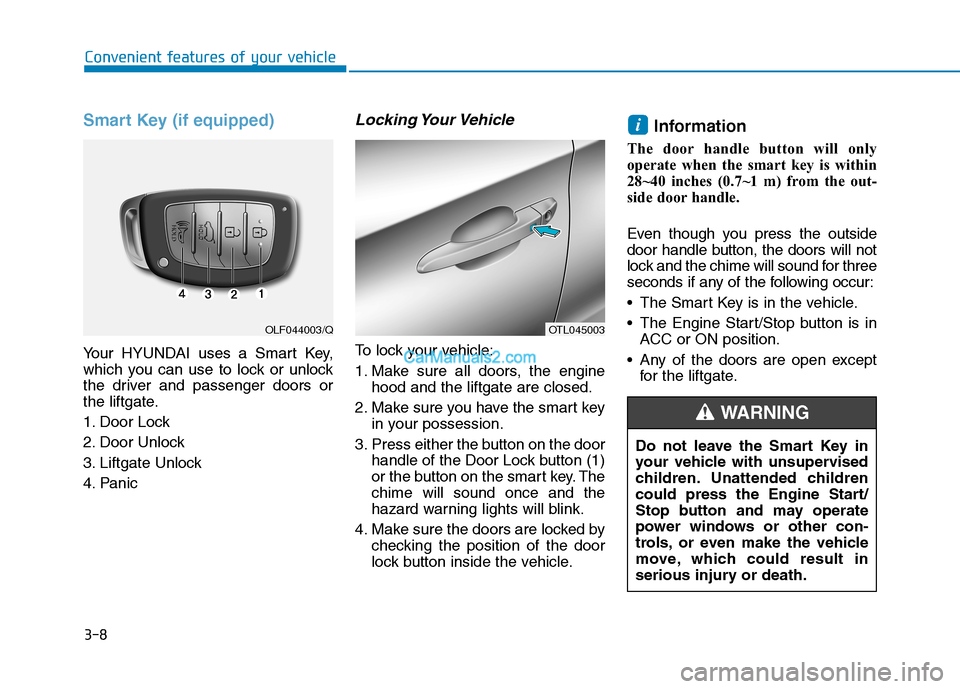
Your HYUNDAI uses a Smart Key,
which you can use to lock or unlock
the driver and passenger doors or
the liftgate.
1. Door Lock
2. Door Unlock
3. Liftgate Unlock
4. Panic
Locking Your Vehicle
To lock your vehicle:
1. Make sure all doors, the engine
hood and the liftgate are closed.
2. Make sure you have the smart key
in your possession.
3. Press either the button on the door
handle of the Door Lock button (1)
or the button on the smart key. The
chime will sound once and the
hazard warning lights will blink.
4. Make sure the doors are locked by
checking the position of the door
lock button inside the vehicle.
Information
The door handle button will only
operate when the smart key is within
28~40 inches (0.7~1 m) from the out-
side door handle.
Even though you press the outside
door handle button, the doors will not
lock and the chime will sound for three
seconds if any of the following occur:
The Smart Key is in the vehicle.
The Engine Start/Stop button is in
ACC or ON position.
Any of the doors are open except
for the liftgate.
i
OTL045003OLF044003/Q
Do not leave the Smart Key in
your vehicle with unsupervised
children. Unattended children
could press the Engine Start/
Stop button and may operate
power windows or other con-
trols, or even make the vehicle
move, which could result in
serious injury or death.
WARNING
Page 101 of 546
3-10
Convenient features of your vehicle
Opening the Liftgate
To open the liftgate:
1. Make sure you have the smart key
in your possession.
2. Press either the liftgate handle
button or press and hold the
Liftgate Unlock button (3) on the
smart key for more than one sec-
ond. The hazard warning lights will
blink two times.
3. Once the liftgate is opened and
then closed, the liftgate will auto-
matically re-lock after 30 seconds.
Information
The liftgate handle button will only
operate when the smart key is within
28 inches (0.7 m) from the liftgate
handle.
Panic button
Press and hold the Panic button (4)
for more than one second. The horn
sounds and hazard warning lights
blink for about 30 seconds. To cancel
the panic mode, press any button on
the Smart Key.
Start-up
You can start the engine without
inserting the key.
For more details, refer to the
"Engine Start/Stop Button" sec-
tion in chapter 5.To prevent damaging the smart key:
Keep the smart key away from
water or any liquid or fire. Internal
circuits may malfunction if the
inside of the smart key gets damp
(from liquids or moisture) or if it is
heated. This can exclude the
smart key from warranty cover-
age.
Avoid dropping or throwing the
smart key.
Protect the smart key from
extreme temperatures.
Always have the smart key with
you when leaving the vehicle. If
the smart key is left near the vehi-
cle, the vehicle battery may be dis-
charged.
NOTICE
NOTICE
i