5-114
Driving your vehicle
Smart Cruise Control Radar
Sensor
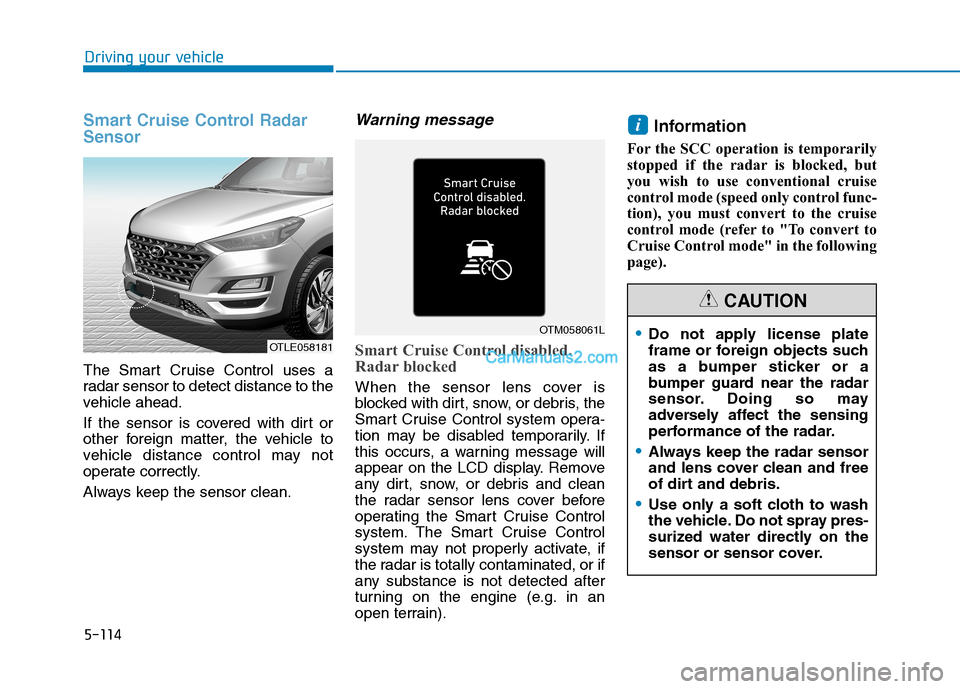
The Smart Cruise Control uses a
radar sensor to detect distance to the
vehicle ahead.
If the sensor is covered with dirt or
other foreign matter, the vehicle to
vehicle distance control may not
operate correctly.
Always keep the sensor clean.
Warning message
Smart Cruise Control disabled.
Radar blocked
When the sensor lens cover is
blocked with dirt, snow, or debris, the
Smart Cruise Control system opera-
tion may be disabled temporarily. If
this occurs, a warning message will
appear on the LCD display. Remove
any dirt, snow, or debris and clean
the radar sensor lens cover before
operating the Smart Cruise Control
system. The Smart Cruise Control
system may not properly activate, if
the radar is totally contaminated, or if
any substance is not detected after
turning on the engine (e.g. in an
open terrain).
Information
For the SCC operation is temporarily
stopped if the radar is blocked, but
you wish to use conventional cruise
control mode (speed only control func-
tion), you must convert to the cruise
control mode (refer to "To convert to
Cruise Control mode" in the following
page).
i
OTLE058181
OTM058061LDo not apply license plate
frame or foreign objects such
as a bumper sticker or a
bumper guard near the radar
sensor. Doing so may
adversely affect the sensing
performance of the radar.
Always keep the radar sensor
and lens cover clean and free
of dirt and debris.
Use only a soft cloth to wash
the vehicle. Do not spray pres-
surized water directly on the
sensor or sensor cover.
CAUTION
6-8
What to do in an emergency
T TI
IR
RE
E
P
PR
RE
ES
SS
SU
UR
RE
E
M
MO
ON
NI
IT
TO
OR
RI
IN
NG
G
S
SY
YS
ST
TE
EM
M
(
(T
TP
PM
MS
S)
)
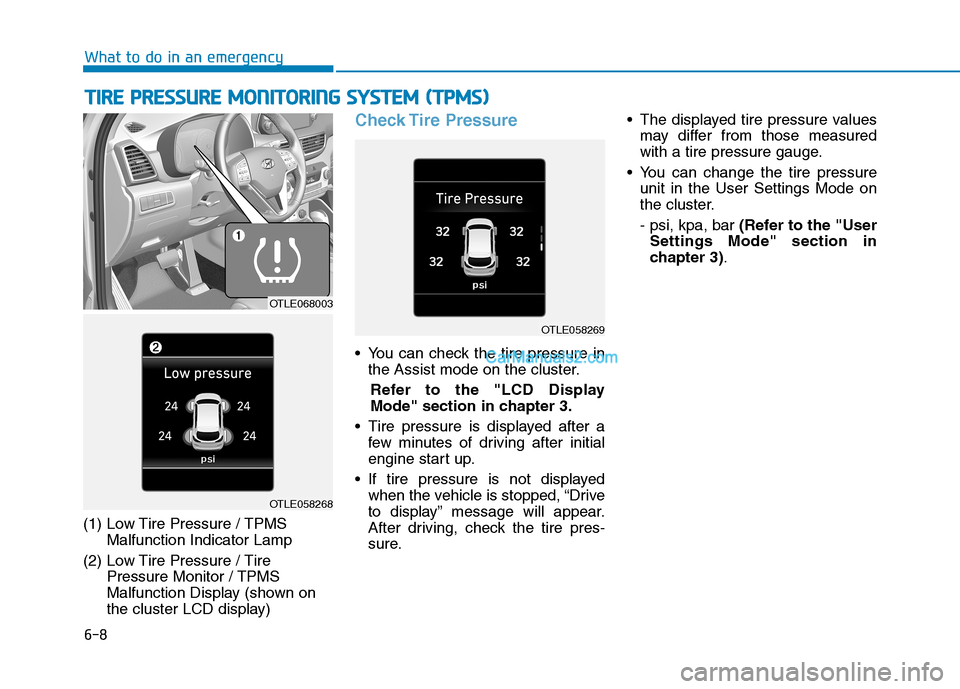
(1) Low Tire Pressure / TPMS
Malfunction Indicator Lamp
(2) Low Tire Pressure / Tire
Pressure Monitor / TPMS
Malfunction Display (shown on
the cluster LCD display)
Check Tire Pressure
You can check the tire pressure in
the Assist mode on the cluster.
Refer to the "LCD Display
Mode" section in chapter 3.
Tire pressure is displayed after a
few minutes of driving after initial
engine start up.
If tire pressure is not displayed
when the vehicle is stopped, “Drive
to display” message will appear.
After driving, check the tire pres-
sure. The displayed tire pressure values
may differ from those measured
with a tire pressure gauge.
You can change the tire pressure
unit in the User Settings Mode on
the cluster.
- psi, kpa, bar (Refer to the "User
Settings Mode" section in
chapter 3).
OTLE058269
OTLE068003
OTLE058268
I-7
Lane Keeping Assist (LKA) System ..............................5-87
Limitations of the System ..........................................5-93
LKA System Function Change ..................................5-95
LKA System Operation ..............................................5-89
Warning Light and Message.......................................5-91
LCD Display ...................................................................3-91
LCD Display Control .................................................3-91
LCD Display Modes ..................................................3-92
Liftgate ............................................................................3-52
Non-Powered liftgate .................................................3-52
Power Liftgate ............................................................3-54
Smart Liftgate.............................................................3-61
Light ..............................................................................3-107
Exterior Lights..........................................................3-107
Interior Lights ...........................................................3-116
Welcome System ......................................................3-115
Light Bulbs .....................................................................7-64
Daytime Running Lamp Replacement .......................7-65
Fog Lamp Replacement .............................................7-65
Headlamp Replacement..............................................7-65
High Mounted Stop Lamp Replacement....................7-73
Interior Light Bulb Replacement ...............................7-73
License Plate Light Bulb Replacement ......................7-73
Parking Lamp Replacement .......................................7-65
Rear Combination Light Bulb Replacement ..............7-70Side Marker Replacement ..........................................7-65
Side Repeater Lamp Replacement .............................7-69
Turn Signal Lamp Replacement.................................7-65
Luggage Tray ................................................................3-170
Luggage Volume ...............................................................8-3
Maintenance Services .......................................................7-4
Owner Maintenance Precautions..................................7-4
Owner's Responsibility.................................................7-4
Manual Climate Control System ..................................3-127
Heating and Air Conditioning ..................................3-128
System Maintenance ................................................3-135
System Operation .....................................................3-133
Mirrors ............................................................................3-24
Inside Rearview Mirror ..............................................3-24
Side View Mirrors ......................................................3-36
Multimedia System ...........................................................4-3
Antenna ........................................................................4-2
Audio / Video / Navigation System (AVN) .................4-4
AUX, USB and iPod
®Port ..........................................4-2
Bluetooth®Wireless Technology Hands-Free ..............4-4
Steering Wheel Audio Control .....................................4-3
I
Index
L
M