Page 211 of 546

3-120
Convenient features of your vehicle
A : Wiper speed control
· MIST – Single wipe
· OFF – Off
· INT – Intermittent wipe
AUTO* – Auto control wipe
· LO – Low wiper speed
· HI – High wiper speed
B : Intermittent control wipe time
adjustment
C : Wash with brief wipes
(pull lever towards you)
D : Rear wiper/washer control
· HI – High wiper speed
· LO – Low wiper speed
· OFF – Off
E : Wash with brief wipes (rear)
(push lever away from you)
* : if equipped
Windshield Wipers
Operates as follows when the igni-
tion switch is in the ON position.
MIST : For a single wiping cycle,
push the lever upward and
release. The wipers will oper-
ate continuously if the lever is
held in this position.
OFF : Wiper is not in operation.
INT : Wiper operates intermittently at
the same wiping intervals. To
vary the speed setting, move
the speed control lever.
AUTO : A rain sensor located near
the top of the windshield
detects moisture accumula-
tion and controls the wiping
cycle automatically. This
mode is designed to operate
the wiper at an appropriate
speed depending on the
amount of rainfall. The sensi-
tivity can be varied by turn-
ing the adjustment control
(B) located on the wiper
stalk.
LO : The wiper runs at a lower speed.
HI : The wiper runs at a higher speed.
W WI
IP
PE
ER
RS
S
A
AN
ND
D
W
WA
AS
SH
HE
ER
RS
S
OTLE045161
OTLA045318
■Front windshield wiper/washer
■Rear window wiper/washer
Page 212 of 546

3-121
Convenient features of your vehicle
3
Information
If there is heavy accumulation of snow
or ice on the windshield, defrost the
windshield for about 10 minutes, or
until the snow and/or ice is removed
before using the windshield wipers to
ensure proper operation.
If you do not remove the snow and/or
ice before using the wiper and washer,
it may damage the wiper and washer
system.
AUTO - Automatic Wiper Control
(if equipped)
A rain sensor located near the top of
the windshield detects moisture
accumulation and controls the wiping
cycle automatically. This mode is
designed to operate the wiper at an
appropriate speed depending on the
amount of rainfall. The sensitivity can
be varied by turning the adjustment
control (B) located on the wiper stalk.
If the wiper switch is set in AUTO
mode when the ignition switch is in
the ON position, the wiper will oper-
ate once to perform a self-check of
the system. Set the wiper control to
the OFF position when the wind-
shield wipers are not required.
i
To avoid personal injury from
the windshield wipers, when the
engine is running and the wind-
shield wiper switch is placed in
the AUTO mode:
Do not touch the upper end of
the windshield glass facing
the rain sensor.
Do not wipe the upper end of
the windshield glass with a
damp or wet cloth.
Do not put pressure on the
windshield glass.
WARNING
Page 213 of 546

3-122
Convenient features of your vehicle
When washing the vehicle, set
the wiper switch in the OFF posi-
tion to stop the auto wiper oper-
ation. The wiper may operate
and be damaged if the switch is
set in the AUTO mode while
washing the vehicle.
Do not remove the sensor cover
located on the upper end of the
passenger side windshield
glass. Damage to system parts
could occur and may not be cov-
ered by your vehicle warranty.
Because of using a photo sen-
sor, temporary malfunction
could occur according to sud-
den ambient light change made
by stone and dust while driving.
Front Windshield Washers
In the OFF position, pull the lever
gently toward you to spray washer
fluid on the windshield and to run the
wipers 1-3 cycles. The spray and
wiper operation will continue until you
release the lever. If the washer does
not work, you may need to add wash-
er fluid to the washer fluid reservoir.
NOTICE
OTLE045164
When the outside temperature is
below freezing, ALWAYS warm
the windshield using the
defroster to help prevent the
washer fluid from freezing on the
windshield and obscuring your
vision which could result in an
accident and serious injury or
death.
WARNING
Page 214 of 546
3-123
Convenient features of your vehicle
3
To prevent possible damage to
the washer pump, do not oper-
ate the washer when the fluid
reservoir is empty.
To prevent possible damage to
the wipers or windshield, do not
operate the wipers when the
windshield is dry.
To prevent damage to the wiper
arms and other components, do
not attempt to move the wipers
manually.
To prevent possible damage to
the wipers and washer system,
use anti-freezing washer fluids
in the winter season or cold
weather.
Rear Window Wiper and
Washer Switch
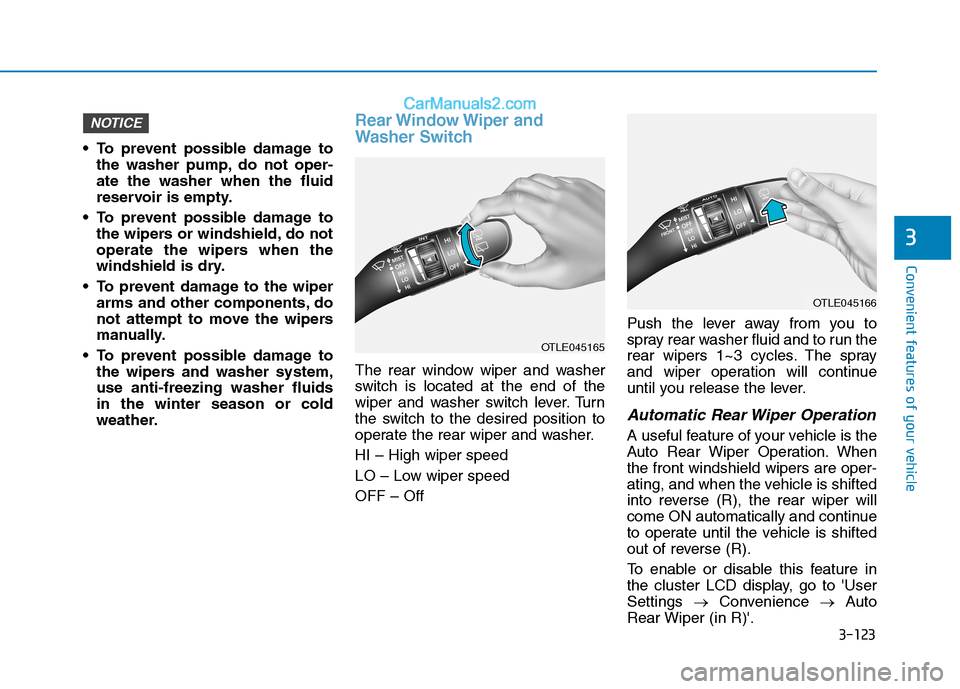
The rear window wiper and washer
switch is located at the end of the
wiper and washer switch lever. Turn
the switch to the desired position to
operate the rear wiper and washer.
HI – High wiper speed
LO – Low wiper speed
OFF – OffPush the lever away from you to
spray rear washer fluid and to run the
rear wipers 1~3 cycles. The spray
and wiper operation will continue
until you release the lever.
Automatic Rear Wiper Operation
A useful feature of your vehicle is the
Auto Rear Wiper Operation. When
the front windshield wipers are oper-
ating, and when the vehicle is shifted
into reverse (R), the rear wiper will
come ON automatically and continue
to operate until the vehicle is shifted
out of reverse (R).
To enable or disable this feature in
the cluster LCD display, go to 'User
Settings →Convenience →Auto
Rear Wiper (in R)'.
NOTICE
OTLE045165
OTLE045166
Page 218 of 546
3-127
Convenient features of your vehicle
3
M MA
AN
NU
UA
AL
L
C
CL
LI
IM
MA
AT
TE
E
C
CO
ON
NT
TR
RO
OL
L
S
SY
YS
ST
TE
EM
M
(
(I
IF
F
E
EQ
QU
UI
IP
PP
PE
ED
D)
)
OTL045207/OTL045207R-1
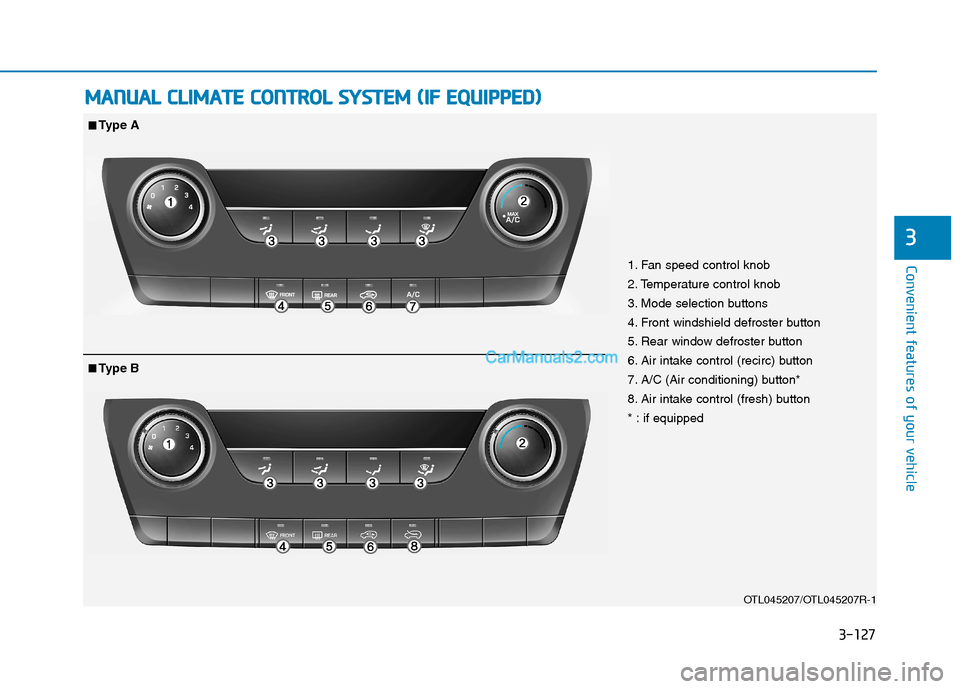
1. Fan speed control knob
2. Temperature control knob
3. Mode selection buttons
4. Front windshield defroster button
5. Rear window defroster button
6. Air intake control (recirc) button
7. A/C (Air conditioning) button*
8. Air intake control (fresh) button
* : if equipped
■ ■Type A
■
■Type B
Page 220 of 546
3-129
Convenient features of your vehicle
3
Mode selection
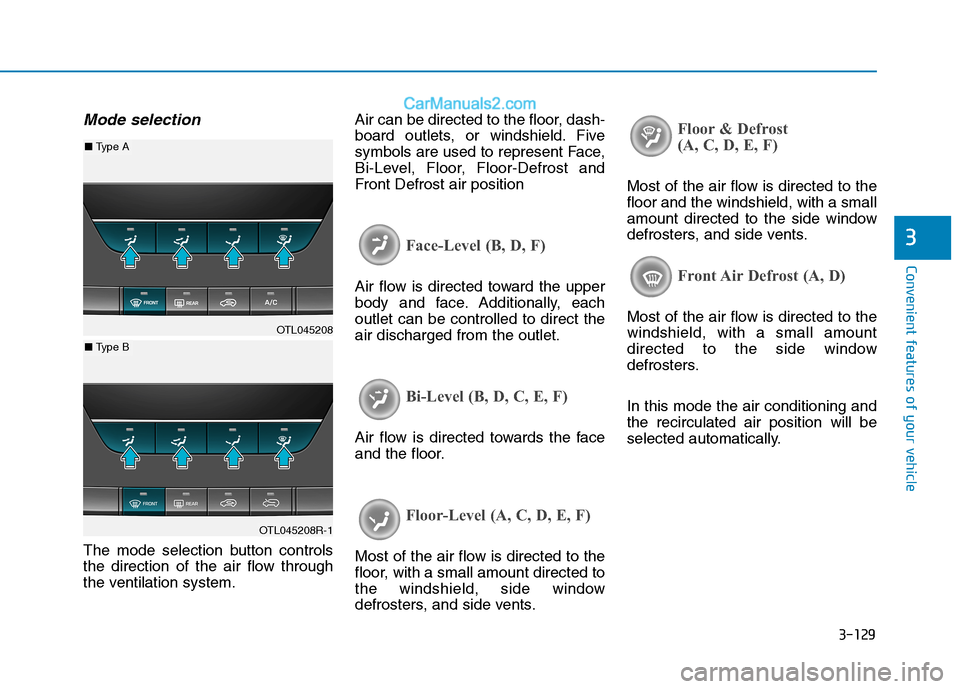
The mode selection button controls
the direction of the air flow through
the ventilation system.Air can be directed to the floor, dash-
board outlets, or windshield. Five
symbols are used to represent Face,
Bi-Level, Floor, Floor-Defrost and
Front Defrost air position
Face-Level (B, D, F)
Air flow is directed toward the upper
body and face. Additionally, each
outlet can be controlled to direct the
air discharged from the outlet.
Bi-Level (B, D, C, E, F)
Air flow is directed towards the face
and the floor.
Floor-Level (A, C, D, E, F)
Most of the air flow is directed to the
floor, with a small amount directed to
the windshield, side window
defrosters, and side vents.
Floor & Defrost
(A, C, D, E, F)
Most of the air flow is directed to the
floor and the windshield, with a small
amount directed to the side window
defrosters, and side vents.
Front Air Defrost (A, D)
Most of the air flow is directed to the
windshield, with a small amount
directed to the side window
defrosters.
In this mode the air conditioning and
the recirculated air position will be
selected automatically.OTL045208
OTL045208R-1
■ Type A
■ Type B
Page 223 of 546
3-132
Convenient features of your vehicle
Information
Prolonged operation of the heater in
the recirculated air position (without
air conditioning selected) may cause
fogging of the windshield and side
windows and the air within the pas-
senger compartment may become
stale.
In addition, prolonged use of the air
conditioning with the recirculated air
position selected will result in exces-
sively dry air in the passenger com-
partment.
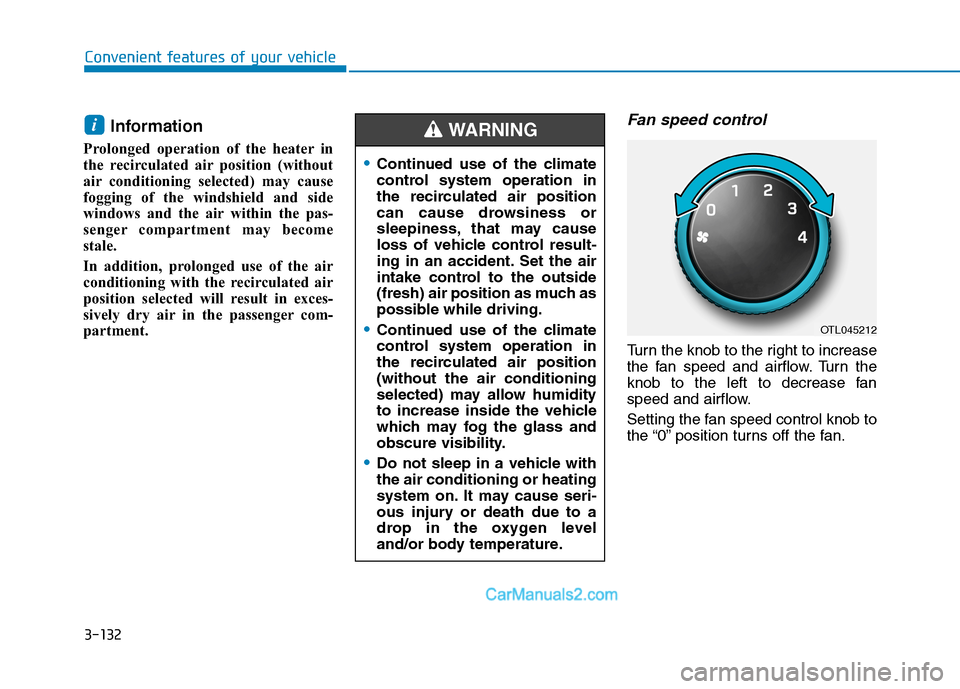
Fan speed control
Turn the knob to the right to increase
the fan speed and airflow. Turn the
knob to the left to decrease fan
speed and airflow.
Setting the fan speed control knob to
the “0” position turns off the fan.
i
OTL045212
Continued use of the climate
control system operation in
the recirculated air position
can cause drowsiness or
sleepiness, that may cause
loss of vehicle control result-
ing in an accident. Set the air
intake control to the outside
(fresh) air position as much as
possible while driving.
Continued use of the climate
control system operation in
the recirculated air position
(without the air conditioning
selected) may allow humidity
to increase inside the vehicle
which may fog the glass and
obscure visibility.
Do not sleep in a vehicle with
the air conditioning or heating
system on. It may cause seri-
ous injury or death due to a
drop in the oxygen level
and/or body temperature.
WARNING
Page 224 of 546
3-133
Convenient features of your vehicle
3
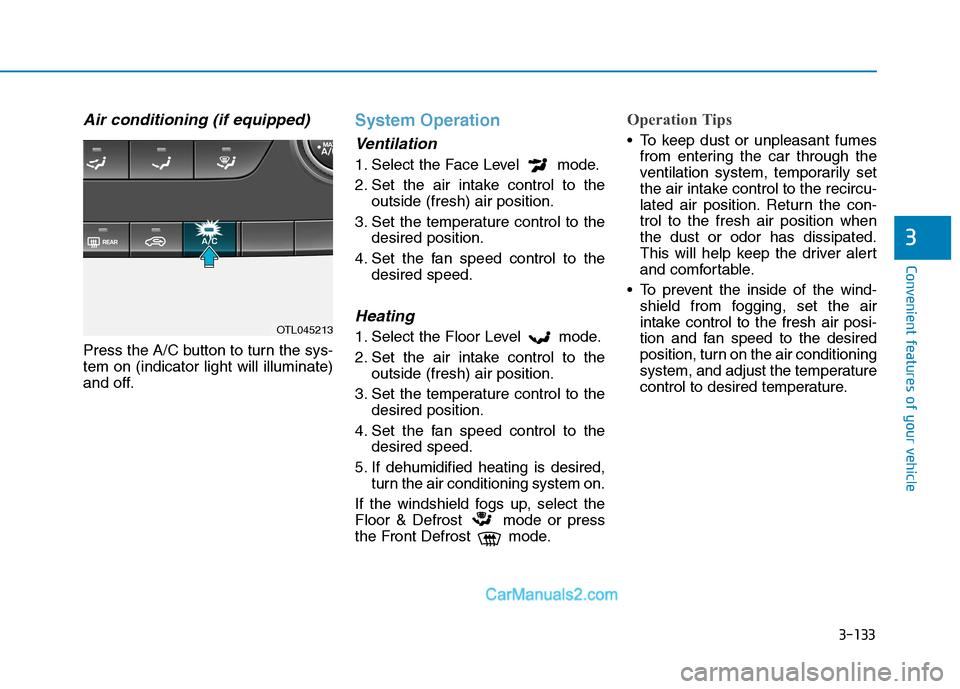
Air conditioning (if equipped)
Press the A/C button to turn the sys-
tem on (indicator light will illuminate)
and off.
System Operation
Ventilation
1. Select the Face Level mode.
2. Set the air intake control to the
outside (fresh) air position.
3. Set the temperature control to the
desired position.
4. Set the fan speed control to the
desired speed.
Heating
1. Select the Floor Level mode.
2. Set the air intake control to the
outside (fresh) air position.
3. Set the temperature control to the
desired position.
4. Set the fan speed control to the
desired speed.
5. If dehumidified heating is desired,
turn the air conditioning system on.
If the windshield fogs up, select the
Floor & Defrost mode or press
the Front Defrost mode.
Operation Tips
To keep dust or unpleasant fumes
from entering the car through the
ventilation system, temporarily set
the air intake control to the recircu-
lated air position. Return the con-
trol to the fresh air position when
the dust or odor has dissipated.
This will help keep the driver alert
and comfortable.
To prevent the inside of the wind-
shield from fogging, set the air
intake control to the fresh air posi-
tion and fan speed to the desired
position, turn on the air conditioning
system, and adjust the temperature
control to desired temperature.
OTL045213