2019 Hyundai Tucson ESP
[x] Cancel search: ESPPage 141 of 685
3-49
Convenient features of your vehicle
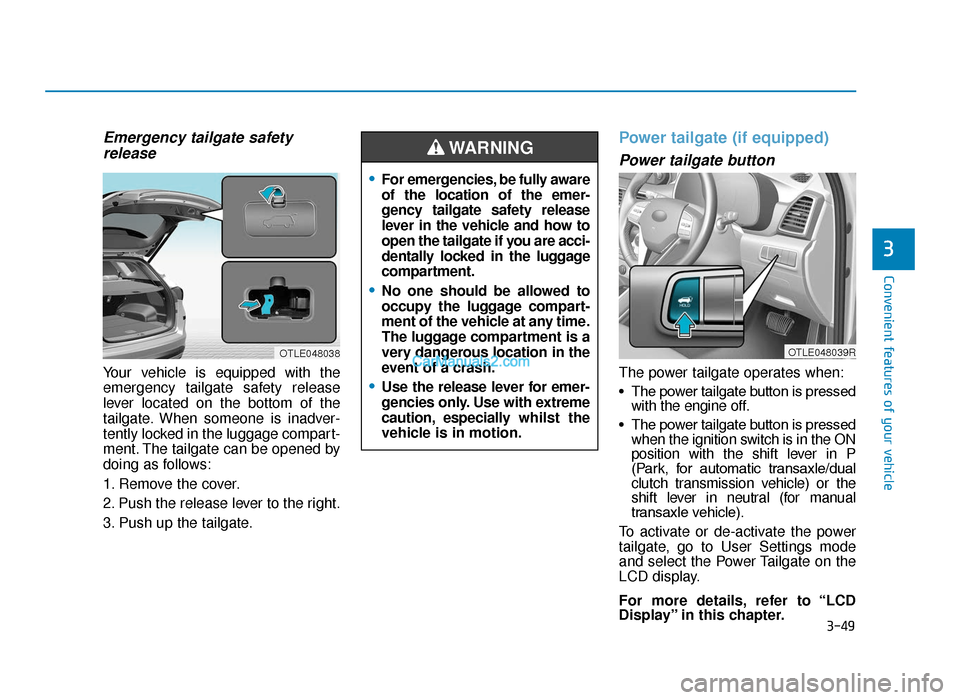
Emergency tailgate safetyrelease
Your vehicle is equipped with the
emergency tailgate safety release
lever located on the bottom of the
tailgate. When someone is inadver-
tently locked in the luggage compart-
ment. The tailgate can be opened by
doing as follows:
1. Remove the cover.
2. Push the release lever to the right.
3. Push up the tailgate.
Power tailgate (if equipped)
Power tailgate button
The power tailgate operates when:
• The power tailgate button is pressed with the engine off.
• The power tailgate button is pressed when the ignition switch is in the ON
position with the shift lever in P
(Park, for automatic transaxle/dual
clutch transmission vehicle) or the
shift lever in neutral (for manual
transaxle vehicle).
To activate or de-activate the power
tailgate, go to User Settings mode
and select the Power Tailgate on the
LCD display.
For more details, refer to “LCD
Display” in this chapter.
3
OTLE048038
•For emergencies, be fully aware
of the location of the emer-
gency tailgate safety release
lever in the vehicle and how to
open the tailgate if you are acci-
dentally locked in the luggage
compartment.
•No one should be allowed to
occupy the luggage compart-
ment of the vehicle at any time.
The luggage compartment is a
very dangerous location in the
event of a crash.
•Use the release lever for emer-
gencies only. Use with extreme
caution, especially whilst the
vehicle is in motion.
WARNING
OTLE048039R
TLe UK 3a(~109).qxp 6/12/2018 2:24 PM Page 49
Page 148 of 685
3-56
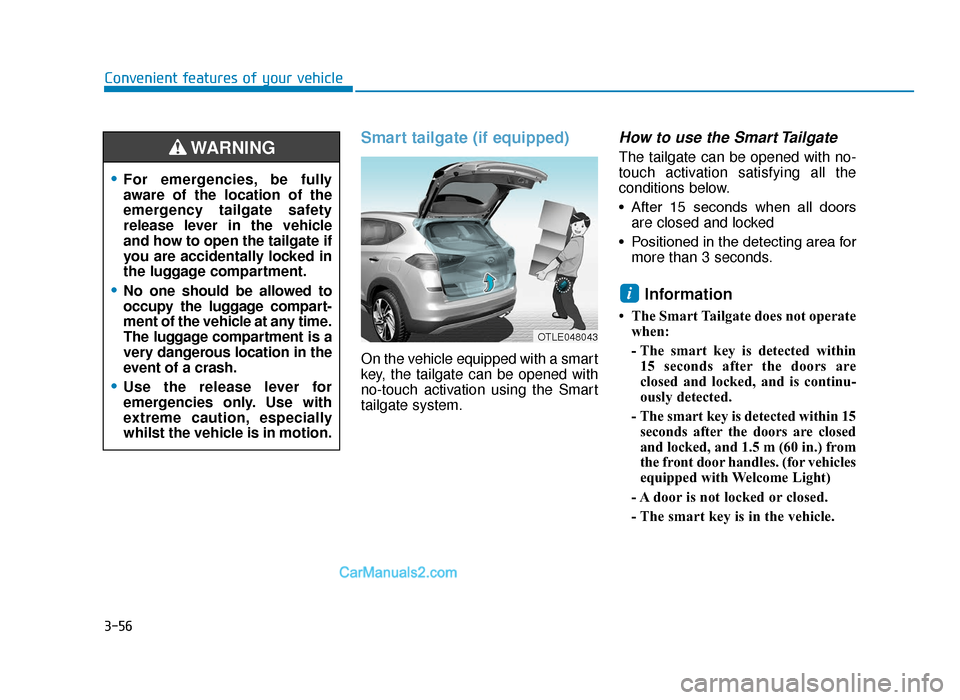
Smart tailgate (if equipped)
On the vehicle equipped with a smart
key, the tailgate can be opened with
no-touch activation using the Smart
tailgate system.
How to use the Smart Tailgate
The tailgate can be opened with no-
touch activation satisfying all the
conditions below.
• After 15 seconds when all doorsare closed and locked
• Positioned in the detecting area for more than 3 seconds.
Information
• The Smart Tailgate does not operatewhen:
- The smart key is detected within15 seconds after the doors are
closed and locked, and is continu-
ously detected.
- The smart key is detected within 15 seconds after the doors are closed
and locked, and 1.5 m (60 in.) from
the front door handles. (for vehicles
equipped with Welcome Light)
- A door is not locked or closed.
- The smart key is in the vehicle.
i
Convenient features of your vehicle
•For emergencies, be fully
aware of the location of the
emergency tailgate safety
release lever in the vehicle
and how to open the tailgate if
you are accidentally locked in
the luggage compartment.
•No one should be allowed to
occupy the luggage compart-
ment of the vehicle at any time.
The luggage compartment is a
very dangerous location in the
event of a crash.
•Use the release lever for
emergencies only. Use with
extreme caution, especially
whilst the vehicle is in motion.
WARNING
OTLE048043
TLe UK 3a(~109).qxp 6/12/2018 2:25 PM Page 56
Page 165 of 685
Convenient features of your vehicle
3
ItemsExplanation
SCC response
• Fast/Normal/Slow
To adjust the sensitivity of the Smart Cruise Control system.
For more details, refer to ''Smart Cruise Control with Stop & Go'' in chapter 5.
SLW (Speed Limit Warning)To activate or deactivate the Intelligent Speed Limit Warning system.
For more details, refer to the "Intelligent Speed Limit Warning (ISLW)" in chapter 5.
DAW (Driver Attention Warning)
To adjust the sensitivity of the Driver Attention Warning (DAW).
- High Sensitivity/Normal Sensitivity/Off
For more details, refer to the "Driver Attention Warning (DAW)" in chapter 5.
Lane safety
To adjust the Lane Keeping Assist (LKA) function.
- LKA (Lane Keeping Assist)
- LDW (Lane Departure Warning)
- Active LKA (if equipped)
For more details, refer to the "Lane Keeping Assist (LKA) system" in chapter 5.
FCA (Forward Collision-Avoidance
Assist)To activate or deactivate the Forward Collision-Avoidance Assist (FCA) system.
For more details, refer to the "Forward Collision-Avoidance Assist (FCA) system" in chapter 5.
FCW (Forward Collision Warning)
To adjust the warning timing of the Forward Collision Warning (FCW) system.- Early / Normal / Late
For more details, refer to the "Forward Collision-Avoidance Assist (FCA) system" in chapter 5.
RCCW (Rear Cross-Traffic Collision
Warning)To activate or deactivate the Rear Cross-Traffic Collision Warning (RCCW) system.
For more details, refer to the "Blind-spot Collision Warning (BCW) system" in chapter 5.
BCW sound (Blind-spot Collision
Warning)To activate or deactivate the Blind-spot Collision Warning (BCW) system sound.
For more details, refer to the "Blind-spot Collision Warning (BCW) system" in chapter 5.
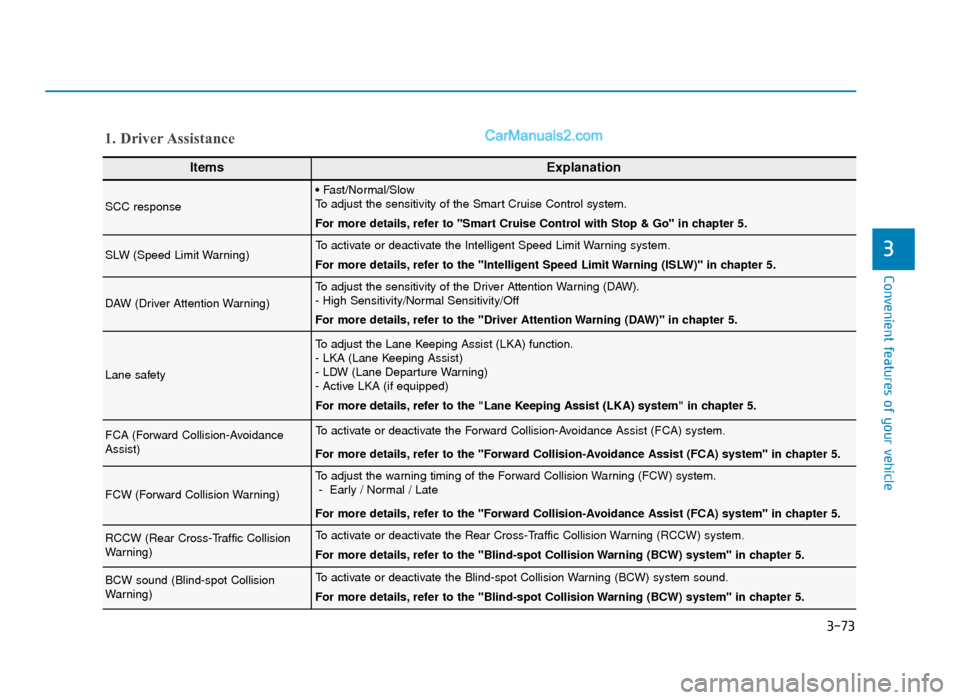
1. Driver Assistance
3-73
TLe UK 3a(~109).qxp 6/12/2018 2:27 PM Page 73
Page 176 of 685
3-84
Convenient features of your vehicle
Engine has overheated
This warning message illuminates
with a warning chime when the
engine coolant temperature is above
120°C (248°F). This means that the
engine is overheated and may be
damaged.
If your vehicle is overheated, refer
to “Overheating” in chapter 6.
Check headlight (if equipped)
This warning message is displayed if
the headlamps are not operating
properly.
In addition, if a specific lamp(turn
signal lamp etc.) is not operating
properly, the warning message
according to a specific lamp (turn
signal lamp etc.) is displayed. A cor-
responding bulb may need to be
replaced.
Information
Make sure to replace the burned out
bulb with a new one of the same
wattage rating.
If not, this warning message will not
be displayed.
Low engine oil (if equipped)
This warning message is displayed
when the engine oil level should be
checked.
If this warning message is displayed,
check the engine oil level as soon as
possible and add engine oil as
required.
Slowly pour the recommended oil lit-
tle by little into a funnel. (Oil refill
capacity : approximately 0.6 ~ 1.0 l)
Use only the specified engine oil.
(Refer to "Recommended lubricants
and capacities" in chapter 8.)
Do not overfill the engine oil. Make
sure the oil level is not above F (Full)
mark on the dipstick.
i
TLe UK 3a(~109).qxp 6/12/2018 2:27 PM Page 84
Page 207 of 685
3-115
Convenient features of your vehicle
3
Turn signals and lane changesignals
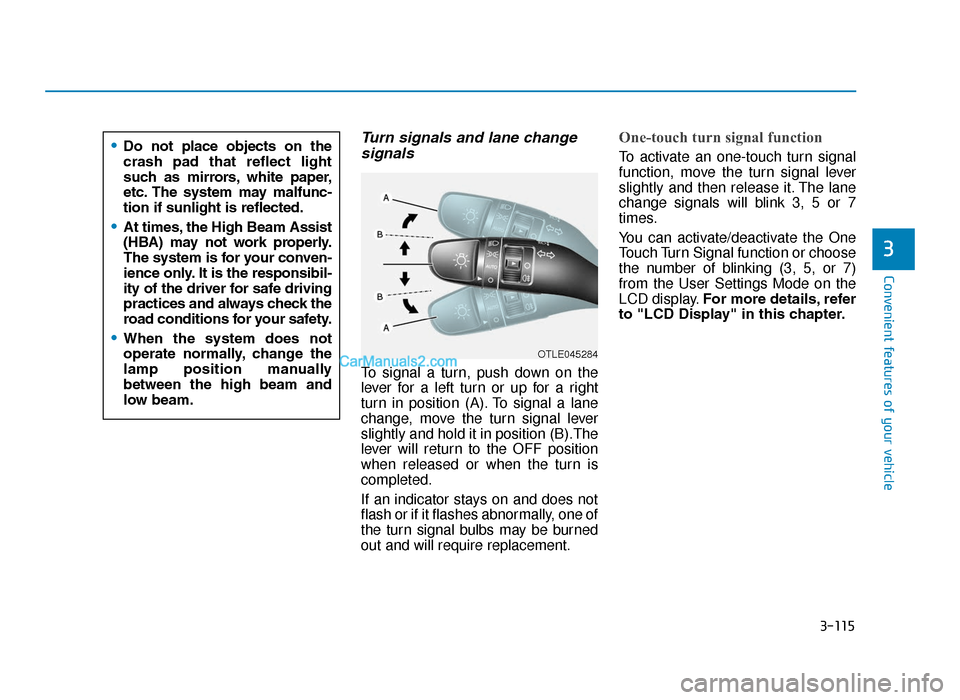
To signal a turn, push down on the
lever for a left turn or up for a right
turn in position (A). To signal a lane
change, move the turn signal lever
slightly and hold it in position (B).The
lever will return to the OFF position
when released or when the turn is
completed.
If an indicator stays on and does not
flash or if it flashes abnormally, one of
the turn signal bulbs may be burned
out and will require replacement.
One-touch turn signal function
To activate an one-touch turn signal
function, move the turn signal lever
slightly and then release it. The lane
change signals will blink 3, 5 or 7
times.
You can activate/deactivate the One
Touch Turn Signal function or choose
the number of blinking (3, 5, or 7)
from the User Settings Mode on the
LCD display. For more details, refer
to "LCD Display" in this chapter.
OTLE045284
•Do not place objects on the
crash pad that reflect light
such as mirrors, white paper,
etc. The system may malfunc-
tion if sunlight is reflected.
•At times, the High Beam Assist
(HBA) may not work properly.
The system is for your conven-
ience only. It is the responsibil-
ity of the driver for safe driving
practices and always check the
road conditions for your safety.
•When the system does not
operate normally, change the
lamp position manually
between the high beam and
low beam.
TLe UK 3b(110~).qxp 6/12/2018 2:35 PM Page 115
Page 210 of 685
3-118
Convenient features of your vehicle
If the driver gets out of the vehicle
through other doors (except dri-
ver's door), the battery saver func-
tion does not operate and the
headlamp delay function does not
turn off automatically. Therefore, It
causes the battery to be dis-
charged. In this case, make sure to
turn off the lamp before getting out
of the vehicle.
Daytime running light (DRL) (if equipped)
The Daytime Running Lights (DRL)
can make it easier for others to see
the front of your vehicle during the
day, especially after dawn and before
sunset.
The DRL system will turn the dedi-
cated lamp OFF when:
1. The headlights or front fog lights
are in the ON position.
2. The parking switch is in the ON position.
3. The engine is turned off.
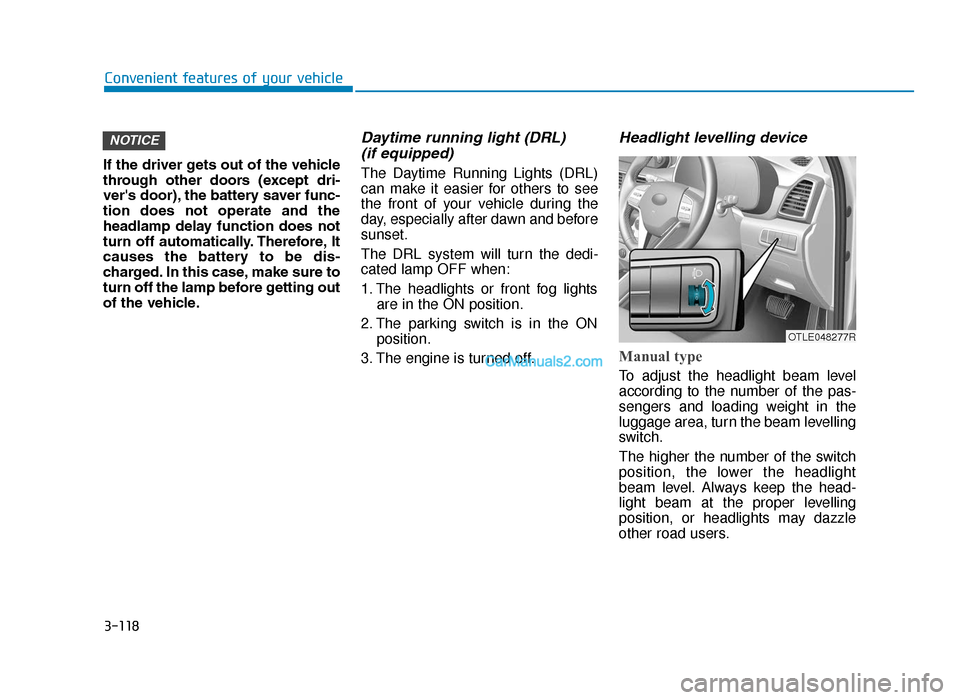
Headlight levelling device
Manual type
To adjust the headlight beam level
according to the number of the pas-
sengers and loading weight in the
luggage area, turn the beam levelling
switch.
The higher the number of the switch
position, the lower the headlight
beam level. Always keep the head-
light beam at the proper levelling
position, or headlights may dazzle
other road users.
NOTICE
OTLE048277R
TLe UK 3b(110~).qxp 6/12/2018 2:35 PM Page 118
Page 221 of 685
![Hyundai Tucson 2019 Owners Manual - RHD (UK, Australia) 3-129
Convenient features of your vehicle
3
DRIVER ASSIST SYSTEM
Parking Distance Warning
(Reverse) system (if equipped)
[B] : Sensor
The Parking Distance Warning
(Reverse) system assists the driver
d](/manual-img/35/19695/w960_19695-220.png "Hyundai Tucson 2019 Owners Manual - RHD (UK, Australia) 3-129
Convenient features of your vehicle
3
DRIVER ASSIST SYSTEM
Parking Distance Warning
(Reverse) system (if equipped)
[B] : Sensor
The Parking Distance Warning
(Reverse) system assists the driver
d")
3-129
Convenient features of your vehicle
3
DRIVER ASSIST SYSTEM
Parking Distance Warning
(Reverse) system (if equipped)
[B] : Sensor
The Parking Distance Warning
(Reverse) system assists the driver
during reverse movement of the vehi-
cle by chiming if any object is sensed
within the distance of 120 cm (50
inches) behind the vehicle.
This system is a supplemental sys-
tem that senses objects within the
range and location of the sensors, it
cannot detect objects in other areas
where sensors are not installed.
Operation of the ParkingDistance Warning (Reverse)system
Operating condition
• This system will activate when
backing up with the ignition switch
in the ON position. However, if
vehicle speed exceeds 3 mph (5
km/h), the system may not detect
objects.
• If vehicle speed exceeds 6 mph (10 km/h), the system will not warn
you even though objects are
detected.
• When more than two objects are sensed at the same time, the clos-
est one will be recognised first.
OTLE048601
•ALWAYS look around your
vehicle to make sure there are
not any objects or obstacles
before moving the vehicle in
any direction to prevent a col-
lision.
• Always pay close attention
when the vehicle is driven
close to objects, particularly
pedestrians, and especially
children.
• Be aware that some objects
may not be visible on the
screen or be detected by the
sensors, due to the objects
distance, size or material, all
of which can limit the effec-
tiveness of the sensor.
WARNING
TLe UK 3b(110~).qxp 6/12/2018 2:37 PM Page 129
Page 225 of 685
3-133
Convenient features of your vehicle
3
The Parking Distance Warning
(Reverse/Forward) system assists
the driver during movement of the
vehicle by chiming if any object is
sensed within the distance of 100 cm
(39 inches) in front and 120 cm (47
inches) behind the vehicle.
This system is a supplemental sys-
tem that senses objects within the
range and location of the sensors, it
cannot detect objects in other areas
where sensors are not installed.Operation of the ParkingDistance Warning(Reverse/Forward) systemOperating condition
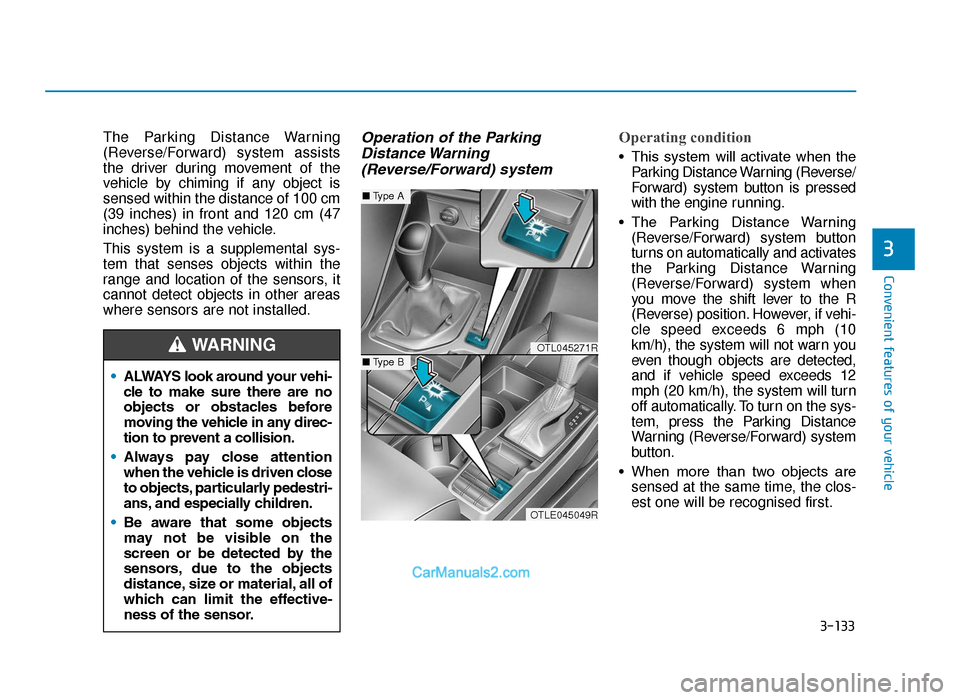
• This system will activate when the
Parking Distance Warning (Reverse/
Forward) system button is pressed
with the engine r unning.
• The Parking Distance Warning (Reverse/Forward) system button
turns on automatically and activates
the Parking Distance Warning
(Reverse/Forward) system when
you move the shift lever to the R
(Reverse) position. However, if vehi-
cle speed exceeds 6 mph (10
km/h), the system will not warn you
even though objects are detected,
and if vehicle speed exceeds 12
mph (20 km/h), the system will turn
off automatically. To turn on the sys-
tem, press the Parking Distance
Warning (Reverse/Forward) system
button.
• When more than two objects are sensed at the same time, the clos-
est one will be recognised first.
•
ALWAYS look around your vehi-
cle to make sure there are no
objects or obstacles before
moving the vehicle in any direc-
tion to prevent a collision.
• Always pay close attention
when the vehicle is driven close
to objects, particularly pedestri-
ans, and especially children.
• Be aware that some objects
may not be visible on the
screen or be detected by the
sensors, due to the objects
distance, size or material, all of
which can limit the effective-
ness of the sensor.
WARNINGOTL045271R
OTLE045049R
■ Type A
■Type B
TLe UK 3b(110~).qxp 6/12/2018 2:37 PM Page 133