Page 179 of 685
3-87
Convenient features of your vehicle
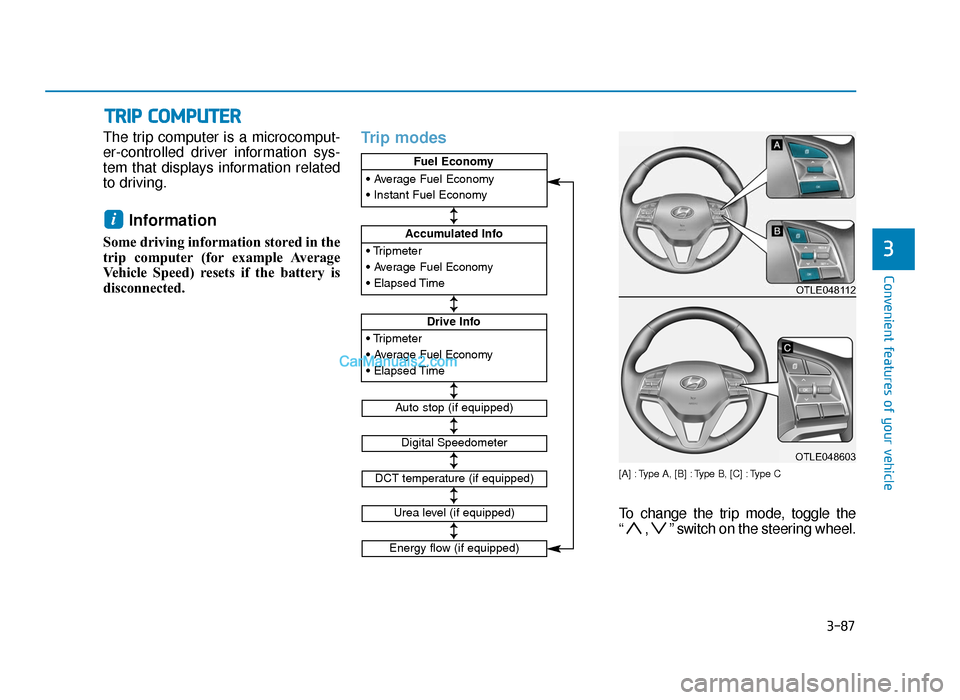
The trip computer is a microcomput-
er-controlled driver information sys-
tem that displays information related
to driving.
Information
Some driving information stored in the
trip computer (for example Average
Vehicle Speed) resets if the battery is
disconnected.
Trip modes
[A] : Type A, [B] : Type B, [C] : Type C
To change the trip mode, toggle the
“ , ” switch on the steering wheel.
i
TRIP COMPUTER
3• Tripmeter
• Average Fuel Economy
• Elapsed Time
Accumulated Info
• Tripmeter
• Average Fuel Economy
• Elapsed Time
Drive Info
• Average Fuel Economy
• Instant Fuel Economy
Fuel Economy
Digital Speedometer
Auto stop (if equipped)
DCT temperature (if equipped)
↕
↕
↕
↕
↕
↕
↕
Urea level (if equipped)
Energy flow (if equipped)
OTLE048112
OTLE048603
TLe UK 3a(~109).qxp 6/12/2018 2:27 PM Page 87
Page 357 of 685
5-33
Driving your vehicle
5
• For smooth launch uphill, pressdown the accelerator pedal
smoothly depending on the current
conditions.
• If you release your foot from the accelerator pedal at low vehicle
speed, you may feel strong engine
brake, which is similar to manual
transaxle.
• When driving downhill, you may use Sports Mode to downshift to a
lower gear in order to control your
speed without using the brake
pedal excessively.
• When you turn the engine on and off, you may hear clicking sounds
as the system goes through a self
test. This is a normal sound for the
Dual clutch transmission.LCD display for transmission
temperature and warning mes-
sage
Transmission temperaturegauge
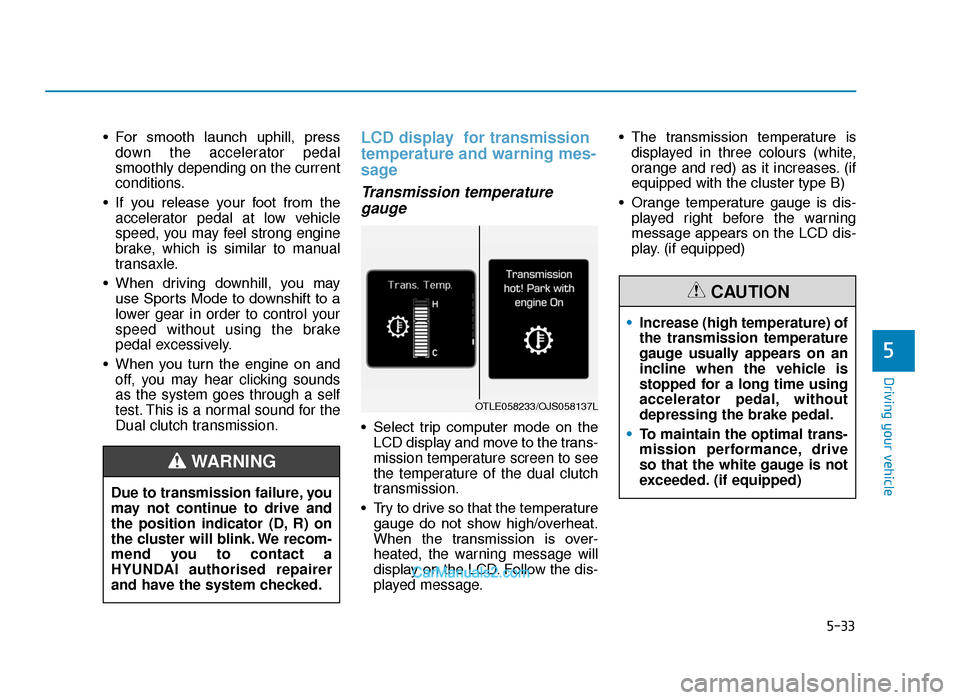
• Select trip computer mode on the
LCD display and move to the trans-
mission temperature screen to see
the temperature of the dual clutch
transmission.
• Try to drive so that the temperature gauge do not show high/overheat.
When the transmission is over-
heated, the warning message will
display on the LCD. Follow the dis-
played message. • The transmission temperature is
displayed in three colours (white,
orange and red) as it increases. (if
equipped with the cluster type B)
• Orange temperature gauge is dis- played right before the warning
message appears on the LCD dis-
play. (if equipped)
Due to transmission failure, you
may not continue to drive and
the position indicator (D, R) on
the cluster will blink. We recom-
mend you to contact a
HYUNDAI authorised repairer
and have the system checked.
WARNING
OTLE058233/OJS058137L
• Increase (high temperature) of
the transmission temperature
gauge usually appears on an
incline when the vehicle is
stopped for a long time using
accelerator pedal, without
depressing the brake pedal.
• To maintain the optimal trans-
mission performance, drive
so that the white gauge is not
exceeded. (if equipped)
CAUTION
TLe UK 5.qxp 5/10/2018 12:20 PM Page 33
Page 585 of 685
7-36
Maintenance
Reset items
Items should be reset after the bat-
tery has been discharged or the bat-
tery has been disconnected.
• Auto up/down window (See chapter 3)
• Sunroof (See chapter 3)
• Trip computer (See chapter 3)
• Climate control system (See chapter 3)
(Continued)
•
The negative battery cable
must be removed first and
installed last when the battery
is disconnected.
• Disconnect the battery charg-
er in the following order.
1. Turn off the battery charger
main switch.
2. Unhook the negative clamp from the negative battery
terminal.
3. Unhook the positive clamp from the positive battery
terminal.
When recharging the battery,
observe the following precau-
tions:
•Before performing mainte-
nance or recharging the bat-
tery, turn off all accessories
and stop the engine.
• Do not allow cigarettes,
sparks, or flame near the bat-
tery.
• Wear eye protection when
checking the battery during
charging.
• The battery must be removed
from the vehicle and placed in
an area with good ventilation.
• Watch the battery during
charging, and stop or reduce
the charging rate if the battery
cells begin gassing (boiling)
violently or if the temperature
of the electrolyte of any cell
exceeds 49°C (120°F).
(Continued)
WARNING
TLe UK 7.qxp 5/10/2018 1:34 PM Page 36
Page 684 of 685
 I-11
I
Index
Sunvisor ......................................................................3-\
172
Surround View Monitor ..............................................3-137
Tailgate .................")
I-11
I
Index
Sunvisor ......................................................................3-\
172
Surround View Monitor ..............................................3-137
Tailgate ........................................................................\
.3-47Non-power tailgate ....................................................3-47
Power tailgate ............................................................3-49
Smart tailgate .............................................................3-56
Theft-alarm system .......................................................3-20
Tilt steering / Telescope steering ..................................3-23
Towing ........................................................................\
..6-42 Emergency towing ....................................................6-44
Removable towing hook ...........................................6-43
Towing service ...........................................................6-42
Towing service..............................................................6-42
Trailer towing .............................................................5-169 Driving with a trailer ...............................................5-174
If you decide to pull a trailer? .................................5-170
Maintenance when towing a trailer .........................5-178
Trailer towing equipment.........................................5-173
Trip computer ...............................................................3-87 Trip modes .................................................................3-87 Tyre pressure monitoring system (TPMS) ...................6-10
Changing a tyre with TPMS ......................................6-14
Check tyre pressure ...................................................6-10
Low tyre pressure position telltale and tyre pressure telltale ........................................................6-12
Low tyre pressure telltale ..........................................6-12
TPMS (Tyre Pressure Monitoring System) malfunction indicator...............................................6-13
Tyre pressure monitoring system ...............................6-11
Tyre specification and pressure label ...........................8-15
Tyres and wheels ..........................................................7-37 Checking tyre inflation pressure ................................7-39
Low aspect ratio tyre .................................................7-48
Recommended cold tyre inflation pressures..............7-37
Tyre care ....................................................................7-37\
Tyre maintenance .......................................................7-43
Tyre replacement........................................................7-41
Tyre rotation...............................................................7-40
Tyre sidewall labelling...............................................7-43
Tyre traction ...............................................................7-43
Wheel alignment and tyre balance ............................7-41
Wheel replacement ...................................................7-43
Tyres and wheels ............................................................8-5
T
TLe UK Index.qxp 6/12/2018 3:27 PM Page 11