2019 HYUNDAI SONATA HYBRID key
[x] Cancel search: keyPage 33 of 546
H22
DDRRIIVV IINN GG TT HH EE HH YY BBRRIIDD //PP LLUU GG--IINN HH YY BBRRIIDD VV EEHH IICC LLEE
Starting the vehicle
1. Carry the smart key or leave it
inside the vehicle.
2. Make sure the parking brake is firmly applied.
3. Place the shift lever in P (Park). With the shift lever in N (Neutral),
you cannot start the vehicle.
4. Depress the brake pedal.
5. Press the Engine Start/Stop but- ton. If the hybrid system starts, the
" " indicator will come on and a
double chime can be heard.
Whether the engine is cold or warm, it should be started without
depressing the accelerator.
After following the start proce-
dures, " " indicator on the
instrument cluster will turn on.
For more information, please checkChapter 5. ECONOMICAL and SAFE OPERA- TION of Hybrid system
Drive smoothly. Accelerate at a
moderate rate and maintain a
steady cruising speed. Do not
make "jack-rabbit" starts. Do not
race between stoplights.
Avoid heavy traffic whenever pos-
sible. Always maintain a safe dis-
tance from other vehicles so you
can avoid unnecessary braking.
This also reduces brake wear out.
The regenerative brake generates energy when the vehicle deceler-
ates.
When the hybrid battery power is low, the hybrid system automatical-
ly recharges the hybrid battery.
When the engine is running with the shift lever in N (Neutral), the
hybrid system cannot generate
electricity. The hybrid battery can-
not recharge with the shift lever in N
(Neutral). Information
In the hybrid system, the engine auto-
matically runs and stops. When the
hybrid system operates, the " "
indicator is illuminated.
In the following situation, the engine
may operate automatically.
- When the engine is ready to run
- When the hybrid battery is being charged
- Depending on the temperature con- dition of the hybrid battery
i
To avoid serious injury, turn off
hybrid system and be sure " "
indicator is off before working
under hood. Engine may start
unexpectedly.
WARNING
Page 59 of 546

H48
SSAA FFEE TT YY PP RR EECCAA UU TTIIOO NNSS FF OO RR HH YY BBRRIIDD SS YY SSTT EEMM (( CC OO NNTT..))
(Continued)
When the vehicle is severely
damaged, remain a safe dis-
tance of 15 meter (50 feet) or
more between your vehicle and
other vehicles/flammables.When a submersion in water
occurs:
When your vehicle is flooded in
water, a high-voltage battery
may cause shock or fires. Thus,
turn the hybrid system OFF, take
the key in your possession and
escape to a safe place. Never
attempt physical contact with
your flooded vehicle.
Immediately contact an author-
ized HYUNDAI dealer and advise
them that a hybrid vehicle is
involved.
WARNING
If a small scale fire occurs, use
a fire extinguisher (ABC, BC)
that is meant for electrical fires.
If it is impossible to extinguish
the fire in the early stage,
remain a safe distance from the
vehicle and immediately call
911. Also, advise them that a
hybrid vehicle is involved. If the fire spreads to the high
voltage battery, large amount ofwater is needed to put out the
fire. Using small amount of
water or fire extinguishers not
meant for electrical fires could
cause serious injury or death
from electrical shocks.
WARNING
Page 137 of 546
Convenient features of your vehicle
Accessing your vehicle .........................................3-3Smart Key ............................................................................3-3
Immobilizer System ...........................................................3-8
Door locks ...............................................................3-9 Operating Door Locks from Outside the Vehicle ......3-9
Operating Door Locks from Inside the Vehicle .......3-10
Auto Door Lock/Unlock Features ...............................3-12
Child-Protector Rear Door locks ................................3-12
Theft-alarm system.............................................3-13
Driver position memory system .........................3-14 Storing Positions into Memory ....................................3-14
Easy Access Function ....................................................3-15
Steering wheel......................................................3-16 Electric Power Steering (EPS) .....................................3-16
Tilt Steering / Telescope Steering ..............................3-17
Heated Steering Wheel ..................................................3-18
Horn ....................................................................................3-18
Mirrors ...................................................................3-19 Inside Rearview Mirror ..................................................3-19
Side View Mirrors ...........................................................3-27
Reverse Parking Aid Function......................................3-30
Windows ................................................................3-31 Power Windows ...............................................................3-32 Panoramic sunroof ..............................................3-35
Sunshade ...........................................................................3-36
Sliding the sunroof .........................................................3-36
Tilting the sunroof ..........................................................3-37
Closing the sunroof ........................................................3-37
Resetting the sunroof ....................................................3-38
Exterior features .................................................3-39 Hood ...................................................................................3-39
Trunk ..................................................................................3-40
Smart Trunk ......................................................................3-43
Fuel Filler Door (Hybrid) ...............................................3-46
Fuel Filler Door (Plug-in hybrid).................................3-50
Instrument cluster................................................3-54 Instrument cluster control ............................................3-56
Gauges ...............................................................................3-57
Warning and indicator lights ........................................3-61
Warning messages ..........................................................3-75
LCD display ...........................................................3-85 LCD display control.........................................................3-85
Trip computer .......................................................3-93 Trip modes ........................................................................3-93
3
Page 139 of 546
3-3
Convenient features of your vehicle
3
AACCCCEE SSSSIINN GG YY OO UURR VV EEHH IICC LLEE
Smart Key
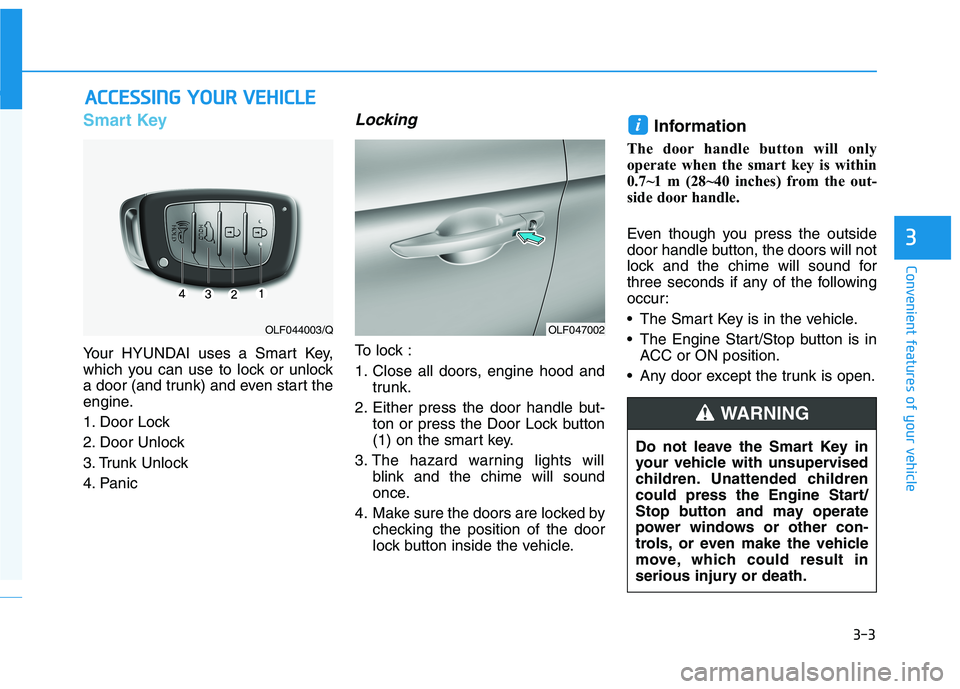
Your HYUNDAI uses a Smart Key,
which you can use to lock or unlock
a door (and trunk) and even start the
engine.
1. Door Lock
2. Door Unlock
3. Trunk Unlock
4. Panic
Locking
To lock :
1. Close all doors, engine hood and
trunk.
2. Either press the door handle but- ton or press the Door Lock button
(1) on the smart key.
3. The hazard warning lights will blink and the chime will sound
once.
4. Make sure the doors are locked by checking the position of the door
lock button inside the vehicle. Information
The door handle button will only
operate when the smart key is within
0.7~1 m (28~40 inches) from the out-
side door handle.
Even though you press the outside
door handle button, the doors will not
lock and the chime will sound for
three seconds if any of the following
occur:
• The Smart Key is in the vehicle.
The Engine Start/Stop button is in ACC or ON position.
Any door except the trunk is open.
i
OLF047002OLF044003/Q
Do not leave the Smart Key in
your vehicle with unsupervised
children. Unattended children
could press the Engine Start/
Stop button and may operate
power windows or other con-
trols, or even make the vehicle
move, which could result in
serious injury or death.
WARNING
Page 140 of 546
3-4
Convenient features of your vehicle
Unlocking your vehicle
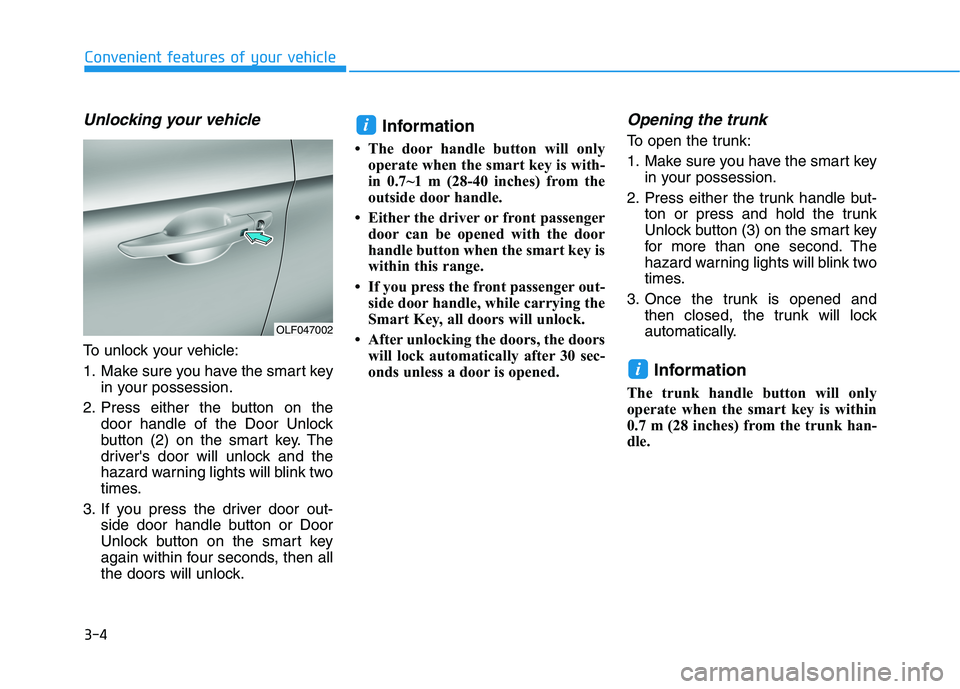
To unlock your vehicle:
1. Make sure you have the smart keyin your possession.
2. Press either the button on the door handle of the Door Unlock
button (2) on the smart key. The
driver's door will unlock and the
hazard warning lights will blink two
times.
3. If you press the driver door out- side door handle button or Door
Unlock button on the smart key
again within four seconds, then all
the doors will unlock. Information
The door handle button will only operate when the smart key is with-
in 0.7~1 m (28-40 inches) from the
outside door handle.
Either the driver or front passenger door can be opened with the door
handle button when the smart key is
within this range.
If you press the front passenger out- side door handle, while carrying the
Smart Key, all doors will unlock.
After unlocking the doors, the doors will lock automatically after 30 sec-
onds unless a door is opened.
Opening the trunk
To open the trunk:
1. Make sure you have the smart key in your possession.
2. Press either the trunk handle but- ton or press and hold the trunk
Unlock button (3) on the smart key
for more than one second. The
hazard warning lights will blink two
times.
3. Once the trunk is opened and then closed, the trunk will lock
automatically.
Information
The trunk handle button will only
operate when the smart key is within
0.7 m (28 inches) from the trunk han-
dle.
i
i
OLF047002
Page 141 of 546
3-5
Convenient features of your vehicle
3
Panic button
Press the Panic button (4) and hold
for more than one second. The horn
sounds and hazard warning lights
blink for about 30 seconds. To cancel
the panic mode, press any button on
the Smart Key.
Start-up
You can start the engine without
inserting the key.
For more information, refer to the
"Engine Start/Stop Button" sec-
tion in chapter 5.
To prevent damaging the smart key:
• Keep the smart key in a cool, dryplace to avoid damage or mal-
function. Exposure to moisture
or high temperature may cause
the internal circuit of the smart
key to malfunction which may
not be covered under warranty.
Avoid dropping or throwing the smart key.
Protect the smart key from extreme temperatures. Always have the smart key with
you when leaving the vehicle. If
the smart key is left near the vehi-
cle, the vehicle battery may be dis-
charged.
Mechanical key
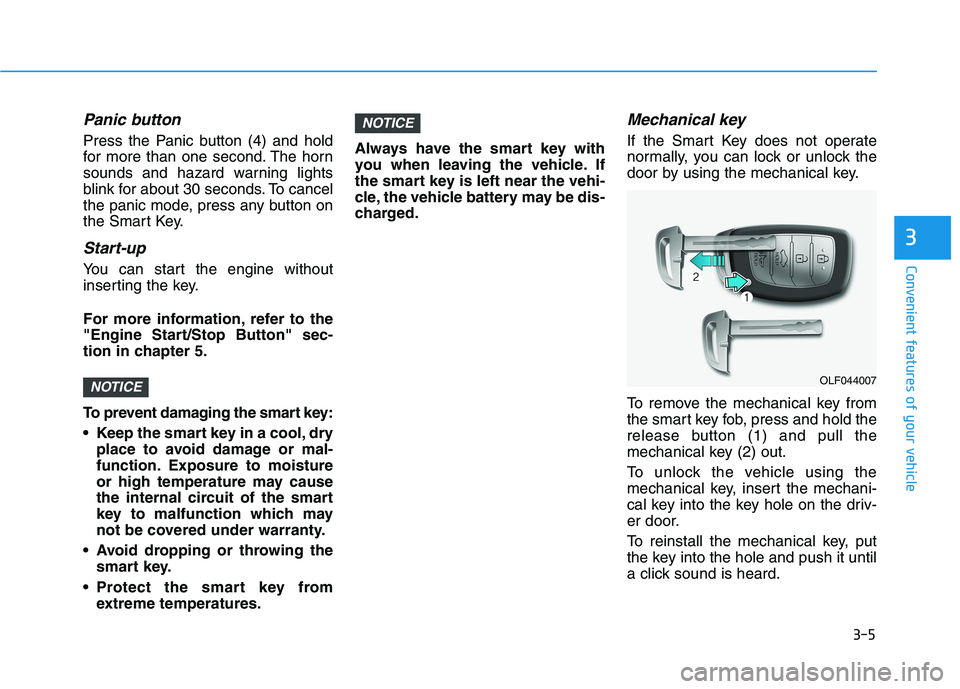
If the Smart Key does not operate
normally, you can lock or unlock the
door by using the mechanical key.
To remove the mechanical key from
the smart key fob, press and hold the
release button (1) and pull the
mechanical key (2) out.
To unlock the vehicle using the
mechanical key, insert the mechani-
cal key into the key hole on the driv-
er door.
To reinstall the mechanical key, put
the key into the hole and push it until
a click sound is heard.
NOTICE
NOTICEOLF044007
Page 142 of 546
3-6
Convenient features of your vehicle
Loss of a smart key
A maximum of two Smart Keys can
be registered to a single vehicle. If
you happen to lose your smart key,
you should immediately take the
vehicle and remaining keys to your
authorized HYUNDAI dealer or tow
the vehicle, if necessary.
Smart key precautions
The smart key will not work if any of
the following occur:
The smart key is close to a radiotransmitter such as a radio station
or an airport which can interfere
with normal operation of the trans-
mitter.
The smart key is near a mobile two way radio system or a cellular
phone.
Another vehicle's smart key is being operated close to your vehi-
cle.
When the smart key does not work
correctly, open and close the door
with the mechanical key. If you have
a problem with the smart key, contact
an authorized HYUNDAI dealer. If the smart key is in close proximity
to your mobile phone, the signal
could be blocked by your mobile
phone's normal operational signals.
This is especially important when the
phone is active such as making and
receiving calls, text messaging,
and/or sending/receiving emails.
When possible, avoid placing the
remote key and your mobile phone inthe same location such as a pants or
jacket pocket in order to avoid inter-
ference between the two devices.
Keep the smart key away from
electromagnetic materials that
blocks electromagnetic waves
to the key surface.
CAUTION
Page 143 of 546
3-7
Convenient features of your vehicle
3
Information
This device complies with Industry
Canada RSS-210 standard(s).
Operation is subject to the following
three conditions:
1. This device may not cause interfer- ence.
2. This device must accept any inter- ference, including interference that
may cause undesired operation of
the device.
3. Changes or modifications not expressly approved by the party
responsible for compliance could
void the user’s authority to operate
the device.Battery replacement
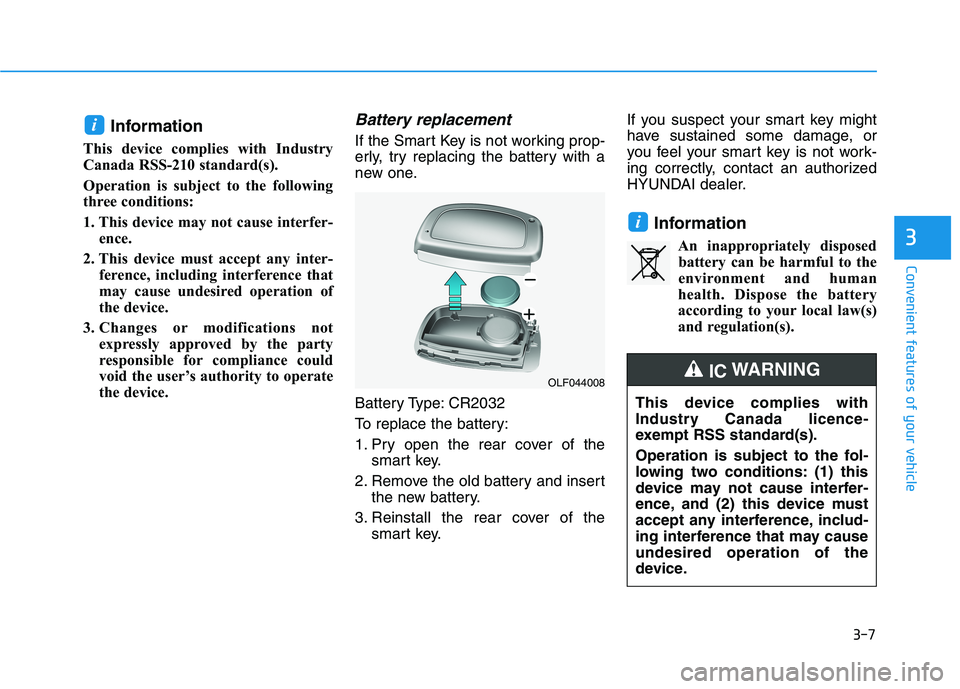
If the Smart Key is not working prop-
erly, try replacing the battery with a
new one.
Battery Type: CR2032
To replace the battery:
1. Pry open the rear cover of the smart key.
2. Remove the old battery and insert the new battery.
3. Reinstall the rear cover of the smart key. If you suspect your smart key might
have sustained some damage, or
you feel your smart key is not work-
ing correctly, contact an authorized
HYUNDAI dealer.
InformationAn inappropriately disposedbattery can be harmful to the
environment and human
health. Dispose the battery
according to your local law(s)
and regulation(s).
i
i
OLF044008
This device complies with
Industry Canada licence-
exempt RSS standard(s).
Operation is subject to the fol-
lowing two conditions: (1) this
device may not cause interfer-
ence, and (2) this device must
accept any interference, includ-
ing interference that may causeundesired operation of the
device.
IC WARNING