Page 197 of 557
3-108
Convenient features of your vehicle
The trip computer is a microcomput-
er-controlled driver information sys-
tem that displays information related
to driving.
Information
Some driving information stored in the
trip computer (for example Average
Vehicle Speed) resets if the battery is
disconnected.
Trip modes
To change the trip mode, toggle the
" , " switch on the steering
wheel.
i
T
T R
R I
IP
P
C
C O
O M
M P
PU
U T
TE
ER
R
OTMA048414
Accumulated Info
Drive Info
Fuel Economy
Digital Speedometer
Smart Shift
Page 199 of 557
3-110
Convenient features of your vehicle
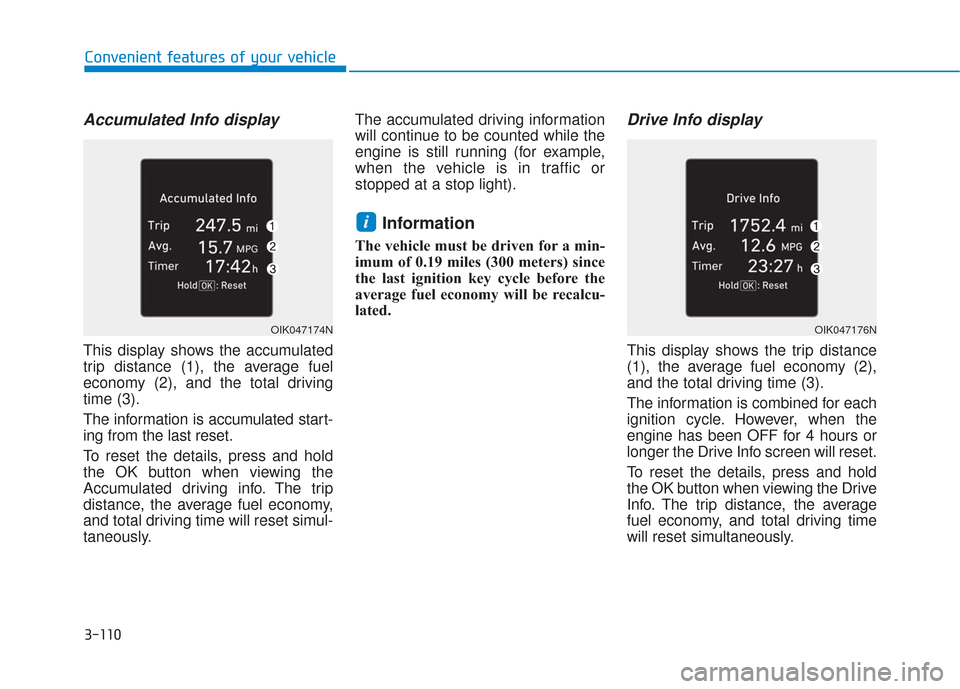
Accumulated Info display
This display shows the accumulated
trip distance (1), the average fuel
economy (2), and the total driving
time (3).
The information is accumulated start-
ing from the last reset.
To reset the details, press and hold
the OK button when viewing the
Accumulated driving info. The trip
distance, the average fuel economy,
and total driving time will reset simul-
taneously.The accumulated driving information
will continue to be counted while the
engine is still running (for example,
when the vehicle is in traffic or
stopped at a stop light).
Information
The vehicle must be driven for a min-
imum of 0.19 miles (300 meters) since
the last ignition key cycle before the
average fuel economy will be recalcu-
lated.
Drive Info display
This display shows the trip distance
(1), the average fuel economy (2),
and the total driving time (3).
The information is combined for each
ignition cycle. However, when the
engine has been OFF for 4 hours or
longer the Drive Info screen will reset.
To reset the details, press and hold
the OK button when viewing the Drive
Info. The trip distance, the average
fuel economy, and total driving time
will reset simultaneously.
i
OIK047174NOIK047176N
Page 468 of 557
B
BR
RA
A K
KE
E
F
F L
LU
U I
ID
D
Checking the Brake Fluid
Level
Check the fluid level in the reservoir
periodically. The fluid level should be
between MAX and MIN marks on the
side of the reservoir.
Before removing the reservoir cap
and adding brake fluid, clean the
area around the reservoir cap thor-
oughly to prevent brake fluid contam-
ination. If the level is low, add the specified
brake fluid to the MAX level. The level
will fall with accumulated mileage.
This is a normal condition associated
with the wear of the brake linings. If
the fluid level is excessively low, have
the brake system checked by an
authorized HYUNDAI dealer.
Do not allow brake fluid to con-
tact the vehicle's body paint, as
paint damage will result.
Brake fluid, which has been exposed to open air for an
extended time should NEVER be
used as its quality cannot be
guaranteed. It should be dis-
posed of properly.
Do not use the wrong kind of brake fluid. A few drops of min-
eral based oil, such as engine
oil, in your brake system can
damage brake system parts.
Information
Use only the specified brake fluid
(refer to "Recommended Lubricants
and Capacities" in chapter 8).
i
NOTICE
If the brake system requires fre-
quent additions of fluid this
could indicate a leak in the
brake system. Have the vehicle
inspected by an authorized
HYUNDAI dealer.
WARNING
Do not allow brake fluid to come
in contact with your eyes. If
brake fluid comes in contact
with your eyes, flush your eyes
with clean water for at least 15
minutes and get immediate
medical attention.
WARNING
ODM072009
Maintenance
7-26
Page 555 of 557

I-12
Tachometer ......................................................................3-\
70
Theft-alarm system .........................................................3-24
Tilt steering/Telescope steering ......................................3-29
Tire chains .....................................................................5-1\
29
Tire pressure monitoring system (TPMS) ........................6-8
Tire rotation ....................................................................7-39\
Tire specification and pressure label ..............................8-11
Tires and wheels .............................................................7-37Check tire inflation pressure ......................................7-39
Compact spare tire replacement .................................7-42
Recommended cold tire inflation pressures ...............7-38
Tire care ......................................................................7-\
37
Tire maintenance ........................................................7-43
Tire replacement .........................................................7-41
Tire rotation ................................................................7-39
Tire sidewall labeling .................................................7-43
Tire terminology and definitions ................................7-47
Tire traction ................................................................7-42
Wheel alignment and tire balance ..............................7-40
Wheel replacement .............................................7-42, 8-5
Towing ........................................................................\
....6-21
Trailer towing................................................................5-133 Reference weight and distance .................................5-135
Tray ........................................................................\
.......3-166 Trip computer................................................................3-108
Accumulated Info display ........................................3-110
Average fuel economy..............................................3-109
Digital speedometer ..................................................3-111
Driving Info display .................................................3-110
Instant fuel economy ................................................3-109
Smart shift.................................................................3-111
Turn signals ...................................................................3-119
USB charger ..................................................................3-173
User settings mode..........................................................3-97
Vanity mirror lamp........................................................3-124
Vehicle break-in process ...................................................F-9
Vehicle certification label ...............................................8-10
Vehicle identification number (VIN) ..............................8-10
Vehicle load limit ..........................................................5-141 Tire loading information label..................................5-142
Vehicle modification .........................................................F-9
Vehicle Stability Management (VSM)............................5-35
Vehicle weight and luggage volume .................................8-6
Index
T
U
V
