2019 Hyundai Santa Fe Audio system
[x] Cancel search: Audio systemPage 360 of 557
5-86
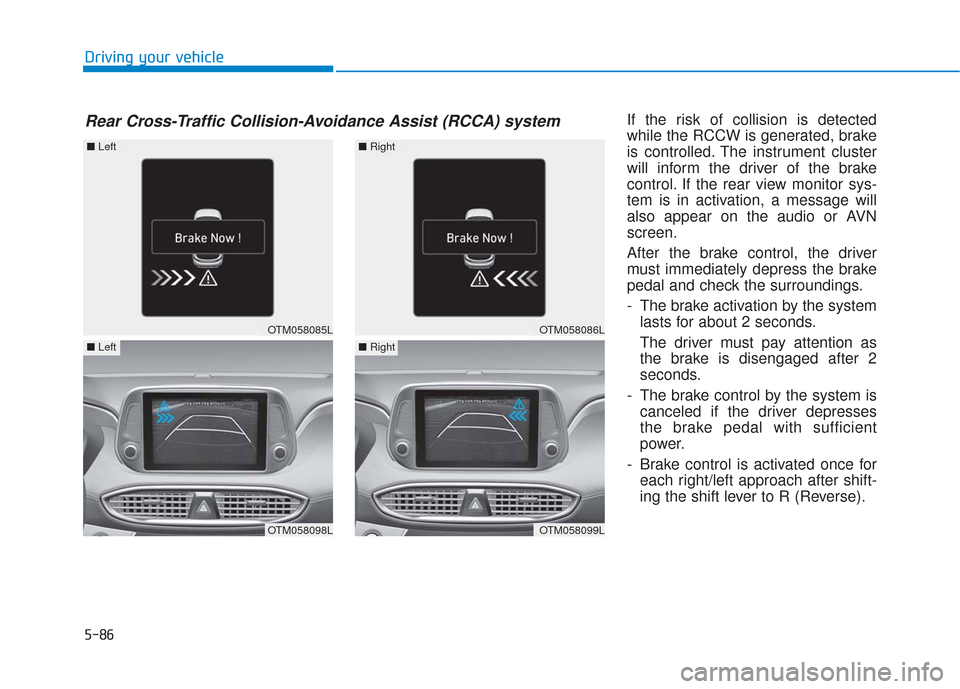
Driving your vehicleIf the risk of collision is detected
while the RCCW is generated, brake
is controlled. The instrument cluster
will inform the driver of the brake
control. If the rear view monitor sys-
tem is in activation, a message will
also appear on the audio or AVN
screen.
After the brake control, the driver
must immediately depress the brake
pedal and check the surroundings.
- The brake activation by the systemlasts for about 2 seconds.
The driver must pay attention as
the brake is disengaged after 2
seconds.
- The brake control by the system is canceled if the driver depresses
the brake pedal with sufficient
power.
- Brake control is activated once for each right/left approach after shift-
ing the shift lever to R (Reverse).
Rear Cross-Traffic Collision-Avoidance Assist (RCCA) system
OTM058085L
■ Left
OTM058098L
■Left
OTM058086L
■Right
OTM058099L
■Right
Page 361 of 557
5-87
Driving your vehicle
5
The brake control may not operate
properly according to the status of
the ESC (Electronic Stability
Control). The same warning mes-
sage is displayed on the instrument
cluster for this case also.
- When the ESC (Electronic StabilityControl) warning light is on.
- When the ESC (Electronic Stability Control) is engaged in a different
function.
The driver should always use
extreme caution while operat-
ing the vehicle, whether or not
the warning light on the outer
side view mirror illuminates or
there is a warning alarm.
Playing the vehicle audio sys-
tem at high volume may offset
the system's warning sounds.
If any other warning sound
such as seat belt warning
chime is already generated,
the Rear Cross-Traffic Collision
Warning system warning may
not sound.
Drive safely even though the
vehicle is equipped with a
Rear Cross-Traffic Collision
Warning system and Rear
Cross-Traffic Collision-Avoidance
Assist system. Do not solely
rely on the system but check
your surrounding when back-
ing the vehicle up.
The driver is responsible for
accurate brake control.
Always pay extreme caution
while driving. The Rear Cross-
Traffic Collision Warning sys-
tem and Rear Cross-Traffic
Collision-Avoidance Assist
system may not operate prop-
erly or unnecessarily operate
in accordance with your driv-
ing situations.
The Rear Cross-Traffic
Collision-Avoidance Assist
system is not a substitute for
safe driving practices, but a
convenience function only. It
is the responsibility of the
driver to always drive cau-
tiously to prevent unexpected
and sudden situations from
occurring. Pay attention to the
road conditions at all times.
WARNING
When the operation condition
of the Rear Cross-Traffic
Collision Warning system is
satisfied, the warning will
occur every time a vehicle
approaches the side or rear
of your stopped (0 mph vehi-
cle speed) vehicle.
The system's warning or
brake may not operate proper-
ly if the left or right of your
vehicle's rear bumper is
blocked by a vehicle or obsta-
cle.
CAUTION
Page 368 of 557
5-94
Driving your vehicle
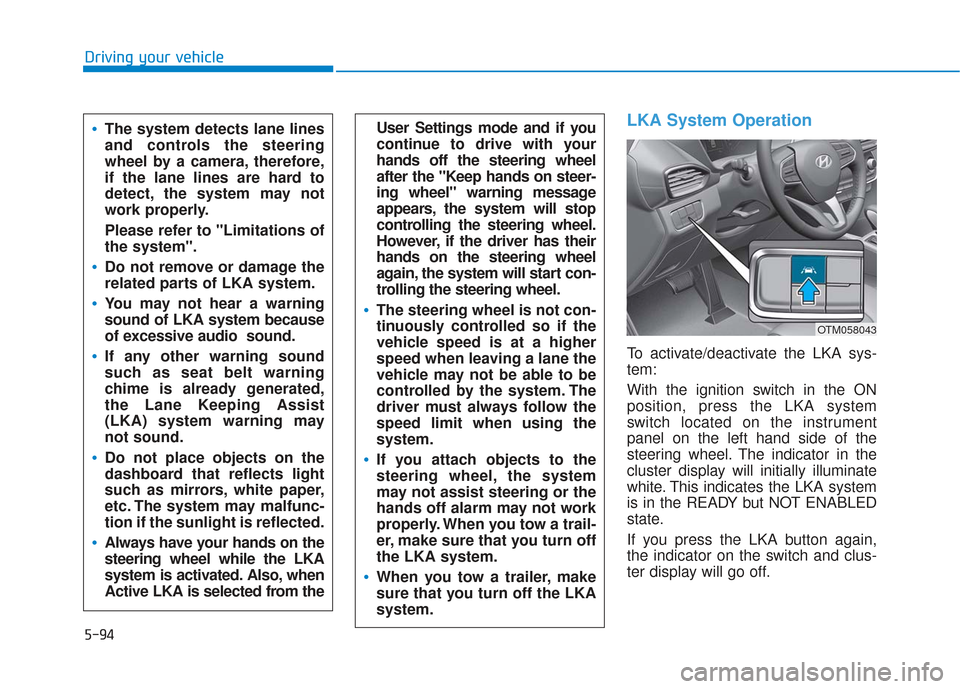
LKA System Operation
To activate/deactivate the LKA sys-
tem:
With the ignition switch in the ON
position, press the LKA system
switch located on the instrument
panel on the left hand side of the
steering wheel. The indicator in the
cluster display will initially illuminate
white. This indicates the LKA system
is in the READY but NOT ENABLED
state.
If you press the LKA button again,
the indicator on the switch and clus-
ter display will go off.
User Settings mode and if you
continue to drive with your
hands off the steering wheel
after the "Keep hands on steer-
ing wheel" warning message
appears, the system will stop
controlling the steering wheel.
However, if the driver has their
hands on the steering wheel
again, the system will start con-
trolling the steering wheel.
The steering wheel is not con-
tinuously controlled so if the
vehicle speed is at a higher
speed when leaving a lane the
vehicle may not be able to be
controlled by the system. The
driver must always follow the
speed limit when using the
system.
If you attach objects to the
steering wheel, the system
may not assist steering or the
hands off alarm may not work
properly. When you tow a trail-
er, make sure that you turn off
the LKA system.
When you tow a trailer, make
sure that you turn off the LKA
system.
The system detects lane lines
and controls the steering
wheel by a camera, therefore,
if the lane lines are hard to
detect, the system may not
work properly.
Please refer to "Limitations of
the system".
Do not remove or damage the
related parts of LKA system.
You may not hear a warning
sound of LKA system because
of excessive audio sound.
If any other warning sound
such as seat belt warning
chime is already generated,
the Lane Keeping Assist
(LKA) system warning may
not sound.
Do not place objects on the
dashboard that reflects light
such as mirrors, white paper,
etc. The system may malfunc-
tion if the sunlight is reflected.
Always have your hands on the
steering wheel while the LKA
system is activated. Also, when
Active LKA is selected from the
OTM058043
Page 379 of 557

5-105
Driving your vehicle
5
The Driver Attention Warning sys-
tem utilizes the camera sensor on
the front windshield for its opera-
tion. To keep the camera sensor in
the best condition, you should
observe the followings:
Do not disassemble the cameratemporarily to tint the window or
to attach any types of coatings
and accessories. If you disas-
semble a camera and assemble
it again, take your vehicle to an
authorized HYUNDAI dealer and
have the system checked for cal-
ibration.
NEVER install any accessories or stickers on the front wind-
shield, nor tint the front wind-
shield.
NEVER locate any reflective objects (i.e. white paper, mirror)
over the dashboard. Any light
reflection may cause a malfunc-
tion of the Driver Attention Alert
(DAW) system.
Pay extreme caution to keep the camera sensor out of water.
NOTICE
The Driver Attention Warning
(DAW) system may not properly
operate with limited alerting in
the following situations:
The lane detection perform-
ance is limited. (For more
details, refer to "Lane Keeping
Assist (LKA) system" in this
chapter.)
The vehicle is violently driven
or is abruptly turned for obsta-
cle avoidance (e.g. construc-
tion area, other vehicles, fallen
objects, bumpy road).
Forward drivability of the vehi-
cle is severely undermined
(possibly due to wide variation
in tire pressures, uneven tire
wear-out, toe-in/toe-out align-
ment).
The vehicle drives on a curvy
road.
The vehicle drives on a bumpy
road.
The vehicle drives through a
windy area.
The vehicle is controlled by the
following driving assist sys-
tems:
- Lane Keeping Assist (LKA)system
- Forward Collision-Avoidance Assist (FCA) system
- Smart Cruise Control (SCC) system
CAUTION
Playing the vehicle audio sys-
tem at high volume may offset
the Driver Attention Warning
(DAW) system warning sounds.
CAUTION
Page 387 of 557
5-113
Driving your vehicle
5
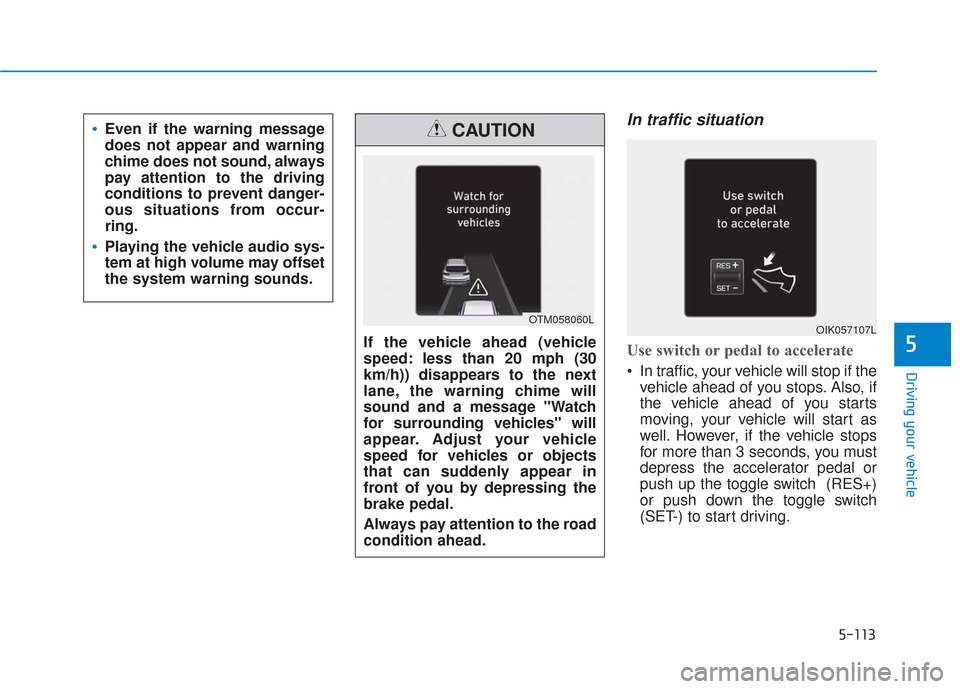
In traffic situation
Use switch or pedal to accelerate
In traffic, your vehicle will stop if thevehicle ahead of you stops. Also, if
the vehicle ahead of you starts
moving, your vehicle will start as
well. However, if the vehicle stops
for more than 3 seconds, you must
depress the accelerator pedal or
push up the toggle switch (RES+)
or push down the toggle switch
(SET-) to start driving.
Even if the warning message
does not appear and warning
chime does not sound, always
pay attention to the driving
conditions to prevent danger-
ous situations from occur-
ring.
Playing the vehicle audio sys-
tem at high volume may offset
the system warning sounds.
If the vehicle ahead (vehicle
speed: less than 20 mph (30
km/h)) disappears to the next
lane, the warning chime will
sound and a message "Watch
for surrounding vehicles" will
appear. Adjust your vehicle
speed for vehicles or objects
that can suddenly appear in
front of you by depressing the
brake pedal.
Always pay attention to the road
condition ahead.
CAUTION
OTM058060LOIK057107L
Page 478 of 557
By jump starting
After a jump start from a good bat-
tery, drive the vehicle for at least 30
minutes or operate at idle for at least
60 minutes before it is shutoff.
Alternatively you may visit a dealer
for charge and battery test.
The vehicle may not restart if you
shut it off before the battery had a
chance to adequately recharge. See
"Jump Starting" in chapter 6 for more
information on jump starting proce-
dures.
Information
An inappropriately disposedbattery can be harmful to
the environment and human
health. Dispose of the bat-
tery according to your local
law(s) or regulations.
Reset Features
The following items may need to be
reset after the battery has been dis-
charged or the battery has been dis-
connected. See chapter 3 or 4 for:
• Power Windows
Driver Position Memory System
Trip Computer
Climate Control System
Clock
Audio System
Sunroof
i
Maintenance
7-36
Page 545 of 557

I-2
AC inverter ...................................................................3-171\
Air bag warning labels ....................................................2-71
Air bags ........................................................................\
...2-49Additional safety precautions .....................................2-71
Air bag collision sensors ............................................2-65
Air bag inflation conditions .......................................2-67
Air bag non-inflation conditions ................................2-68
Air bag warning labels ...............................................2-71
Curtain air bags ..........................................................2-53
Driver's air bag ...........................................................2-51
How does the air bags system operate? .....................2-54
Occupant Classification System (OCS) .....................2-60
Passenger's front air bag.............................................2-51
Side air bags ...............................................................2-52
SRS Care ....................................................................2-70\
SRS components and functions..................................2-54
SRS warning light ......................................................2-55
What to expect after an air bag inflates .....................2-59
Why didn't my air bag go off in a collision ...............2-65
Air cleaner filter replacement .........................................7-27
Air conditioning system specification ..............................8-6
Air ventilation seats ........................................................2-22
Alarm system ..................................................................3-24
All Wheel Drive (AWD) .................................................5-40
Antenna ........................................................................\
.....4-2
Anti-lock Brake System (ABS) ......................................5-30 Appearance care..............................................................7-76
Exterior care ...............................................................7-76
Interior care ................................................................7-81
Armrest ........................................................................\
...2-16
Ashtray ........................................................................\
..3-168
Audio / Video / Navigation system ..................................4-4
Auto defogging system .................................................3-161
Auto hold ........................................................................\
5-27
Auto light position ........................................................3-114
Automatic climate control system ................................3-147
Automatic transmission ..................................................5-14 Good driving practices ...............................................5-18
Manual shift mode......................................................5-16
Shift lock system ........................................................5-17
Shift-lock release ........................................................5-17
Transmission ranges ...................................................5-15
Automatic ventilation ...................................................3-164
AUX, USB and iPod
®port ...............................................4-2
Battery ........................................................................\
.....7-33 Battery recharging ......................................................7-35
Battery saver function ...................................................3-120
Before driving ...................................................................5-4
Blade type fuse ...............................................................7-54
Blind-Spot Collision Warning (BCW) system ...............5-68
Blind-Spot Collision-Avoidance Assist (BCA) system ..5-68
Bluetooth
®Wireless Technology ......................................4-4
Index
A
B
Page 552 of 557
I-9
Maintenance under severe usage conditions (2.0 T-GDI) ............................................7-16
Maintenance under severe usage conditions (2.4 GDI) ..............................................7-11
Normal maintenance schedule (2.0 T-GDI) ...............7-13
Normal maintenance schedule (2.4 GDI) ....................7-8
Owner maintenance ......................................................7-5
Scheduled maintenance services ..................................7-7
Tire maintenance ........................................................7-43
Maintenance services ........................................................7-4
Manual climate control system .....................................3-138
Master warning mode .....................................................3-96
Mirrors ........................................................................\
....3-30 Adjusting the side view mirrors .................................3-41
Day/night rearview mirror..........................................3-31
Electrochromic mirror (ECM)....................................3-32
Folding the side view mirrors ....................................3-41
Inside rearview mirror ................................................3-30
Reverse parking aid function .....................................3-41
Side view mirrors .......................................................3-40
Moonroof, see sunroof ....................................................3-47
Multi fuse ........................................................................\
7-54
Multimedia system............................................................4-2 Antenna ........................................................................\
4-2
Audio / Video / Navigation system ..............................4-4
AUX, USB and iPod
®port ..........................................4-2
Bluetooth®Wireless Technology..................................4-4
Steering wheel audio controls ......................................4-3 NORMAL mode .............................................................5-51
Occupant Classification System (OCS)..........................2-60
Odometer........................................................................\
.3-72
Oil (Engine) ....................................................................7-21\
One touch turn signal function .....................................3-120
Outside temperature gauge .............................................3-72
Owner maintenance ..........................................................7-5
Panoramic sunroof, see sunroof......................................3-47
Parking Distance Warning (Reverse) system ...............3-133
Parking lamp position ...................................................3-115
Passenger's front air bag .................................................2-51
Power brakes ...................................................................5-20
Power liftgate ..................................................................3-54
Power outlet ..................................................................3-170
Power window lock switch .............................................3-46
Pre-tensioner seat belt .....................................................2-31
Emergency fastening device.......................................2-31
Retractor pretensioner ................................................2-31
Puddle lamp ..................................................................3-124I
Index
N
O
P