Page 172 of 682
3-81
Convenient features of your vehicle
3
Light ON Indicator
Light
This indicator light illuminates:
• When the tail lights or headlamps
are on.
Front Fog Indicator
Light (if equipped)
This indicator light illuminates:
• When the front fog lights are on.
Rear Fog Indicator
Light (if equipped)
This indicator light illuminates:
• When the rear fog lights are on.
LED Headlamp Warning
Light (if equipped)
This warning light illuminates:
• When you turn the ignition switch
or the Engine Start/Stop button to
the ON position.
• When there is a malfunction with
the LED headlamp.
In this case, we recommend that you
have the vehicle inspected by an a
HYUNDAI authorised repairer.
This warning light blinks:
When there is a malfunction with a
LED headlamp related part.
In this case, we recommend that you
have the vehicle inspected by an a
HYUNDAI authorised repairer.
Continuous driving with the LED
Headlamp Warning Light on or
blinking can reduce LED head-
lamp life.
4 Wheel Drive (4WD)
LOCK Indicator Light
(if equipped)
This indicator light illuminates:
• Once you set the ignition switch or
Engine Start/Stop Button to the ON
position.
- It illuminates for approximately 3
seconds and then goes off.
• When you select 4WD Lock mode
by pressing the 4WD LOCK button.
- The 4WD LOCK mode is to
increase the drive power when
driving on wet pavement, snow
covered roads and/or off-road.
Do not use 4WD LOCK mode on
dry paved roads or highway, it can
cause noise, vibration or damage
of 4WD related parts.
NOTICE
NOTICE
Page 178 of 682
3-87
Convenient features of your vehicle
3
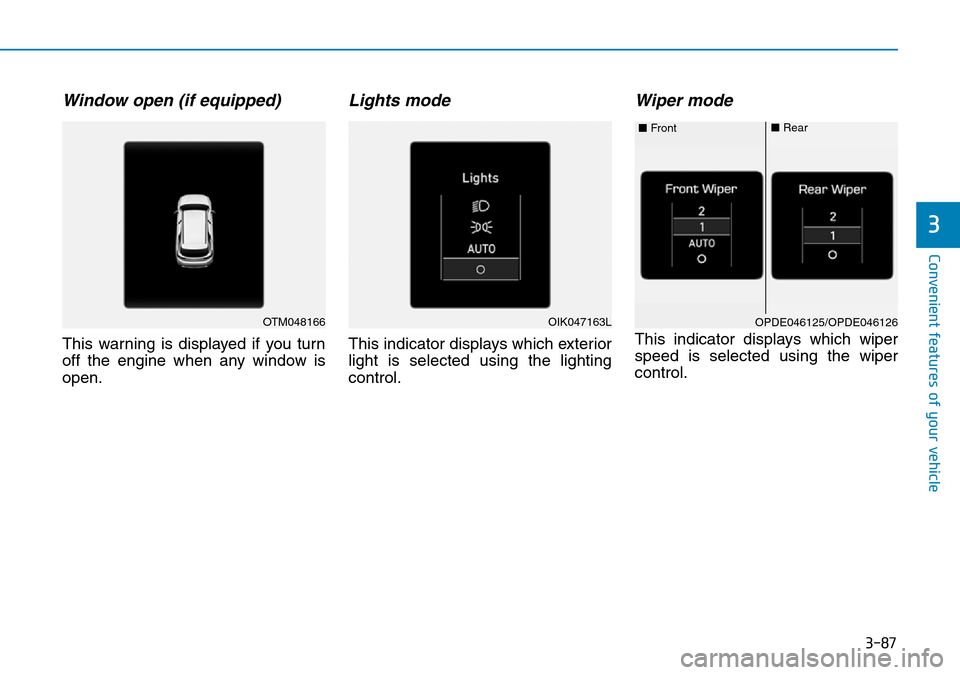
Window open (if equipped)
This warning is displayed if you turn
off the engine when any window is
open.
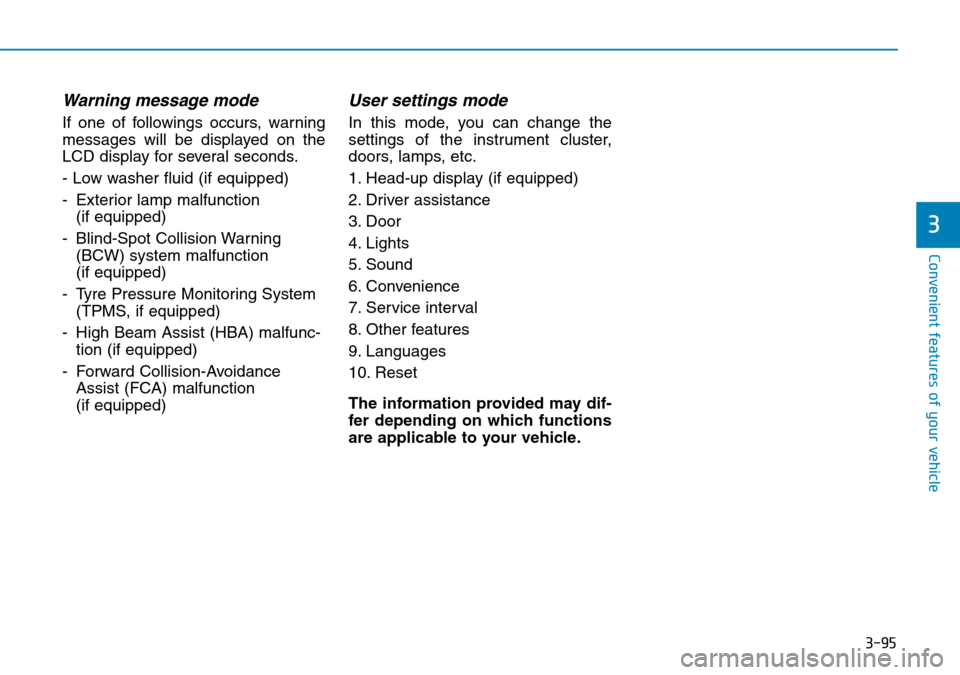
Lights mode
This indicator displays which exterior
light is selected using the lighting
control.
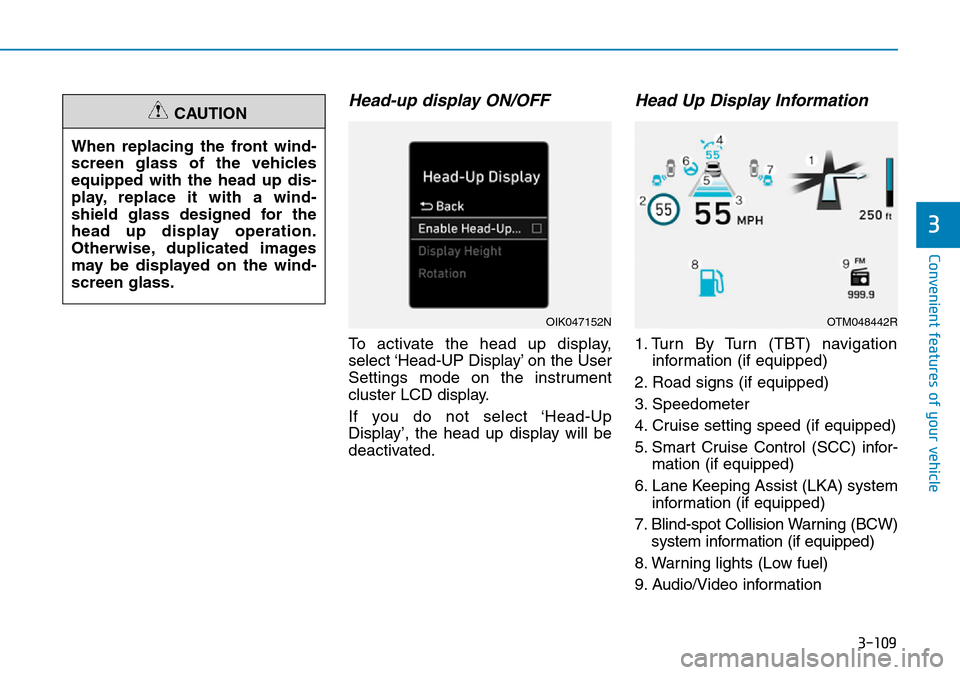
Wiper mode
This indicator displays which wiper
speed is selected using the wiper
control.
OTM048166OPDE046125/OPDE046126 ■Front■RearOIK047163L
Page 181 of 682
3-90
Convenient features of your vehicle
Check DAW (Driver Attention
Warning) system (if equipped)
This warning message is displayed if
there is a problem with the Driver
Attention Warning (DAW) system. We
recommend that you have the vehicle
inspected by a HYUNDAI authorised
repairer.
For more information, refer to
"Driver Attention Warning (DAW)
system" in chapter 5.
Check FCW (Forward Collision
Warning) system (if equipped)
This warning message is displayed if
there is a problem with the Forward
Collision Warning (FCW) system. We
recommend that you have the vehicle
inspected by a HYUNDAI authorised
repairer.
For more information, refer to
"Forward Collision Warning (FCW)
System" in chapter 5.
Check LKA (Lane Keeping
Assist) system (if equipped)
This warning message is displayed if
there is a problem with the Lane
Keeping Assist (LKA) system. We
recommend that you have the vehicle
inspected by a HYUNDAI authorised
repairer.
For more information, refer to
"Lane Keeping Assist (LKA) sys-
tem" in chapter 5.
Check exhaust system
(if equipped)
This warning message illuminates if
the DPF or GPF system has a mal-
function. at this time, DPF or GPF
warning light also blinks.
In this case, we recommend that you
have the DPF or GPF system checked
by a HYUNDAI authorised repairer.
DPF : Diesel Particulate Filter
GPF : Gasoline (Petrol) Particulate
Filter
For more details, refer to "Warning
lights" in this chapter.
Low urea (for diesel engine)
This warning message illuminates if
the urea solution level in the urea
solution tank is nearly empty.
- When the SCR warning light is illu-
minates.
Refill urea solution as soon as possi-
ble.
For more details, refer to "Low
urea solution warning message"
in the chapter 7.
Check urea system
(for diesel engine)
This warning message illuminates if
the urea system has a malfunction.
In this case, we recommend that you
have the urea system checked by a
HYUNDAI authorised repairer.
For more details, refer to "Low
urea solution warning message"
in the chapter 7.
Page 186 of 682
3-95
Convenient features of your vehicle
3
Warning message mode
If one of followings occurs, warning
messages will be displayed on the
LCD display for several seconds.
- Low washer fluid (if equipped)
- Exterior lamp malfunction
(if equipped)
- Blind-Spot Collision Warning
(BCW) system malfunction
(if equipped)
- Tyre Pressure Monitoring System
(TPMS, if equipped)
- High Beam Assist (HBA) malfunc-
tion (if equipped)
- Forward Collision-Avoidance
Assist (FCA) malfunction
(if equipped)
User settings mode
In this mode, you can change the
settings of the instrument cluster,
doors, lamps, etc.
1. Head-up display (if equipped)
2. Driver assistance
3. Door
4. Lights
5. Sound
6. Convenience
7. Service interval
8. Other features
9. Languages
10. Reset
The information provided may dif-
fer depending on which functions
are applicable to your vehicle.
Page 192 of 682
3-101
Convenient features of your vehicle
3
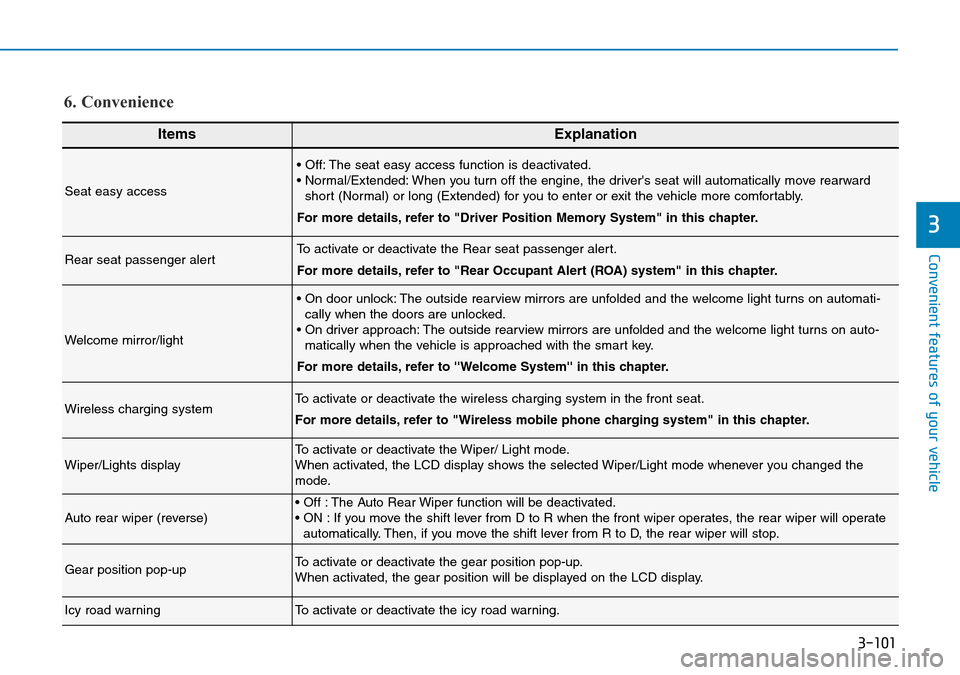
ItemsExplanation
Seat easy access
• Off: The seat easy access function is deactivated.
• Normal/Extended: When you turn off the engine, the driver's seat will automatically move rearward
short (Normal) or long (Extended) for you to enter or exit the vehicle more comfortably.
For more details, refer to "Driver Position Memory System" in this chapter.
Rear seat passenger alertTo activate or deactivate the Rear seat passenger alert.
For more details, refer to "Rear Occupant Alert (ROA) system" in this chapter.
Welcome mirror/light
• On door unlock: The outside rearview mirrors are unfolded and the welcome light turns on automati-
cally when the doors are unlocked.
• On driver approach: The outside rearview mirrors are unfolded and the welcome light turns on auto-
matically when the vehicle is approached with the smart key.
For more details, refer to ''Welcome System'' in this chapter.
Wireless charging systemTo activate or deactivate the wireless charging system in the front seat.
For more details, refer to "Wireless mobile phone charging system" in this chapter.
Wiper/Lights displayTo activate or deactivate the Wiper/ Light mode.
When activated, the LCD display shows the selected Wiper/Light mode whenever you changed the
mode.
Auto rear wiper (reverse)• Off : The Auto Rear Wiper function will be deactivated.
• ON : If you move the shift lever from D to R when the front wiper operates, the rear wiper will operate
automatically. Then, if you move the shift lever from R to D, the rear wiper will stop.
Gear position pop-upTo activate or deactivate the gear position pop-up.
When activated, the gear position will be displayed on the LCD display.
Icy road warningTo activate or deactivate the icy road warning.
6. Convenience
Page 200 of 682
3-109
Convenient features of your vehicle
3
Head-up display ON/OFF
To activate the head up display,
select ‘Head-UP Display’ on the User
Settings mode on the instrument
cluster LCD display.
If you do not select ‘Head-Up
Display’, the head up display will be
deactivated.
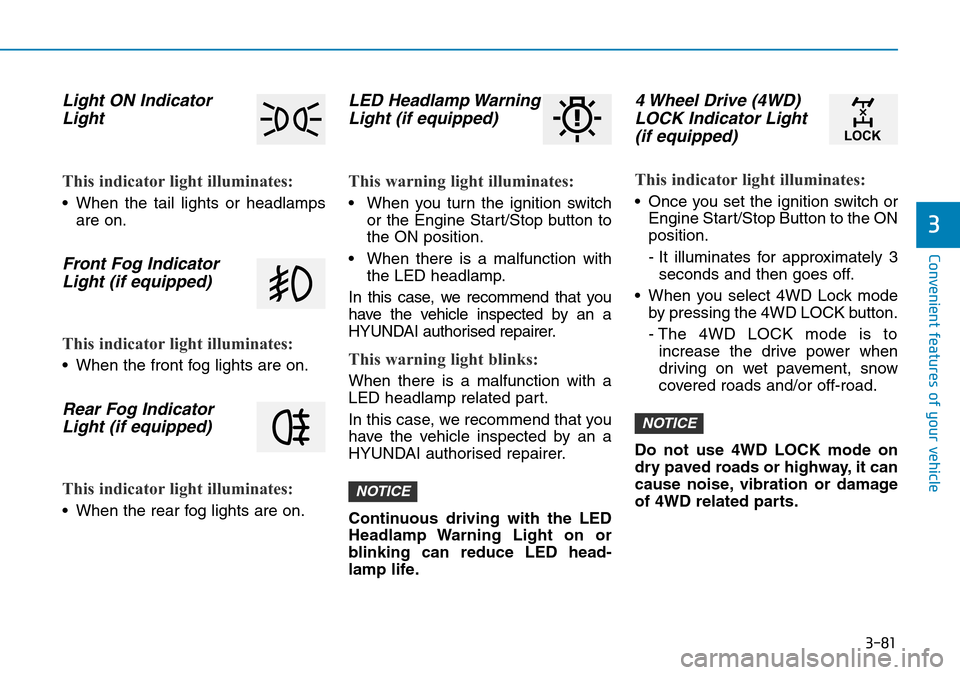
Head Up Display Information
1. Turn By Turn (TBT) navigation
information (if equipped)
2. Road signs (if equipped)
3. Speedometer
4. Cruise setting speed (if equipped)
5. Smart Cruise Control (SCC) infor-
mation (if equipped)
6. Lane Keeping Assist (LKA) system
information (if equipped)
7. Blind-spot Collision Warning (BCW)
system information (if equipped)
8. Warning lights (Low fuel)
9. Audio/Video information When replacing the front wind-
screen glass of the vehicles
equipped with the head up dis-
play, replace it with a wind-
shield glass designed for the
head up display operation.
Otherwise, duplicated images
may be displayed on the wind-
screen glass.
CAUTION
OIK047152NOTM048442R
Page 205 of 682
3-114
When the High Beam Assist (HBA) is
operating, the high beam switches to
low beam in the following conditions.
- When the headlamp of an on-com-
ing vehicle is detected.
- When the tail lamp of a vehicle in
front is detected.
- When headlamp/tail lamp of bicy-
cle/motorcycle is detected.
- When the surroundings are bright
enough high beams are not needed.
- When streetlights or other lights
are detected.
- When the light switch is not in the
AUTO position.
- When the High Beam Assist (HBA)
is off.
- When vehicle speed is below 22mph
(35 km/h).Warning light and message
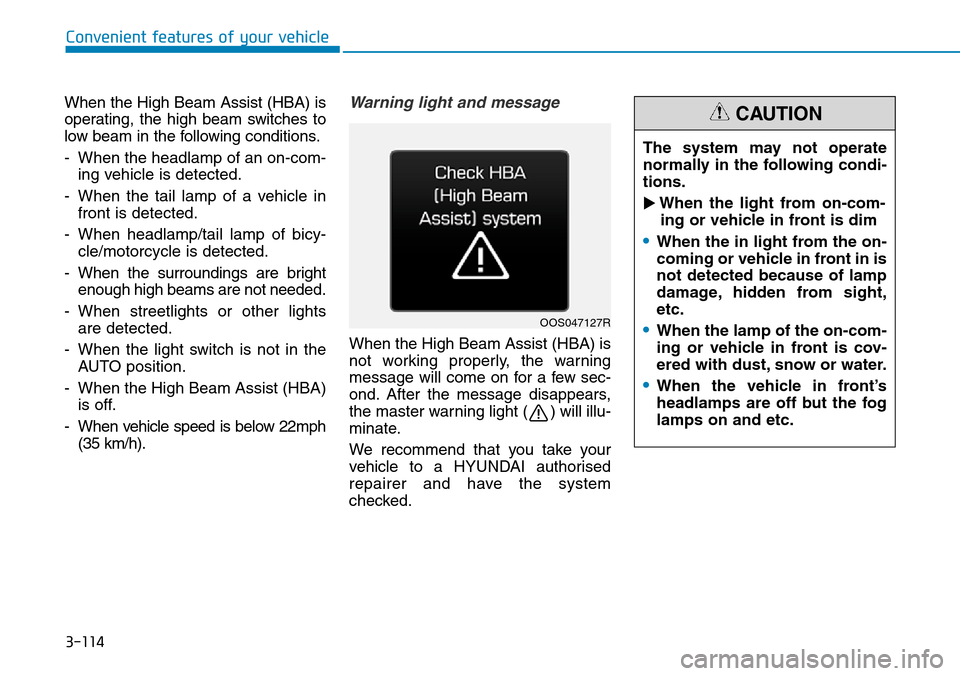
When the High Beam Assist (HBA) is
not working properly, the warning
message will come on for a few sec-
ond. After the message disappears,
the master warning light ( ) will illu-
minate.
We recommend that you take your
vehicle to a HYUNDAI authorised
repairer and have the system
checked.
Convenient features of your vehicle
OOS047127R
The system may not operate
normally in the following condi-
tions.
�When the light from on-com-
ing or vehicle in front is dim
€When the in light from the on-
coming or vehicle in front in is
not detected because of lamp
damage, hidden from sight,
etc.
€When the lamp of the on-com-
ing or vehicle in front is cov-
ered with dust, snow or water.
€When the vehicle in front
headlamps are off but the fog
lamps on and etc.
CAUTION
Page 213 of 682
3-122
Interior lights
Do not use the interior lights for
extended periods when the engine
is turned off otherwise the battery
will discharge.
Interior lamp AUTO cut
The interior lamps will automatically
go off approximately 20 minutes after
the engine is turned off and the
doors are closed. If a door is opened,
the lamp will go off 40 minutes after
the engine is turned off. If the doors
are locked and the vehicle enters the
armed stage of the theft alarm sys-
tem, the lamps will go off five sec-
onds later.
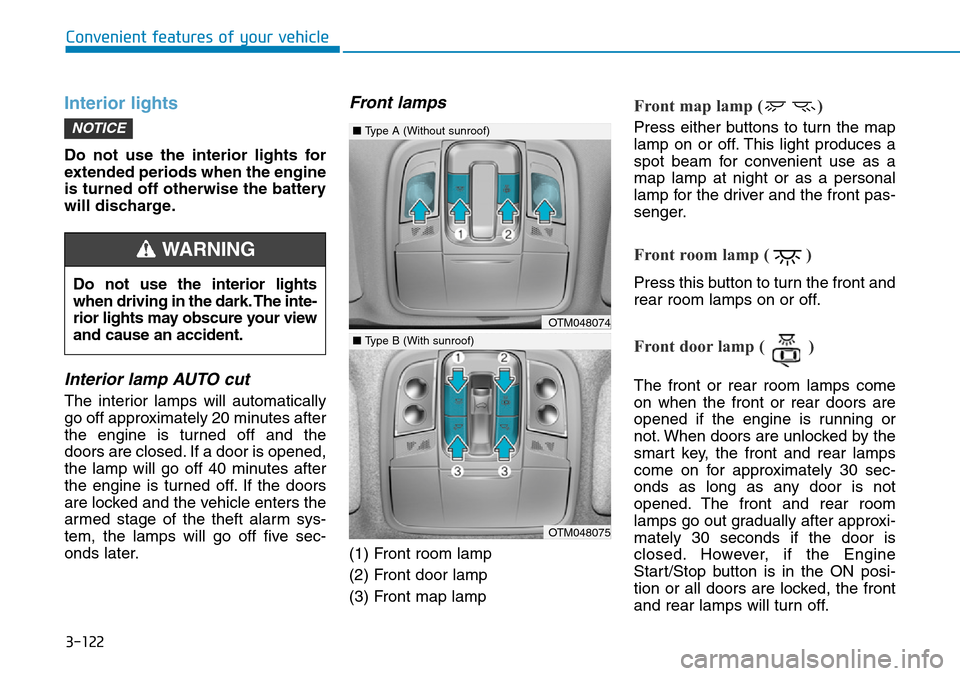
Front lamps
(1) Front room lamp
(2) Front door lamp
(3) Front map lamp
Front map lamp ( )
Press either buttons to turn the map
lamp on or off. This light produces a
spot beam for convenient use as a
map lamp at night or as a personal
lamp for the driver and the front pas-
senger.
Front room lamp ( )
Press this button to turn the front and
rear room lamps on or off.
Front door lamp ( )
The front or rear room lamps come
on when the front or rear doors are
opened if the engine is running or
not. When doors are unlocked by the
smart key, the front and rear lamps
come on for approximately 30 sec-
onds as long as any door is not
opened. The front and rear room
lamps go out gradually after approxi-
mately 30 seconds if the door is
closed. However, if the Engine
Start/Stop button is in the ON posi-
tion or all doors are locked, the front
and rear lamps will turn off.
NOTICE
Convenient features of your vehicle
Do not use the interior lights
when driving in the dark. The inte-
rior lights may obscure your view
and cause an accident.
WARNING
OTM048074
OTM048075
■Type A (Without sunroof)
■Type B (With sunroof)