2019 Hyundai Kona EV temperature control
[x] Cancel search: temperature controlPage 86 of 540

Driver Assist System .........................................3-112
Rear View Monitor ......................................................3-112
Parking Distance Warning (Reverse) System ........3-113
Automatic Climate Control System ..................3-117
Automatic Temperature Control Mode ....................3-118
Manual Temperature Control Mode .........................3-119
System Operation .........................................................3-126
System Maintenance....................................................3-128
Windshield Defrosting and Defogging ............3-130
To Defog Inside Windshield .....................................3-130
To Defrost Outside Windshield ..................................3-131
Defogging logic ............................................................3-131
Auto Defogging System ..............................................3-131
Rear Window Defroster ..............................................3-133
Climate Control Additional Features ...............3-134
Cluster ionizer ..............................................................3-134
Automatic Ventilation ...................................................3-134
Sunroof Inside Air Recirculation ...............................3-134
Storage Compartment .......................................3-135
Center Console Storage ..............................................3-135
Glove Box ........................................................................\
3-135
Sunglass Holder ...........................................................3-135
Interior Features ................................................3-137
Cup Holder ......................................................................3-\
137
Sunvisor ........................................................................\
...3-138
Power Outlet ..................................................................3-139
USB Charger .................................................................3-140
Wireless Cellular Phone Charging System..............3-140
Clock ........................................................................\
.........3-142
Coat Hook .......................................................................3\
-143
Floor Mat Anchor(s).....................................................3-143
Luggage Net Holder .....................................................3-144
Cargo Area Cover..........................................................3-145
3
Page 120 of 540

3-36
Tilting the Sunroof
Tilt the sunroof open:
Push the sunroof control lever
upward until the sunroof moves to
the desired position.
To close the sunroof:
Push the sunroof control lever forward
until the sunroof closes. Periodically remove any dirt that
may accumulate on the sunroof
guide rail or between the sun-
roof and roof panel which can
make a noise.
Do not try to open the sunroof when the temperature is below
freezing or when the sunroof is
covered with snow or ice, other-
wise the motor could be dam-
aged. In cold and wet climates, the
sunroof may not work properly.
NOTICE
Convenient features of your vehicle
Small objects that can get
caught between the sunroof
glass and the front glass chan-
nel may not be detected by the
automatic reverse system. If
this occurs, the sunroof glass
will not detect the object and
will not reverse direction.
WARNING
OOSEV048053L
Page 132 of 540

3-48
Convenient features of your vehicle
When there are only 2 bars remain-
ing on the gauge, the SOC level is
low. The warning lamp turns ON to
alert you that the battery must be
charged soon.
When the warning lamp turns ON,
the vehicle can drive an additional
12~18 miles (20~30 km) depending
on the driving speed, heater/air con-
ditioner, weather, driving style, and
other factors. Charging is required.
When there are 1-2 gauge bars left
for the high voltage battery, the
vehicle speed is limited and then
eventually the vehicle will turn OFF.
Charge the vehicle immediately.
Outside temperature indicator
The outside temperature is shown in
the lower portion of the cluster LCD
display. The units may be displayed
in Fahrenheit (F) or Celsius (C).
- Temperature range : -40°F ~ 140°F
(-40°C ~ 60°C)
Note that the temperature indicated
on the LCD display may not change
as quickly as the outside tempera-
ture (there may be a slight delay
before the temperature changes.) You can change the temperature unit
from °F to °C or °C to °F in the User
Settings mode in the cluster:
- Go to User Settings Mode
➝Other
➝ Temperature Unit.
For vehicles equipped with Automatic
Climate Control, you can also:
- Press the AUTO button while press- ing the OFF button on the climate
control unit for 3 seconds
Both the temperature unit on the
cluster LCD display and climate con-
trol screen will change.
NOTICE
OOSEV048103
OOSEV048104N
Page 143 of 540

3-59
Convenient features of your vehicle
3
Icy Road Warning Light(if equipped)
This warning light is to warn the driver
the road may be icy.
When the reading on the outside
temperature gauge is below 40°F
(4°C), the Icy Road Warning Light
and Outside Temperature Gauge
blinks and then illuminates. Also, the
warning chime sounds 1 time.
You can activate or deactivate Icy
Road Warning function from the User
Settings mode in the cluster LCD dis-
play.
Information
If the icy road warning light comes ON
while driving, it is an indication that
roads may be icy. In this situation, pay
close attention to your driving and
reduce your vehicle speed as a precau-
tion. Avoid sudden changes in accelera-
tion or braking or sudden changes in
steering in order to maintain control of
your vehicle while driving in adverse
weather conditions.
Master Warning Light
This indicator light illuminates:
When there is a malfunction in oper-
ation in any of the following systems:
- LED headlamp malfunction (if
equipped)
- Forward Collision-Avoidance Assist system malfunction (if equipped)
- Forward Collision-Avoidance Assist radar blocked (if equipped)
- Blind-Spot Collision Warning sys- tem malfunction (if equipped)
- Blind-Spot Collision Warning radar blocked (if equipped)
- Smart Cruise Control with Stop & Go malfunction (if equipped)
- Smart Cruise Control with Stop & Go radar blocked (if equipped)
- Lamp malfunction
- High Beam Assist malfunction (if equipped)
- Tire Pressure Monitoring System (TPMS) malfunction
To identify the details of the warning,
look at the LCD display.
Electronic Stability Control (ESC) IndicatorLight
This indicator light illuminates:
When the POWER button is in the
ON position.
- It illuminates for approximately 3seconds and then goes off.
When there is a malfunction with the ESC system.
If this occurs, have your vehicle
inspected by an authorized
HYUNDAI dealer.
This indicator light blinks:
While the ESC is operating.
For more details, refer to
"Electronic Stability Control (ESC)"
in chapter 5.i
Page 201 of 540
3-117
Convenient features of your vehicle
3
A
AU
U T
TO
O M
M A
AT
TI
IC
C
C
C L
LI
IM
M A
AT
TE
E
C
C O
O N
NT
TR
R O
O L
L
S
S Y
Y S
ST
T E
EM
M
OOSEV048300
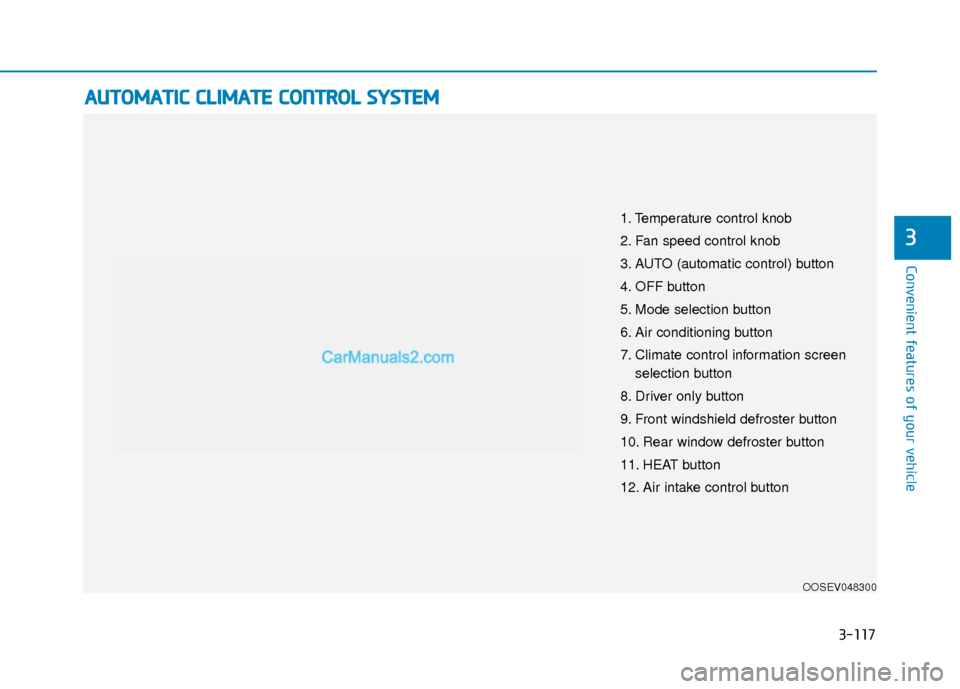
1. Temperature control knob
2. Fan speed control knob
3. AUTO (automatic control) button
4. OFF button
5. Mode selection button
6. Air conditioning button
7. Climate control information screen
selection button
8. Driver only button
9. Front windshield defroster button
10. Rear window defroster button
11. HEAT button
12. Air intake control button
Page 202 of 540
3-118
Convenient features of your vehicle
Automatic Temperature
Control Mode
The Automatic Climate Control
System is controlled by setting the
desired temperature.
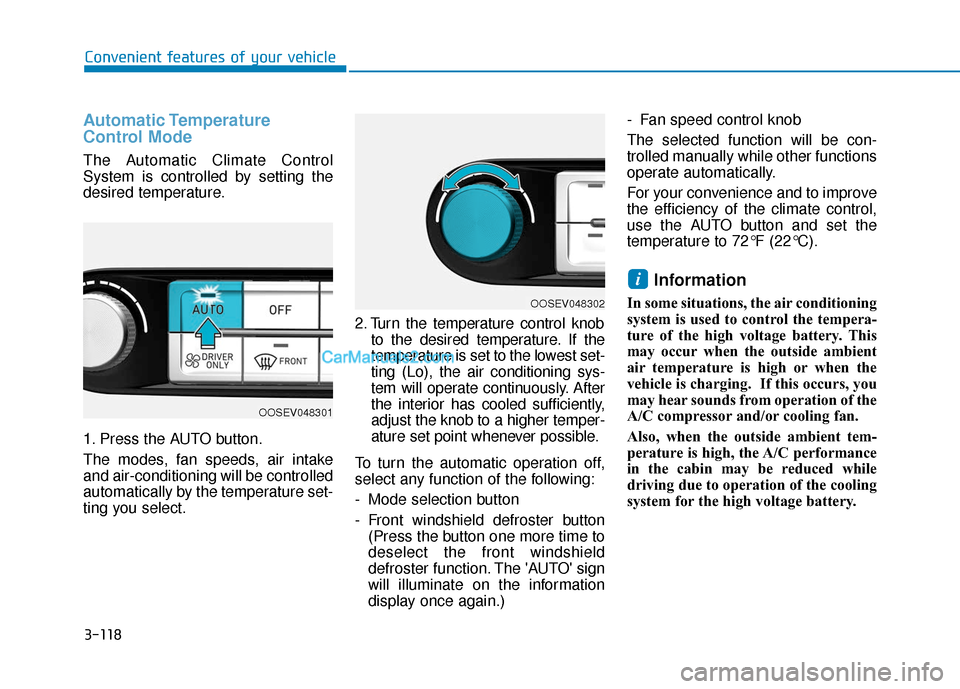
1. Press the AUTO button.
The modes, fan speeds, air intake
and air-conditioning will be controlled
automatically by the temperature set-
ting you select.2. Turn the temperature control knob
to the desired temperature. If the
temperature is set to the lowest set-
ting (Lo), the air conditioning sys-
tem will operate continuously. After
the interior has cooled sufficiently,
adjust the knob to a higher temper-
ature set point whenever possible.
To turn the automatic operation off,
select any function of the following:
- Mode selection button
- Front windshield defroster button (Press the button one more time to
deselect the front windshield
defroster function. The 'AUTO' sign
will illuminate on the information
display once again.) - Fan speed control knob
The selected function will be con-
trolled manually while other functions
operate automatically.
For your convenience and to improve
the efficiency of the climate control,
use the AUTO button and set the
temperature to 72°F (22°C).
Information
In some situations, the air conditioning
system is used to control the tempera-
ture of the high voltage battery. This
may occur when the outside ambient
air temperature is high or when the
vehicle is charging. If this occurs, you
may hear sounds from operation of the
A/C compressor and/or cooling fan.
Also, when the outside ambient tem-
perature is high, the A/C performance
in the cabin may be reduced while
driving due to operation of the cooling
system for the high voltage battery.
i
OOSEV048302
OOSEV048301
Page 203 of 540
3-119
Convenient features of your vehicle
3
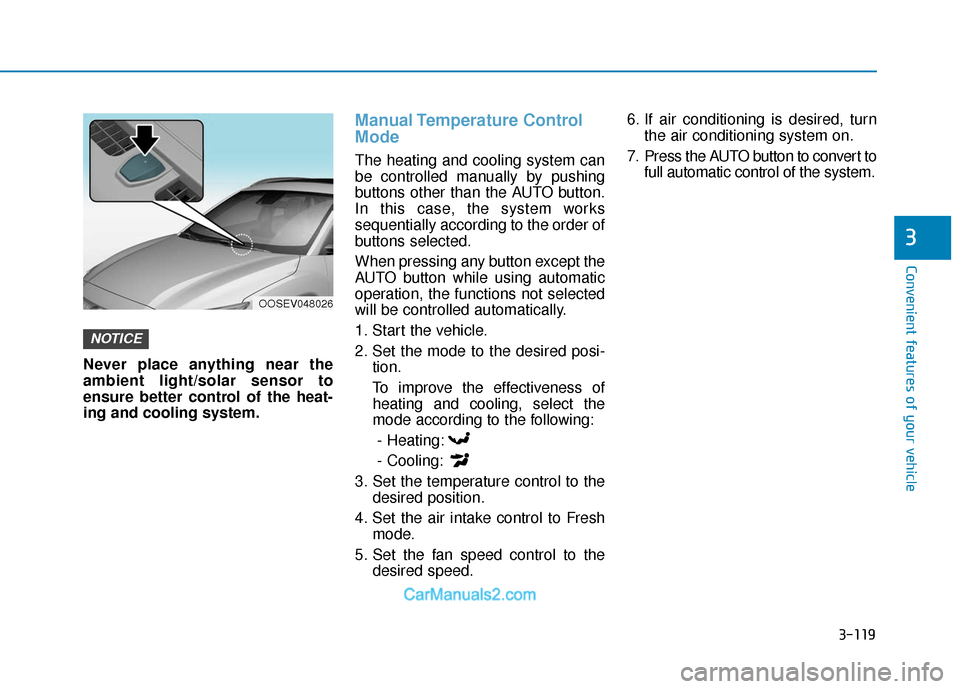
Never place anything near the
ambient light/solar sensor to
ensure better control of the heat-
ing and cooling system.
Manual Temperature Control
Mode
The heating and cooling system can
be controlled manually by pushing
buttons other than the AUTO button.
In this case, the system works
sequentially according to the order of
buttons selected.
When pressing any button except the
AUTO button while using automatic
operation, the functions not selected
will be controlled automatically.
1. Start the vehicle.
2. Set the mode to the desired posi-tion.
To improve the effectiveness of heating and cooling, select the
mode according to the following:
- Heating:
- Cooling:
3. Set the temperature control to the desired position.
4. Set the air intake control to Fresh mode.
5. Set the fan speed control to the desired speed. 6. If air conditioning is desired, turn
the air conditioning system on.
7. Press the AUTO button to convert to full automatic control of the system.
NOTICE
OOSEV048026
Page 206 of 540

3-122
Convenient features of your vehicle
Instrument panel vents
The instrument panel vent air flow
can be directed up/down or left/right
using the vent adjustment lever.
The air flow can also be CLOSED
using the vent adjustment lever. The
instrument panel air vents are the
"click-to-close" type.
To CLOSE the instrument panel
vents perform the following:
- For the driver side vents, slide thevent adjustment lever to the left
until it clicks.
- For the passenger side vents, slide the vent adjustment lever to the
right until it clicks.
Temperature control
Turn the knob to the right to increase
the temperature. Turn the knob to the
left to decrease temperature.
The temperature will increase or
decrease by 1°F/0.5°C for each incre-
mental location. When set to the low-
est temperature setting, the air condi-
tioning will operate continuously.
Temperature conversion
If the battery has been discharged or
disconnected, the temperature mode
display will reset to Fahrenheit.
To change the temperature unit from
°F to °C or °C to °F:
- On the instrument cluster, go toUser Settings ➝ Other ➝
Temperature Unit.
- Press the AUTO button while press- ing the OFF button on the climate
control unit for 3 seconds.
The temperature unit on both the
cluster LCD display and climate con-
trol screen will change.
OOSEV048306KOOSEV048302