2019 Hyundai Kona EV sensor
[x] Cancel search: sensorPage 428 of 540

7-48
Maintenance
Fuse NameFuse RatingProtected Component
START7.5ASmart Key Control Module, EPCU
CLUSTER7.5AHead Up Display, Instrument Cluster
DOOR LOCK20ADoor Lock Relay, Door Unlock Relay, ICM Relay Box (Two Turn Unlock Relay)
PDM 27.5AStart/Stop Button Switch
FCA10AForward Collision Avoidance Assist Unit
S/HEATER20AFront Seat Warmer Module, Front Air Ventilation Seat Module
SPARE20ASpare
A/C7.5AA/C Control Module, Cluster Ionizer
PDM 115ASmart Key Control Module
E-SHIFTER10AShift Select Switch (SBW), Front Console Switch
AIR BAG15ASRS Control Module, Passenger Occupant Detection Sensor
IG125APCB Block(FUSE : IEB 3, EPCU 2)
Instrument panel fuse panel
Page 445 of 540

7-65
7
Maintenance
A
AP
PP
PE
EA
A R
RA
A N
N C
CE
E
C
C A
A R
RE
E
Exterior Care
Exterior general caution
It is very important to follow the label
directions when using any chemical
cleaner or polish. Read all warning
and caution statements that appear
on the label.
High-pressure washing
When using high-pressure wash-
ers, make sure to maintain suffi-
cient distance from the vehicle.
Insufficient clearance or excessive
pressure can lead to component
damage or water penetration.
Do not spray the camera, sensors or its surrounding area directly with
a high pressure washer. Shock
applied from high pressure water
may cause the device to not oper-
ate normally.
Do not bring the nozzle tip close to boots (rubber or plastic covers)or
connectors as they may be dam-
aged if they come into contact with
high pressure water.
Do not use any high-pressure noz- zles, which induce either one-
direct water stream or water
swirling.
Protecting your vehicle’s finish
Washing
To help protect your vehicle’s finish
from rust and deterioration, wash it
thoroughly and frequently at least
once a month with lukewarm or cold
water.
If you use your vehicle for off-road
driving, you should wash it after each
off-road trip. Pay special attention to
the removal of any accumulation of
salt, dirt, mud, and other foreign
materials. Make sure the drain holes
in the lower edges of the doors and
rocker panels are kept clear and
clean.
Insects, tar, tree sap, bird droppings,
industrial pollution and similar
deposits can damage your vehicle’s
finish if not removed immediately.
Even prompt washing with plain
water may not completely remove all
these deposits. A mild soap, safe for
use on painted surfaces, should be
used.
Page 501 of 540

H38
E
EV
V
C
C H
H A
AR
RG
G I
IN
N G
G
U
U S
SI
IN
N G
G
T
T H
H E
E
P
P O
O R
RT
TA
A B
BL
LE
E
C
C H
H A
AR
RG
G E
ER
R
(
( C
C O
O N
NT
T.
.)
)
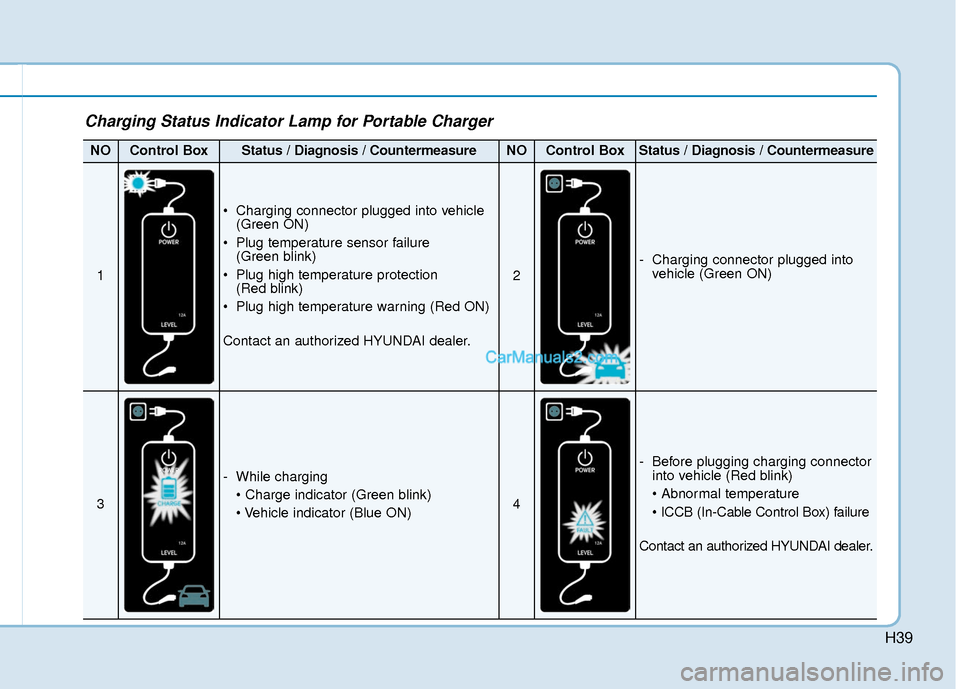
Charging Status Indicator Lamp for Portable Charger
Control BoxIndicatorDetails
PLUG
On : Power on
Blink : Plug temperature sensor failure
On : Plug high temperature protection
Blink : Plug high temperature warning
POWEROn : Power on
CHARGEBlink : Charging In power saving mode, only the CHARGE
indicator is illuminated.
FAU LTBlink : Charging interrupted
CHARGE LEVEL
Charging current 12 AThe charging current
changes (3 level)
whenever the button
(1) is pressed for 1 sec
with the charger
plugged into an electri-
cal outlet but not the
vehicle.
Charging current 10 A
Charging current 8 A
VEHICLE
Charging connector plugged
Charging
Blink : Charging impossible
(Green)
(Green) (Blue)
(Red)(Red)
❈
Back of the control box
Page 502 of 540
H39
Charging Status Indicator Lamp for Portable Charger
NOControl BoxStatus / Diagnosis / CountermeasureNOControl BoxStatus / Diagnosis / Countermeasure
1
Charging connector plugged into vehicle(Green ON)
Plug temperature sensor failure (Green blink)
Plug high temperature protection (Red blink)
Plug high temperature warning (Red ON)
Contact an authorized HYUNDAI dealer.
2
- Charging connector plugged into vehicle (Green ON)
3
- While charging
4
- Before plugging charging connectorinto vehicle (Red blink)
Contact an authorized HYUNDAI dealer.
Page 503 of 540
H40
E
EV
V
C
C H
H A
AR
RG
G I
IN
N G
G
U
U S
SI
IN
N G
G
T
T H
H E
E
P
P O
O R
RT
TA
A B
BL
LE
E
C
C H
H A
AR
RG
G E
ER
R
(
( C
C O
O N
NT
T.
.)
)
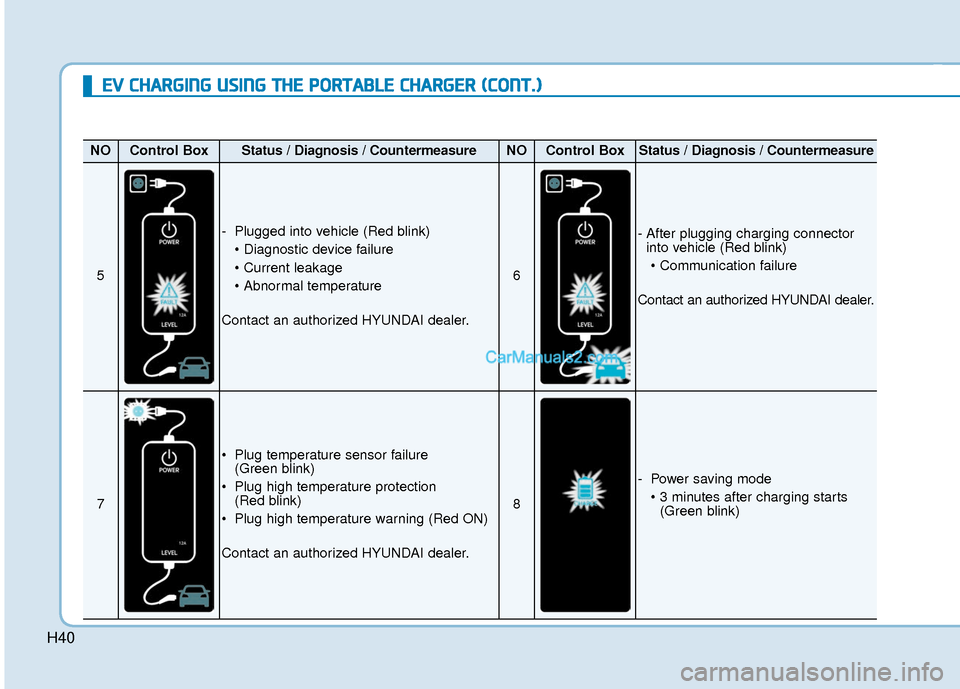
NOControl BoxStatus / Diagnosis / CountermeasureNOControl BoxStatus / Diagnosis / Countermeasure
5
- Plugged into vehicle (Red blink)
Contact an authorized HYUNDAI dealer.
6
- After plugging charging connector into vehicle (Red blink)
Contact an authorized HYUNDAI dealer.
7
Plug temperature sensor failure (Green blink)
Plug high temperature protection (Red blink)
Plug high temperature warning (Red ON)
Contact an authorized HYUNDAI dealer.
8
- Power saving mode (Green blink)
Page 511 of 540

H48
D
DR
RI
IV
V I
IN
N G
G
A
A N
N D
D
O
O P
PE
ER
R A
A T
TI
IN
N G
G
I
IN
N F
FO
O R
RM
M A
AT
TI
IO
O N
N
(
( C
C O
O N
NT
T.
.)
)
When there are only 2 bars remain-
ing on the gauge, the SOC level is
low. The warning lamp turns ON to
alert you that the battery must be
charged soon.
When the warning lamp turns ON,
the vehicle can drive an additional
12~18 miles (20~30 km) depending
on the driving speed, heater/air con-
ditioner, weather, driving style, and
other factors. Charging is required.
When there are 1-2 gauge bars left
for the high voltage battery, the
vehicle speed is limited and then
eventually the vehicle will turn OFF.
Charge the vehicle immediately.
Warning and Indicator Lights
Ready Indicator
This indicator illuminates :
When the vehicle is ready to be driven.
- ON : Normal driving is possible.
- OFF : Nor mal driving is not possible,
or a problem has occurred.
- Blinking : Emergency driving.
When the ready indicator goes OFF
or blinks, there is a problem with the
system. In this case, have your vehi-
cle inspected by an authorized
HYUNDAI dealer.
Service Warning Light
This warning light illuminates :
When the POWER button is in the ON position.
- It illuminates for approximately 3seconds and then goes off.
When there is a problem with relat- ed parts of the electric vehicle con-
trol system, such as sensors, etc.
When the warning light illuminates
while driving, or does not go OFF
after starting the vehicle, have your
vehicle inspected by an authorized
HYUNDAI dealer.
NOTICE
OOSEV048103
Page 528 of 540

I-2
Air bag warning labels ....................................................2-71
Air bags ........................................................................\
...2-47Additional safety precautions .....................................2-69
Air bag collision sensors ............................................2-64
Air bag inflation conditions .......................................2-65
Air bag non-inflation conditions ................................2-66
Air bag warning labels ...............................................2-69
Curtain air bags ..........................................................2-51
Driver's air bag ...........................................................2-49
How does the air bags system operate? .....................2-52
Occupant Classification System (OCS) .....................2-57
Passenger's front air bag.............................................2-49
Side air bags ...............................................................2-50
SRS Care ....................................................................2-68\
SRS components and functions..................................2-52
SRS warning light ......................................................2-53
What to expect after an air bag inflates .....................2-56
Why didn't my air bag go off in a collision ...............2-63
Air conditioning system specification ..............................8-5
Air ventilated seats .........................................................2-22
Airconditioning system .................................................3-117
Alarm system ..................................................................3-15
Antenna ........................................................................\
.....4-3
Anti-lock Brake System (ABS) ......................................5-40 Appearance care..............................................................7-65
Exterior care ...............................................................7-65
Interior care ................................................................7-70
Armrest ........................................................................\
...2-15
Audio / Video / Navigation system ..................................4-4
Auto defogging system .................................................3-131
Auto hold ........................................................................\
5-36
Auto light position ..........................................................3-97
Automatic climate control system ................................3-117 Air conditioning .......................................................3-125
Air intake control .....................................................3-123
Automatic heating and air conditioning ...................3-118
Climate control information screen selection button .3-125
Driver only ...............................................................3-124
Fan speed control .....................................................3-124
Fresh mode ...............................................................3-123
HEAT button.............................................................3-125
Manual heating and air conditioning........................3-119
Mode selection .........................................................3-120
OFF mode.................................................................3-126
Recirculation mode ..................................................3-123
System maintenance .................................................3-128
Temperature control .................................................3-122
Automatic ventilation ...................................................3-134
Auxiliary battery (12 volt) Battery recharging ......................................................7-23
Aux, USB and iPod ..........................................................4-2
Index
A