Page 480 of 540
H17
Lamp status
DetailsBefore charging(steady ON)While charging (blinking
ON/OFF)
High voltage battery level
ver y low
yellowyellow
High voltage battery level low
greengreen
High voltage battery level
middle
greengreen
High voltage battery level high
greengreen
Lamp statusDetails
An LED in the front of the vehicle near the
inner portion of the H-emblem indicates
when the EV battery is being used while the
vehicle is stationary.
The EV battery may be in use to charge the
12V auxiliary battery or when charge man-
agement is set to control the climate setting
and the heater or air conditioner is turned on.
Lamp statusDetails
To override any charge scheduling that has
previously been set, you can press the
scheduled charging deactivation button.
Scheduled charging will be deactivated
allowing you to charge immediately.
➁ ➁ Charging level ➂
➂
EV Battery Charging Indicator
➃
➃ Immediate charging
Page 487 of 540

H24
E
EL
LE
E C
CT
T R
R I
IC
C
V
V E
EH
H I
IC
C L
LE
E
C
C H
H A
AR
RG
G I
IN
N G
G
(
( C
C O
O N
NT
T.
.)
)
8. Check to see that the charging
indicator light in the instrument
cluster is illuminated. Charging
has not been initiated if the charg-
ing indicator light is OFF.
If the charging indicator light is
OFF, it may be necessary to dis-
connect the charging connector
from the vehicle and repeat the
connection process. Refer to the
charging station display screen for
more information.
Information
• Radio reception may have interfer-ence when the vehicle is charging.
• Note that the vehicle cannot be shift- ed out of P (Park) when the vehicle
is charging.
9. After charging has started, the estimated charging time is dis-
played on the instrument cluster
for about 1 minute.
If you open the driver seat door while charging, the estimated
charging time is also displayed on
the instrument cluster for about 1
minute. When scheduled charging is set,
the estimated charging time is dis-
played as "--".
Information
Depending on the condition and dura-
bility of the high voltage battery,
charger specifications, and ambient
temperature, the time required for
charging the battery may vary.
i
i
OOSEVQ018010
OOSEV048133N
Page 488 of 540
H25
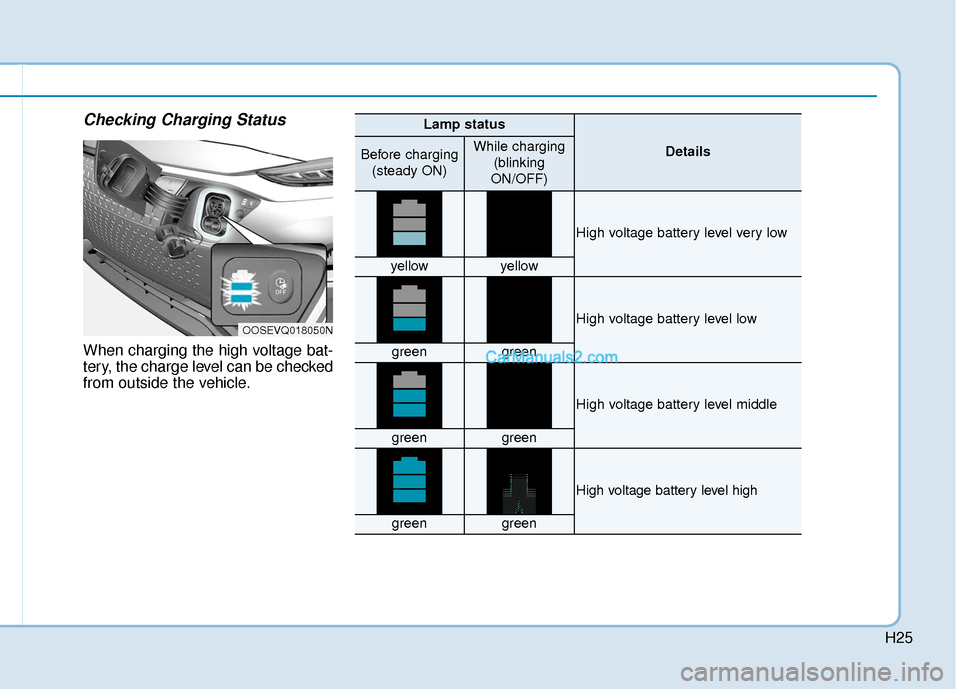
Checking Charging Status
When charging the high voltage bat-
tery, the charge level can be checked
from outside the vehicle.
OOSEVQ018050N
Lamp status
DetailsBefore charging(steady ON)While charging (blinking
ON/OFF)
High voltage battery level very low
yellowyellow
High voltage battery level low
greengreen
High voltage battery level middle
greengreen
High voltage battery level high
greengreen
Page 492 of 540
H29
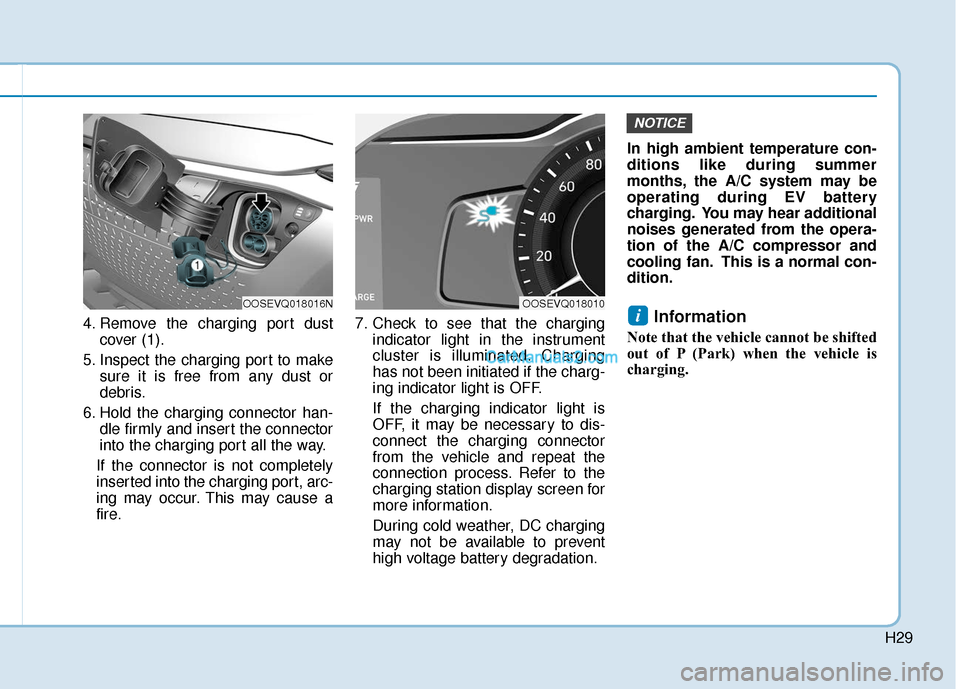
4. Remove the charging port dustcover (1).
5. Inspect the charging port to make sure it is free from any dust or
debris.
6. Hold the charging connector han- dle firmly and insert the connector
into the charging port all the way.
If the connector is not completely
inserted into the charging port, arc-
ing may occur. This may cause a
fire. 7. Check to see that the charging
indicator light in the instrument
cluster is illuminated. Charging
has not been initiated if the charg-
ing indicator light is OFF.
If the charging indicator light is
OFF, it may be necessary to dis-
connect the charging connector
from the vehicle and repeat the
connection process. Refer to the
charging station display screen for
more information.
During cold weather, DC charging
may not be available to prevent
high voltage battery degradation. In high ambient temperature con-
ditions like during summer
months, the A/C system may be
operating during EV battery
charging. You may hear additional
noises generated from the opera-
tion of the A/C compressor and
cooling fan. This is a normal con-
dition.Information
Note that the vehicle cannot be shifted
out of P (Park) when the vehicle is
charging.
i
NOTICE
OOSEVQ018016NOOSEVQ018010
Page 493 of 540
H30
E
EL
LE
E C
CT
T R
R I
IC
C
V
V E
EH
H I
IC
C L
LE
E
C
C H
H A
AR
RG
G I
IN
N G
G
(
( C
C O
O N
NT
T.
.)
)
8. After charging has started, the
estimated charging time is dis-
played on the instrument cluster
for about 1 minute.
If you open the driver seat door while charging, the estimated
charging time is also displayed on
the instrument cluster for about 1
minute.
Information
Depending on the condition and dura-
bility of the high voltage battery,
charger specifications, and ambient
temperature, the time required for
charging the battery may vary.
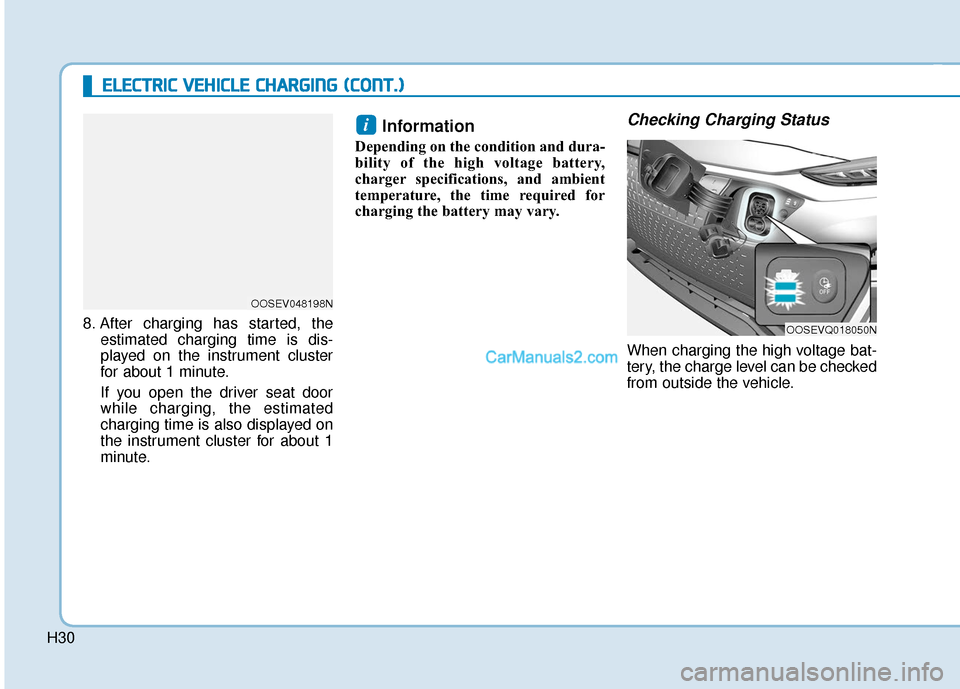
Checking Charging Status
When charging the high voltage bat-
tery, the charge level can be checked
from outside the vehicle.
i
OOSEVQ018050N
OOSEV048198N
Page 494 of 540
H31
How to Disconnect DC Charger
1. Refer to the instructions on the on-screen display of the DC charging
station before disconnecting the
charging connector from the vehi-
cle. Once charging is stopped,
remove the charging connector.
2. Make sure to re-install the charg- ing port dust cover(s) before clos-
ing the charging door.
3. The charging door must be fully closed before driving the vehicle.
OOSEVQ018013N
Lamp status
DetailsBefore charging
(steady ON)While charging (blinking
ON/OFF)
High voltage battery level very low
yellowyellow
High voltage battery level low
greengreen
High voltage battery level middle
greengreen
High voltage battery level high
greengreen
Page 499 of 540

H36
E
EV
V
C
C H
H A
AR
RG
G I
IN
N G
G
U
U S
SI
IN
N G
G
T
T H
H E
E
P
P O
O R
RT
TA
A B
BL
LE
E
C
C H
H A
AR
RG
G E
ER
R
(
( C
C O
O N
NT
T.
.)
)
10. Check to see that the charging
indicator light in the instrument
cluster is illuminated. Charging
has not been initiated if the
charging indicator light is OFF.
If the charging indicator light is
OFF, it may be necessary to dis-
connect the charging connector
from the vehicle and repeat the
connection process.
Information
Note that the vehicle cannot be shifted
out of Park (P) when the vehicle is
charging. 11. After charging has started, the
estimated charging time is dis-
played on the instrument cluster
for about 1 minute.
If you open the driver seat door
while charging, the estimated
charging time is also displayed
on the instrument cluster for
about 1 minute.
When scheduled charging is set, the estimated charging time is
displayed as "--".
Information
Depending on the condition and dura-
bility of the high voltage battery,
charger specifications, and ambient
temperature, the time required for
charging the battery may vary.
i
i
OOSEV048133NOAEEQ016032
Page 500 of 540
H37
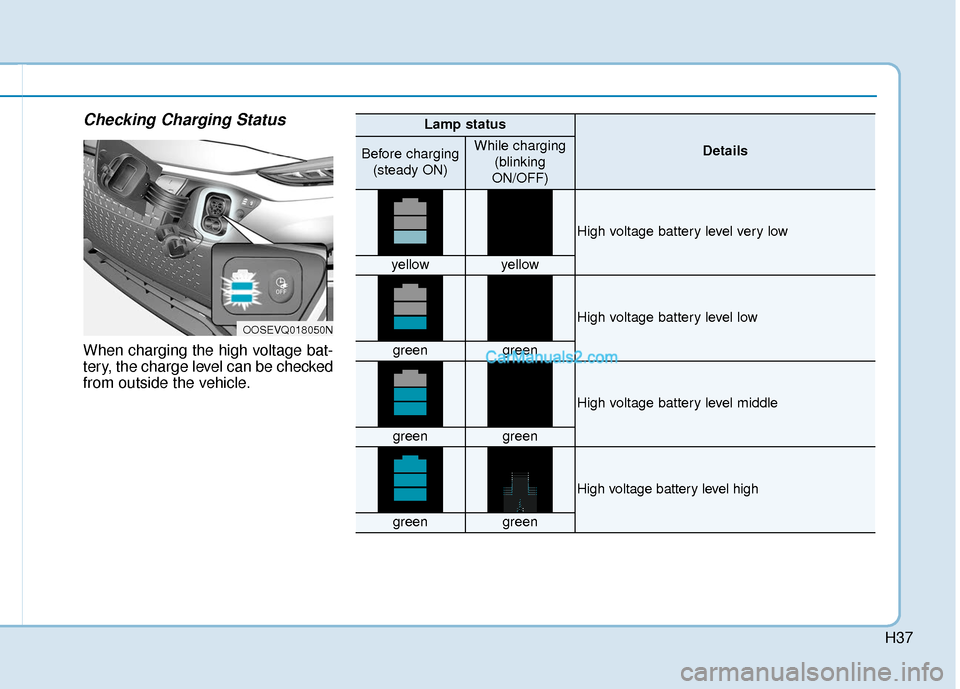
Checking Charging Status
When charging the high voltage bat-
tery, the charge level can be checked
from outside the vehicle.
OOSEVQ018050N
Lamp status
DetailsBefore charging(steady ON)While charging (blinking
ON/OFF)
High voltage battery level very low
yellowyellow
High voltage battery level low
greengreen
High voltage battery level middle
greengreen
High voltage battery level high
greengreen