Page 217 of 540
3-133
Convenient features of your vehicle
3
Rear Window Defroster
To prevent damage to the rear
window defroster conducting ele-
ments bonded to the inside sur-
face of the rear window, never use
sharp instruments or window
cleaners containing abrasives to
clean the window.
If you want to defrost and defog
the front windshield, refer to the
"Windshield Defrosting and
Defogging" section in this chapter.The defroster heats the window to
remove frost, fog and thin ice from
the interior and exterior of the rear
window, while the vehicle is in the
ready ( ) mode.
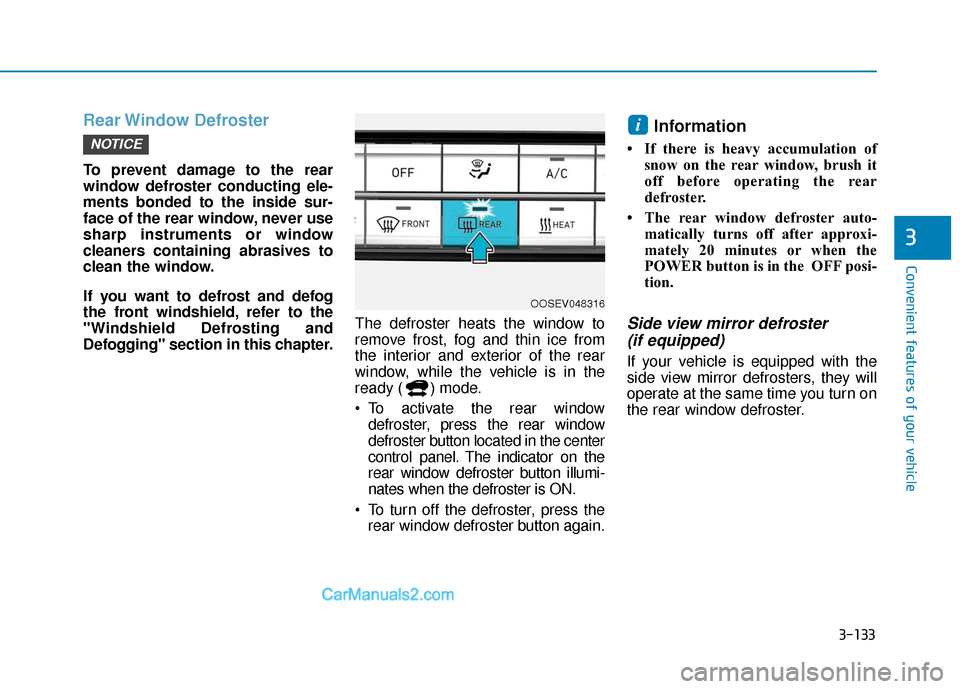
To activate the rear window
defroster, press the rear window
defroster button located in the center
control panel. The indicator on the
rear window defroster button illumi-
nates when the defroster is ON.
To turn off the defroster, press the rear window defroster button again.
Information
• If there is heavy accumulation of snow on the rear window, brush it
off before operating the rear
defroster.
• The rear window defroster auto- matically turns off after approxi-
mately 20 minutes or when the
POWER button is in the OFF posi-
tion.
Side view mirror defroster (if equipped)
If your vehicle is equipped with the
side view mirror defrosters, they will
operate at the same time you turn on
the rear window defroster.
i
NOTICE
OOSEV048316
Page 220 of 540
3-136
Convenient features of your vehicle
Sunglass Holder
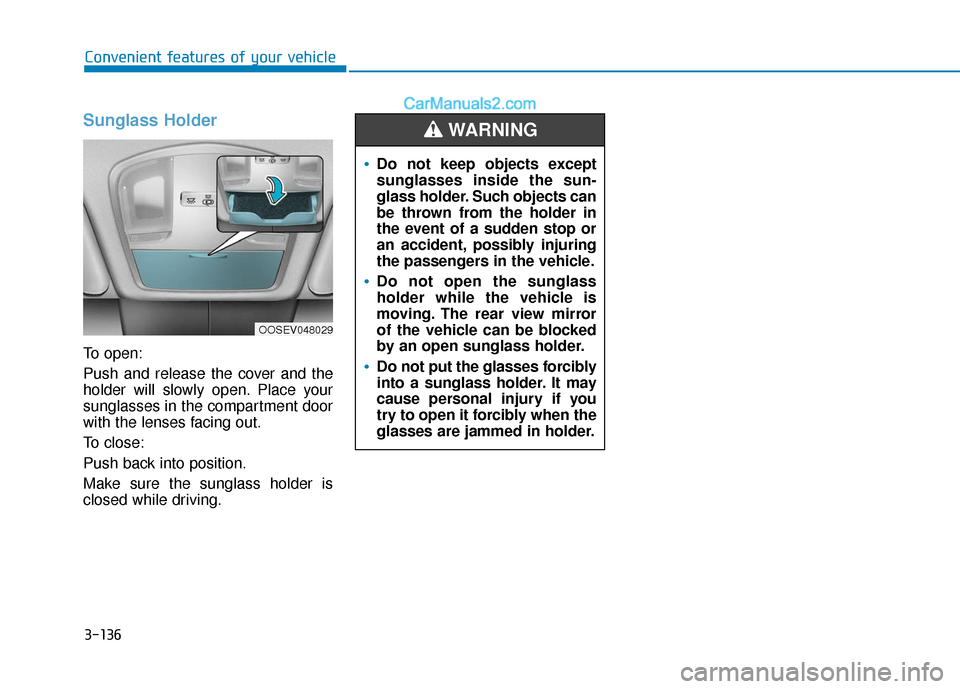
To open:
Push and release the cover and the
holder will slowly open. Place your
sunglasses in the compartment door
with the lenses facing out.
To close:
Push back into position.
Make sure the sunglass holder is
closed while driving.
Do not keep objects except
sunglasses inside the sun-
glass holder. Such objects can
be thrown from the holder in
the event of a sudden stop or
an accident, possibly injuring
the passengers in the vehicle.
Do not open the sunglass
holder while the vehicle is
moving. The rear view mirror
of the vehicle can be blocked
by an open sunglass holder.
Do not put the glasses forcibly
into a sunglass holder. It may
cause personal injury if you
try to open it forcibly when the
glasses are jammed in holder.
WARNING
OOSEV048029
Page 222 of 540

3-138
Convenient features of your vehicle
Keep your drinks sealed while driving to prevent spilling your
drink. If liquid spills, it may get
into the vehicle's electrical/elec-
tronic system and damage elec-
trical/electronic parts.
When cleaning spilled liquids do not use hot air to blow out or dry
the cup holder. This may dam-
age the interior.
Sunvisor
To use the sunvisor, pull it down-
ward.
To use the sunvisor to block the sun
from the side window, pull it down-
ward, release it from the bracket (1)
and swing it to the side towards the
window (2).
To use the vanity mirror, pull down
the sunvisor and slide the mirror
cover (3).
Adjust the sunvisor forward or back-
ward (4) as needed (if equipped). Use
the ticket holder (5) to hold tickets. Close the vanity mirror cover securely
and return the sunvisor to its original
position after use.
The tab (5) adjacent to the vanity
mirror on the sunvisor can be
used for toll road tickets or self-
parking tickets. Use caution when
inserting tickets into the ticket
holder to avoid damage. Refrain
from putting several tickets in the
ticket holder as this could also
damage the retaining tab.
NOTICE
NOTICE
OTM048089
For your safety, do not block
your view when using the sunvi-
sor.
WARNING
Page 237 of 540

5-4
Driving your vehicle
Before Entering the Vehicle
• Be sure all windows, outside mir-ror(s), and outside lights are clean
and unobstructed.
Remove any frost, snow, or ice that has accumulated on your vehicle.
Visually check the tires for uneven wear and damage.
Check under the vehicle for any sign of leaks.
Be sure there are no obstacles behind you if you intend to back up.
Before Starting
Make sure the hood, the liftgate,and the doors are securely closed
and locked.
Adjust the position of the seat and steering wheel.
Adjust the inside and outer side view mirrors.
Verify all the lights work.
Fasten your seat belts. Check that all passengers have fastened their
seat belts.
Check the gauges and indicators in the instrument panel and the mes-
sages on the instrument display
when the POWER button is in the
ON position.
Check that any items you are car- rying are stored properly or fas-
tened down securely.
CALIFORNIA PROPOSITION 65
WARNING
Engine exhaust and a wide vari-
ety of automobile components
including components found in
the interior furnishings in a
vehicle, contain or emit harmful
chemicals known to the State of
California to cause cancer and
birth defects and reproductive
harm. In addition, certain fluids
contained in vehicles and cer-
tain products of components
contain or emit chemicals
known to the State of California
to cause cancer and birth
defects or other reproductive
harm.WARNING
B B
E
EF
FO
O R
RE
E
D
D R
RI
IV
V I
IN
N G
G
Page 287 of 540

5-54
Driving your vehicle
FCA Sensor
In order for the FCA system to oper-
ate properly, always make sure the
camera is clean and free of dirt,
snow, and debris. Dirt, snow, or for-
eign substances on the surface may
adversely affect the sensing perform-
ance of the sensor.The sensing performance of the
sensor may be affected if the fol-
lowing instructions are not fol-
lowed.
Always keep the camera sensor
clean and free of dirt and debris.
Use only genuine parts to repair or replace a damaged sensor.
Be careful not to apply unneces-
sary force on the camera sensor. If
the sensor is forcibly moved out
of proper alignment, the FCA sys-
tem may not operate correctly. In
this case, a warning message may
not be displayed. Have the vehicle
inspected by an authorized
HYUNDAI dealer. Do not tint the window or install
stickers, accessories around the
inside mirror where the camera
is installed.
NEVER locate any reflective objects (i.e. white paper, mirror)
over the dashboard. Any light
reflection may cause a malfunc-
tion of the system.
Pay extreme caution to keep the camera out of water.
NEVER arbitrarily disassemble the camera assembly, nor apply
any impact on the camera
assembly.
Playing the vehicle audio sys- tem at high volume may offset
the system warning sounds.
Information
Have the system checked by an
authorized HYUNDAI dealer when:
• The windshield glass is replaced.
• The camera or related parts arerepaired or removed.
i
NOTICE
NOTICE
NOTICE
OOSEV058117N
■ Front camera
Page 295 of 540

5-62
Driving your vehicle
System Description
The Blind-Spot Collision Warning
(BCW)/Rear Cross-Traffic Collision
Warning (RCCW) system uses radar
sensors in the rear bumper to moni-
tor and warn the driver of an
approaching vehicle in the driver's
blind spot area.
The system monitors the rear area of
the vehicle and provides information
to the driver with an audible alert and
an indicator on the outer side view
mirrors.
Blind-Spot Collision Warning
(1) Blind spot area
The blind spot area range varies rel-
ative to vehicle speed. Note that if
your vehicle is traveling much faster
than the vehicles around you, the
warning will not occur.(2) Lane change assist
The lane change assist feature will
help alert you when a vehicle is
approaching in an adjacent lane at a
high rate of speed. If the driver acti-
vates the turn signal when the sys-
tem detects an oncoming vehicle,
the system sounds an audible alert.
The time of alert varies according to
the speed difference between you
and the approaching vehicle.
B B
L
LI
IN
N D
D-
-S
S P
P O
O T
T
C
C O
O L
LL
LI
IS
S I
IO
O N
N
W
W A
AR
RN
N I
IN
N G
G
(
( B
B C
CW
W )
)
/
/
R
R E
EA
A R
R
C
C R
R O
O S
SS
S-
-T
T R
R A
A F
FF
FI
IC
C
C
C O
O L
LL
LI
IS
S I
IO
O N
N
W
W A
AR
RN
N I
IN
N G
G
(
( R
R C
CC
CW
W )
)
OTM058120LOTM058121L
Page 297 of 540
5-64
Driving your vehicle
To cancel:
Press the BCW switch again. The
indicator on the switch will go off.
When the system is not used, turn the
system off by turning off the switch.
Information
• If the vehicle is turned off then on again, the BCW system returns to
the previous state.
• When the system is turned on, the warning light will illuminate for 3
seconds on the outer side view mir-
ror. The function will activate when:
1. The system is on.
2. The vehicle speed is above
approximately 20 mph (30 km/h).
3. An oncoming vehicle is detected in the blind spot area.
First stage alert
If a vehicle is detected within the
boundary of the system, a warning
light (yellow) will illuminate on the
outer side view mirror.
Once the detected vehicle is no
longer within the blind spot area, the
warning will turn off depending on
the driving conditions of the vehicle.
i
OOS057024
■ Left side
■ Right side
Page 298 of 540

5-65
Driving your vehicle
5
The second stage alarm may bedeactivated.
- To deactivate the warning chime:
Go to the 'User Settings → Driver
Assistance and deselect Blind-
Spot Collision Warning Sound' on
the LCD display.
- To activate the warning chime:
Go to the 'User Settings → Driver
Assistance and select Blind-Spot
Collision Warning Sound' on the
LCD display.
Information
The warning chime function helps
alert the driver. Deactivate this func-
tion only when it is necessary.
For more information, refer to
"LCD Display Modes" in chapter 3.
i
OOS057025
■ Left side
OOS057026
■ Right side
Second stage alert
A warning chime to alert the driver will activate when:
1. A vehicle has been detected in the blind spot area by the radar system
(the warning light will illuminate on the outer side view mirror and/or the
head up display (if equipped) (i.e, in the first stage alert)) AND
2. The turn signal is applied (same side as where the vehicle is being detected).
When this alert is activated, the warning light on the outer side view mir-
ror and/or the head up display (if equipped) will also blink.
If you turn off the turn signal indicator, the second stage alert (warning
chime and blinking warning light on the outer side view mirror) will be
deactivated.
Once the detected vehicle is no longer within the blind spot area, the warn-
ing will turn off according to the driving conditions of the vehicle.