Page 490 of 555
H10
E
EV
V
M
M O
OD
DE
E
(
( C
C O
O N
NT
T.
.)
)
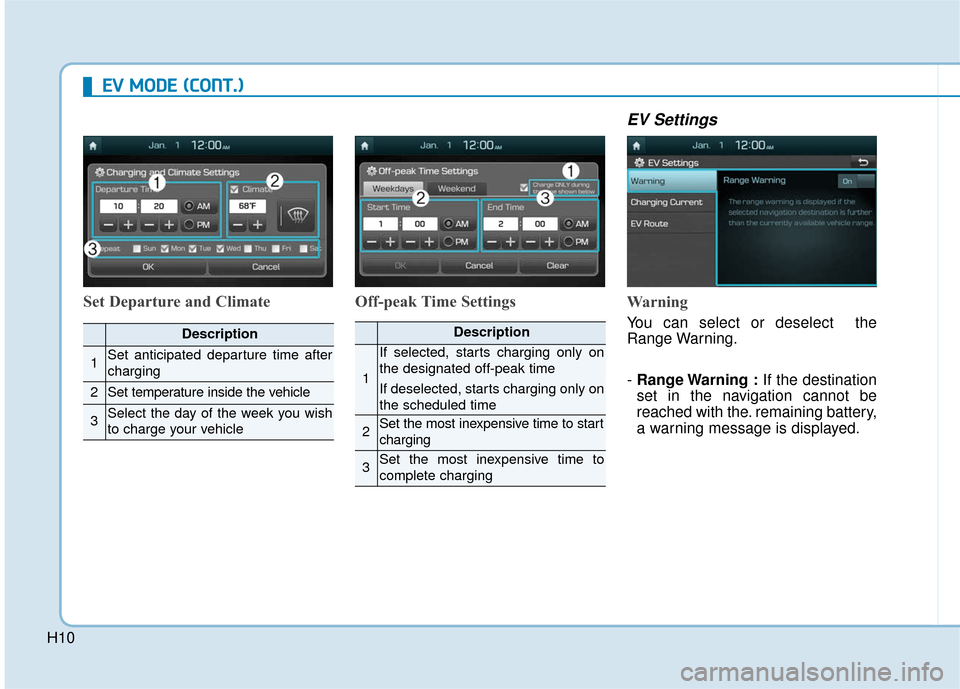
Set Departure and Climate Off-peak Time Settings
EV Settings
Warning
You can select or deselect the
Range Warning.
- Range Warning : If the destination
set in the navigation cannot be
reached with the. remaining battery,
a warning message is displayed.Description
1Set anticipated departure time after
charging
2Set temperature inside the vehicle
3Select the day of the week you wish
to charge your vehicle
Description
1
If selected, starts charging only on
the designated off-peak time
If deselected, starts charging only on
the scheduled time
2Set the most inexpensive time to start
charging
3Set the most inexpensive time to
complete charging
Page 492 of 555
H12
Charging Information
Normal Charge :
The electric vehicle is charged by
plugging into a normal charger
installed in your home or a public
charging station. (For further details,
refer to the 'Normal Charge'.)
Fast Charge (if equipped):
You can charge at high speeds at
public charging stations. Refer to
the respective company's manual
that is provided for each fast charg-
er type.
Battery performance and durability
can deteriorate if the fast charger is
used constantly.
Use of fast charge should be mini-
mized in order to help prolong high
voltage battery life.
Trickle Charge :
The Electric vehicle can be charged
by using household electricity. The
electrical outlet in your home must
comply with regulations and can
safely accommodate the Voltage /
Current (Amps) / Power (Watts) rat-
ings specified on the portable
charge.
Charging Time Information
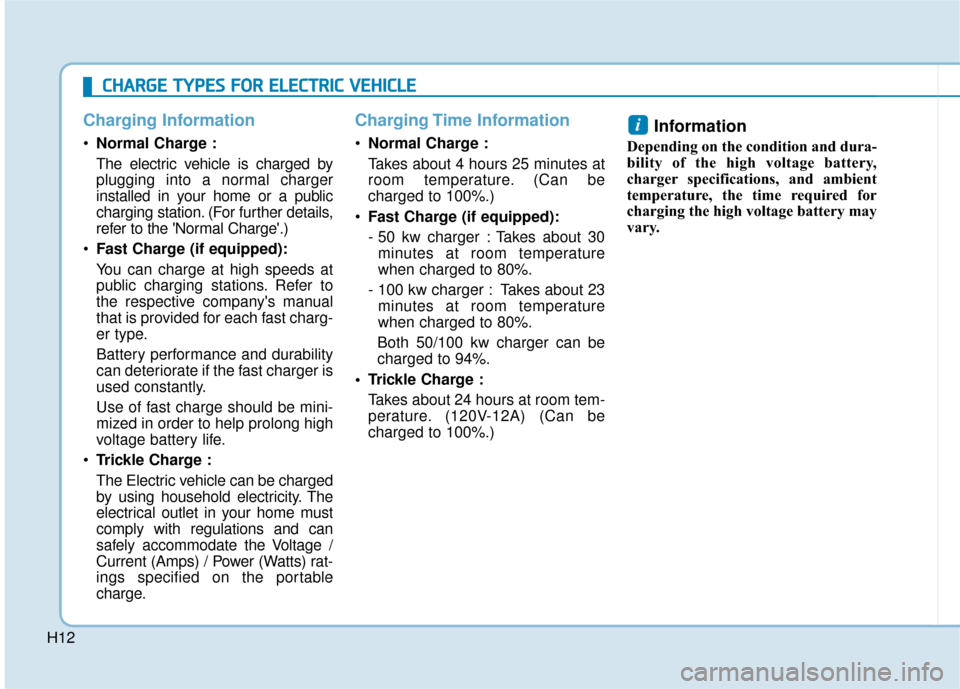
Normal Charge :
Takes about 4 hours 25 minutes at
room temperature. (Can be
charged to 100%.)
Fast Charge (if equipped):
- 50 kw charger : Takes about 30
minutes at room temperature
when charged to 80%.
- 100 kw charger : Takes about 23 minutes at room temperature
when charged to 80%.
Both 50/100 kw charger can be
charged to 94%.
Trickle Charge : Takes about 24 hours at room tem-
perature. (120V-12A) (Can be
charged to 100%.)
Information
Depending on the condition and dura-
bility of the high voltage battery,
charger specifications, and ambient
temperature, the time required for
charging the high voltage battery may
vary.
i
C CH
H A
AR
RG
G E
E
T
T Y
Y P
PE
ES
S
F
F O
O R
R
E
E L
LE
E C
CT
T R
R I
IC
C
V
V E
EH
H I
IC
C L
LE
E
Page 493 of 555
H13
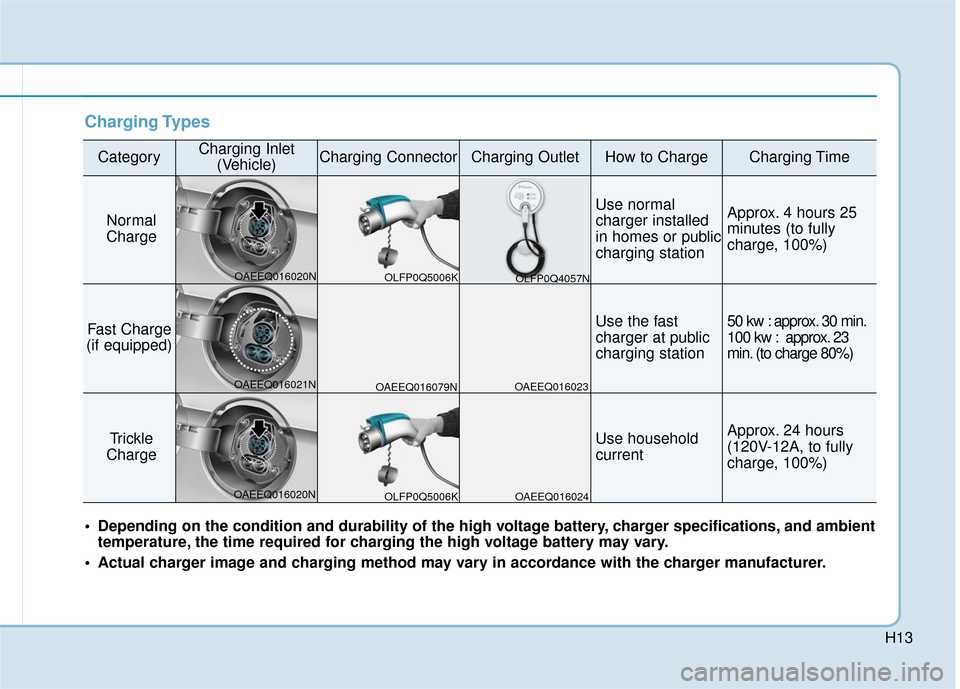
Charging Types
CategoryCharging Inlet(Vehicle)Charging ConnectorCharging OutletHow to ChargeCharging Time
Normal
Charge
Use normal
charger installed
in homes or public
charging stationApprox. 4 hours 25
minutes (to fully
charge, 100%)
Fast Charge
(if equipped)Use the fast
charger at public
charging station50 kw : approx. 30 min.
100 kw : approx. 23
min. (to charge 80%)
Trickle
Charge Use household
currentApprox. 24 hours
(120V-12A, to fully
charge, 100%)
Depending on the condition and durability of the high voltage battery, charger specifications, and ambient temperature, the time required for charging the high voltage battery may vary.
Actual charger image and charging method may vary in accordance with the charger manufacturer.
OLFP0Q5006K
OAEEQ016020N
OAEEQ016021N
OAEEQ016020N OAEEQ016079N
OAEEQ016023
OAEEQ016024 OLFP0Q4057N
OLFP0Q5006K
Page 494 of 555
H14
C
CH
H A
AR
RG
G E
E
I
IN
N D
DI
IC
C A
A T
TO
O R
R
L
L A
A M
M P
P
F
F O
O R
R
E
E L
LE
E C
CT
T R
R I
IC
C
V
V E
EH
H I
IC
C L
LE
E
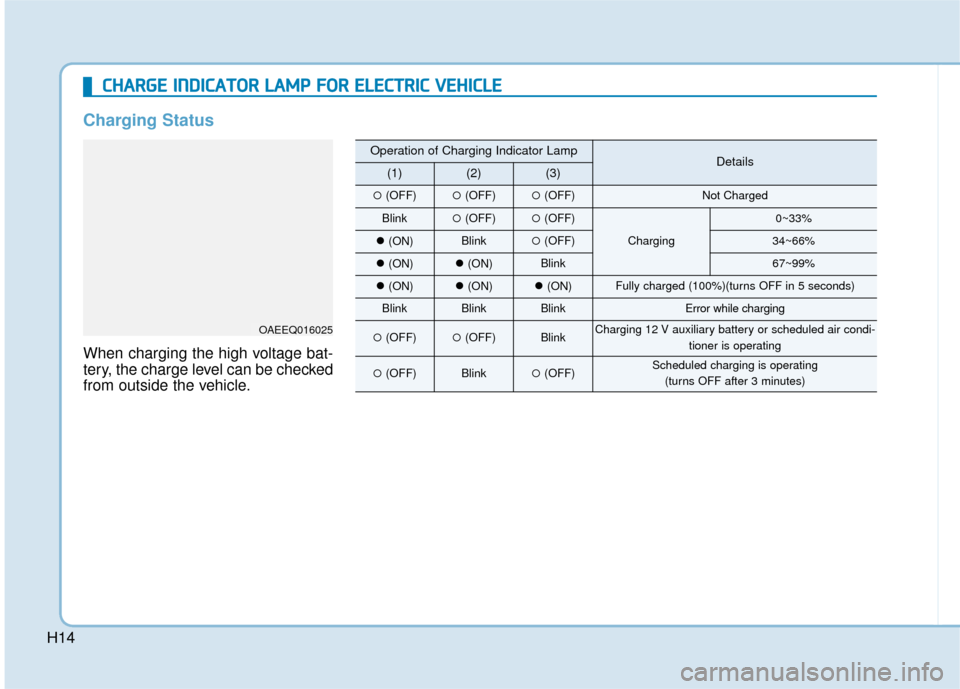
Charging Status
When charging the high voltage bat-
tery, the charge level can be checked
from outside the vehicle.
OAEEQ016025
Operation of Charging Indicator LampDetails(1)(2)(3)
�(OFF)�(OFF)�(OFF)Not Charged
Blink�(OFF)�(OFF)
Charging
0~33%
�(ON)Blink�(OFF)34~66%
�(ON)�(ON)Blink67~99%
�(ON)�(ON)�(ON)Fully charged (100%)(turns OFF in 5 seconds)
BlinkBlinkBlinkError while charging
�(OFF)�(OFF)BlinkCharging 12 V auxiliary battery or scheduled air condi-
tioner is operating
�(OFF)Blink�(OFF)Scheduled charging is operating (turns OFF after 3 minutes)
Page 496 of 555
H16
Scheduled Charging
(if equipped)
You can set-up a charging sched-ule for your vehicle using the AVN
or BlueLink application.
Refer to the Multimedia manual or
the BlueLink manual for detailed
information about setting sched-
uled charging.
Scheduled charging can only be done when using a normal charger
or the portable charger (ICCB: In-
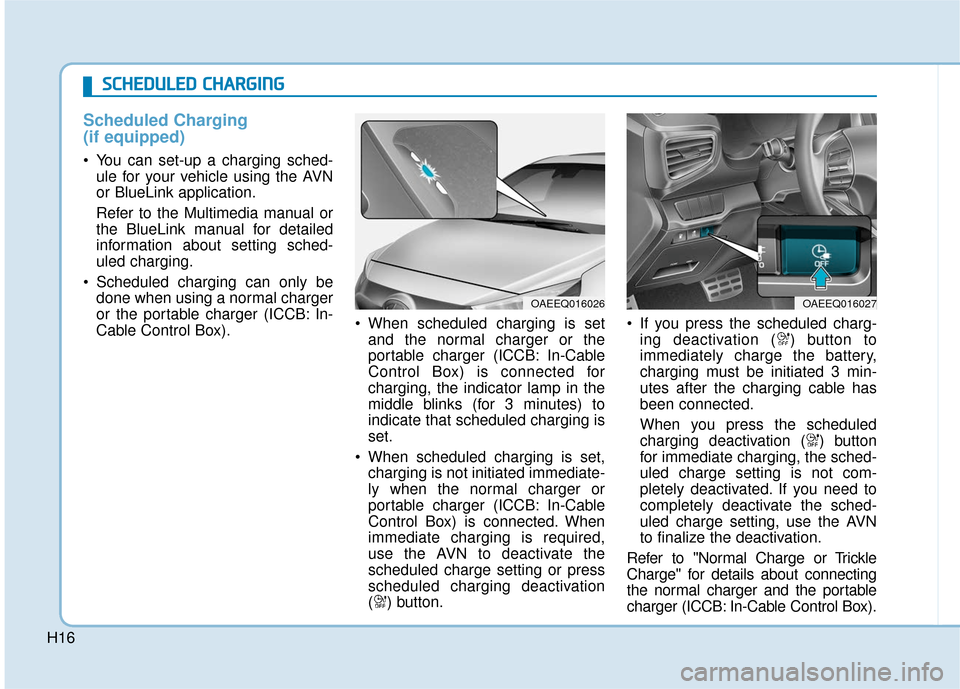
Cable Control Box). When scheduled charging is set
and the normal charger or the
portable charger (ICCB: In-Cable
Control Box) is connected for
charging, the indicator lamp in the
middle blinks (for 3 minutes) to
indicate that scheduled charging is
set.
When scheduled charging is set, charging is not initiated immediate-
ly when the normal charger or
portable charger (ICCB: In-Cable
Control Box) is connected. When
immediate charging is required,
use the AVN to deactivate the
scheduled charge setting or press
scheduled charging deactivation
( ) button. If you press the scheduled charg-
ing deactivation ( ) button to
immediately charge the battery,
charging must be initiated 3 min-
utes after the charging cable has
been connected.
When you press the scheduled
charging deactivation ( ) button
for immediate charging, the sched-
uled charge setting is not com-
pletely deactivated. If you need to
completely deactivate the sched-
uled charge setting, use the AVN
to finalize the deactivation.
Refer to "Normal Charge or Trickle
Charge" for details about connecting
the normal charger and the portable
charger (ICCB: In-Cable Control Box).
OAEEQ016026
S
S C
C H
H E
ED
D U
U L
LE
E D
D
C
C H
H A
AR
RG
G I
IN
N G
G
OAEEQ016027
Page 498 of 555
H18
Immediately stop charging
when you find abnormal
symptoms (odor, smoke).
Replace the charging cable if
the cable coating is damaged
to prevent electrical shock.
When connecting or removing
the charging cable, make sure
to hold the charging connec-
tor handle and charging plug.
If you pull the cable itself
(without using the handle), the
internal wires may disconnect
or get damaged. This may lead
to electric shock or fire.
WARNING
Always keep the charging con-
nector and charging plug in
clean and dry condition. Be
sure to keep the charging
cable in a condition where
there is no water or moisture.
Make sure to use the designat-
ed charger for charging the
electric vehicle. Using any
other charger may cause fail-
ure.
Before charging the battery,
turn the vehicle OFF.
When the vehicle is switched
OFF while charging, the cool-
ing fan inside the motor com-
partment may automatically
operate. Do not touch the cool-
ing fan while charging.
Be careful not to drop the
charging connector. The
charging connector can be
damaged.
CAUTION
P PR
R E
EC
CA
A U
U T
TI
IO
O N
NS
S
F
F O
O R
R
C
C H
H A
AR
RG
G I
IN
N G
G
E
E L
LE
E C
CT
T R
R I
IC
C
V
V E
EH
H I
IC
C L
LE
E
(
( C
C O
O N
NT
T.
.)
)
Page 501 of 555
H21
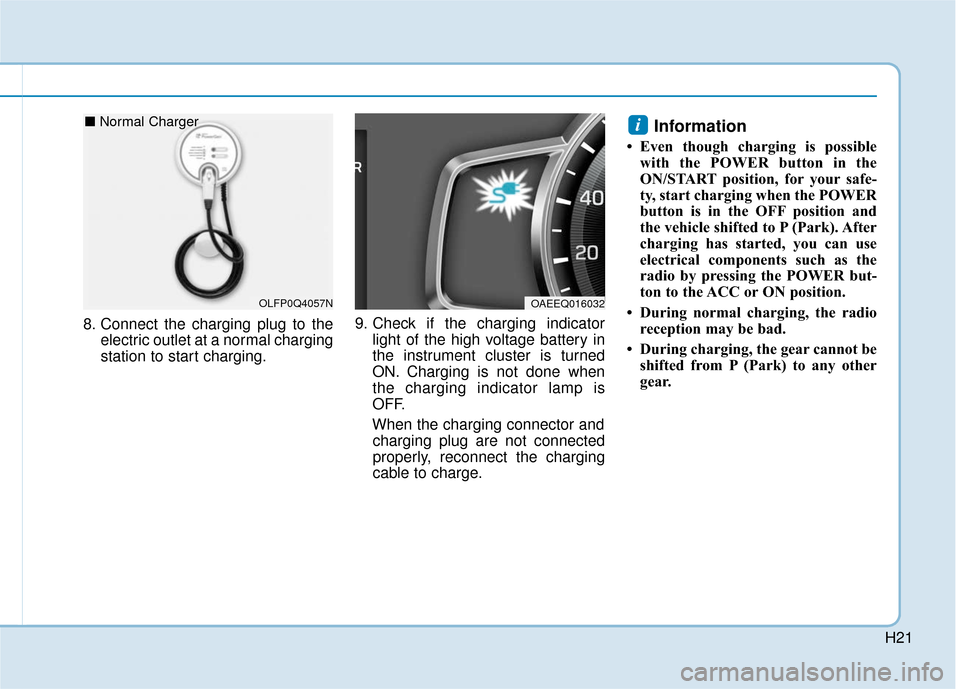
8. Connect the charging plug to theelectric outlet at a normal charging
station to start charging. 9. Check if the charging indicator
light of the high voltage battery in
the instrument cluster is turned
ON. Charging is not done when
the charging indicator lamp is
OFF.
When the charging connector and charging plug are not connected
properly, reconnect the charging
cable to charge.
Information
• Even though charging is possible with the POWER button in the
ON/START position, for your safe-
ty, start charging when the POWER
button is in the OFF position and
the vehicle shifted to P (Park). After
charging has started, you can use
electrical components such as the
radio by pressing the POWER but-
ton to the ACC or ON position.
• During normal charging, the radio reception may be bad.
• During charging, the gear cannot be shifted from P (Park) to any other
gear.
i
OAEEQ016032OLFP0Q4057N
■ Normal Charger
Page 502 of 555
H22
C
CH
H A
AR
RG
G I
IN
N G
G
E
E L
LE
E C
CT
T R
R I
IC
C
V
V E
EH
H I
IC
C L
LE
E
(
( N
N O
O R
RM
M A
AL
L
C
C H
H A
AR
RG
G E
E)
)
(
( C
C O
O N
NT
T.
.)
)
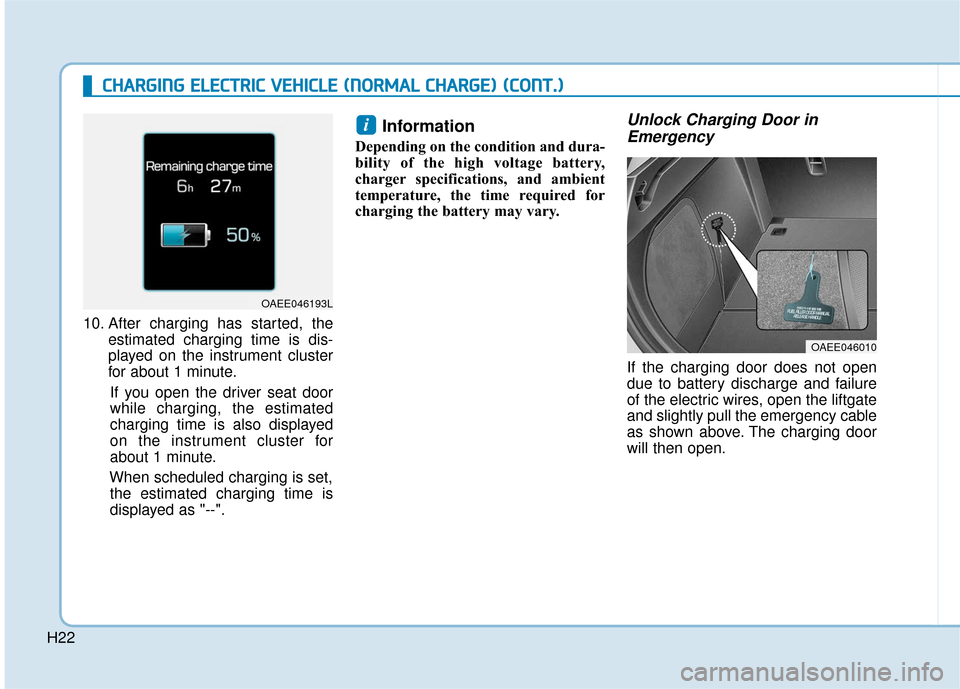
10. After charging has started, the
estimated charging time is dis-
played on the instrument cluster
for about 1 minute.
If you open the driver seat door
while charging, the estimated
charging time is also displayed
on the instrument cluster for
about 1 minute.
When scheduled charging is set, the estimated charging time is
displayed as "--".
Information
Depending on the condition and dura-
bility of the high voltage battery,
charger specifications, and ambient
temperature, the time required for
charging the battery may vary.
Unlock Charging Door in Emergency
If the charging door does not open
due to battery discharge and failure
of the electric wires, open the liftgate
and slightly pull the emergency cable
as shown above. The charging door
will then open.
i
OAEE046010
OAEE046193L