Page 164 of 534
3-79
Convenient features of your vehicle
3
Low Washer Fluid (if equipped)
This warning message is displayedon the service reminder mode if
the washer fluid level in the reser-
voir is nearly empty.
If this warning message is dis- played, have the washer fluid
reservoir refilled.
Low Fuel
This warning message is displayed ifthe fuel tank is almost out of fuel.
When this message is displayed, the
vehicle range is approximately 30
miles.
When this message is displayed, the
low fuel level warning light in thecluster will come on.
It is recommended to look for the nearest fueling station and refuel as
soon as possible.
Engine has overheated
This warning message is displayed
when the engine coolant tempera-
ture is above 120°C (248°F). This
means that the engine is overheated
and may be damaged.
If your vehicle is overheated, refer
to "Overheating" in chapter 6.
Check headlight
This warning message is displayed if
the headlamps are not operating
properly. The headlamp bulb mayneed to be replaced.
In addition, if a specific lamp(turn
signal lamp etc.) is not operating
properly, the warning message
according to a specific lamp (turn
signal lamp etc.) is displayed. A cor-
responding bulb may need to bereplaced.
When replacing the bulb, use the
same wattage bulb.
For more details, refer to "BULB
WATTAGE" in chapter 8.
NOTICE
Page 167 of 534
3-82
Convenient features of your vehicle
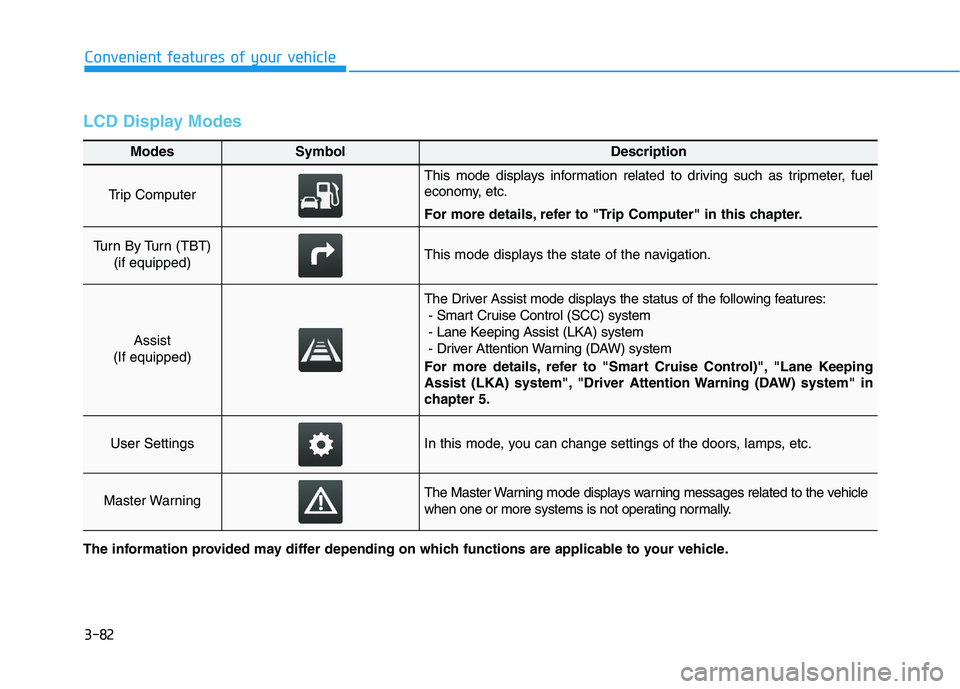
LCD Display Modes
Modes SymbolDescription
Trip Computer
This mode displays information related to driving such as tripmeter, fuel
economy, etc.
For more details, refer to "Trip Computer" in this chapter.
Turn By Turn (TBT) (if equipped)This mode displays the state of the navigation.
Assist
(If equipped)
The Driver Assist mode displays the status of the following features: - Smart Cruise Control (SCC) system
- Lane Keeping Assist (LKA) system
- Driver Attention Warning (DAW) system
For more details, refer to "Smart Cruise Control)", "Lane Keeping
Assist (LKA) system", "Driver Attention Warning (DAW) system" in
chapter 5.
User SettingsIn this mode, you can change settings of the doors, lamps, etc.
Master WarningThe Master Warning mode displays warning messages related to the vehicle
when one or more systems is not operating normally.
The information provided may differ depending on which functions are applicable to your vehicle.
Page 168 of 534
3-83
Convenient features of your vehicle
3
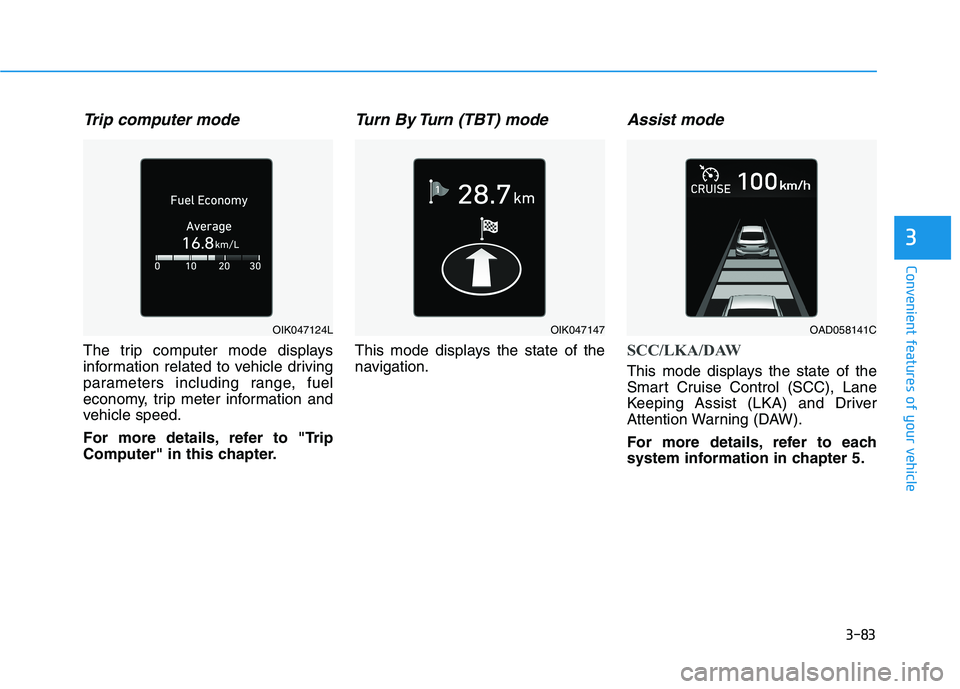
Trip computer mode
The trip computer mode displays
information related to vehicle driving
parameters including range, fuel
economy, trip meter information and
vehicle speed.
For more details, refer to "Trip
Computer" in this chapter.
Turn By Turn (TBT) mode
This mode displays the state of the
navigation.
Assist mode
SCC/LKA/DAW
This mode displays the state of the
Smart Cruise Control (SCC), Lane
Keeping Assist (LKA) and Driver
Attention Warning (DAW).
For more details, refer to each
system information in chapter 5.
OIK047124LOIK047147OAD058141C
Page 177 of 534
3-92
Convenient features of your vehicle
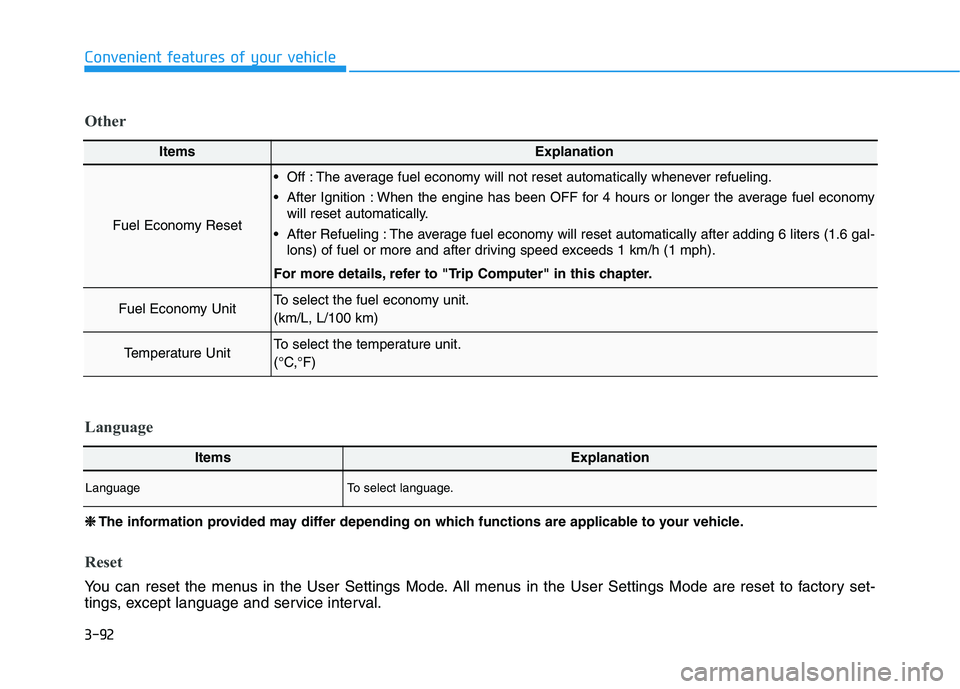
ItemsExplanation
Fuel Economy Reset
Off : The average fuel economy will not reset automatically whenever refueling.
After Ignition : When the engine has been OFF for 4 hours or longer the average fuel economywill reset automatically.
After Refueling : The average fuel economy will reset automatically after adding 6 liters (1.6 gal- lons) of fuel or more and after driving speed exceeds 1 km/h (1 mph).
For more details, refer to "Trip Computer" in this chapter.
Fuel Economy UnitTo select the fuel economy unit. (km/L, L/100 km)
Temperature UnitTo select the temperature unit.
(°C,°F)
Other
❈❈ The information provided may differ depending on which functions are applicable to your vehicle.
Reset
You can reset the menus in the User Settings Mode. All menus in the User Settings Mode are reset to factory set-
tings, except language and service interval.
ItemsExplanation
LanguageTo select language.
Language
Page 178 of 534
3-93
Convenient features of your vehicle
3
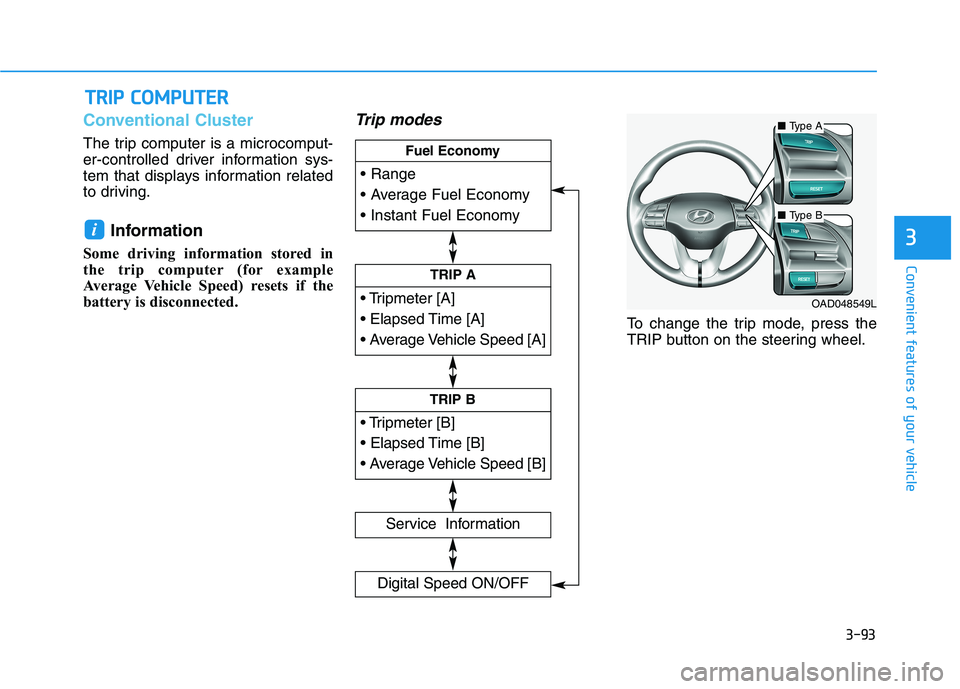
Conventional Cluster
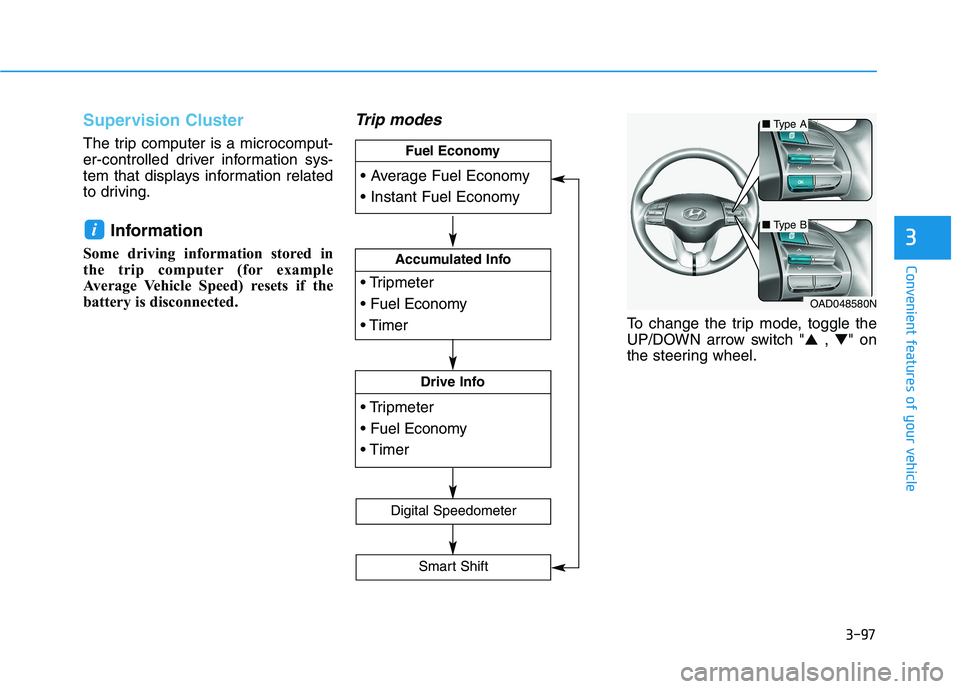
The trip computer is a microcomput-
er-controlled driver information sys-
tem that displays information related
to driving.Information
Some driving information stored in
the trip computer (for example
Average Vehicle Speed) resets if the
battery is disconnected.
Trip modes
To change the trip mode, press the
TRIP button on the steering wheel.
i
TT RR IIPP CC OO MM PPUU TTEERR
TRIP A
Service Information
Digital Speed ON/OFF
TRIP B
Fuel Economy
■
Type A
■Type B
OAD048549L
Page 179 of 534
3-94
Convenient features of your vehicle
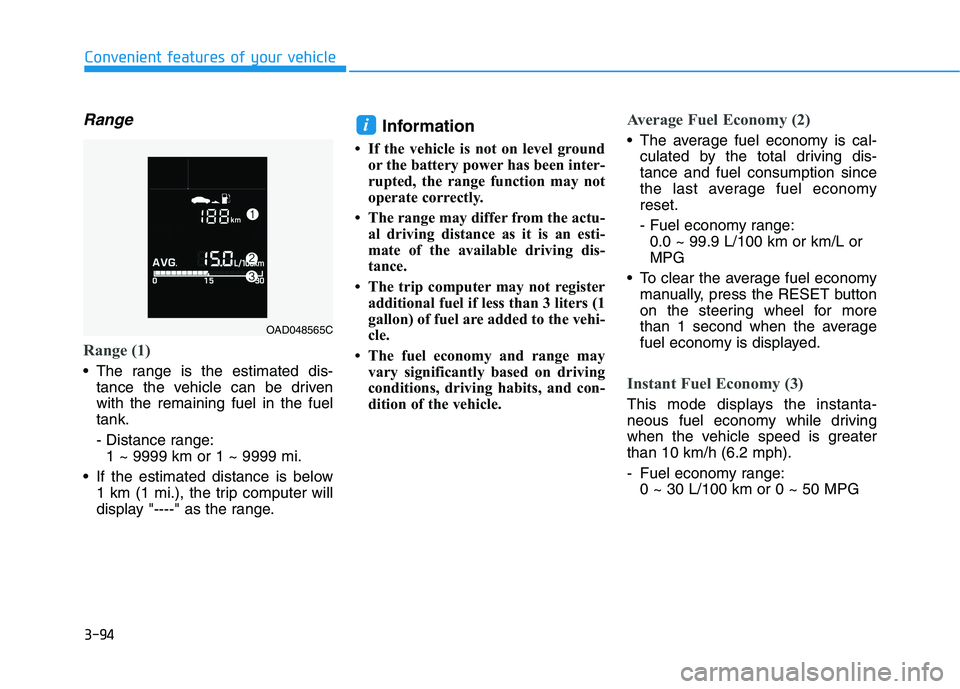
Range
Range (1)
The range is the estimated dis-tance the vehicle can be driven with the remaining fuel in the fueltank.
- Distance range:1 ~ 9999 km or 1 ~ 9999 mi.
If the estimated distance is below 1 km (1 mi.), the trip computer will
display "----" as the range. Information
If the vehicle is not on level ground or the battery power has been inter-
rupted, the range function may not
operate correctly.
The range may differ from the actu- al driving distance as it is an esti-
mate of the available driving dis-
tance.
The trip computer may not register additional fuel if less than 3 liters (1
gallon) of fuel are added to the vehi-
cle.
The fuel economy and range may vary significantly based on driving
conditions, driving habits, and con-
dition of the vehicle.
Average Fuel Economy (2)
The average fuel economy is cal-culated by the total driving dis- tance and fuel consumption since
the last average fuel economyreset.
- Fuel economy range:0.0 ~ 99.9 L/100 km or km/L or MPG
To clear the average fuel economy manually, press the RESET button
on the steering wheel for more
than 1 second when the average
fuel economy is displayed.
Instant Fuel Economy (3)
This mode displays the instanta-
neous fuel economy while driving
when the vehicle speed is greaterthan 10 km/h (6.2 mph).
- Fuel economy range:0 ~ 30 L/100 km or 0 ~ 50 MPG
i
OAD048565C
Page 182 of 534
3-97
Convenient features of your vehicle
3
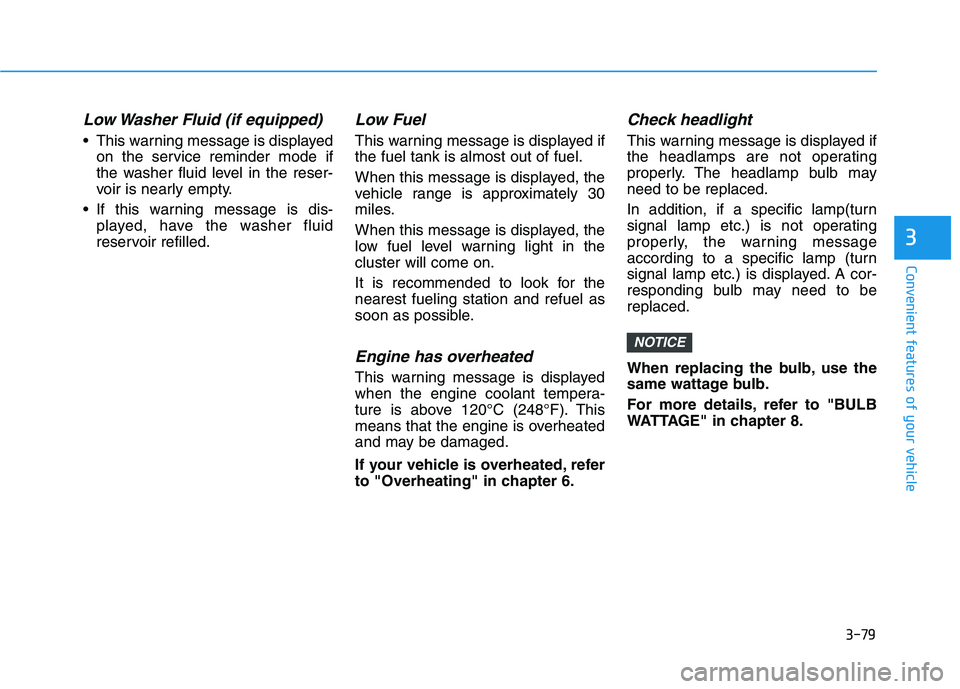
Supervision Cluster
The trip computer is a microcomput-
er-controlled driver information sys-
tem that displays information related
to driving.Information
Some driving information stored in
the trip computer (for example
Average Vehicle Speed) resets if the
battery is disconnected.
Trip modes
To change the trip mode, toggle the
UP/DOWN arrow switch " ▲ , ▼ " on
the steering wheel.
i
Accumulated Info
Drive Info
Fuel Economy
Digital Speedometer
Smart Shift
OAD048580N
■
Type A
■Type B
Page 183 of 534
3-98
Convenient features of your vehicle
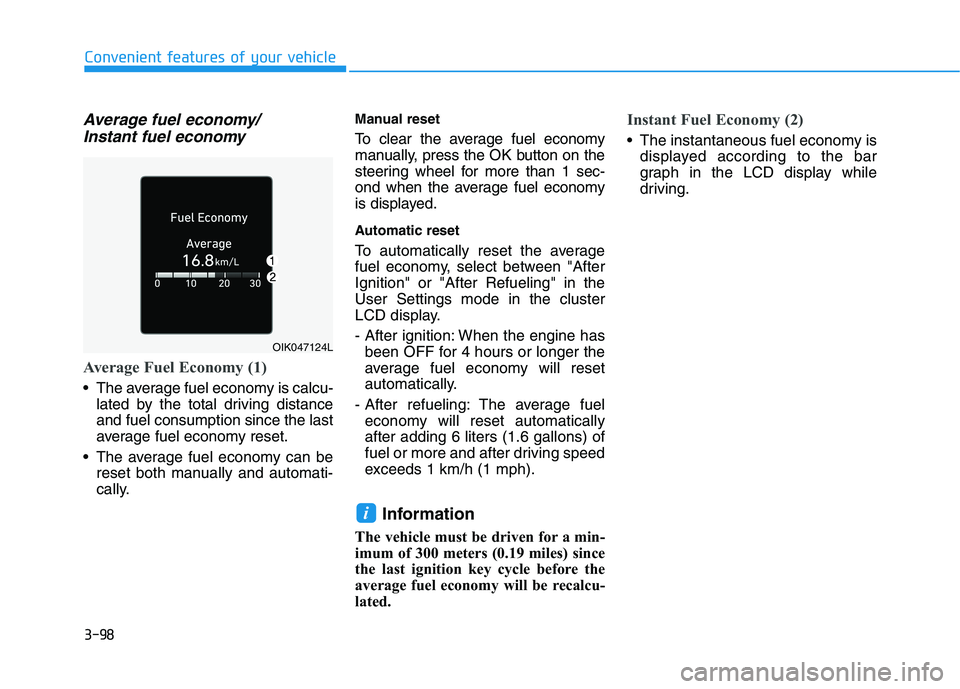
Average fuel economy/Instant fuel economy
Average Fuel Economy (1)
The average fuel economy is calcu- lated by the total driving distance and fuel consumption since the last
average fuel economy reset.
The average fuel economy can be reset both manually and automati-
cally. Manual reset
To clear the average fuel economy
manually, press the OK button on the
steering wheel for more than 1 sec-
ond when the average fuel economy
is displayed.
Automatic reset
To automatically reset the average
fuel economy, select between "AfterIgnition" or "After Refueling" in theUser Settings mode in the cluster
LCD display.
- After ignition: When the engine has
been OFF for 4 hours or longer the
average fuel economy will reset
automatically.
- After refueling: The average fuel economy will reset automaticallyafter adding 6 liters (1.6 gallons) of
fuel or more and after driving speed
exceeds 1 km/h (1 mph).
Information
The vehicle must be driven for a min-
imum of 300 meters (0.19 miles) since
the last ignition key cycle before the
average fuel economy will be recalcu-
lated.
Instant Fuel Economy (2)
The instantaneous fuel economy is displayed according to the bar
graph in the LCD display while
driving.
i
OIK047124L