2019 HONDA ODYSSEY Radio
[x] Cancel search: RadioPage 5 of 767

Contents
Child Safety P. 62Exhaust Gas Hazard P. 80Safety Labels P. 81
Opening and Closing the Tailgate P. 159 Opening and Closing the Sliding Doors P. 170
Opening and Closing the Moonroof* P. 185 Operating the Switches Around the Steering Wheel P. 186
Interior Lights/Interior Convenience Items P. 225 Climate Control System P. 248, 252
Audio Error Messages P. 367 General Information on the Audio System P. 372
Customized Features P. 445 HomeLink® Universal Transceiver* P. 470 Bluetooth ® HandsFreeLink ® P. 473, 498
When Driving P. 538 Braking P. 602Parking Your Vehicle P. 619
Fuel Economy and CO
2 Emissions P. 635
Maintenance Under the Hood P. 647 Replacing Light Bulbs P. 660
Checking and Maintaining Tires P. 675 Battery P. 684 Remote Transmitter Care P. 686
Climate Control System Maintenance P. 689 Cleaning P. 690 Accessories and Modifications P. 696
Engine Does Not Start P. 710 Jump Starting P. 713Overheating P. 715
Emergency Towing P. 731 When You Cannot Unlock the Fuel Fill Door P. 732
When You Cannot Close the Power Sliding Doors
* P. 735 Refueling P. 736
Devices that Emit Radio Waves P. 743 Reporting Safety Defects P. 745 Emissions Testing P. 746
Customer Service Information P. 751
Quick Reference GuideP. 4
Safe DrivingP. 33
Instrument PanelP. 83
ControlsP. 141
FeaturesP. 259
DrivingP. 525
MaintenanceP. 637
Handling the UnexpectedP. 699
InformationP. 739
IndexP. 752
19 ODYSSEY-31THR6120.book 3 ページ 2018年12月6日 木曜日 午後4時35分
Page 22 of 767
20
Quick Reference Guide
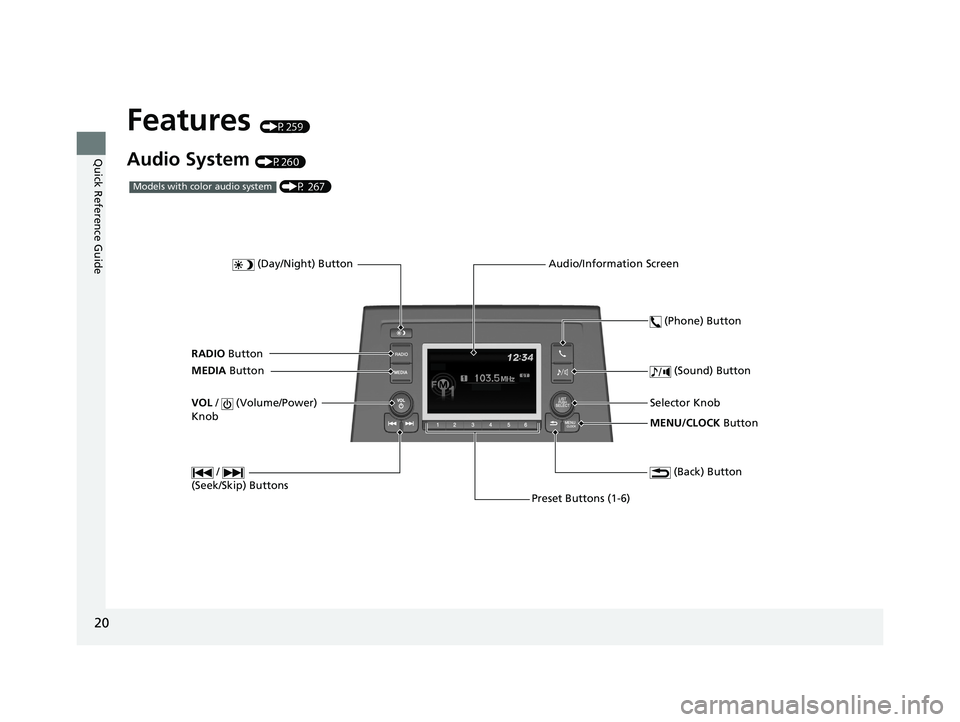
Features (P259)
Audio System (P260)
MENU/CLOCK Button
Selector Knob
(Day/Night) Button
(Back) Button
(Sound) Button
VOL
/ (Volume/Power)
Knob
Preset Buttons (1-6) (Phone) Button
RADIO
Button
/
(Seek/Skip) Buttons
MEDIA Button Audio/Information Screen
(P 267)Models with color audio system
19 ODYSSEY-31THR6120.book 20 ページ 2018年12月6日 木曜日 午後4時35分
Page 24 of 767

22
Quick Reference Guide
Audio Remote Controls
(P264)
●
(+ / ( - Bar
Press to adjust the volume up/down.
● SOURCE Button
Press to change the audio mode:
FM1/FM2/AM/USB/iPod/
Bluetooth ® Audio/AUX
● / Buttons
Radio: Press to change the preset station. Press and hold to select the next or
previous strong station.
USB device/ Bluetooth® Audio:
Press to skip to the beginning of
the next song or return to the
beginning of the current song.
Press and hold to change a folder.
Models with color audio system
( + / (- Bar
SOURCE
Button / Buttons
●(
+ / (- Bar
Press to adjust the volume up/down.
● / / / /ENTER Buttons
Press or to select Now Playing on
the home screen of the driver
information interface, and then press the
ENTER button.
Press or to cycle through the audio
mode as follows:
Android Auto/Apple CarPlay/SiriusXM ®
*/
Rear Entertainment*/AUX Input/AM/
Bluetooth ® Audio/Social Playlist/FM/My
Honda Music/USB/iPod/CD
*
Models with Display Audio
ENTER Button
/ / / Buttons34
(+ / (- Bar
34
34
34
Radio: Press / to change the
preset station.
CD
*/USB device/My Honda Music/
Bluetooth ® Audio:
Press / to skip to the
beginning of the next song or
return to the beginning of the
current song.
19 ODYSSEY-31THR6120.book 22 ページ 2018年12月6日 木曜日 午後4時35分
Page 148 of 767
146
uuLocking and Unlocking the Doors uLow Remote Signal Strength
Controls
Low Remote Signal Strength
The vehicle transmits radio waves to locate the remote when locking/unlocking the
doors*, tailgate*, and fuel fill door*, opening the power sliding door* and the power
tailgate*, or to start the engine.
In the following cases, locking/unlocking the doors
*, opening the power sliding
door* and the power tailgate*, or starting the engine may be inhibited or operation
may be unstable:
• Strong radio waves are being tra nsmitted by nearby equipment.
• You are carrying the remote together with telecommunications equipment,
laptop computers, cell phone s, or wireless devices.
• A metallic object is touchi ng or covering the remote.
1Low Remote Signal Strength
Communication between the remote and the vehicle
consumes the remote’s battery.
Battery life is about two years, but this varies
depending on regularity of use.
The battery is consumed whenever the remote is
receiving strong radio waves. Avoid placing it near
electrical appliances such as televisions and personal
computers.
* Not available on all models
19 ODYSSEY-31THR6120.book 146 ページ 2018年12月6日 木曜日 午後4時35分
Page 181 of 767
179Continued
Controls
Security System
Immobilizer System
The immobilizer system prevents a key that has not been pre-registered from
starting the engine. Each key contains electronic transmitters that use electronic
signals to verify the key.
Pay attention to the follo wing when pressing the ENGINE START/STOP button:
• Do not allow objects that emit strong radio waves near the ENGINE START/
STOP button.
• Make sure the key is not covered by or touching a metal object.
• Do not bring a key from another vehicle’s immobilizer system near the ENGINE
START/STOP button.
• Do not put the key near magnetic items. Electronic devices, such as televisions
and audio systems emit strong magnetic fields. Note that even a key chain can
become magnetic.
Security System Alarm
The security system alarm activates when the tailgate, hood, or doors are forcibly
opened.
The alarm does not activate if the tailgate or doors are opened with the key, remote
transmitter or smart entry system
*.
However, the alarm activates if a door is opened with the key, then the hood is
opened before the power mode is set to ON.
■When the security system alarm activates
The horn sounds intermittently, and some exterior lights flash.
1 Immobilizer System
NOTICE
Leaving the key in the vehicl e can result in theft or
accidental movement of the vehicle.
Always take the key with you whenever you leave the
vehicle unattended.
Do not alter the system or add other devices to it.
Doing so may damage the system and make your
vehicle inoperable.
Canadian models only: Apply and hold the brake
pedal before turning the vehicle on the first time after
the battery has been disconnected.
1 Security System Alarm
The security alarm continues for a maximum of two
minutes until the security system deactivates.
* Not available on all models
19 ODYSSEY-31THR6120.book 179 ページ 2018年12月6日 木曜日 午後4時35分
Page 261 of 767

259
Features
This chapter describes how to operate technology features.
Audio SystemAbout Your Audio System ................ 260
USB Ports ......................................... 261
Auxiliary Input Jack .......................... 262
Audio System Theft Protection ......... 263
Audio Remote Controls .................... 264
Audio System Basic Operation ........ 267
Audio/Information Screen ................ 268
Adjusting the Sound ........................ 272
Display Setup ................................... 273
Playing AM/FM Radio ....................... 274
Playing an iPod ................................ 276
Playing a USB Flash Drive ................. 279
Playing Bluetooth ® Audio ................. 282
Models with color audio system
Audio System Basic Operation ........ 285
Audio/Information Screen ................ 286
System Updates ............................... 300
File Manager .................................... 306
Adjusting the Sound ........................ 312
Display Setup ................................... 313
Voice Control Operation .................. 315
Playing AM/FM Radio ....................... 318
Playing SiriusXM ® Radio
*................. 322
Playing a CD*.................................. 332
Playing an iPod ................................ 335
Playing a USB Flash Drive ................. 338
Playing My Honda Music .................. 341
Playing Bluetooth ® Audio................. 345
Models with Display AudioPlaying Social Playlist........................ 347
HondaLink ®..................................... 349
Wi-Fi Connection ............................. 354
Near Field Communication (NFC)
*... 356
Siri Eyes Free .................................... 359
Apple CarPlay .................................. 360
Android Auto .................................. 363
Audio Error Messages ...................... 367
General Information on the Audio System..... 372Blu-ray/DVD Rear Entertainment System*...... 396Customized Features............................. 445
HomeLink ® Universal Transceiver*....... 470
Bluetooth ® HandsFreeLink ®.......... 473 , 498
CabinWatch
TM *....................................... 523
CabinTalkTM *........................................... 524
* Not available on all models
19 ODYSSEY-31THR6120.book 259 ページ 2018年12月6日 木曜日 午後4時35分
Page 262 of 767

260
Features
Audio System
About Your Audio System
The audio system features AM/FM radio and SiriusXM ® Radio* service. It can also
play audio CDs*, WMA/MP3/AAC files*, USB flash drives, and iPod, iPhone, iPad*
and Bluetooth ® devices.
You can operate the audi o system from the buttons
* and knobs on the panel, the
remote controls on the steering wheel, or the icons on the touchscreen interface*.
1About Your Audio System
iPod, iPad, iPhone and iT unes are trademarks of
Apple Inc.
State or local laws may pr ohibit the operation of
handheld electronic devi ces while operating a
vehicle.
Video CDs, DVDs
*1, Blu-ray Discs*1, and 3-inch (8-cm)
mini CDs are not supported.
*1: Models with CD player
SiriusXM ® Radio
* is available on a subscription basis
only. For more information on SiriusXM ® Radio*,
contact a dealer.
2 General Information on the Audio System
P. 372
SiriusXM ® Radio
* is available in the United States and
Canada, except Ha waii, Alaska, and Puerto Rico.
SiriusXM ®
* is a registered trademark of SiriusXM
Radio*, Inc.
After you set the power m ode to VEHICLE OFF, you
can use the audio system for up to 30 minutes per
driving cycle, or until opening the driver’s door.
However, whether you can continue using the audio
system depends on the batter y condition. Repeatedly
using this feature ma y drain the battery.
Models with Blu-rayTM or CD player
Models with Display AudioRemote Controls iPod
USB Flash Drive*1 : Models with color audio system
*2 : Models with Display Audio
*1
*2
* Not available on all models
19 ODYSSEY-31THR6120.book 260 ページ 2018年12月6日 木曜日 午後4時35分
Page 263 of 767

261
uuAudio System uUSB Ports
Features
USB Ports
Install the iPod USB connector or the USB flash drive to the USB port.
■In the consol e compartment
The USB port (1.0A) on the right side is for
playing audio files on a USB flash drive,
connecting a cell phone, and charging
devices.
The USB port (2.5A) on the left side is only for
charging devices.
The USB port (2.5A) on the right side is for
charging devices, playing audio files and
connecting compatible phones with Apple
CarPlay or Android Auto.
The USB port (2.5A) on the left side is only for
charging devices.
■On the back of the console
compartment*
The USB ports (2.5A) are only for charging
devices.
1 USB Ports
•Do not leave the iPod or USB flash drive in the
vehicle. Direct sunlight and high temperatures may
damage it.
•We recommend using an ex tension cable with the
USB port.
•Do not connect the iPod or USB flash drive using a
hub.
•Do not use a device such as a card reader or hard
disk drive, as the device or your files may be
damaged.
•We recommend keeping y our data backed up
before using the device in your vehicle.
•Displayed messages may vary depending on the
device model and software version.
If the audio system does not recognize the iPod, try
reconnecting it a few times or reboot the device. To
reboot, follow the manufac turer’s instructions
provided with the iPod or visit www.apple.com/ipod.
The USB port can supply up to 1.0A/2.5A of power. It
does not output 1.0A/2.5A unless the device
requests.
For amperage details, read the operating manual of
the device that ne eds to be charged.
Set the power mode to ACCESSORY or ON first.
Under certain condi tions, a device connected to the
port may generate noise in the radio you are listening
to.
USB charge
Models
with color
audio
system
Models
with
Display
Audio
Models with color audio system
Models with Display Audio
* Not available on all models
19 ODYSSEY-31THR6120.book 261 ページ 2018年12月6日 木曜日 午後4時35分