Page 332 of 767
330
uuAudio System Basic Operation uPlaying SiriusXM ® Radio*
Features
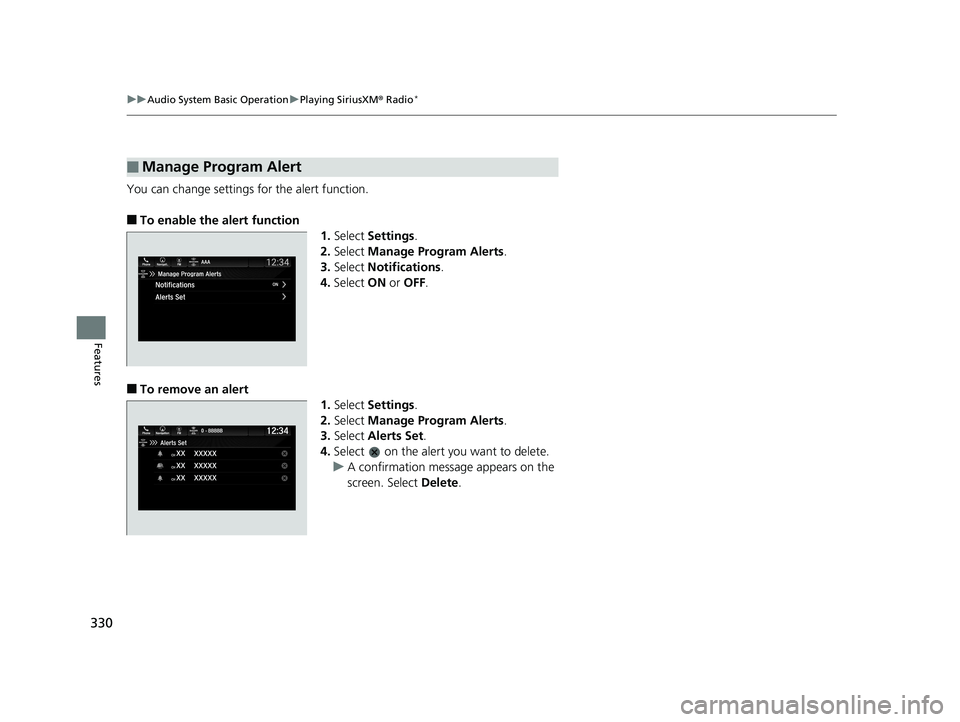
You can change settings for the alert function.
■To enable the alert function
1.Select Settings .
2. Select Manage Program Alerts .
3. Select Notifications .
4. Select ON or OFF .
■To remove an alert
1.Select Settings .
2. Select Manage Program Alerts .
3. Select Alerts Set .
4. Select on the alert you want to delete.
u A confirmation message appears on the
screen. Select Delete.
■Manage Program Alert
19 ODYSSEY-31THR6120.book 330 ページ 2018年12月6日 木曜日 午後4時35分
Page 333 of 767
331
uuAudio System Basic Operation uPlaying SiriusXM ® Radio*
Features
Sample each channel on the selected mode for 10 seconds.
1. Select More.
2. Select Scan.
You can change a scan mode by the following procedure.
1. Select Settings .
2. Select Scan Mode .
3. Select Channel or Preset .
To turn off scan, select Stop.
■Scan1Scan
The “Scan Songs in Preset s” function is based on
TuneScan
TM technology of SiriusXM ®.
The “Featured Channels ” function is based on
Featured Favorites
TM technology of SiriusXM ®.
TuneScan
TM and Featured FavoritesTM are registered
trademarks of SiriusXM ® Radio, Inc.
19 ODYSSEY-31THR6120.book 331 ページ 2018年12月6日 木曜日 午後4時35分
Page 374 of 767
372
Features
General Information on the Audio System
SiriusXM® Radio Service*
1. You need your radio ID ready before regist ering for subscription. To see the ID in
the screen, select Channel to 0.
2. Have your radio ID ready, and either call or visit the SiriusXM® website to
subscribe.
Switch to the SiriusXM ® mode by using the audio remote controls on the steering
wheel, or through the audio/information screen, and stay in this mode for about 30
minutes until the service is activated. Make sure your vehicle is in an open area with
good reception.
Channel not subscribed. Call SiriusXM to subscribe.:
You are not subscribed to the channel selected.
Subscription updated:
SiriusXM ® radio is receiving information update from the network.
Channel Not Available:
No such channel exits, or the artist or title information is unavailable.
No Signal:
The signal is too weak in the current location.
Check Tuner:
There is a problem with the SiriusXM ® tuner. Contact a dealer.
Check Antenna:
There is a problem with the SiriusXM ® antenna. Contact a dealer.
■Subscribing to SiriusXM® Radio
■Receiving SiriusXM® Radio
■SiriusXM® Radio Display Messages
Models with Display Audio
1 Subscribing to SiriusXM ® Radio
Contact Information for SiriusXM ® Radio:
•US: SiriusXM ® Radio at www.siriusxm.com or 1-
800-852-9696
•Canada: SiriusXM ® Canada at www.siriusxm.ca , or
1-877-209-0079
1 Receiving SiriusXM ® Radio
The SiriusXM ® satellites are in orbit over the equator;
therefore, objects south of the vehicle may cause
satellite rece ption interruptions. Sa tellite signals are
more likely to be blocked by tall buildings and
mountains the farther north you travel from the
equator.
You may experience rece ption problems under the
following circumstances:
•In a location with an obstruction to the south of
your vehicle.
•In tunnels•On the lower level of a multi-tiered road
•Large items carried on the roof rack
* Not available on all models
19 ODYSSEY-31THR6120.book 372 ページ 2018年12月6日 木曜日 午後4時35分
Page 398 of 767
396
Features
Blu-ray/DVD Rear Entertainment System*
Rear seat passengers can enjoy a completely separate entertainment source than
front passengers, including movies , games, and other audio choices.1Blu-ray/DVD Rear Entertainment System*
Blu-ray DiscTM, Blu-rayTM, and the logos are
trademarks of the Blu-ray Disc Association.
BD-XL, BD-Live, Blu-ray 3D , and Ultra HD Blu-ray are
not supported.
CAUTION: Radio Frequency Radiation Exposure The
Rear Entertainment System remote complies with
FCC radiation exposure lim its set forth for an
uncontrolled environment and meets the FCC radio
frequency (RF) Exposure Guidelines.
The Rear Entertainment Sy stem remote should be
kept at least 7.9 inch (20 cm) or more away from a
person’s body when operated.
* Not available on all models
19 ODYSSEY-31THR6120.book 396 ページ 2018年12月6日 木曜日 午後4時35分
Page 419 of 767
417
uuBlu-ray/DVD Rear Entertainment System*uAudio Sources for Front and Rear Seats
Features
Audio Sources for Front and Rear Seats
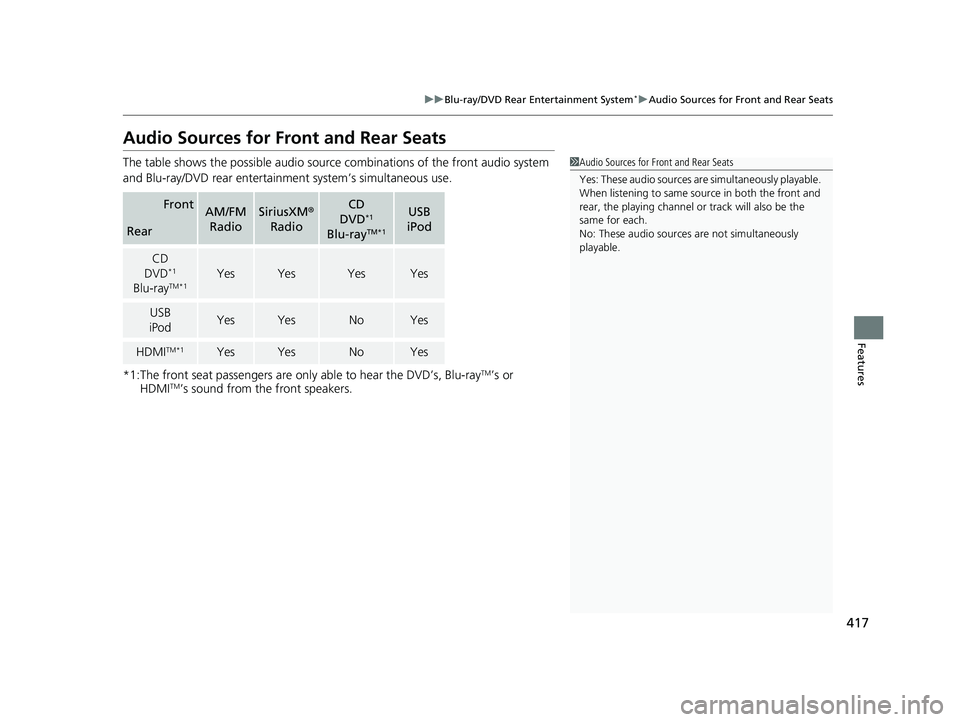
The table shows the possible audio source combinations of the front audio system
and Blu-ray/DVD rear entertainm ent system’s simultaneous use.
*1:The front seat passengers are only able to hear the DVD’s, Blu-ray
TM’s or
HDMITM’s sound from the front speakers.
FrontAM/FM
RadioSiriusXM ®
RadioCD
DVD*1
Blu-rayTM*1
USB
iPod
Rear
CD
DVD*1
Blu-rayTM*1YesYesYesYes
USB
iPodYesYesNoYes
HDMITM*1YesYesNoYes
1 Audio Sources for Front and Rear Seats
Yes: These audio sources ar e simultaneously playable.
When listening to same source in both the front and
rear, the playing channel or track will also be the
same for each.
No: These audio sources are not simultaneously
playable.
19 ODYSSEY-31THR6120.book 417 ページ 2018年12月6日 木曜日 午後4時35分
Page 448 of 767
446
uuCustomized Features u
Features
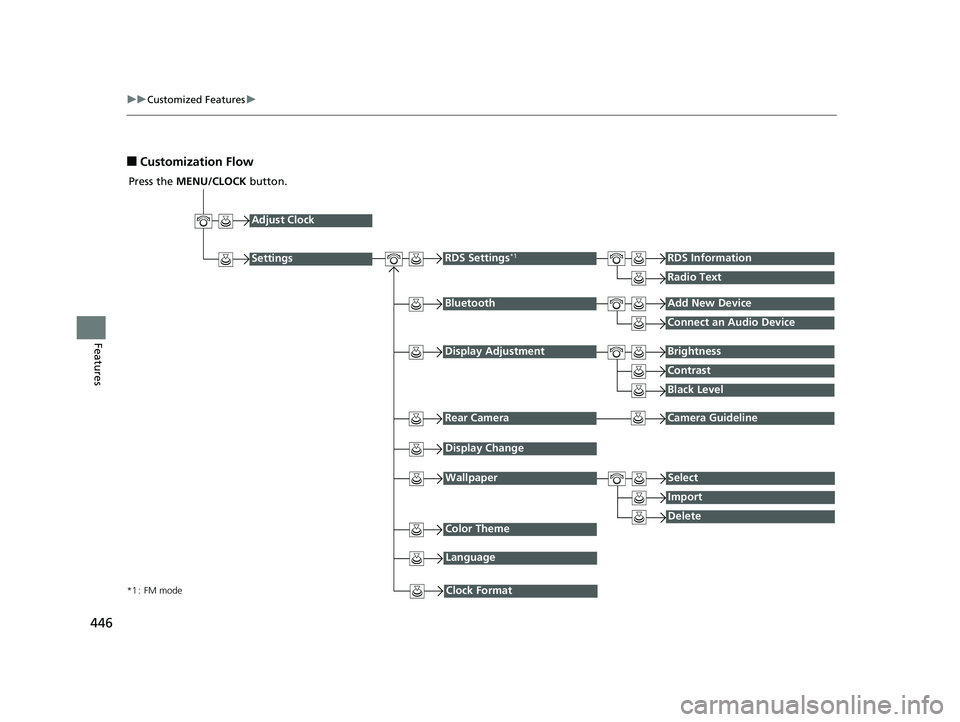
■Customization Flow
Press the MENU/CLOCK button.
Adjust Clock
BluetoothAdd New Device
Connect an Audio Device
Display AdjustmentBrightness
Contrast
Black Level
Rear CameraCamera Guideline
RDS Settings*1RDS Information
Radio Text
Display Change
WallpaperSelect
Import
DeleteColor Theme
Language
Clock Format*1 : FM mode
Settings
19 ODYSSEY-31THR6120.book 446 ページ 2018年12月6日 木曜日 午後4時35分
Page 450 of 767
448
uuCustomized Features u
Features
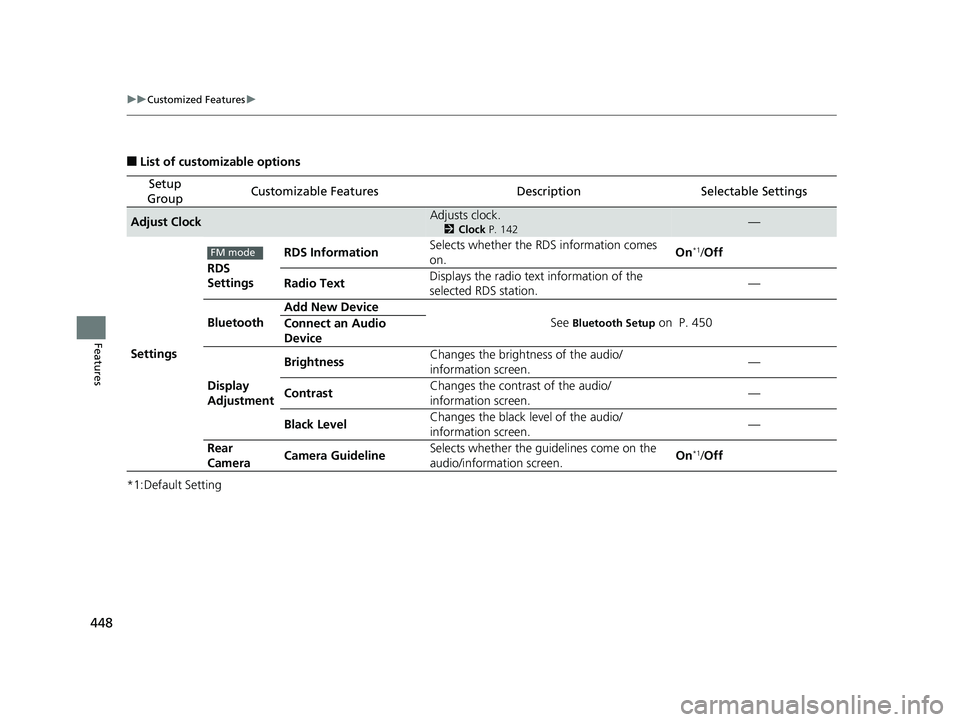
■List of customizable options
*1:Default Setting
Setup
GroupCustomizable FeaturesDescriptionSelectable Settings
Adjust ClockAdjusts clock.
2 Clock P. 142—
Settings RDS
Settings
RDS Information
Selects whether the RDS information comes
on. On
*1/
Off
Radio Text Displays the radio text information of the
selected RDS station. —
Bluetooth Add New Device
See
Bluetooth Setup on P. 450
Connect an Audio
Device
Display
Adjustment Brightness
Changes the brightness of the audio/
information screen. —
Contrast Changes the contrast of the audio/
information screen. —
Black Level Changes the black level of the audio/
information screen.
—
Rear
Camera Camera Guideline Selects whether the guidelines come on the
audio/information screen. On
*1/
Off
FM mode
19 ODYSSEY-31THR6120.book 448 ページ 2018年12月6日 木曜日 午後4時35分
Page 540 of 767
538
Driving
When Driving
Starting the Engine
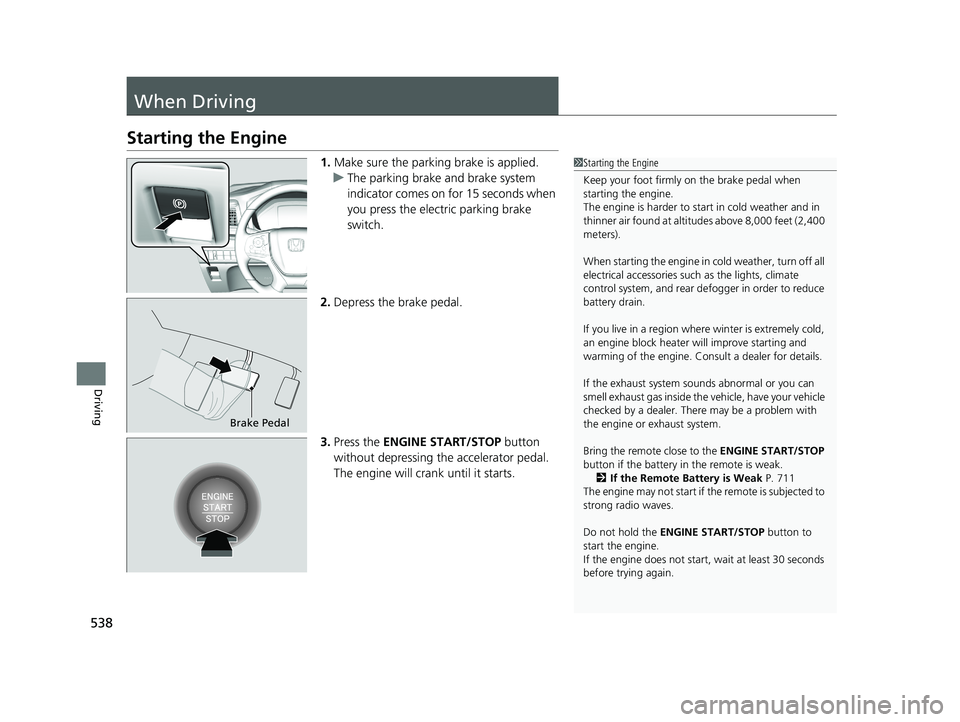
1.Make sure the parking brake is applied.
u The parking brake and brake system
indicator comes on for 15 seconds when
you press the electric parking brake
switch.
2. Depress the brake pedal.
3. Press the ENGINE START/STOP button
without depressing the accelerator pedal.
The engine will crank until it starts.1 Starting the Engine
Keep your foot firmly on the brake pedal when
starting the engine.
The engine is harder to st art in cold weather and in
thinner air found at altitudes above 8,000 feet (2,400
meters).
When starting the engine in cold weather, turn off all
electrical accessories such as the lights, climate
control system, and rear de fogger in order to reduce
battery drain.
If you live in a region where winter is extremely cold,
an engine block heater will improve starting and
warming of the engine. Cons ult a dealer for details.
If the exhaust system sounds abnormal or you can
smell exhaust gas inside the vehicle, have your vehicle
checked by a dealer. There may be a problem with
the engine or exhaust system.
Bring the remote close to the ENGINE START/STOP
button if the battery in the remote is weak. 2 If the Remote Battery is Weak P. 711
The engine may not start if the remote is subjected to
strong radio waves.
Do not hold the ENGINE START/STOP button to
start the engine.
If the engine does not start, wait at least 30 seconds
before trying again.
Brake Pedal
19 ODYSSEY-31THR6120.book 538 ページ 2018年12月6日 木曜日 午後4時35分