Page 134 of 767
uuGauges and Displays uDriver Information Interface
132
Instrument Panel
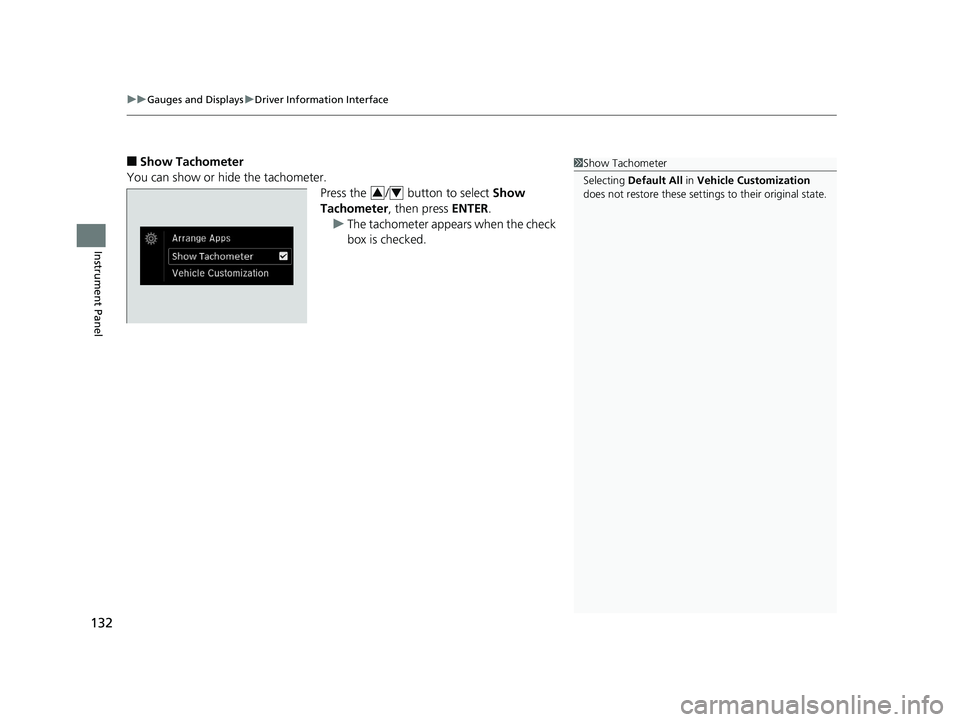
■Show Tachometer
You can show or hide the tachometer. Press the / button to select Show
Tachometer, then press ENTER.
u The tachometer appears when the check
box is checked.1Show Tachometer
Selecting Default All in Vehicle Customization
does not restore these settings to their original state.
34
19 ODYSSEY-31THR6120.book 132 ページ 2018年12月6日 木曜日 午後4時35分
Page 135 of 767
Continued133
uuGauges and Displays uDriver Information Interface
Instrument Panel
■Vehicle Customization
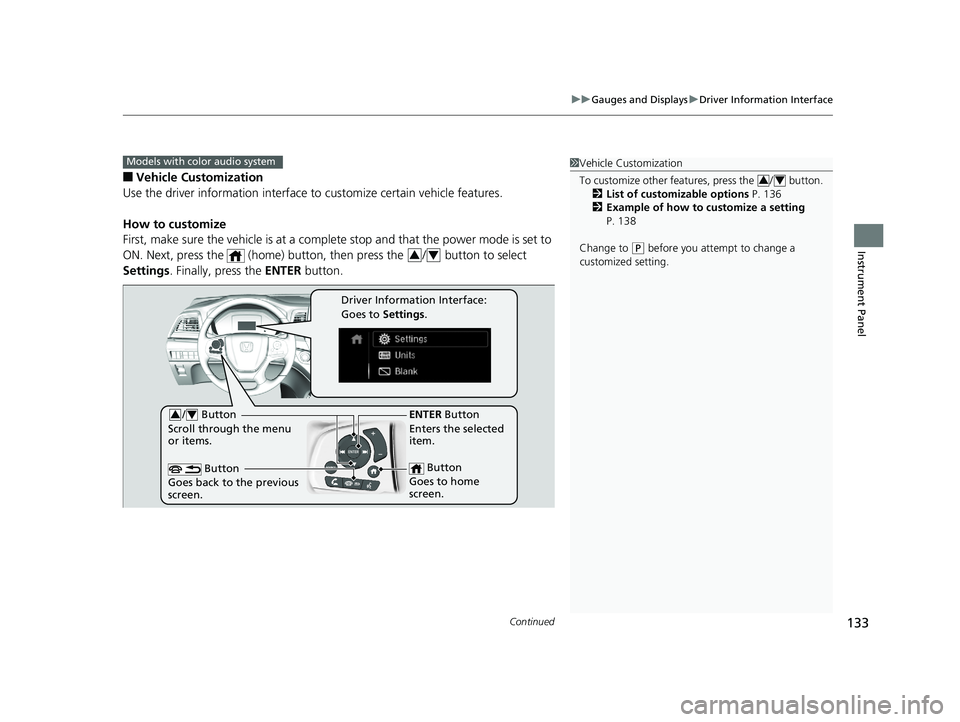
Use the driver information interface to customize certain vehicle features.
How to customize
First, make sure the vehicle is at a complete stop and that the power mode is set to
ON. Next, press the (home) button, then press the / button to select
Settings . Finally, press the ENTER button.
Models with color audio system1Vehicle Customization
To customize other features, press the / button.
2 List of customizable options P. 136
2 Example of how to customize a setting
P. 138
Change to
( P before you attempt to change a
customized setting.
34
34
/ Button
Scroll through the menu
or items.34
Button
Goes back to the previous
screen.
ENTER Button
Enters the selected
item.
Button
Goes to home
screen.
Driver Information Interface:
Goes to Settings.
19 ODYSSEY-31THR6120.book 133 ページ 2018年12月6日 木曜日 午後4時35分
Page 136 of 767
134
uuGauges and Displays uDriver Information Interface
Instrument Panel
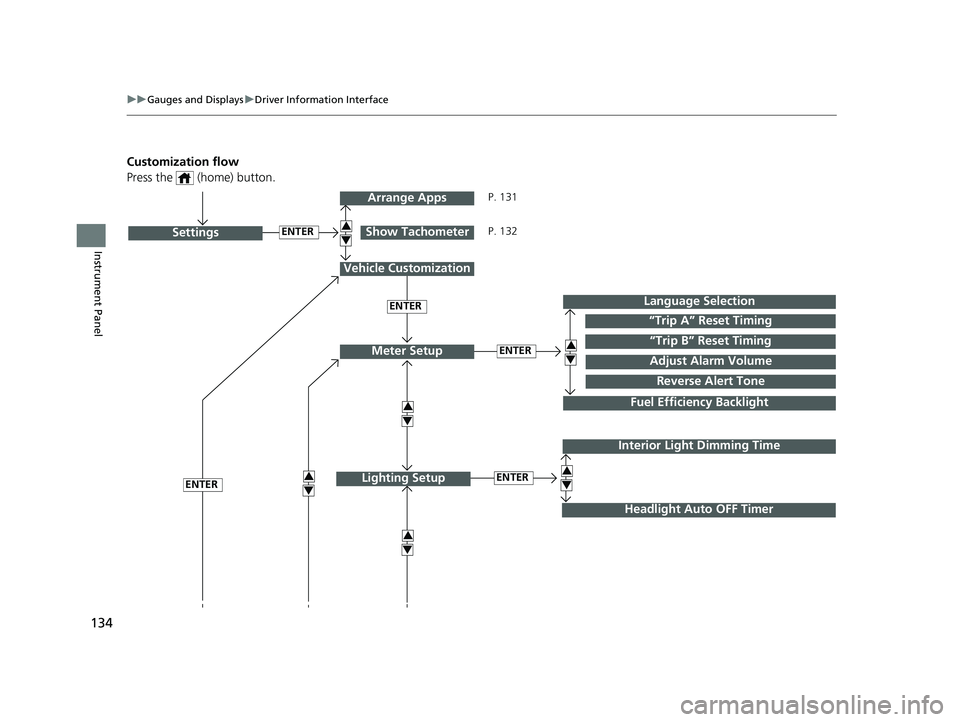
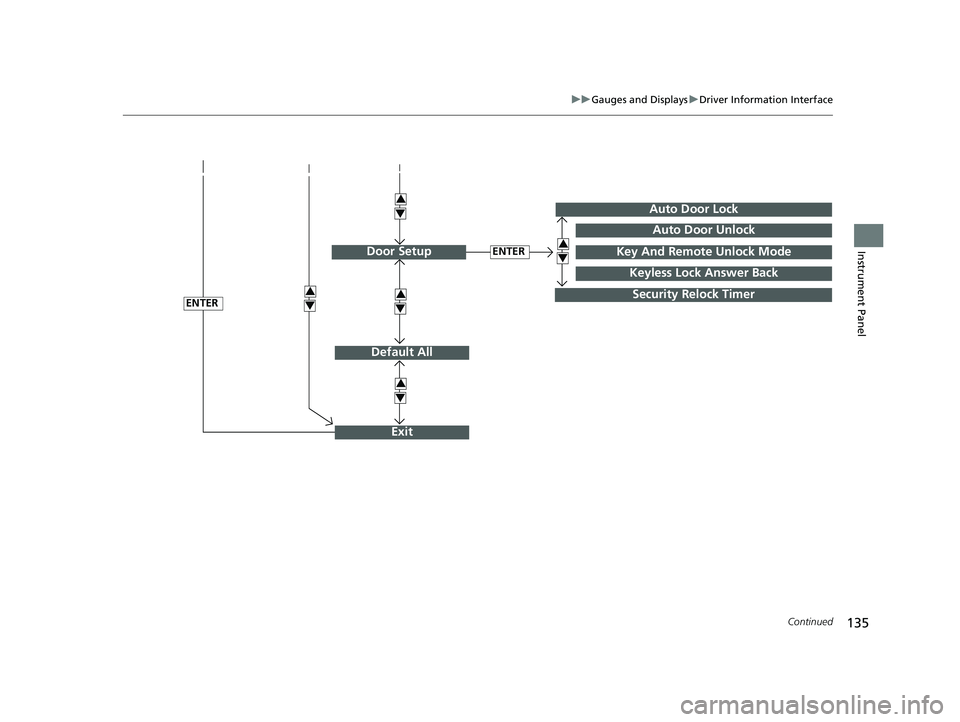
Customization flow
Press the (home) button.
ENTER“Trip B” Reset Timing
Reverse Alert Tone
Fuel Efficiency Backlight
“Trip A” Reset Timing
Language Selection
Adjust Alarm VolumeMeter Setup
ENTERSettings
Arrange Apps
Show Tachometer3
4
3
4
3
4
3
4
3
4
Vehicle Customization
ENTER
P. 131
P. 132
Interior Light Dimming Time
Headlight Auto OFF Timer
ENTERLighting Setup3
4ENTER
19 ODYSSEY-31THR6120.book 134 ページ 2018年12月6日 木曜日 午後4時35分
Page 137 of 767
135
uuGauges and Displays uDriver Information Interface
Continued
Instrument Panel
Default All
ENTER
ENTER
Auto Door Lock
Security Relock Timer
Auto Door Unlock
Key And Remote Unlock Mode
Keyless Lock Answer Back
Door Setup
Exit
3
4
3
4
3
4
3
4
3
4
19 ODYSSEY-31THR6120.book 135 ページ 2018年12月6日 木曜日 午後4時35分
Page 138 of 767
136
uuGauges and Displays uDriver Information Interface
Instrument Panel
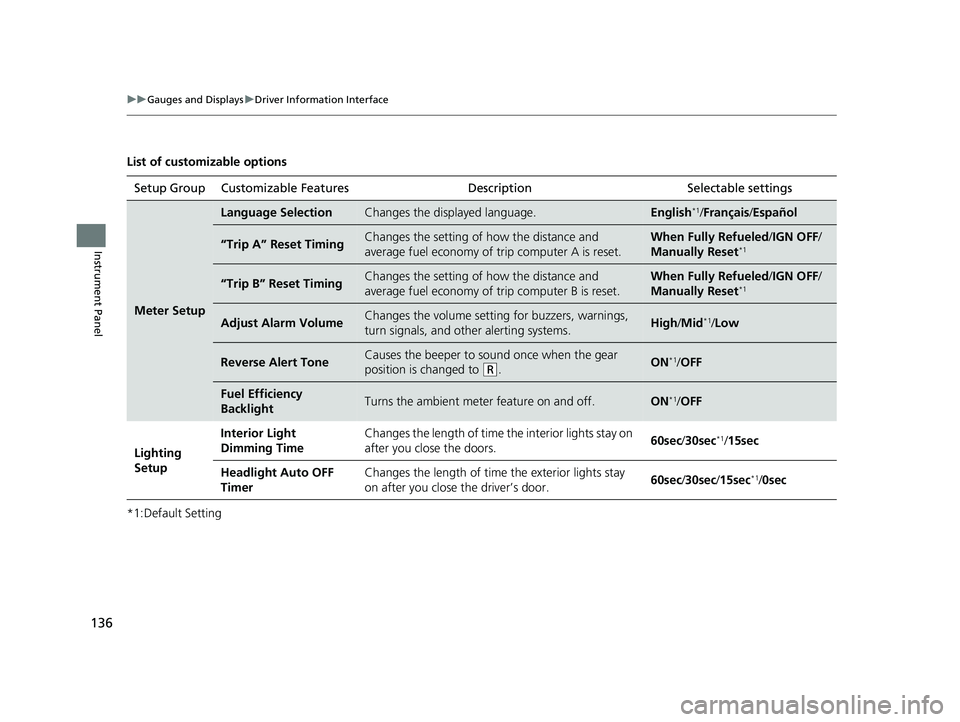
List of customizable options
*1:Default SettingSetup Group Customizable Features
Description Selectable settings
Meter Setup
Language SelectionChanges the displayed language.English*1/Français /Español
“Trip A” Reset TimingChanges the setting of how the distance and
average fuel economy of trip computer A is reset.When Fully Refueled /IGN OFF /
Manually Reset*1
“Trip B” Reset TimingChanges the setting of how the distance and
average fuel economy of trip computer B is reset.When Fully Refueled/IGN OFF /
Manually Reset*1
Adjust Alarm VolumeChanges the volume setting for buzzers, warnings,
turn signals, and other alerting systems.High /Mid*1/Low
Reverse Alert ToneCauses the beeper to s ound once when the gear
position is changed to
( R.ON*1/ OFF
Fuel Efficiency
BacklightTurns the ambient meter feature on and off.ON*1/OFF
Lighting
Setup Interior Light
Dimming Time
Changes the length of time the interior lights stay on
after you close the doors.
60sec
/30sec
*1/15sec
Headlight Auto OFF
Timer Changes the length of time the exterior lights stay
on after you close the driver’s door.
60sec
/30sec/ 15sec
*1/0sec
19 ODYSSEY-31THR6120.book 136 ページ 2018年12月6日 木曜日 午後4時35分
Page 139 of 767
137
uuGauges and Displays uDriver Information Interface
Continued
Instrument Panel
*1:Default SettingSetup Group Customizable Features
Description Selectable settings
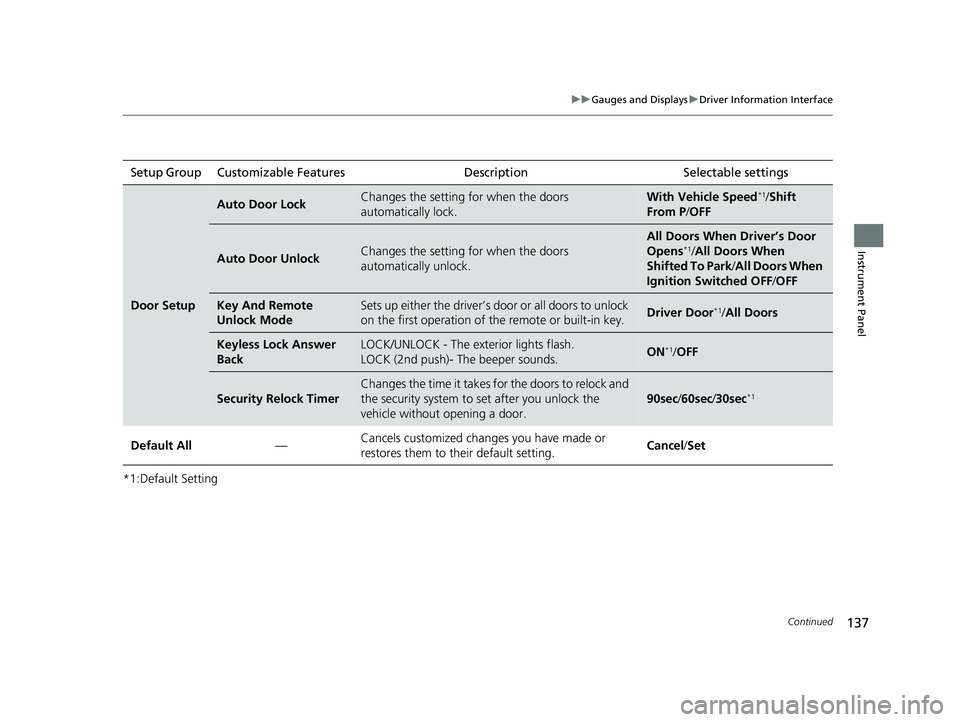
Door Setup
Auto Door LockChanges the setting for when the doors
automatically lock.With Vehicle Speed*1/Shift
From P /OFF
Auto Door UnlockChanges the setting for when the doors
automatically unlock.
All Doors When Driver’s Door
Opens*1/All Doors When
Shifted To Park /All Doors When
Ignition Switched OFF /OFF
Key And Remote
Unlock ModeSets up either the driver’s do or or all doors to unlock
on the first operation of th e remote or built-in key.Driver Door*1/All Doors
Keyless Lock Answer
BackLOCK/UNLOCK - The exterior lights flash.
LOCK (2nd push)- The beeper sounds.ON*1/OFF
Security Relock Timer
Changes the time it takes fo r the doors to relock and
the security system to set after you unlock the
vehicle without opening a door.
90sec /60sec /30sec*1
Default All —Cancels customized changes you have made or
restores them to their default setting.
Cancel
/Set
19 ODYSSEY-31THR6120.book 137 ページ 2018年12月6日 木曜日 午後4時35分
Page 140 of 767
138
uuGauges and Displays uDriver Information Interface
Instrument Panel
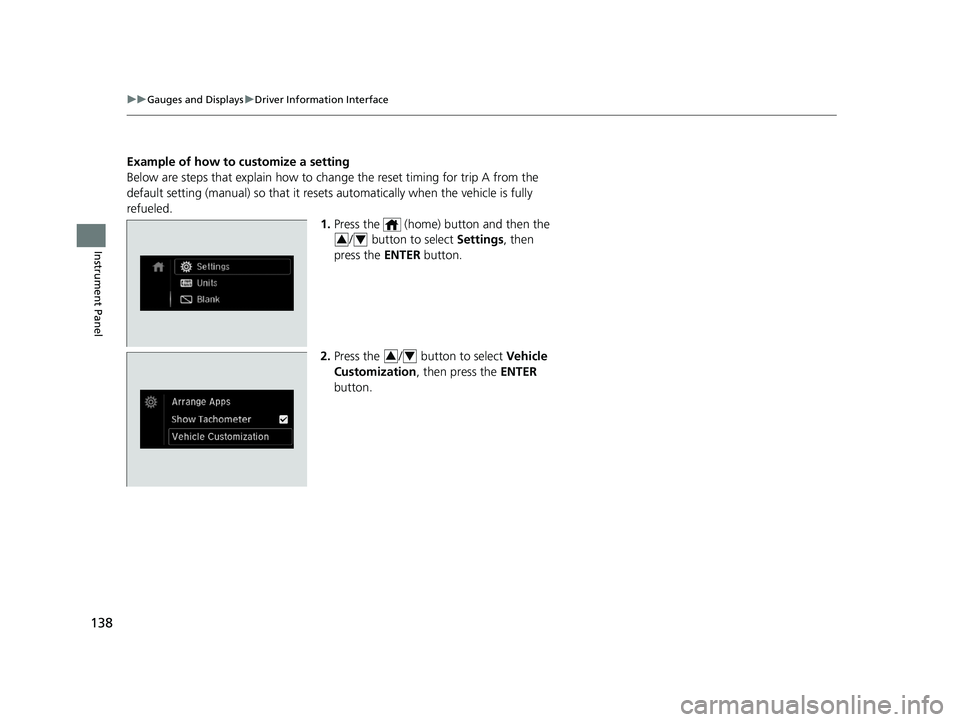
Example of how to customize a setting
Below are steps that explai n how to change the reset timing for trip A from the
default setting (manual) so that it resets automatically when the vehicle is fully
refueled. 1.Press the (home) button and then the
/ button to select Settings, then
press the ENTER button.
2. Press the / button to select Vehicle
Customization , then press the ENTER
button.
34
34
19 ODYSSEY-31THR6120.book 138 ページ 2018年12月6日 木曜日 午後4時35分
Page 141 of 767
139
uuGauges and Displays uDriver Information Interface
Continued
Instrument Panel
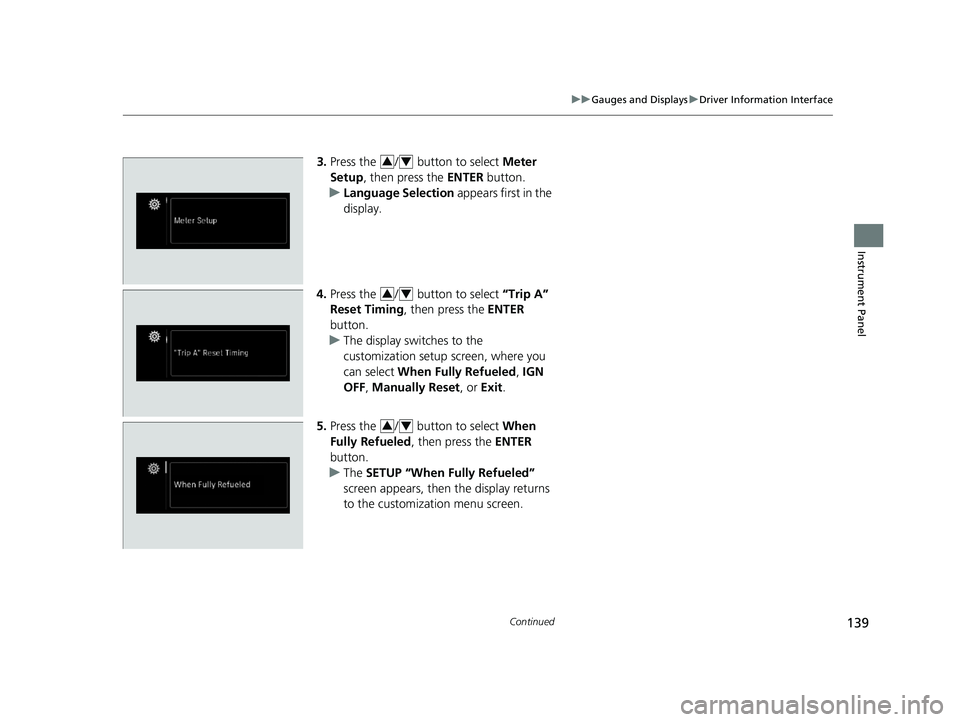
3. Press the / button to select Meter
Setup , then press the ENTER button.
u Language Selection appears first in the
display.
4. Press the / button to select “Trip A”
Reset Timing , then press the ENTER
button.
u The display swit ches to the
customization setup screen, where you
can select When Fully Refueled , IGN
OFF , Manually Reset , or Exit.
5. Press the / button to select When
Fully Refueled, then press the ENTER
button.
u The SETUP “When Fully Refueled”
screen appears, then the display returns
to the customizat ion menu screen.34
34
34
19 ODYSSEY-31THR6120.book 139 ページ 2018年12月6日 木曜日 午後4時35分