2019 HONDA CLARITY FUEL CELL buttons
[x] Cancel search: buttonsPage 332 of 551
uuBluetooth ® HandsFreeLink ®u Using HFL
330
Features
(Pick-up) button: Press to go directly to the phone menu on the driver
information interface, or to answer an incoming call.
(Hang-up/back) button: Press to end a call, go back to the previous
command, or cancel a command.
(Talk) button: Press to access Voice Portal.
buttons: Press to select an item displayed on the phone menu in the driver
information interface.
ENTER button: Press to call a number listed in the selected item on the phone
menu in the driver information interface.
button: Select and press ENTER to display Speed Dial , Call History , or
Phonebook on the phone menu in the driver information interface.
To go to the Phone Menu screen:
1. Select .
2. Select Phone to switch the display to the phone screen.
3. Select .1Bluetooth ® HandsFreeLink ®
Bluetooth ® Wireless Technology
The Bluetooth ® word mark and logos are registered
trademarks owned by Blue tooth SIG, Inc., and any
use of such marks by Honda Motor Co., Ltd., is under
license. Other trademarks and trade names are those
of their respective owners.
HFL Limitations
An incoming call on HFL will interrupt the audio
s y s te m wh e n it is p la y i n g . It wi ll re s u m e w h en t h e c a l l
is ended.
34
19 CLARITY FCV CSS-31TRT6200.book 330 ページ 2019年1月17日 木曜日 午前11 時54分
Page 355 of 551
Continued353
uuBluetooth ® HandsFreeLink ®u HFL Menus
Features
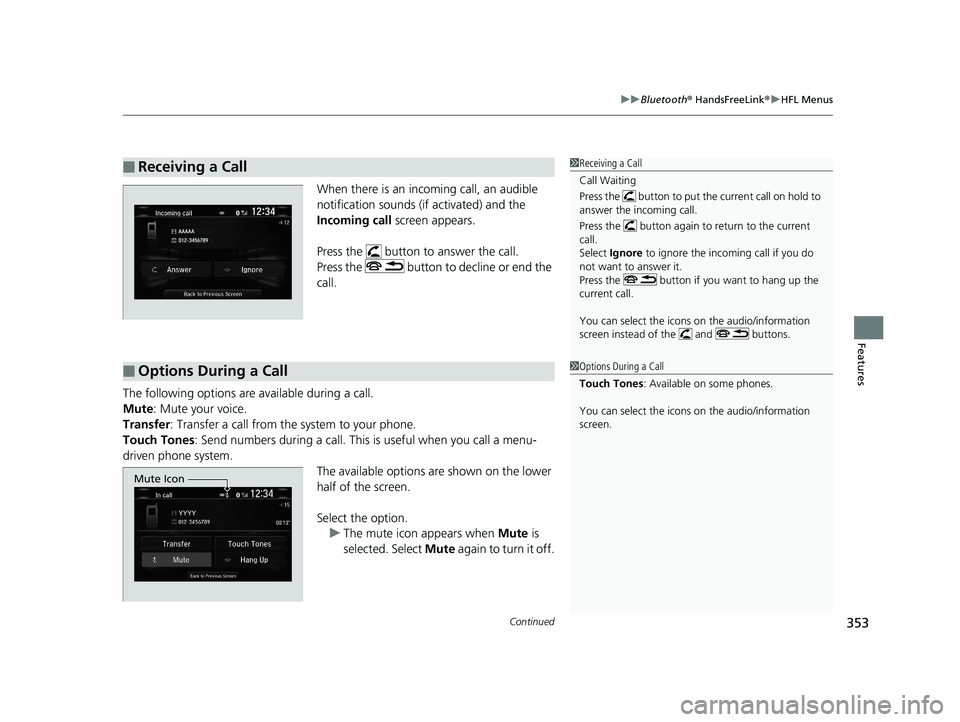
When there is an inco ming call, an audible
notification sounds (if activated) and the
Incoming call screen appears.
Press the button to answer the call.
Press the button to decline or end the
call.
The following options are available during a call.
Mute : Mute your voice.
Transfer: Transfer a call from the system to your phone.
Touch Tones : Send numbers during a call. This is useful when you call a menu-
driven phone system. The available options are shown on the lower
half of the screen.
Select the option. u The mute icon appears when Mute is
selected. Select Mute again to turn it off.
■Receiving a Call1Receiving a Call
Call Waiting
Press the button to put the current call on hold to
answer the incoming call.
Press the button again to return to the current
call.
Select Ignore to ignore the incoming call if you do
not want to answer it.
Press the button if you want to hang up the
current call.
You can select the icons on the audio/information
screen instead of the and buttons.
■Options During a Call1 Options During a Call
Touch Tones : Available on some phones.
You can select the icons on the audio/information
screen.
Mute Icon
19 CLARITY FCV CSS-31TRT6200.book 353 ページ 2019年1月17日 木曜日 午前11 時54分
Page 377 of 551
375
uuWhen Driving uShifting
Continued
Driving
Shifting
Change the gear position in accordance with your driving needs.
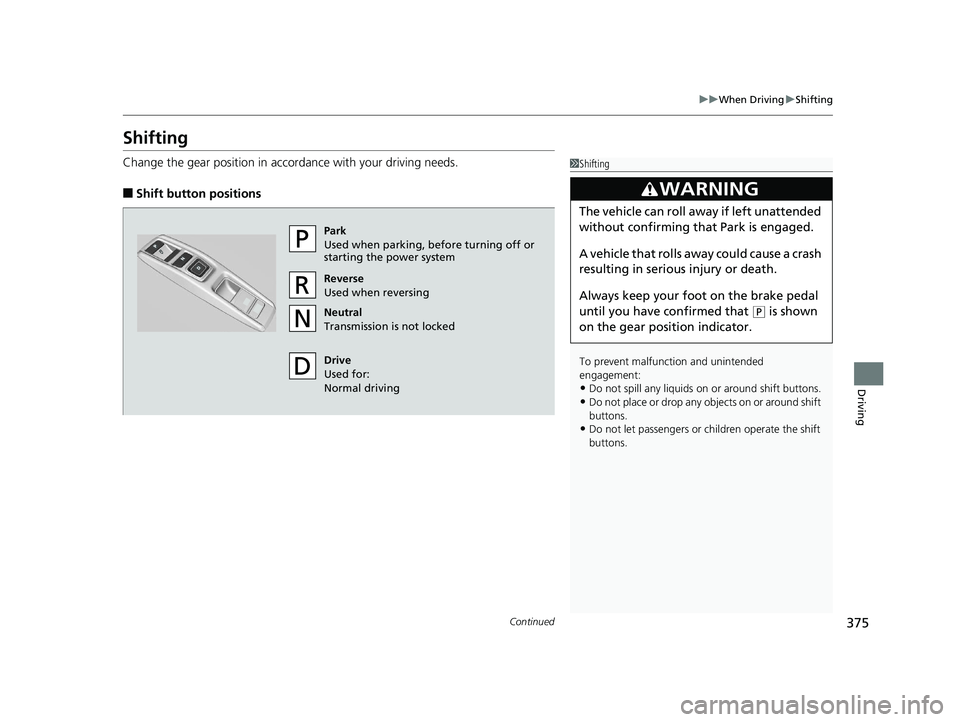
■Shift button positions
1Shifting
To prevent malfunc tion and unintended
engagement:
•Do not spill any liquids on or around shift buttons.
•Do not place or drop any objects on or around shift
buttons.
•Do not let passengers or ch ildren operate the shift
buttons.
3WARNING
The vehicle can roll aw ay if left unattended
without confirming th at Park is engaged.
A vehicle that rolls away could cause a crash
resulting in serious injury or death.
Always keep your foot on the brake pedal
until you have confirmed that
( P is shown
on the gear position indicator.
Park
Used when parking, before turning off or
starting the power system
Reverse
Used when reversing
Neutral
Transmission is not locked
Drive
Used for:
Normal driving
19 CLARITY FCV CSS-31TRT6200.book 375 ページ 2019年1月17日 木曜日 午前11 時54分
Page 481 of 551
479
Maintenance
Remote Transmitter Care
Replacing the Button Battery
If the indicator does not come on when the button is pressed, replace the battery.
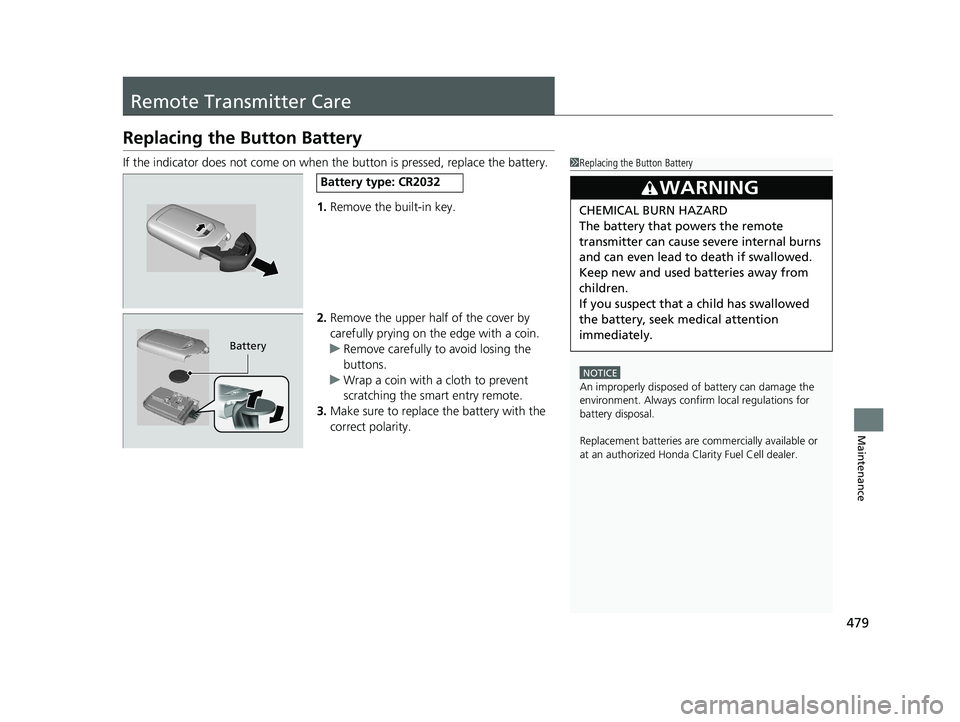
1. Remove the built-in key.
2. Remove the upper half of the cover by
carefully prying on the edge with a coin.
u Remove carefully to avoid losing the
buttons.
u Wrap a coin with a cloth to prevent
scratching the smart entry remote.
3. Make sure to replace the battery with the
correct polarity.1Replacing the Button Battery
NOTICE
An improperly disposed of battery can damage the
environment. Always conf irm local regulations for
battery disposal.
Replacement batteries are commercially available or
at an authorized Honda Clarity Fuel Cell dealer.
3WARNING
CHEMICAL BURN HAZARD
The battery that powers the remote
transmitter can cause severe internal burns
and can even lead to death if swallowed.
Keep new and used batteries away from
children.
If you suspect that a child has swallowed
the battery, seek medical attention
immediately.
Battery type: CR2032
Battery
19 CLARITY FCV CSS-31TRT6200.book 479 ページ 2019年1月17日 木曜日 午前11 時54分
Page 506 of 551
504
uuPower System Won’t Start uIf the Smart Entry Remote Battery is Weak
Handling the Unexpected
If the Smart Entry Remote Battery is Weak
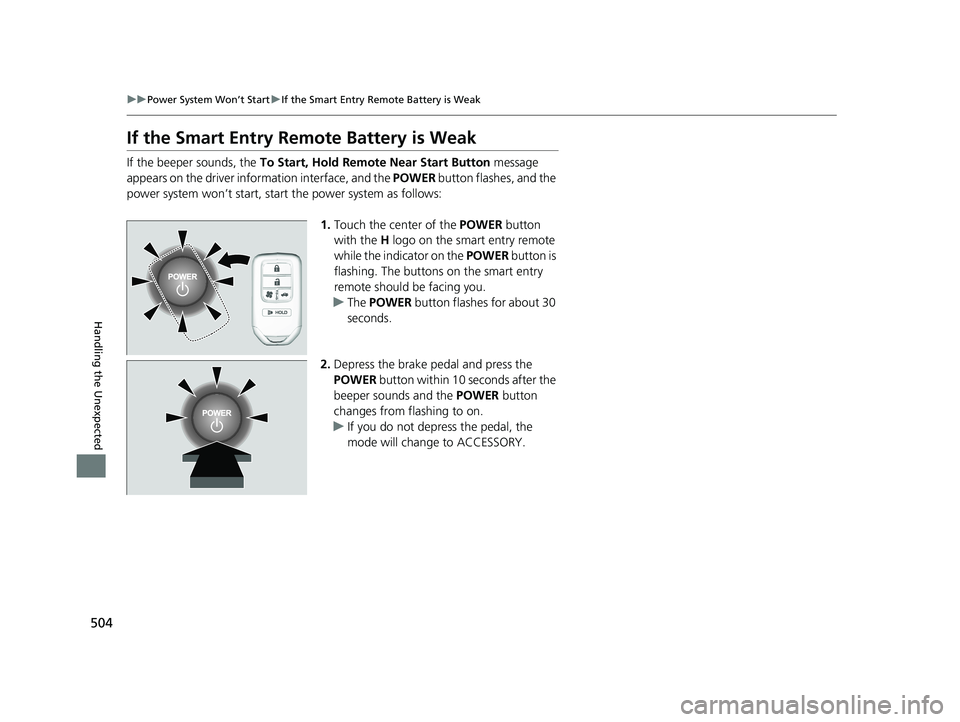
If the beeper sounds, the To Start, Hold Remote Near Start Button message
appears on the driver info rmation interface, and the POWER button flashes, and the
power system won’t start, start the power system as follows:
1.Touch the center of the POWER button
with the H logo on the smart entry remote
while the indicator on the POWER button is
flashing. The buttons on the smart entry
remote should be facing you.
u The POWER button flashes for about 30
seconds.
2. Depress the brake pedal and press the
POWER button within 10 seconds after the
beeper sounds and the POWER button
changes from flashing to on.
u If you do not depress the pedal, the
mode will change to ACCESSORY.
19 CLARITY FCV CSS-31TRT6200.book 504 ページ 2019年1月17日 木曜日 午前11 時54分
Page 545 of 551
543
Index
H
Handling the Unexpected....................... 489
HandsFreeLink ® (HFL) .............................. 329
Automatic Import of Cellular Phonebook
and Call History..................................... 342
Displaying Messages ............................... 356
HFL Buttons ............................................ 329
HFL Menus.............................................. 332
HFL Status Display ................................... 331
In Case of Emergency ............................. 360
Limitations for Manual Operation............ 331
Making a Call ......................................... 350
Options During a Call.............................. 353
Phone Setup ........................................... 337
Phonebook Phonetic Modification........... 346
Receiving a Call....................................... 353
Receiving a Text Message/E-mail ............. 354
Ring Tone ............................................... 341
Selecting a Mail Account......................... 355
Speed Dial .............................................. 343
To Set Up Text Messa ge/E-mail Options .. 340
Hazard Warning Button .............................. 6
HD Radio
TM............................................... 236
Head Restraints ........................................ 174
Headlights ................................................ 158
Aiming.................................................... 463
Automatic Operation .............................. 159
Dimming......................................... 158, 161
Operating ............................................... 158
Head-Up Display ...................................... 127
Brightness Control .................................. 165 Heaters (Seat)
........................................... 186
HFL (HandsFreeLink ®)............................... 329
High Beam Indicator .................................. 96
High Voltage Battery ............................... 419
Hill Start Assist System ............................. 372
HomeLink® Universal Transceiver ............ 326
Honda App License Agreement ............... 284
Honda Sensing ®.......................................... 36
HondaLink® ............................................... 262
I
Identification Numbers
Motor, and Transmission ......................... 532
Vehicle Identification ............................... 532
Illumination Control
Buttons ........................................... 164, 165
Immobilizer System .................................. 149
Indicator .................................................... 96
Indicators .................................................... 86
12-Volt Battery Charging System ....... 90, 513
Adaptive Cruise Control (ACC) with Low Speed Follow (LSF).................... 99, 389
Anti-lock Brake System (ABS) ..................... 92
Automatic Brake Hold ....................... 87, 428
Automatic Brake Hold System ............ 87, 428
Collision Mitigation Braking System
TM
(CMBSTM) ....................................... 100, 101
Electric Power Steering (EPS) System .. 93, 514
Gear Position ............................................. 91
High Beam ................................................ 96 Hydrogen Leak .......................................... 90
Immobilizer System ................................... 96
Lane Keeping Assist Sy
stem (LKAS) .. 100, 407
Lights On .................................................. 96
Low Fuel ................................................... 90
Low Tire Pressure/TPMS ............. 94, 415, 417
Parking Brake and Brake System (Amber) .. 88
Parking Brake and Brake
System (Red)...................... 86, 87, 514, 515
POWER SYSTEM ........................................ 89
READY ...................................................... 90
Road Departure Mitigation (RDM) ............. 98
Seat Belt Reminder .............................. 50, 92
Security System Alarm ............................... 97
SPORT Mode ..................................... 97, 381
Supplemental Restraint System ............ 67, 93
System Message ........................................ 95
Transmission System.................................. 91
Turn Signal and Hazard Warning ............... 96
Vehicle Stability Assist (VSA® )
System ............................................ 93, 412
VSA ® OFF .......................................... 93, 413
Information .............................................. 529
Instant Fuel Economy ............................... 122
Instrument Panel ........................................ 85
Brightness Control................................... 164
Interior Lights ........................................... 178
Interior Rearview Mirror .......................... 170
19 CLARITY FCV CSS-31TRT6200.book 543 ページ 2019年1月17日 木曜日 午前11 時54分