2019 HONDA CIVIC SEDAN reset
[x] Cancel search: resetPage 386 of 679
uuBluetooth ® HandsFreeLink ®u HFL Menus
384
Features
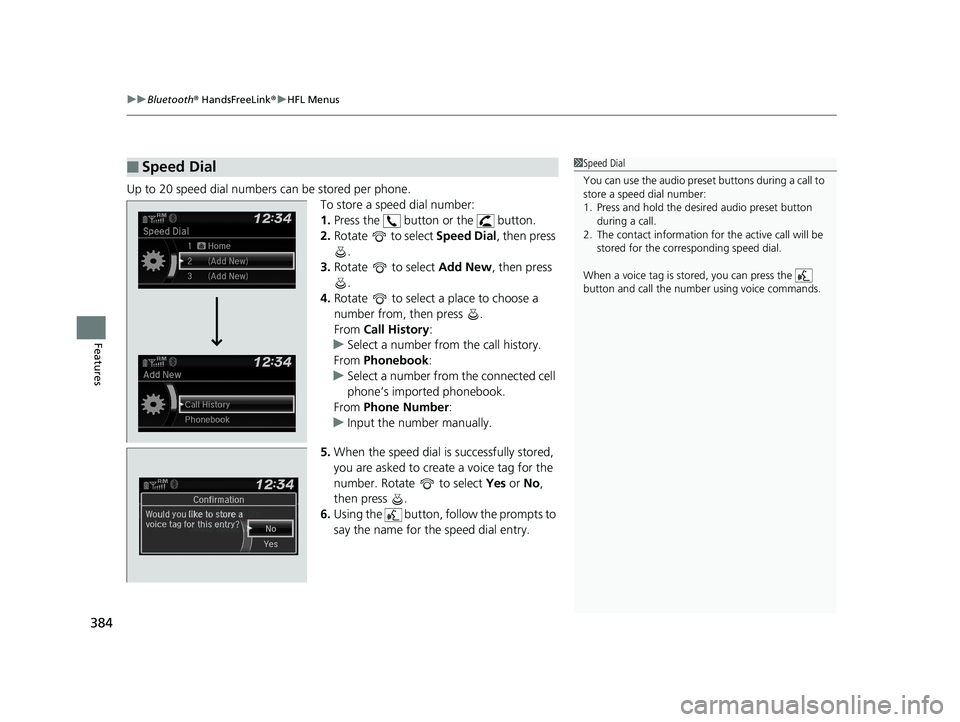
Up to 20 speed dial numbers can be stored per phone.
To store a speed dial number:
1.Press the button or the button.
2. Rotate to select Speed Dial, then press
.
3. Rotate to select Add New, then press
.
4. Rotate to select a place to choose a
number from, then press .
From Call History :
u Select a number from the call history.
From Phonebook :
u Select a number from the connected cell
phone’s imported phonebook.
From Phone Number :
u Input the number manually.
5. When the speed dial is successfully stored,
you are asked to create a voice tag for the
number. Rotate to select Yes or No ,
then press .
6. Using the button, follow the prompts to
say the name for the speed dial entry.
■Speed Dial1Speed Dial
You can use the audio preset buttons during a call to
store a speed dial number:
1. Press and hold the desired audio preset button
during a call.
2. The contact information for the active call will be
stored for the corresponding speed dial.
When a voice tag is stored, you can press the
button and call the numbe r using voice commands.
Change Speed Dial
Delete Speed DialChaChaChaChahaChangengengengegenge Sp SpSpSpSpSpeedeedeedeedeedeed Dial
DelDelDelDleteeteetet SpSpSpSeedeedeedd DiDiDiDiDiDiDiDiDiDiiDiDiiDiilalaaaaalaa
19 CIVIC 4D HCM_HMIN_J (KA KL KC)-31TBA6301.book 384 ページ 2018年10月26日 金曜日 午前7時42分
Page 393 of 679
Continued391
uuBluetooth ® HandsFreeLink ®u HFL Menus
Features
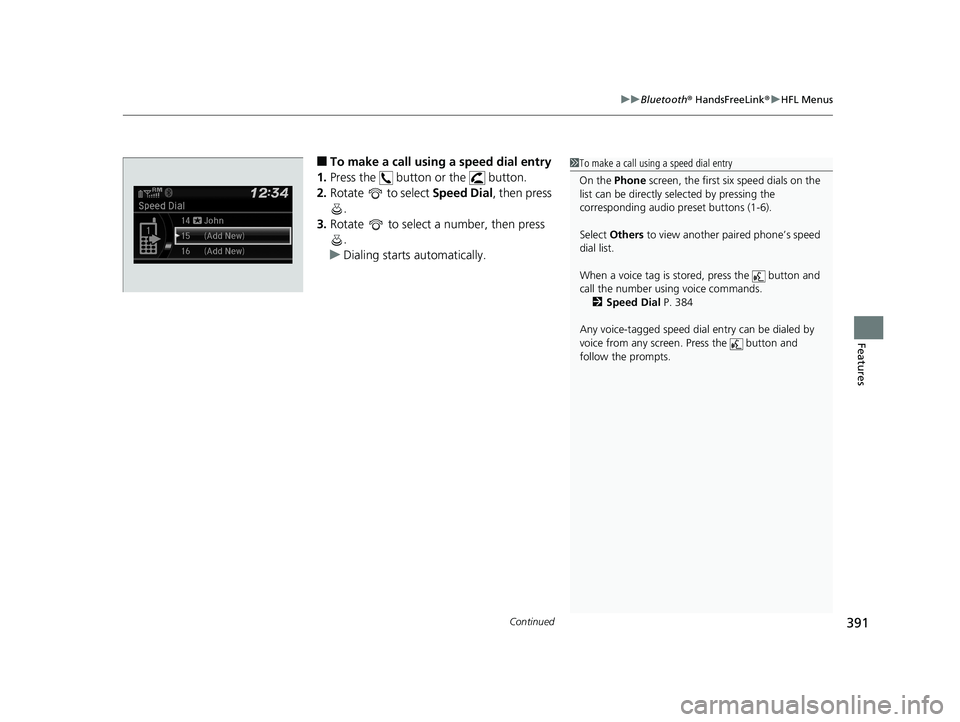
■To make a call using a speed dial entry
1. Press the button or the button.
2. Rotate to select Speed Dial, then press
.
3. Rotate to select a number, then press
.
u Dialing starts automatically.1To make a call using a speed dial entry
On the Phone screen, the first six speed dials on the
list can be directly selected by pressing the
corresponding audio preset buttons (1-6).
Select Others to view another paired phone’s speed
dial list.
When a voice tag is stored, press the button and
call the number using voice commands. 2 Speed Dial P. 384
Any voice-tagged speed dial entry can be dialed by
voice from any screen. Press the button and
follow the prompts.
19 CIVIC 4D HCM_HMIN_J (KA KL KC)-31TBA6301.book 391 ページ 2018年10月26日 金曜日 午前7時42分
Page 401 of 679
399
uuBluetooth ® HandsFreeLink ®u HFL Menus
Continued
Features
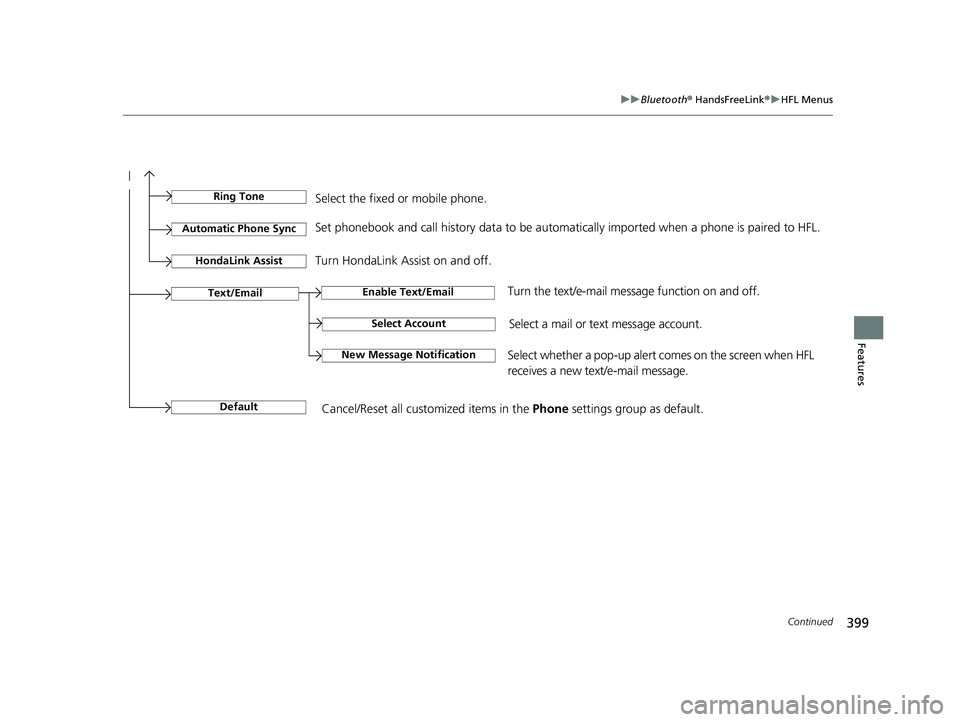
Select Account
Enable Text/EmailText/Email
New Message NotificationSelect whether a pop-up alert co mes on the screen when HFL
receives a new text/e-mail message.
Turn the text/e-mail message function on and off.
Select a mail or te xt message account.
DefaultCancel/Reset all customized items in the Phone settings group as default.
Ring ToneSelect the fixed or mobile phone.
Automatic Phone SyncSet phonebook and call history data to be automa tically imported when a phone is paired to HFL.
Turn HondaLink Assist on and off.HondaLink Assist
19 CIVIC 4D HCM_HMIN_J (KA KL KC)-31TBA6301.book 399 ページ 2018年10月26日 金曜日 午前7時42分
Page 556 of 679
554
uuMaintenance MinderTMuTo Use Maintenance MinderTM
Maintenance
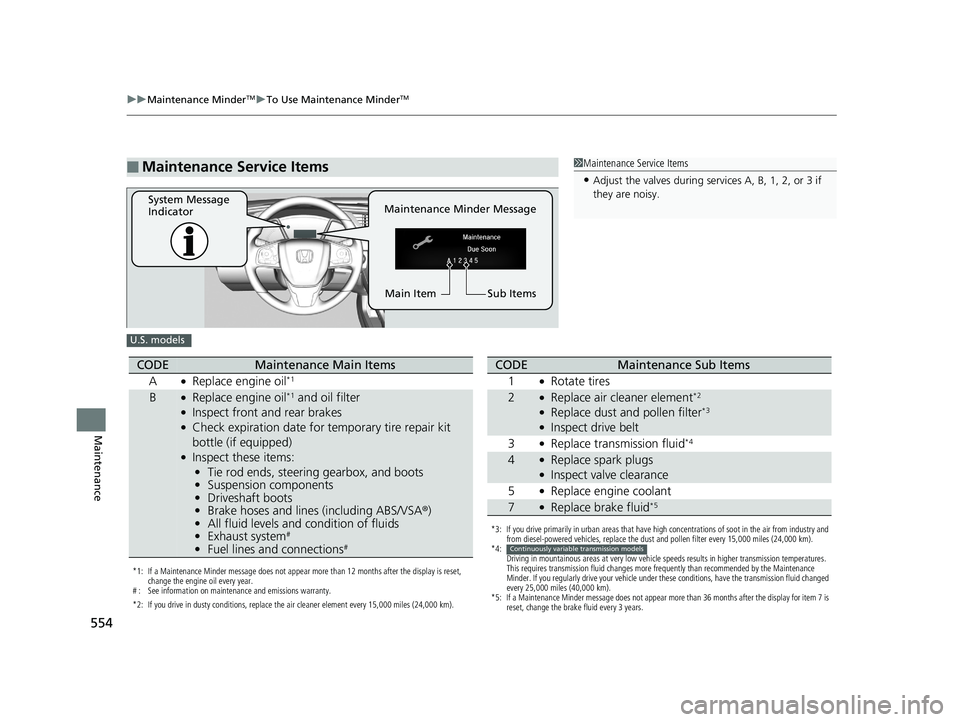
■Maintenance Service Items1Maintenance Service Items
•Adjust the valves during services A, B, 1, 2, or 3 if
they are noisy.
Maintenance Minder Message
System Message
Indicator
Sub Items
Main Item
U.S. models
*1: If a Maintenance Minder message does not appear more than 12 months after the display is reset,
change the engine oil every year.
# : See information on maintenance and emissions warranty.
*2: If you drive in dusty conditions, replace the air cleaner element every 15,000 miles (24,000 km).
CODEMaintenance Main Items
A
●Replace engine oil*1
B●Replace engine oil*1 and oil filter●Inspect front and rear brakes●Check expiration date for temporary tire repair kit
bottle (if equipped)
●Inspect these items:
• Tie rod ends, steering gearbox, and boots
• Suspension components
• Driveshaft boots
• Brake hoses and lines (including ABS/VSA ®)
• All fluid levels and condition of fluids
• Exhaust system
#
•Fuel lines and connections#
*3: If you drive primarily in urban areas that have high concentrations of soot in the air from industry and
from diesel-powered vehicles, replace the dust and pollen filter every 15,000 miles (24,000 km).
*4: Driving in mountainous areas at very low vehicle speeds results in higher transmission temperatures.
This requires transmission fluid changes more frequently than recommended by the Maintenance
Minder. If you regularly drive your vehicle under these conditions, have the transmission fluid changed
every 25,000 miles (40,000 km).
*5: If a Maintenance Minder message does not appear more than 36 months after the display for item 7 is reset, change the brake fluid every 3 years.
CODEMaintenance Sub Items
1
●Rotate tires
2●Replace air cleaner element*2
●Replace dust and pollen filter*3
●Inspect drive belt
3
●Replace transmission fluid*4
4●Replace spark plugs●Inspect valve clearance
5
●Replace engine coolant
7●Replace brake fluid*5
Continuously variable transmission models
19 CIVIC 4D HCM_HMIN_J (KA KL KC)-31TBA6301.book 554 ページ 2018年10月26日 金曜日 午前7時42分
Page 557 of 679
555
uuMaintenance MinderTMuTo Use Maintenance MinderTM
Continued
Maintenance
1Maintenance Service Items
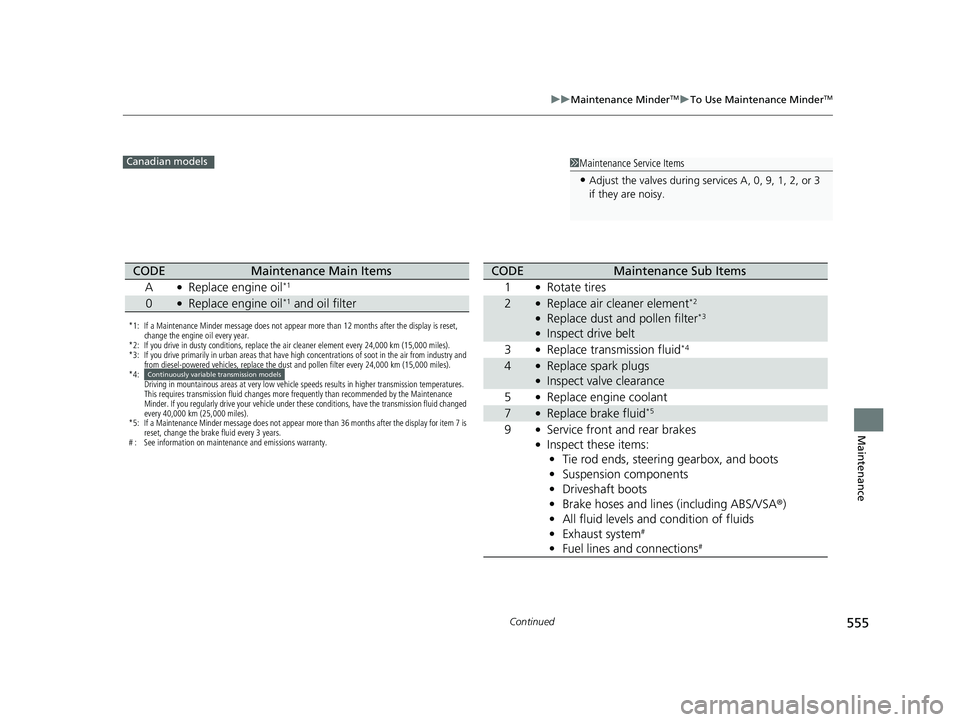
•Adjust the valves during services A, 0, 9, 1, 2, or 3
if they are noisy.
Canadian models
*1: If a Maintenance Minder message does not appear more than 12 months after the display is reset,
change the engine oil every year.
*2: If you drive in dusty conditions, replace the air cleaner element every 24,000 km (15,000 miles).
*3: If you drive primarily in urban areas that have high concentrations of soot in the air from industry and from diesel-powered vehicles, replace the dust and pollen filter every 24,000 km (15,000 miles).
*4: Driving in mountainous areas at very low vehicle speeds results in higher transmission temperatures.
This requires transmission fluid changes more frequently than recommended by the Maintenance
Minder. If you regularly drive your vehicle under these conditions, have the transmission fluid changed
every 40,000 km (25,000 miles).
*5: If a Maintenance Minder message does not appear more than 36 months after the display for item 7 is reset, change the brake fluid every 3 years.
# : See information on maintenance and emissions warranty.
CODEMaintenance Main Items
A
●Replace engine oil*1
0●Replace engine oil*1 and oil filter
Continuously variable transmission models
CODEMaintenance Sub Items
1
●Rotate tires
2●Replace air cleaner element*2
●Replace dust and pollen filter*3
●Inspect drive belt
3
●Replace transmission fluid*4
4●Replace spark plugs●Inspect valve clearance
5
●Replace engine coolant
7●Replace brake fluid*5
9●Service front and rear brakes●Inspect these items: • Tie rod ends, steering gearbox, and boots
• Suspension components
• Driveshaft boots
• Brake hoses and lines (including ABS/VSA ®)
• All fluid levels and condition of fluids
• Exhaust system
#
•Fuel lines and connections#
19 CIVIC 4D HCM_HMIN_J (KA KL KC)-31TBA6301.book 555 ページ 2018年10月26日 金曜日 午前7時42分
Page 558 of 679
uuMaintenance MinderTMuTo Use Maintenance MinderTM
556
Maintenance
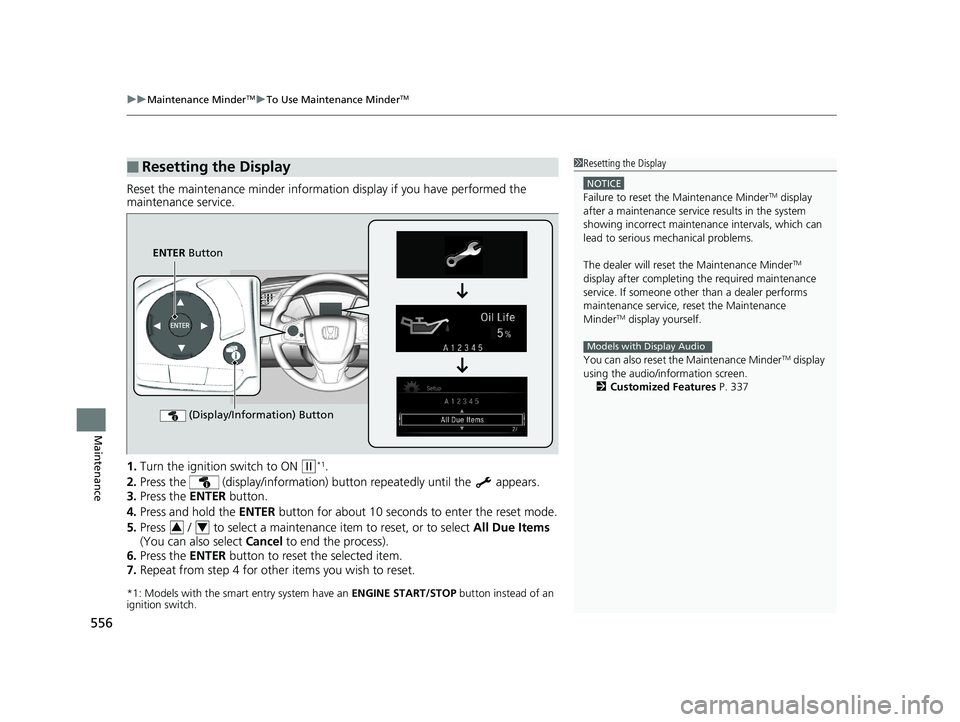
Reset the maintenance minder informati on display if you have performed the
maintenance service.
1. Turn the ignition switch to ON
(w*1.
2. Press the (display/information) bu tton repeatedly until the appears.
3. Press the ENTER button.
4. Press and hold the ENTER button for about 10 seconds to enter the reset mode.
5. Press / to select a maintenance item to reset, or to select All Due Items
(You can also select Cancel to end the process).
6. Press the ENTER button to reset the selected item.
7. Repeat from step 4 for other items you wish to reset.
*1: Models with the smart entry system have an ENGINE START/STOP button instead of an
ignition switch.
■Resetting the Display1 Resetting the Display
NOTICE
Failure to reset the Maintenance MinderTM display
after a maintenance servic e results in the system
showing incorrect maintena nce intervals, which can
lead to serious mechanical problems.
The dealer will reset the Maintenance Minder
TM
display after completing th e required maintenance
service. If someone other than a dealer performs
maintenance service, reset the Maintenance
Minder
TM display yourself.
You can also reset the Maintenance Minder
TM display
using the audio/information screen.
2 Customized Features P. 337
Models with Display Audio
ENTER Button
(Display/Information) Button
34
19 CIVIC 4D HCM_HMIN_J (KA KL KC)-31TBA6301.book 556 ページ 2018年10月26日 金曜日 午前7時42分
Page 596 of 679
594
Maintenance
Battery
Checking the Battery
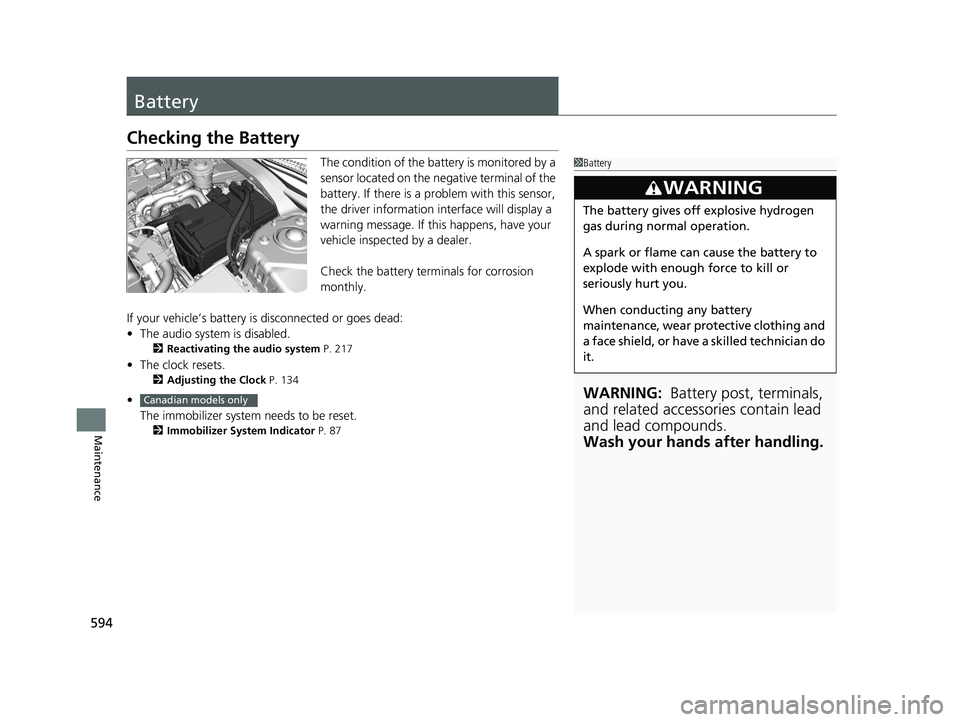
The condition of the battery is monitored by a
sensor located on the negative terminal of the
battery. If there is a problem with this sensor,
the driver information in terface will display a
warning message. If this happens, have your
vehicle inspected by a dealer.
Check the battery terminals for corrosion
monthly.
If your vehicle’s battery is disconnected or goes dead:
• The audio system is disabled.
2 Reactivating the audio system P. 217
•The clock resets.
2 Adjusting the Clock P. 134
•
The immobilizer system needs to be reset.
2 Immobilizer System Indicator P. 87
1Battery
WARNING: Battery post, terminals,
and related accessories contain lead
and lead compounds.
Wash your hands after handling.
3WARNING
The battery gives off explosive hydrogen
gas during normal operation.
A spark or flame can cause the battery to
explode with enough force to kill or
seriously hurt you.
When conducting any battery
maintenance, wear prot ective clothing and
a face shield, or have a skilled technician do
it.
Canadian models only
19 CIVIC 4D HCM_HMIN_J (KA KL KC)-31TBA6301.book 594 ページ 2018年10月26日 金曜日 午前7時42分
Page 675 of 679
673
Index
Opening/ClosingHood ...................................................... 559
Moonroof ............................................... 159
Power Windows...................................... 156
Trunk ...................................................... 150
Outside Temperature Display ................. 118
Overheating ............................................. 635
P
Paddle Shifters (7-Speed Manual Shift
Mode) ..................................................... 448
Pandora ®.................................................. 287
Panic Mode ............................................... 155
Parking ..................................................... 537
Parking Brake ........................................... 529
Parking Brake and Brake System Indicator (Amber) ....................................... 77, 78, 640
Parking Brake and Brake System Indicator (Red) .......................................... 76, 639, 640
Passenger Front Airb ag Off Indicator....... 58
Passing Indicators ..................................... 166
Playing Bluetooth ® Audio ............... 236, 292
Power Windows ....................................... 156
Precautions While Driving Rain ........................................................ 442
Pregnant Women ....................................... 44
Puncture (Tire) ......................................... 609
R
Radio (FM/AM).................................. 228, 268
Radio (SiriusXM ®) ..................................... 272
Radio Data System (RDS) .................. 229, 270
Range ........................................................ 117
RDS (Radio Data System) .................. 229, 270
Readiness Codes (Emissions Testing) ....... 661
Rear Defogger/Heated Door Mirror
Button ..................................................... 176
Rear Seat Heaters ..................................... 200
Rear Seats (Folding Down) ....................... 186
Rearview Mirror ........................................ 178
Refueling ................................................... 541
Fuel Gauge .............................................. 111
Gasoline .......................... 541, 651, 654, 656
Low Fuel Indicator ..................................... 82
Regulations ............................... 466, 587, 659
Remote Transmitter ................................. 143
Replacement
Battery .................................................... 596
Bulbs ....................................................... 572
Fuses ............................................... 643, 645
Tires ........................................................ 590
Wiper Blade Rubber ................................. 581
Reporting Safety Defects ......................... 660
Resetting a Trip Meter ............................. 116
Rev Indicators ........................................... 121
Road Departure Mitigation (RDM) .......... 522
On and Off .............................................. 523
S
Safe Driving ................................................ 33
Safety Check ............................................... 37
Safety Labels ............................................... 74
Safety Message ............................................. 1
Seat Belts .................................................... 38
Adjusting the Shoulder Anchor.................. 43
Automatic Seat Belt Tensioners ................. 41
Checking................................................... 45
Fastening .................................................. 42
Installing a Child Seat wi th a Lap/Shoulder Seat
Belt ......................................................... 67
Pregnant Women ...................................... 44
Reminder .................................................. 40
Warning Indicator ............................... 40, 81
Seat Heaters ...................................... 199, 200
Seats .......................................................... 180
Adjusting ................................................ 180
Front Seat Heaters ................................... 199
Front Seats .............................................. 180
Rear Seat Heaters .................................... 200
Rear Seats ............................................... 186
Security System ......................................... 153
Security System Alarm Indicator................. 88
Selecting a Child Seat ................................. 64
Selector Knob (Audio) .............................. 221
Setting the Clock ...................................... 134
Shift Lever ........................... 23, 444, 446, 450
Releasing................................................. 634
Won’t Move ............................................ 634
19 CIVIC 4D HCM_HMIN_J (KA KL KC)-31TBA6301.book 673 ページ 2018年10月26日 金曜日 午前7時42分