Page 239 of 675
237
Features
Audio System Basic Operation
To use the audio system function, the ignition swit ch must be in ACCESSORY (q or
ON
(w*1.
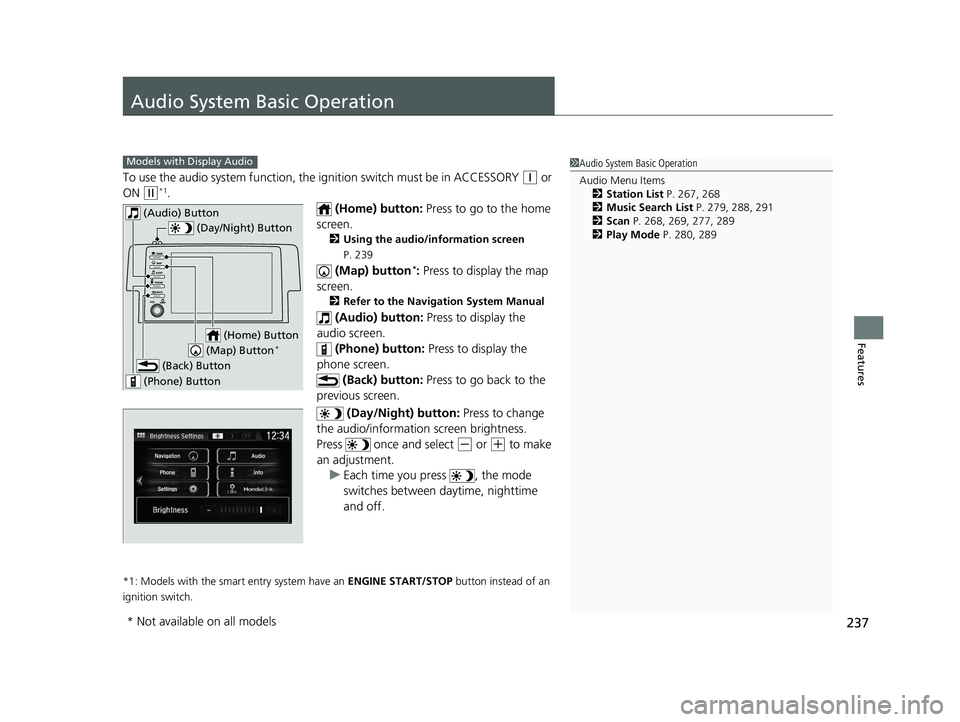
(Home) button: Press to go to the home
screen.
2 Using the audio/information screen
P. 239
(Map) button*: Press to display the map
screen.
2 Refer to the Navigation System Manual
(Audio) button: Press to display the
audio screen.
(Phone) button: Press to display the
phone screen. (Back) button: Press to go back to the
previous screen.
(Day/Night) button: Press to change
the audio/information screen brightness.
Press once and select
(- or (+ to make
an adjustment. u Each time you press , the mode
switches between da ytime, nighttime
and off.
*1: Models with the smart entry system have an ENGINE START/STOP button instead of an
ignition switch.
1 Audio System Basic Operation
Audio Menu Items
2 Station List P. 267, 268
2 Music Search List P. 279, 288, 291
2 Scan P. 268, 269, 277, 289
2 Play Mode P. 280, 289Models with Display Audio
(Day/Night) Button
(Home) Button
(Back) Button
(Phone) Button
(Audio) Button
(Map) Button*
* Not available on all models
19 CIVIC 2D HCM (KA KL KC)-31TBG6300.book 237 ページ 2018年9月4日 火 曜日 午後1時38分
Page 241 of 675
Continued239
uuAudio System Basic Operation uAudio/Information Screen
Features
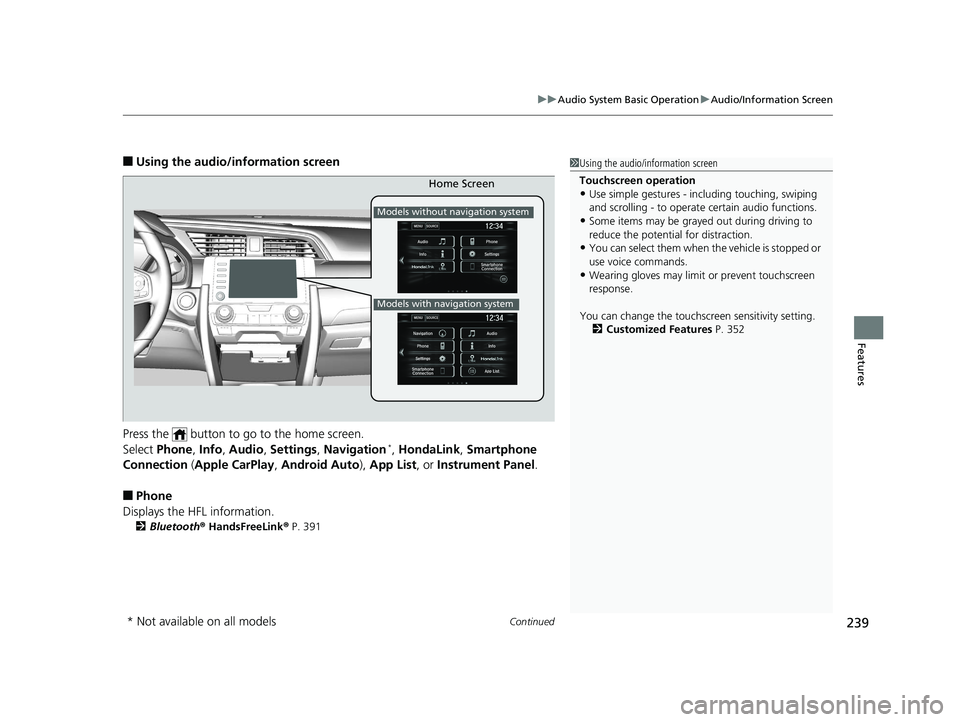
■Using the audio/in formation screen
Press the button to go to the home screen.
Select Phone , Info , Audio , Settings , Navigation
*, HondaLink , Smartphone
Connection (Apple CarPlay, Android Auto), App List , or Instrument Panel .
■Phone
Displays the HFL information.
2 Bluetooth ® HandsFreeLink ® P. 391
1 Using the audio/in formation screen
Touchscreen operation
•Use simple gestures - in cluding touching, swiping
and scrolling - to operate certain audio functions.
•Some items may be grayed out during driving to
reduce the potential for distraction.
•You can select them when the vehicle is stopped or
use voice commands.
•Wearing gloves may limit or prevent touchscreen
response.
You can change the touchs creen sensitivity setting.
2 Customized Features P. 352
Home Screen
Models without navigation system
Models with navigation system
* Not available on all models
19 CIVIC 2D HCM (KA KL KC)-31TBG6300.book 239 ページ 2018年9月4日 火 曜日 午後1時38分
Page 242 of 675
240
uuAudio System Basic Operation uAudio/Information Screen
Features
■Info
Displays Trip Computer or Clock/Wallpaper . Select MENU on the Info Menu
screen to see all available options: Trip Computer, Voice Info , Clock/Wallpaper
and System/Device Information .
Trip Computer :
• Current Drive tab: Displays the current trip information.
• History of Trip A tab: Displays information for the three previous drives. The
information is stored every time you reset Trip A.
To delete the history manually, select Delete History on the History of Trip A
tab. The confirmation message app ears on the screen, then select Yes.
Voice Info : Displays the all commands list.
Clock/Wallpaper : Displays the clock and wallpaper.
System/Device Information :
• System Info: Displays the software version of the audio system.
• USB Info : Displays the memory usage of the USB device.
■Audio
Displays the current audio information.
■Settings
Enters the customiz ing menu screen.
2Customized Features P. 335
■Navigation*
Displays the navigation screen.
2Refer to the Navigation System Manual
* Not available on all models
19 CIVIC 2D HCM (KA KL KC)-31TBG6300.book 240 ページ 2018年9月4日 火 曜日 午後1時38分
Page 252 of 675
uuAudio System Basic Operation uAudio/Information Screen
250
Features
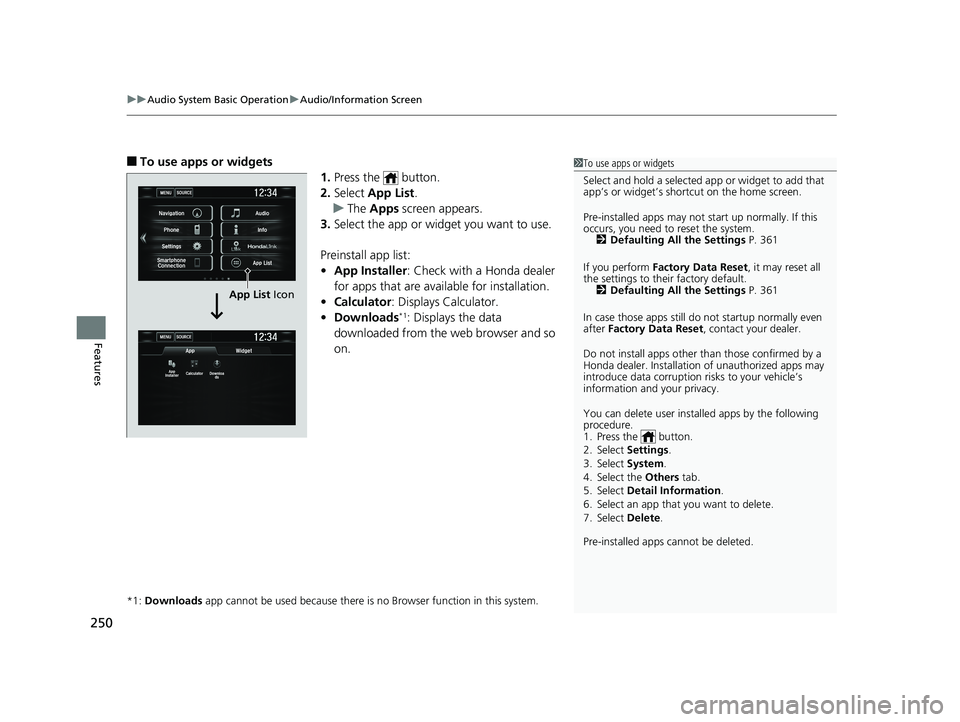
■To use apps or widgets
1.Press the button.
2. Select App List .
u The Apps screen appears.
3. Select the app or widget you want to use.
Preinstall app list:
• App Installer : Check with a Honda dealer
for apps that are available for installation.
• Calculator : Displays Calculator.
• Downloads
*1: Displays the data
downloaded from the web browser and so
on.
*1: Downloads app cannot be used because there is no Browser function in this system.
1To use apps or widgets
Select and hold a selected app or widget to add that
app’s or widget’s shortcut on the home screen.
Pre-installed apps may not start up normally. If this
occurs, you need to reset the system.
2 Defaulting All the Settings P. 361
If you perform Factory Data Reset , it may reset all
the settings to their factory default. 2 Defaulting All the Settings P. 361
In case those apps still do not startup normally even
after Factory Data Reset , contact your dealer.
Do not install apps other than those confirmed by a
Honda dealer. Installation of unauthorized apps may
introduce data corruption risks to your vehicle’s
information and your privacy.
You can delete user installed apps by the following
procedure.
1. Press the button.
2. Select Settings .
3. Select System .
4. Select the Others tab.
5. Select Detail Information .
6. Select an app that you want to delete.
7. Select Delete .
Pre-installed apps cannot be deleted.
MENUSOURCE
MENUSOURCE
App
App
Installer Calculator Downloa
ds
Widget
Navigation Audio
Info
App List
Phone
Settings
Smartphone Connection
App List Icon
19 CIVIC 2D HCM (KA KL KC)-31TBG6300.book 250 ページ 2018年9月4日 火 曜日 午後1時38分
Page 255 of 675
Continued253
uuAudio System Basic Operation uAudio/Information Screen
Features
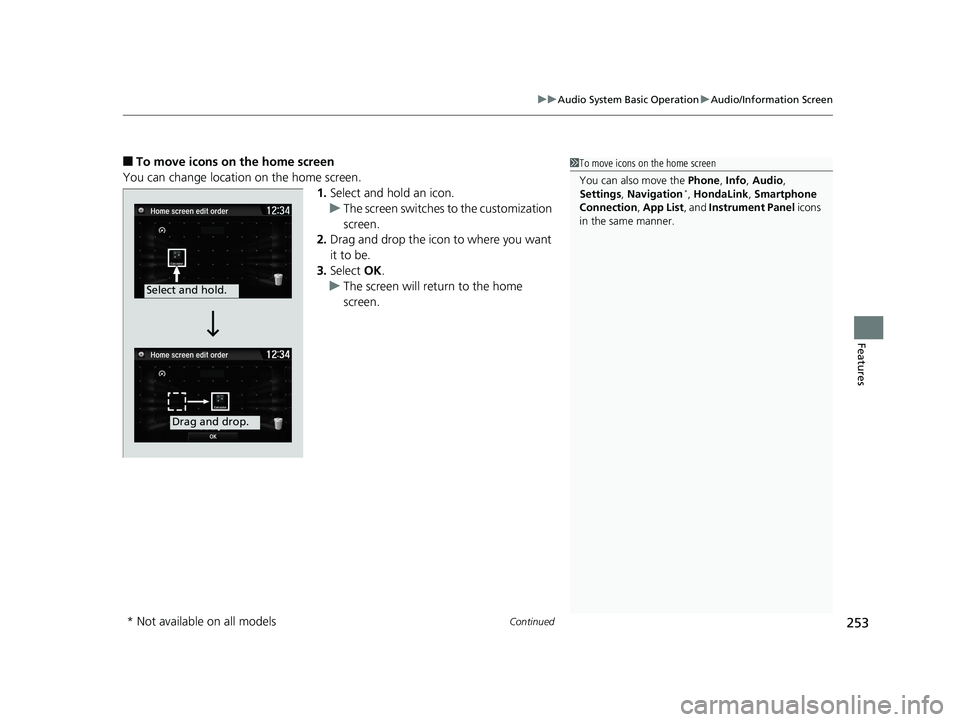
■To move icons on the home screen
You can change location on the home screen. 1.Select and hold an icon.
u The screen switches to the customization
screen.
2. Drag and drop the icon to where you want
it to be.
3. Select OK.
u The screen will return to the home
screen.1To move icons on the home screen
You can also move the Phone, Info, Audio ,
Settings , Navigation
*, HondaLink, Smartphone
Connection , App List , and Instrument Panel icons
in the same manner.
Select and hold.
Drag and drop.
* Not available on all models
19 CIVIC 2D HCM (KA KL KC)-31TBG6300.book 253 ページ 2018年9月4日 火 曜日 午後1時38分
Page 256 of 675
uuAudio System Basic Operation uAudio/Information Screen
254
Features
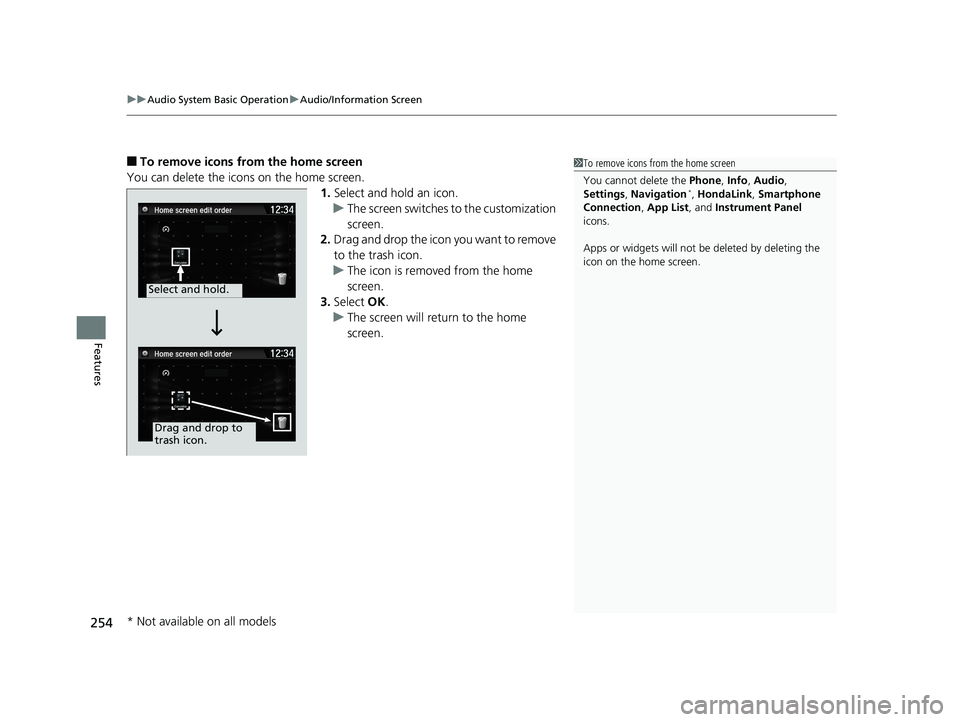
■To remove icons from the home screen
You can delete the icons on the home screen. 1.Select and hold an icon.
u The screen switches to the customization
screen.
2. Drag and drop the icon you want to remove
to the trash icon.
u The icon is removed from the home
screen.
3. Select OK.
u The screen will return to the home
screen.1To remove icons from the home screen
You cannot delete the Phone, Info, Audio ,
Settings , Navigation
*, HondaLink, Smartphone
Connection , App List, and Instrument Panel
icons.
Apps or widgets will not be deleted by deleting the
icon on the home screen.
Select and hold.
Drag and drop to
trash icon.
* Not available on all models
19 CIVIC 2D HCM (KA KL KC)-31TBG6300.book 254 ページ 2018年9月4日 火 曜日 午後1時38分
Page 265 of 675
263
uuAudio System Basic Operation uVoice Control Operation
Continued
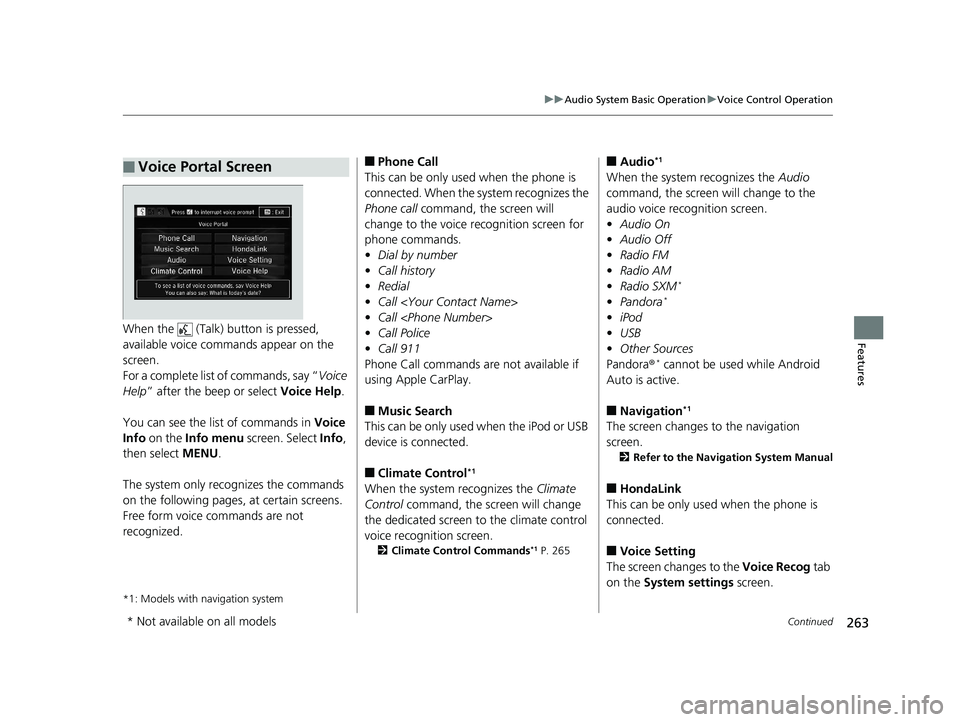
FeaturesWhen the (Talk) button is pressed,
available voice comma nds appear on the
screen.
For a complete list of commands, say “ Voice
Help ” after the beep or select Voice Help.
You can see the list of commands in Voice
Info on the Info menu screen. Select Info,
then select MENU.
The system only recognizes the commands
on the following pages, at certain screens.
Free form voice commands are not
recognized.
*1: Models with navigation system
■Voice Portal Screen■Phone Call
This can be only used when the phone is
connected. When the sy stem recognizes the
Phone call command, the screen will
change to the voice re cognition screen for
phone commands.
• Dial by number
• Call history
• Redial
• Call
• Call
• Call Police
• Call 911
Phone Call commands are not available if
using Apple CarPlay.
■Music Search
This can be only used when the iPod or USB
device is connected.
■Climate Control*1
When the system recognizes the Climate
Control command, the screen will change
the dedicated screen to the climate control
voice recognition screen.
2 Climate Control Commands*1 P. 265
■Audio*1
When the system recognizes the Audio
command, the screen will change to the
audio voice recognition screen.
• Audio On
• Audio Off
• Radio FM
• Radio AM
• Radio SXM
*
•Pandora*
•iPod
• USB
• Other Sources
Pandora®
* cannot be used while Android
Auto is active.
■Navigation*1
The screen changes to the navigation
screen.
2 Refer to the Navigation System Manual
■HondaLink
This can be only used when the phone is
connected.
■Voice Setting
The screen changes to the Voice Recog tab
on the System settings screen.
* Not available on all models
19 CIVIC 2D HCM (KA KL KC)-31TBG6300.book 263 ページ 2018年9月4日 火 曜日 午後1時38分
Page 266 of 675
264
uuAudio System Basic Operation uVoice Control Operation
Features
■Voice Help
You can see a list of the available
commands on the screen.
• Useful Commands
• Phone Commands
• Audio Commands
*1
•On Screen Commands
• Music Search Commands
• General Commands
• Climate Control Commands
*1
The system accepts these commands on the
voice portal top screen.
•Call
• Call
• What time is it?
• What is today’s date?
*1: Models with navigation system
■Useful Commands
The system accepts these commands on the
dedicated screen for the voice recognition
of the phone.
• Call by Number
• Call by Name
• Call
• Call
The system accepts these commands on the
dedicated screen for the voice recognition
of the audio.
■Radio FM Commands
• Radio tune to <87.7-107.9> FM
• Radio tune to <87.7 -107.9> HD <1-8>
FM
• Radio FM preset <1-12>
■Radio AM Commands
• Radio tune to <530-1710> AM
• Radio AM preset <1-6>
■Radio SXM Commands*
•SXM channel <1-255>
■Phone Commands
■Audio Commands*1
•SXM channel
name, traffic and weather city name,
sports team name>
• Radio SXM preset <1-12>
■Pandora Commands*
•Pandora play
■iPod Commands
• iPod play
• iPod play track <1-30>
• Music Search
• What album is this?
• What am I listening to?
■USB Commands
• USB play
• USB play track <1-30>
• Music Search
• What album is this?
• What am I listening to?
■Bluetooth ® Audio Commands
• Bluetooth ® Audio play
NOTE:
Bluetooth ® Audio commands may not work
on some phones or Bluetooth ® Audio
devices.
* Not available on all models
19 CIVIC 2D HCM (KA KL KC)-31TBG6300.book 264 ページ 2018年9月4日 火 曜日 午後1時38分