2019 HONDA ACCORD SEDAN center console
[x] Cancel search: center consolePage 17 of 727
15
Quick Reference Guide
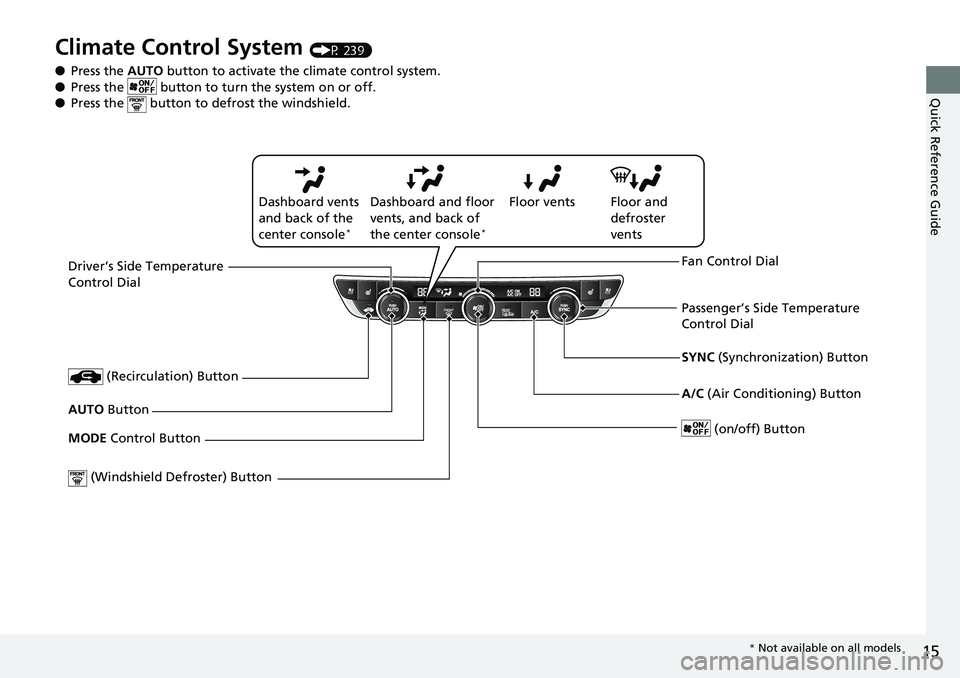
Climate Control System (P 239)
● Press the AUTO button to activate th e climate control system.
● Press the button to tu rn the system on or off.
● Press the button to defrost the windshield.
Driver’s Side Temperature
Control Dial
(Windshield De froster) Button
SYNC (Synchronization) Button
AUTO Button
(on/off) Button
(Recirculation) Button
MODE Control Button Fan Control Dial
A/C
(Air Conditioning) Button
Passenger’s Side Temperature
Control Dial
Floor vents
Dashboard vents
and back of the
center console
*
Dashboard and floor
vents, and back of
the center console
*
Floor and
defroster
vents
* Not available on all models
Page 61 of 727

59
uuAirbags uAirbag System Indicators
Safe Driving■When the passenger airbag off
indicator comes on
The indicator comes on to alert you that the
passenger’s front airbag has been turned off.
This occurs when the weight sensors detect
about 65 lbs (29 kg) or less, the weight of an
infant or small child, on the seat.
Children age 12 or under should always ride properly restrained in a back seat.
2 Child Safety P. 61
If the front passenger’s seat is empty, the indicator will come on and, in the event of
a crash, the front passenger’s airbag will not deploy. The front passenger’s knee
airbag will not deploy either.
■Passenger Front Airbag Off Indicator1 Passenger Front Airbag Off Indicator
To ensure the passenger is detected properly, confirm
that:
•There is no child seat or other object pressing
against the rear of the seat-back.
•There is no rear passenger pushing or pulling on
the back of the front passenger’s seat.
•The front seat or seat-b ack is not forced back
against an object on the s eat or floor behind it.
•There is no object placed under or beside the front
passenger’s seat.
•The occupant is sitting in an upright position and
the seat back is not excessively reclined.
•The occupant is not leaning against the door or
center console.
•The occupant’s feet are plac ed on the floor in front
of them.
•There are no objects ha nging from the front
passenger’s seat.
•Only small, lightweight objects are in the seat-back
pocket.
The passenger airbag off indicator may come on and
go off periodically if the tota l weight on the seat is
near the airbag cutoff threshold.
Have your vehicle checked by a dealer as soon as
possible if:
•All of the above conditions are met, and the
indicator comes on with an adult seated in the
front passenger seat.
•The seat is empty and the indicator is off.
Do not allow an adult passe nger to ride in the front
seat when the indicator is on.
U.S. Canada
Page 241 of 727
239Continued
Controls
Climate Control System
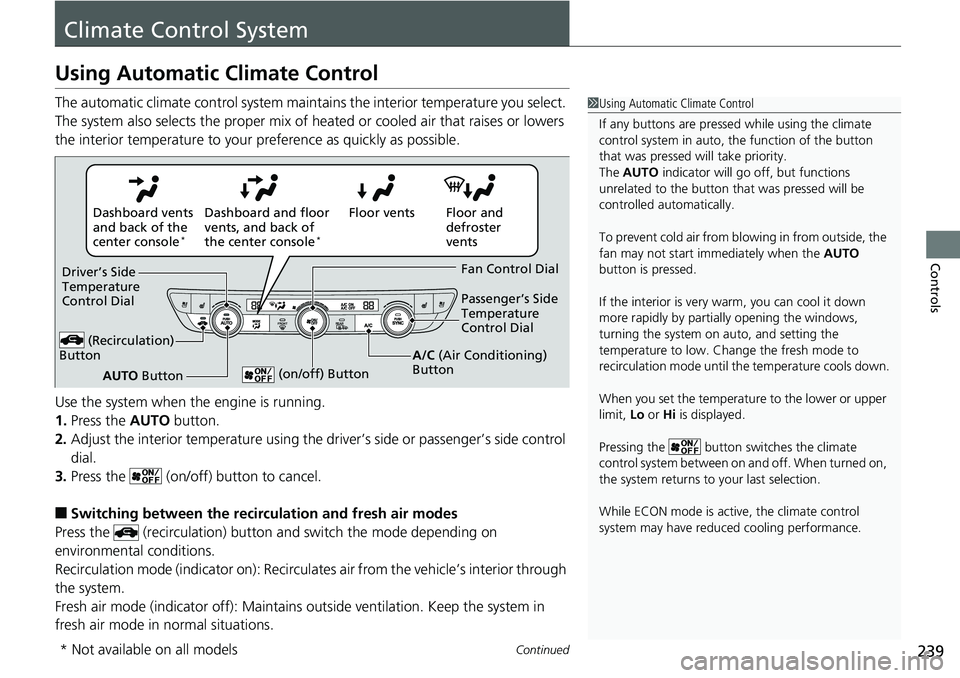
Using Automatic Climate Control
The automatic climate control system maintains the interior temperature you select.
The system also selects the proper mix of heat ed or cooled air that raises or lowers
the interior temperature to your pr eference as quickly as possible.
Use the system when the engine is running.
1. Press the AUTO button.
2. Adjust the interior temperature using the dr iver’s side or passenger’s side control
dial.
3. Press the (on/off) button to cancel.
■Switching between the recirc ulation and fresh air modes
Press the (recirculation) button and switch the mode depending on
environmental conditions.
Recirculation mode (indicator on): Recirculat es air from the vehicle’s interior through
the system.
Fresh air mode (indicator off): Maintains outside ventilation. Keep the system in
fresh air mode in normal situations.
1 Using Automatic Climate Control
If any buttons are presse d while using the climate
control system in auto, the function of the button
that was pressed will take priority.
The AUTO indicator will go off, but functions
unrelated to the button th at was pressed will be
controlled automatically.
To prevent cold air from bl owing in from outside, the
fan may not start i mmediately when the AUTO
button is pressed.
If the interior is very warm, you can cool it down
more rapidly by partial ly opening the windows,
turning the system on auto, and setting the
temperature to low. Change the fresh mode to
recirculation mode until the temperature cools down.
When you set the temperature to the lower or upper
limit, Lo or Hi is displayed.
Pressing the button sw itches the climate
control system between on and off. When turned on,
the system returns to your last selection.
While ECON mode is active, the climate control
system may have reduced cooling performance.
Floor and
defroster
vents
Floor vents
Dashboard and floor
vents, and back of
the center console
*
Dashboard vents
and back of the
center console
*
AUTO Button
Driver’s Side
Temperature
Control Dial
(Recirculation)
Button
Fan Control Dial
A/C (Air Conditioning)
Button Passenger’s Side
Temperature
Control Dial
(on/off) Button
* Not available on all models
Page 248 of 727
uuAudio System uUSB Port(s)
246
Features
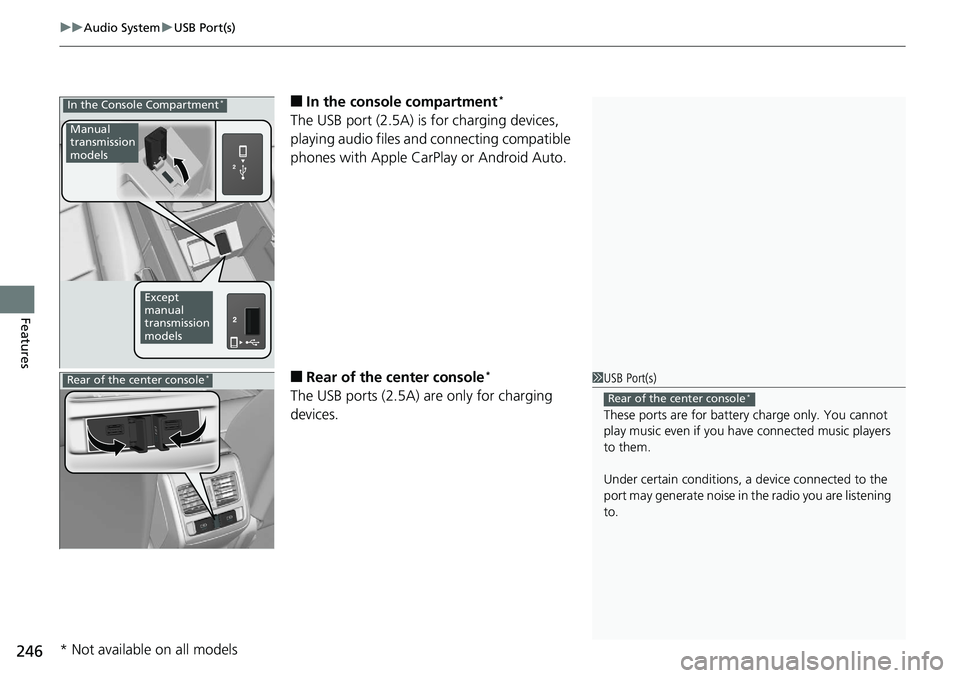
■In the consol e compartment*
The USB port (2.5A) is for charging devices,
playing audio files and connecting compatible
phones with Apple CarPlay or Android Auto.
■Rear of the center console*
The USB ports (2.5A) are only for charging
devices.
In the Console Compartment*
Manual
transmission
models
Except
manual
transmission
models
1 USB Port(s)
These ports are for battery charge only. You cannot
play music even if you ha ve connected music players
to them.
Under certain condi tions, a device connected to the
port may generate noise in the radio you are listening
to.
Rear of the center console*Rear of the center console*
* Not available on all models
Page 279 of 727
Continued277
uuAudio System Basic Operation uAudio/Information Screen
Features
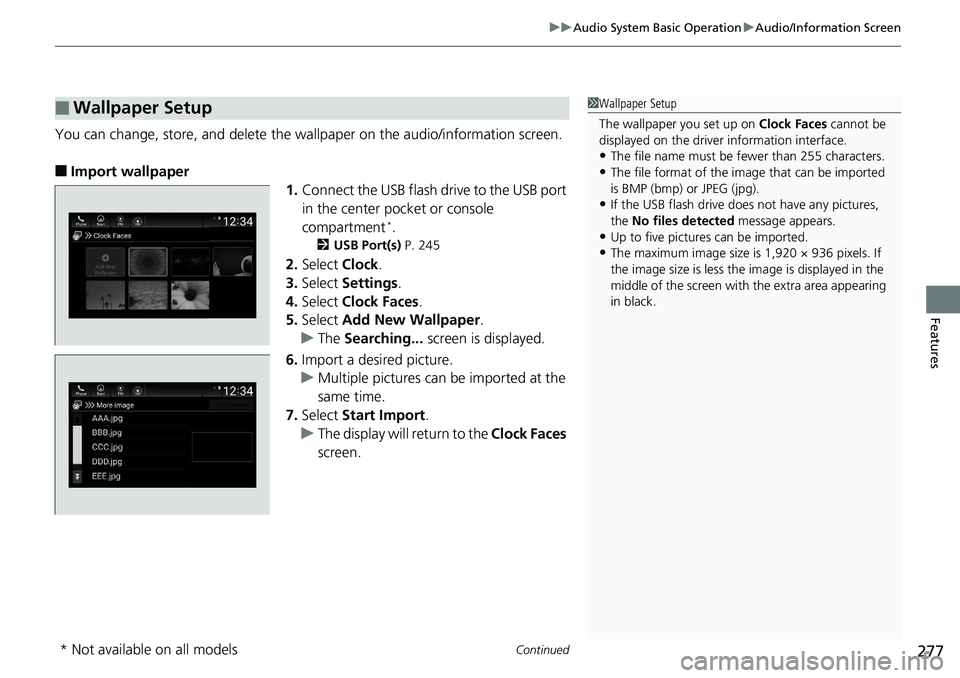
You can change, store, and delete the wa llpaper on the audio/information screen.
■Import wallpaper
1.Connect the USB flash drive to the USB port
in the center pocket or console
compartment
*.
2 USB Port(s) P. 245
2.Select Clock.
3. Select Settings .
4. Select Clock Faces .
5. Select Add New Wallpaper .
u The Searching... screen is displayed.
6. Import a desired picture.
u Multiple pictures can be imported at the
same time.
7. Select Start Import .
u The display will return to the Clock Faces
screen.
■Wallpaper Setup1 Wallpaper Setup
The wallpaper you set up on Clock Faces cannot be
displayed on the driver information interface.
•The file name must be fewer than 255 characters.
•The file format of the im age that can be imported
is BMP (bmp) or JPEG (jpg).
•If the USB flash drive doe s not have any pictures,
the No files detected message appears.
•Up to five pictur es can be imported.
•The maximum image size is 1,920 × 936 pixels. If
the image size is less the image is displayed in the
middle of the screen with the extra area appearing
in black.
* Not available on all models
Page 292 of 727
uuAudio System Basic Operation uSystem Updates
290
Features
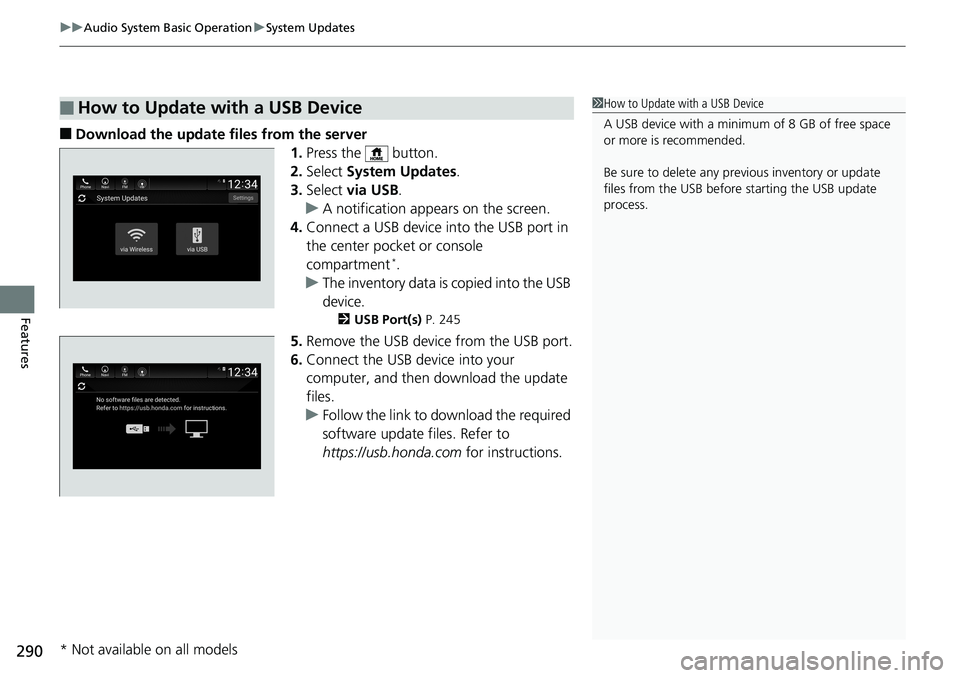
■Download the update files from the server
1.Press the button.
2. Select System Updates .
3. Select via USB .
u A notification appears on the screen.
4. Connect a USB device into the USB port in
the center pocket or console
compartment
*.
u The inventory data is copied into the USB
device.
2 USB Port(s) P. 245
5.Remove the USB device from the USB port.
6. Connect the USB device into your
computer, and then download the update
files.
u Follow the link to download the required
software update files. Refer to
https://usb.honda.com for instructions.
■How to Update with a USB Device1How to Update with a USB Device
A USB device with a minimum of 8 GB of free space
or more is recommended.
Be sure to delete any pr evious inventory or update
files from the USB before starting the USB update
process.
* Not available on all models
Page 338 of 727
336
uuAudio System Basic Operation uApple CarPlay ®
Features
Apple CarPlay ®
If you connect an Apple CarPlay-compatible iPhone to the system via the USB port
in the center pocket or console compartment*, you can use the audio/information
screen, instead of the iPhone display, to make a phone call, listen to music, view
maps (navigation), an d access messages.
2USB Port(s) P. 245
■Phone
Access the contact list, make phon e calls, or listen to voice mail.
■Messages
Check and reply to text messages, or have messages read to you.
■Music
Play music stored on your iPhone.
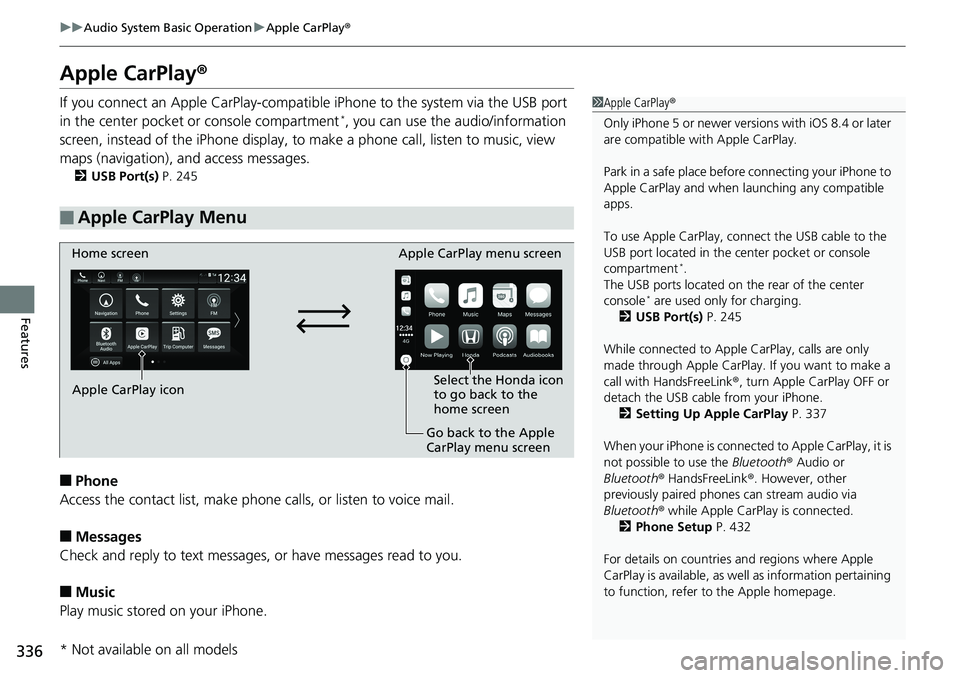
■Apple CarPlay Menu
1 Apple CarPlay ®
Only iPhone 5 or newer versi ons with iOS 8.4 or later
are compatible with Apple CarPlay.
Park in a safe place before connecting your iPhone to
Apple CarPlay and when launching any compatible
apps.
To use Apple CarPlay, connect the USB cable to the
USB port located in the center pocket or console
compartment
*.
The USB ports located on the rear of the center
console
* are used only for charging.
2 USB Port(s) P. 245
While connected to Apple CarPlay, calls are only
made through Apple CarPlay. If you want to make a
call with HandsFreeLink ®, turn Apple CarPlay OFF or
detach the USB cable from your iPhone. 2 Setting Up Apple CarPlay P. 337
When your iPhone is connected to Apple CarPlay, it is
not possible to use the Bluetooth® Audio or
Bluetooth ® HandsFreeLink ®. However, other
previously paired phones can stream audio via
Bluetooth ® while Apple CarPlay is connected.
2 Phone Setup P. 432
For details on c ountries and regions where Apple
CarPlay is available, as well as information pertaining
to function, refer to the Apple homepage.
Home screen
Apple CarPlay icon Apple CarPlay menu screen
Go back to the Apple
CarPlay menu screen
Select the Honda icon
to go back to the
home screen
* Not available on all models
Page 341 of 727
339
uuAudio System Basic Operation uAndroid AutoTM
Continued
Features
Android AutoTM
When you connect an Android phone to the audio system via the front USB port,
Android Auto is automatically initiated. When connected via Android Auto, you can
use the audio/information screen to access the Phone, Google Maps (Navigation),
Google Play Music, and Google Now functions. When you first use Android Auto, a
tutorial will appear on the screen.
We recommend that you complete this tuto rial while safely parked before using
Android Auto.
2 USB Port(s) P. 245
2 Auto Pairing Connection P. 341
1Android AutoTM
To use Android Auto, you need to download the
Android Auto app from Google Play to your
smartphone.
Only Android 5.0 (Lollipop) or later versions are
compatible with Android Auto.
Bluetooth A2DP cannot be used with Android Auto
phone.
Park in a safe place befo re connecting your Android
phone to Android Auto and when launching any
compatible apps.
To use Android Auto, connect the USB cable to the
USB port(s) located in the center pocket or the
console compartment
*. The USB ports located on the
rear of the center console* will not enable Android
Auto operation. 2 USB Port(s) P. 245
To directly access the Android Auto phone function,
press Phone on the home screen.
2 Auto Pairing Connection P. 341
When your Android phone is connected to Android
Auto, it is not possible to use the Bluetooth® Audio.
However, other previously paired phones can stream
audio via Bluetooth ® while Android Auto is
connected.
2 Phone Setup P. 432
* Not available on all models