2019 HONDA ACCORD SEDAN steering wheel
[x] Cancel search: steering wheelPage 512 of 727
510
uuHonda Sensing ®u Collision Mitigation Braking SystemTM (CMBSTM)
Driving
Collision Mitigati on Braking SystemTM (CMBSTM)
Can assist you when there is a possibility of your vehicle colliding with a vehicle or a
pedestrian detected in front of yours. The CMBSTM is designed to alert you when a
potential collision is determined, as well as to reduce your vehicle speed to help
minimize collision severity when a collision is deemed unavoidable.
■How the system works
1 Collision Mitigation Braking SystemTM (CMBSTM)
Important Safety Reminder
The CMBS
TM is designed to reduce the severity of an
unavoidable collision. It do es not prevent a collision
nor stop the vehicle automati cally. It is still your
responsibility to operate the brake pedal and steering
wheel appropriately acco rding to the driving
conditions.
The CMBS
TM may not activate or may not detect a
vehicle in front of y our vehicle under certain
conditions: 2 CMBS
TM Conditions and Limitations P. 514
You can read about handling information for the
camera equipped with this system. 2 Front Sensor Camera P. 568
For directions on the prop er handling of the radar
sensor, refer to the following page. 2 Radar Sensor P. 570
When the CMBS
TM activates, it may automatically
apply the brake. It will be canceled when your vehicle
stops or a potential coll ision is not determined.
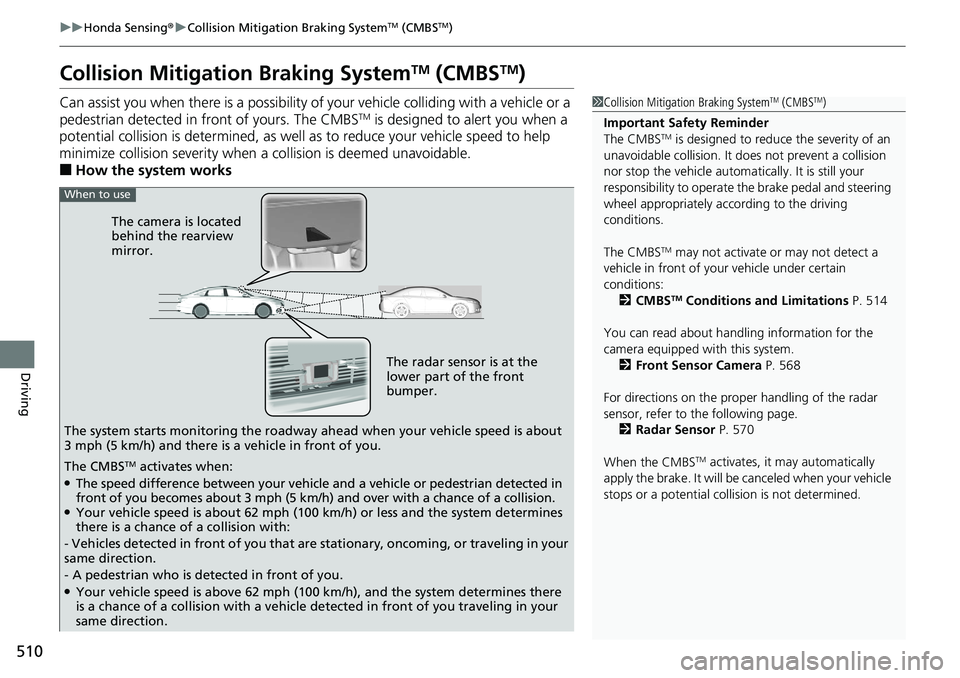
The radar sensor is at the
lower part of the front
bumper.
The camera is located
behind the rearview
mirror.
The system starts monitoring the roadway ah ead when your vehicle speed is about
3 mph (5 km/h) and there is a vehicle in front of you.
When to use
The CMBSTM activates when:●The speed difference between your vehicle and a vehicle or pedestrian detected in
front of you becomes about 3 mph (5 km/h) and over with a chance of a collision.
●Your vehicle speed is about 62 mph (100 km/h) or less and the system determines
there is a chance of a collision with:
- Vehicles detected in front of you that ar e stationary, oncoming, or traveling in your
same direction.
- A pedestrian who is detected in front of you.
●Your vehicle speed is above 62 mph (100 km/h), and the system determines there
is a chance of a collision with a vehicle detected in front of you traveling in your
same direction.
Page 522 of 727
uuHonda Sensing ®u Adaptive Cruise Control (ACC) with Low Speed Follow (LSF)*
520
Driving
■How to activate the system1Adaptive Cruise Control (ACC) with Low Speed Follow (LSF)*
When the MAIN button is pressed, both ACC with
LSF and the Lane Keeping Assist System (LKAS) are
either turned on or off.
ACC with LSF may not work properly under certain
conditions. 2 ACC with LSF Conditions and Limitations
P. 525
When not using ACC with LSF: Turn off adaptive
cruise by pressing the MAIN button. This also will
turn off the Lane Keeping Assist System (LKAS).
Do not use ACC with LSF under the following
conditions:
•On roads with heavy traf fic or while driving in
continuous stop and go traffic.
•On roads with sharp turns.
•On roads with steep downhill sections, as the set
vehicle speed can be exceeded by coasting. In such
cases, ACC with LSF will not apply the brakes to
maintain the set speed.
•On roads with toll collection facilities or other
objects between lanes of traffic, or in parking
areas, or faci lities with driv e through access.
How to use
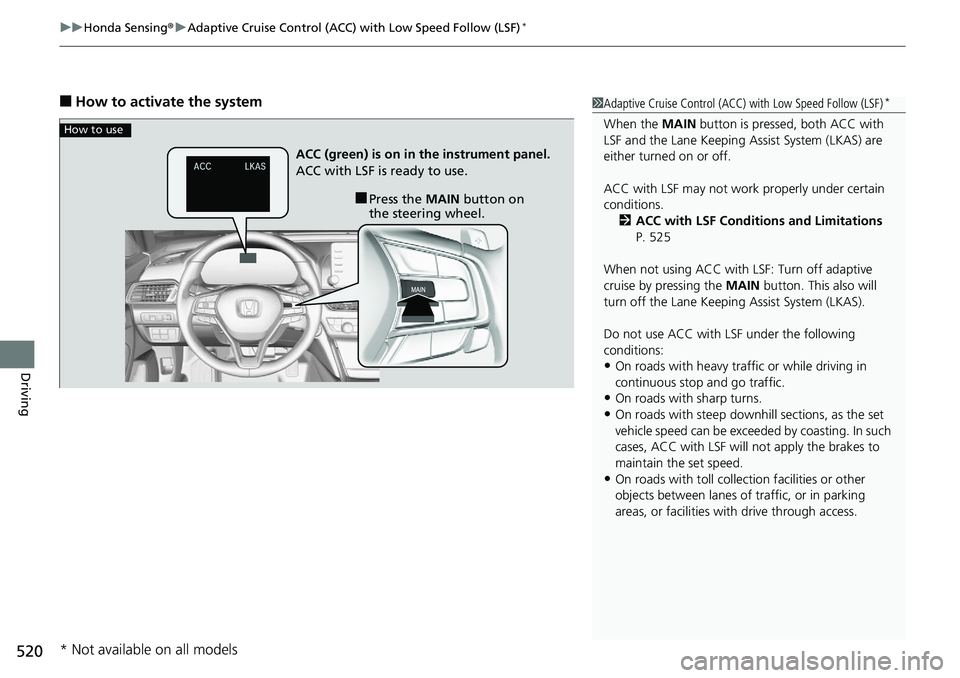
■Press the MAIN button on
the steering wheel.
ACC (green) is on in the instrument panel.
ACC with LSF is ready to use.
* Not available on all models
Page 530 of 727
uuHonda Sensing ®u Adaptive Cruise Control (ACC) with Low Speed Follow (LSF)*
528
Driving
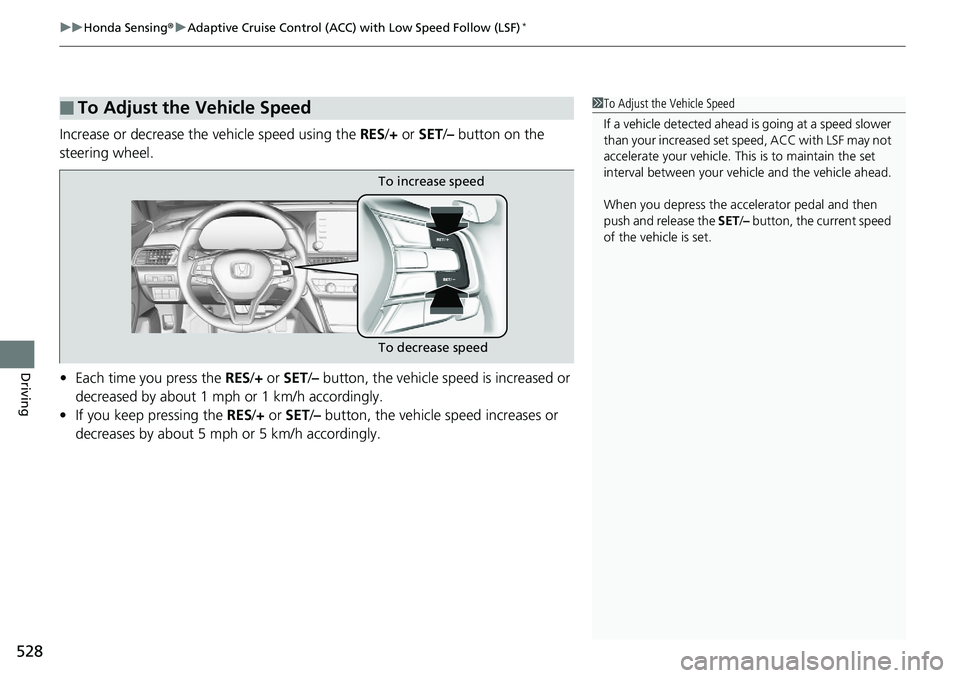
Increase or decrease the vehicle speed using the RES/+ or SET/– button on the
steering wheel.
• Each time you press the RES/+ or SET/ – button, the vehicle sp eed is increased or
decreased by about 1 mph or 1 km/h accordingly.
• If you keep pressing the RES/+ or SET /– button, the vehicle speed increases or
decreases by about 5 mph or 5 km/h accordingly.
■To Adjust the Vehicle Speed1 To Adjust the Vehicle Speed
If a vehicle detected ahead is going at a speed slower
than your increased set speed, ACC with LSF may not
accelerate your vehicle. This is to maintain the set
interval between your vehi cle and the vehicle ahead.
When you depress the accelerator pedal and then
push and release the SET/– button, the current speed
of the vehicle is set.
To increase speed
To decrease speed
Page 534 of 727

uuHonda Sensing ®u Adaptive Cruise Control (ACC) with Low Speed Follow (LSF)*
532
Driving
■Automatic cancellation
The beeper sounds and a message appears on the driver information interface when
ACC with LSF is automatically canceled. An y of these conditions may cause the ACC
with LSF to automatically cancel:
• Bad weather (rain, fog, snow, etc.)
• When the radar sensor at the lower part of the front bumper gets dirty.
• The vehicle ahead of you cannot be detected.
• An abnormal tire condition is dete cted, or the tires are skidding.
• Driving on a mountainous road, or driving off road for extended periods.
• Abrupt steering wheel movement.
• When the ABS, VSA ® or CMBS
TM is activated.
• When the ABS or VSA ® system indicator comes on.
• When the vehicle is stopped on a very steep slope.
• When you manually apply the parking brake.
• When the detected vehicle wi thin the ACC with LSF range is too close to your vehicle.
• The camera behind the rearview mirror, or the area around the camera, including
the windshield, gets dirty.
• When the Maximum Load Limit is exceeded.
• When passing through an enclos ed space, such as tunnel.
In the following cases, a buzzer sounds, ACC with LSF is deactivated, and the Cruise
Cancelled: Slope Too Steep. Watch Downhill Speed message appears in the
driver information interface.
• The vehicle has repeatedly applied the brakes to maintain the set speed (for
example, you are descending a long slope).
The ACC with LSF automatic cancellation can be also triggered by the following
causes. In these cases, the parking brake will be automatically applied.
• The driver’s seat belt is unfasten ed when the vehicle is stationary.
• The vehicle stops for mo re than 10 minutes.
• The engine is turned off.
1Automatic cancellation
Even though ACC with LSF has been automatically
canceled, you can still resu me the prior set speed.
Wait until the condition that caused ACC with LSF to
cancel improves, then press the SET/– button.
Page 538 of 727
uuHonda Sensing ®u Adaptive Cruise Control (ACC)*
536
Driving
■How to activate the system1Adaptive Cruise Control (ACC)*
When the MAIN button is pressed, ACC and Lane
Keeping Assist System (LKAS) are both turned on or
off.
ACC may not work properly under certain conditions.
2 ACC Conditions and Limitations P. 540
When not using ACC: Turn off adaptive cruise by
pressing the MAIN button. This also will turn off the
Lane Keeping Assist System (LKAS).
Do not use ACC under the following conditions:
•On roads with heavy traf fic or while driving in
continuous stop and go traffic.
•On roads with sharp turns.
•On roads with steep downhill sections, as the set
vehicle speed can be exceeded by coasting. In such
cases, ACC will not apply the brakes to maintain
the set speed.
•On roads with toll collection facilities or other
objects between lanes of traffic, or in parking
areas, or faci lities with driv e through access.
When the engine speed slows down, try to
downshift.
When the engine speed goes up, try to upshift.
You can maintain the set sp eed if you change gear
within five seconds.
How to use
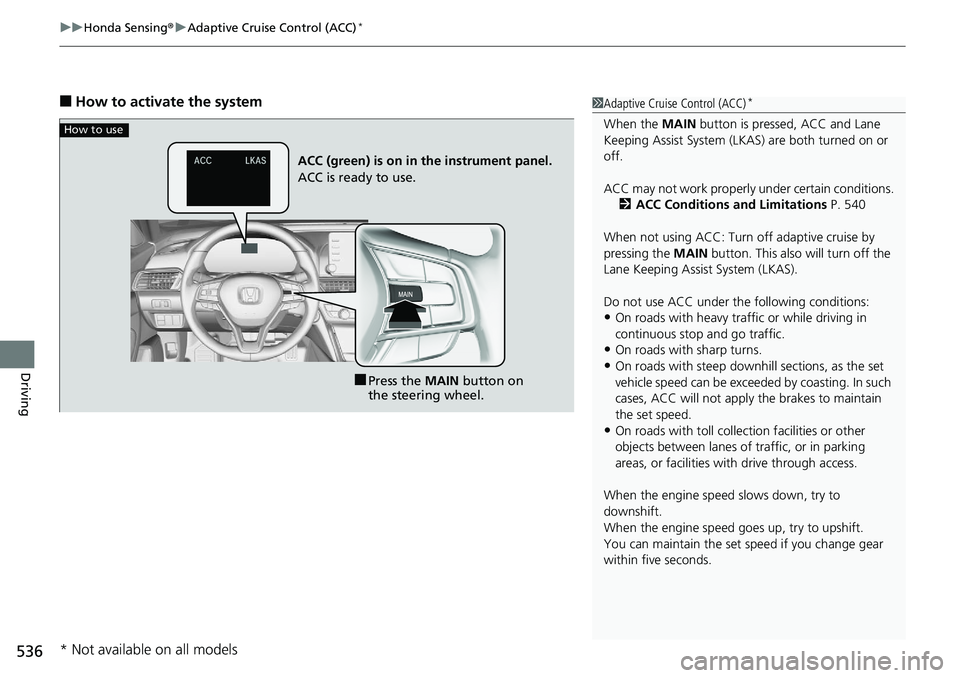
■Press the MAIN button on
the steering wheel.
ACC (green) is on in the instrument panel.
ACC is ready to use.
* Not available on all models
Page 545 of 727
Continued543
uuHonda Sensing ®u Adaptive Cruise Control (ACC)*
Driving
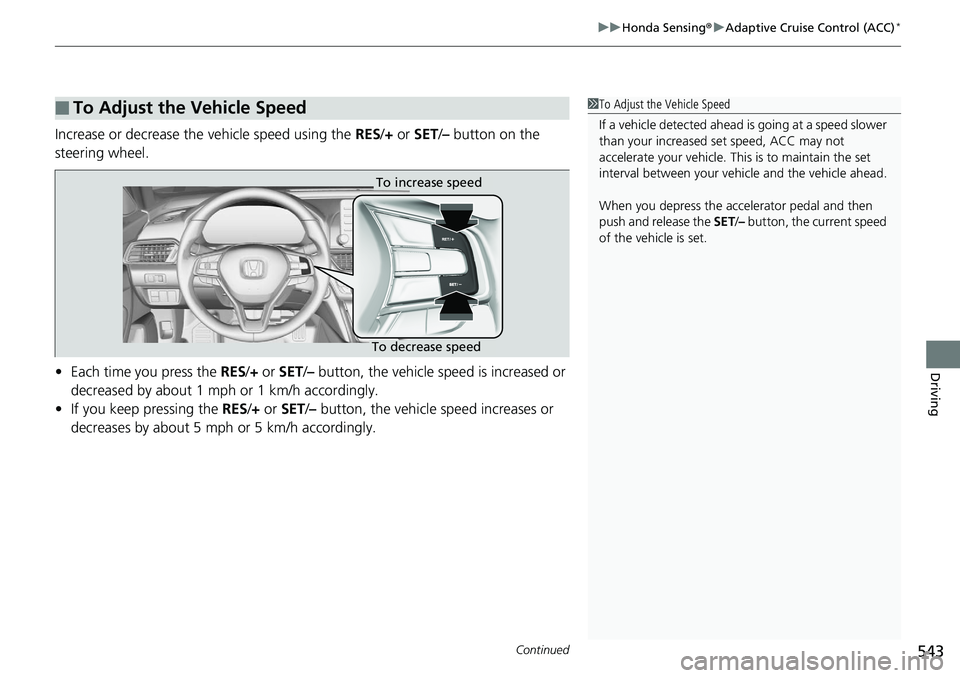
Increase or decrease the vehicle speed using the RES/+ or SET /– button on the
steering wheel.
• Each time you press the RES/+ or SET /– button, the vehicle speed is increased or
decreased by about 1 mph or 1 km/h accordingly.
• If you keep pressing the RES/+ or SET/– button, the vehicle speed increases or
decreases by about 5 mph or 5 km/h accordingly.
■To Adjust the Vehicle Speed1 To Adjust the Vehicle Speed
If a vehicle detected ahead is going at a speed slower
than your increased set speed, ACC may not
accelerate your vehicle. This is to maintain the set
interval between your vehi cle and the vehicle ahead.
When you depress the accelerator pedal and then
push and release the SET/– button, the current speed
of the vehicle is set.
To increase speed
To decrease speed
Page 549 of 727

Continued547
uuHonda Sensing ®u Adaptive Cruise Control (ACC)*
Driving
■Automatic ca ncellation
The beeper sounds and a message appears on the driver information interface when
ACC is automatically cancel ed. Any of these conditions may cause the ACC to
automatically cancel:
• Bad weather (rain, fog, snow, etc.)
• When the radar sensor at the lower part of the front bumper gets dirty.
• The vehicle ahead of yo u cannot be detected.
• An abnormal tire condition is de tected, or the tires are skidding.
• Driving on a mountainous road, or driving off road for extended periods.
• Abrupt steering wheel movement.
• When the ABS, VSA ® or CMBS
TM is activated.
• When the ABS or VSA ® system indicator comes on.
• When you manually apply the parking brake.
• When the detected vehicle within the AC C range is too close to your vehicle.
• The camera behind the rearview mirror, or the area around the camera, including
the windshield, gets dirty.
• When the Maximum Load Limit is exceeded.
• When passing through an enclos ed space, such as tunnel.
• Ignoring shift down indication shown in the tachometer display will cancel the
ACC after about 10 seconds.
• The engine speed goes into the tachometer’s red zone.
• The engine speed goes to below 1,000 rpm.
• You shift into neutral temporarily when shifting into a higher or lower gear.
In the following cases, a buzzer sounds, ACC is deactivated, and the Cruise
Cancelled: Slope Too Steep. Watch Downhill Speed message appears in the
driver information interface.
• The vehicle has repeatedly applied the brakes to maintain the set speed (for
example, you are descending a long slope).
1 Automatic cancellation
Even though ACC has been automatically canceled,
you can still resume the prior set speed.
Wait until the condition that caused ACC to cancel
improves, then press the SET/– button.
Page 552 of 727

550
uuHonda Sensing ®u Lane Keeping Assist System (LKAS)
Driving
Lane Keeping Assist System (LKAS)
Provides steering input to help keep the vehicle in the middle of a detected lane and
provides tactile and visual alerts if the ve hicle is detected drifting out of its lane.1Lane Keeping Assist System (LKAS)
Important Safety Reminders
The LKAS is for your convenience only. It is not a
substitute for your vehicl e control. The system does
not work if you take y our hands off the steering
wheel or fail to steer the vehicle.
2 Driver Information Interface Warning and
Information Messages P. 105
Do not place objects on the instrument panel.
Objects may reflect on th e windshield and prevent
correct detection of the traffic lanes.
The LKAS only alerts you when lane drift is detected
without a turn signal in us e. The LKAS may not detect
all lane markings or lane departures; accuracy will
vary based on weather, speed, and lane marker
condition.
It is always your responsibility to safely operate the
vehicle and avoid collisions.
The LKAS is convenient when it is used on freeways.
The LKAS may not work properly or may work
improperly under the certain conditions:
2 LKAS Conditions and Limitations P. 555
You can read about handling information for the
camera equipped with this system. 2 Front Sensor Camera P. 568
When you operate the turn signals to chan ge lanes, the system is suspended, and
resumes after the signals are off.
If you make a lane change without operating the turn signals, the LKAS alerts
activate, and torque is applied to the steering.
■Front Sensor Camera
Monitors the lane
lines.■Tactile and visual alerts
Rapid vibrations on the steering
wheel and a warning display alert
you that the vehicle is drifting out of
a detected lane.
■Steering input assist
The system applies torque to the steering to keep the vehicle between the left and
right lane lines. The applied torque become s stronger as the vehicle gets closer to
either of the lane lines.