2019 GMC SIERRA DENALI maintenance reset
[x] Cancel search: maintenance resetPage 161 of 472
GMC Sierra/Sierra Denali Owner Manual (GMNA-Localizing-U.S./Canada/
Mexico-1500-11698638) - 2019 - crc - 5/15/18
160 Instruments and Controls additional maintenance is
recommended. See Maintenance
Schedule 0 415 .
The Oil Life display must be reset
after each oil change. It will not
reset itself. Do not reset the Oil Life
display at any time other than when
the oil has just been changed.
It cannot be reset accurately until
the next oil change. To reset the
engine oil life system, see Engine
Oil Life System 0 323 .
Air Filter Life
Turn the trip odometer reset stem
until AIR FILTER LIFE displays.
This displays an estimate of the
engine air filter ’ s remaining useful
life and the state of the system.
Engine Air Filter Life 95% means
95% of the current air filter life
remains. Messages will display
based on the engine air filter life and
the state of the system.
When the REPLACE AT NEXT OIL
CHANGE message displays, the
engine air filter should be replaced
at the time of the next oil change.
When the REPLACE NOW message displays, the engine air
filter should be replaced as soon as
possible.
The Air Filter Life display must be
reset after the engine air filter
replacement. To reset, see Engine
Air Filter Life System 0 325 .
Brake Pad Life
This displays an estimate of the
remaining life of the front and rear
brake pads. Messages will display
based on brake pad wear and the
state of the system. Reset the Brake
Pad Life display after replacing the
brake pads. See Brake Pad Life
System 0 335 .
Driver Information Center
(DIC) (Midlevel and
Uplevel) The DIC displays are shown in the
center of the instrument cluster in
the Info app. See Instrument Cluster
0 138 . The displays show the status
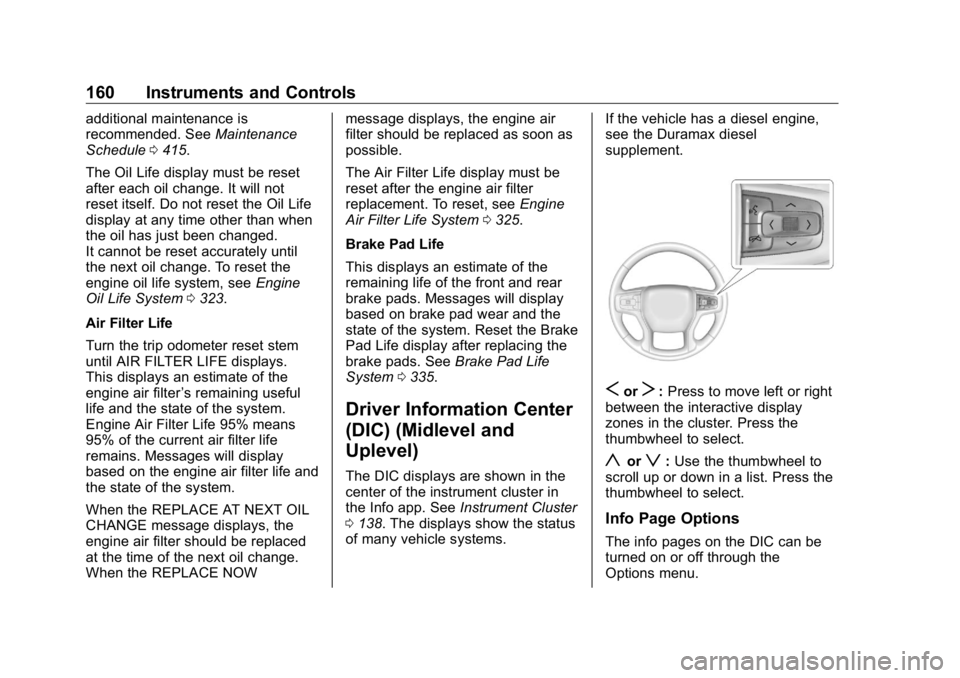
of many vehicle systems. If the vehicle has a diesel engine,
see the Duramax diesel
supplement.
S or
T : Press to move left or right
between the interactive display
zones in the cluster. Press the
thumbwheel to select.
y or
z : Use the thumbwheel to
scroll up or down in a list. Press the
thumbwheel to select.
Info Page Options
The info pages on the DIC can be
turned on or off through the
Options menu.
Page 163 of 472
GMC Sierra/Sierra Denali Owner Manual (GMNA-Localizing-U.S./Canada/
Mexico-1500-11698638) - 2019 - crc - 5/15/18
162 Instruments and Controls In addition to the engine oil life
system monitoring the oil life,
additional maintenance is
recommended. See Maintenance
Schedule 0 415 .
The Oil Life display must be reset
after each oil change. It will not
reset itself. Do not reset the Oil Life
display at any time other than when
the oil has just been changed.
It cannot be reset accurately until
the next oil change. To reset the
engine oil life system, press the
thumbwheel while the Oil Life
display is active. See Engine Oil
Life System 0 323 .
Tire Pressure : Shows the
approximate pressures of all four
tires. Tire pressure is displayed in
either kilopascal (kPa) or in pounds
per square inch (psi). If the pressure
is low, the value for that tire is
shown in amber.
See Tire Pressure Monitor System
0 369 and Tire Pressure Monitor
Operation 0 370 .
Air Filter Life : Shows an estimate
of the engine air filter ’ s remaining
useful life and the state of the system. Engine Air Filter Life 95%
means 95% of the current air filter
life remains. Messages will display
based on the engine air filter life and
the state of the system. When the
REPLACE AT NEXT OIL CHANGE
message displays, the engine air
filter should be replaced at the time
of the next oil change. When the
REPLACE NOW message displays,
the engine air filter should be
replaced as soon as possible.
The Air Filter Life display must be
reset after the engine air filter
replacement. To reset, see Engine
Air Filter Life System 0 325 .
Brake Pad Life : This displays an
estimate of the remaining life of the
front and rear brake pads.
Messages will display based on
brake pad wear and the state of the
system. Reset the Brake Pad Life
display after replacing the brake
pads. See Brake Pad Life System
0 335 . Fuel Economy : Displays average
fuel economy, the best fuel
economy over the selected
distance, and a bar graph showing
instantaneous fuel economy.
Press the thumbwheel to change
the selected distance. Press and
hold the thumbwheel while this
display is active to reset the best
fuel economy and average fuel
economy. This display can also be
reset by selecting reset in the menu.
Engine Hours (Hourmeter) :
Shows the total number of hours the
engine has run. This display also
shows the engine idle hours.
Transmission Fluid
Temperature : Shows the
temperature of the automatic
transmission fluid in either degrees
Celsius (°C) or degrees
Fahrenheit (°F).
Trailer Brake : On vehicles with the
Integrated Trailer Brake Control
(ITBC) system, the trailer brake
display appears in the DIC.
Page 302 of 472
GMC Sierra/Sierra Denali Owner Manual (GMNA-Localizing-U.S./Canada/
Mexico-1500-11698638) - 2019 - crc - 5/16/18
Driving and Operating 301The Maintenance Status view
displays reminders. Touch a
reminder to edit.
Touch + New Maintenance
Reminder to go to the Select New
Reminder view.
The progress bar turns yellow when
the maintenance item reaches 90%
complete.
The progress bar turns red when
the maintenance item reaches
100% complete.
Maintenance Notifications
.
Touch Service Complete to reset
the maintenance reminder.
.
Touch Remind Me Later to delay
the reminder.
.
Touch X next to Upcoming Alerts
(90%) to dismiss the alert. It will
not appear again.
.
Touch X next to Maintenance
Due (100%) to delay the alert to
the next ignition cycle.
Always follow all of the maintenance
instructions that came with your
trailer. Guest Trailer Status View Touch the Guest Trailer Profile for
the status views.
The Trailer Status view displays
mileage information. Touch to edit,
and follow the on-screen prompts.
Mileage and fuel economy will reset
after the trailer disconnects.
Checklist View This view shows the recommended
steps to take before towing a trailer.
Touch the box next to each item if
that step has been completed.
Touch
p to access a detailed
view of each step. Within each
detailed view, touch Next and
Previous to navigate between steps.
The checklist is unique to the Trailer
Profile based on hitch type; for
example, the steps involve different
details between conventional,
gooseneck, and fifth-wheel hitch
types. Custom Checklist Items For each of the Trailer Profile
checklists, there is an option to
create custom items to view in the
checklist. The custom item will
appear at the bottom of the
checklist.
Guest Trailer and No Trailer
Connected If Guest Trailer Profile is active or if
no trailer is connected, the checklist
will show all of the checklists
associated with Custom Trailer
Profiles in addition to default
checklists.
Trailers View Touch the Trailers tab to view,
activate, create, edit, or delete
Trailer Profiles.
If a trailer is connected, touch the
Trailer Profile name to activate a
Trailer Profile.
There can be up to five Custom
Trailer Profiles on the vehicle.
Page 305 of 472
GMC Sierra/Sierra Denali Owner Manual (GMNA-Localizing-U.S./Canada/
Mexico-1500-11698638) - 2019 - crc - 5/16/18
304 Driving and Operating Touch a reminder to view, reset,
delete, or edit it.
Reset Reminder
Touch Maintenance Complete in the
reminder view to reset the reminder.
On the pop-up, touch Reset to reset
the time and mileage values for the
reminder. Touch Cancel to return to
the previous view and nothing will
change.
Edit Reminder
Touch to edit the mileage or time
settings for the reminder. Touch
Save to save the new settings to the
Trailer Profile.
Delete Reminder
Touch to delete the maintenance
reminder. On the pop-up, touch
Delete to delete the reminder or
touch Cancel to return to the
previous view and nothing will
change.
New Maintenance Reminder
Touch + New Maintenance
Reminder to set up a new reminder.
Suggested reminders that were previously set will have checkmarks
next to them. Suggested reminders
that have not been set will have
empty boxes next to them. The
maximum number of reminders
is 10.
Mileage
Touch to edit the Trailer Profile ’ s
mileage.
Effect on Maintenance Reminders
If the mileage is reset or changed,
and mileage has already
accumulated, any maintenance
reminders that have been set up will
be adjusted accordingly.
Average Fuel Economy
Touch to reset the average fuel
economy for the Trailer Profile.
Touch Reset to change, or touch
Cancel to go back to the
previous view.
Reverse Lights Alert
Turn on to receive failure messages
about the reverse lights. Turn off to
not receive failure messages about
the reverse lights, unless they are later detected. This setting cannot
be edited when the Trailer Profile is
inactive or when the trailer is
disconnected.
Electric Brakes Alert
Turn on to receive failure messages
about the electric trailer brakes.
Turn off to not receive failure
messages about the electric trailer
brakes, unless they are later
detected. This setting cannot be
edited when the Trailer Profile is
inactive or when the trailer is
disconnected.
Delete Trailer
Touch to delete the Trailer Profile
and all of its settings.
On the pop-up, touch Delete to
delete the Trailer Profile. Touch
Cancel to dismiss the pop-up and
return to the previous view.
Settings View
Within the Trailering App, touch the
Settings tab to modify the following
settings:
.
Trailer Detection Alert
Page 326 of 472
GMC Sierra/Sierra Denali Owner Manual (GMNA-Localizing-U.S./Canada/
Mexico-1500-11698638) - 2019 - crc - 5/15/18
Vehicle Care 325
Automatic Transmission
Fluid When to Check and Change
Automatic Transmission Fluid It is usually not necessary to check
the transmission fluid level. The only
reason for fluid loss is a
transmission leak or overheated
transmission. This vehicle is not
equipped with a transmission fluid
level dipstick. There is a special
procedure for checking and
changing the transmission fluid in
these vehicles. Because this
procedure is difficult, this should be
done at the dealer. Contact the
dealer for additional information or
the procedure can be found in the
service manual. See Publication
Ordering Information 0 442 .
Caution
Use of the incorrect automatic
transmission fluid may damage
the vehicle, and the damage may
(Continued) Caution (Continued) not be covered by the vehicle
warranty. Always use the correct
automatic transmission fluid. See
Recommended Fluids and
Lubricants 0 425 .
Change the fluid and filter at the
scheduled maintenance intervals
listed in Maintenance Schedule
0 415 . Be sure to use the
transmission fluid listed in
Recommended Fluids and
Lubricants 0 425 .
Engine Air Filter Life
System When to Change the Engine
Air Filter
When the “ Replace at Next Oil
Change ” message displays, the
engine air filter should be replaced
at the time of the next engine oil
change. When the “ Replace Engine
Air Filter Now ” message displays,
the engine air filter should be replaced as soon as possible. Reset
the engine air filter life system after
the engine air filter is replaced. See
your dealer for service and to reset
the system.
If equipped, this feature provides an
indication of when to change the
engine air filter. It is based on
driving conditions, which can cause
when to change to vary greatly. It is
possible an air filter change may not
be indicated for up to four years.
How to Reset the Engine Air
Filter Life System To reset:
1. Place the vehicle in P (Park).
2. Display the Air Filter Life on the
DIC.
See Driver Information Center
(DIC) (Midlevel and Uplevel)
0 160 or Driver Information
Center (DIC) (Base Level)
0 159 .
3. Press
T to move to the Reset/
Disable display area. Select
Reset then press
V .
Page 327 of 472
GMC Sierra/Sierra Denali Owner Manual (GMNA-Localizing-U.S./Canada/
Mexico-1500-11698638) - 2019 - crc - 5/15/18
326 Vehicle Care 4. Press to confirm to reset.
5. If the vehicle is not equipped
with DIC buttons, depress the
thumbwheel or trip odometer
reset stem for several seconds
to reset the air filter life system.
Engine Air Cleaner/Filter If the vehicle has a diesel engine,
see “ Engine Air Cleaner/Filter ” in
the Duramax diesel supplement for
the correct inspection and
replacement procedures.
The engine air cleaner/filter is on
the driver side of the engine
compartment. See Engine
Compartment Overview 0 316 .
When to Inspect the Engine Air
Cleaner/Filter For intervals on changing and
inspecting the engine air filter, see
Maintenance Schedule 0 415 .
If equipped with the engine air filter
life system, see Engine Air Filter
Life System 0 325 . If driving in very dusty areas, follow
the engine air filter inspecting and
changing intervals. See
Maintenance Schedule 0 415 .
How to Inspect the Engine Air
Cleaner/Filter Do not start the engine or have the
engine running with the engine air
cleaner/filter housing open. Before
removing the engine air cleaner/
filter, make sure that the engine air
cleaner/filter housing and nearby
components are free of dirt and
debris. Remove the engine air
cleaner/filter. Lightly tap and shake
the engine air cleaner/filter (away
from the vehicle), to release loose
dust and dirt. Inspect the engine air
cleaner/filter for damage, and
replace if damaged. Do not clean
the engine air cleaner/filter or
components with water or
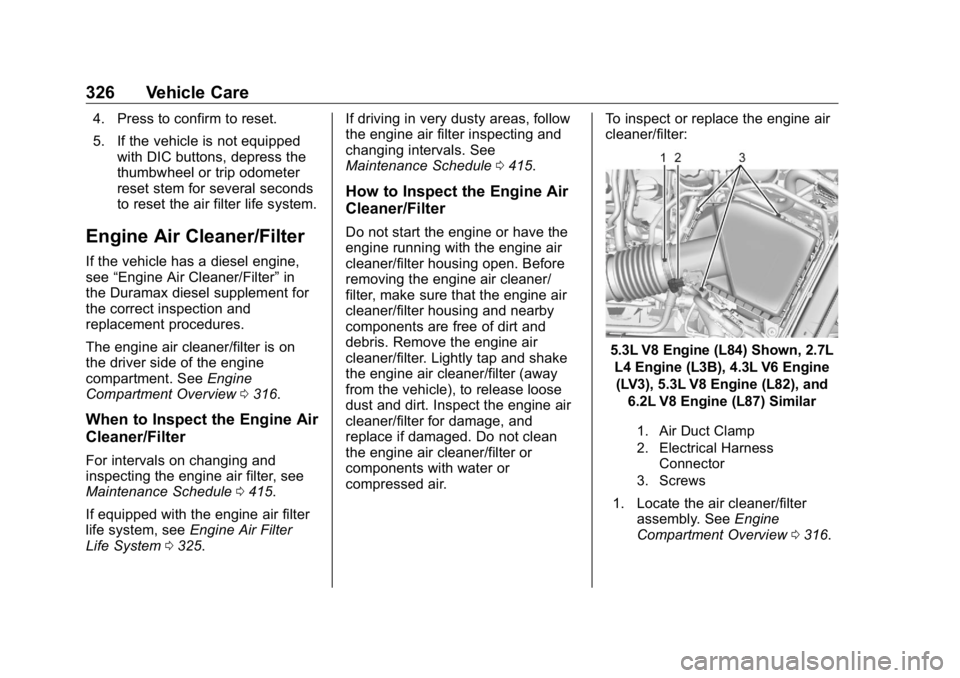
compressed air. To inspect or replace the engine air
cleaner/filter:
5.3L V8 Engine (L84) Shown, 2.7L
L4 Engine (L3B), 4.3L V6 Engine
(LV3), 5.3L V8 Engine (L82), and
6.2L V8 Engine (L87) Similar
1. Air Duct Clamp
2. Electrical Harness
Connector
3. Screws
1. Locate the air cleaner/filter
assembly. See Engine
Compartment Overview 0 316 .
Page 377 of 472
GMC Sierra/Sierra Denali Owner Manual (GMNA-Localizing-U.S./Canada/
Mexico-1500-11698638) - 2019 - crc - 5/15/18
376 Vehicle Care .
There is cord or fabric
showing through the tire's
rubber..
The tread or sidewall is
cracked, cut, or snagged
deep enough to show cord or
fabric..
The tire has a bump, bulge,
or split..
The tire has a puncture, cut,
or other damage that cannot
be repaired well because of
the size or location of the
damage.
Tire Rotation Tires should be rotated every
12 000 km (7,500 mi). See
Maintenance Schedule 0 415 .
Tires are rotated to achieve a
uniform wear for all tires. The
first rotation is the most
important. Anytime unusual wear is
noticed, rotate the tires as soon
as possible, check for proper tire
inflation pressure, and check for
damaged tires or wheels. If the
unusual wear continues after the
rotation, check the wheel
alignment.
See When It Is Time for New
Tires 0 377 and Wheel
Replacement 0 381 .
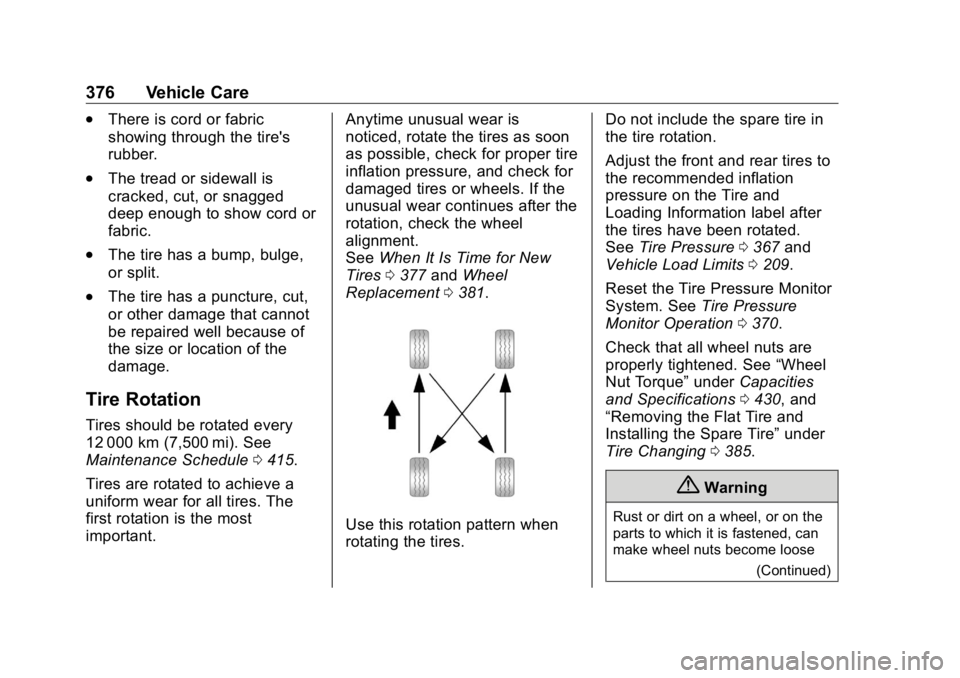
Use this rotation pattern when
rotating the tires. Do not include the spare tire in
the tire rotation.
Adjust the front and rear tires to
the recommended inflation
pressure on the Tire and
Loading Information label after
the tires have been rotated.
See Tire Pressure 0 367 and
Vehicle Load Limits 0 209 .
Reset the Tire Pressure Monitor
System. See Tire Pressure
Monitor Operation 0 370 .
Check that all wheel nuts are
properly tightened. See “ Wheel
Nut Torque ” under Capacities
and Specifications 0 430 , and
“ Removing the Flat Tire and
Installing the Spare Tire ” under
Tire Changing 0 385 .
{ Warning
Rust or dirt on a wheel, or on the
parts to which it is fastened, can
make wheel nuts become loose
(Continued)
Page 416 of 472
GMC Sierra/Sierra Denali Owner Manual (GMNA-Localizing-U.S./Canada/
Mexico-1500-11698638) - 2019 - crc - 5/15/18
Service and Maintenance 415
Maintenance
Schedule Owner Checks and Services At Each Fuel Stop
.
Check the engine oil level. See
Engine Oil 0 321 .
Once a Month
.
Check the tire inflation
pressures, including the spare.
See Tire Pressure 0 367 .
.
Inspect the tires for wear. See
Tire Inspection 0 375 .
.
Check the windshield washer
fluid level. See Washer Fluid
0 334 .
Engine Oil Change When the CHANGE ENGINE OIL
SOON message displays, have the
engine oil and filter changed within
the next 1 000 km/600 mi. If driven
under the best conditions, the
engine oil life system may not
indicate the need for vehicle service
for up to a year. The engine oil and filter must be changed at least once
a year and the oil life system must
be reset. Your trained dealer
technician can perform this work.
If the engine oil life system is reset
accidentally, service the vehicle
within 5 000 km/3,000 mi since the
last service. Reset the oil life
system when the oil is changed.
See Engine Oil Life System 0 323 .
Passenger Compartment Air
Filter The passenger compartment air
filter removes dust, pollen, and
other airborne irritants from outside
air that is pulled into the vehicle.
The filter should be replaced as part
of routine scheduled maintenance.
Inspect the passenger compartment
air filter every 36 000 km/
22,500 miles or two years,
whichever comes first. Replace if
necessary. More frequent
replacement may be needed if the
vehicle is driven in areas with heavy
traffic, areas with poor air quality,
or areas with high dust levels. Replacement may also be needed if
there is a reduction in air flow,
excessive window fogging, or odors.
Extended Idle Use When the vehicle is used in a way
that requires extended idle time,
one hour of use shall be deemed
the same as 53 km (33 mi).
See Driver Information Center (DIC)
(Midlevel and Uplevel) 0 160 or
Driver Information Center (DIC)
(Base Level) 0 159 for hourmeter.
Air Conditioning Desiccant
(Replace Every Seven Years) The air conditioning system requires
maintenance every seven years.
This service requires replacement of
the desiccant to help the longevity
and efficient operation of the air
conditioning system. This service
can be complex. See your dealer.