2019 GMC SIERRA DENALI display
[x] Cancel search: displayPage 61 of 472
GMC Sierra/Sierra Denali Owner Manual (GMNA-Localizing-U.S./Canada/
Mexico-1500-11698638) - 2019 - crc - 5/15/18
60 Keys, Doors, and Windows
Interior Mirrors Interior Rearview Mirrors Adjust the rearview mirror for a clear
view of the area behind your
vehicle.
Do not spray glass cleaner directly
on the mirror. Use a soft towel
dampened with water.
Manual Rearview Mirror If equipped, push the tab forward for
daytime use and pull it rearward for
nighttime use to avoid glare from
the headlamps from behind.
Automatic Dimming
Rearview Mirror If equipped, the mirror will
automatically reduce the glare of the
headlamps from behind. The
dimming feature comes on each
time the vehicle is started. Rear Camera Mirror If equipped, this automatic dimming
mirror provides a wide angle camera
view of the area behind the vehicle.
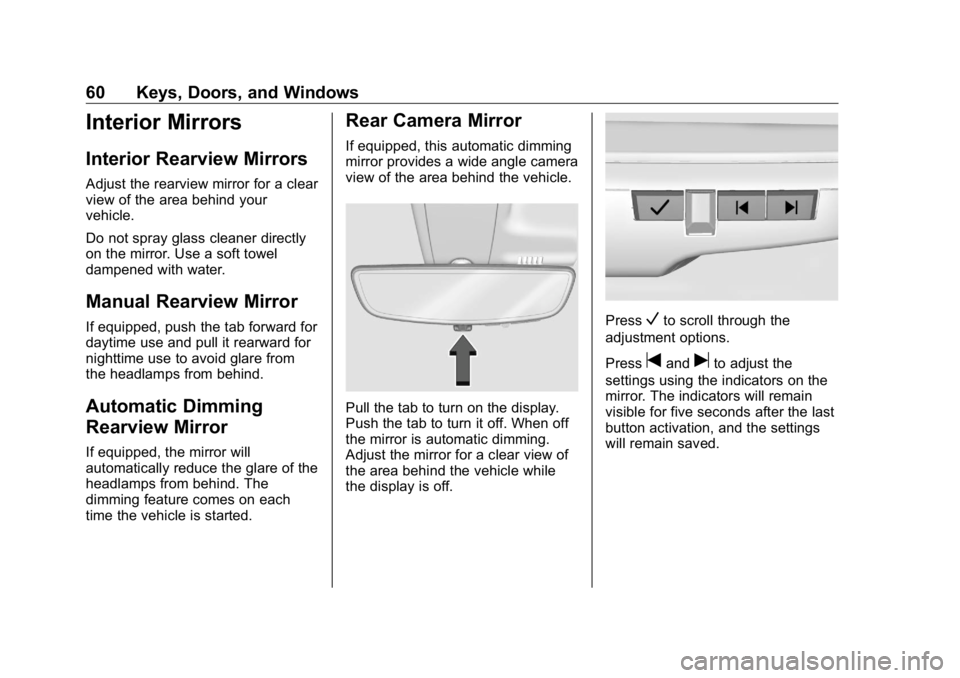
Pull the tab to turn on the display.
Push the tab to turn it off. When off
the mirror is automatic dimming.
Adjust the mirror for a clear view of
the area behind the vehicle while
the display is off. Press
V to scroll through the
adjustment options.
Press
t and
u to adjust the
settings using the indicators on the
mirror. The indicators will remain
visible for five seconds after the last
button activation, and the settings
will remain saved.
Page 63 of 472
GMC Sierra/Sierra Denali Owner Manual (GMNA-Localizing-U.S./Canada/
Mexico-1500-11698638) - 2019 - crc - 5/15/18
62 Keys, Doors, and Windows Troubleshooting
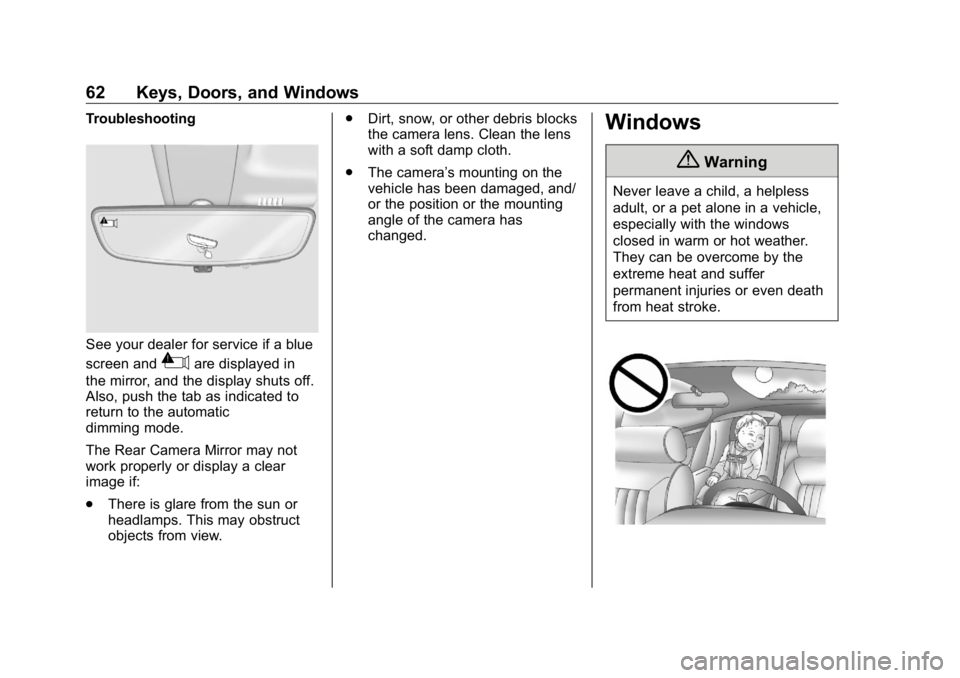
See your dealer for service if a blue
screen and
3 are displayed in
the mirror, and the display shuts off.
Also, push the tab as indicated to
return to the automatic
dimming mode.
The Rear Camera Mirror may not
work properly or display a clear
image if:
.
There is glare from the sun or
headlamps. This may obstruct
objects from view. .
Dirt, snow, or other debris blocks
the camera lens. Clean the lens
with a soft damp cloth.
.
The camera ’ s mounting on the
vehicle has been damaged, and/
or the position or the mounting
angle of the camera has
changed.
Windows
{ WarningNever leave a child, a helpless
adult, or a pet alone in a vehicle,
especially with the windows
closed in warm or hot weather.
They can be overcome by the
extreme heat and suffer
permanent injuries or even death
from heat stroke.
Page 74 of 472
GMC Sierra/Sierra Denali Owner Manual (GMNA-Localizing-U.S./Canada/
Mexico-1500-11698638) - 2019 - crc - 5/15/18
Seats and Restraints 73
Memory Seats
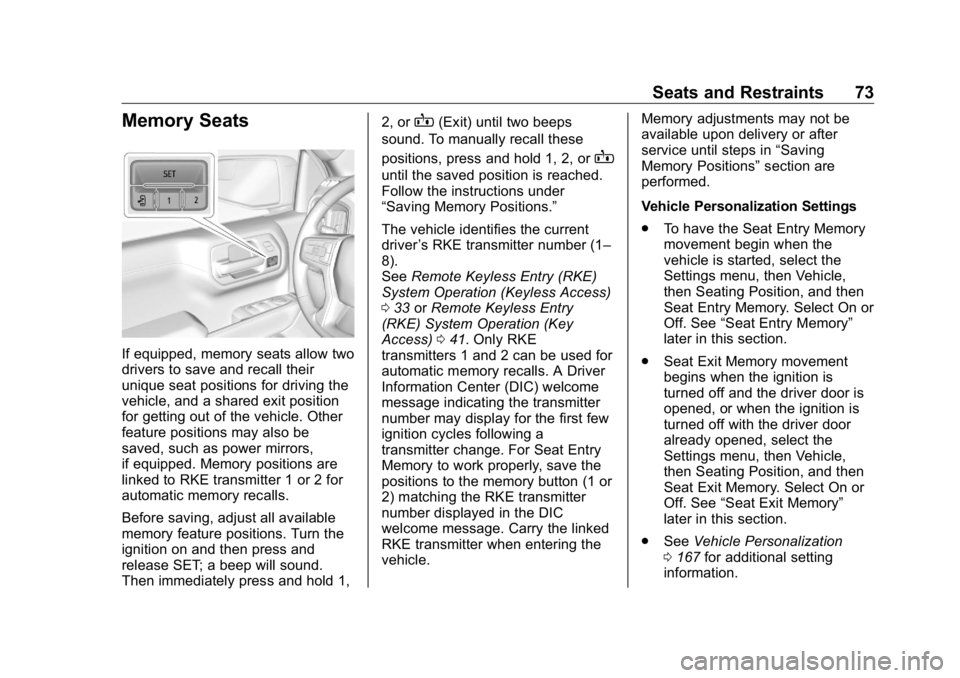
If equipped, memory seats allow two
drivers to save and recall their
unique seat positions for driving the
vehicle, and a shared exit position
for getting out of the vehicle. Other
feature positions may also be
saved, such as power mirrors,
if equipped. Memory positions are
linked to RKE transmitter 1 or 2 for
automatic memory recalls.
Before saving, adjust all available
memory feature positions. Turn the
ignition on and then press and
release SET; a beep will sound.
Then immediately press and hold 1, 2, or
B (Exit) until two beeps
sound. To manually recall these
positions, press and hold 1, 2, or
Buntil the saved position is reached.
Follow the instructions under
“ Saving Memory Positions. ”
The vehicle identifies the current
driver ’ s RKE transmitter number (1 –
8).
See Remote Keyless Entry (RKE)
System Operation (Keyless Access)
0 33 or Remote Keyless Entry
(RKE) System Operation (Key
Access) 0 41 . Only RKE
transmitters 1 and 2 can be used for
automatic memory recalls. A Driver
Information Center (DIC) welcome
message indicating the transmitter
number may display for the first few
ignition cycles following a
transmitter change. For Seat Entry
Memory to work properly, save the
positions to the memory button (1 or
2) matching the RKE transmitter
number displayed in the DIC
welcome message. Carry the linked
RKE transmitter when entering the
vehicle. Memory adjustments may not be
available upon delivery or after
service until steps in “ Saving
Memory Positions ” section are
performed.
Vehicle Personalization Settings
.
To have the Seat Entry Memory
movement begin when the
vehicle is started, select the
Settings menu, then Vehicle,
then Seating Position, and then
Seat Entry Memory. Select On or
Off. See “ Seat Entry Memory ”
later in this section.
.
Seat Exit Memory movement
begins when the ignition is
turned off and the driver door is
opened, or when the ignition is
turned off with the driver door
already opened, select the
Settings menu, then Vehicle,
then Seating Position, and then
Seat Exit Memory. Select On or
Off. See “ Seat Exit Memory ”
later in this section.
.
See Vehicle Personalization
0 167 for additional setting
information.
Page 75 of 472
GMC Sierra/Sierra Denali Owner Manual (GMNA-Localizing-U.S./Canada/
Mexico-1500-11698638) - 2019 - crc - 5/15/18
74 Seats and Restraints Identifying Driver Number
To identify the driver number:
1. Start the vehicle with a different
key or RKE transmitter. The
DIC should display the driver
number; 1 or 2. Turn the
ignition off and remove the key
or RKE transmitter from the
vehicle.
2. Start the vehicle with the initial
key or RKE transmitter. The
DIC should display the other
driver number not shown in
Step 1.
Saving Memory Positions
Read these instructions completely
before saving memory positions.
To save preferred driving positions
1 and 2:
1. Turn the ignition on or to ACC/
ACCESSORY.
A DIC welcome message may
indicate driver number 1 or 2.
2. Adjust all available memory
features to the desired driving
position. 3. Press and release SET; a beep
will sound.
4. Immediately press and hold the
1 or 2 memory button matching
the above DIC welcome
message until two beeps
sound.
If too much time passes
between releasing SET and
pressing 1, the memory
position will not be saved and
two beeps will not sound.
Repeat Steps 3 and 4.
1 or 2 corresponds to the driver
number. See “ Identifying Driver
Number ” previously in this
section.
5. Repeat Steps 1 – 4 for a second
driver using 1 or 2.
To save the position for
B and
Seat Exit Memory, repeat Steps 1 – 4
using
B . This saves the position
for getting out of the vehicle.
Save preferred memory feature
positions to both 1 and 2 if you are
the only driver. Manually Recalling Memory
Positions
Press and hold 1, 2, or
B to recall
the previously saved memory
positions.
To stop Manual Memory Recall
movement, release 1, 2, or
B or
press any of the following controls:
.
Power seat
.
Memory SET
.
Power mirror, with the driver or
passenger outside mirror
selected
Seat Entry Memory
The vehicle identifies the number of
the current driver ’ s RKE transmitter
(1 – 8).
See Remote Keyless Entry (RKE)
System Operation (Keyless Access)
0 33 or Remote Keyless Entry
(RKE) System Operation (Key
Access) 0 41 . If the RKE transmitter
is 1 or 2, and Seat Entry Memory is
programmed on in vehicle
personalization, the positions saved
to the same memory button number
Page 78 of 472
GMC Sierra/Sierra Denali Owner Manual (GMNA-Localizing-U.S./Canada/
Mexico-1500-11698638) - 2019 - crc - 5/15/18
Seats and Restraints 77
Rear Seats Rear Seat Reminder If equipped, the message REAR
SEAT REMINDER LOOK IN REAR
SEAT displays under certain
conditions indicating there may be
an item or passenger in the rear
seat. Check before exiting the
vehicle.
This feature will activate when a
second row door is opened while
the vehicle is on or up to 10 minutes
before the vehicle is turned on.
There will be an alert when the
vehicle is turned off. The alert does
not directly detect objects in the rear
seat; instead, under certain
conditions, it detects when a rear
door is opened and closed,
indicating that there may be
something in the rear seat.
The feature is active only once each
time the vehicle is turned on and off,
and will require reactivation by
opening and closing the second row
doors. There may be an alert even
when there is nothing in the rear
seat; for example, if a child entered the vehicle through the rear door
and left the vehicle without the
vehicle being shut off.
The feature can be turned on or off.
See Vehicle Personalization 0 167 .
Folding the Rear Seat Cushion Either side of the rear seat cushion
can be folded up for added cargo
space.
CautionFolding a rear seat with the seat
belts still fastened may cause
damage to the seat or the seat
belts. Always unbuckle the seat
belts and return them to their
normal stowed position before
folding a rear seat.
Make sure that nothing is on the
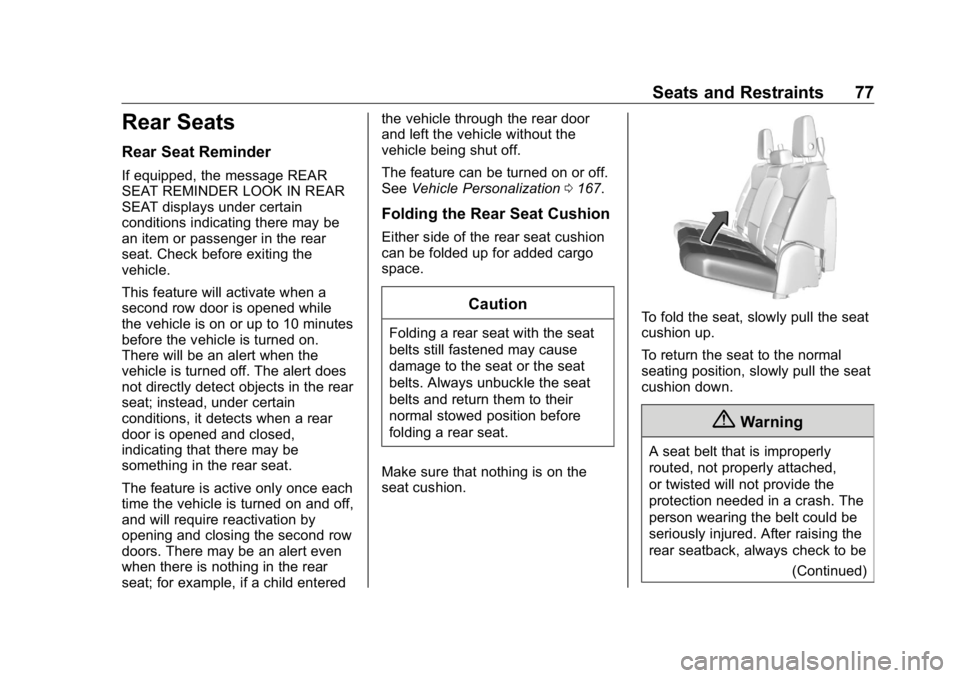
seat cushion. To fold the seat, slowly pull the seat
cushion up.
To return the seat to the normal
seating position, slowly pull the seat
cushion down.
{ Warning
A seat belt that is improperly
routed, not properly attached,
or twisted will not provide the
protection needed in a crash. The
person wearing the belt could be
seriously injured. After raising the
rear seatback, always check to be
(Continued)
Page 79 of 472
GMC Sierra/Sierra Denali Owner Manual (GMNA-Localizing-U.S./Canada/
Mexico-1500-11698638) - 2019 - crc - 5/15/18
78 Seats and Restraints Warning (Continued)sure that the seat belts are
properly routed and attached, and
are not twisted.
Heated Rear Seats
{ WarningIf you cannot feel temperature
change or pain to the skin, the
seat heater may cause burns.
See the Warning under Heated
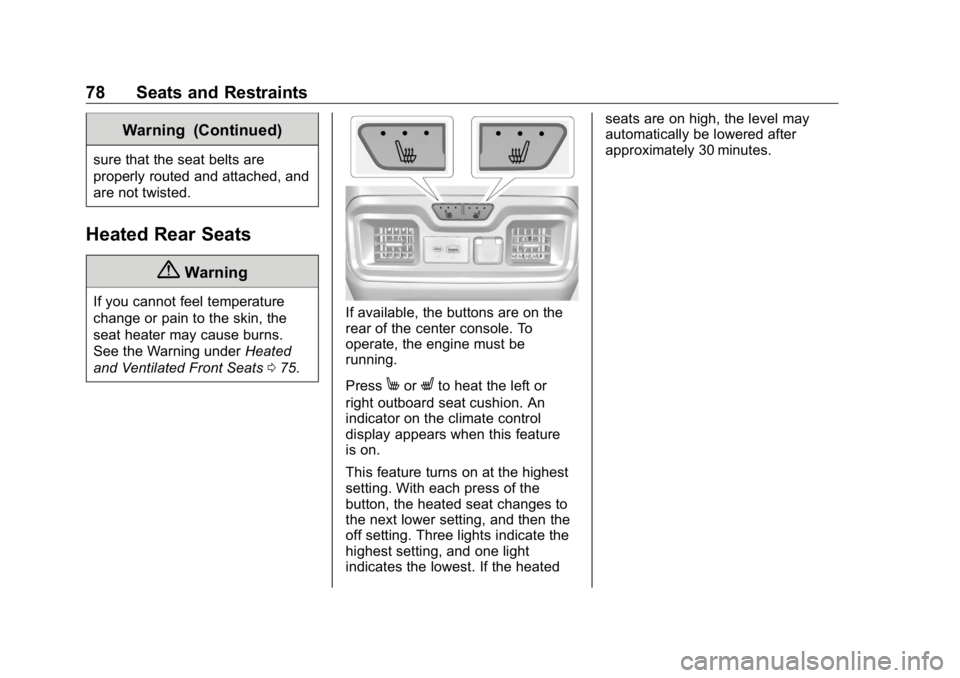
and Ventilated Front Seats 0 75 . If available, the buttons are on the
rear of the center console. To
operate, the engine must be
running.
Press
M or
L to heat the left or
right outboard seat cushion. An
indicator on the climate control
display appears when this feature
is on.
This feature turns on at the highest
setting. With each press of the
button, the heated seat changes to
the next lower setting, and then the
off setting. Three lights indicate the
highest setting, and one light
indicates the lowest. If the heated seats are on high, the level may
automatically be lowered after
approximately 30 minutes.
Page 130 of 472
GMC Sierra/Sierra Denali Owner Manual (GMNA-Localizing-U.S./Canada/
Mexico-1500-11698638) - 2019 - crc - 5/15/18
Instruments and Controls 129
Instruments and
Controls Controls Steering Wheel Adjustment . . . 130
Steering Wheel Controls . . . . . . 131
Heated Steering Wheel . . . . . . . 131
Horn . . . . . . . . . . . . . . . . . . . . . . . . . . 131
Windshield Wiper/Washer . . . . 131
Compass . . . . . . . . . . . . . . . . . . . . . 132
Clock . . . . . . . . . . . . . . . . . . . . . . . . . 132
Power Outlets . . . . . . . . . . . . . . . . 132
Wireless Charging . . . . . . . . . . . . 135
Warning Lights, Gauges, and
Indicators Warning Lights, Gauges, and
Indicators . . . . . . . . . . . . . . . . . . . 137
Instrument Cluster . . . . . . . . . . . . 138
Speedometer . . . . . . . . . . . . . . . . . 142
Odometer . . . . . . . . . . . . . . . . . . . . . 142
Trip Odometer . . . . . . . . . . . . . . . . 142
Tachometer . . . . . . . . . . . . . . . . . . . 143
Fuel Gauge . . . . . . . . . . . . . . . . . . . 143
Engine Oil Pressure
Gauge . . . . . . . . . . . . . . . . . . . . . . 144
Engine Coolant Temperature
Gauge . . . . . . . . . . . . . . . . . . . . . . 145 Voltmeter Gauge . . . . . . . . . . . . . 146
Seat Belt Reminders . . . . . . . . . 146
Airbag Readiness Light . . . . . . . 147
Passenger Airbag Status
Indicator . . . . . . . . . . . . . . . . . . . . 148
Charging System Light . . . . . . . 148
Malfunction Indicator Lamp
(Check Engine Light) . . . . . . . . 149
Brake System Warning
Light . . . . . . . . . . . . . . . . . . . . . . . . 151
Electric Parking Brake
Light . . . . . . . . . . . . . . . . . . . . . . . . 152
Service Electric Parking Brake
Light . . . . . . . . . . . . . . . . . . . . . . . . 152
Antilock Brake System (ABS)
Warning Light . . . . . . . . . . . . . . . 152
Four-Wheel-Drive Light . . . . . . . 153
Tow/Haul Mode Light . . . . . . . . . 153
Hill Descent Control Light . . . . 153
Lane Keep Assist (LKA)
Light . . . . . . . . . . . . . . . . . . . . . . . . 153
Vehicle Ahead Indicator . . . . . . 154
Pedestrian Ahead Indicator . . . 154
Traction Off Light . . . . . . . . . . . . . 154
Traction Control System (TCS)/
Electronic Stability Control
Light . . . . . . . . . . . . . . . . . . . . . . . . 154
Electronic Stability Control
(ESC) Off Light . . . . . . . . . . . . . . 155 Engine Coolant Temperature
Warning Light . . . . . . . . . . . . . . . 155
Driver Mode Control Light . . . . 156
Tire Pressure Light . . . . . . . . . . . 156
Engine Oil Pressure Light
(Uplevel Cluster) . . . . . . . . . . . . 157
Low Fuel Warning Light . . . . . . 157
Security Light . . . . . . . . . . . . . . . . . 157
High-Beam On Light . . . . . . . . . . 157
Front Fog Lamp Light . . . . . . . . . 158
Lamps On Reminder . . . . . . . . . 158
Cruise Control Light . . . . . . . . . . 158
Door Ajar Light . . . . . . . . . . . . . . . 158
Information Displays Driver Information Center (DIC)
(Base Level) . . . . . . . . . . . . . . . . 159
Driver Information Center (DIC)
(Midlevel and Uplevel) . . . . . . 160
Head-Up Display (HUD) . . . . . . 163
Vehicle Messages Vehicle Messages . . . . . . . . . . . . 166
Engine Power Messages . . . . . 167
Vehicle Speed Messages . . . . . 167
Vehicle Personalization Vehicle Personalization . . . . . . . 167
Universal Remote System
Universal Remote System . . . . 172
Page 132 of 472
GMC Sierra/Sierra Denali Owner Manual (GMNA-Localizing-U.S./Canada/
Mexico-1500-11698638) - 2019 - crc - 5/15/18
Instruments and Controls 131
Steering Wheel Controls The infotainment system can be
operated by using the steering
wheel controls. See “ Steering Wheel
Controls ” in the infotainment
manual.
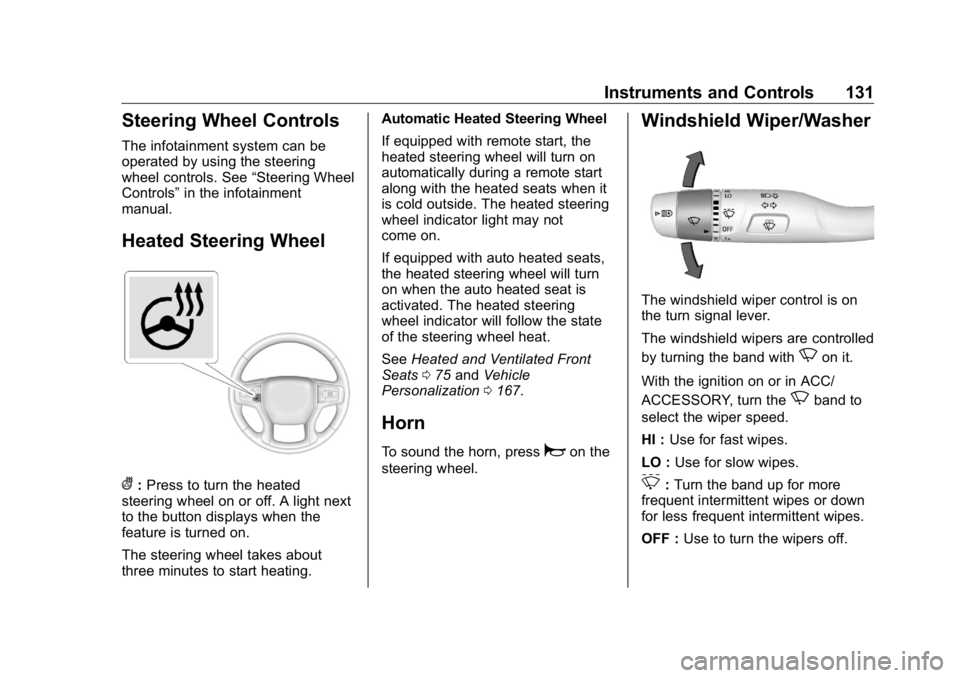
Heated Steering Wheel
( : Press to turn the heated
steering wheel on or off. A light next
to the button displays when the
feature is turned on.
The steering wheel takes about
three minutes to start heating. Automatic Heated Steering Wheel
If equipped with remote start, the
heated steering wheel will turn on
automatically during a remote start
along with the heated seats when it
is cold outside. The heated steering
wheel indicator light may not
come on.
If equipped with auto heated seats,
the heated steering wheel will turn
on when the auto heated seat is
activated. The heated steering
wheel indicator will follow the state
of the steering wheel heat.
See Heated and Ventilated Front
Seats 0 75 and Vehicle
Personalization 0 167 .
Horn To sound the horn, press
a on the
steering wheel. Windshield Wiper/Washer
The windshield wiper control is on
the turn signal lever.
The windshield wipers are controlled
by turning the band with
N on it.
With the ignition on or in ACC/
ACCESSORY, turn the
N band to
select the wiper speed.
HI : Use for fast wipes.
LO : Use for slow wipes.
3 : Turn the band up for more
frequent intermittent wipes or down
for less frequent intermittent wipes.
OFF : Use to turn the wipers off.