2019 FORD TAURUS window
[x] Cancel search: windowPage 326 of 515

The cellular profile, media device index,
and development log will remain in the
vehicle unless you delete them and are
generally accessible only in the vehicle
when the cellular phone or media player
is connected. If you no longer plan to use
the system or the vehicle, we recommend
you perform a Master Reset to erase all
stored information.
System data cannot be accessed without
special equipment and access to the
vehicle's SYNC module. Ford Motor
Company and Ford of Canada will not
access the system data for any purpose
other than as described absent consent, a
court order, or where required by law
enforcement, other government
authorities, or other third parties acting
with lawful authority. Other parties may
seek to access the information
independently of Ford Motor Company and
Ford of Canada. For further privacy
information, see the sections on 911 Assist,
Vehicle Health Report, and Traffic,
Directions and Information.
USING VOICE RECOGNITION
This system helps you control many
features using voice commands. This
allows you to keep your hands on the
wheel and focus on what is in front of you.
Helpful Hints
•
Make sure the interior of your vehicle is
as quiet as possible. Wind noise from
open windows and road vibrations may
prevent the system from correctly
recognizing spoken commands.
• After pressing the voice button, wait
until after the tone sounds and
Listening appears before saying a
command. Any command spoken
before this does not register with the
system.
• Speak naturally, without long pauses
between words.
• At any time, you can interrupt the
system while it is speaking by pressing
the voice button.
Initiating a Voice Session Initiate a voice session by
pressing the voice button on the
steering wheel controls. See
Voice Control (page 64).
When prompted you can say any of the following: If you want the system to carry out the following
Voice command
Stream audio from your phone.
Bluetooth Audio
Cancel the requested action.
Cancel
Access mobile applications.
mobile (apps | applica-
tions)
Make calls.
Phone
Access the device connected to your USB port.
USB [1]
Run a vehicle health report.
Vehicle Health (Report)
323
Taurus (CPH) Canada/United States of America, enUSA, Edition date: 201806, First-Printing SYNC™E142599
Page 343 of 515
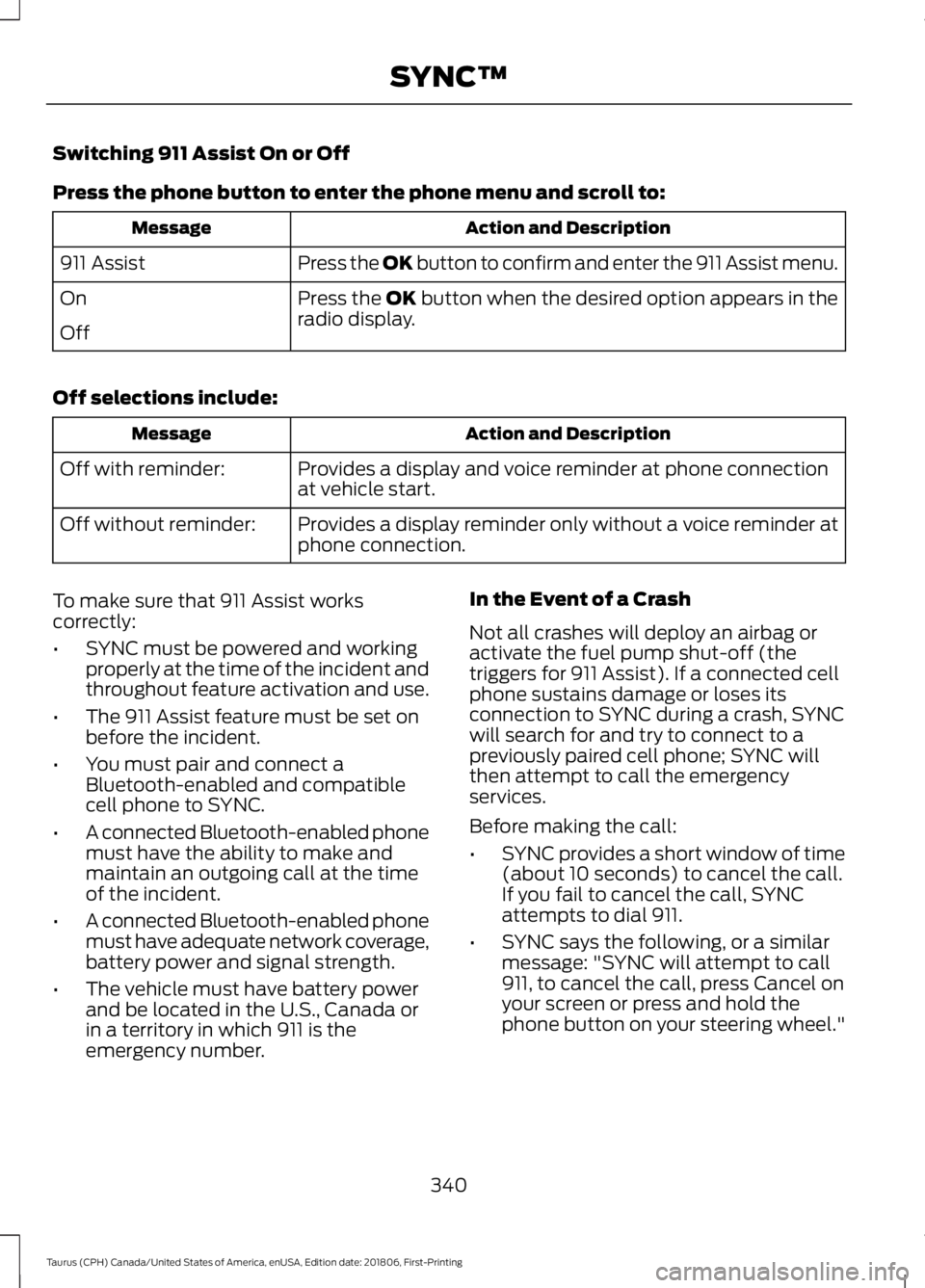
Switching 911 Assist On or Off
Press the phone button to enter the phone menu and scroll to:
Action and Description
Message
Press the OK button to confirm and enter the 911 Assist menu.
911 Assist
Press the OK button when the desired option appears in the
radio display.
On
Off
Off selections include: Action and Description
Message
Provides a display and voice reminder at phone connection
at vehicle start.
Off with reminder:
Provides a display reminder only without a voice reminder at
phone connection.
Off without reminder:
To make sure that 911 Assist works
correctly:
• SYNC must be powered and working
properly at the time of the incident and
throughout feature activation and use.
• The 911 Assist feature must be set on
before the incident.
• You must pair and connect a
Bluetooth-enabled and compatible
cell phone to SYNC.
• A connected Bluetooth-enabled phone
must have the ability to make and
maintain an outgoing call at the time
of the incident.
• A connected Bluetooth-enabled phone
must have adequate network coverage,
battery power and signal strength.
• The vehicle must have battery power
and be located in the U.S., Canada or
in a territory in which 911 is the
emergency number. In the Event of a Crash
Not all crashes will deploy an airbag or
activate the fuel pump shut-off (the
triggers for 911 Assist). If a connected cell
phone sustains damage or loses its
connection to SYNC during a crash, SYNC
will search for and try to connect to a
previously paired cell phone; SYNC will
then attempt to call the emergency
services.
Before making the call:
•
SYNC provides a short window of time
(about 10 seconds) to cancel the call.
If you fail to cancel the call, SYNC
attempts to dial 911.
• SYNC says the following, or a similar
message: "SYNC will attempt to call
911, to cancel the call, press Cancel on
your screen or press and hold the
phone button on your steering wheel."
340
Taurus (CPH) Canada/United States of America, enUSA, Edition date: 201806, First-Printing SYNC™
Page 371 of 515
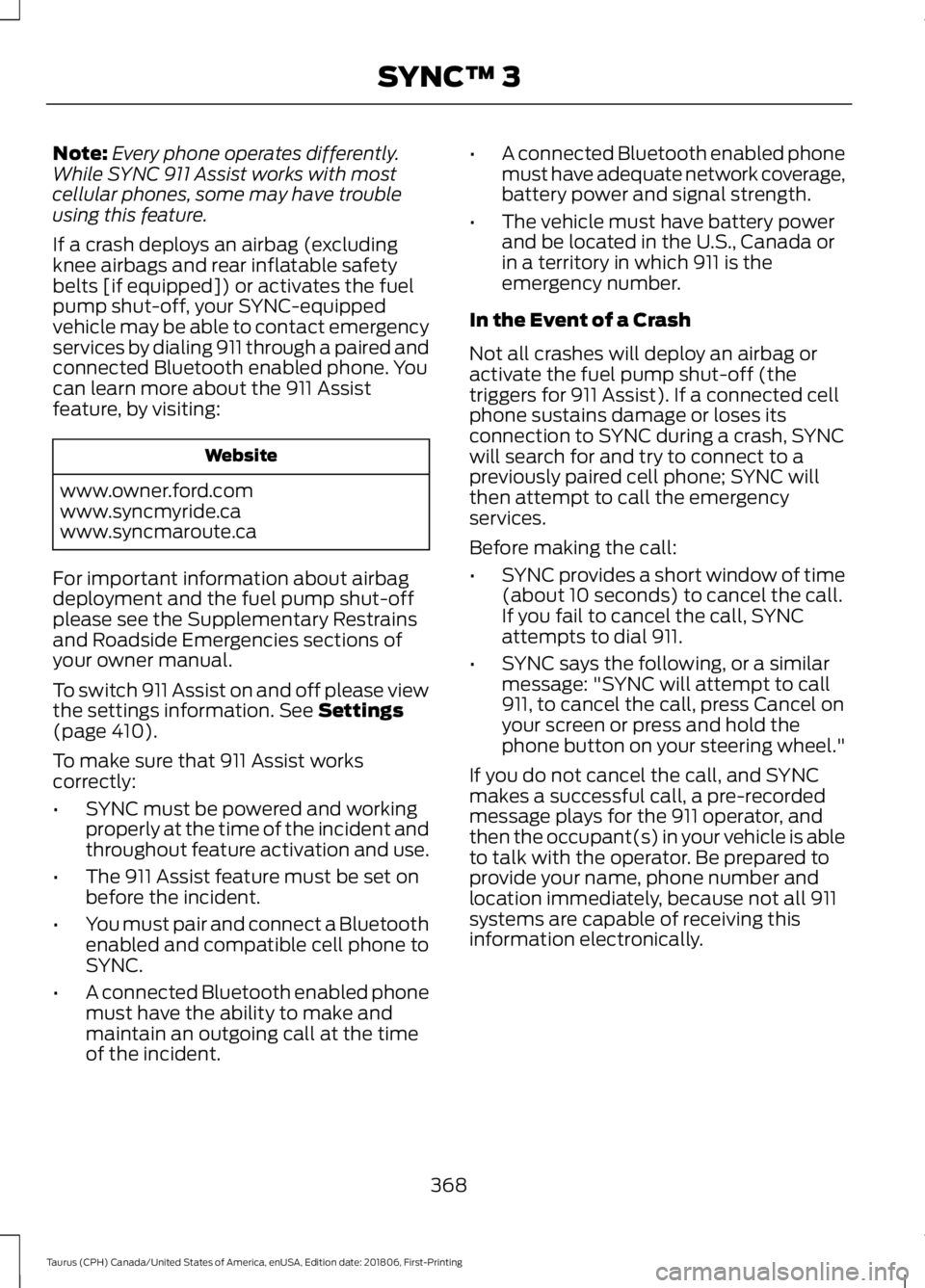
Note:
Every phone operates differently.
While SYNC 911 Assist works with most
cellular phones, some may have trouble
using this feature.
If a crash deploys an airbag (excluding
knee airbags and rear inflatable safety
belts [if equipped]) or activates the fuel
pump shut-off, your SYNC-equipped
vehicle may be able to contact emergency
services by dialing 911 through a paired and
connected Bluetooth enabled phone. You
can learn more about the 911 Assist
feature, by visiting: Website
www.owner.ford.com
www.syncmyride.ca
www.syncmaroute.ca
For important information about airbag
deployment and the fuel pump shut-off
please see the Supplementary Restrains
and Roadside Emergencies sections of
your owner manual.
To switch 911 Assist on and off please view
the settings information. See Settings
(page 410).
To make sure that 911 Assist works
correctly:
• SYNC must be powered and working
properly at the time of the incident and
throughout feature activation and use.
• The 911 Assist feature must be set on
before the incident.
• You must pair and connect a Bluetooth
enabled and compatible cell phone to
SYNC.
• A connected Bluetooth enabled phone
must have the ability to make and
maintain an outgoing call at the time
of the incident. •
A connected Bluetooth enabled phone
must have adequate network coverage,
battery power and signal strength.
• The vehicle must have battery power
and be located in the U.S., Canada or
in a territory in which 911 is the
emergency number.
In the Event of a Crash
Not all crashes will deploy an airbag or
activate the fuel pump shut-off (the
triggers for 911 Assist). If a connected cell
phone sustains damage or loses its
connection to SYNC during a crash, SYNC
will search for and try to connect to a
previously paired cell phone; SYNC will
then attempt to call the emergency
services.
Before making the call:
• SYNC provides a short window of time
(about 10 seconds) to cancel the call.
If you fail to cancel the call, SYNC
attempts to dial 911.
• SYNC says the following, or a similar
message: "SYNC will attempt to call
911, to cancel the call, press Cancel on
your screen or press and hold the
phone button on your steering wheel."
If you do not cancel the call, and SYNC
makes a successful call, a pre-recorded
message plays for the 911 operator, and
then the occupant(s) in your vehicle is able
to talk with the operator. Be prepared to
provide your name, phone number and
location immediately, because not all 911
systems are capable of receiving this
information electronically.
368
Taurus (CPH) Canada/United States of America, enUSA, Edition date: 201806, First-Printing SYNC™ 3
Page 395 of 515
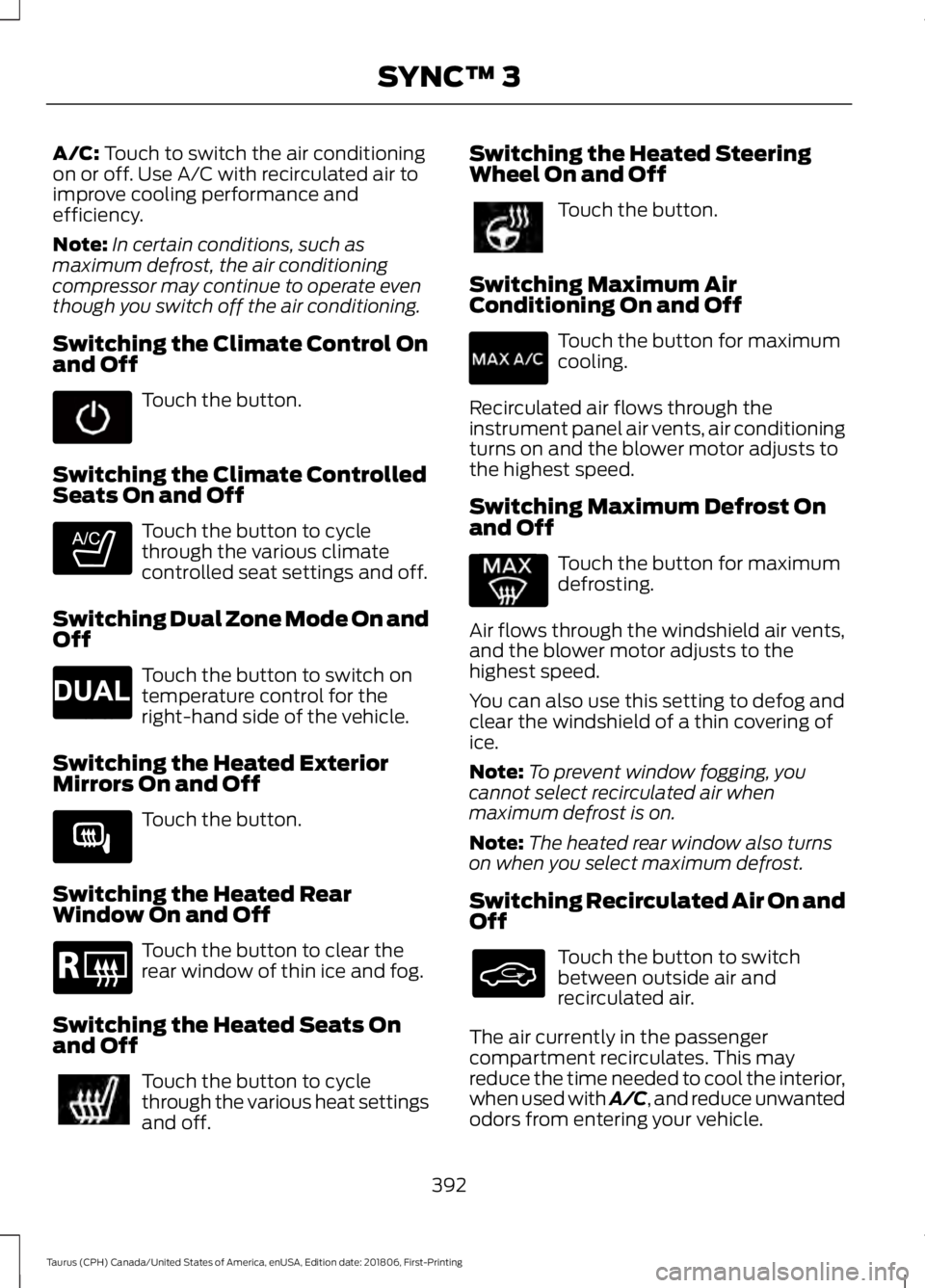
A/C: Touch to switch the air conditioning
on or off. Use A/C with recirculated air to
improve cooling performance and
efficiency.
Note: In certain conditions, such as
maximum defrost, the air conditioning
compressor may continue to operate even
though you switch off the air conditioning.
Switching the Climate Control On
and Off Touch the button.
Switching the Climate Controlled
Seats On and Off Touch the button to cycle
through the various climate
controlled seat settings and off.
Switching Dual Zone Mode On and
Off Touch the button to switch on
temperature control for the
right-hand side of the vehicle.
Switching the Heated Exterior
Mirrors On and Off Touch the button.
Switching the Heated Rear
Window On and Off Touch the button to clear the
rear window of thin ice and fog.
Switching the Heated Seats On
and Off Touch the button to cycle
through the various heat settings
and off. Switching the Heated Steering
Wheel On and Off Touch the button.
Switching Maximum Air
Conditioning On and Off Touch the button for maximum
cooling.
Recirculated air flows through the
instrument panel air vents, air conditioning
turns on and the blower motor adjusts to
the highest speed.
Switching Maximum Defrost On
and Off Touch the button for maximum
defrosting.
Air flows through the windshield air vents,
and the blower motor adjusts to the
highest speed.
You can also use this setting to defog and
clear the windshield of a thin covering of
ice.
Note: To prevent window fogging, you
cannot select recirculated air when
maximum defrost is on.
Note: The heated rear window also turns
on when you select maximum defrost.
Switching Recirculated Air On and
Off Touch the button to switch
between outside air and
recirculated air.
The air currently in the passenger
compartment recirculates. This may
reduce the time needed to cool the interior,
when used with A/C, and reduce unwanted
odors from entering your vehicle.
392
Taurus (CPH) Canada/United States of America, enUSA, Edition date: 201806, First-Printing SYNC™ 3 E265282 E265280 E266189 E184884
Page 432 of 515
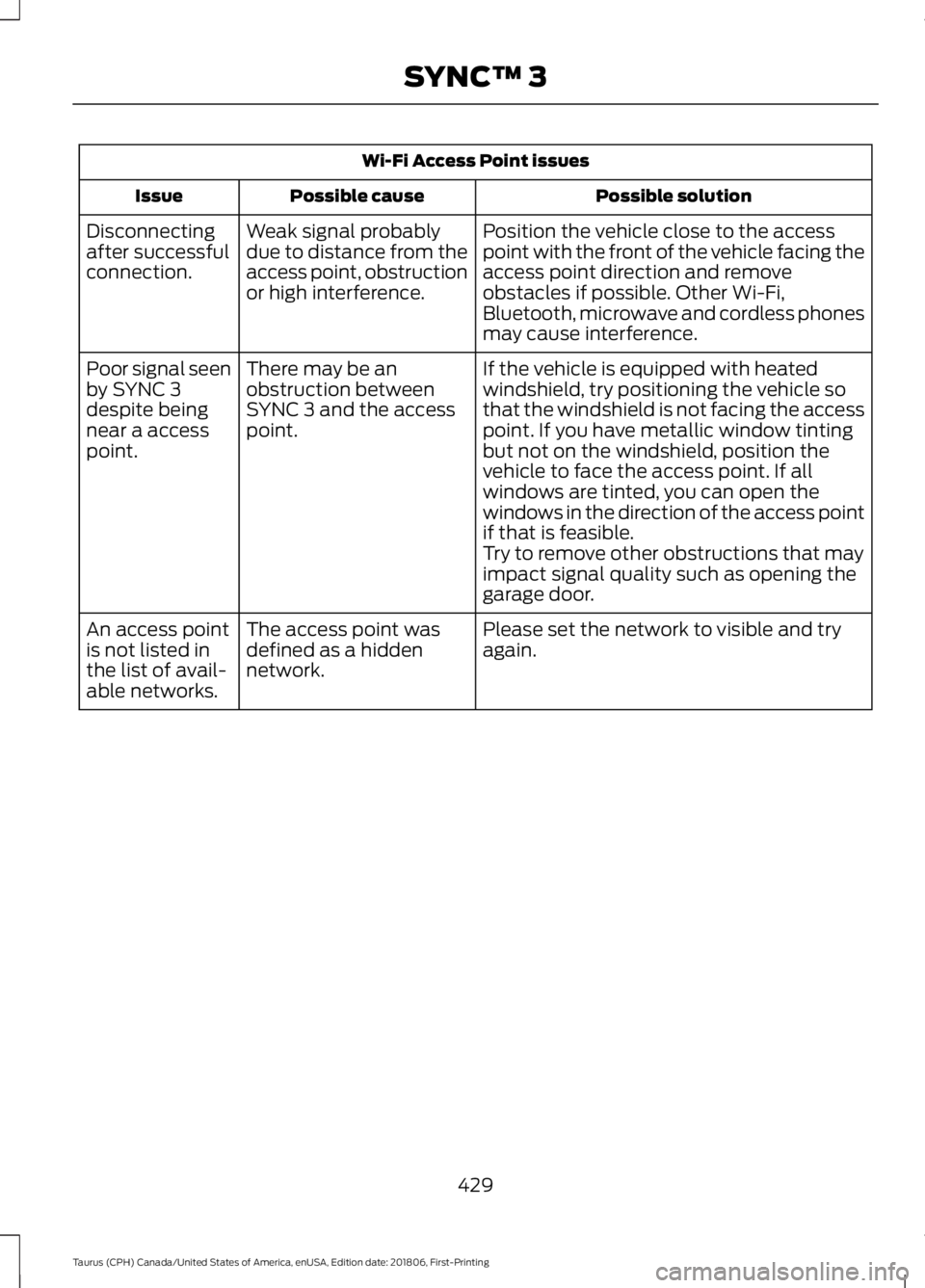
Wi-Fi Access Point issues
Possible solution
Possible cause
Issue
Position the vehicle close to the access
point with the front of the vehicle facing the
access point direction and remove
obstacles if possible. Other Wi-Fi,
Bluetooth, microwave and cordless phones
may cause interference.
Weak signal probably
due to distance from the
access point, obstruction
or high interference.
Disconnecting
after successful
connection.
If the vehicle is equipped with heated
windshield, try positioning the vehicle so
that the windshield is not facing the access
point. If you have metallic window tinting
but not on the windshield, position the
vehicle to face the access point. If all
windows are tinted, you can open the
windows in the direction of the access point
if that is feasible.
There may be an
obstruction between
SYNC 3 and the access
point.
Poor signal seen
by SYNC 3
despite being
near a access
point.
Try to remove other obstructions that may
impact signal quality such as opening the
garage door.
Please set the network to visible and try
again.
The access point was
defined as a hidden
network.
An access point
is not listed in
the list of avail-
able networks.
429
Taurus (CPH) Canada/United States of America, enUSA, Edition date: 201806, First-Printing SYNC™ 3
Page 441 of 515
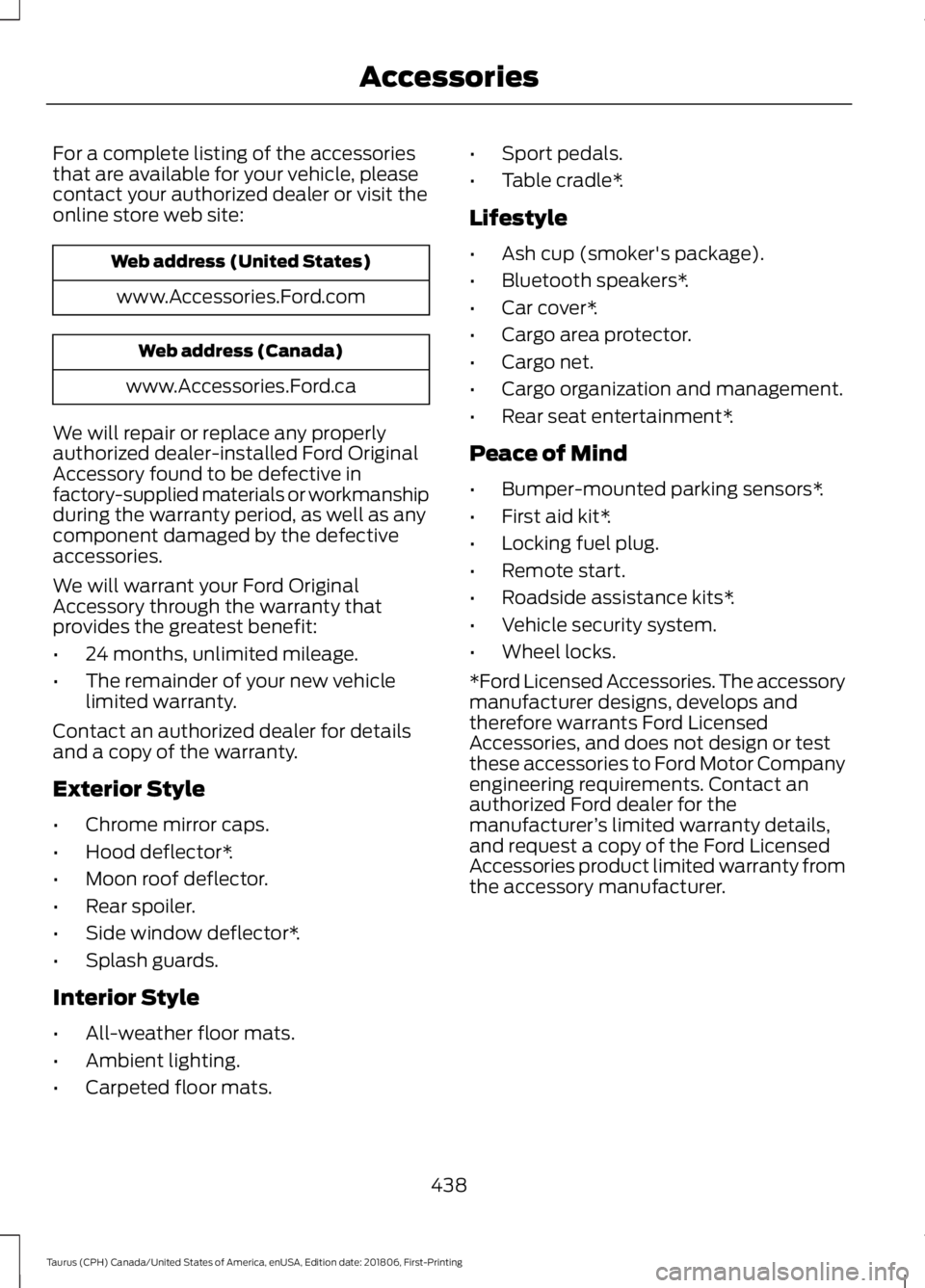
For a complete listing of the accessories
that are available for your vehicle, please
contact your authorized dealer or visit the
online store web site:
Web address (United States)
www.Accessories.Ford.com Web address (Canada)
www.Accessories.Ford.ca
We will repair or replace any properly
authorized dealer-installed Ford Original
Accessory found to be defective in
factory-supplied materials or workmanship
during the warranty period, as well as any
component damaged by the defective
accessories.
We will warrant your Ford Original
Accessory through the warranty that
provides the greatest benefit:
• 24 months, unlimited mileage.
• The remainder of your new vehicle
limited warranty.
Contact an authorized dealer for details
and a copy of the warranty.
Exterior Style
• Chrome mirror caps.
• Hood deflector*.
• Moon roof deflector.
• Rear spoiler.
• Side window deflector*.
• Splash guards.
Interior Style
• All-weather floor mats.
• Ambient lighting.
• Carpeted floor mats. •
Sport pedals.
• Table cradle*.
Lifestyle
• Ash cup (smoker's package).
• Bluetooth speakers*.
• Car cover*.
• Cargo area protector.
• Cargo net.
• Cargo organization and management.
• Rear seat entertainment*.
Peace of Mind
• Bumper-mounted parking sensors*.
• First aid kit*.
• Locking fuel plug.
• Remote start.
• Roadside assistance kits*.
• Vehicle security system.
• Wheel locks.
*Ford Licensed Accessories. The accessory
manufacturer designs, develops and
therefore warrants Ford Licensed
Accessories, and does not design or test
these accessories to Ford Motor Company
engineering requirements. Contact an
authorized Ford dealer for the
manufacturer ’s limited warranty details,
and request a copy of the Ford Licensed
Accessories product limited warranty from
the accessory manufacturer.
438
Taurus (CPH) Canada/United States of America, enUSA, Edition date: 201806, First-Printing Accessories
Page 448 of 515

Multi-Point Inspection
Hazard warning system operation
Accessory drive belt(s)
Horn operation
Battery performance
Radiator, cooler, heater and air conditioninghoses
Engine air filter
Suspension components for leaks ordamage
Exhaust system
Steering and linkage
Exterior lamps operation
Tires (including spare) for wear and properpressure2
Fluid levels 1
; fill if necessary
Windshield for cracks, chips or pits
For oil and fluid leaks
Washer spray and wiper operation
Half-shaft dust boots
1 Brake, coolant recovery reservoir, automatic transmission and window washer
2 If your vehicle is equipped with a temporary mobility kit, check the tire sealant expiration
Use By date on the canister. Replace as needed.
Be sure to ask your dealership service
advisor or technician about the multi-point
vehicle inspection. It is a comprehensive
way to perform a thorough inspection of
your vehicle. Your checklist gives you
immediate feedback on the overall
condition of your vehicle.
NORMAL SCHEDULED
MAINTENANCE
Intelligent Oil-Life Monitor™
Your vehicle is equipped with an Intelligent
Oil-Life Monitor that determines when you
should change the engine oil based on how
your vehicle is used. By using several
important factors in its calculations, the
monitor helps reduce the cost of owning
your vehicle and reduces environmental
waste at the same time. This means you do not have to remember
to change the oil on a mileage-based
schedule. Your vehicle lets you know when
an oil change is due by displaying a
message in the information display.
The following table provides examples of
vehicle use and its impact on oil change
intervals. It is a guideline only. Actual oil
change intervals depend on several factors
and generally decrease with severity of
use.
445
Taurus (CPH) Canada/United States of America, enUSA, Edition date: 201806, First-Printing Scheduled Maintenance
Page 506 of 515

Breaking-In.....................................................207
Bulb Specification Chart...........................307
C
Cabin Air Filter.................................................113
Capacities and Specifications - 3.5L Duratec.........................................................298
Alternative Engine Oil for Extremely Cold Climates............................................................ 301
Specifications..................................................... 299
Capacities and Specifications - 3.5L Ecoboost™.................................................302
Alternative Engine Oil for Extremely Cold Climates........................................................... 306
Specifications..................................................... 303
Capacities and Specifications................293
Car Wash See: Cleaning the Exterior.............................. 255
Catalytic Converter
......................................146
On-Board Diagnostics (OBD-II).................... 147
Readiness for Inspection and Maintenance (I/M) Testing.................................................... 147
Center Console
..............................................130
Changing a Bulb...........................................252 Front Fog Lamp.................................................. 252
High-Intensity Discharge Headlamps........252
LED Lamps........................................................... 253
License Plate Lamp.......................................... 253
Changing a Fuse...........................................232 Fuses....................................................................... 232
Changing a Road Wheel............................287 Dissimilar Spare Wheel and Tire Assembly
Information...................................................... 287
Tire Change Procedure.................................... 288
Changing the 12V Battery.........................248 Battery Management System...................... 250
Changing the Engine Air Filter.................253
Changing the Wiper Blades
......................251
Changing the Windshield Wiper
Blades................................................................ 251
Checking MyKey System Status...............53 MyKey Distance..................................................... 53
Number of Admin Keys...................................... 53
Number of MyKeys.............................................. 53
Checking the Wiper Blades.....................250
Child Restraint and Seatbelt Maintenance.................................................34 Child Restraint Positioning
.........................26
Child Safety........................................................17
General Information............................................. 17
Child Safety Locks.........................................28 Left-Hand Side..................................................... 28
Right-Hand Side................................................... 28
Cleaning Leather Seats.............................259
Cleaning Products
.......................................255
Materials............................................................... 255
Cleaning the Engine....................................257
Cleaning the Exterior..................................255 Cleaning the Headlamps................................ 256
Exterior Chrome Parts..................................... 256
Exterior Plastic Parts........................................ 256
Stripes or Graphics............................................ 256
Underbody........................................................... 256
Under Hood......................................................... 256
Cleaning the Instrument Panel and Instrument Cluster Lens
........................258
Cleaning the Interior...................................258
Mirrors.................................................................... 258
Cleaning the Wheels..................................260
Cleaning the Windows and Wiper Blades............................................................257
Clearing All MyKeys.......................................52
Climate.............................................................391 Accessing Rear Climate Controls................393
Accessing the Climate Control Menu.........391
Directing the Airflow.......................................... 391
Rear Climate Control Lock Indicator..........393
Setting the Blower Motor Speed.................. 391
Setting the Temperature................................. 391
Switching Auto Mode On and Off................391
Switching Dual Zone Mode On and Off....................................................................... 392
Switching Maximum Air Conditioning On and Off.............................................................. 392
Switching Maximum Defrost On and Off....................................................................... 392
Switching Rear Auto Mode On and Off...................................................................... 393
Switching Recirculated Air On and Off....................................................................... 392
Switching the Air Conditioning On and Off....................................................................... 391
Switching the Climate Controlled Seats On and Off.............................................................. 392
503
Taurus (CPH) Canada/United States of America, enUSA, Edition date: 201806, First-Printing Index