2019 FORD TAURUS wheel
[x] Cancel search: wheelPage 99 of 515
All Wheel Drive
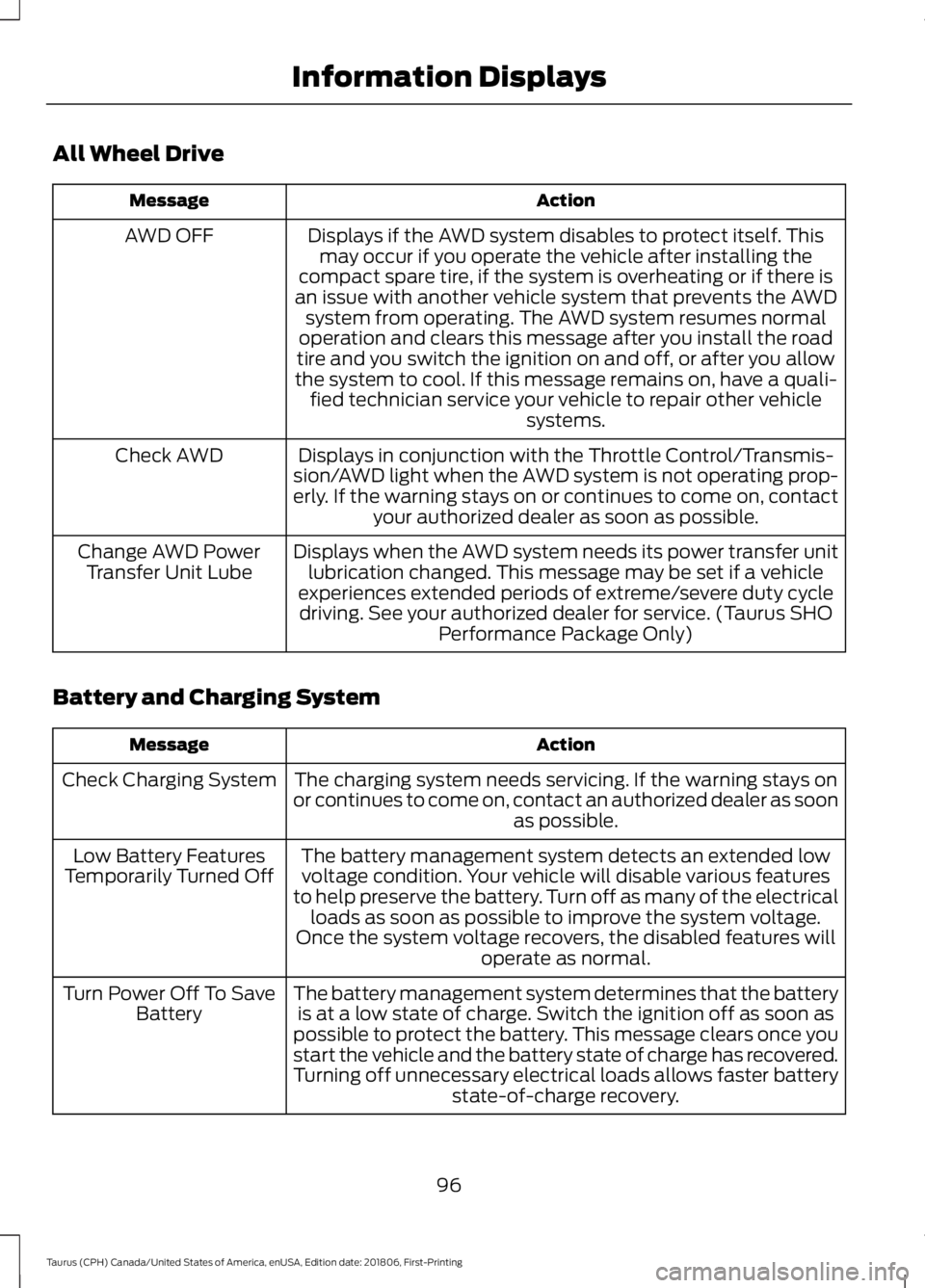
Action
Message
Displays if the AWD system disables to protect itself. Thismay occur if you operate the vehicle after installing the
compact spare tire, if the system is overheating or if there is
an issue with another vehicle system that prevents the AWD system from operating. The AWD system resumes normal
operation and clears this message after you install the road
tire and you switch the ignition on and off, or after you allow
the system to cool. If this message remains on, have a quali- fied technician service your vehicle to repair other vehicle systems.
AWD OFF
Displays in conjunction with the Throttle Control/Transmis-
sion/AWD light when the AWD system is not operating prop-
erly. If the warning stays on or continues to come on, contact your authorized dealer as soon as possible.
Check AWD
Displays when the AWD system needs its power transfer unitlubrication changed. This message may be set if a vehicle
experiences extended periods of extreme/severe duty cycle driving. See your authorized dealer for service. (Taurus SHO Performance Package Only)
Change AWD Power
Transfer Unit Lube
Battery and Charging System Action
Message
The charging system needs servicing. If the warning stays on
or continues to come on, contact an authorized dealer as soon as possible.
Check Charging System
The battery management system detects an extended lowvoltage condition. Your vehicle will disable various features
to help preserve the battery. Turn off as many of the electrical loads as soon as possible to improve the system voltage.
Once the system voltage recovers, the disabled features will operate as normal.
Low Battery Features
Temporarily Turned Off
The battery management system determines that the batteryis at a low state of charge. Switch the ignition off as soon as
possible to protect the battery. This message clears once you
start the vehicle and the battery state of charge has recovered.
Turning off unnecessary electrical loads allows faster battery state-of-charge recovery.
Turn Power Off To Save
Battery
96
Taurus (CPH) Canada/United States of America, enUSA, Edition date: 201806, First-Printing Information Displays
Page 102 of 515
Keys and Intelligent Access
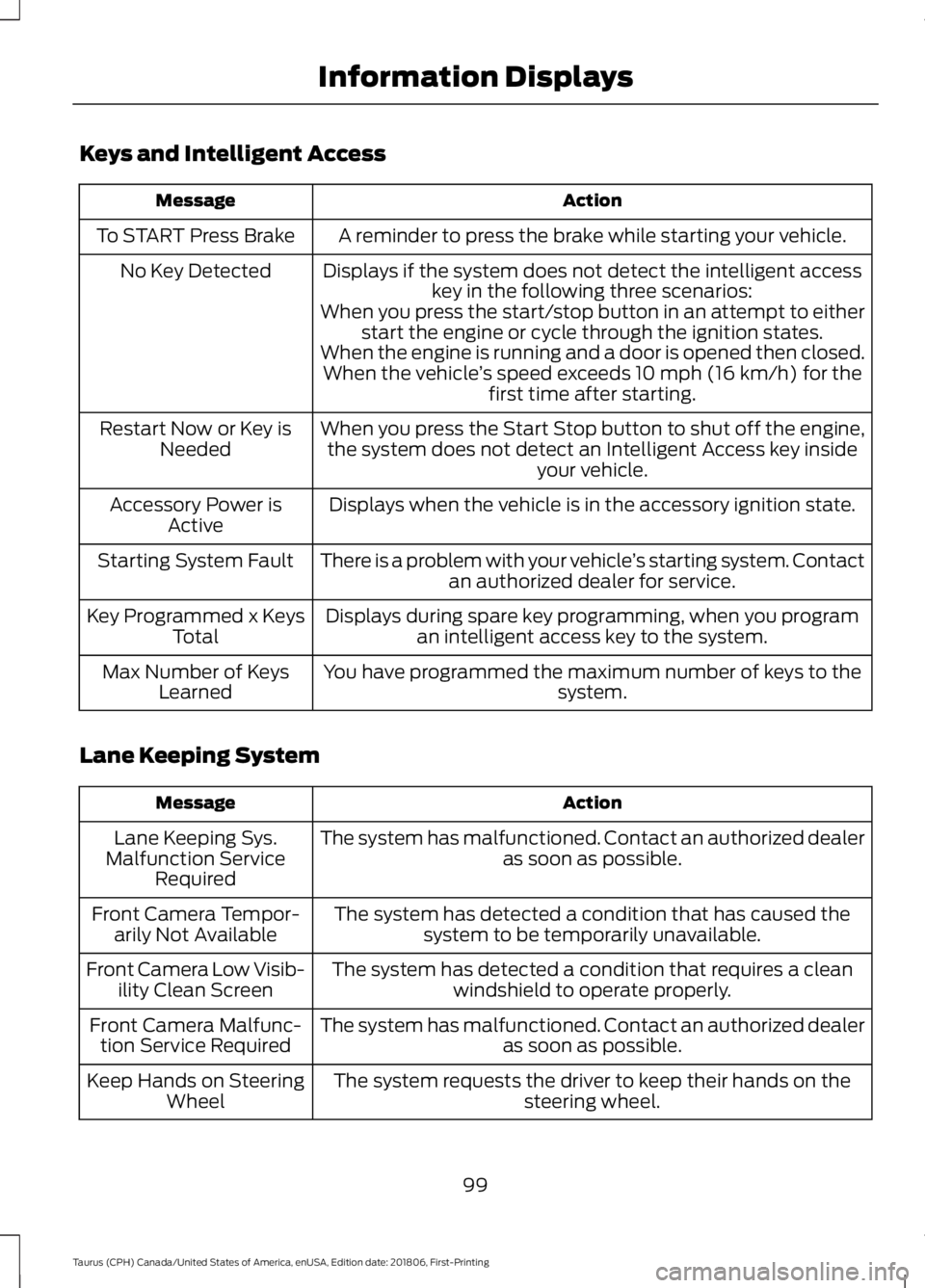
Action
Message
A reminder to press the brake while starting your vehicle.
To START Press Brake
Displays if the system does not detect the intelligent accesskey in the following three scenarios:
No Key Detected
When you press the start/stop button in an attempt to eitherstart the engine or cycle through the ignition states.
When the engine is running and a door is opened then closed. When the vehicle ’s speed exceeds 10 mph (16 km/h) for the
first time after starting.
When you press the Start Stop button to shut off the engine, the system does not detect an Intelligent Access key inside your vehicle.
Restart Now or Key is
Needed
Displays when the vehicle is in the accessory ignition state.
Accessory Power is
Active
There is a problem with your vehicle ’s starting system. Contact
an authorized dealer for service.
Starting System Fault
Displays during spare key programming, when you programan intelligent access key to the system.
Key Programmed x Keys
Total
You have programmed the maximum number of keys to the system.
Max Number of Keys
Learned
Lane Keeping System Action
Message
The system has malfunctioned. Contact an authorized dealer as soon as possible.
Lane Keeping Sys.
Malfunction Service Required
The system has detected a condition that has caused thesystem to be temporarily unavailable.
Front Camera Tempor-
arily Not Available
The system has detected a condition that requires a cleanwindshield to operate properly.
Front Camera Low Visib-
ility Clean Screen
The system has malfunctioned. Contact an authorized dealeras soon as possible.
Front Camera Malfunc-
tion Service Required
The system requests the driver to keep their hands on thesteering wheel.
Keep Hands on Steering
Wheel
99
Taurus (CPH) Canada/United States of America, enUSA, Edition date: 201806, First-Printing Information Displays
Page 116 of 515

Note:
Do not remove ice from the mirrors
with a scraper or adjust the mirror glass
when it is frozen in place.
Note: Do not clean the mirror housing or
glass with harsh abrasives, fuel or other
petroleum-based cleaning products.
CABIN AIR FILTER
Your vehicle is equipped with a cabin air
filter, which gives you and your passengers
the following benefits:
• It improves your driving comfort by
reducing particle concentration.
• It improves the interior compartment
cleanliness.
• It protects the climate control
components from particle deposits.
You can locate the cabin air filter behind
the glove box.
Note: Make sure you have a cabin air filter
installed at all times. This prevents foreign
objects from entering the system. Running
the system without a filter in place could
result in degradation or damage to the
system.
Replace the filter at regular intervals. See
Scheduled Maintenance (page 442).
For additional cabin air filter information,
or to replace the filter, see an authorized
dealer.
REMOTE START
(If Equipped)
The climate control system adjusts the
interior temperature during remote start.
You can switch this feature on or off and
adjust the settings using the information
display controls. See
Information
Displays (page 85). You cannot adjust the climate control
setting during remote start operation.
Switch the ignition on to make
adjustments.
Based on your remote start settings, the
following vehicle-dependent features may
or may not remain on after remote starting
your vehicle:
•
Climate controlled seats.
• Heated steering wheel.
• Heated mirrors.
• Heated rear window.
• Windshield wiper de-icer.
Note: For dual zone climate controlled
seats, the passenger seat setting defaults
to match the driver seat during remote start.
Automatic Settings
If
Auto is on, the system sets the interior
temperature to 72°F (22°C) and heats or
cools the vehicle interior as required to
achieve comfort.
Note: In cold weather, the heated rear
window and heated mirrors turn on.
Last Settings
If
Last Settings is on, the system uses the
settings last selected before you turned
off the vehicle.
Heated and Cooled Features
In Auto mode, certain heated features may
switch on during cold weather, and cooled
features during hot weather.
113
Taurus (CPH) Canada/United States of America, enUSA, Edition date: 201806, First-Printing Climate Control
Page 117 of 515
SITTING IN THE CORRECT
POSITION
WARNING: Sitting improperly, out
of position or with the seatback reclined
too far can take weight off the seat
cushion and affect the decision of the
passenger sensing system, resulting in
serious injury or death in the event of a
crash. Always sit upright against your
seat back, with your feet on the floor. WARNING:
Do not recline the
seatback too far as this can cause the
occupant to slide under the seatbelt,
resulting in serious injury in the event of
a collision. WARNING:
Do not place objects
higher than the top of the seat backrest.
Failure to follow this instruction could
result in personal injury or death in the
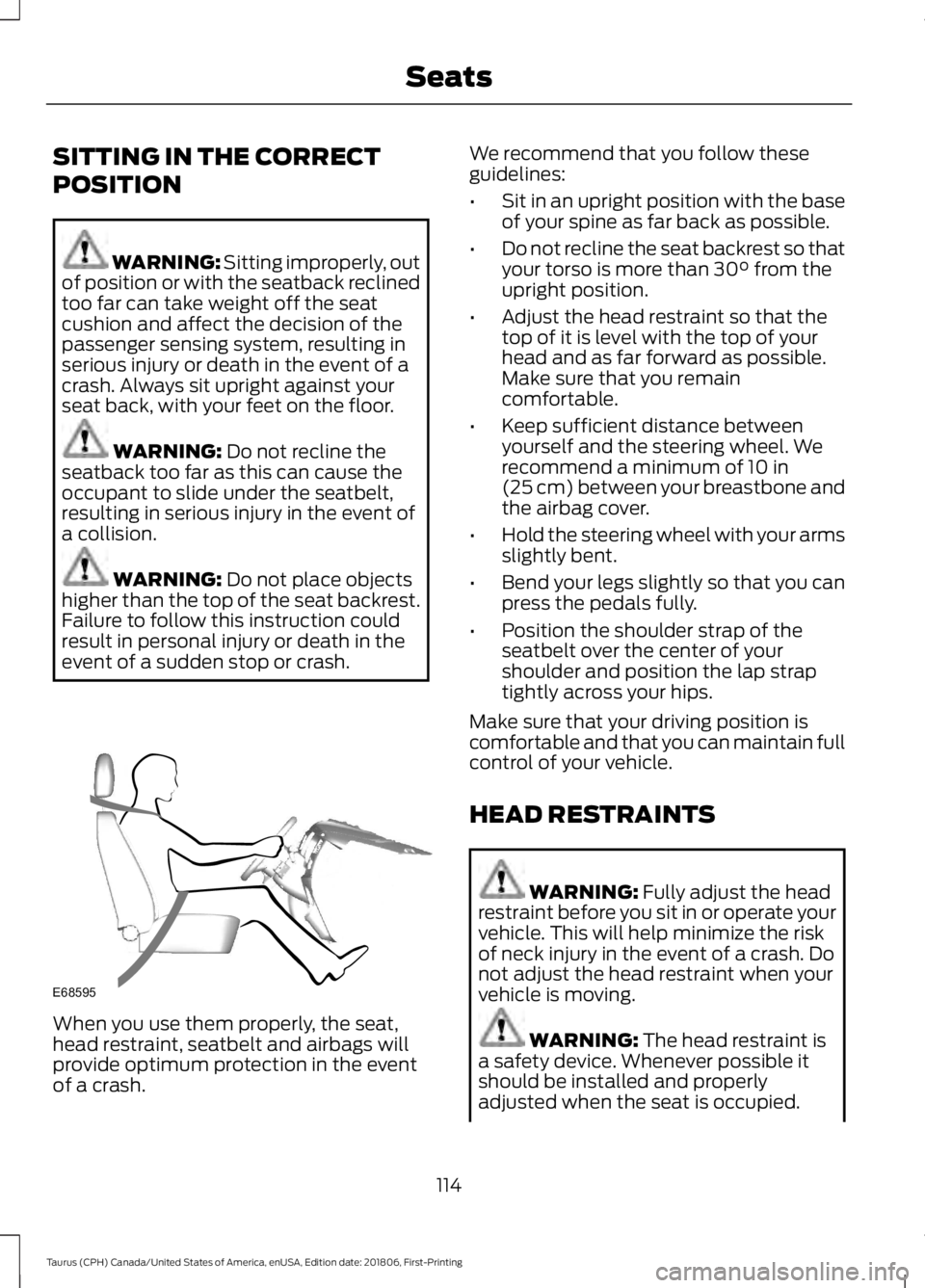
event of a sudden stop or crash. When you use them properly, the seat,
head restraint, seatbelt and airbags will
provide optimum protection in the event
of a crash. We recommend that you follow these
guidelines:
•
Sit in an upright position with the base
of your spine as far back as possible.
• Do not recline the seat backrest so that
your torso is more than
30° from the
upright position.
• Adjust the head restraint so that the
top of it is level with the top of your
head and as far forward as possible.
Make sure that you remain
comfortable.
• Keep sufficient distance between
yourself and the steering wheel. We
recommend a minimum of
10 in
(25 cm) between your breastbone and
the airbag cover.
• Hold the steering wheel with your arms
slightly bent.
• Bend your legs slightly so that you can
press the pedals fully.
• Position the shoulder strap of the
seatbelt over the center of your
shoulder and position the lap strap
tightly across your hips.
Make sure that your driving position is
comfortable and that you can maintain full
control of your vehicle.
HEAD RESTRAINTS WARNING:
Fully adjust the head
restraint before you sit in or operate your
vehicle. This will help minimize the risk
of neck injury in the event of a crash. Do
not adjust the head restraint when your
vehicle is moving. WARNING:
The head restraint is
a safety device. Whenever possible it
should be installed and properly
adjusted when the seat is occupied.
114
Taurus (CPH) Canada/United States of America, enUSA, Edition date: 201806, First-Printing SeatsE68595
Page 152 of 515
AUTOMATIC TRANSMISSION
WARNING: Always fully apply the
parking brake and make sure you shift
into park (P). Switch the ignition off and
remove the key whenever you leave your
vehicle. WARNING:
Do not apply the brake
pedal and accelerator pedal
simultaneously. Applying both pedals
simultaneously for more than a few
seconds will limit engine performance,
which may result in difficulty maintaining
speed in traffic and could lead to serious
injury.
Understanding the Positions of
Your Automatic Transmission
Putting your vehicle in gear:
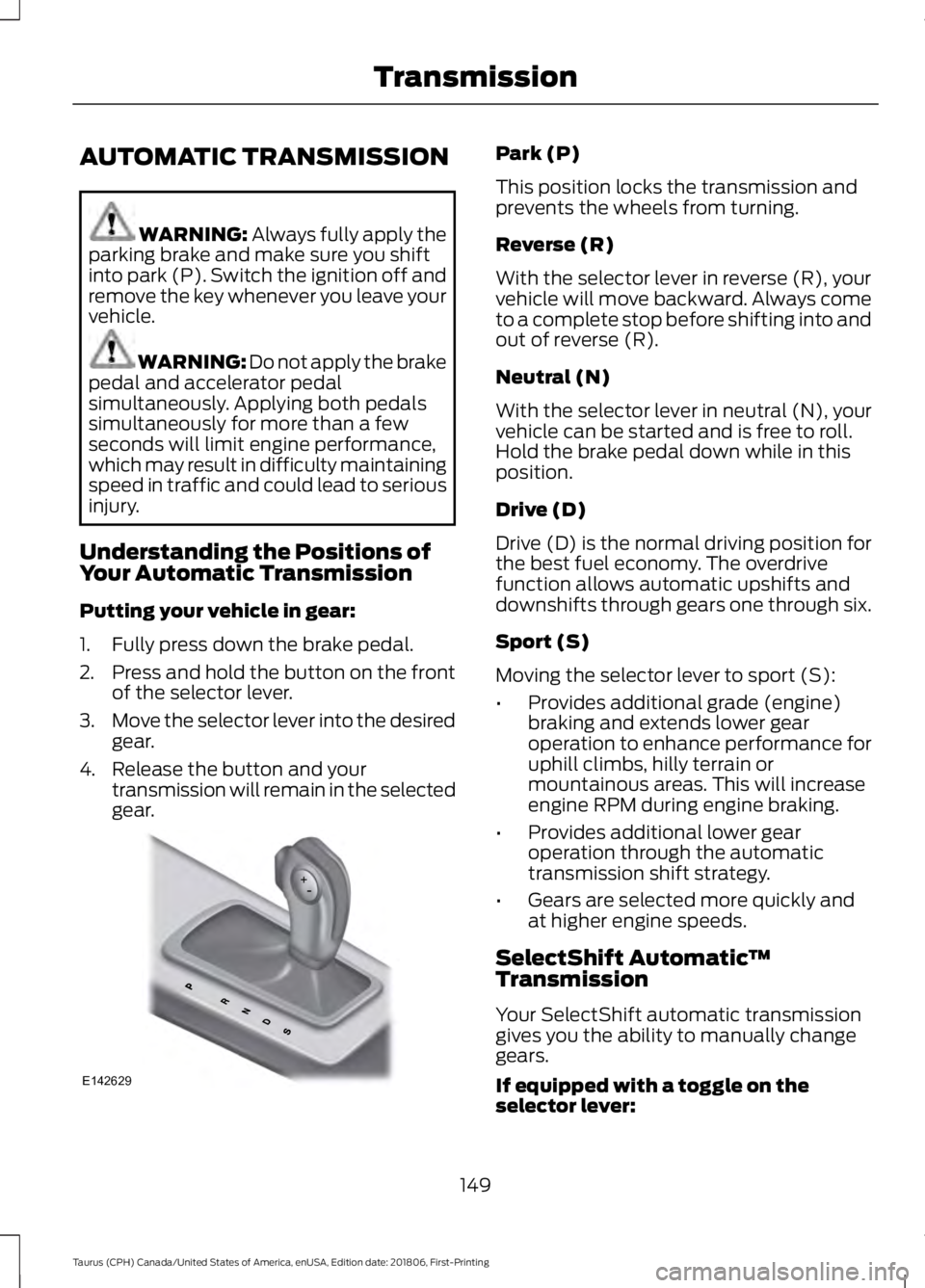
1. Fully press down the brake pedal.
2. Press and hold the button on the front
of the selector lever.
3. Move the selector lever into the desired
gear.
4. Release the button and your transmission will remain in the selected
gear. Park (P)
This position locks the transmission and
prevents the wheels from turning.
Reverse (R)
With the selector lever in reverse (R), your
vehicle will move backward. Always come
to a complete stop before shifting into and
out of reverse (R).
Neutral (N)
With the selector lever in neutral (N), your
vehicle can be started and is free to roll.
Hold the brake pedal down while in this
position.
Drive (D)
Drive (D) is the normal driving position for
the best fuel economy. The overdrive
function allows automatic upshifts and
downshifts through gears one through six.
Sport (S)
Moving the selector lever to sport (S):
•
Provides additional grade (engine)
braking and extends lower gear
operation to enhance performance for
uphill climbs, hilly terrain or
mountainous areas. This will increase
engine RPM during engine braking.
• Provides additional lower gear
operation through the automatic
transmission shift strategy.
• Gears are selected more quickly and
at higher engine speeds.
SelectShift Automatic ™
Transmission
Your SelectShift automatic transmission
gives you the ability to manually change
gears.
If equipped with a toggle on the
selector lever:
149
Taurus (CPH) Canada/United States of America, enUSA, Edition date: 201806, First-Printing TransmissionE142629
Page 153 of 515

•
Press the (+) button to upshift.
• Press the (-) button to downshift.
If equipped with steering wheel
paddles: •
Pull the right paddle (+) to upshift.
• Pull the left paddle (-) to downshift.
With your vehicle in drive (D), the paddle
shifters provide temporary manual control.
They allow you the ability to shift gears
quickly, without taking your hands off the
steering wheel. You can achieve extensive
manual control by moving the selector
lever to sport (S).
The system determines when temporary
manual control is no longer in use and
returns to automatic control.
Upshift to the recommended shift speeds
according to the following chart: Upshifts when accelerating (recom-
mended for best fuel economy)
Shift from:15 mph (24 km/h)
1 - 2
25 mph (40 km/h)
2 - 3
40 mph (64 km/h)
3 - 4
45 mph (72 km/h)
4 - 5
50 mph (80 km/h)
5 - 6
The instrument cluster will display the
selected gear that you are currently in and
a shift indicator arrow to assist in
optimizing shifting.
SelectShift will automatically make some
shifts for you in the event that your engine
speed is running at too high, or too low an
RPM.
Note: Engine damage may occur if
excessive engine revving is held without
shifting.
Brake-Shift Interlock WARNING: Do not drive your
vehicle until you verify that the brake
lamps are working. WARNING:
When doing this
procedure, you need to take the
transmission out of park (P) which
means your vehicle can roll freely. To
avoid unwanted vehicle movement,
always fully apply the parking brake prior
to doing this procedure. Use wheels
chocks if appropriate.
150
Taurus (CPH) Canada/United States of America, enUSA, Edition date: 201806, First-Printing TransmissionE142629 E144821
Page 156 of 515
USING ALL-WHEEL DRIVE
All-wheel drive uses all four wheels to
power the vehicle. This increases traction,
enabling you to drive over terrain and road
conditions that a conventional two-wheel
drive vehicle cannot. The AWD system is
active all the time and requires no input
from the operator.
Note:
Your AWD vehicle is not intended for
off-road use. The AWD feature gives your
vehicle some limited off-road capabilities
in which driving surfaces are relatively level,
obstruction-free and otherwise similar to
normal on-road driving conditions.
Operating your vehicle under other than
those conditions could subject the vehicle
to excessive stress which might result in
damage which is not covered under your
warranty.
Note: The Power Transfer Unit (PTU) in
Taurus SHO™ performance package
vehicles does not require any normal
scheduled maintenance. The system is
electronically monitored and notifies the
driver of required service by displaying the
message Change AWD Power Transfer
Unit Lube in the information display. The
PTU lubricant will be more likely to require
a fluid change if the vehicle has experienced
extended periods of extreme or severe duty
cycle driving. Do not check or change the
PTU lubricant unless the unit shows signs
of leakage or a message indicating required
service is displayed. Contact an authorized
dealer for service if the PTU was submerged
in water and to reset the PTU lube life
monitor. Note:
When an AWD system fault is
present, the warning
Check AWD displays
in the information display. The AWD system
is not functioning correctly and defaulted
to front-wheel drive. When this warning
displays, have your vehicle serviced at an
authorized dealer.
Note: The
AWD OFF message may also
appear in the information display if the AWD
system overheats and defaults to
front-wheel drive. This may occur if the
vehicle is operated in extreme conditions
with excessive wheel slip, such as deep
sand. To resume normal AWD function as
soon as possible, stop the vehicle in a safe
location and stop the engine for at least 10
minutes. After the engine has been
restarted and the AWD system has
adequately cooled, the AWD OFF message
will turn off and normal AWD function
returns. If the engine is not stopped, the
AWD OFF
message turns off when the
system cools and normal AWD function
returns.
153
Taurus (CPH) Canada/United States of America, enUSA, Edition date: 201806, First-Printing All-Wheel Drive
(If Equipped)
Page 157 of 515
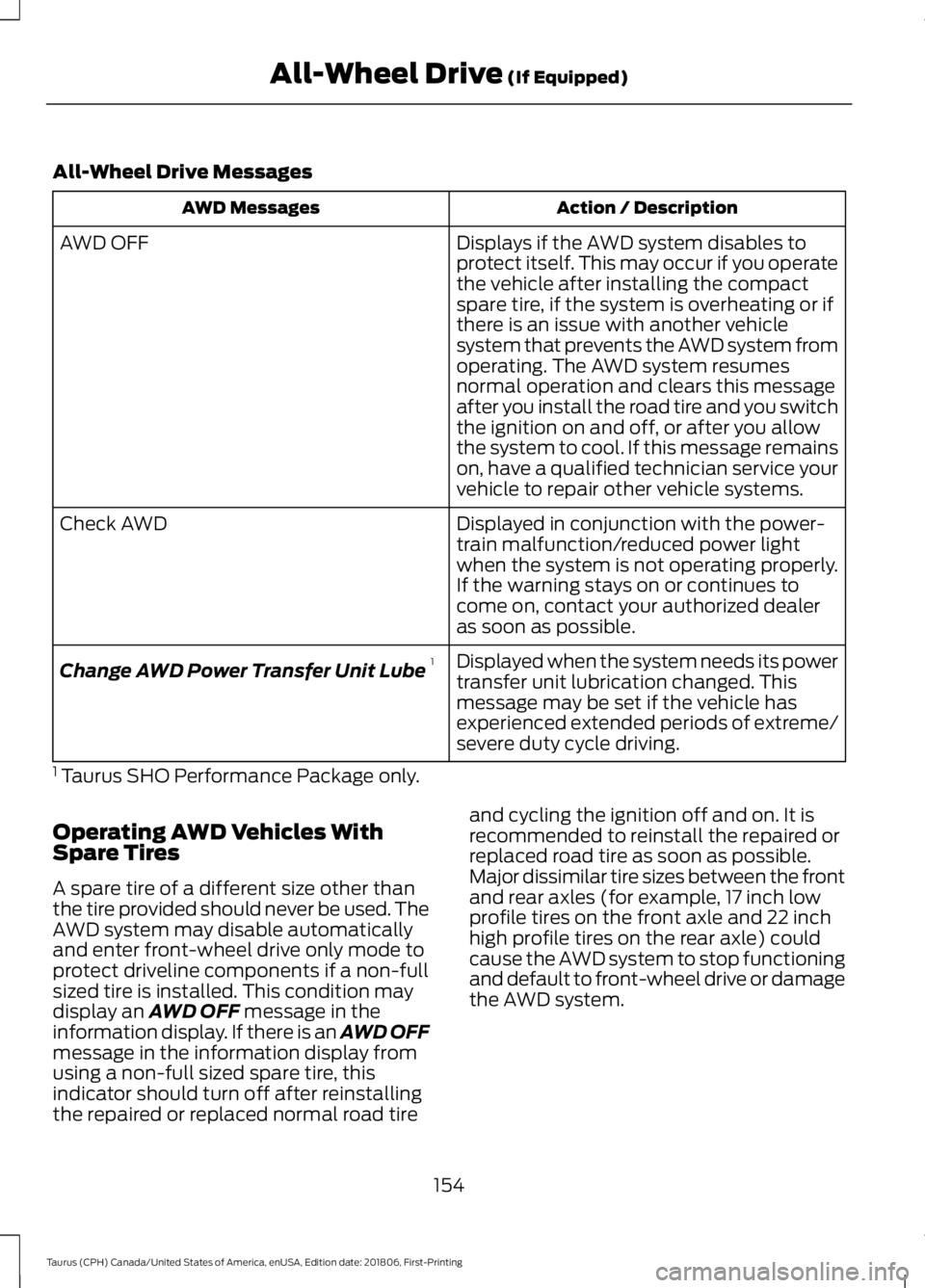
All-Wheel Drive Messages
Action / Description
AWD Messages
Displays if the AWD system disables to
protect itself. This may occur if you operate
the vehicle after installing the compact
spare tire, if the system is overheating or if
there is an issue with another vehicle
system that prevents the AWD system from
AWD OFF
operating. The AWD system resumes
normal operation and clears this message
after you install the road tire and you switch
the ignition on and off, or after you allow
the system to cool. If this message remains
on, have a qualified technician service your
vehicle to repair other vehicle systems.
Displayed in conjunction with the power-
train malfunction/reduced power light
when the system is not operating properly.
If the warning stays on or continues to
come on, contact your authorized dealer
as soon as possible.
Check AWD
Displayed when the system needs its power
transfer unit lubrication changed. This
message may be set if the vehicle has
experienced extended periods of extreme/
severe duty cycle driving.
Change AWD Power Transfer Unit Lube
1
1 Taurus SHO Performance Package only.
Operating AWD Vehicles With
Spare Tires
A spare tire of a different size other than
the tire provided should never be used. The
AWD system may disable automatically
and enter front-wheel drive only mode to
protect driveline components if a non-full
sized tire is installed. This condition may
display an AWD OFF message in the
information display. If there is an AWD OFF
message in the information display from
using a non-full sized spare tire, this
indicator should turn off after reinstalling
the repaired or replaced normal road tire and cycling the ignition off and on. It is
recommended to reinstall the repaired or
replaced road tire as soon as possible.
Major dissimilar tire sizes between the front
and rear axles (for example, 17 inch low
profile tires on the front axle and 22 inch
high profile tires on the rear axle) could
cause the AWD system to stop functioning
and default to front-wheel drive or damage
the AWD system.
154
Taurus (CPH) Canada/United States of America, enUSA, Edition date: 201806, First-Printing All-Wheel Drive
(If Equipped)