2019 FORD TAURUS CD player
[x] Cancel search: CD playerPage 414 of 515
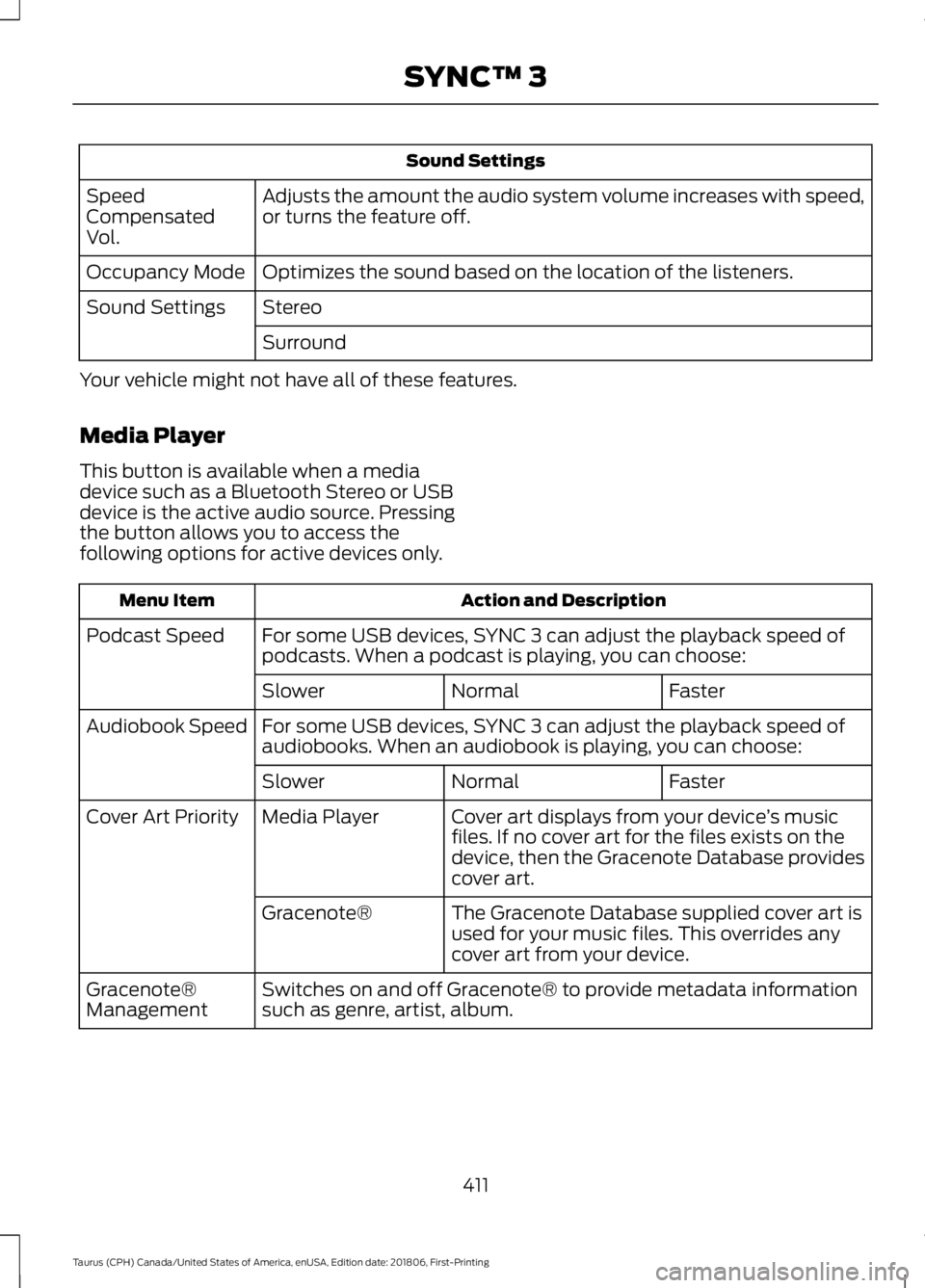
Sound Settings
Adjusts the amount the audio system volume increases with speed,
or turns the feature off.
Speed
Compensated
Vol.
Optimizes the sound based on the location of the listeners.
Occupancy Mode
Stereo
Sound Settings
Surround
Your vehicle might not have all of these features.
Media Player
This button is available when a media
device such as a Bluetooth Stereo or USB
device is the active audio source. Pressing
the button allows you to access the
following options for active devices only. Action and Description
Menu Item
For some USB devices, SYNC 3 can adjust the playback speed of
podcasts. When a podcast is playing, you can choose:
Podcast Speed
Faster
Normal
Slower
For some USB devices, SYNC 3 can adjust the playback speed of
audiobooks. When an audiobook is playing, you can choose:
Audiobook Speed
Faster
Normal
Slower
Cover art displays from your device ’s music
files. If no cover art for the files exists on the
device, then the Gracenote Database provides
cover art.
Media Player
Cover Art Priority
The Gracenote Database supplied cover art is
used for your music files. This overrides any
cover art from your device.
Gracenote®
Switches on and off Gracenote® to provide metadata information
such as genre, artist, album.
Gracenote®
Management
411
Taurus (CPH) Canada/United States of America, enUSA, Edition date: 201806, First-Printing SYNC™ 3
Page 430 of 515
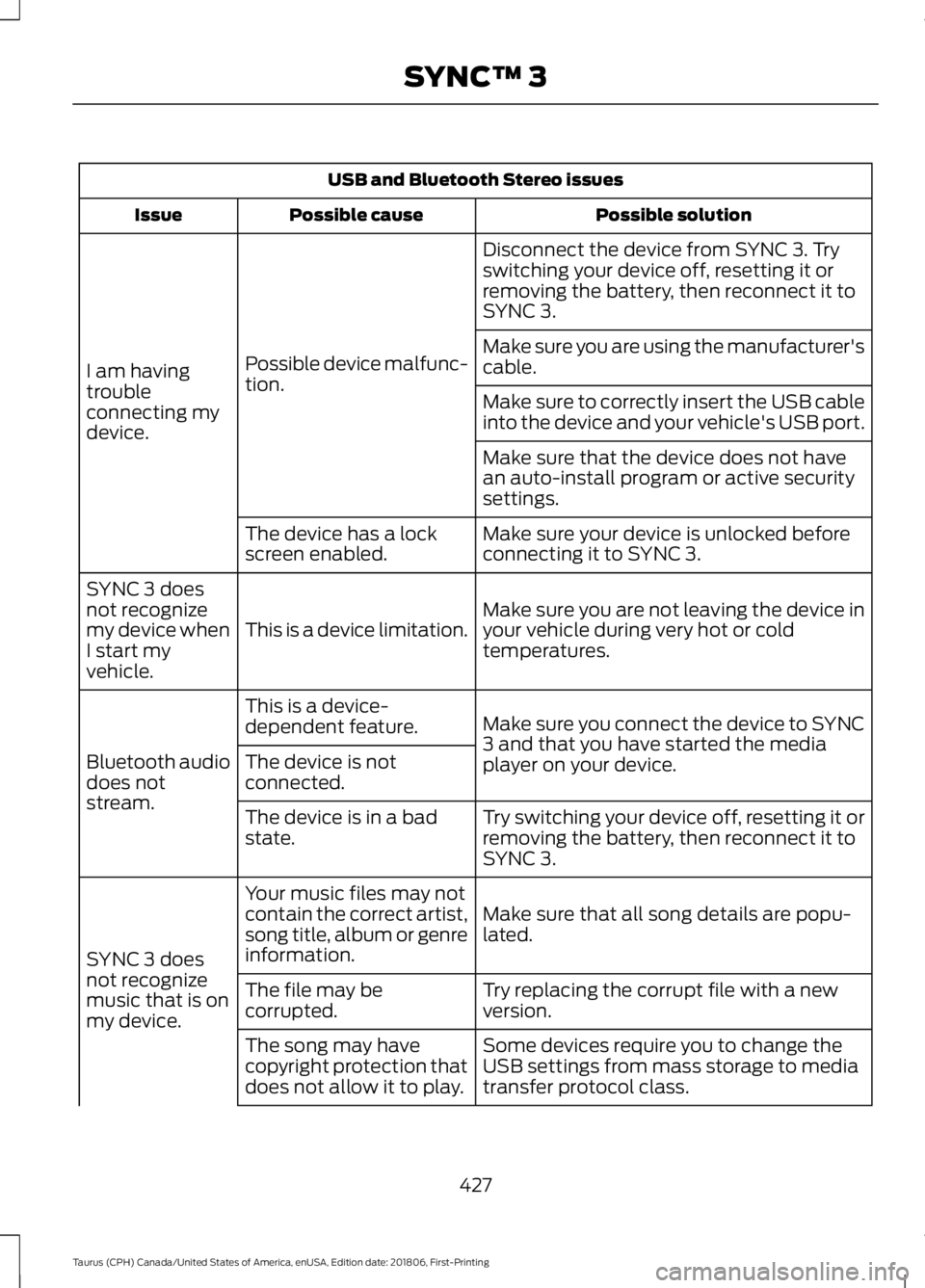
USB and Bluetooth Stereo issues
Possible solution
Possible cause
Issue
Disconnect the device from SYNC 3. Try
switching your device off, resetting it or
removing the battery, then reconnect it to
SYNC 3.
Possible device malfunc-
tion.
I am having
trouble
connecting my
device. Make sure you are using the manufacturer's
cable.
Make sure to correctly insert the USB cable
into the device and your vehicle's USB port.
Make sure that the device does not have
an auto-install program or active security
settings.
Make sure your device is unlocked before
connecting it to SYNC 3.
The device has a lock
screen enabled.
Make sure you are not leaving the device in
your vehicle during very hot or cold
temperatures.
This is a device limitation.
SYNC 3 does
not recognize
my device when
I start my
vehicle.
Make sure you connect the device to SYNC
3 and that you have started the media
player on your device.
This is a device-
dependent feature.
Bluetooth audio
does not
stream. The device is not
connected.
Try switching your device off, resetting it or
removing the battery, then reconnect it to
SYNC 3.
The device is in a bad
state.
Make sure that all song details are popu-
lated.
Your music files may not
contain the correct artist,
song title, album or genre
information.
SYNC 3 does
not recognize
music that is on
my device. Try replacing the corrupt file with a new
version.
The file may be
corrupted.
Some devices require you to change the
USB settings from mass storage to media
transfer protocol class.
The song may have
copyright protection that
does not allow it to play.
427
Taurus (CPH) Canada/United States of America, enUSA, Edition date: 201806, First-Printing SYNC™ 3
Page 431 of 515
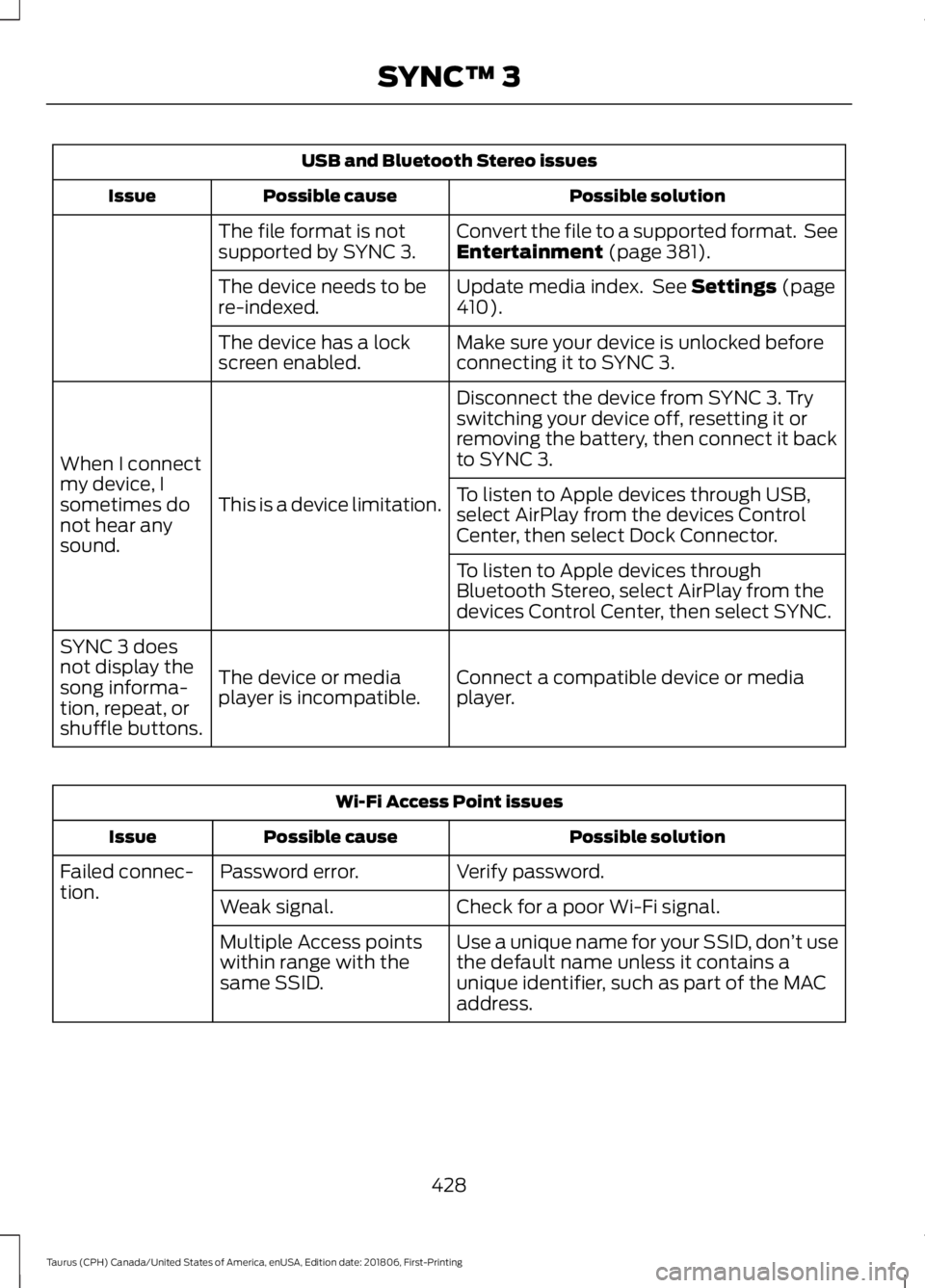
USB and Bluetooth Stereo issues
Possible solution
Possible cause
Issue
Convert the file to a supported format. See
Entertainment (page 381).
The file format is not
supported by SYNC 3.
Update media index. See
Settings (page
410).
The device needs to be
re-indexed.
Make sure your device is unlocked before
connecting it to SYNC 3.
The device has a lock
screen enabled.
Disconnect the device from SYNC 3. Try
switching your device off, resetting it or
removing the battery, then connect it back
to SYNC 3.
This is a device limitation.
When I connect
my device, I
sometimes do
not hear any
sound. To listen to Apple devices through USB,
select AirPlay from the devices Control
Center, then select Dock Connector.
To listen to Apple devices through
Bluetooth Stereo, select AirPlay from the
devices Control Center, then select SYNC.
Connect a compatible device or media
player.
The device or media
player is incompatible.
SYNC 3 does
not display the
song informa-
tion, repeat, or
shuffle buttons. Wi-Fi Access Point issues
Possible solution
Possible cause
Issue
Verify password.
Password error.
Failed connec-
tion.
Check for a poor Wi-Fi signal.
Weak signal.
Use a unique name for your SSID, don ’t use
the default name unless it contains a
unique identifier, such as part of the MAC
address.
Multiple Access points
within range with the
same SSID.
428
Taurus (CPH) Canada/United States of America, enUSA, Edition date: 201806, First-Printing SYNC™ 3
Page 437 of 515
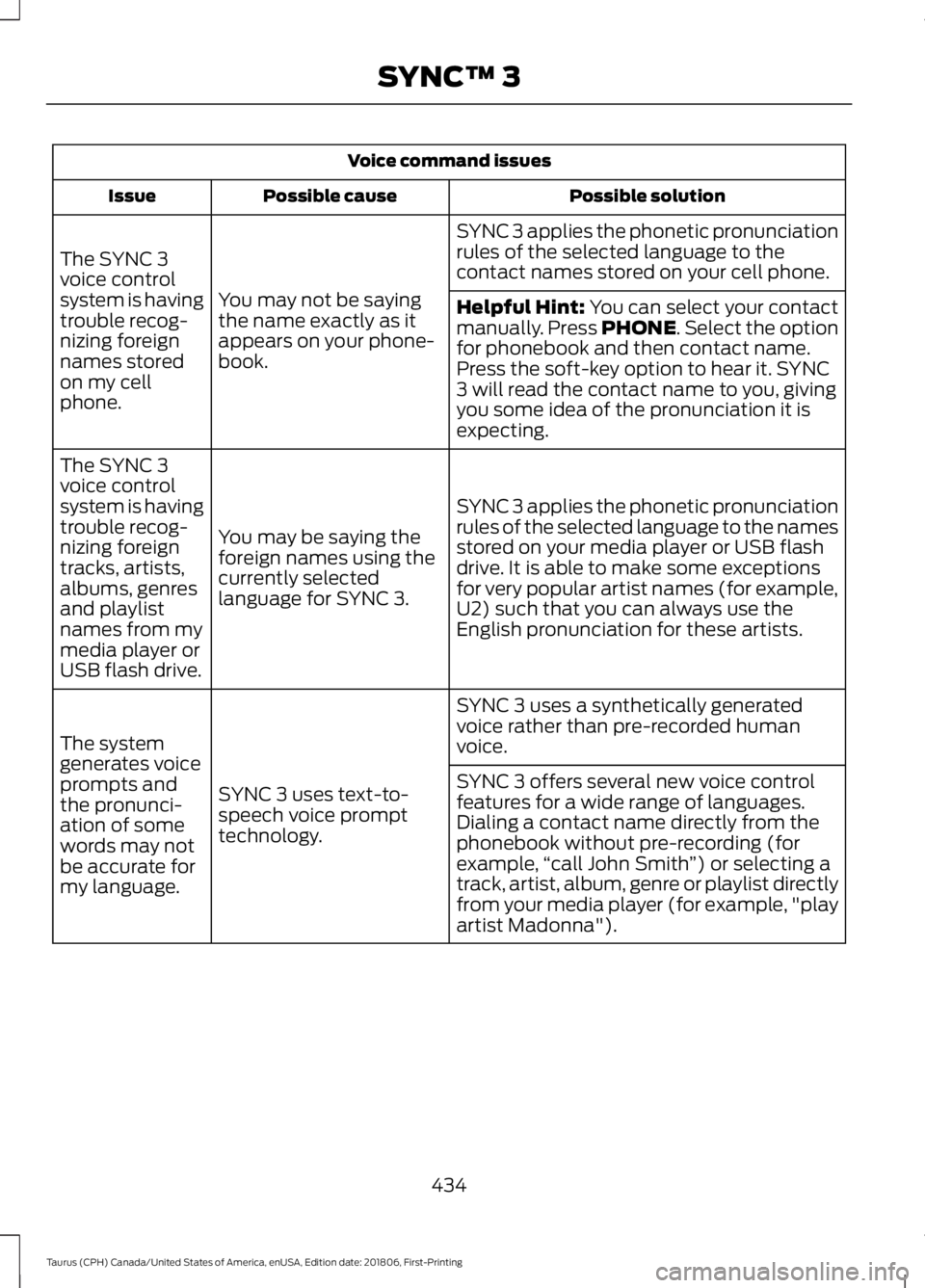
Voice command issues
Possible solution
Possible cause
Issue
SYNC 3 applies the phonetic pronunciation
rules of the selected language to the
contact names stored on your cell phone.
You may not be saying
the name exactly as it
appears on your phone-
book.
The SYNC 3
voice control
system is having
trouble recog-
nizing foreign
names stored
on my cell
phone.
Helpful Hint: You can select your contact
manually. Press PHONE. Select the option
for phonebook and then contact name.
Press the soft-key option to hear it. SYNC
3 will read the contact name to you, giving
you some idea of the pronunciation it is
expecting.
SYNC 3 applies the phonetic pronunciation
rules of the selected language to the names
stored on your media player or USB flash
drive. It is able to make some exceptions
for very popular artist names (for example,
U2) such that you can always use the
English pronunciation for these artists.
You may be saying the
foreign names using the
currently selected
language for SYNC 3.
The SYNC 3
voice control
system is having
trouble recog-
nizing foreign
tracks, artists,
albums, genres
and playlist
names from my
media player or
USB flash drive.
SYNC 3 uses a synthetically generated
voice rather than pre-recorded human
voice.
SYNC 3 uses text-to-
speech voice prompt
technology.
The system
generates voice
prompts and
the pronunci-
ation of some
words may not
be accurate for
my language. SYNC 3 offers several new voice control
features for a wide range of languages.
Dialing a contact name directly from the
phonebook without pre-recording (for
example,
“call John Smith ”) or selecting a
track, artist, album, genre or playlist directly
from your media player (for example, "play
artist Madonna").
434
Taurus (CPH) Canada/United States of America, enUSA, Edition date: 201806, First-Printing SYNC™ 3
Page 440 of 515
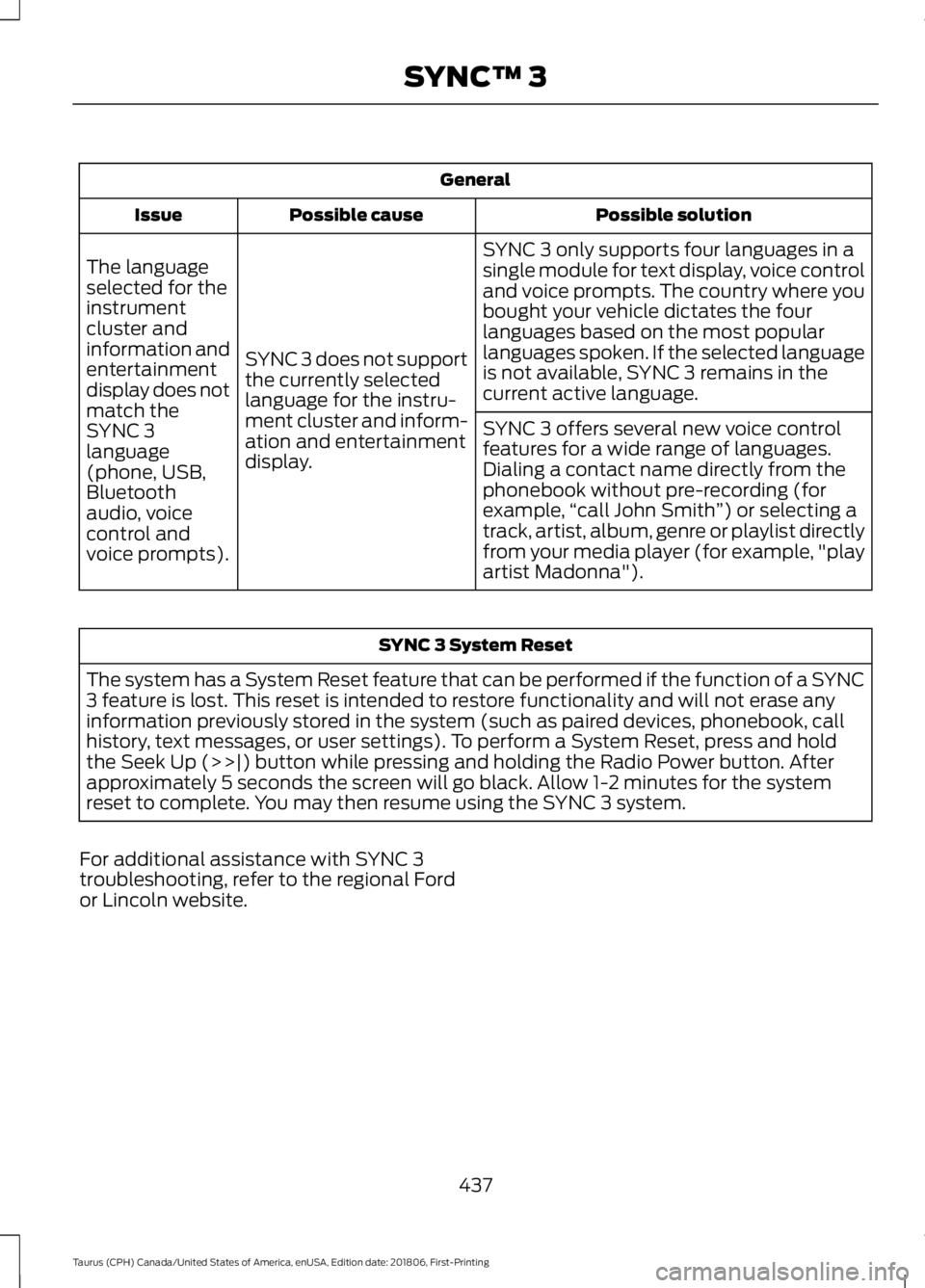
General
Possible solution
Possible cause
Issue
SYNC 3 only supports four languages in a
single module for text display, voice control
and voice prompts. The country where you
bought your vehicle dictates the four
languages based on the most popular
languages spoken. If the selected language
is not available, SYNC 3 remains in the
current active language.
SYNC 3 does not support
the currently selected
language for the instru-
ment cluster and inform-
ation and entertainment
display.
The language
selected for the
instrument
cluster and
information and
entertainment
display does not
match the
SYNC 3
SYNC 3 offers several new voice control
features for a wide range of languages.
Dialing a contact name directly from the
phonebook without pre-recording (for
example,
“call John Smith ”) or selecting a
track, artist, album, genre or playlist directly
from your media player (for example, "play
artist Madonna").
language
(phone, USB,
Bluetooth
audio, voice
control and
voice prompts). SYNC 3 System Reset
The system has a System Reset feature that can be performed if the function of a SYNC
3 feature is lost. This reset is intended to restore functionality and will not erase any
information previously stored in the system (such as paired devices, phonebook, call
history, text messages, or user settings). To perform a System Reset, press and hold
the Seek Up (>>|) button while pressing and holding the Radio Power button. After
approximately 5 seconds the screen will go black. Allow 1-2 minutes for the system
reset to complete. You may then resume using the SYNC 3 system.
For additional assistance with SYNC 3
troubleshooting, refer to the regional Ford
or Lincoln website.
437
Taurus (CPH) Canada/United States of America, enUSA, Edition date: 201806, First-Printing SYNC™ 3
Page 508 of 515

Engine Specifications - 3.5L
Duratec.........................................................293
Drivebelt Routing............................................... 293
Engine Specifications - 3.5L Ecoboost™.................................................293
Drivebelt Routing............................................... 294
Entertainment...............................................381 AM/FM Radio...................................................... 382
Apps....................................................................... 390
Bluetooth Stereo or USB................................ 389
CD (If equipped)................................................ 388
HD Radio ™ Information (If
Available)........................................................ 385
SiriusXM® Satellite Radio (If Activated)........................................................ 383
Sources.................................................................. 382
Supported Media Players, Formats and Metadata Information................................ 390
USB Ports............................................................. 390
Environment......................................................14
Essential Towing Checks..........................204 Before Towing a Trailer.................................... 205
Hitches.................................................................. 204
Launching or Retrieving a Boat or Personal Watercraft (PWC)........................................ 205
Safety Chains...................................................... 204
Trailer Brakes...................................................... 204
Trailer Lamps...................................................... 204
When Towing a Trailer..................................... 205
Event Data Recording See: Data Recording.............................................. 9
Export Unique Options..................................13
Exterior Mirrors.................................................75
Auto-Dimming Feature...................................... 76
Blind Spot Monitor............................................... 76
Fold-Away Exterior Mirrors................................ 75
Heated Exterior Mirrors....................................... 75
Integrated Blind Spot Mirrors........................... 76
Memory Mirrors..................................................... 76
Power Exterior Mirrors......................................... 75
Puddle Lamps........................................................ 76
F
Fastening the Seatbelts..............................30 Seatbelt Locking Modes..................................... 31
Using Seatbelts During Pregnancy...............30 Flat Tire
See: Changing a Road Wheel........................ 287
Flat Tire Inflation See: Tire Sealant and Inflator Kit.................263
Floor Mats
......................................................208
Foot Pedals See: Adjusting the Pedals................................. 66
Ford Credit
..........................................................11
US Only...................................................................... 11
Ford Protect..................................................440 Ford Protect Extended Service Plan
(CANADA ONLY)........................................... 441
Ford Protect Extended Service Plans (U.S. Only)................................................................. 440
Front Passenger Sensing System............39
Fuel and Refueling.......................................136
Fuel Consumption
........................................143
Advertised Capacity.......................................... 143
Calculating Fuel Economy.............................. 143
Filling the Fuel Tank........................................... 143
Fuel Filler Funnel Location........................138
Fuel Filter........................................................248
Fuel Quality - E85........................................136 Choosing the Right Fuel - Flex Fuel
Vehicles............................................................. 136
Switching Between E85 and Gasoline............................................................. 137
Fuel Quality - Gasoline...............................138 Choosing the Right Fuel................................... 138
Fuel Shutoff.....................................................211
Fuses.................................................................223
Fuse Specification Chart...........................223 Passenger Compartment Fuse
Panel
.................................................................. 228
Power Distribution Box.................................... 223
G
Garage Door Opener See: Universal Garage Door Opener............124
Gauges................................................................79 Fuel Gauge............................................................. 80
Information Display............................................ 80
Type 1........................................................................\
. 79
Type 2....................................................................... 80
Gearbox See: Transmission.............................................. 149
505
Taurus (CPH) Canada/United States of America, enUSA, Edition date: 201806, First-Printing Index
Page 512 of 515
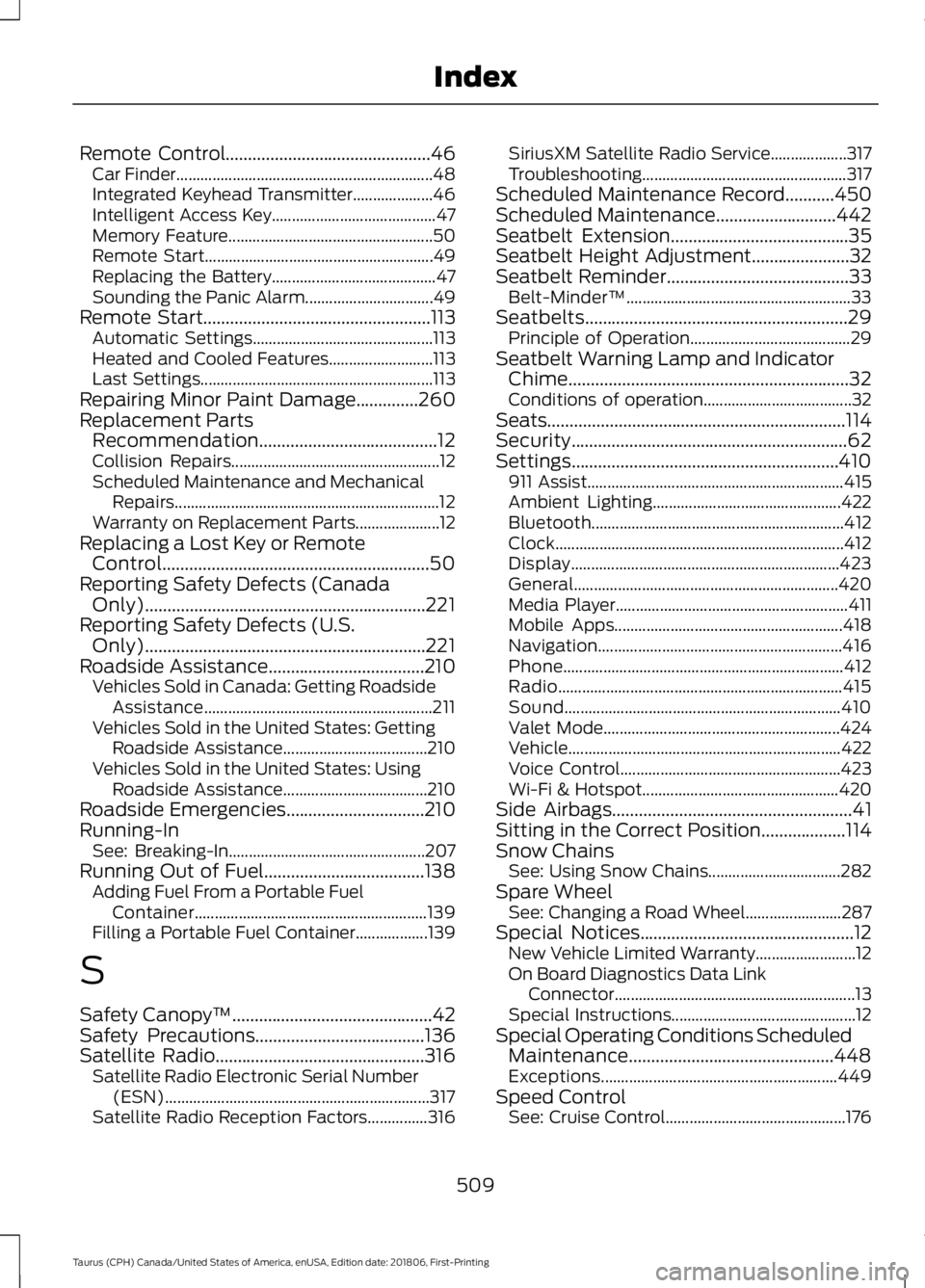
Remote Control..............................................46
Car Finder................................................................ 48
Integrated Keyhead Transmitter.................... 46
Intelligent Access Key......................................... 47
Memory Feature................................................... 50
Remote Start......................................................... 49
Replacing the Battery......................................... 47
Sounding the Panic Alarm................................ 49
Remote Start
...................................................113
Automatic Settings............................................. 113
Heated and Cooled Features.......................... 113
Last Settings.......................................................... 113
Repairing Minor Paint Damage..............260
Replacement Parts Recommendation........................................12
Collision Repairs.................................................... 12
Scheduled Maintenance and Mechanical Repairs.................................................................. 12
Warranty on Replacement Parts..................... 12
Replacing a Lost Key or Remote Control............................................................50
Reporting Safety Defects (Canada Only)...............................................................221
Reporting Safety Defects (U.S. Only)...............................................................221
Roadside Assistance
...................................210
Vehicles Sold in Canada: Getting Roadside
Assistance......................................................... 211
Vehicles Sold in the United States: Getting Roadside Assistance.................................... 210
Vehicles Sold in the United States: Using Roadside Assistance.................................... 210
Roadside Emergencies
...............................210
Running-In See: Breaking-In................................................. 207
Running Out of Fuel....................................138 Adding Fuel From a Portable Fuel
Container.......................................................... 139
Filling a Portable Fuel Container.................. 139
S
Safety Canopy ™
.............................................42
Safety Precautions......................................136
Satellite Radio...............................................316 Satellite Radio Electronic Serial Number
(ESN).................................................................. 317
Satellite Radio Reception Factors...............316 SiriusXM Satellite Radio Service...................
317
Troubleshooting................................................... 317
Scheduled Maintenance Record
...........450
Scheduled Maintenance...........................442
Seatbelt Extension........................................35
Seatbelt Height Adjustment......................32
Seatbelt Reminder
.........................................33
Belt-Minder™........................................................ 33
Seatbelts...........................................................29 Principle of Operation........................................ 29
Seatbelt Warning Lamp and Indicator Chime...............................................................32
Conditions of operation..................................... 32
Seats
...................................................................114
Security..............................................................62
Settings............................................................410 911 Assist................................................................ 415
Ambient Lighting............................................... 422
Bluetooth............................................................... 412
Clock........................................................................\
412
Display................................................................... 423
General.................................................................. 420
Media Player.......................................................... 411
Mobile Apps......................................................... 418
Navigation............................................................. 416
Phone...................................................................... 412
Radio....................................................................... 415
Sound..................................................................... 410
Valet Mode........................................................... 424
Vehicle.................................................................... 422
Voice Control....................................................... 423
Wi-Fi & Hotspot................................................. 420
Side Airbags
......................................................41
Sitting in the Correct Position...................114
Snow Chains See: Using Snow Chains................................. 282
Spare Wheel See: Changing a Road Wheel........................ 287
Special Notices................................................12 New Vehicle Limited Warranty......................... 12
On Board Diagnostics Data Link Connector............................................................ 13
Special Instructions.............................................. 12
Special Operating Conditions Scheduled Maintenance..............................................448
Exceptions........................................................... 449
Speed Control See: Cruise Control............................................. 176
509
Taurus (CPH) Canada/United States of America, enUSA, Edition date: 201806, First-Printing Index
Page 514 of 515

Radio Frequency Certifications for Cruise
Control Module............................................. 498
Radio Frequency Certifications for Mid Range Radar.................................................... 491
Radio Frequency Certifications for Passive Anti-Theft System....................................... 492
Radio Frequency Certifications for Radio Transceiver Module..................................... 495
Radio Frequency Certifications for SYNC 3........................................................................\
.. 498
Radio Frequency Certifications for Tire Pressure Monitoring Sensor(s)...............488
Radio Frequency Certifications for Wireless Charging.......................................................... 498
Radio Frequency Statement for Audio Unit.................................................................... 499
U
Under Hood Overview - 3.5L Duratec.........................................................235
Engine Shield....................................................... 236
Under Hood Overview - 3.5L Ecoboost™..................................................237
Universal Garage Door Opener................124 HomeLink Wireless Control System............124
USB Port..........................................................319
Using Adaptive Cruise Control.................177 Automatic Cancellation.................................. 180
Blocked Sensor.................................................... 181
Canceling the Set Speed................................ 180
Changing the Set Speed................................. 180
Detection Issues................................................. 180
Following a Vehicle............................................ 178
Hilly Condition Usage....................................... 180
Overriding the Set Speed................................. 179
Resuming the Set Speed................................ 180
Setting the Adaptive Cruise Speed..............178
Setting the Gap Distance................................. 179
Switching Adaptive Cruise Control Off....................................................................... 180
Switching Adaptive Cruise Control On........................................................................\
178
Switching to Normal Cruise Control............182
System Not Available........................................ 181
Using All-Wheel Drive
.................................153
Driving In Special Conditions With
All-Wheel Drive (AWD)............................... 155Operating AWD Vehicles With Mismatched
Tires.................................................................... 155
Operating AWD Vehicles With Spare Tires.................................................................... 154
Using Cruise Control....................................176 Canceling the Set Speed................................. 176
Changing the Set Speed.................................. 176
Resuming the Set Speed.................................. 177
Setting the Cruise Speed................................. 176
Switching Cruise Control Off........................... 177
Switching Cruise Control On........................... 176
Using MyKey With Remote Start Systems..........................................................53
Using Snow Chains.....................................282
Using Stability Control
...............................165
Using Summer Tires...................................282
Using SYNC™ With Your Media Player.............................................................342
Accessing Your Play Menu.............................. 347
Connecting Your Digital Media Player to the USB Port........................................................... 342
Media Menu Features...................................... 345
Media Voice Commands................................ 344
System Settings................................................. 349
What's Playing?................................................. 344
Using SYNC™ With Your Phone............326 Accessing Features Through the Phone
Menu.................................................................. 330
Accessing Your Phone Settings.................... 335
Making a Call....................................................... 329
Pairing Subsequent Cell Phones.................. 327
Pairing Your Cell Phone for the First Time ........................................................................\
..... 326
Phone Options during an Active Call.........329
Phone Voice Commands................................. 327
Receiving Calls.................................................... 329
System Settings................................................. 336
Text Messaging................................................... 333
Using Traction Control
................................163
Switching the System Off............................... 163
System Indicator Lights and Messages.......................................................... 163
Using a Switch..................................................... 163
Using the Information Display Controls............................................................. 163
Using Voice Recognition............................323 Audio Voice Commands.................................. 375
511
Taurus (CPH) Canada/United States of America, enUSA, Edition date: 201806, First-Printing Index