2019 FORD TAURUS pairing phone
[x] Cancel search: pairing phonePage 416 of 515
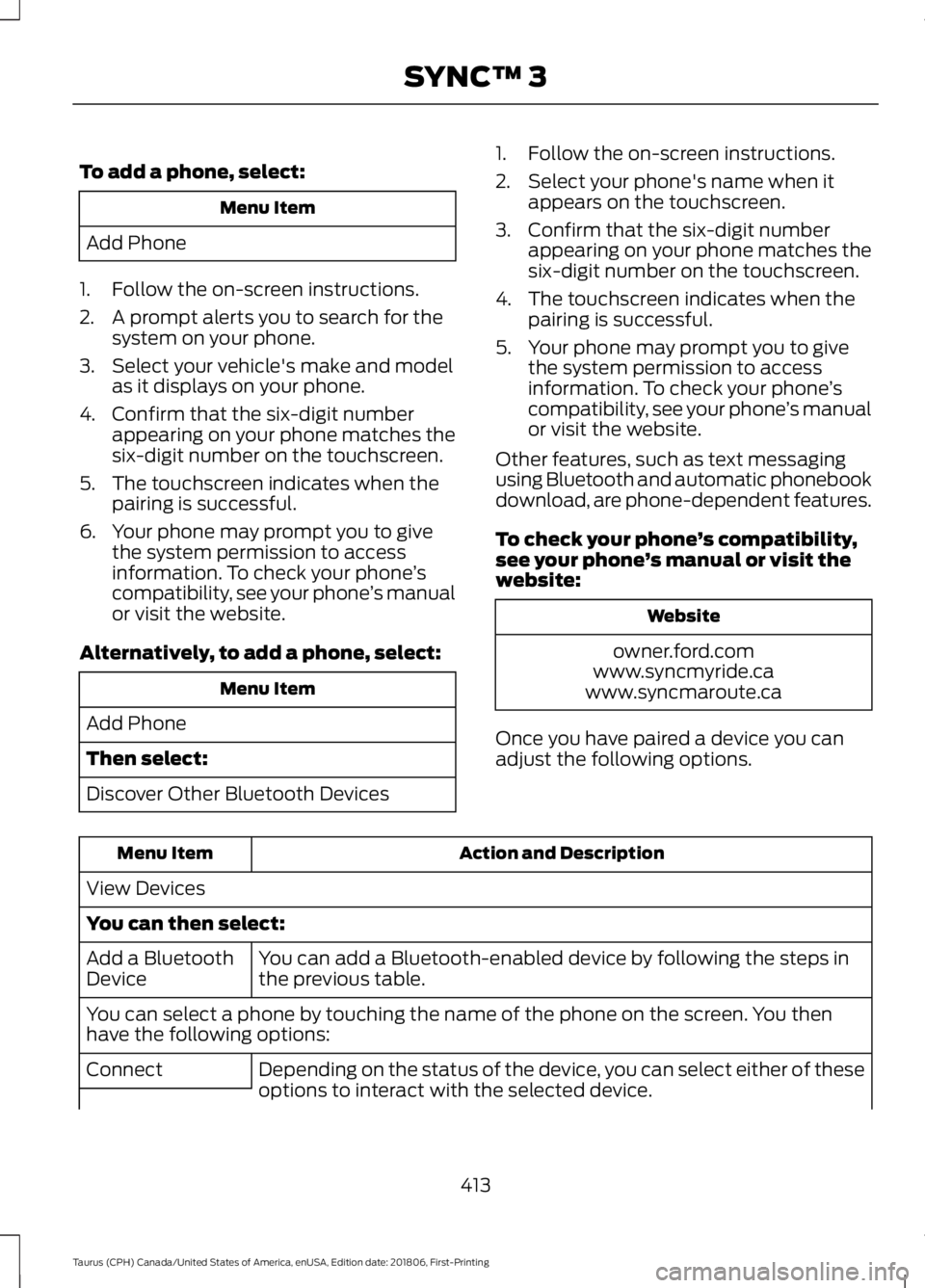
To add a phone, select:
Menu Item
Add Phone
1. Follow the on-screen instructions.
2. A prompt alerts you to search for the system on your phone.
3. Select your vehicle's make and model as it displays on your phone.
4. Confirm that the six-digit number appearing on your phone matches the
six-digit number on the touchscreen.
5. The touchscreen indicates when the pairing is successful.
6. Your phone may prompt you to give the system permission to access
information. To check your phone ’s
compatibility, see your phone ’s manual
or visit the website.
Alternatively, to add a phone, select: Menu Item
Add Phone
Then select:
Discover Other Bluetooth Devices 1. Follow the on-screen instructions.
2. Select your phone's name when it
appears on the touchscreen.
3. Confirm that the six-digit number appearing on your phone matches the
six-digit number on the touchscreen.
4. The touchscreen indicates when the pairing is successful.
5. Your phone may prompt you to give the system permission to access
information. To check your phone ’s
compatibility, see your phone ’s manual
or visit the website.
Other features, such as text messaging
using Bluetooth and automatic phonebook
download, are phone-dependent features.
To check your phone ’s compatibility,
see your phone ’s manual or visit the
website: Website
owner.ford.com
www.syncmyride.ca
www.syncmaroute.ca
Once you have paired a device you can
adjust the following options. Action and Description
Menu Item
View Devices
You can then select: You can add a Bluetooth-enabled device by following the steps in
the previous table.
Add a Bluetooth
Device
You can select a phone by touching the name of the phone on the screen. You then
have the following options:
Depending on the status of the device, you can select either of these
options to interact with the selected device.
Connect
413
Taurus (CPH) Canada/United States of America, enUSA, Edition date: 201806, First-Printing SYNC™ 3
Page 429 of 515
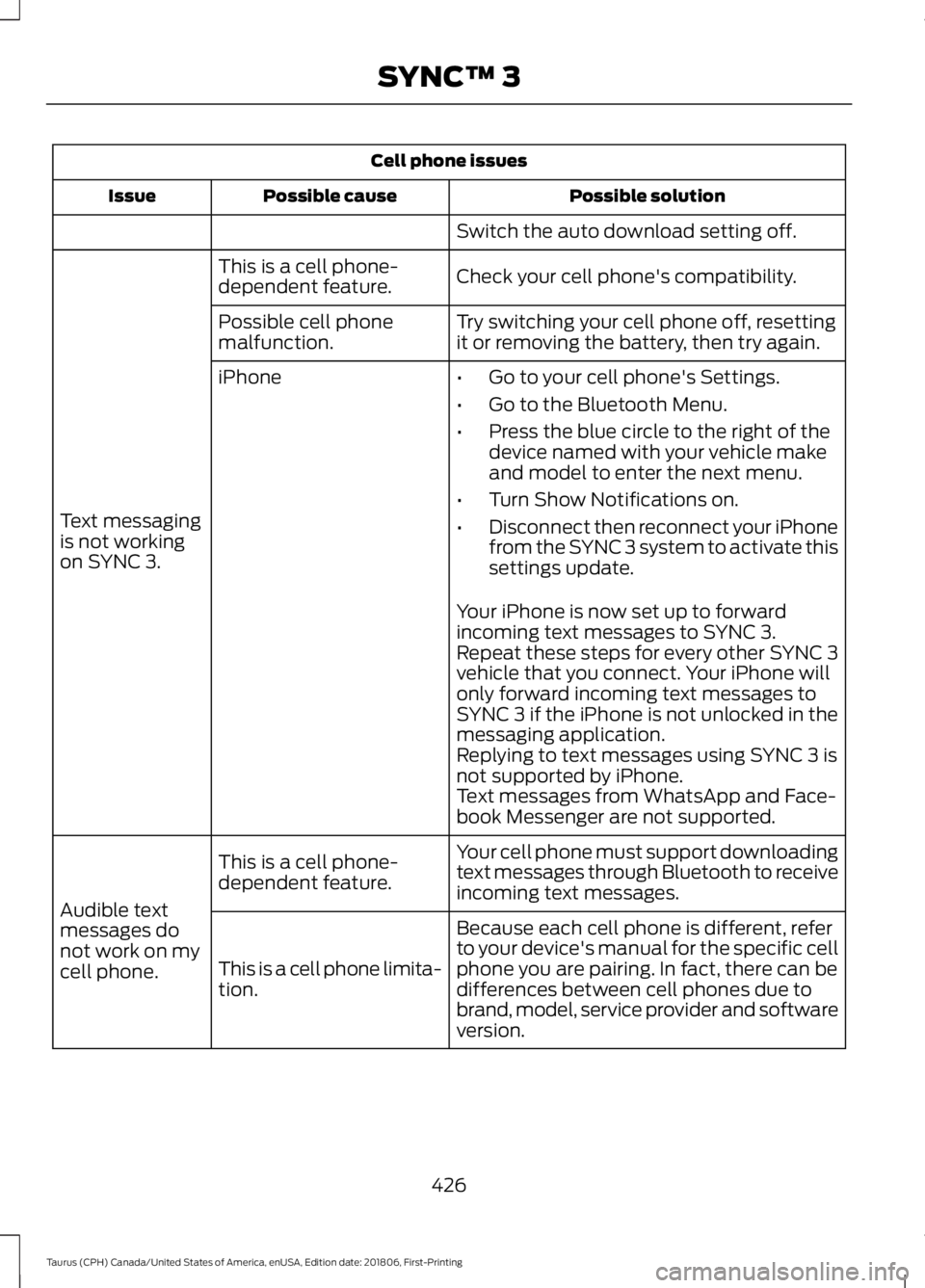
Cell phone issues
Possible solution
Possible cause
Issue
Switch the auto download setting off.
Check your cell phone's compatibility.
This is a cell phone-
dependent feature.
Text messaging
is not working
on SYNC 3. Try switching your cell phone off, resetting
it or removing the battery, then try again.
Possible cell phone
malfunction.
iPhone
•Go to your cell phone's Settings.
• Go to the Bluetooth Menu.
• Press the blue circle to the right of the
device named with your vehicle make
and model to enter the next menu.
• Turn Show Notifications on.
• Disconnect then reconnect your iPhone
from the SYNC 3 system to activate this
settings update.
Your iPhone is now set up to forward
incoming text messages to SYNC 3.
Repeat these steps for every other SYNC 3
vehicle that you connect. Your iPhone will
only forward incoming text messages to
SYNC 3 if the iPhone is not unlocked in the
messaging application.
Replying to text messages using SYNC 3 is
not supported by iPhone.
Text messages from WhatsApp and Face-
book Messenger are not supported.
Your cell phone must support downloading
text messages through Bluetooth to receive
incoming text messages.
This is a cell phone-
dependent feature.
Audible text
messages do
not work on my
cell phone. Because each cell phone is different, refer
to your device's manual for the specific cell
phone you are pairing. In fact, there can be
differences between cell phones due to
brand, model, service provider and software
version.
This is a cell phone limita-
tion.
426
Taurus (CPH) Canada/United States of America, enUSA, Edition date: 201806, First-Printing SYNC™ 3
Page 511 of 515

Moonroof............................................................77
Bounce-Back......................................................... 78
Opening and Closing the Moonroof..............78
Venting the Moonroof......................................... 78
Motorcraft Parts - 3.5L Duratec.............294
Motorcraft Parts - 3.5L Ecoboost™.................................................295
MyKey Troubleshooting...............................53
MyKey ™..............................................................51
Principle of Operation.......................................... 51
N
Navigation......................................................399 cityseeker............................................................. 406
Destination Mode............................................... 401
Map Mode............................................................ 399
Navigation Map Updates................................ 407
Navigation Menu............................................... 404
SiriusXM Traffic and Travel Link................... 407
SYNC AppLink.................................................... 406
Waypoints............................................................ 405
Normal Scheduled Maintenance..........445 Intelligent Oil-Life Monitor™........................ 445
Normal Maintenance Intervals.................... 446
O
Oil Change Indicator Reset......................239
Oil Check See: Engine Oil Check...................................... 238
Opening and Closing the Hood..............234 Closing the Hood............................................... 235
Opening the Hood............................................. 234
Ordering Additional Owner's Literature.......................................................221
Obtaining a French Owner ’s Manual...........221
Overhead Console.......................................130
P
Parking Aids
....................................................167
Principle of Operation....................................... 167
Parking Brake
..................................................161
Passive Anti-Theft System.........................62 SecuriLock®........................................................... 62
PATS See: Passive Anti-Theft System..................... 62Pedals................................................................66
Perchlorate.........................................................11
Personal Safety System
™
..........................36
How Does the Personal Safety System
Work?.................................................................. 36
Phone...............................................................393 During a Phone Call.......................................... 397
Making Calls........................................................ 396
Pairing Your Cell Phone for the First Time................................................................... 393
Phone Menu........................................................ 394
Receiving Calls.................................................... 397
Smartphone Connectivity.............................. 398
Text Messaging.................................................. 398
Post-Crash Alert System...........................214
Power Door Locks See: Locking and Unlocking............................. 55
Power Seats.....................................................117 Adjusting the Lumbar Support....................... 119
Adjusting the Multi-Contour Front Seats With Active Motion ....................................... 119
Power Steering Fluid Check....................248
Power Windows
..............................................74
Accessory Delay.................................................... 75
Bounce-Back.......................................................... 74
One-Touch Down................................................. 74
One-Touch Up....................................................... 74
Window Lock.......................................................... 75
Protecting the Environment........................14
Puncture See: Changing a Road Wheel........................ 287
R
Rear Parking Aid............................................167 Obstacle Distance Indicator.......................... 168
Rear Seat Armrest........................................130
Rear Seats
........................................................121
Split-folding Rear Seat...................................... 121
Rear View Camera
........................................172
Using the Rear View Camera System..........173
Rear View Camera See: Rear View Camera.................................... 172
Recommended Towing Weights...........203
Refueling.........................................................140 Refueling System Overview........................... 140
Refueling System Warning.............................. 142
Refueling Your Vehicle....................................... 141
508
Taurus (CPH) Canada/United States of America, enUSA, Edition date: 201806, First-Printing Index
Page 512 of 515
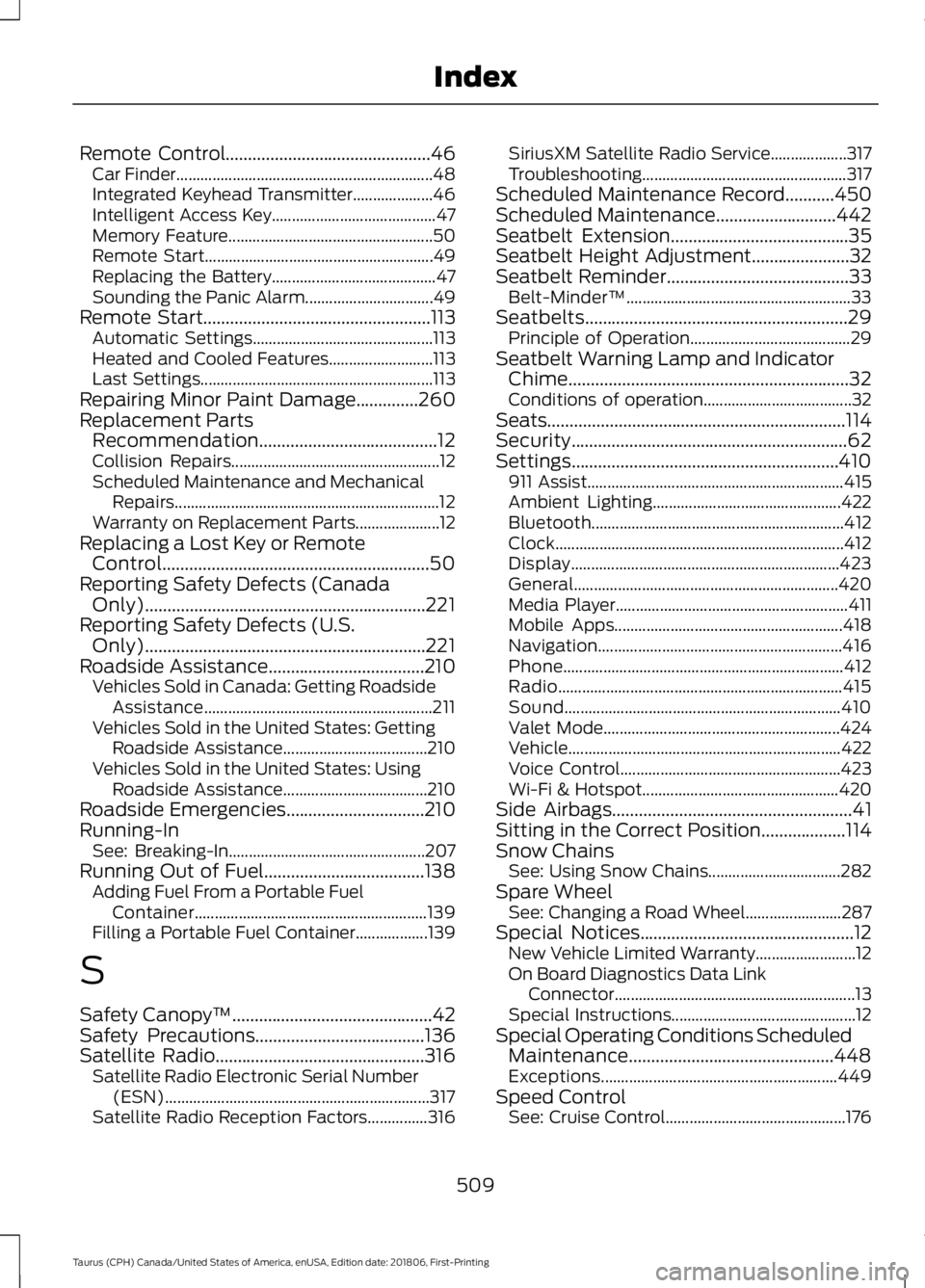
Remote Control..............................................46
Car Finder................................................................ 48
Integrated Keyhead Transmitter.................... 46
Intelligent Access Key......................................... 47
Memory Feature................................................... 50
Remote Start......................................................... 49
Replacing the Battery......................................... 47
Sounding the Panic Alarm................................ 49
Remote Start
...................................................113
Automatic Settings............................................. 113
Heated and Cooled Features.......................... 113
Last Settings.......................................................... 113
Repairing Minor Paint Damage..............260
Replacement Parts Recommendation........................................12
Collision Repairs.................................................... 12
Scheduled Maintenance and Mechanical Repairs.................................................................. 12
Warranty on Replacement Parts..................... 12
Replacing a Lost Key or Remote Control............................................................50
Reporting Safety Defects (Canada Only)...............................................................221
Reporting Safety Defects (U.S. Only)...............................................................221
Roadside Assistance
...................................210
Vehicles Sold in Canada: Getting Roadside
Assistance......................................................... 211
Vehicles Sold in the United States: Getting Roadside Assistance.................................... 210
Vehicles Sold in the United States: Using Roadside Assistance.................................... 210
Roadside Emergencies
...............................210
Running-In See: Breaking-In................................................. 207
Running Out of Fuel....................................138 Adding Fuel From a Portable Fuel
Container.......................................................... 139
Filling a Portable Fuel Container.................. 139
S
Safety Canopy ™
.............................................42
Safety Precautions......................................136
Satellite Radio...............................................316 Satellite Radio Electronic Serial Number
(ESN).................................................................. 317
Satellite Radio Reception Factors...............316 SiriusXM Satellite Radio Service...................
317
Troubleshooting................................................... 317
Scheduled Maintenance Record
...........450
Scheduled Maintenance...........................442
Seatbelt Extension........................................35
Seatbelt Height Adjustment......................32
Seatbelt Reminder
.........................................33
Belt-Minder™........................................................ 33
Seatbelts...........................................................29 Principle of Operation........................................ 29
Seatbelt Warning Lamp and Indicator Chime...............................................................32
Conditions of operation..................................... 32
Seats
...................................................................114
Security..............................................................62
Settings............................................................410 911 Assist................................................................ 415
Ambient Lighting............................................... 422
Bluetooth............................................................... 412
Clock........................................................................\
412
Display................................................................... 423
General.................................................................. 420
Media Player.......................................................... 411
Mobile Apps......................................................... 418
Navigation............................................................. 416
Phone...................................................................... 412
Radio....................................................................... 415
Sound..................................................................... 410
Valet Mode........................................................... 424
Vehicle.................................................................... 422
Voice Control....................................................... 423
Wi-Fi & Hotspot................................................. 420
Side Airbags
......................................................41
Sitting in the Correct Position...................114
Snow Chains See: Using Snow Chains................................. 282
Spare Wheel See: Changing a Road Wheel........................ 287
Special Notices................................................12 New Vehicle Limited Warranty......................... 12
On Board Diagnostics Data Link Connector............................................................ 13
Special Instructions.............................................. 12
Special Operating Conditions Scheduled Maintenance..............................................448
Exceptions........................................................... 449
Speed Control See: Cruise Control............................................. 176
509
Taurus (CPH) Canada/United States of America, enUSA, Edition date: 201806, First-Printing Index
Page 514 of 515

Radio Frequency Certifications for Cruise
Control Module............................................. 498
Radio Frequency Certifications for Mid Range Radar.................................................... 491
Radio Frequency Certifications for Passive Anti-Theft System....................................... 492
Radio Frequency Certifications for Radio Transceiver Module..................................... 495
Radio Frequency Certifications for SYNC 3........................................................................\
.. 498
Radio Frequency Certifications for Tire Pressure Monitoring Sensor(s)...............488
Radio Frequency Certifications for Wireless Charging.......................................................... 498
Radio Frequency Statement for Audio Unit.................................................................... 499
U
Under Hood Overview - 3.5L Duratec.........................................................235
Engine Shield....................................................... 236
Under Hood Overview - 3.5L Ecoboost™..................................................237
Universal Garage Door Opener................124 HomeLink Wireless Control System............124
USB Port..........................................................319
Using Adaptive Cruise Control.................177 Automatic Cancellation.................................. 180
Blocked Sensor.................................................... 181
Canceling the Set Speed................................ 180
Changing the Set Speed................................. 180
Detection Issues................................................. 180
Following a Vehicle............................................ 178
Hilly Condition Usage....................................... 180
Overriding the Set Speed................................. 179
Resuming the Set Speed................................ 180
Setting the Adaptive Cruise Speed..............178
Setting the Gap Distance................................. 179
Switching Adaptive Cruise Control Off....................................................................... 180
Switching Adaptive Cruise Control On........................................................................\
178
Switching to Normal Cruise Control............182
System Not Available........................................ 181
Using All-Wheel Drive
.................................153
Driving In Special Conditions With
All-Wheel Drive (AWD)............................... 155Operating AWD Vehicles With Mismatched
Tires.................................................................... 155
Operating AWD Vehicles With Spare Tires.................................................................... 154
Using Cruise Control....................................176 Canceling the Set Speed................................. 176
Changing the Set Speed.................................. 176
Resuming the Set Speed.................................. 177
Setting the Cruise Speed................................. 176
Switching Cruise Control Off........................... 177
Switching Cruise Control On........................... 176
Using MyKey With Remote Start Systems..........................................................53
Using Snow Chains.....................................282
Using Stability Control
...............................165
Using Summer Tires...................................282
Using SYNC™ With Your Media Player.............................................................342
Accessing Your Play Menu.............................. 347
Connecting Your Digital Media Player to the USB Port........................................................... 342
Media Menu Features...................................... 345
Media Voice Commands................................ 344
System Settings................................................. 349
What's Playing?................................................. 344
Using SYNC™ With Your Phone............326 Accessing Features Through the Phone
Menu.................................................................. 330
Accessing Your Phone Settings.................... 335
Making a Call....................................................... 329
Pairing Subsequent Cell Phones.................. 327
Pairing Your Cell Phone for the First Time ........................................................................\
..... 326
Phone Options during an Active Call.........329
Phone Voice Commands................................. 327
Receiving Calls.................................................... 329
System Settings................................................. 336
Text Messaging................................................... 333
Using Traction Control
................................163
Switching the System Off............................... 163
System Indicator Lights and Messages.......................................................... 163
Using a Switch..................................................... 163
Using the Information Display Controls............................................................. 163
Using Voice Recognition............................323 Audio Voice Commands.................................. 375
511
Taurus (CPH) Canada/United States of America, enUSA, Edition date: 201806, First-Printing Index