2019 FORD RANGER speed
[x] Cancel search: speedPage 6 of 512

Running Out of Fuel
....................................142
Refueling .........................................................
144
Fuel Consumption ......................................
146
Engine Emission Control
Emission Law ................................................
148
Catalytic Converter .....................................
149
Transmission
Automatic Transmission ...........................
152
Four-Wheel Drive
Principle of Operation ................................
156
Using Four-Wheel Drive ............................
156
Rear Axle
Electronic Locking Differential ...............
163
Brakes
General Information ...................................
165
Hints on Driving With Anti-Lock Brakes ........................................................................\
.
165
Parking Brake ................................................
166
Hill Start Assist .............................................
166
Traction Control
Principle of Operation ...............................
168
Using Traction Control ..............................
168
Stability Control
Principle of Operation ...............................
169
Using Stability Control ...............................
170
Terrain Control
Principle of Operation ................................
172
Trail Control
About Trail Control ......................................
174
Switching Trail Control On and Off .......
174
Setting the Trail Control Speed ..............
174Canceling the Set Speed
..........................
174
Trail Control Indicators ...............................
174
Trail Control – Troubleshooting ..............
175
Parking Aids
Principle of Operation ................................
176
Rear Parking Aid ...........................................
176
Front Parking Aid ..........................................
177
Rear View Camera .......................................
178
Cruise Control
Principle of Operation ................................
182
Using Cruise Control ...................................
182
Using Adaptive Cruise Control ...............
183
Driving Aids
Driver Alert .....................................................
190
Lane Keeping System .................................
191
Blind Spot Information System .............
196
Cross Traffic Alert ........................................
199
Steering ..........................................................
202
Pre-Collision Assist ....................................
203
Load Carrying
Load Limit ......................................................
207
Roof Racks and Load Carriers ..................
211
Load Retaining Fixtures ..............................
211
Tailgate
Tailgate Lock ..................................................
213
Manual Tailgate ............................................
213
Removing the Tailgate ...............................
213
Towing
Towing a Trailer .............................................
215
Trailer Sway Control ...................................
216
Recommended Towing Weights ...........
216
Essential Towing Checks ..........................
218
Towing the Vehicle on Four Wheels ......
221
3
Ranger (TFG) Canada/United States of America, enUSA, Edition date: 201809, Fourth-Printing Table of Contents
Page 13 of 512

Your vehicle has electronic control units
that have data recording functionality and
the ability to permanently or temporarily
store data. This data could include
information on the condition and status of
your vehicle, vehicle maintenance
requirements, events and malfunctions.
The types of data that can be recorded are
described in this section. Some of the data
recorded is stored in event logs or error
logs.
Note:
Error logs are reset following a service
or repair.
Note: We may provide information in
response to requests from law enforcement,
other government authorities and third
parties acting with lawful authority or
through a legal process. Such information
could be used by them in legal proceedings.
Data recorded includes, for example:
• Operating states of system
components, for example fuel level,
tire pressure and battery charge level.
• Vehicle and component status, for
example wheel speed, deceleration,
lateral acceleration and seatbelt
status.
• Events or errors in essential systems,
for example headlamps and brakes.
• System responses to driving situations,
for example airbag deployment and
stability control.
• Environmental conditions, for example
temperature.
Some of this data, when used in
combination with other information, for
example an accident report, damage to a
vehicle or eyewitness statements, could
be associated with a specific person. Service Data
Service data recorders in your vehicle are
capable of collecting and storing
diagnostic information about your vehicle.
This potentially includes information about
the performance or status of various
systems and modules in the vehicle, such
as engine, throttle, steering or brake
systems. In order to properly diagnose and
service your vehicle, Ford Motor Company
(Ford of Canada in Canada), and service
and repair facilities may access or share
among them vehicle diagnostic
information received through a direct
connection to your vehicle when
diagnosing or servicing your vehicle.
Additionally, Ford Motor Company (Ford
of Canada, in Canada) may, where
permitted by law, use vehicle diagnostic
information for vehicle improvement or
with other information we may have about
you, (for example, your contact
information), to offer you products or
services that may interest you. Data may
be provided to our service providers such
as part suppliers that may help diagnose
malfunctions, and who are similarly
obligated to protect data. We retain this
data only as long as necessary to perform
these functions or to comply with law. We
may provide information where required
in response to official requests to law
enforcement or other government
authorities or third parties acting with
lawful authority or court order, and such
information may be used in legal
proceedings. For U.S. only (if equipped), if
you choose to use connected apps and
services, you consent that certain
diagnostic information may also be
accessed electronically by Ford Motor
Company and Ford authorized service
facilities, and that the diagnostic
information may be used to provide
services to you, personalizing your
experience, troubleshoot, and to improve
products and services and offer you
10
Ranger (TFG) Canada/United States of America, enUSA, Edition date: 201809, Fourth-Printing Introduction
Page 18 of 512

interference with or even damage to
vehicle systems. We do not recommend
or endorse the use of aftermarket plug-in
devices unless approved by Ford. The
vehicle Warranty will not cover damage
caused by an aftermarket plug-in device.
Notice to Owners of Pickup Trucks
and Utility Type Vehicles
WARNING: Utility vehicles have a
significantly higher rollover rate than
other types of vehicles.
Before you drive your vehicle, please read
this Owner ’s Guide carefully. Your vehicle
is not a passenger car. As with other
vehicles of this type, failure to operate this
vehicle correctly may result in loss of
vehicle control, vehicle rollover, personal
injury or death.
Using Your Vehicle With a
Snowplow
Do not use this vehicle for
snowplowing.
Your vehicle does not have a snowplowing
package.
Using Your Vehicle as an
Ambulance
Do not use this vehicle as an
ambulance.
Your vehicle does not have the Ford
Ambulance Preparation Package. Fleet Telematics Modem
(If Equipped)
The onboard modem provides access to
data to support telematics services such
as location, speed, idle time, fuel, vehicle
diagnostics and maintenance alerts. To
explore data, telematics services, third
party service provider support and to
manage existing telematics accounts, refer
to www.commericalsolutions.ford.com or
call 833-FCS-FORD
Note: This is not available with FordPass
Connect.
FordPass Connect
(If Equipped)
With a FordPass Connect-equipped
vehicle, you can use FordPass to track your
vehicle ’s location and remotely access
vehicle features such as start, lock and
unlock and vehicle status including fuel
level and approximate mileage. Message
and data rates may apply. Services may
be limited by mobile phone network
coverage area. For additional information,
refer to www.fordpass.com.
MOBILE COMMUNICATIONS
EQUIPMENT WARNING:
Driving while
distracted can result in loss of vehicle
control, crash and injury. We strongly
recommend that you use extreme
caution when using any device that may
take your focus off the road. Your
primary responsibility is the safe
operation of your vehicle. We
recommend against the use of any
hand-held device while driving and
encourage the use of voice-operated
systems when possible. Make sure you
are aware of all applicable local laws
that may affect the use of electronic
devices while driving.
15
Ranger (TFG) Canada/United States of America, enUSA, Edition date: 201809, Fourth-Printing Introduction
Page 41 of 512

When the initial warning expires for the
driver, more warnings are provided for the
driver and front passenger. This lamp
illuminates and a warning tone sounds if
you or your front passenger do not fasten
the seatbelt buckle and the vehicle speed
exceeds 6 mph (9.7 km/h). To deactivate
the warning, see Deactivating and
Activating the Belt-Minder Feature.
Note: To avoid inadvertent warnings, do
not place large objects on the seat. This lamp illuminates when you
switch the ignition on, identifying
the number of seating positions
with fastened buckles. It illuminates again
when a seating position changes from
unfastened to fastened. This warning displays and a tone sounds
if an occupant unfastens the rear seatbelt
buckle or it becomes unfastened.
Note:
If a rear seat is unoccupied, or an
occupant never fastens the seatbelt buckle
to begin with, the warning will not display.
Note: Front seating positions appear in this
warning display. Warnings for unfastened
front seatbelt buckles appear in the initial
warning lamp. Seatbelt Status
Seatbelt fastened.
A
Seatbelt not fastened.
B
Seatbelt recently unfastened.
C
Fault
D
To view the seatbelt status, use the
information display controls on the
steering wheel.
Deactivating and Activating the
Seatbelt Reminder (Front Seats Only) WARNING:
While the system
allows you to deactivate it, this system
is designed to improve your chances of
being safely belted and surviving an
accident. We recommend you leave the
system activated for yourself and others
who may use the vehicle.
38
Ranger (TFG) Canada/United States of America, enUSA, Edition date: 201809, Fourth-Printing SeatbeltsE206718 E283584 E281361 E274703
Page 42 of 512

Note:
The driver and front passenger
warnings switch on and off independently.
When you perform this procedure for one
seating position, do not buckle the other
position as this terminates the process.
Read Steps 1 - 4 before starting the
procedure.
Make sure that:
• You set the parking brake.
• The transmission is in park (P).
• The ignition is off.
• You close all vehicle doors.
• You unbuckle the driver and front
passenger seatbelts.
1. Switch the ignition on. Do not start the
engine.
2. Wait until the seatbelt warning lamp turns off (about one minute). After
Step 2, wait an additional five seconds
before proceeding with Step 3. Once
you start Step 3, you must complete
the procedure within 60 seconds.
3. For the seating position you are switching off, buckle then unbuckle the
seatbelt three times at a moderate
speed, ending in the unbuckled state.
After Step 3, the seatbelt warning lamp
turns on.
4. When the seatbelt warning lamp is on,
buckle then unbuckle the seatbelt.
After Step 4, the seatbelt warning lamp
flashes for confirmation.
• This switches the feature off if it is
currently on.
• This switches the feature on if it is
currently off. CHILD RESTRAINT AND
SEATBELT MAINTENANCE
Inspect the vehicle seatbelts and child
safety seat systems periodically to make
sure they work properly and are not
damaged. Inspect the vehicle and child
restraint seatbelts to make sure there are
no nicks, tears or cuts. Replace if
necessary. All vehicle seatbelt assemblies,
including retractors, buckles, front seatbelt
buckle assemblies, buckle support
assemblies (slide bar-if equipped),
shoulder belt height adjusters (if
equipped), shoulder belt guide on seat
backrest (if equipped), child safety seat
LATCH and tether anchors, and attaching
hardware, should be inspected after a
crash. Read the child restraint
manufacturer's instructions for additional
inspection and maintenance information
specific to the child restraint.
We recommend that all seatbelt
assemblies in use in vehicles involved in a
crash be replaced. However, if the crash
was minor and an authorized dealer finds
that the belts do not show damage and
continue to operate properly, they do not
need to be replaced. Seatbelt assemblies
not in use during a crash should also be
inspected and replaced if either damage
or improper operation is noted.
Properly care for seatbelts. See Vehicle
Care (page 273).
SEATBELT EXTENSIONS WARNING:
Persons who fit into
the vehicle's seatbelt should not use an
extension. Unnecessary use could result
in serious personal injury in the event of
a crash.
39
Ranger (TFG) Canada/United States of America, enUSA, Edition date: 201809, Fourth-Printing Seatbelts
Page 60 of 512

PRINCIPLE OF OPERATION
MyKey allows you to program keys with
restricted driving modes to promote good
driving habits. You can program the
restrictions to all keys except one. Any keys
that you did not program are administrator
keys or admin keys.
You can use admin keys to:
•
Create a MyKey with certain vehicle
restrictions.
• Program certain MyKey settings.
• Clear all MyKey restrictions.
After you program a MyKey, you can view
the following information through the
information display:
• The total number of admin keys and
MyKeys for your vehicle.
• The total distance a MyKey driver
traveled with your vehicle.
Note: Every MyKey receives the same
restrictions and settings. You cannot
program them individually.
Note: For vehicles equipped with a
push-button start switch: When both a
MyKey and an admin key are present when
you start your vehicle, the system recognizes
the admin key only. Standard Settings
Not every vehicle includes the features
listed below. If your vehicle has this
equipment, then you cannot change the
following settings when using a MyKey:
•
Seatbelt reminder or Belt-Minder™.
MyKey mutes the audio system until
drivers, and in some instances,
passengers, fasten their seatbelts.
Note: If your vehicle includes an
AM/FM radio or a very basic audio
system, then the radio may not mute.
• Earlier low-fuel warning. The low-fuel
warning activates earlier for MyKey
drivers, giving them more time to refuel.
• Certain driver alerts, stability systems
or parking aids turn on automatically
when you use the MyKey system. For
example, Blind Spot Information
System (BLIS), cross traffic alert, lane
departure warning or forward collision
warning. Note:
MyKey drivers may be
able to turn the lane departure warning
feature off, but this feature turns back
on automatically with every new key
cycle.
• Restricted touchscreen operation in
some markets. For example, MyKey
may prevent manual navigation
destination input while the vehicle is in
any gear other than park (P) or when
the vehicle reaches a certain rate of
speed.
• Satellite radio adult content
restrictions, if this feature is available
in your market.
Optional Settings
You can configure certain vehicle feature
settings when you first create a MyKey. You
can also change the settings afterward
with an admin key.
57
Ranger (TFG) Canada/United States of America, enUSA, Edition date: 201809, Fourth-Printing MyKey
™
Page 61 of 512

Note:
Not every feature applies to every
vehicle in every market. When they are
available for your vehicle, then they appear
in your information display, providing
choices to switch them on or off, or to select
a more specific setting.
• Various vehicle speed limits so the
MyKey driver cannot exceed certain
speeds. The information display shows
warnings followed by an audible tone
when the MyKey driver reaches the set
speed. You cannot override the set
speed by fully depressing the
accelerator pedal. WARNING: Do not set MyKey
maximum speed limit to a limit that will
prevent the driver from maintaining a
safe speed considering posted speed
limits and prevailing road conditions. The
driver is always responsible to drive in
accordance with local laws and
prevailing conditions. Failure to do so
could result in accident or injury. •
Various vehicle speed reminders so
MyKey drivers know when their vehicle
speed approaches the limits. Warnings
appear in your information display and
a tone sounds when the MyKey drivers
exceed the set vehicle speed.
• The audio system's maximum volume
limits to 45% so MyKey drivers can
concentrate on the road. A message
appears in the information display
when MyKey drivers attempt to exceed
the limited volume. MyKey also
disables the automatic volume control.
Note:
If your vehicle includes an
AM/FM radio or a very basic audio
system, then the radio may not limit.
• Always on setting. This setting forces
certain features to remain on and
active for MyKey drivers. For example,
E911 or emergency assistance and the
do not disturb features stay on even if
a MyKey driver uses the feature's
control to switch it off. When selected,
you will not be able to turn off Advance
Trac or traction control (if your vehicle
has this feature).
CREATING A MYKEY
Use the information display to create a
MyKey:
1. Insert the key you want to program into
the ignition. If your vehicle is equipped
with a push-button start, place the
remote control into the backup slot.
See
Passive Key Backup Position
(page 56).
2. Switch the ignition on.
3. Access the main menu in the information display and then scroll
through the menus to change the
settings of your MyKey. From the
MyKey menu select the option Create
MyKey. See
Information Displays
(page 90).
58
Ranger (TFG) Canada/United States of America, enUSA, Edition date: 201809, Fourth-Printing MyKey
™
Page 66 of 512
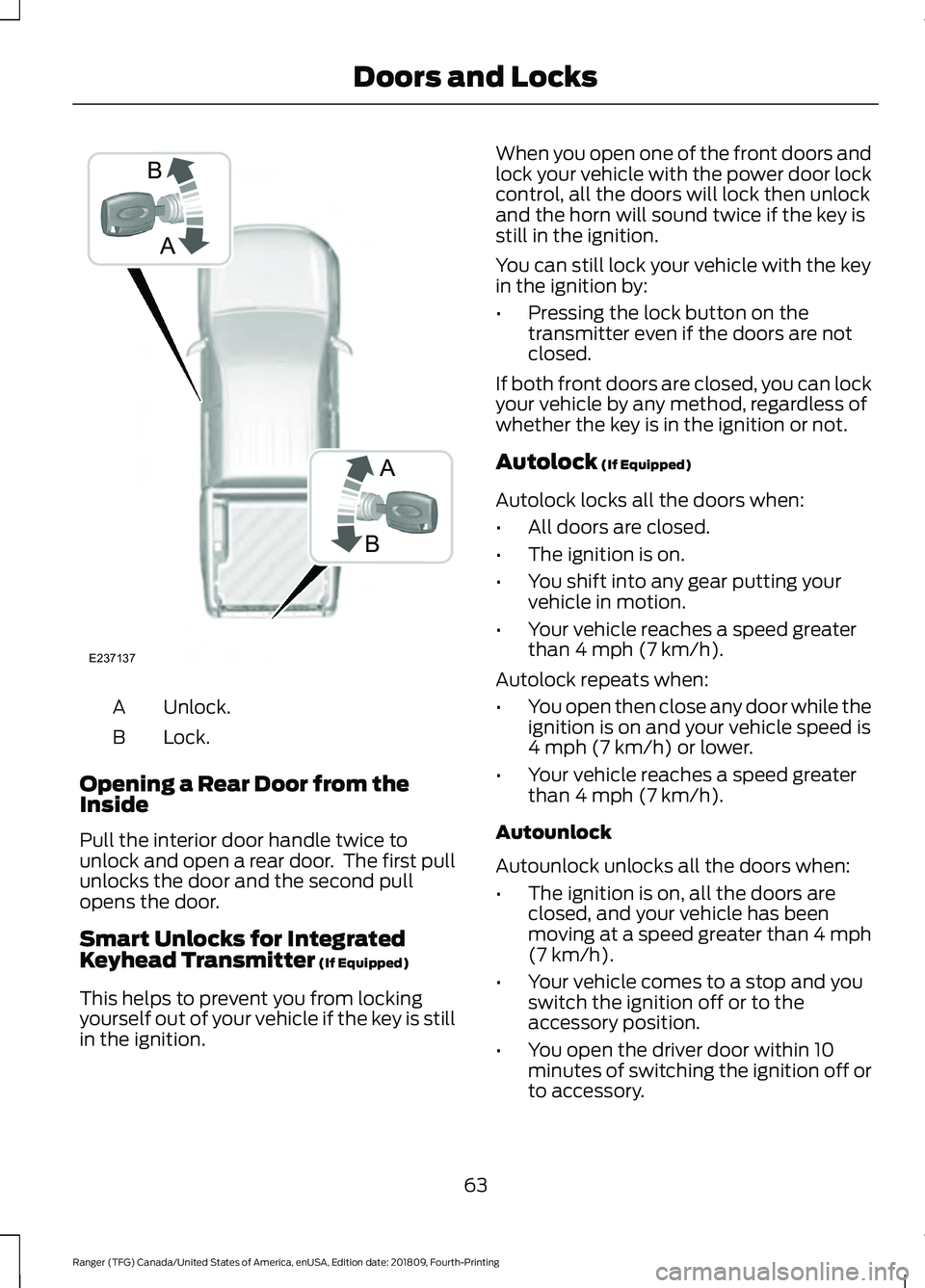
Unlock.
A
Lock.
B
Opening a Rear Door from the
Inside
Pull the interior door handle twice to
unlock and open a rear door. The first pull
unlocks the door and the second pull
opens the door.
Smart Unlocks for Integrated
Keyhead Transmitter (If Equipped)
This helps to prevent you from locking
yourself out of your vehicle if the key is still
in the ignition. When you open one of the front doors and
lock your vehicle with the power door lock
control, all the doors will lock then unlock
and the horn will sound twice if the key is
still in the ignition.
You can still lock your vehicle with the key
in the ignition by:
•
Pressing the lock button on the
transmitter even if the doors are not
closed.
If both front doors are closed, you can lock
your vehicle by any method, regardless of
whether the key is in the ignition or not.
Autolock
(If Equipped)
Autolock locks all the doors when:
• All doors are closed.
• The ignition is on.
• You shift into any gear putting your
vehicle in motion.
• Your vehicle reaches a speed greater
than
4 mph (7 km/h).
Autolock repeats when:
• You open then close any door while the
ignition is on and your vehicle speed is
4 mph (7 km/h)
or lower.
• Your vehicle reaches a speed greater
than
4 mph (7 km/h).
Autounlock
Autounlock unlocks all the doors when:
• The ignition is on, all the doors are
closed, and your vehicle has been
moving at a speed greater than 4 mph
(7 km/h)
.
• Your vehicle comes to a stop and you
switch the ignition off or to the
accessory position.
• You open the driver door within 10
minutes of switching the ignition off or
to accessory.
63
Ranger (TFG) Canada/United States of America, enUSA, Edition date: 201809, Fourth-Printing Doors and LocksA
B
B
A
E237137