2019 FORD RANGER speed
[x] Cancel search: speedPage 72 of 512
WINDSHIELD WIPERS
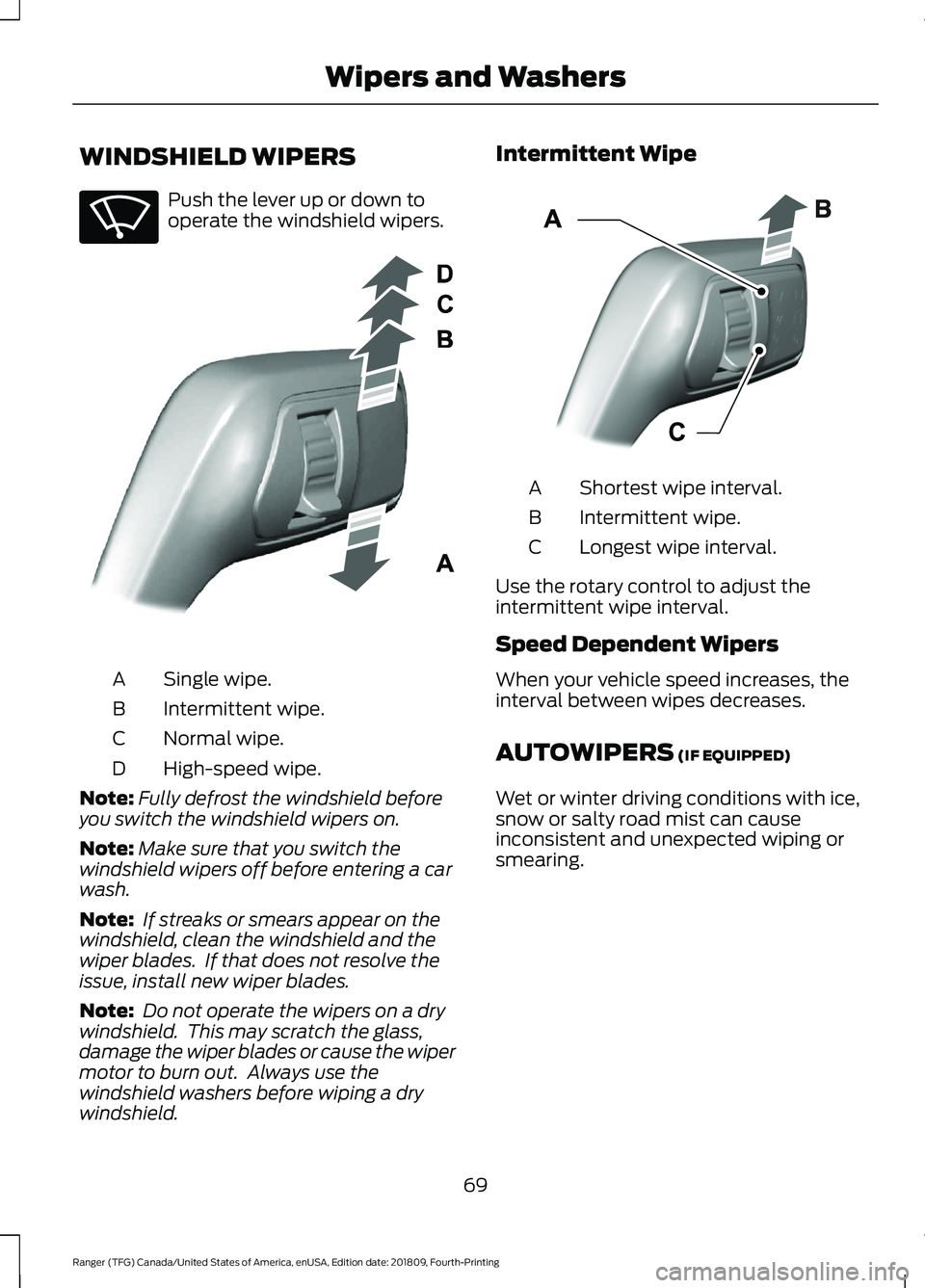
Push the lever up or down to
operate the windshield wipers.
Single wipe.
A
Intermittent wipe.
B
Normal wipe.
C
High-speed wipe.
D
Note: Fully defrost the windshield before
you switch the windshield wipers on.
Note: Make sure that you switch the
windshield wipers off before entering a car
wash.
Note: If streaks or smears appear on the
windshield, clean the windshield and the
wiper blades. If that does not resolve the
issue, install new wiper blades.
Note: Do not operate the wipers on a dry
windshield. This may scratch the glass,
damage the wiper blades or cause the wiper
motor to burn out. Always use the
windshield washers before wiping a dry
windshield. Intermittent Wipe
Shortest wipe interval.
A
Intermittent wipe.
B
Longest wipe interval.
C
Use the rotary control to adjust the
intermittent wipe interval.
Speed Dependent Wipers
When your vehicle speed increases, the
interval between wipes decreases.
AUTOWIPERS (IF EQUIPPED)
Wet or winter driving conditions with ice,
snow or salty road mist can cause
inconsistent and unexpected wiping or
smearing.
69
Ranger (TFG) Canada/United States of America, enUSA, Edition date: 201809, Fourth-Printing Wipers and WashersE270969 E295996 E295997
Page 73 of 512

High sensitivity.
A
Autowipers On.
B
Low sensitivity.
C
Use the rotary control to adjust the
sensitivity of the autowipers. When you
select low sensitivity, the wipers operate
when the sensor detects a large amount
of water on the windshield. When you
select high sensitivity, the wipers operate
when the sensor detects a small amount
of water on the windshield.
Keep the outside of the windshield clean.
The rain sensor is very sensitive and the
wipers may operate if dirt, mist or insects
hit the windshield.
In these conditions, you can do the
following:
• Lower the sensitivity of the autowipers
to reduce the amount of smearing on
the windshield.
• Switch to normal or high-speed wipe.
• Switch autowipers off.
Note: Fully defrost the windshield before
you switch the windshield wipers on.
Note: Make sure that you switch the
windshield wipers off before entering a car
wash. Note:
If streaks or smears appear on the
windshield, clean the windshield and the
wiper blades. If that does not resolve the
issue, install new wiper blades.
Note: If you switch autolamps and
autowipers on, the headlamps turn on when
the windshield wipers continuously operate.
Autowipers Settings
Autowipers defaults to on and remains on
until you switch it off in the information
display. When you switch off autowipers,
the wipers operate in intermittent mode.
WINDSHIELD WASHERS Pull the lever toward you to
operate the windshield washers.
When you release the lever, the wipers
operate for a short time. When activated,
a courtesy wipe occurs a short time after
the wipers stop to clear any remaining
washer fluid.
Note: You can switch courtesy wipe on or
off in the information display. See
Information Displays (page 90).
Note: Do not operate the washers when
the washer reservoir is empty. This could
cause the washer pump to overheat.
70
Ranger (TFG) Canada/United States of America, enUSA, Edition date: 201809, Fourth-Printing Wipers and WashersE295997 E296048 E270967
Page 77 of 512

If the daytime running lamps are off in the
information display, the lamps stay off in
all switch positions.
AUTOMATIC HIGH BEAM
CONTROL (IF EQUIPPED)
WARNING:
The system does not
relieve you of your responsibility to drive
with due care and attention. You may
need to override the system if it does not
turn the high beams on or off.
The system turns on high beams if it is dark
enough and no other traffic is present. If it
detects an approaching vehicle ’s
headlamps or tail lamps, or street lighting
ahead, the system turns off high beams
before they can distract other road users.
Low beams remain on.
Note: The system may not operate properly
if the sensor is blocked. Keep the windshield
free from obstruction or damage.
Note: The system may not operate properly
in cold or inclement conditions. You can
switch on the high beams by overriding the
system.
Note: If the system detects a blockage, for
example bird droppings, bug splatter, snow
or ice, the system goes into low beam mode
until you clear the blockage. A message may
appear in the information display if the
camera is blocked.
Note: Using much larger tires or equipping
vehicle accessories such as snowplows can
modify your vehicle's ride height and
degrade automatic high beam control
performance.
A camera sensor, centrally mounted
behind the windshield of your vehicle,
continuously monitors conditions to turn
the high beams on and off. Once the system is active, the high beams
turn on if:
•
The ambient light level is low enough.
• There is no traffic in front of your
vehicle.
• The vehicle speed is greater than
approximately
32 mph (51 km/h).
The system turns the high beams off if:
• The ambient light level is high enough
that high beams are not required.
• The system detects an approaching
vehicle's headlamps or tail lamps.
• The vehicle speed falls below
approximately
27 mph (44 km/h).
• The system detects severe rain, snow
or fog.
• The camera is blocked.
Switching the System On and Off
Switch the system on using the information
display. See Information Displays (page
90
). Switch the lighting control to the
autolamps position. See
Autolamps
(page 72).
Overriding the System
Push the lever away from you to switch
between high beam and low beam.
74
Ranger (TFG) Canada/United States of America, enUSA, Edition date: 201809, Fourth-Printing LightingE142451
Page 86 of 512

GAUGES
Type 1 and 2
Tachometer
A
Information Display (Type 2 shown Type 1 similar)
B
Speedometer
C
Fuel Gauge
D
Engine Coolant Temperature Gauge
E
Information Display
Odometer
Located in the bottom of the information
display. Registers the accumulated
distance your vehicle has traveled. Compass
Displays the vehicle
’s heading direction.
Trip Computer
See General Information (page 90).
83
Ranger (TFG) Canada/United States of America, enUSA, Edition date: 201809, Fourth-Printing Instrument ClusterE271817
Page 88 of 512

Type 3
Left Information Display
A
Speedometer
B
Right Information Display. See General Information (page 90).
C
Left Information Display
Odometer
Located in the bottom of the information
display. Registers the accumulated
distance your vehicle has traveled.
Trip Computer
See
General Information (page 90). Vehicle Settings and Personalization
See
General Information (page 90).
85
Ranger (TFG) Canada/United States of America, enUSA, Edition date: 201809, Fourth-Printing Instrument ClusterE272460
Page 89 of 512

WARNING LAMPS AND
INDICATORS
The following warning lamps and
indicators alert you to a vehicle condition
that may become serious. Some lamps
illuminate when you start your vehicle to
make sure they work. If any lamps remain
on after starting your vehicle, refer to the
respective system warning lamp for further
information.
Note:
Some warning indicators appear in
the information display and operate the
same as a warning lamp but do not
illuminate when you start your vehicle.
Adaptive Cruise Control Indicator
(If Equipped) It illuminates when you switch
the system on.
It illuminates white when the
system is in standby mode. It illuminates
green when you set the adaptive cruise
speed.
See Using Adaptive Cruise Control
(page 183).
Anti-Lock Braking System If it illuminates when you are
driving, this indicates a
malfunction. Your vehicle
continues to have normal braking without
the anti-lock brake system function. Have
your vehicle checked as soon as possible.
Automatic Headlamp High Beam
Indicator
(If Equipped) It illuminates when the system
automatically turns the
headlamp high beam on.
See
Automatic High Beam Control
(page 74). Auto-Start-Stop Indicator (If Equipped) It illuminates when the engine
has automatically stopped. It
flashes to inform you when the
engine needs to restart. The indicator is
shown with a strikethrough if the system
is not available.
See
Auto-Start-Stop (page 139).
Battery It illuminates when you switch
the ignition on.
If it illuminates when the engine
is running this indicates a malfunction.
Have your vehicle checked as soon as
possible.
Blind Spot Monitor
(If Equipped) It illuminates when you switch
the system off.
See
Blind Spot Information
System (page 196).
Brake System Warning Lamp WARNING:
Driving your vehicle
with the warning lamp on is dangerous.
A significant decrease in braking
performance may occur. It may take you
longer to stop your vehicle. Have your
vehicle checked as soon as possible.
Driving extended distances with the
parking brake engaged can cause brake
failure and the risk of personal injury.
Note: Indicators vary depending on region.
This lamp is a dual function lamp and will
illuminate when:
86
Ranger (TFG) Canada/United States of America, enUSA, Edition date: 201809, Fourth-Printing Instrument ClusterE144524 E151262
Page 94 of 512

Trip 1 and 2
Digital Speedo
Distance to E
Trip Odometer
Trip Timer
Average Fuel
Outside Temp.
All Values 1
1 Type 2
• Digital Speedometer - Shows the speed your vehicle is traveling.
• Distance to E - Shows the approximate distance your vehicle can travel before running
out of fuel.
• Trip Odometer — Registers the distance of individual journeys.
• Trip Timer — The timer stops when you turn your vehicle off and restarts when you
restart your vehicle.
• Average Fuel — Shows the average fuel economy for a given trip.
• Outside Temperature — Shows the outside air temperature.
• All Values — Shows the Distance to E, Trip Odometer, Trip Timer and Average Fuel.
Note: Press and hold OK on the current screen to reset the respective trip, distance, time
and fuel information. Fuel Economy
Distance to E
Inst Fuel Econ
Average Fuel
Fuel History 1
Average Speed
91
Ranger (TFG) Canada/United States of America, enUSA, Edition date: 201809, Fourth-Printing Information Displays
Page 95 of 512

Fuel Economy
All Values 1
Auto StartStop
1 Type 2
• Distance to Empty - Shows the approximate distance your vehicle can travel before
running out of fuel.
• Inst Fuel Economy - Shows a visual graph of your instantaneous fuel economy along
with your Avg MPG since the function was last reset.
• Average Fuel — Shows the average fuel economy for a given trip.
• Fuel History - Shows a bar chart of your fuel history.
• Average Speed — Shows your average speed for a given trip.
• All Values — Shows all fuel economy values (DTE, Inst Fuel Econ, Avg Fuel).
• Auto StartStop - Available Auto Start-Stop messaging will provide details about what
is happening with your system. See Information Messages (page 98).
Note: You can reset your average fuel economy by pressing and holding the
OK button on
the left hand steering wheel controls. Driver Assist
Traction control
Cross Traffic 1
Enter the submenu and select your setting
Cruise Control 1
Enter the submenu and select your setting
Driver Alert 1
Hill Start Assist Enter the submenu and
select your setting
Lane Keeping System 1
Enter the submenu and
select your setting
Pre-Collision
Rear Park Aid
Enter the submenu and select your setting
Speed Limiter 1
Tire Monitor
92
Ranger (TFG) Canada/United States of America, enUSA, Edition date: 201809, Fourth-Printing Information Displays