2019 FORD RANGER ECO mode
[x] Cancel search: ECO modePage 137 of 512

Switching the Ignition Off
Turn the key to position 0.
Switching the Ignition to
Accessory Mode
Turn the key to position
I. Electrical
accessories, for example the radio, operate
without the engine running.
Switching the Ignition On
Turn the key to position
II. All electrical
circuits and accessories are operational
and the warning lamps and indicators
illuminate.
Starting the Engine
Turn the key to position
III. Release the
key when the engine starts.
PUSH BUTTON IGNITION
SWITCH
(IF EQUIPPED)
Switching the Ignition On to
Accessory Mode Press the push button ignition switch once
without your foot on the brake or clutch
pedal. It is on the instrument panel near
the steering wheel. All electrical circuits
and accessories are operational and the
warning lamps and indicators illuminate. Press the push button ignition switch again
without your foot on the brake or clutch
pedal to switch the ignition off.
Note:
The system may not function if the
passive key is close to metal objects or
electronic devices, for example keys or a cell
phone.
Note: The ignition turns off if you leave your
vehicle unattended. This is to prevent the
vehicle battery from losing charge.
Note: A valid passive key must be inside
your vehicle to switch the ignition on and
start the engine.
Starting The Engine - Vehicles with
Manual Transmission
(If Equipped)
1. Fully press the clutch pedal.
2. Press the push button ignition switch.
Note: If you release the clutch pedal during
engine starting, the engine stops cranking.
Starting The Engine - Vehicles with
Automatic Transmission
(If Equipped)
1. Fully press the brake pedal.
2. Shift into park (P).
3. Press the push button ignition switch.
Note: If you release the brake pedal during
engine starting, the engine stops cranking.
Vehicles with a Diesel Engine
(If
Equipped)
Note: The engine does not crank until the
glow plug indicator turns off. This may take
several seconds in extremely cold
conditions.
134
Ranger (TFG) Canada/United States of America, enUSA, Edition date: 201809, Fourth-Printing Starting and Stopping the EngineE144447
Page 155 of 512

AUTOMATIC TRANSMISSION
WARNING: Always fully apply the
parking brake and make sure you shift
into park (P). Failure to follow this
instruction could result in personal injury
or death. WARNING:
Do not apply the brake
pedal and accelerator pedal
simultaneously. Applying both pedals
simultaneously for more than a few
seconds will limit engine performance,
which may result in difficulty maintaining
speed in traffic and could lead to serious
injury.
Note: A cold engine has a higher idle
speed. This increases the tendency for your
vehicle to creep when you have selected a
drive gear.
Transmission Selector Lever
Positions Park.
P
Reverse.
R
Neutral.
N
Drive.
D
Sport mode and manual shifting.
S Press the button (1) on the transmission
selector lever (2) to select reverse (R) or
drive (D). After the transmission is in drive
(D), you can then press the button (1) on
the transmission selector lever (2) again
to select sport (S). The current gear
displays on the instrument panel.
Park (P)
Note:
To move the transmission selector
lever from park (P), apply the brake with
ignition key in position II.
Note: An audible warning sounds if you
open the driver door and you have not
moved the selector lever to park (P). The
battery saver deactivates the audible
warning after a period of time.
In this position, power is not transmitted
to the driven wheels and the transmission
is locked. You can start the engine with the
transmission selector lever in this position.
Reverse (R)
Shift the selector lever to reverse (R) to
allow your vehicle to move backward.
Neutral (N)
In this position, power is not transmitted
to the driven wheels but the transmission
is not locked. You can start the engine with
the transmission selector lever in this
position.
Drive (D)
Drive (D) is the normal driving position for
the best fuel economy and smoothness.
Shift the transmission selector lever to
drive (D) to allow your vehicle to move
forward and shift automatically through
the forward gears.
The transmission shifts to the appropriate
gear for optimum performance based on
ambient temperature, road gradient,
vehicle load and your input.
152
Ranger (TFG) Canada/United States of America, enUSA, Edition date: 201809, Fourth-Printing TransmissionE269654
Page 156 of 512

Sport Mode (S)
Switch on sport mode by shifting the
transmission selector lever to sport (S). In
sport mode the transmission selects the
optimum gear for best performance. This
gear selection is typically lower than that
of drive (D) and the shifts are faster.
Tow Mode
To switch on tow mode, press
the button on the center console
until tow mode is active. The
indicator light illuminates in the instrument
cluster when the system becomes active.
The tow mode feature:
• Moves upshifts to higher engine speeds
to reduce the frequency of
transmission shifting.
• Provides engine braking in all forward
gears, which slows your vehicle and
assists you in controlling your vehicle
when descending a slope.
• Depending on driving conditions and
load conditions, may downshift the
transmission, slow your vehicle and
control your vehicle speed when
descending a hill, without pressing the
accelerator pedal. The amount of
downshift braking provided varies
based upon the amount you press the
brake pedal.
The tow mode feature improves
transmission operation when towing a
trailer or a heavy load. All transmission
gear ranges are available when using tow
mode.
To switch off the tow mode feature and
return to normal driving mode, press the
button on the center console twice. The
indicator light turns off when the system
turns off. Tow mode also turns off when
you power down your vehicle. SelectShift™ Automatic
Transmission
This feature gives you the ability to change
gears up or down as desired.
As long as the engine speed does not
exceed the maximum allowable limit,
downshifts are allowed. SelectShift
automatically downshifts at low engine
speeds in order to prevent engine stalls.
Note:
Engine damage may occur if you
maintain excessive engine revving without
shifting.
SelectShift does not automatically upshift,
even if the engine is approaching the RPM
limit.
For 10 speed transmissions - with the
transmission selector lever in sport (S)
position:
• Press the (+) button on the
transmission selector lever to upshift.
• Press the (-) button on the
transmission selector lever to
downshift. To exit SelectShift mode, return the
transmission selector lever to drive (D).
When your vehicle is stationary, only the
1st and 2nd gears can be selected. Manual
shifting is sequential, therefore gears
cannot be skipped.
153
Ranger (TFG) Canada/United States of America, enUSA, Edition date: 201809, Fourth-Printing TransmissionE246592 E269656
Page 160 of 512

2H (4X2)
For general on-road driving, this mode
provides optimal smoothness and fuel
economy. Sends power to the rear wheels
only.
Note:
2H may engage or disengage based
on terrain mode selection. See Principle of
Operation (page 156).
4H (4X4 HIGH)
Provides mechanically locked four-wheel
drive power to both the front and rear
wheels for use in off-road or winter
conditions such as deep snow, sand or
mud. This mode is not for use on dry
pavement.
Note: 4H may engage or disengage based
on terrain mode selection. See Principle of
Operation
(page 156).
4L (4X4 LOW)
Provides mechanically locked four-wheel
drive power to both the front and rear
wheels with additional gearing for
increased torque multiplication. Intended
only for off-road applications such as deep
sand, steep grades, or pulling heavy
objects.
Note: 4L may engage or disengage based
on terrain mode selection. See Principle of
Operation
(page 156).
Shifting Between 4WD System Modes
Note: Momentarily releasing the accelerator
pedal when performing a shift aids the
performance of engagement or
disengagement.
Note: Do not perform this operation if the
rear wheels are slipping or when applying
the accelerator pedal.
Note: You may hear some noise as the
system shifts or engages; this is normal. You can move the control between 2H to
4H at a stop or when driving up to 68 mph
(110 km/h)
. The information display may
display a message indicating a 4X4 shift
and the LED for the selected mode flashes.
Once the shift is complete, the LED light
for the selected mode remains illuminated.
Shifting To or From 4L (4X4 low)
Note: You may hear some noise as the
system shifts or engages; this is normal.
1. Stop your vehicle when it is safe to do so.
2. Place the transmission in neutral (N).
3. Turn the transfer shift switch from 2H to 4L or 4L to 2H.
The information display should display a
message indicating a 4X4 shift is in
progress followed by the system mode
selected. If any of the above shift
conditions are not present, the shift should
not occur and the information display
shows information guiding you through the
proper shifting procedures.
How Your Vehicle Differs From
Other Vehicles WARNING: Vehicles with a higher
center of gravity (utility and four-wheel
drive vehicles) handle differently than
vehicles with a lower center of gravity
(passenger cars). Avoid sharp turns,
excessive speed and abrupt steering in
these vehicles. Failure to drive cautiously
increases the risk of losing control of your
vehicle, vehicle rollover, personal injury
and death.
Truck and utility vehicles can differ from
some other vehicles. Your vehicle may be
higher to allow it to travel over rough
terrain without getting hung up or
damaging underbody components.
157
Ranger (TFG) Canada/United States of America, enUSA, Edition date: 201809, Fourth-Printing Four-Wheel Drive
(If Equipped)
Page 161 of 512

The differences that make your vehicle so
versatile also make it handle differently
than an ordinary passenger car.
Maintain steering wheel control at all
times, especially in rough terrain. Since
sudden changes in terrain can result in
abrupt steering wheel motion, make sure
you grip the steering wheel from the
outside. Do not grip the spokes of the
steering wheel.
Drive cautiously to avoid vehicle damage
from concealed objects such as rocks and
stumps.
You should either know the terrain or
examine maps of the area before driving.
Map out your route before driving in the
area. To maintain steering and braking
control of your vehicle, you must have all
four wheels on the ground and they must
be rolling, not sliding or spinning.
Driving Off-Road With Truck and
Utility Vehicles
Note:
On some models, the initial shift from
two-wheel drive to four-wheel drive when
your vehicle is moving can cause some
momentary clunk or ratchet sounds. This is
the front drivetrain coming up to speed.
Note: Your vehicle may have a front air
dam. Due to low ground clearance, you can
damage it when taking your vehicle off-road.
You can take the air dam off by removing
the bolts that secure it.
Note: Momentarily releasing the
accelerator pedal when a shift in progress
message displays, should improve
engagement or disengagement
performance.
Four-wheel drive vehicles are specially
designed for driving on sand, snow, mud
and rough terrain and have operating
characteristics that are somewhat
different from conventional vehicles, both
on and off the road. The transfer case supplies power to all four
wheels. On four-wheel drive vehicles, the
transfer case allows you to select different
4WD modes when necessary. You can find
information on transfer case operation and
shifting procedures in this chapter. You can
find information on transfer case
maintenance in the Maintenance chapter.
You should become thoroughly familiar
with this information before you operate
your vehicle.
Four-wheel drive uses all four wheels to
power your vehicle. This increases traction,
enabling you to drive over terrain and road
conditions that a conventional two-wheel
drive vehicle cannot.
Basic Operating Principles
•
Drive slower in strong crosswinds which
can affect the normal steering
characteristics of your vehicle.
• When driving your vehicle on surfaces
made slippery by loose sand, water,
gravel, snow or ice proceed with care.
• Do not use 4H or 4L on dry, hard
surfaced roads. Doing so can produce
excessive noise, increase tire wear and
may damage drive components. 4H or
4L modes are only for consistently
slippery or loose surfaces.
If Your Vehicle Leaves the Road
If your vehicle leaves the road, reduce your
vehicle speed and avoid severe braking.
When your vehicle speed decreases, ease
your vehicle back onto the road. Do not
sharply turn the steering wheel when
returning your vehicle to the road.
It may be safer to stay on the shoulder of
the road and gradually slow down before
returning to the road. You may lose control
if you do not slow down or if you too
sharply or abruptly turn the steering wheel.
158
Ranger (TFG) Canada/United States of America, enUSA, Edition date: 201809, Fourth-Printing Four-Wheel Drive (If Equipped)
Page 166 of 512

ELECTRONIC LOCKING
DIFFERENTIAL (IF EQUIPPED)
Note: Do not operate the system on dry
hard surface roads. Doing so could lead to
excessive tire noise and wear. Use the
system only on consistently slippery or loose
surfaces.
The system locks the left and right portions
of the rear axle together to form a solid
driving axle, resulting in increased rear
wheel traction in certain conditions.
Press and hold the electronic differential
lock button for 2 seconds to activate the
system.
Note: The lock button is on the center
console. The electronic differential lock can lock
and unlock when the internal gears are
aligned and no torque load is placed on
the differential. To aid alignment, drive the
vehicle in a straight line with the
accelerator pedal released. Alternatively,
drive slowly forward and backward while
moving the steering wheel from side to side
to allow the electronic differential lock to
lock. High vehicle speed and high accelerator
pedal application inhibit the electronic
locking differential system engagement.
Follow the instruction on the instrument
cluster for engagement and
disengagement.
Note:
You can use the system in any drive
mode 2H, 4H or 4L.
Note: When you engage the system, the
Electronic Stability Program (ESP) functions
such as Stability Control, Traction Control,
Hill Descent Control, Emergency stop signal,
Hill Start Assist and Trailer Sway Control
are deactivated, the ESP Off indicator
illuminates, and the HDC on indicator turns
off.
Note: When the anti-lock braking system
is operating, the system disengages.
The electronic locking differential system
can affect various terrain modes. See
Principle of Operation
(page 172).
Operating Electronic Locking
Differential with Spare or
Mismatched Tires
The size of the spare tire can affect the
performance of the electronic locking
differential system. When there is a
significant size difference between the two
rear tires, you could have limited electronic
locking differential functionality. If your
electronic locking differential has difficulty
disengaging, release your accelerator pedal
and turn the steering wheel in the opposite
direction while rolling forward.
Note: We recommend that you engage and
disengage the electronic locking differential
when stopped, and a spare tire is mounted
on the rear axle.
163
Ranger (TFG) Canada/United States of America, enUSA, Edition date: 201809, Fourth-Printing Rear AxleE277073
Page 175 of 512

PRINCIPLE OF OPERATION
Using the Terrain Management
System
The terrain management system optimizes
drivability and comfort by maximizing
traction when operating on different types
of terrain.
Press the TM button on the center console
to choose between the following modes:
Note:
Changing terrain modes could
automatically change your 4X4 setting for
optimal performance. Normal - For on-road
conditions. Select this mode
before driving on surfaces which
are similar to a hard road surface or once
the need for a special mode has passed.
Note: This is the default when you switch
on your vehicle and whenever you select 4x2
via the four-wheel drive control. Grass/Gravel/Snow
- For
off-road conditions. Select this
mode where loose or slippery
material such as packed snow, ice, grass,
or a thin layer of gravel or sand covers a
firm surface. If your vehicle cannot gain
traction in deep snow, switching off the
traction control system could help.
Note: Make sure you switch traction control
back on when you regain traction. Mud/Ruts
- For off-road
conditions. Select this mode for
muddy, rutted, soft or uneven
terrain. Sand
- For off-road conditions.
Select this mode in soft dry sand
or deep gravel. If crossing wet
sand that could be sufficiently deep
enough for the wheels to sink into the
surface, select Mud/Ruts mode.
Note: The Grass/Gravel/Snow, Sand and
Mud/Ruts modes are for off-road use only.
Note: The curve control portion of the
AdvanceTrac® system is unavailable when
you select Sand or Mud/Ruts. If the system
becomes inoperable, selecting some modes
may not be possible and a message
displays. If it becomes inoperable due to a
system fault, all of the mode indicators on
the control turn off and one of the following
messages appears in the information
display:
TERRAIN MANAGEMENT SYSTEM
FAULT
Switching the engine on and off may clear
the fault. If that does not work, have the
system serviced by an authorized dealer.
MODE CHANGE NOT ACCEPTED,
RETRY
This mode change cannot be made at the
time of your request. Try the mode change
again.
Off-road Screen
You can continuously monitor the
real-time status of your vehicle's off-road
systems using the information display.
172
Ranger (TFG) Canada/United States of America, enUSA, Edition date: 201809, Fourth-Printing Terrain Control
(If Equipped)E282969 E283048 E283044 E225313 E283037
Page 176 of 512
Note:
Operating your vehicle in any of the
off-road modes does not guarantee that it
cannot become stuck in sand, snow or mud
or other debris. It is your responsibility to
assess off-road situations and determine if
the terrain is passable.
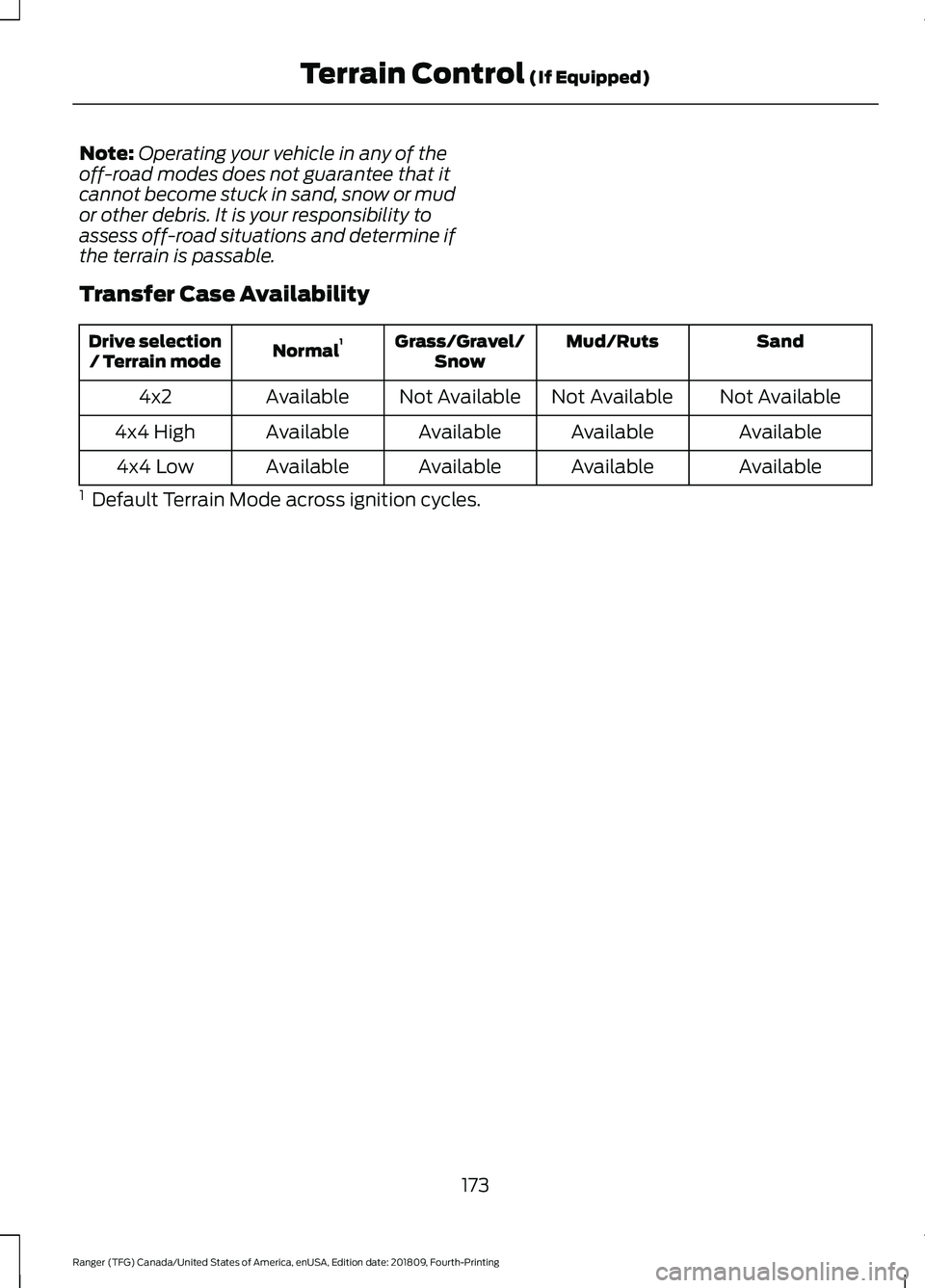
Transfer Case Availability Sand
Mud/Ruts
Grass/Gravel/
Snow
Normal 1
Drive selection
/ Terrain mode
Not Available
Not Available
Not Available
Available
4x2
Available
Available
Available
Available
4x4 High
Available
Available
Available
Available
4x4 Low
1 Default Terrain Mode across ignition cycles.
173
Ranger (TFG) Canada/United States of America, enUSA, Edition date: 201809, Fourth-Printing Terrain Control (If Equipped)