2019 FORD RANGER jack
[x] Cancel search: jackPage 314 of 512

Removing a Road Wheel
WARNING: Park your vehicle in
such a position that neither the traffic
nor you are hindered or endangered. WARNING:
Make sure that the
wheels are pointing straight ahead. WARNING:
If your vehicle has a
manual transmission, shift into first or
reverse gear. If your vehicle has an
automatic transmission, shift into park
(P). WARNING: Secure the diagonally
opposite wheel with an appropriate
block or wheel chock. WARNING:
Make sure that the
vehicle jack is vertical to the jacking point
and the base is flat on the ground. WARNING:
Never place anything
between the vehicle jack and your
vehicle.
Note: Do not lay alloy road wheels face
down on the ground. 1. Assemble the jack handle.
Note:
Assemble the three handles to jack
the rear of the vehicle.
2. Ensure screwthread on the jack is adequately lubricated before use.
3. Loosen the wheel nuts.
4. Raise your vehicle until the tire is clear of the ground.
311
Ranger (TFG) Canada/United States of America, enUSA, Edition date: 201809, Fourth-Printing Wheels and Tires E296117 E296118 E266665
Page 315 of 512
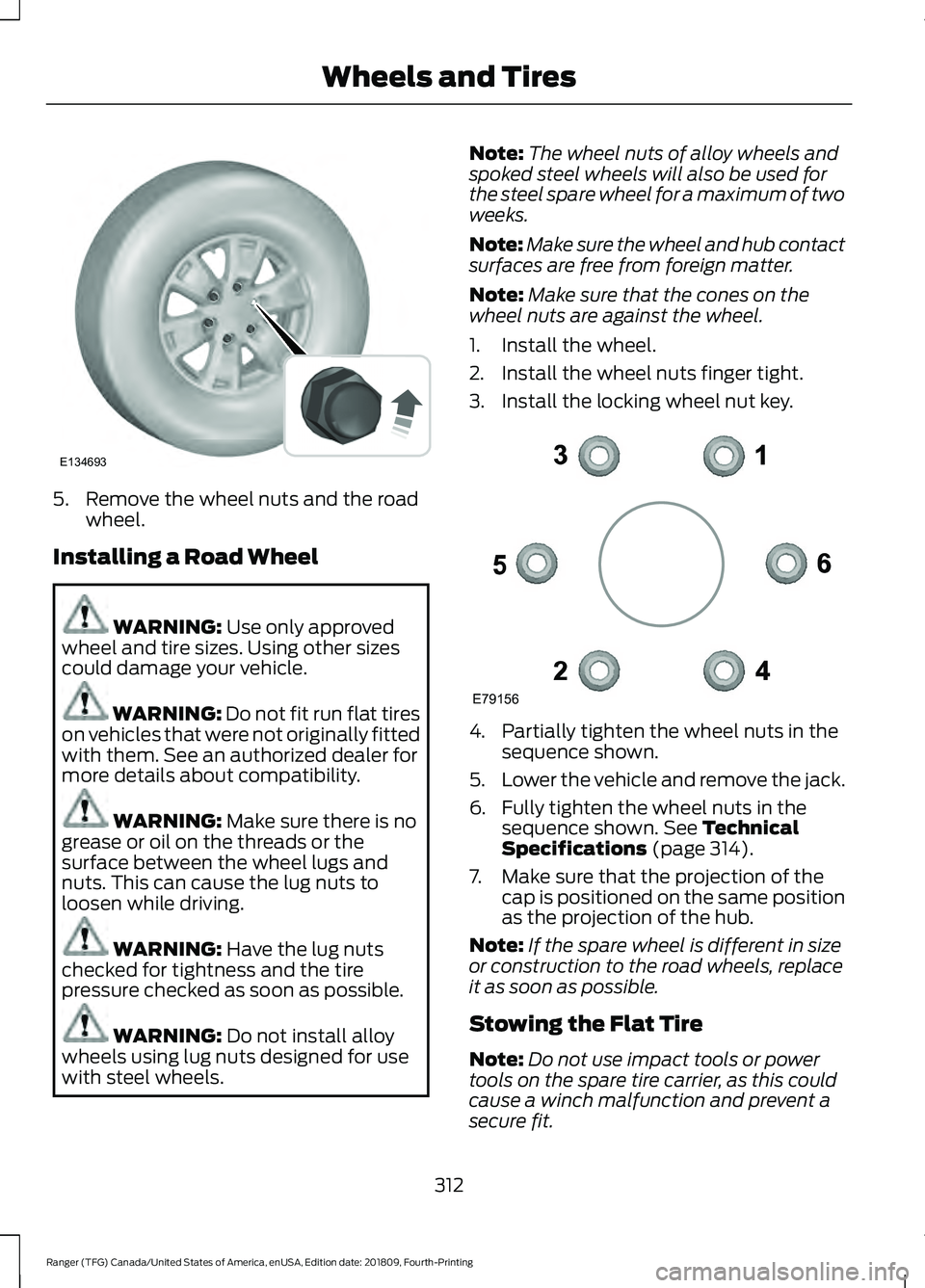
5. Remove the wheel nuts and the road
wheel.
Installing a Road Wheel WARNING: Use only approved
wheel and tire sizes. Using other sizes
could damage your vehicle. WARNING: Do not fit run flat tires
on vehicles that were not originally fitted
with them. See an authorized dealer for
more details about compatibility. WARNING:
Make sure there is no
grease or oil on the threads or the
surface between the wheel lugs and
nuts. This can cause the lug nuts to
loosen while driving. WARNING:
Have the lug nuts
checked for tightness and the tire
pressure checked as soon as possible. WARNING:
Do not install alloy
wheels using lug nuts designed for use
with steel wheels. Note:
The wheel nuts of alloy wheels and
spoked steel wheels will also be used for
the steel spare wheel for a maximum of two
weeks.
Note: Make sure the wheel and hub contact
surfaces are free from foreign matter.
Note: Make sure that the cones on the
wheel nuts are against the wheel.
1. Install the wheel.
2. Install the wheel nuts finger tight.
3. Install the locking wheel nut key. 4. Partially tighten the wheel nuts in the
sequence shown.
5. Lower the vehicle and remove the jack.
6. Fully tighten the wheel nuts in the sequence shown.
See Technical
Specifications (page 314).
7. Make sure that the projection of the cap is positioned on the same position
as the projection of the hub.
Note: If the spare wheel is different in size
or construction to the road wheels, replace
it as soon as possible.
Stowing the Flat Tire
Note: Do not use impact tools or power
tools on the spare tire carrier, as this could
cause a winch malfunction and prevent a
secure fit.
312
Ranger (TFG) Canada/United States of America, enUSA, Edition date: 201809, Fourth-Printing Wheels and TiresE134693 E79156
Page 316 of 512
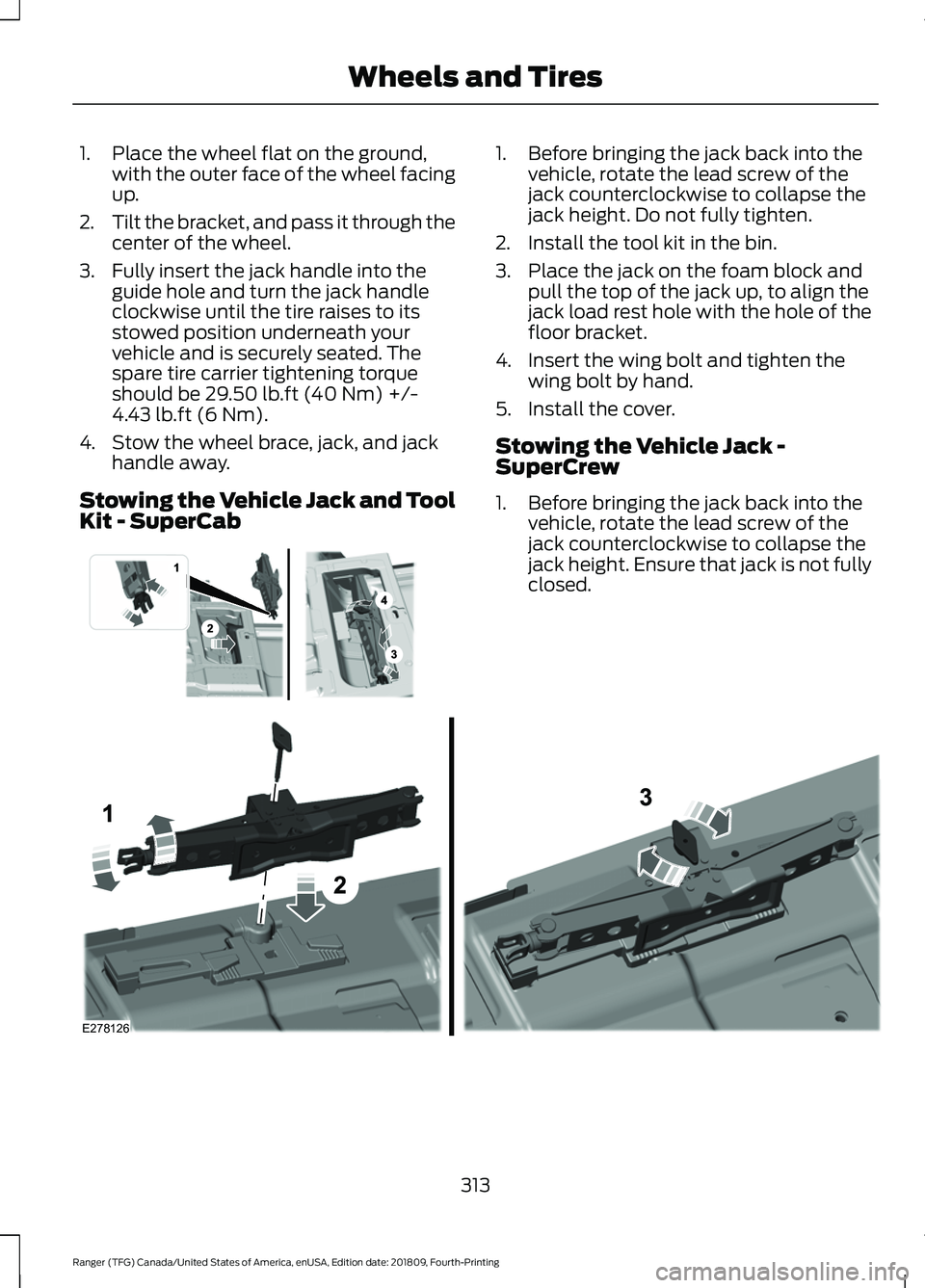
1. Place the wheel flat on the ground,
with the outer face of the wheel facing
up.
2. Tilt the bracket, and pass it through the
center of the wheel.
3. Fully insert the jack handle into the guide hole and turn the jack handle
clockwise until the tire raises to its
stowed position underneath your
vehicle and is securely seated. The
spare tire carrier tightening torque
should be 29.50 lb.ft (40 Nm) +/-
4.43 lb.ft (6 Nm).
4. Stow the wheel brace, jack, and jack handle away.
Stowing the Vehicle Jack and Tool
Kit - SuperCab 1. Before bringing the jack back into the
vehicle, rotate the lead screw of the
jack counterclockwise to collapse the
jack height. Do not fully tighten.
2. Install the tool kit in the bin.
3. Place the jack on the foam block and pull the top of the jack up, to align the
jack load rest hole with the hole of the
floor bracket.
4. Insert the wing bolt and tighten the wing bolt by hand.
5. Install the cover.
Stowing the Vehicle Jack -
SuperCrew
1. Before bringing the jack back into the vehicle, rotate the lead screw of the
jack counterclockwise to collapse the
jack height. Ensure that jack is not fully
closed. 313
Ranger (TFG) Canada/United States of America, enUSA, Edition date: 201809, Fourth-Printing Wheels and Tires E296013 E278126
Page 317 of 512

2. Place the jack on the foam block and
pull the top of the jack up, to align the
jack load rest hole with the hole of the
floor bracket.
3. Insert the wing bolt and tighten the wing bolt by hand.
Stowing the Tool Kit - SuperCrew 1. Place the tools inside the tool bag.
2. Install the tool bag on the plastic bin
by passing them through the D-ring
straps and placing them as shown in
the image.
3. Pull the straps forward to tighten.
TECHNICAL SPECIFICATIONS
Wheel Lug Nut Torque Specifications WARNING: When you install a wheel, always remove any corrosion, dirt or foreign
materials present on the mounting surfaces of the wheel or the surface of the wheel
hub, brake drum or brake disc that contacts the wheel. Make sure to secure any fasteners
that attach the rotor to the hub so they do not interfere with the mounting surfaces of
the wheel. Installing wheels without correct metal-to-metal contact at the wheel
mounting surfaces can cause the wheel nuts to loosen and the wheel to come off while
your vehicle is in motion, resulting in loss of vehicle control, personal injury or death. lb.ft (Nm)
1
Bolt Size
100 lb.ft (135 Nm)
M12 x 1.5
1 Torque specifications are for nut and bolt threads free of dirt and rust. Use only our
recommended replacement fasteners.
Retighten the lug nuts to the specified torque within 100 miles (160 kilometers) after any
wheel disturbance, such as tire rotation, changing a flat tire or wheel removal.
314
Ranger (TFG) Canada/United States of America, enUSA, Edition date: 201809, Fourth-Printing Wheels and TiresE284139
Page 340 of 512

AUDIO INPUT JACK (IF EQUIPPED)
WARNING:
Driving while
distracted can result in loss of vehicle
control, crash and injury. We strongly
recommend that you use extreme
caution when using any device that may
take your focus off the road. Your
primary responsibility is the safe
operation of your vehicle. We
recommend against the use of any
hand-held device while driving and
encourage the use of voice-operated
systems when possible. Make sure you
are aware of all applicable local laws
that may affect the use of electronic
devices while driving. WARNING:
Always place your
device in a secure location in your vehicle
so it does not become a projectile in a
sudden stop or crash. Failure to follow
this instruction could result in personal
injury. The auxiliary input jack allows you to
connect and play music from your portable
music player through your vehicle speakers.
You can use any portable music player
designed for use with headphones. Your
audio extension cable must have male
connectors at each end. 1. Make sure your vehicle is stationary
with the audio unit and the portable
music player switched off.
2. Plug the extension cable from the device into the audio input jack.
3. Switch on the radio and select either a
tuned FM station or a CD.
4. Adjust the volume as desired.
5. Switch on your device and adjust the volume to half the maximum level.
6. Press
AUX until LINE or LINE IN
appears in the display. You should hear
music from your device even if it is low.
7. Adjust the volume on your device until
it reaches the volume level of the FM
station or CD. Do this by switching back
and forth between the AUX and FM or
CD controls.
Use the vehicle audio unit buttons to
restore playback from the vehicle audio
unit, while your device remains connected.
Note: The audio extension cable must be
long enough for you to safely store the
device when your vehicle is moving.
Note: For optimum performance when
using any auxiliary device set the volume on
the device high. This reduces audio
interference when charging the device using
the vehicle power supply.
Note: For safety reasons, do not connect
or adjust the settings on your device while
your vehicle is moving.
USB PORT
(IF EQUIPPED) WARNING:
Driving while
distracted can result in loss of vehicle
control, crash and injury. We strongly
recommend that you use extreme
caution when using any device that may
take your focus off the road. Your
337
Ranger (TFG) Canada/United States of America, enUSA, Edition date: 201809, Fourth-Printing Audio SystemE191758
Page 341 of 512

primary responsibility is the safe
operation of your vehicle. We
recommend against the use of any
hand-held device while driving and
encourage the use of voice-operated
systems when possible. Make sure you
are aware of all applicable local laws
that may affect the use of electronic
devices while driving.
The USB port allows you to plug in media
playing devices, memory sticks and charge
devices.
Note:
Not all USB ports in your vehicle have
data transfer capabilities. See Auxiliary
Power Points (page 129).
USING VOICE RECOGNITION -
VEHICLES WITHOUT: SYNC
Voice Pass Through
This system allows you to use the voice
recognition features of your phone. Press the voice control button
on the steering wheel.
Note: This only works when connected via
Bluetooth. See
Connecting a Bluetooth
Device (page 331).
Note: When using voice pass through use
the language set on the device. MEDIA HUB
(IF EQUIPPED) WARNING:
Driving while
distracted can result in loss of vehicle
control, crash and injury. We strongly
recommend that you use extreme
caution when using any device that may
take your focus off the road. Your
primary responsibility is the safe
operation of your vehicle. We
recommend against the use of any
hand-held device while driving and
encourage the use of voice-operated
systems when possible. Make sure you
are aware of all applicable local laws
that may affect the use of electronic
devices while driving.
The media hub may be on the instrument
panel or center console.
The media hub may contain one or more
of the following inputs:
See
USB Port (page 337).
See
Audio Input Jack (page 337).
338
Ranger (TFG) Canada/United States of America, enUSA, Edition date: 201809, Fourth-Printing Audio SystemE201595 E142599
Page 500 of 512

4
4WD
See: Four-Wheel Drive..................................... 156
A
A/C See: Climate Control........................................... 111
About This Manual...........................................7
About Trail Control.......................................174
ABS See: Brakes........................................................... 165
ABS driving hints See: Hints on Driving With Anti-Lock
Brakes................................................................ 165
Accessories....................................................433 Exterior Style....................................................... 433
Interior Style........................................................ 433
Lifestyle................................................................. 433
Peace of Mind..................................................... 433
Accessories See: Replacement Parts
Recommendation............................................ 13
ACC See: Using Adaptive Cruise Control.............183
Adjusting the Headlamps........................266 Vertical Aim Adjustment................................ 266
Adjusting the Steering Wheel...................66
Airbag Disposal
...............................................49
Air Conditioning See: Climate Control........................................... 111
Air Filter See: Changing the Engine Air Filter.............272
Alarm See: Anti-Theft Alarm........................................ 65
Ambient Lighting............................................76 Adjusting the Brightness.................................... 76
Changing the Color.............................................. 76
Switching Ambient Lighting Off..................... 76
Switching Ambient Lighting On...................... 76
Anti-Theft Alarm
............................................65
Alarm System........................................................ 65
Arming the Alarm................................................. 65
Disarming the Alarm........................................... 65
Triggering the Alarm............................................65
Appendices....................................................455 Apps.................................................................402
........................................................................\
.......... 402
SiriusXM Traffic and Travel Link.................. 404
At a Glance........................................................18
Audible Warnings and Indicators.............89 Headlamps On Warning Chime..................... 89
Key in Ignition Warning Chime........................ 89
Keyless Warning Alert........................................ 89
Parking Brake On Warning Chime.................89
Audio Control
..................................................66
Type One................................................................. 66
Type Two................................................................. 67
You can operate the following functions with the control:............................................... 67
Audio Input Jack...........................................337
Audio System................................................326 General Information......................................... 326
Audio Unit - Vehicles With: SYNC 3
......................................................................330
Adjusting the Volume...................................... 330
Changing Radio Stations................................. 331
Playing or Pausing Media................................. 331
Switching the Audio Unit On and Off..........331
Using Seek, Fast Forward and Reverse.............................................................. 331
Audio Unit - Vehicles With: SYNC.........328 Accessing the Apps Menu.............................. 328
Accessing the Clock Settings........................ 328
Accessing the Information Menu.................328
Accessing the Media Source Menu.............328
Accessing the Phone Features..................... 328
Accessing the Settings Menu........................ 328
Accessing the Sound Settings...................... 329
Adjusting the Volume....................................... 329
Changing Radio Stations................................ 329
Listening to the Radio...................................... 329
Playing or Pausing Media............................... 329
Switching Repeat Mode On and Off..........329
Switching Shuffle Mode On and Off..........329
Switching the Audio Unit On and Off........329
Switching the Display On and Off...............329
Using a Cell Phone............................................ 329
Using Seek, Fast Forward and Reverse............................................................. 330
Using the Display Control............................... 330
Using the Number Block................................. 330
497
Ranger (TFG) Canada/United States of America, enUSA, Edition date: 201809, Fourth-Printing Index
Page 502 of 512

Cargo Lamps....................................................76
Car Wash See: Cleaning the Exterior............................... 273
Catalytic Converter
......................................149
On-Board Diagnostics (OBD-II)................... 150
Readiness for Inspection and Maintenance (I/M) Testing..................................................... 151
Center Console
...............................................131
Changing a Bulb..........................................268 Approach Lamp and Side Direction
Indicator........................................................... 269
Central High Mounted Brake Lamp..............271
Front Fog Lamps............................................... 269
Front Side Marker Bulb................................... 269
License Plate Lamp............................................ 271
Rear Lamps.......................................................... 270
Replacing LED Fog Lamp Bulbs................... 270
Replacing the Headlamp Bulbs .................. 268
Changing a Fuse
..........................................254
Fuses...................................................................... 254
Changing a Road Wheel...........................304 Dissimilar Spare Wheel and Tire Assembly
Information..................................................... 304
Installing a Road Wheel................................... 312
Jacking and Lifting Points............................... 310
Removing a Road Wheel.................................. 311
Spare Wheel....................................................... 309
Stowing the Flat Tire......................................... 312
Stowing the Tool Kit - SuperCrew................314
Stowing the Vehicle Jack and Tool Kit - SuperCab.......................................................... 313
Stowing the Vehicle Jack - SuperCrew........................................................ 313
Tire Change Procedure.................................... 305
Vehicle Jack......................................................... 306
Changing the 12V Battery.........................264 Remove and Reinstall the Battery..............265
Changing the Engine Air Filter.................272
Changing the Wiper Blades
.....................266
Changing the Windshield Wiper
Blades............................................................... 266
Charging the 12V Battery..........................263 Battery Management System....................... 263
Checking MyKey System Status...............59 MyKey Distance.................................................... 59
Number of Admin Keys..................................... 60
Number of MyKeys.............................................. 60
Checking the Wiper Blades.....................266 Child Restraint and Seatbelt
Maintenance.................................................39
Child Restraint Positioning
..........................31
Child Safety......................................................20 General Information............................................ 20
Child Safety Locks..........................................33 Left-Hand Side...................................................... 33
Right-Hand Side................................................... 33
Cleaning Leather Seats..............................277
Cleaning Products........................................273 Materials................................................................ 273
Cleaning the Engine....................................275
Cleaning the Exterior...................................273 Cleaning the Headlamps................................. 274
Exterior Chrome Parts...................................... 274
Exterior Plastic Parts......................................... 274
Stripes or Graphics............................................ 274
Underbody............................................................ 274
Under Hood.......................................................... 274
Cleaning the Instrument Panel and Instrument Cluster Lens
.........................276
Cleaning the Interior....................................276
Mirrors..................................................................... 276
Cleaning the Wheels..................................278
Cleaning the Windows and Wiper Blades............................................................275
Clearing All MyKeys
.......................................59
Climate............................................................386
Climate Control
...............................................111
Cold Weather Precautions.......................225
Connecting a Bluetooth Device - Vehicles Without: SYNC..........................331
Pairing a Device................................................... 331
Coolant Check See: Engine Coolant Check........................... 260
Crash Sensors and Airbag Indicator.......48
Creating a MyKey
...........................................58
Programming and Changing Configurable
Settings............................................................... 59
Cross Traffic Alert.........................................199 Blocked Sensors................................................. 201
False Alerts.......................................................... 202
Switching the System Off and On..............202
System Errors...................................................... 202
System Lights, Messages and Audible Alerts.................................................................. 201
System Limitations........................................... 202
Using the Cross Traffic Alert System.........200
499
Ranger (TFG) Canada/United States of America, enUSA, Edition date: 201809, Fourth-Printing Index