2019 FORD RANGER clock
[x] Cancel search: clockPage 272 of 512

5. Install the new bulb in reverse order.
Replacing the Front Park and Direction
Indicator Bulb
1. Make sure the lamps are off.
2.
Turn the bulb holder counterclockwise
and remove it.
3. Remove the bulb by pulling it straight out.
4. Install the new bulb in reverse order.
Replacing LED Headlamp Bulbs
All bulbs in this assembly except for the
direction indicator bulb are LED. If an LED
fails have your vehicle checked as soon as
possible. Contact an authorized dealer.
Front Side Marker Bulb 1. Make sure the lamps are off.
2. Remove the lamp from the wheel lip
molding by releasing the clip.
3. Turn the bulb holder counterclockwise
and remove it.
4. Remove the bulb by pulling it straight out.
5. Install the new bulb in reverse order. Approach Lamp and Side Direction
Indicator (If Equipped)
Side direction indicator.
A
Approach lamp.
B
If an LED fails have your vehicle checked
as soon as possible. Contact an authorized
dealer.
Front Fog Lamps 1. Make sure the lamps are off.
2. To access the bulb, reach behind the
bumper.
3. Disconnect the electrical connector.
4. Turn the bulb counterclockwise and remove it.
5. Install the new bulb in reverse order.
Note: You cannot separate the bulb from
the bulb holder.
269
Ranger (TFG) Canada/United States of America, enUSA, Edition date: 201809, Fourth-Printing MaintenanceE301637 ABE133683 E284974
Page 273 of 512

Replacing LED Fog Lamp Bulbs (If
Equipped)
If an LED fails have your vehicle checked
as soon as possible. Contact an authorized
dealer.
Rear Lamps
Type 1
Tail, Brake, Reversing, and Direction
Indicator Brake and rear park bulb.
A
Rear direction indicator bulb.
B
Reverse lamp bulb.
C
1. Make sure the lamps are off.
2. Open the tailgate to access the rear lamp assemblies.
3. Remove the two bolts from the tail lamp assembly. Then, carefully pull the
lamp assembly from the tailgate pillar
by releasing the two retaining tabs.
4. Turn the bulb holder counterclockwise
and remove it.
5. Remove the bulb by pulling it straight out.
6. Install the new bulb in reverse order.
270
Ranger (TFG) Canada/United States of America, enUSA, Edition date: 201809, Fourth-Printing MaintenanceE284588 E284593
Page 274 of 512
Replacing LED Brake, Rear, Direction
Indicator and Reverse Lamp Bulbs
If an LED fails have your vehicle checked
as soon as possible. Contact an authorized
dealer.
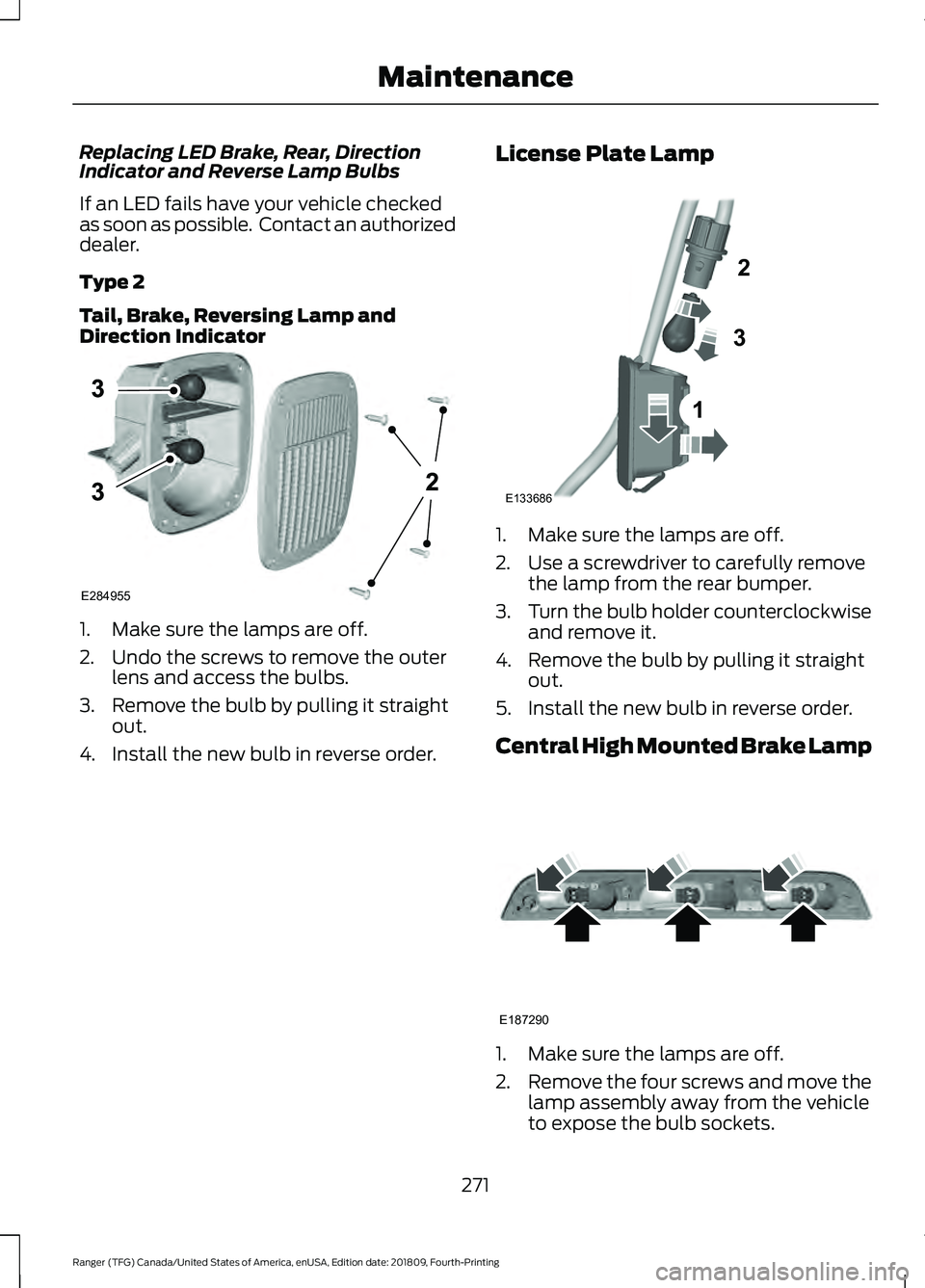
Type 2
Tail, Brake, Reversing Lamp and
Direction Indicator
1. Make sure the lamps are off.
2. Undo the screws to remove the outer
lens and access the bulbs.
3. Remove the bulb by pulling it straight out.
4. Install the new bulb in reverse order. License Plate Lamp 1. Make sure the lamps are off.
2. Use a screwdriver to carefully remove
the lamp from the rear bumper.
3. Turn the bulb holder counterclockwise
and remove it.
4. Remove the bulb by pulling it straight out.
5. Install the new bulb in reverse order.
Central High Mounted Brake Lamp 1. Make sure the lamps are off.
2.
Remove the four screws and move the
lamp assembly away from the vehicle
to expose the bulb sockets.
271
Ranger (TFG) Canada/United States of America, enUSA, Edition date: 201809, Fourth-Printing MaintenanceE284955 1
2
3
E133686 E187290
Page 275 of 512

3. Remove the bulb socket by rotating it
counterclockwise and pulling it out of
the lamp assembly.
4. Pull the bulb straight out of the socket.
5. Install the new bulb in reverse order.
Replacing LED Cargo Lamp and
High-mount Brake Lamp Bulbs
If an LED fails have your vehicle checked
as soon as possible. Contact an authorized
dealer.
CHANGING THE ENGINE AIR
FILTER WARNING: To reduce the risk of
vehicle damage and personal burn
injuries, do not start your engine with the
air cleaner removed and do not remove
it while the engine is running.
When changing the engine air filter, do not
allow debris or foreign material to enter
the air induction system. Engine
components are susceptible to damage
not covered by the vehicle Warranty.
Change the air filter element at the correct
interval. See
Scheduled Maintenance
(page 437).
Incorrect component use can cause
damage not covered by the vehicle
Warranty. See
Motorcraft Parts (page
317).
To replace the air filter element do the
following: 1. Remove the clips that secure the air
filter housing cover.
2. Carefully lift the air filter housing cover.
3. Remove the air filter element from the
air filter housing.
4. Wipe any dirt or debris from the air filter
housing and cover to make sure no dirt
gets in the engine and that you have a
good seal.
5. Install a new air filter element. Be careful not to crimp the filter element
edges between the air filter housing
and cover. This could cause filter
damage and allow unfiltered air to
enter the engine if it is not properly
seated.
6. Install the air filter housing cover.
7. Engage the clips to secure the air filter housing cover to the air filter housing.
272
Ranger (TFG) Canada/United States of America, enUSA, Edition date: 201809, Fourth-Printing MaintenanceE276908
Page 306 of 512

•
To reduce the chances of interference
from another vehicle, perform the
system reset procedure at least 3 ft
(1 m) away from another Ford Motor
Company vehicle undergoing the
system reset procedure at the same
time.
• Do not wait more than two minutes
between resetting each tire sensor or
the system can time-out and you have
to repeat the entire procedure on all
four wheels.
• A double horn sounds indicating the
need to repeat the procedure.
Performing the System Reset Procedure
Read the entire procedure before
attempting.
1. Drive the vehicle above
20 mph
(32 km/h) for at least two minutes,
then park in a safe location where you
can easily get to all four tires and have
access to an air pump.
2. Place the ignition in the off position and
keep the key in the ignition.
3. Cycle the ignition to the on position with the engine off.
4. Turn the hazard flashers on then off three times. You must accomplish this
within 10 seconds. If you successfully
enter the reset mode, the horn sounds
once, the system indicator flashes and
a message shows in the information
display. If this does not occur, please
try again starting at step 2. If after
repeated attempts to enter the reset
mode, the horn does not sound, the
system indicator does not flash and no
message shows in the information
display, seek service from your
authorized dealer. 5. Train the tire pressure monitoring
system sensors in the tires using the
following system reset sequence
starting with the left front tire in the
following clockwise order: Left front -
driver side front tire, Right front -
passenger side front tire, Right rear -
passenger side rear tire, Left rear -
driver side rear tire.
6. Remove the valve cap from the valve stem on the left front tire. Decrease the
air pressure until the horn sounds.
Note: The single horn tone confirms that
the sensor identification code has been
learned by the module for this position. If a
double horn is heard, the reset procedure
was unsuccessful, and you must repeat it.
7. Remove the valve cap from the valve stem on the right front tire. Decrease
the air pressure until the horn sounds.
8. Remove the valve cap from the valve stem on the right rear tire. Decrease the
air pressure until the horn sounds.
9. Remove the valve cap from the valve stem on the left rear tire. Decrease the
air pressure until the horn sounds.
Training is complete after the horn
sounds for the last tire trained, driver
side rear tire, the system indicator
stops flashing, and a message shows
in the information display.
10. Turn the ignition off. If two short horn
beeps are heard, the reset procedure
was unsuccessful and you must
repeat it. If after repeating the
procedure and two short beeps are
heard when the ignition is turned to
off, seek assistance from your
authorized dealer.
303
Ranger (TFG) Canada/United States of America, enUSA, Edition date: 201809, Fourth-Printing Wheels and Tires
Page 312 of 512
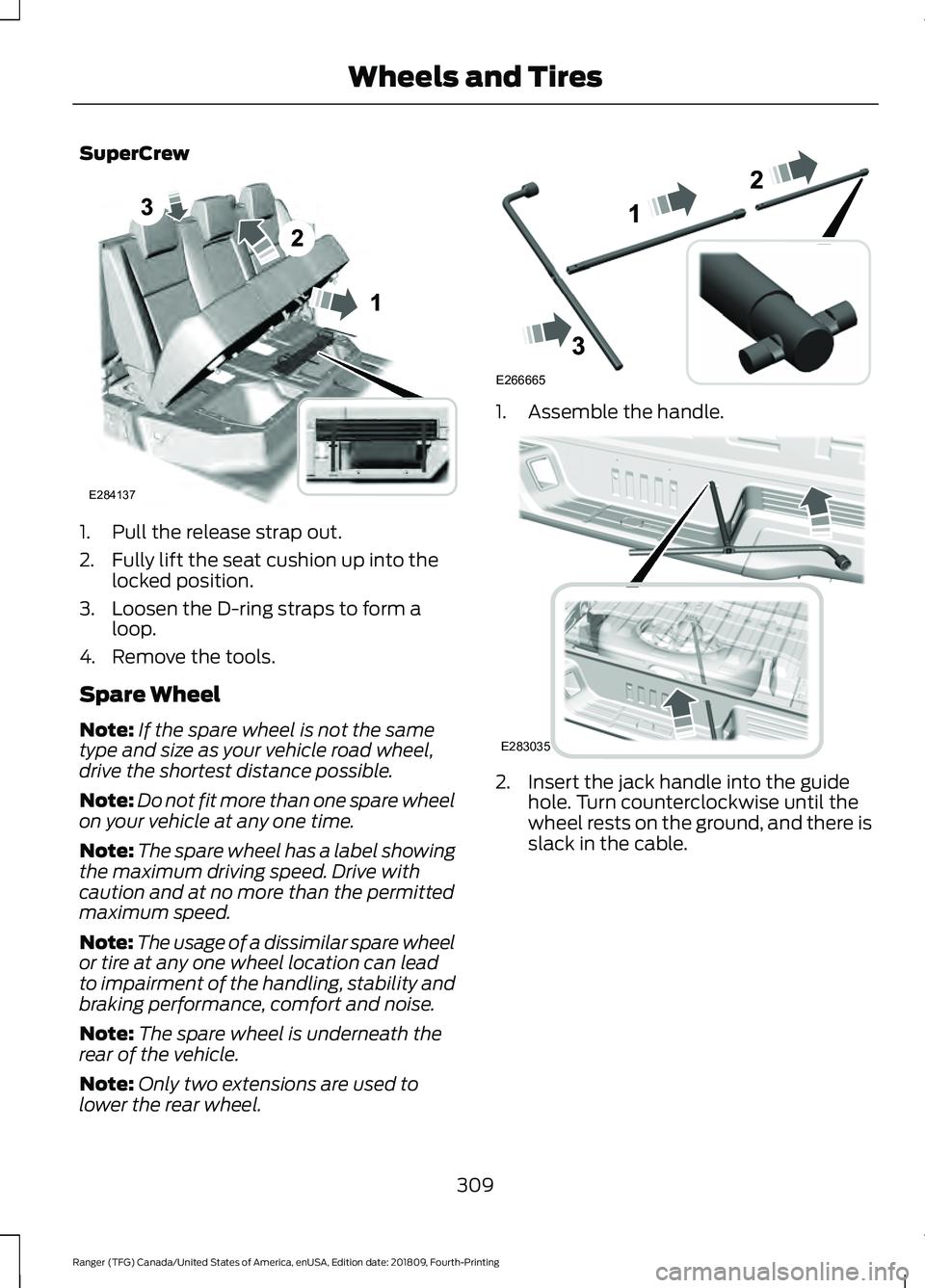
SuperCrew
1. Pull the release strap out.
2. Fully lift the seat cushion up into the
locked position.
3. Loosen the D-ring straps to form a loop.
4. Remove the tools.
Spare Wheel
Note: If the spare wheel is not the same
type and size as your vehicle road wheel,
drive the shortest distance possible.
Note: Do not fit more than one spare wheel
on your vehicle at any one time.
Note: The spare wheel has a label showing
the maximum driving speed. Drive with
caution and at no more than the permitted
maximum speed.
Note: The usage of a dissimilar spare wheel
or tire at any one wheel location can lead
to impairment of the handling, stability and
braking performance, comfort and noise.
Note: The spare wheel is underneath the
rear of the vehicle.
Note: Only two extensions are used to
lower the rear wheel. 1. Assemble the handle.
2. Insert the jack handle into the guide
hole. Turn counterclockwise until the
wheel rests on the ground, and there is
slack in the cable.
309
Ranger (TFG) Canada/United States of America, enUSA, Edition date: 201809, Fourth-Printing Wheels and TiresE284137 E266665 E283035
Page 316 of 512
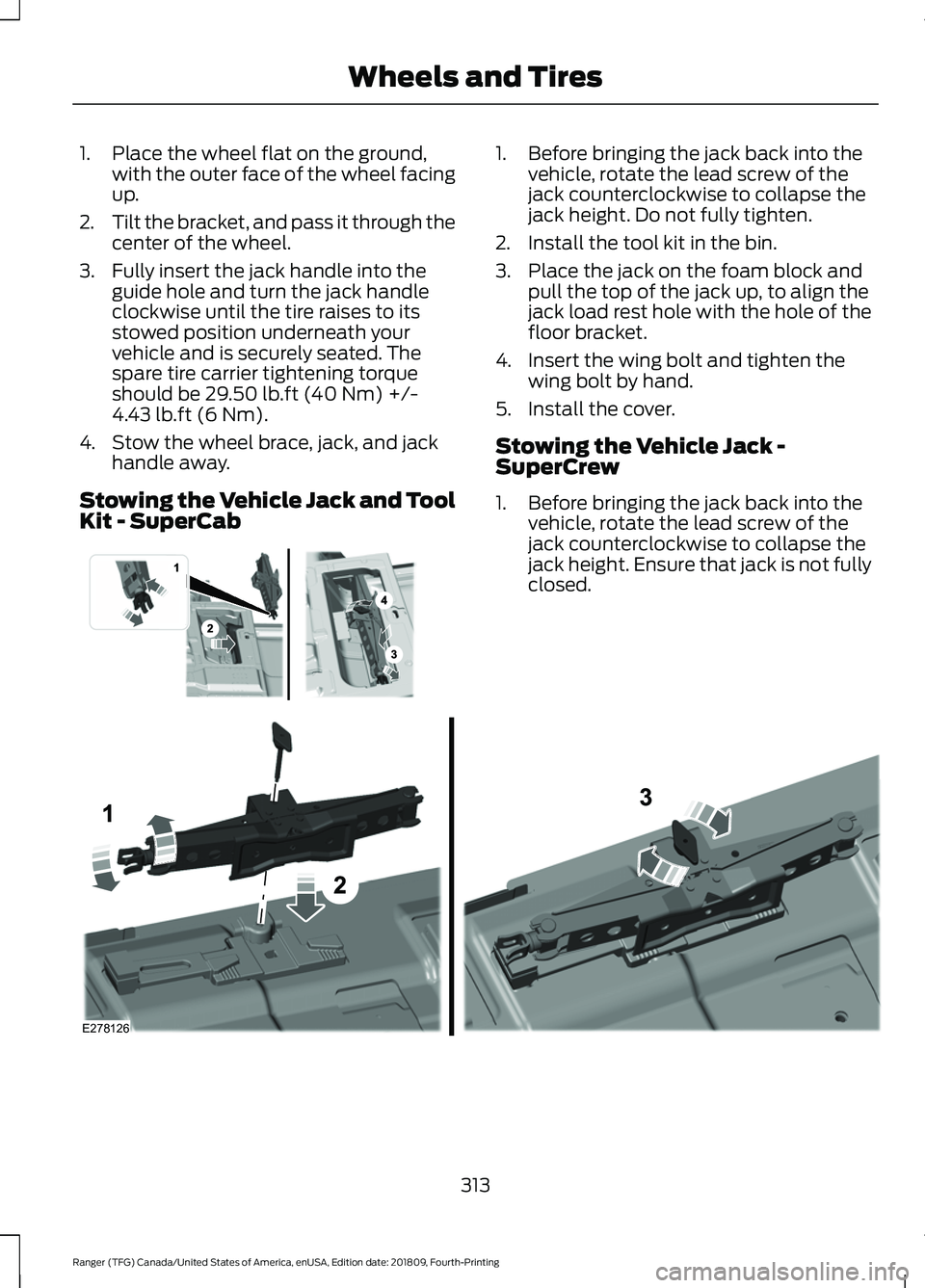
1. Place the wheel flat on the ground,
with the outer face of the wheel facing
up.
2. Tilt the bracket, and pass it through the
center of the wheel.
3. Fully insert the jack handle into the guide hole and turn the jack handle
clockwise until the tire raises to its
stowed position underneath your
vehicle and is securely seated. The
spare tire carrier tightening torque
should be 29.50 lb.ft (40 Nm) +/-
4.43 lb.ft (6 Nm).
4. Stow the wheel brace, jack, and jack handle away.
Stowing the Vehicle Jack and Tool
Kit - SuperCab 1. Before bringing the jack back into the
vehicle, rotate the lead screw of the
jack counterclockwise to collapse the
jack height. Do not fully tighten.
2. Install the tool kit in the bin.
3. Place the jack on the foam block and pull the top of the jack up, to align the
jack load rest hole with the hole of the
floor bracket.
4. Insert the wing bolt and tighten the wing bolt by hand.
5. Install the cover.
Stowing the Vehicle Jack -
SuperCrew
1. Before bringing the jack back into the vehicle, rotate the lead screw of the
jack counterclockwise to collapse the
jack height. Ensure that jack is not fully
closed. 313
Ranger (TFG) Canada/United States of America, enUSA, Edition date: 201809, Fourth-Printing Wheels and Tires E296013 E278126
Page 329 of 512

GENERAL INFORMATION
Radio Frequencies and Reception
Factors
AM and FM frequencies are established by
the Federal Communications Commission
(FCC) and the Canadian Radio and
Telecommunications Commission (CRTC).
Those frequencies are:
•
AM: 530-1710 kHz
• FM: 87.9-107.9 MHz
Note: Listening to loud audio for long
periods of time could damage your hearing. Radio Reception Factors
The further you travel from an AM or FM station, the
weaker the signal and the weaker the reception.
Distance and strength
Hills, mountains, tall buildings, bridges, tunnels, freeway
overpasses, parking garages, dense tree foliage and
thunderstorms can interfere with the reception.
Terrain
When you pass a ground-based broadcast repeating
tower, a stronger signal may overtake a weaker one and
result in the audio system muting.
Station overload
AUDIO UNIT - VEHICLES
WITHOUT: SYNC WARNING: Driving while
distracted can result in loss of vehicle
control, crash and injury. We strongly
recommend that you use extreme
caution when using any device that may
take your focus off the road. Your
primary responsibility is the safe
operation of your vehicle. We
recommend against the use of any
hand-held device while driving and
encourage the use of voice-operated
systems when possible. Make sure you
are aware of all applicable local laws
that may affect the use of electronic
devices while driving. Accessing the Clock Settings Press and release the button to
access the clock setting.
Use the center arrow controls to
change the hours and minutes.
Accessing the Media Source Menu Press and release the button to
open the media source menu.
You can press this multiple times to
change to a media device or scroll through
the media sources using the arrow buttons.
Press
OK to select a source.
Accessing the Menu Press and release the button to
access different audio system
features.
326
Ranger (TFG) Canada/United States of America, enUSA, Edition date: 201809, Fourth-Printing Audio SystemE265036 E265035 E265038