2019 FORD FIESTA 5 speed
[x] Cancel search: 5 speedPage 88 of 443

Stability Control and Traction
Control Indicator
Flashes during operation.
If it does not illuminate when you
switch the ignition on, or remains
on when the engine is running, this
indicates a malfunction. Have your vehicle
checked as soon as possible.
Note: The system automatically turns off
if there is a malfunction.
See Stability Control (page 137). See
Traction Control (page 136).
Stability Control and Traction
Control Off Warning Lamp It illuminates when you switch
the system off.
AUDIBLE WARNINGS AND
INDICATORS
Exterior Lamps On
Sounds when you remove the key from the
ignition and open the driver door, and you
have left the headlamps or parking lamps
on.
Gearshift Lever Not in Park (P)
Sounds when the driver door is open, the
key is in the ignition and the gearshift lever
is not in park (P).
Key in Ignition
Sounds when the driver door is open and
the key is in the ignition. Key Outside Vehicle - Vehicles
With Keyless System
Sounds when you close the driver door, the
key is outside your vehicle and the engine
is running. The system does not detect a
passive key inside your vehicle.
Parking Brake On
Sounds when the parking brake is on and
your vehicle is moving. If the warning chime
continues to sound when you release the
parking brake, have the system checked
by an authorized dealer.
Safety Belt Minder
WARNING:
The safety belt minder
remains in stand-by mode when the
front safety belts have been fastened. It
will sound if either safety belt is
unfastened. WARNING:
Do not sit on top of a
fastened safety belt to prevent the
safety belt minder from coming on. The
occupant protection system will only
provide optimum protection when you
use the safety belt correctly.
Sounds when your vehicle speed exceeds
the pre-determined limit and the front
safety belts are unfastened. The chime will
stop after a period of time.
85
2019 Fiesta (CCT) Canada/United States of America, KE8J 19A321 AA enUSA, Edition date: 201806, Second-Printing Instrument ClusterE138639 E130458
Page 89 of 443
GENERAL INFORMATION
WARNING: Driving while
distracted can result in loss of vehicle
control, crash and injury. We strongly
recommend that you use extreme
caution when using any device that may
take your focus off the road. Your
primary responsibility is the safe
operation of your vehicle. We
recommend against the use of any
hand-held device while driving and
encourage the use of voice-operated
systems when possible. Make sure you
are aware of all applicable local laws
that may affect the use of electronic
devices while driving.
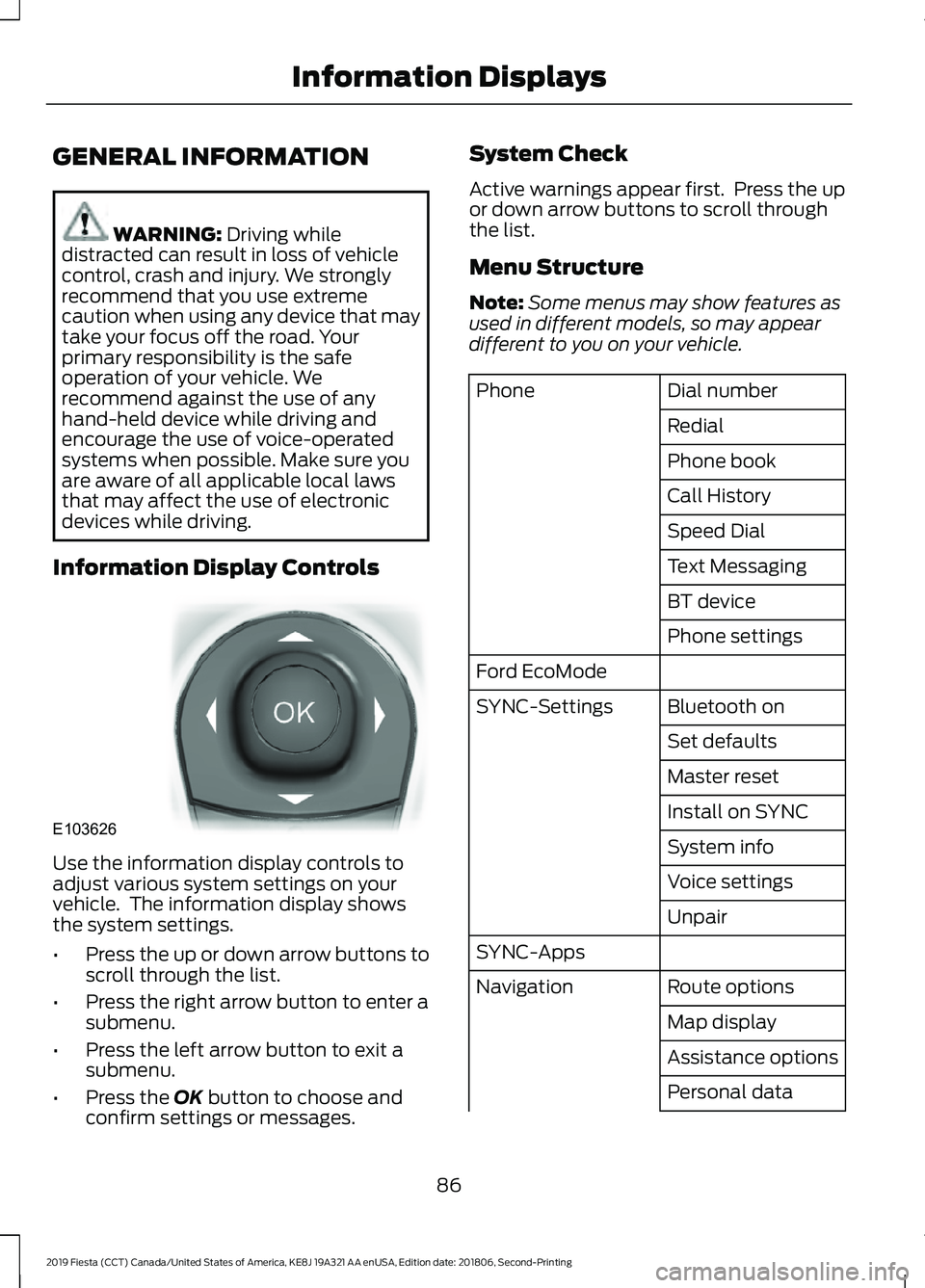
Information Display Controls Use the information display controls to
adjust various system settings on your
vehicle. The information display shows
the system settings.
•
Press the up or down arrow buttons to
scroll through the list.
• Press the right arrow button to enter a
submenu.
• Press the left arrow button to exit a
submenu.
• Press the
OK button to choose and
confirm settings or messages. System Check
Active warnings appear first. Press the up
or down arrow buttons to scroll through
the list.
Menu Structure
Note:
Some menus may show features as
used in different models, so may appear
different to you on your vehicle. Dial number
Phone
Redial
Phone book
Call History
Speed Dial
Text Messaging
BT device
Phone settings
Ford EcoMode Bluetooth on
SYNC-Settings
Set defaults
Master reset
Install on SYNC
System info
Voice settings
Unpair
SYNC-Apps Route options
Navigation
Map display
Assistance options
Personal data
86
2019 Fiesta (CCT) Canada/United States of America, KE8J 19A321 AA enUSA, Edition date: 201806, Second-Printing Information DisplaysE103626
Page 90 of 443
Reset all settings
Adaptive volume
Audio settings
Sound
Nav audio mixing
DSP settings
DSP equaliser
Traffic
News
Alt. frequency
RDS regional
Traction control
Vehicle settings
Hill start assist
Alarm system
Power mirror
Indicator
Ambient light
Chimes
Auto time (GPS)
Clock settings
Set time
Set date
Set time zone
24-hour mode
Measure unit
Display settings
Language
Dimming
Create MyKey
MyKey
Traction control
ESC Max Speed
Speed warning
MyKey Volume
limit
Information
Clear MyKeys
CLOCK
Type 1
To adjust the clock, switch the ignition on
and press buttons H or M on the
information and entertainment display as
necessary.
Type 2
Note: Use the information display to adjust
the clock. See General Information (page
86).
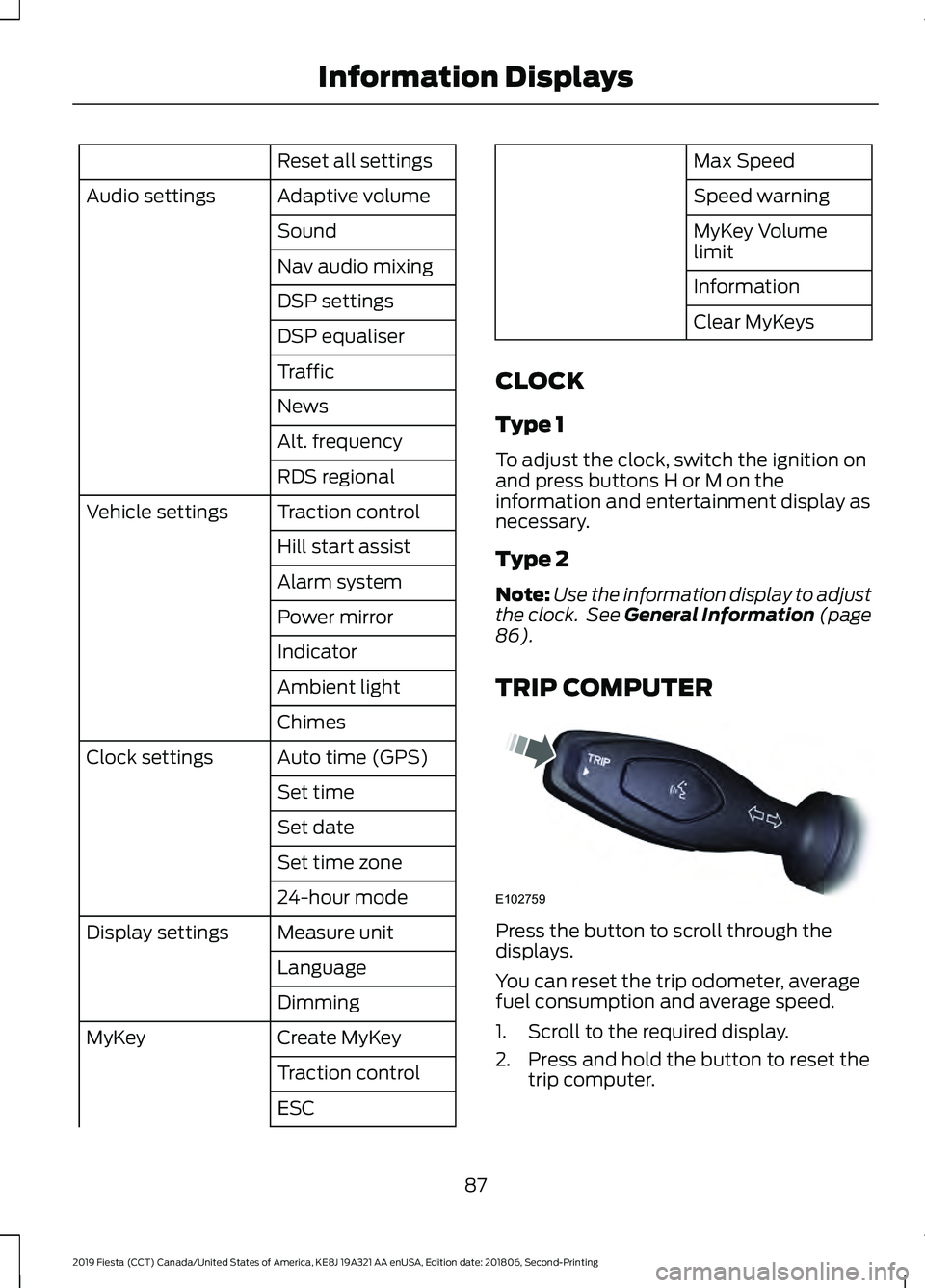
TRIP COMPUTER Press the button to scroll through the
displays.
You can reset the trip odometer, average
fuel consumption and average speed.
1. Scroll to the required display.
2. Press and hold the button to reset the
trip computer.
87
2019 Fiesta (CCT) Canada/United States of America, KE8J 19A321 AA enUSA, Edition date: 201806, Second-Printing Information DisplaysE102759
Page 91 of 443
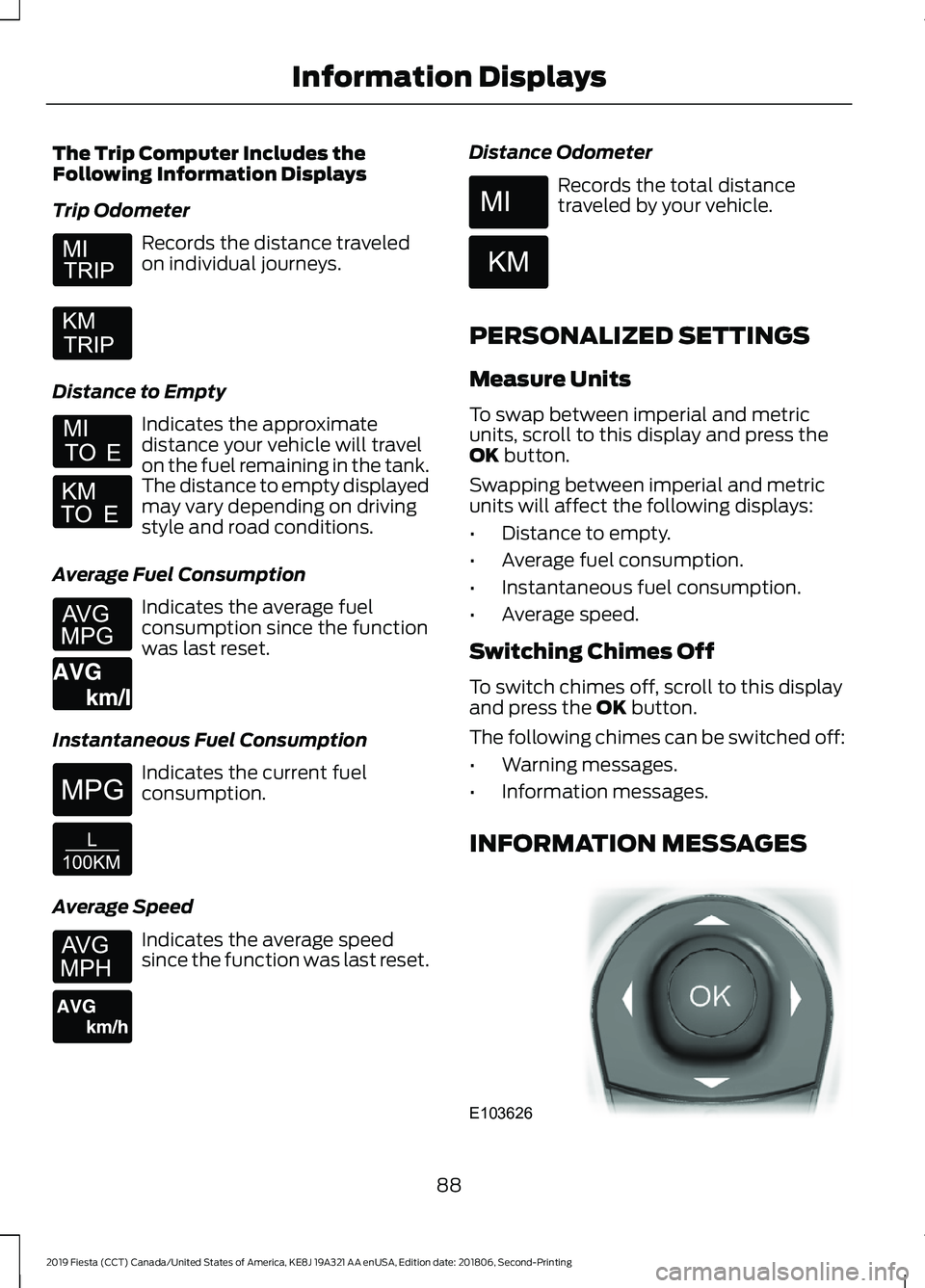
The Trip Computer Includes the
Following Information Displays
Trip Odometer
Records the distance traveled
on individual journeys.
Distance to Empty Indicates the approximate
distance your vehicle will travel
on the fuel remaining in the tank.
The distance to empty displayed
may vary depending on driving
style and road conditions.
Average Fuel Consumption Indicates the average fuel
consumption since the function
was last reset.
Instantaneous Fuel Consumption Indicates the current fuel
consumption.
Average Speed Indicates the average speed
since the function was last reset. Distance Odometer Records the total distance
traveled by your vehicle.
PERSONALIZED SETTINGS
Measure Units
To swap between imperial and metric
units, scroll to this display and press the
OK button.
Swapping between imperial and metric
units will affect the following displays:
• Distance to empty.
• Average fuel consumption.
• Instantaneous fuel consumption.
• Average speed.
Switching Chimes Off
To switch chimes off, scroll to this display
and press the
OK button.
The following chimes can be switched off:
• Warning messages.
• Information messages.
INFORMATION MESSAGES 88
2019 Fiesta (CCT) Canada/United States of America, KE8J 19A321 AA enUSA, Edition date: 201806, Second-Printing Information Displays E164638E E146275 E146277 E103626
Page 95 of 443
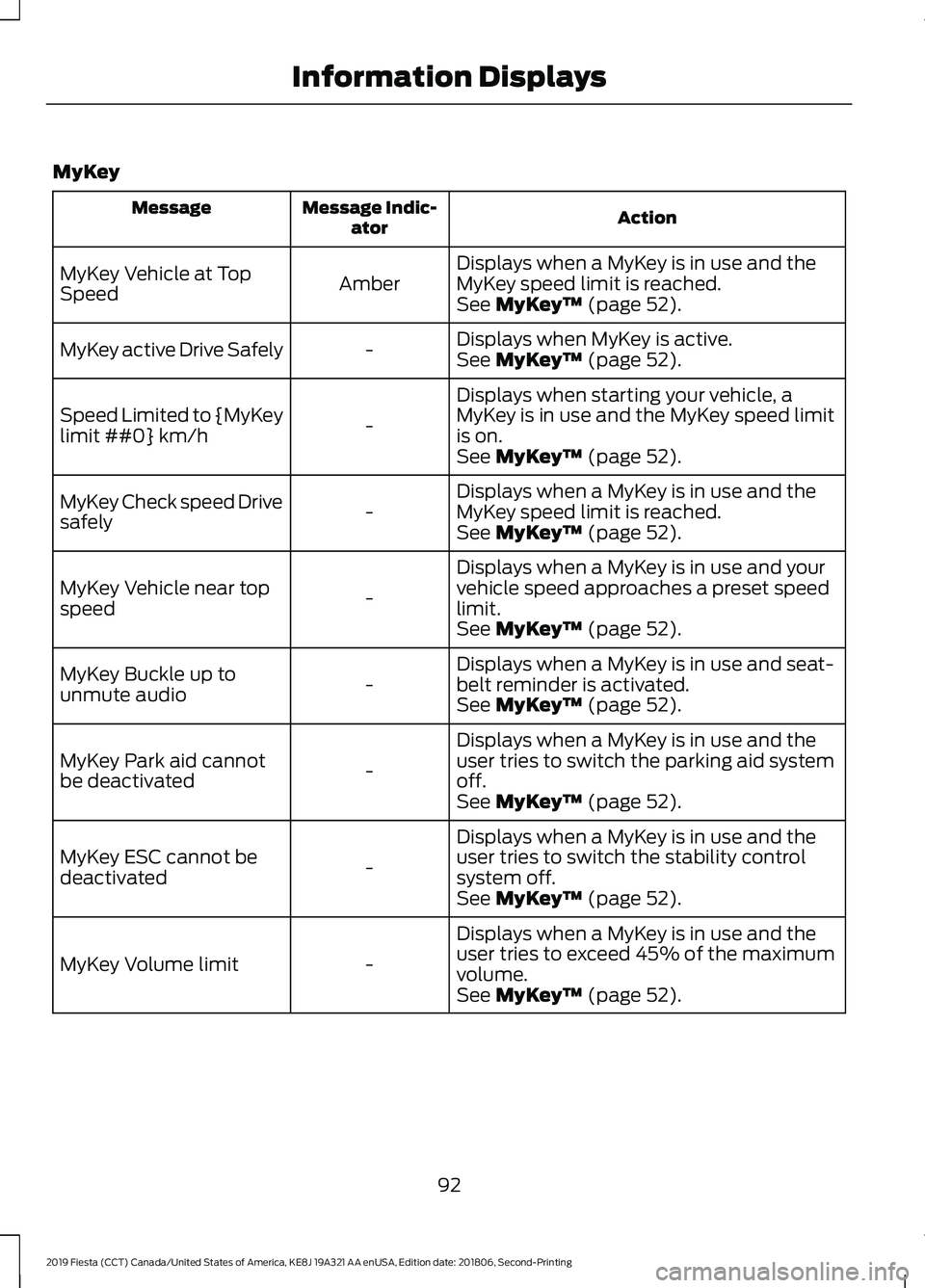
MyKey
Action
Message Indic-
ator
Message
Displays when a MyKey is in use and the
MyKey speed limit is reached.
Amber
MyKey Vehicle at Top
Speed
See MyKey™ (page 52).
Displays when MyKey is active.
-
MyKey active Drive Safely
See
MyKey™ (page 52).
Displays when starting your vehicle, a
MyKey is in use and the MyKey speed limit
is on.
-
Speed Limited to {MyKey
limit ##0} km/h
See
MyKey™ (page 52).
Displays when a MyKey is in use and the
MyKey speed limit is reached.
-
MyKey Check speed Drive
safely
See
MyKey™ (page 52).
Displays when a MyKey is in use and your
vehicle speed approaches a preset speed
limit.
-
MyKey Vehicle near top
speed
See
MyKey™ (page 52).
Displays when a MyKey is in use and seat-
belt reminder is activated.
-
MyKey Buckle up to
unmute audio
See
MyKey™ (page 52).
Displays when a MyKey is in use and the
user tries to switch the parking aid system
off.
-
MyKey Park aid cannot
be deactivated
See
MyKey™ (page 52).
Displays when a MyKey is in use and the
user tries to switch the stability control
system off.
-
MyKey ESC cannot be
deactivated
See
MyKey™ (page 52).
Displays when a MyKey is in use and the
user tries to exceed 45% of the maximum
volume.
-
MyKey Volume limit
See
MyKey™ (page 52).
92
2019 Fiesta (CCT) Canada/United States of America, KE8J 19A321 AA enUSA, Edition date: 201806, Second-Printing Information Displays
Page 99 of 443
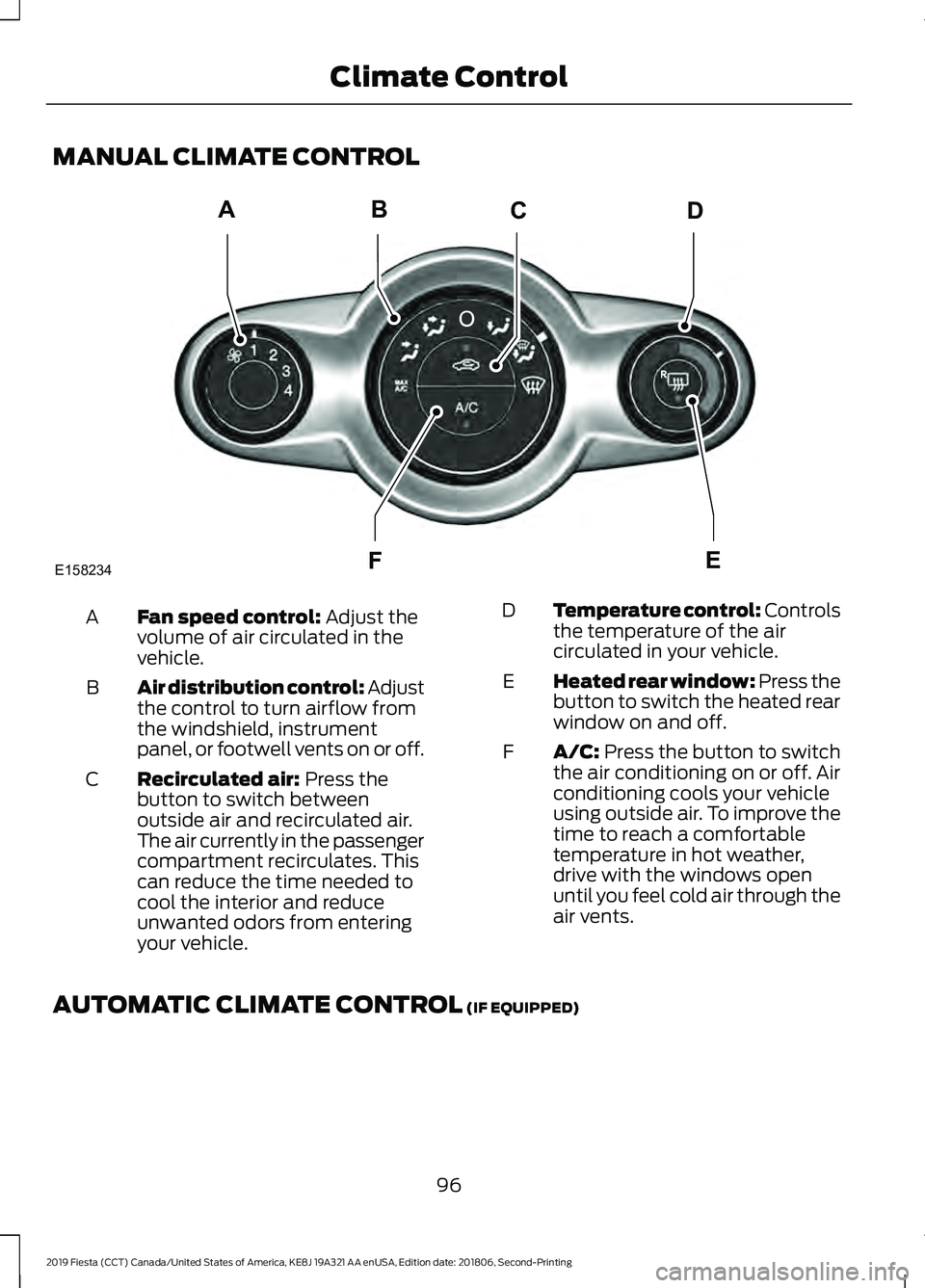
MANUAL CLIMATE CONTROL
Fan speed control: Adjust the
volume of air circulated in the
vehicle.
A
Air distribution control:
Adjust
the control to turn airflow from
the windshield, instrument
panel, or footwell vents on or off.
B
Recirculated air:
Press the
button to switch between
outside air and recirculated air.
The air currently in the passenger
compartment recirculates. This
can reduce the time needed to
cool the interior and reduce
unwanted odors from entering
your vehicle.
C Temperature control: Controls
the temperature of the air
circulated in your vehicle.
D
Heated rear window:
Press the
button to switch the heated rear
window on and off.
E
A/C:
Press the button to switch
the air conditioning on or off. Air
conditioning cools your vehicle
using outside air. To improve the
time to reach a comfortable
temperature in hot weather,
drive with the windows open
until you feel cold air through the
air vents.
F
AUTOMATIC CLIMATE CONTROL
(IF EQUIPPED)
96
2019 Fiesta (CCT) Canada/United States of America, KE8J 19A321 AA enUSA, Edition date: 201806, Second-Printing Climate ControlABCD
F
E
E158234
Page 100 of 443
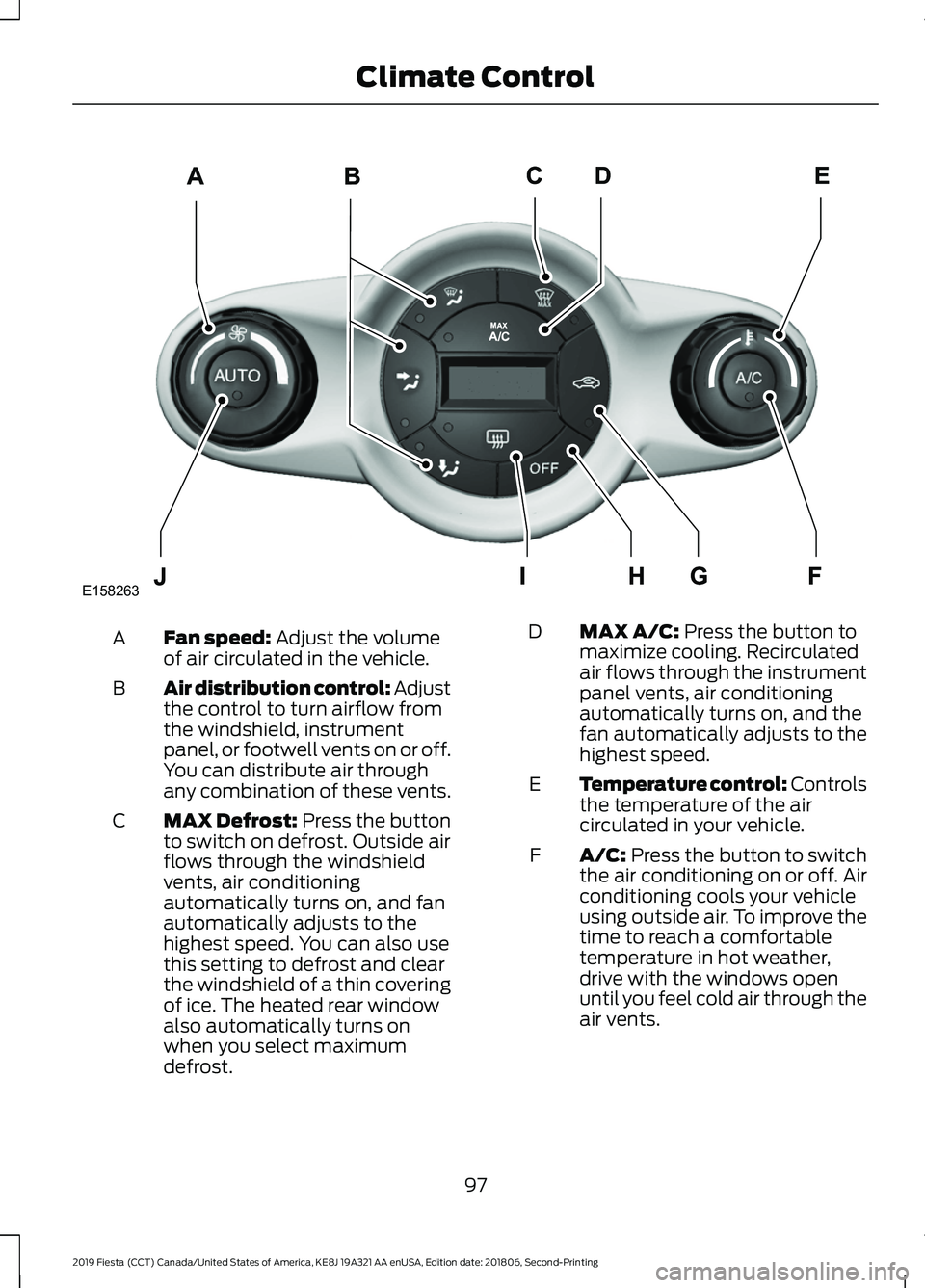
Fan speed: Adjust the volume
of air circulated in the vehicle.
A
Air distribution control:
Adjust
the control to turn airflow from
the windshield, instrument
panel, or footwell vents on or off.
You can distribute air through
any combination of these vents.
B
MAX Defrost:
Press the button
to switch on defrost. Outside air
flows through the windshield
vents, air conditioning
automatically turns on, and fan
automatically adjusts to the
C
highest speed. You can also use
this setting to defrost and clear
the windshield of a thin covering
of ice. The heated rear window
also automatically turns on
when you select maximum
defrost. MAX A/C:
Press the button to
maximize cooling. Recirculated
air flows through the instrument
panel vents, air conditioning
automatically turns on, and the
fan automatically adjusts to the
highest speed.
D
Temperature control: Controls
the temperature of the air
circulated in your vehicle.
E
A/C:
Press the button to switch
the air conditioning on or off. Air
conditioning cools your vehicle
using outside air. To improve the
time to reach a comfortable
temperature in hot weather,
drive with the windows open
until you feel cold air through the
air vents.
F
97
2019 Fiesta (CCT) Canada/United States of America, KE8J 19A321 AA enUSA, Edition date: 201806, Second-Printing Climate ControlE158263
Page 101 of 443
Recirculated air: Press the
button to switch between
outside air and recirculated air.
The air currently in the passenger
compartment recirculates. This
can reduce the time needed to
cool the interior and reduce
unwanted odors from entering
your vehicle.
G
Note:
Recirculated air may also
turn on and off automatically in
instrument panel or instrument
panel and floor airflow modes
during hot weather to improve
cooling efficiency.
OFF:
Press the button to switch
the system on and off. When the
system is off, it prevents outside
air from entering the vehicle.
H
Heated rear window:
Press the
button to switch the heated rear
window on and off.
I
AUTO:
Press the button to
switch on automatic operation.
Select the desired temperature
using the temperature control.
The system adjusts fan speed,
air distribution, air conditioning
operation, and selects outside
air or recirculated air to heat or
cool the vehicle in order to
maintain the desired
temperature.
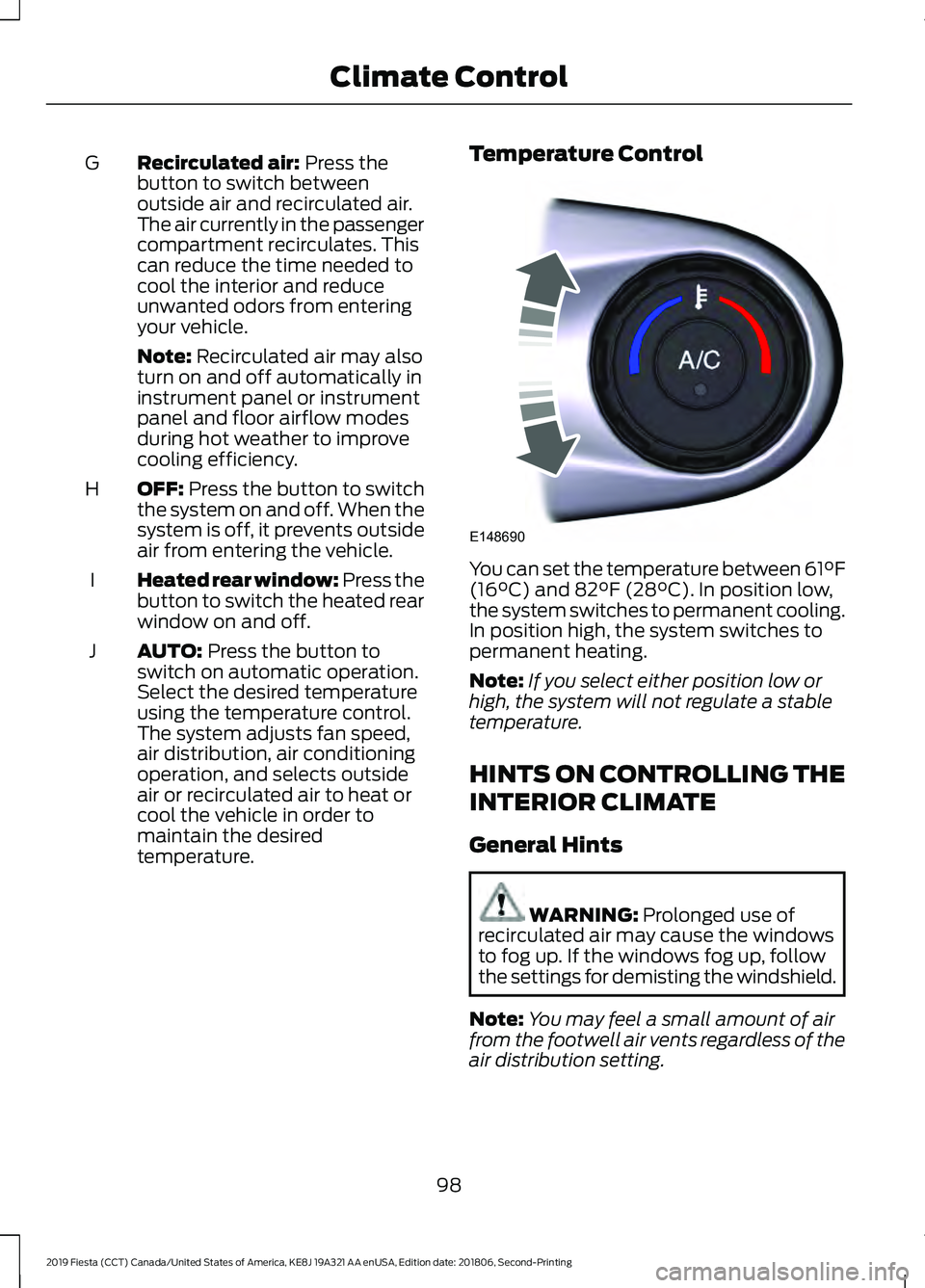
J Temperature Control You can set the temperature between 61°F
(16°C)
and 82°F (28°C). In position low,
the system switches to permanent cooling.
In position high, the system switches to
permanent heating.
Note: If you select either position low or
high, the system will not regulate a stable
temperature.
HINTS ON CONTROLLING THE
INTERIOR CLIMATE
General Hints WARNING:
Prolonged use of
recirculated air may cause the windows
to fog up. If the windows fog up, follow
the settings for demisting the windshield.
Note: You may feel a small amount of air
from the footwell air vents regardless of the
air distribution setting.
98
2019 Fiesta (CCT) Canada/United States of America, KE8J 19A321 AA enUSA, Edition date: 201806, Second-Printing Climate ControlE148690