2019 FORD F-150 light
[x] Cancel search: lightPage 547 of 644
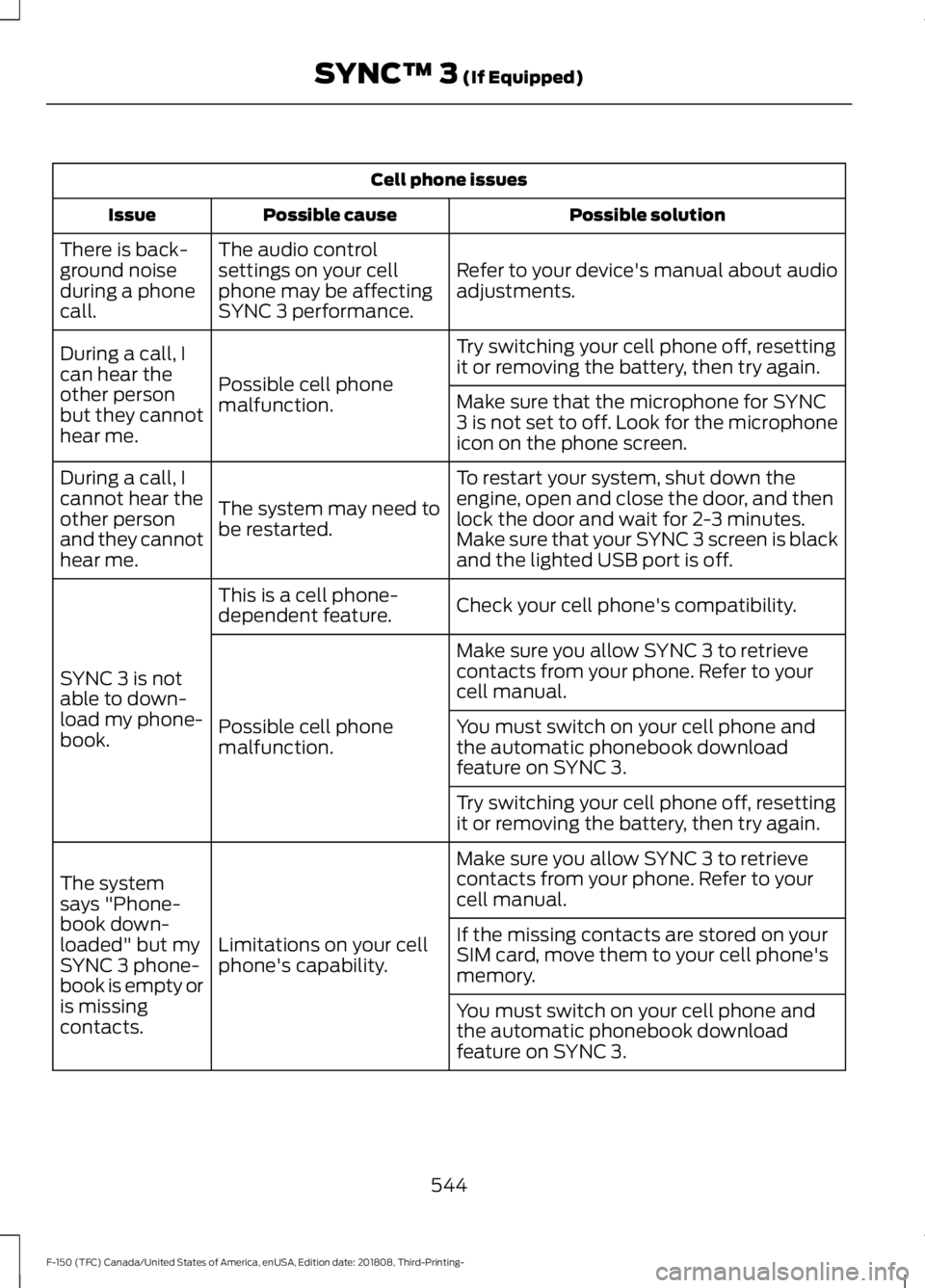
Cell phone issues
Possible solution
Possible cause
Issue
Refer to your device's manual about audio
adjustments.
The audio control
settings on your cell
phone may be affecting
SYNC 3 performance.
There is back-
ground noise
during a phone
call.
Try switching your cell phone off, resetting
it or removing the battery, then try again.
Possible cell phone
malfunction.
During a call, I
can hear the
other person
but they cannot
hear me.
Make sure that the microphone for SYNC
3 is not set to off. Look for the microphone
icon on the phone screen.
To restart your system, shut down the
engine, open and close the door, and then
lock the door and wait for 2-3 minutes.
Make sure that your SYNC 3 screen is black
and the lighted USB port is off.
The system may need to
be restarted.
During a call, I
cannot hear the
other person
and they cannot
hear me.
Check your cell phone's compatibility.
This is a cell phone-
dependent feature.
SYNC 3 is not
able to down-
load my phone-
book. Make sure you allow SYNC 3 to retrieve
contacts from your phone. Refer to your
cell manual.
Possible cell phone
malfunction. You must switch on your cell phone and
the automatic phonebook download
feature on SYNC 3.
Try switching your cell phone off, resetting
it or removing the battery, then try again.
Make sure you allow SYNC 3 to retrieve
contacts from your phone. Refer to your
cell manual.
Limitations on your cell
phone's capability.
The system
says "Phone-
book down-
loaded" but my
SYNC 3 phone-
book is empty or
is missing
contacts. If the missing contacts are stored on your
SIM card, move them to your cell phone's
memory.
You must switch on your cell phone and
the automatic phonebook download
feature on SYNC 3.
544
F-150 (TFC) Canada/United States of America, enUSA, Edition date: 201808, Third-Printing- SYNC™ 3 (If Equipped)
Page 560 of 644
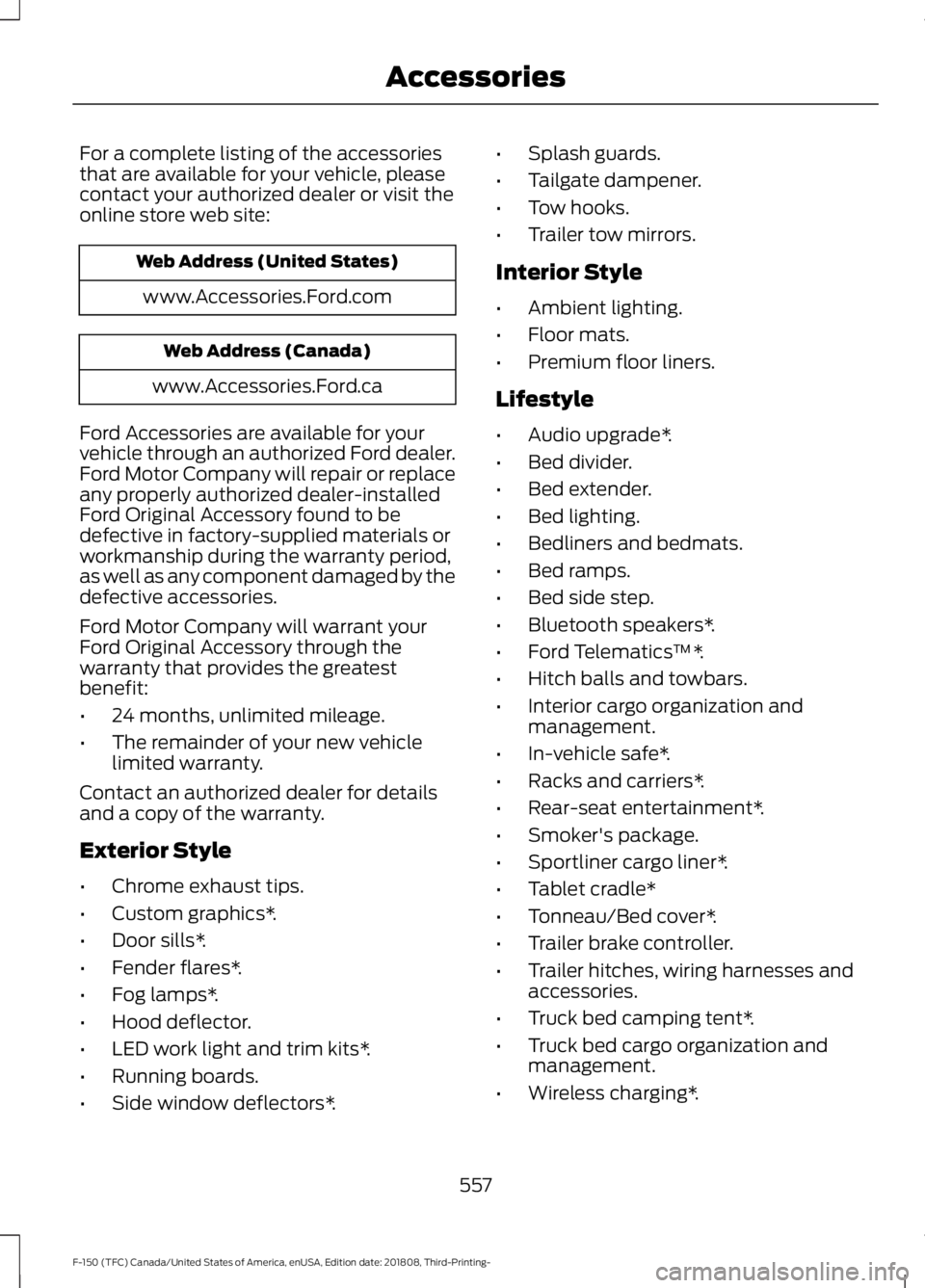
For a complete listing of the accessories
that are available for your vehicle, please
contact your authorized dealer or visit the
online store web site:
Web Address (United States)
www.Accessories.Ford.com Web Address (Canada)
www.Accessories.Ford.ca
Ford Accessories are available for your
vehicle through an authorized Ford dealer.
Ford Motor Company will repair or replace
any properly authorized dealer-installed
Ford Original Accessory found to be
defective in factory-supplied materials or
workmanship during the warranty period,
as well as any component damaged by the
defective accessories.
Ford Motor Company will warrant your
Ford Original Accessory through the
warranty that provides the greatest
benefit:
• 24 months, unlimited mileage.
• The remainder of your new vehicle
limited warranty.
Contact an authorized dealer for details
and a copy of the warranty.
Exterior Style
• Chrome exhaust tips.
• Custom graphics*.
• Door sills*.
• Fender flares*.
• Fog lamps*.
• Hood deflector.
• LED work light and trim kits*.
• Running boards.
• Side window deflectors*. •
Splash guards.
• Tailgate dampener.
• Tow hooks.
• Trailer tow mirrors.
Interior Style
• Ambient lighting.
• Floor mats.
• Premium floor liners.
Lifestyle
• Audio upgrade*.
• Bed divider.
• Bed extender.
• Bed lighting.
• Bedliners and bedmats.
• Bed ramps.
• Bed side step.
• Bluetooth speakers*.
• Ford Telematics ™*.
• Hitch balls and towbars.
• Interior cargo organization and
management.
• In-vehicle safe*.
• Racks and carriers*.
• Rear-seat entertainment*.
• Smoker's package.
• Sportliner cargo liner*.
• Tablet cradle*
• Tonneau/Bed cover*.
• Trailer brake controller.
• Trailer hitches, wiring harnesses and
accessories.
• Truck bed camping tent*.
• Truck bed cargo organization and
management.
• Wireless charging*.
557
F-150 (TFC) Canada/United States of America, enUSA, Edition date: 201808, Third-Printing- Accessories
Page 567 of 644
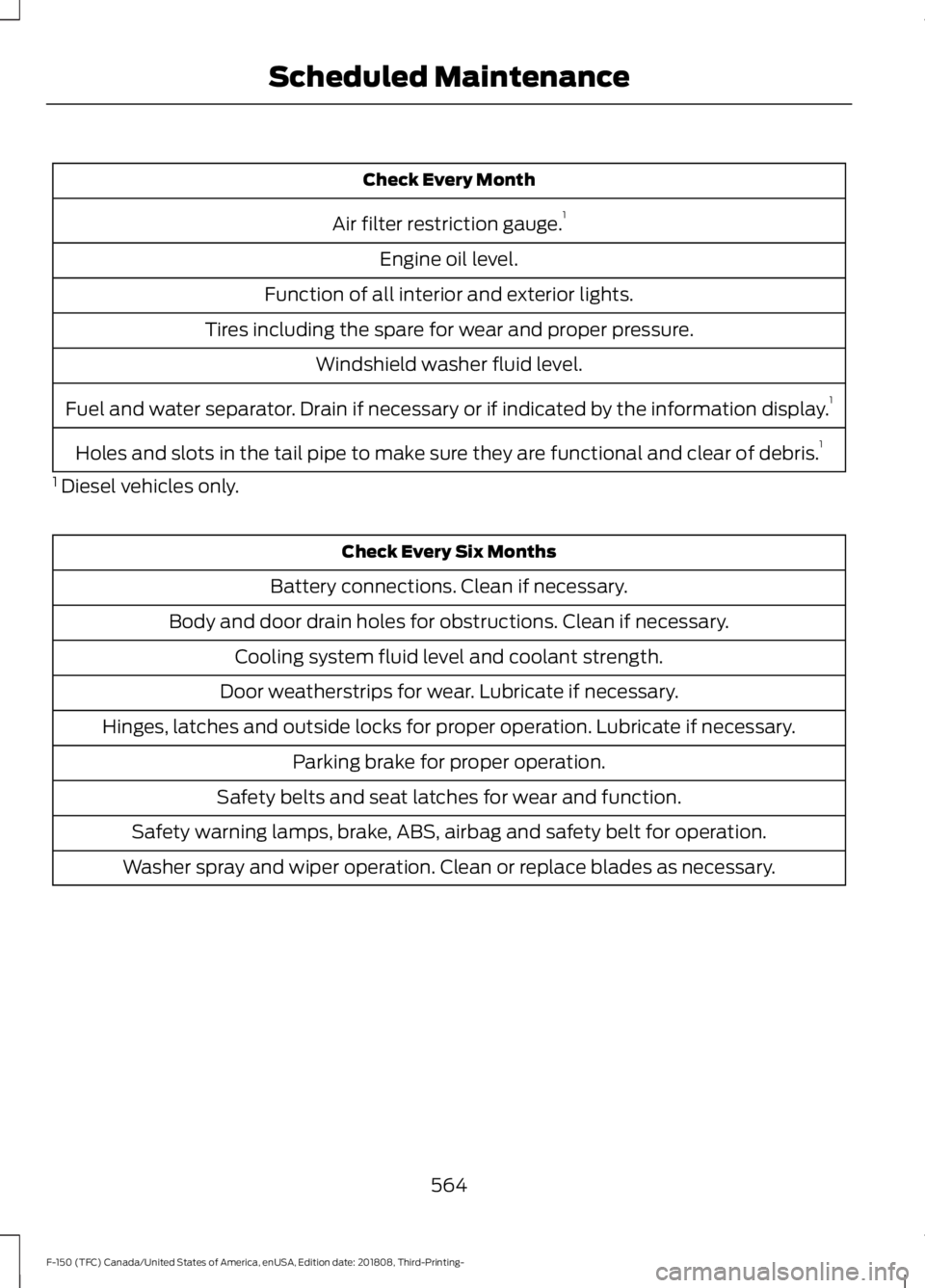
Check Every Month
Air filter restriction gauge. 1
Engine oil level.
Function of all interior and exterior lights.
Tires including the spare for wear and proper pressure. Windshield washer fluid level.
Fuel and water separator. Drain if necessary or if indicated by the information display. 1
Holes and slots in the tail pipe to make sure they are functional and clear of debris. 1
1 Diesel vehicles only. Check Every Six Months
Battery connections. Clean if necessary.
Body and door drain holes for obstructions. Clean if necessary. Cooling system fluid level and coolant strength.
Door weatherstrips for wear. Lubricate if necessary.
Hinges, latches and outside locks for proper operation. Lubricate if necessary. Parking brake for proper operation.
Safety belts and seat latches for wear and function.
Safety warning lamps, brake, ABS, airbag and safety belt for operation.
Washer spray and wiper operation. Clean or replace blades as necessary.
564
F-150 (TFC) Canada/United States of America, enUSA, Edition date: 201808, Third-Printing- Scheduled Maintenance
Page 578 of 644
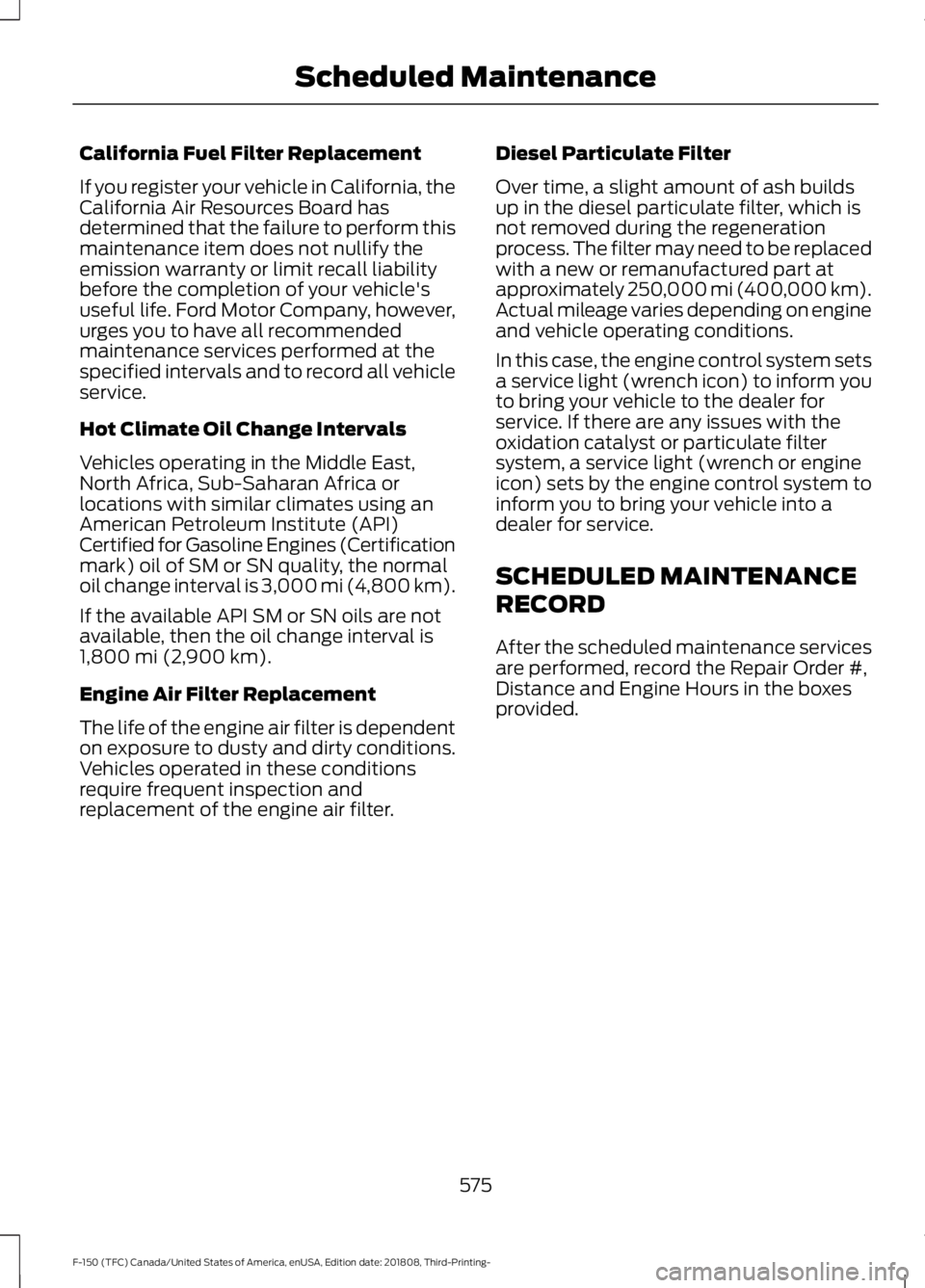
California Fuel Filter Replacement
If you register your vehicle in California, the
California Air Resources Board has
determined that the failure to perform this
maintenance item does not nullify the
emission warranty or limit recall liability
before the completion of your vehicle's
useful life. Ford Motor Company, however,
urges you to have all recommended
maintenance services performed at the
specified intervals and to record all vehicle
service.
Hot Climate Oil Change Intervals
Vehicles operating in the Middle East,
North Africa, Sub-Saharan Africa or
locations with similar climates using an
American Petroleum Institute (API)
Certified for Gasoline Engines (Certification
mark) oil of SM or SN quality, the normal
oil change interval is 3,000 mi (4,800 km).
If the available API SM or SN oils are not
available, then the oil change interval is
1,800 mi (2,900 km).
Engine Air Filter Replacement
The life of the engine air filter is dependent
on exposure to dusty and dirty conditions.
Vehicles operated in these conditions
require frequent inspection and
replacement of the engine air filter. Diesel Particulate Filter
Over time, a slight amount of ash builds
up in the diesel particulate filter, which is
not removed during the regeneration
process. The filter may need to be replaced
with a new or remanufactured part at
approximately 250,000 mi (400,000 km).
Actual mileage varies depending on engine
and vehicle operating conditions.
In this case, the engine control system sets
a service light (wrench icon) to inform you
to bring your vehicle to the dealer for
service. If there are any issues with the
oxidation catalyst or particulate filter
system, a service light (wrench or engine
icon) sets by the engine control system to
inform you to bring your vehicle into a
dealer for service.
SCHEDULED MAINTENANCE
RECORD
After the scheduled maintenance services
are performed, record the Repair Order #,
Distance and Engine Hours in the boxes
provided.
575
F-150 (TFC) Canada/United States of America, enUSA, Edition date: 201808, Third-Printing- Scheduled Maintenance
Page 616 of 644

By using SUNA Products and/or Services,
you will be deemed to have accepted and
agreed to be bound by the terms and
conditions fully detailed at:
Website
www.sunatraffic.com.au/termsandcon- ditions/
2. Intellectual Property
SUNA Products and/or Services are for
your personal use. You may not record, or
retransmit the content, nor use the content
in association with any other traffic
information or route guidance service or
device not approved by Intelematics. You
obtain no right of ownership in any
Intellectual Property Rights (including
copyright) in the data that is used to
provide SUNA Products and/or Services.
3. Appropriate Use
SUNA Products and/or Services are
intended as an aid to personal motoring
and travel planning, and do not provide
comprehensive or accurate information on
all occasions. On occasions, you may
experience additional delay as a result of
using SUNA Products and/or Services. You
acknowledge that it is not intended, or
suitable, for use in applications where time
of arrival or driving directions may impact
the safety of the public or yourself.
4. Use of SUNA Products and Services
while driving
You, and other authorised drivers of the
vehicle in which SUNA Products and/or
Services are available or installed and
active, remain at all times responsible for
observing all relevant laws and codes of
safe driving. In particular, you agree to only
actively operate SUNA Products and/or
Services when the Vehicle is at a complete
stop and it is safe to do so. 5. Service Continuity and Reception of
the SUNA Traffic Channel
We will use reasonable endeavours to
provide the SUNA Traffic Channel 24 hours
a day, 365 days a year. The SUNA Traffic
Channel may occasionally be unavailable
for technical reasons or for planned
maintenance. We will try to perform
maintenance at times when congestion is
light. We reserve the right to withdraw
SUNA Products and/or Services at any
time.
Also, we cannot assure the uninterrupted
reception of the SUNA Traffic Channel
RDS-TMC signal at any particular location.
6. Limitation of Liability
Neither Intelematics (nor its suppliers or
the manufacturer of your device (the
“Suppliers”)) shall be liable to you or to
any third party for any damages either
direct, indirect, incidental, consequential
or otherwise arising out of the use of or
inability to use SUNA Products and/or
Services even if Intelematics or a Supplier
has been advised of the possibility of such
damages. You also acknowledge that the
neither Intelematics nor any Supplier
guarantees nor make any warranties that
relate to the availability, accuracy or
completeness of SUNA Products and/or
Services, and to the extent which it is
lawful to do so, both Intelematics and each
Supplier excludes any warranties which
might otherwise be implied by any State
or Federal legislation in relation to SUNA
Products and/or Services.
7. Please Note
Great care has been taken in preparing this
manual. Constant product development
may mean that some information is not
entirely up-to-date. The information in this
document is subject to change without
notice.
613
F-150 (TFC) Canada/United States of America, enUSA, Edition date: 201808, Third-Printing- Appendices
Page 630 of 644

3
360 Degree Camera...................................246
Camera Views..................................................... 247
Front Camera...................................................... 248
Side Camera........................................................ 248
4
4WD See: Four-Wheel Drive...................................... 218
A
A/C See: Climate Control.......................................... 147
About This Manual
...........................................7
ABS See: Brakes........................................................... 228
ABS driving hints See: Hints on Driving With Anti-Lock
Brakes................................................................ 229
Accessories....................................................557 Exterior Style........................................................ 557
Interior Style......................................................... 557
Lifestyle.................................................................. 557
Peace of Mind..................................................... 558
Accessories See: Replacement Parts
Recommendation............................................ 14
ACC See: Using Adaptive Cruise Control...........250
Active Park Assist
........................................239
Automatic Steering into Parking
Space.................................................................. 241
Deactivating the Park Assist Feature.........242
Troubleshooting the System......................... 242
Using Active Park Assist................................. 240
Adjustable Pedals
.........................................90
Adjusting the Headlamps........................369 Horizontal Aim Adjustment........................... 370
Vertical Aim Adjustment................................ 369
Adjusting the Pedals....................................90
Adjusting the Steering Wheel - Vehicles With: Manual Adjustable Steering
Column...........................................................86 Adjusting the Steering Wheel - Vehicles
With: Power Adjustable Steering
Column...........................................................86
End of Travel Position......................................... 87
Memory Feature.................................................... 87
Airbag Disposal...............................................57
Air Conditioning See: Climate Control.......................................... 147
Air Filter See: Changing the Engine Air Filter -
Diesel................................................................. 374
See: Changing the Engine Air Filter - Gasoline............................................................ 374
Alarm See: Anti-Theft Alarm........................................ 83
Ambient Lighting
...........................................98
Adjusting the Brightness................................... 98
Switching Ambient Lighting Off..................... 98
Switching Ambient Lighting On..................... 98
Anti-Theft Alarm............................................83 Arming the Alarm................................................. 83
Disarming the Alarm........................................... 83
Using the System................................................. 83
Appendices...................................................586
Apps.................................................................526 ........................................................................\
.......... 526
SiriusXM Traffic and Travel Link................... 528
At a Glance........................................................18
Audible Warnings and Indicators.............114 Airbag Secondary Warning.............................. 114
Beltminder Warning............................................ 114
Door Ajar Warning............................................... 114
Headlamps On Warning................................... 114
Key in Ignition Warning...................................... 114
Keyless Warning Alert........................................ 114
Parking Brake On Warning............................... 115
Rear Park Aid Warning....................................... 114
Service AdvanceTrac Warning........................ 115
Audio Control...................................................87 Media........................................................................\
88
Seek, Next or Previous....................................... 88
Audio System
................................................453
General Information......................................... 453
Audio Unit - Vehicles With: Touchscreen Display..........................................................455
Adjusting the Volume...................................... 456
Changing Radio Stations............................... 456
Selecting the Audio Modes........................... 456
627
F-150 (TFC) Canada/United States of America, enUSA, Edition date: 201808, Third-Printing- Index
Page 633 of 644

Checking MyKey System Status...............67
MyKey Distance..................................................... 67
Number of Admin Keys...................................... 68
Number of MyKeys.............................................. 68
Checking the Wiper Blades.....................368
Child Restraint and Seatbelt Maintenance.................................................46
Child Restraint Positioning.........................35
Child Safety......................................................20 General Information............................................ 20
Child Safety Locks..........................................37 Left-Hand Side...................................................... 37
Right-Hand Side................................................... 37
Cleaning Leather Seats.............................382 With King Ranch Edition................................. 382
Without King Ranch Edition.......................... 382
Cleaning Products........................................377 Materials................................................................ 377
Cleaning the Engine....................................379
Cleaning the Exhaust - Diesel.................379
Cleaning the Exterior...................................377 Cleaning the Headlamps................................ 378
Exterior Chrome Parts...................................... 378
Exterior Plastic Parts........................................ 378
Stripes or Graphics............................................ 378
Underbody............................................................ 378
Under Hood.......................................................... 378
Cleaning the Instrument Panel and Instrument Cluster Lens.........................381
Cleaning the Interior..................................380 Mirrors..................................................................... 381
Cleaning the Wheels..................................383
Cleaning the Windows and Wiper Blades...........................................................380
Clearing All MyKeys.......................................67
Climate.............................................................510 Accessing Rear Climate Controls.................512
Accessing the Climate Control Menu.........510
Directing the Airflow..........................................510
Rear Climate Control Lock Indicator...........512
Setting the Blower Motor Speed.................. 510
Setting the Temperature................................. 510
Switching Auto Mode On and Off................510
Switching Dual Zone Mode On and Off........................................................................\
. 511
Switching Maximum Air Conditioning On and Off................................................................ 511Switching Maximum Defrost On and
Off........................................................................\
. 511
Switching Rear Auto Mode On and Off........................................................................\
512
Switching Recirculated Air On and Off........................................................................\
. 511
Switching the Air Conditioning On and Off....................................................................... 510
Switching the Climate Controlled Seats On and Off................................................................ 511
Switching the Climate Control On and Off........................................................................\
. 511
Switching the Heated Exterior Mirrors On and Off................................................................ 511
Switching the Heated Rear Window On and Off........................................................................\
. 511
Switching the Heated Seats On and Off........................................................................\
. 511
Switching the Heated Steering Wheel On and Off................................................................ 511
Switching the Rear Climate Controlled Seats On and Off........................................... 512
Switching the Rear Heated Seats On and Off........................................................................\
512
Switching the Rear Ventilated Seats On and Off............................................................... 512
Switching the Ventilated Seats On and Off........................................................................\
512
Climate Control
.............................................147
Coolant Check See: Engine Coolant Check........................... 359
Crash Sensors and Airbag Indicator
.......56
Creating a MyKey...........................................66
Programming and Changing Configurable
Settings............................................................... 67
Creating a Wi-Fi Hotspot..........................452 Connecting a Device to the Wi-Fi
Hotspot............................................................ 452
Finding the Wi-Fi Hotspot Name and Password......................................................... 452
Cross Traffic Alert........................................266 Blocked Sensors................................................ 268
Switching the System Off and On..............268
System Errors...................................................... 268
System Lights, Messages and Audible Alerts................................................................. 268
System Limitations........................................... 268
Using the Cross Traffic Alert System.........266
630
F-150 (TFC) Canada/United States of America, enUSA, Edition date: 201808, Third-Printing- Index
Page 637 of 644
Recommended Settings for Heating...........151
Hints on Driving With Anti-Lock Brakes............................................................229
Home Screen................................................492
Hood Lock See: Opening and Closing the Hood..........350
I
Ignition Switch................................................174
In California (U.S. Only).............................333
Information Display Control......................89
Information Displays
....................................116
General Information........................................... 116
Information Messages
................................128
4WD........................................................................\
. 145
Active Park............................................................ 129
Adaptive Cruise Control................................... 129
AdvanceTrac and Traction Control..............130
Airbag...................................................................... 130
Alarm and Security.............................................. 131
Battery and Charging System......................... 131
Blind Spot Information and Cross Traffic Alert System.................................................... 132
Diesel Messages.................................................. 132
Doors and Locks.................................................. 135
Driver Alert............................................................. 135
Drivetrain................................................................ 136
Engine..................................................................... 136
Fuel........................................................................\
.. 136
Keys and Intelligent Access............................. 137
Lane Keeping System....................................... 138
Maintenance........................................................ 138
MyKey...................................................................... 139
Off Road................................................................. 139
Park Aid.................................................................. 140
Park Brake............................................................. 140
Power Steering..................................................... 141
Pre-Collision Assist............................................. 141
Pro Trailer Backup Assist................................. 142
Remote Start........................................................ 143
Seats........................................................................\
143
Side-Wind.............................................................. 143
Starting System ................................................. 144
Tire Pressure Monitoring System.................144
Trailer...................................................................... 144
Installing Child Restraints...........................22 Child Seats.............................................................. 22Combining Seatbelt and LATCH Lower
Anchors for Attaching Child Safety
Seats.................................................................... 30
Front Seat Tether Strap Attachment (Regular Cab).................................................... 31
Rear Seat Tether Strap Attachment (Crew Cab and Super Cab)....................................... 32
Use of Inboard Lower Anchors from the Outermost Seating Positions (Center
Seating Use) .................................................... 30
Using Inflatable Seatbelts (Rear Seat Outermost Positions).................................... 26
Using Lap and Shoulder Belts (Except Front Center Position of Super Cab and Crew
Cab)...................................................................... 22
Using Lap and Shoulder Belts (Front Center Position of Super Cab and Crew
Cab)...................................................................... 24
Using Lower Anchors and Tethers for CHildren (LATCH)........................................... 29
Using Tether Straps............................................ 30
Instrument Cluster
.......................................107
Instrument Lighting Dimmer.....................94
Instrument Panel
............................................18
Interior Lamps.................................................97
Front Interior Lamp.............................................. 97
Rear Interior Lamps............................................ 98
Interior Mirror
.................................................104
Automatic Dimming Mirror............................. 105
Manual Dimming Mirror................................... 104
Introduction.........................................................7
J
Jump Starting the Vehicle........................328 Connecting the Jumper Cables.................... 328
Jump Starting...................................................... 329
Preparing Your Vehicle..................................... 328
Removing the Jumper Cables....................... 329
K
Keyless Entry....................................................73 SECURICODE™ KEYLESS ENTRY
KEYPAD............................................................... 73
Keyless Starting
.............................................175
Ignition Modes...................................................... 175
Keys and Remote Controls.........................58
634
F-150 (TFC) Canada/United States of America, enUSA, Edition date: 201808, Third-Printing- Index