2019 FORD F-150 display
[x] Cancel search: displayPage 222 of 644

4H (4X4 HIGH)
Provides mechanically locked four-wheel
drive power to both the front and rear
wheels for use in off-road or winter
conditions such as deep snow, sand or
mud. This mode is not for use on dry
pavement.
4L (4X4 LOW)
Provides mechanically locked four-wheel
drive power to both the front and rear
wheels for use on low traction surfaces,
but does so with additional gearing for
increased torque multiplication. Intended
only for off-road applications such as deep
sand, steep grades, or pulling heavy
objects. 4L (4X4 low) should not engage
while your vehicle is moving above 3 mph
(5 km/h); this is normal and should be no
reason for concern. Refer to Shifting to or
from 4L (4X4 low) for proper operation.
Shifting between system modes
Note: Momentarily releasing the accelerator
pedal while a shift in progress message
displays can improve
engagement/disengagement performance.
Note: Do not perform this operation if the
rear wheels are slipping or while applying
the accelerator pedal.
Note: You may hear some noise as the
system shifts or engages; this is normal.
You can move the control from 2H or 4H
at a stop or while driving. The information
display may display a message indicating
a 4X4 shift is in progress. Once the shift is
complete the message center can then
display the system mode selected.
Shifting to or from 4L (4X4 low)
Note: You may hear some noise as the
system shifts or engages; this is normal.
1. Bring your vehicle to a speed of
3 mph
(5 km/h) or less. 2. Place the transmission in neutral (N).
3. Move the 4WD control to the desired
position.
The information display can display a
message indicating a 4X4 shift is in
progress. The information display can then
display the system mode selected. If any
of the above shift conditions are not
present, the shift should not occur and the
information display can display
information guiding the driver through the
proper shifting procedures.
If
Shift Delayed Pull Forward displays in
the information display, a transfer case
gear tooth blockage is present. To alleviate
this condition, place the transmission in a
forward gear, move your vehicle forward
approximately
5 ft (1.5 m), and shift the
transmission back to neutral (N) to allow
the transfer case to complete the range
shift.
Using the 2-Speed Automatic 4WD
System
(If Equipped)
This system includes an electronically
controlled transfer case with a high
capacity clutch. The system is interactive
with the road, continually monitoring and
adjusting power delivery to the front and
rear wheels to optimize traction.
Note: The AdvanceTrac system has the
ability to take over control of the transfer
case clutch in 4A mode and disable it during
driving maneuvers when necessary.
Note: The information display may show
messages during 4WD operation. See
Information Messages
(page 128).
219
F-150 (TFC) Canada/United States of America, enUSA, Edition date: 201808, Third-Printing- Four-Wheel Drive
(If Equipped)
Page 223 of 644

2H (4X2)
For general on-road driving, this mode
provides optimal smoothness and fuel
economy at high speeds. Sends power to
the rear wheels only.
4A (4X4 AUTO)
Provides electronic controlled four-wheel
drive with power delivered to the front and
rear wheels, as required, for increased
traction. 4A tuning varies based on
selected Drive Mode See Drive Control
(page 274). . 4A in Normal and Sport is
appropriate for all on-road driving
conditions, including, dry road surfaces. 4A
in Snow/Wet is appropriate for slippery
on-road conditions such as snow and ice
covered roads.
4H (4X4 HIGH)
Provides electronically or mechanically
locked four-wheel drive power to both the
front and rear wheels for use in off-road or
winter conditions such as deep snow, sand
or mud. This mode is not for use on dry
pavement. 4L (4X4 LOW)
Provides electronically or mechanically
locked four-wheel drive power to both the
front and rear wheels for use on low
traction surfaces, but does so with
additional gearing for increased torque
multiplication. Intended only for off-road
applications such as deep sand, steep
grades, or pulling heavy objects. 4L (4X4
low) should not engage while your vehicle
is moving above
3 mph (5 km/h); this is
normal and should be no reason for
concern. Refer to Shifting to or from 4L
(4X4 low) for proper operation.
Shifting between system modes
Note: Momentarily releasing the accelerator
pedal while a shift in progress message
displays can improve
engagement/disengagement performance.
Note: Do not perform this operation if the
rear wheels are slipping or while applying
the accelerator pedal.
Note: You may hear some noise as the
system shifts or engages; this is normal.
You can move the control from 2H to 4A
or 4H at a stop or while driving. The
information display may display a message
indicating a 4X4 shift is in progress. Once
the shift is complete the message center
can then display the system mode
selected.
Shifting to or from 4L (4X4 low)
Note: You may hear some noise as the
system shifts or engages; this is normal.
1. Bring your vehicle to a speed of
3 mph
(5 km/h) or less.
2. Place the transmission in neutral (N).
3. Move the 4WD control to the desired position.
220
F-150 (TFC) Canada/United States of America, enUSA, Edition date: 201808, Third-Printing- Four-Wheel Drive
(If Equipped)E225302
Page 224 of 644

The information display can display a
message indicating a 4X4 shift is in
progress. The information display can then
display the system mode selected. If any
of the above shift conditions are not
present, the shift should not occur and the
information display can display
information guiding the driver through the
proper shifting procedures.
If Shift Delayed Pull Forward displays in
the information display, a transfer case
gear tooth blockage is present. To alleviate
this condition, place the transmission in a
forward gear, move your vehicle forward
approximately
5 ft (1.5 m), and shift the
transmission back to neutral (N) to allow
the transfer case to complete the range
shift.
Operating 4WD vehicles with spare or
mismatched tires
On four-wheel drive vehicles, the size of
the spare tire can affect the 4X4 system.
If there is a significant difference between
the size of the spare tire and the remaining
tires, you may have limited four-wheel
drive functionality.
When driving with the full-size dissimilar
spare wheel and tire assembly, it is
recommended that you do not:
• Exceed
50 mph (80 km/h) with a 4WD
mode turned on.
• Turn on a 4WD mode unless the
vehicle is stationary.
• Use a 4WD mode on dry pavement.
When driving with the full-size dissimilar
spare wheel and tire assembly, 4WD
functionality may be limited, especially
when driving in a mechanically locked 4WD
mode. You may experience the following:
• Additional noise from the transfer case
or other drive components.
• Difficulty shifting out of a mechanically
locked 4WD mode. Use of a dissimilar spare wheel and tire
assembly may lead to impairment of the
following:
•
Comfort and noise.
• Winter weather driving capability.
• Wet driving capability.
• Four-wheel drive capability.
How Your Vehicle Differs From
Other Vehicles WARNING: Vehicles with a higher
center of gravity (utility and four-wheel
drive vehicles) handle differently than
vehicles with a lower center of gravity
(passenger cars). Avoid sharp turns,
excessive speed and abrupt steering in
these vehicles. Failure to drive cautiously
increases the risk of losing control of your
vehicle, vehicle rollover, personal injury
and death.
Truck and utility vehicles can differ from
some other vehicles. Your vehicle may be
higher to allow it to travel over rough
terrain without getting hung up or
damaging underbody components.
The differences that make your vehicle so
versatile also make it handle differently
than an ordinary passenger car.
Maintain steering wheel control at all
times, especially in rough terrain. Since
sudden changes in terrain can result in
abrupt steering wheel motion, make sure
you grip the steering wheel from the
outside. Do not grip the spokes.
Drive cautiously to avoid vehicle damage
from concealed objects such as rocks and
stumps.
221
F-150 (TFC) Canada/United States of America, enUSA, Edition date: 201808, Third-Printing- Four-Wheel Drive
(If Equipped)
Page 229 of 644
ELECTRONIC LOCKING
DIFFERENTIAL (IF EQUIPPED)
Note: The electronic locking differential is
for off-road use only and is not for use on
dry pavement. Using the electronic locking
differential on dry pavement will result in
increased tire wear, noise and vibration.
The electronic locking differential is a
device housed in the rear axle that allows
both rear wheels to turn at the same
speed. The electronic locking differential
can provide additional traction should your
vehicle become stuck. You can activate
the differential electronically and shift it
on the fly within the differential operating
speed range. The differential is for use in
mud, rocks, sand, or any off-road condition
where you need maximum traction. It is
not for use on dry pavement.
The following conditions will affect the
electronic locking differential:
• The electronic locking differential will
not engage if your vehicle speed is
above
20 mph (32 km/h) in 4x2, 4x4
Auto, or 4x4 High modes.
• The electronic locking differential will
not engage if your vehicle speed is
above or
56 mph (90 km/h) in 4X4
Low.
• The electronic locking differential may
not engage if you press your
accelerator pedal during an
engagement attempt. A message may
display in the instrument display
guiding you to release the accelerator
pedal.
• In 4x2, 4x4 Auto, and 4x4 High modes,
the electronic locking differential will
automatically disengage at speeds
above
25 mph (41 km/h) and will
automatically reengage at speeds
below
20 mph (32 km/h). •
In 4L (4X4 low), the electronic locking
differential will automatically
disengage at speeds above
62 mph
(100 km/h) and will automatically
reengage at speeds below 56 mph
(90 km/h).
• The AdvanceTrac system has the
ability to take over control of the
electronic locking differential and
disable it during driving maneuvers
when necessary.
When you switch the system on, if you do
not meet the required conditions for
electronic locking differential activation,
the instrument cluster will display the
appropriate information guiding you
through the proper activation process.
Activating the Electronic Locking
Differential
Note: Do not use electronic locking
differential on dry, hard surfaced roads.
Doing so will produce excessive noise,
vibration and increase tire wear.
Note: If the electronic locking differential
has difficulty disengaging, release the
accelerator pedal and turn the steering
wheel in the opposite direction while rolling.
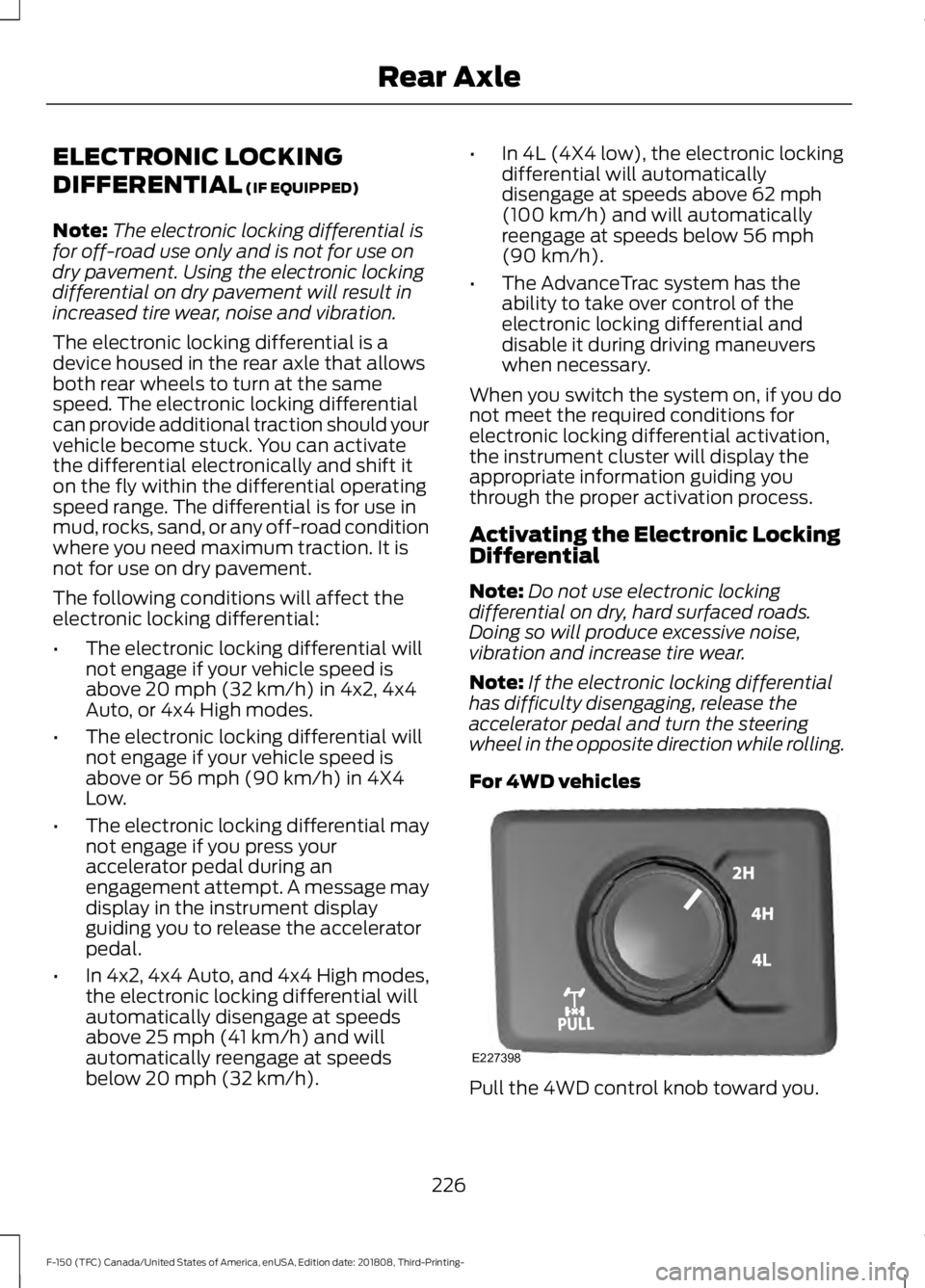
For 4WD vehicles Pull the 4WD control knob toward you.
226
F-150 (TFC) Canada/United States of America, enUSA, Edition date: 201808, Third-Printing- Rear AxleE227398
Page 230 of 644

For 2WD vehicles
Turn the control to ON.
Once the indicator light
illuminates in the information
display, both rear wheel axle
shafts will be locked together providing
added traction.
If the indicator does not come on, or the
indicator turns off while driving, one of the
following has occurred:
• The vehicle speed is too high.
• The left and right rear wheel speed
difference is too high during an
engagement attempt.
• The system has malfunctioned and is
accompanied by a message in the
information display. See your
authorized Ford dealer for assistance.
• The vehicle is experiencing an anti-lock
brake activation.
Operating ELD With a Spare or
Mismatched Tires
On vehicles with an ELD, the size of the
spare tire can affect performance of the
system. If there is a significant difference
between the two rear tires, you may have
limited ELD functionality. If the electronic
locking differential has difficulty disengaging, release the accelerator pedal
and turn the steering wheel in the opposite
direction when rolling. We recommend
engaging and disengaging the ELD at a
stop when you mount a spare on the rear
axle.
227
F-150 (TFC) Canada/United States of America, enUSA, Edition date: 201808, Third-Printing- Rear AxleE183740 E163170
Page 234 of 644

The system makes it easier to pull away
when your vehicle is on a slope without the
need to use the parking brake.
When the system is active, your vehicle
remains stationary on the slope for two to
three seconds after you release the brake
pedal. This allows time to move your foot
from the brake to the accelerator pedal.
The system releases the brakes
automatically once the engine has
developed sufficient torque to prevent your
vehicle from rolling down the slope. This
is an advantage when pulling away on a
slope, for example from a car park ramp,
traffic lights or when reversing uphill into
a parking space.
The system activates on any slope that
causes your vehicle to roll.
Note:
There is no warning light to indicate
the system is either on or off.
Using Hill Start Assist
1. Press the brake pedal to bring your vehicle to a complete standstill. Keep
the brake pedal pressed and shift into
first gear when facing uphill or reverse
(R) when facing downhill.
2. If the sensors detect that your vehicle is on a slope, the system activates
automatically.
3. When you remove your foot from the brake pedal, your vehicle remains on
the slope without rolling away for
about two to three seconds. This hold
time automatically extends if you are
in the process of driving off.
4. Drive off in the normal manner. The system releases the brakes
automatically.
Note: When you remove your foot from the
brake pedal and press the pedal again when
the system is active, you will experience
significantly reduced brake pedal travel. This
is normal. Switching the System On and Off
Vehicles with Manual Transmission
You can switch this feature on or off in the
information display. The system
remembers the last setting when you start
your vehicle.
Vehicles with Automatic Transmission
You cannot turn the system on or off.
When you switch the ignition on, the
system automatically turns on.
231
F-150 (TFC) Canada/United States of America, enUSA, Edition date: 201808, Third-Printing- Brakes
Page 235 of 644
PRINCIPLE OF OPERATION
The traction control system helps avoid
drive wheel spin and loss of traction.
If your vehicle begins to slide, the system
applies the brakes to individual wheels
and, when needed, reduces engine power
at the same time. If the wheels spin when
accelerating on slippery or loose surfaces,
the system reduces engine power in order
to increase traction.
USING TRACTION CONTROL
WARNING: The stability and
traction control light illuminates steadily
if the system detects a failure. Make sure
you did not manually disable the traction
control system using the information
display controls or the switch. If the
stability control and traction control light
is still illuminating steadily, have the
system serviced by an authorized dealer
immediately. Operating your vehicle with
the traction control disabled could lead
to an increased risk of loss of vehicle
control, vehicle rollover, personal injury
and death.
The system automatically turns on each
time you switch the ignition on.
If your vehicle is stuck in mud or snow,
switching traction control off may be
beneficial as this allows the wheels to spin.
Note: When you switch traction control off,
stability control remains fully active. Switching the System Off The switch for the stability and traction
control system is on the instrument panel.
When you switch the system off, a
message and an illuminated icon appear
on the instrument cluster.
Use the switch again to return the traction
control system to normal operation.
Your vehicle may have MyKey restrictions
regarding this feature. See
Principle of
Operation (page 65).
System Indicator Lights and
Messages The stability and traction control
light temporarily illuminates on
engine start-up and flashes:
• When a driving condition activates
either of the systems.
• If a problem occurs in either of the
systems. The stability and traction control
off light temporarily illuminates
on engine start-up and stays on:
• When you switch the traction control
system off.
• When you select an alternative stability
control mode.
232
F-150 (TFC) Canada/United States of America, enUSA, Edition date: 201808, Third-Printing- Traction ControlE166706 E138639 E130458
Page 237 of 644

Side-Wind Stabilization
The system applies the brakes on one side
of your vehicle to reduce the effect of a
sudden side-wind gust on your vehicle's
path. When the system turns on, the
stability and traction control light flashes,
and a message may appear in the
information display. You may notice a
slight deceleration and may still need to
make a steering correction to maintain the
intended vehicle path. The system does
not turn on for a continuous side-wind or
during turns.
Traction Control
The system enhances your vehicle's ability
to maintain traction of the wheels by
detecting and controlling wheel spin. See
Using Traction Control (page 232). Vehicle without stability control
skidding off its intended route.
A
Vehicle with stability control
maintaining control on a slippery
surface.
B
USING STABILITY CONTROL
AdvanceTrac ™ with Roll Stability
Control ™ (RSC™)
The system automatically turns on each
time you switch the ignition on.
You can switch the electronic stability
control systems off.
When you shift the transmission into
reverse (R), the systems are disabled.
You can switch the traction control system
off or on independently. See
Using
Traction Control (page 232).
234
F-150 (TFC) Canada/United States of America, enUSA, Edition date: 201808, Third-Printing- Stability ControlE72903A
AA
B
BB
B